Solved Does anyone actually LIKE Windows 7?

Status
Not open for further replies.
This thread makes me Laugh my DAD is 75 and uses Windows 7 like a champ ;)
Your Dad and I were born in the same year and I not only help some on this Forum but run a Compter help Club for newbies many of who are young enough to be my grand children. Age is all in the mind (Usually in young people!)
 

My Computer

Computer type
PC/Desktop
OS
Microsoft Windows 7 Home Premium 64-bit 7601 Multiprocessor Free Service Pack 1
CPU
Intel(R) Core(TM) i7-3770 CPU @ 3.40GHz
Motherboard
ASUSTeK COMPUTER INC. P8H77-M
Memory
8.00 GB
Graphics Card(s)
Intel(R) HD Graphics 4000
Sound Card
On Board
Monitor(s) Displays
Dell 24"
Screen Resolution
1920 x 1080
Hard Drives
(1) INTEL SSDSC2CT180A3 ATA Device (2) ST500DM002-1BD142 ATA Device (3) WDC WD3200AAKS-75L9A0 ATA Device (4) Generic- Compact Flash USB Device (5) Generic- MS/MS-Pro USB Device (6) Generic- SD/MMC USB Device (7) Generic- SM/xD-Picture USB
PSU
500w Corsair
Case
Cooler Master
Cooling
3 Fans
Keyboard
Logitech MK300
Mouse
Logitech WOM
Internet Speed
75Mb
Antivirus
Norton 360
Browser
Firefox, Opera, IE
This thread makes me Laugh my DAD is 75 and uses Windows 7 like a champ ;)
Your Dad and I were born in the same year and I not only help some on this Forum but run a Compter help Club for newbies many of who are young enough to be my grand children. Age is all in the mind (Usually in young people!)


My point exactly no one is limited to anything it is just the choice of wanting to learn
Knowledge is aquired by asking questions reading and trying to learn about it

Ignorance is aquired by doubting one's self and not willing to learn for the better of there situation pretty much speaks for itself
 

My Computer

Computer type
PC/Desktop
Computer Manufacturer/Model Number
CoreI7-6700K MrFingerIII Special Builds
OS
Windows 10 Home Premium 64bit sp1
CPU
Intel I7-6700K @ 4.6 Ghz 1.344 volts everyday OC
Motherboard
Asrock Fatality K6 Z170 Socket 1151
Memory
32GB G-Skill TridentZ 3200mhz 16-18-18-38 DDR4
Graphics Card(s)
Sli Gigabyte Windforce GTX 980 G1
Sound Card
AC97 Creative Rage Tactic 3D Headphones Bluetooth
Monitor(s) Displays
27" Asus ROG Swift PG278Q G-Sync 48" Vizio Smart HD TV
Screen Resolution
2560x1440p 27"- 48" Currently Gaming at 2560x1440p Res 2K
Hard Drives
250GB Samsung Evo840SSD Seagate baracuda 500 GB WD Mybook 500Gb 1TB Seagate Barracuda
PSU
HX1050w Corsair Silver 80plus certified crosfire/sli
Case
Enthod Pro Full Tower
Cooling
Corsair H110i GT 280 mm High Performance WaterBlock
Keyboard
Logitech wireless keyboard
Mouse
Logitech wireless mouse
Internet Speed
Cox Cable 100+ mb
Antivirus
WebRoot Spysweeper with Antivirus
Browser
IE-10, Chrome, Opera
Other Info
My Other Rig is a AMD FX8320E @4.6Ghz 16GB Ballistic Sport Ram
Mobo Asrock Fatality 990FX 120GB OCZ SSD 1TB Seagate Barracuda Corsair H75 Cooling PSU Corsair CX750
GPU GTX Gigabyte 970G1
What's all this rubbish about age and not wanting to learn?:mad:

I didn't pay all that money for a new computer (including Wndows 7) to leave it unused. I'd love to know how I do various jobs.

I've had enough of this thread. Over to you lot. I'm off . . .

BTW: The "Old Fogie Member" tag is just a joke. I feel great - and young at heart. As they say: "Age is just a number". See ya!
 

My Computer

Computer Manufacturer/Model Number
Microsoft Windows XP (preferred) and Microsoft Windows 7 (tolerated)
OS
Windows 7 Professional
What's all this rubbish about age and not wanting to learn?:mad:

I didn't pay all that money for a new computer (including Wndows 7) to leave it unused. I'd love to know how I do various jobs.

I've had enough of this thread. Over to you lot. I'm off . . .

BTW: The "Old Fogie Member" tag is just a joke. I feel great - and young at heart. As they say: "Age is just a number". See ya!

You can draw what ever conclusion you like nothing was directed towards you

You made a thread to post opinions and thoughts but your upset that Opinions come off borrish like .........I was simply saying I am proud of my Father even though he is a olderman that decided to get into computers about 4 years ago and stating he doesn't have issues getting around Win 7
 

My Computer

Computer type
PC/Desktop
Computer Manufacturer/Model Number
CoreI7-6700K MrFingerIII Special Builds
OS
Windows 10 Home Premium 64bit sp1
CPU
Intel I7-6700K @ 4.6 Ghz 1.344 volts everyday OC
Motherboard
Asrock Fatality K6 Z170 Socket 1151
Memory
32GB G-Skill TridentZ 3200mhz 16-18-18-38 DDR4
Graphics Card(s)
Sli Gigabyte Windforce GTX 980 G1
Sound Card
AC97 Creative Rage Tactic 3D Headphones Bluetooth
Monitor(s) Displays
27" Asus ROG Swift PG278Q G-Sync 48" Vizio Smart HD TV
Screen Resolution
2560x1440p 27"- 48" Currently Gaming at 2560x1440p Res 2K
Hard Drives
250GB Samsung Evo840SSD Seagate baracuda 500 GB WD Mybook 500Gb 1TB Seagate Barracuda
PSU
HX1050w Corsair Silver 80plus certified crosfire/sli
Case
Enthod Pro Full Tower
Cooling
Corsair H110i GT 280 mm High Performance WaterBlock
Keyboard
Logitech wireless keyboard
Mouse
Logitech wireless mouse
Internet Speed
Cox Cable 100+ mb
Antivirus
WebRoot Spysweeper with Antivirus
Browser
IE-10, Chrome, Opera
Other Info
My Other Rig is a AMD FX8320E @4.6Ghz 16GB Ballistic Sport Ram
Mobo Asrock Fatality 990FX 120GB OCZ SSD 1TB Seagate Barracuda Corsair H75 Cooling PSU Corsair CX750
GPU GTX Gigabyte 970G1
yes, I like w7.

I had been using my 32 bit setup for more than 3 years, and never really needed to reformat and reinstall. Before that I was on XP, and that needed reformat and reinstall every 3-6 months. So, w7 is "stable".

not that problems hadn't appeared. once it started taking 5-6 minutes for booting, and once booton "automatic fix error" message wouldn't go even after I let it do whatever it wanted (and it always "couldn't find any solution") but then I used chkdsk with surface test on all partition, and that did the magic and problem disappeared.
 

My Computer

Computer Manufacturer/Model Number
assembled locally.
OS
Windows 7 Ultimate x86/x64 dual boot
CPU
Intel(R) Pentium(R) Dual CPU E2180 @ 2.00GHz
Motherboard
ASUSTeK Computer INC. Model P5G-MX
Memory
2GB DDR2
Graphics Card(s)
Intel 82945G Express Chipset Family v 8.15.10.1930
Sound Card
Realtek High Definition Audio 2.65 v6..0.1.6449
Monitor(s) Displays
LG Flatron W1943S
Screen Resolution
1360*760
Hard Drives
Seagate SATA 250 GB, Seagate IDE 40 GB
PSU
beetel ATX
Case
Intex
Cooling
?
Keyboard
zebronics K06 non-multimedia
Mouse
zebronics M05
Internet Speed
3.1 Mbps reliance broadband+ (it crowls mostly)
when I had installed w7 for the first time. I was at a loss for 3 reasons -
- windows explorer has changed face. It was nothing like it was in xp. folder options were hidden and different, menu was missing. it didn't use to scroll files and folders, all the mess.

- Alt - tab combo to change windows was missing. that was available in XP.

- window was auto raising. Whichever window my mouse scrolled over, that became active. that was not in XP

and there was no Tweakui available for w7 that was a boon for xp.

so, I removed w7 and worked in xp for several more months.

Then, crying about these problems, someone told me about FreeCommander replacement of windows explorer, and vistaswitcher replacement of Alt-tab for w7. I installed them and that made w7 bearable and I started using that again, and never needed to go back to xp.

I am still crying about that stupid window autoraise, and couldn't find a solution about it in 3-4 years but I am tolerating it somehow.

And the mess they have created in attaching default programs to file extention. it is so complex and totally wrong that I could never get it set right. it was so easy in xp to just go to folder option and select which ext is to be opened by which program.

There should be a rule somewhere that no new software will be released without a "TweakUI" thinggy. :-)

Thanks for letting me vent...
 

My Computer

Computer Manufacturer/Model Number
assembled locally.
OS
Windows 7 Ultimate x86/x64 dual boot
CPU
Intel(R) Pentium(R) Dual CPU E2180 @ 2.00GHz
Motherboard
ASUSTeK Computer INC. Model P5G-MX
Memory
2GB DDR2
Graphics Card(s)
Intel 82945G Express Chipset Family v 8.15.10.1930
Sound Card
Realtek High Definition Audio 2.65 v6..0.1.6449
Monitor(s) Displays
LG Flatron W1943S
Screen Resolution
1360*760
Hard Drives
Seagate SATA 250 GB, Seagate IDE 40 GB
PSU
beetel ATX
Case
Intex
Cooling
?
Keyboard
zebronics K06 non-multimedia
Mouse
zebronics M05
Internet Speed
3.1 Mbps reliance broadband+ (it crowls mostly)
I'm okay with it...

Purchased a laptop beginning of 2011 with 7 on it. I've been fine with it until recently... A recent update seems to have taken away some features. In particular the screen saver. I did have it using windows live photo gallery, and I can still use my pictures folder or select folders, but the options for how they're shown are different...i.e. I did have a really nice set-up... photos were shown collage style, with soft framed edges on a background that was soft and kind of marbled looking (aero glass I believe it was called). After a windows update, the screensaver was turned off (or set to 'none'). And now there are no options...i.e. I can choose photos and select what folders to use, but they just appear on the screen...I can change the time frame they are shown but nothing else...meaning, I can't use any transitions, collage, etc... Then, I can use MSN photo show, which allows for collage, but nothing more.

No, screensaver is not the only thing I use on my laptop, or desktop for that matter. But I like watching the pics of my kids when I'm waiting for a DVD to copy, or while waiting for stuff to sync to a device. I'm not necessarily complaining about 7, I just wish it wasn't getting brushed aside for 8 or whatever else they come up with in the near future. I'm betting I won't like 8 or anything more because I'm not into the whole 'social' thing. I have a FB account, and I talk with my folks via webcam, but 'living' on a social network is NOT me.

At any rate, I get it...technology only goes forward. New stuff is exciting and needs focus to get going. It would be nice, however, if the people who like to keep it simple didn't get thrown to the wayside.:(

Peace out!
 

My Computer

Computer Manufacturer/Model Number
Gateway/NV53A
OS
Win 7 Home premium 64
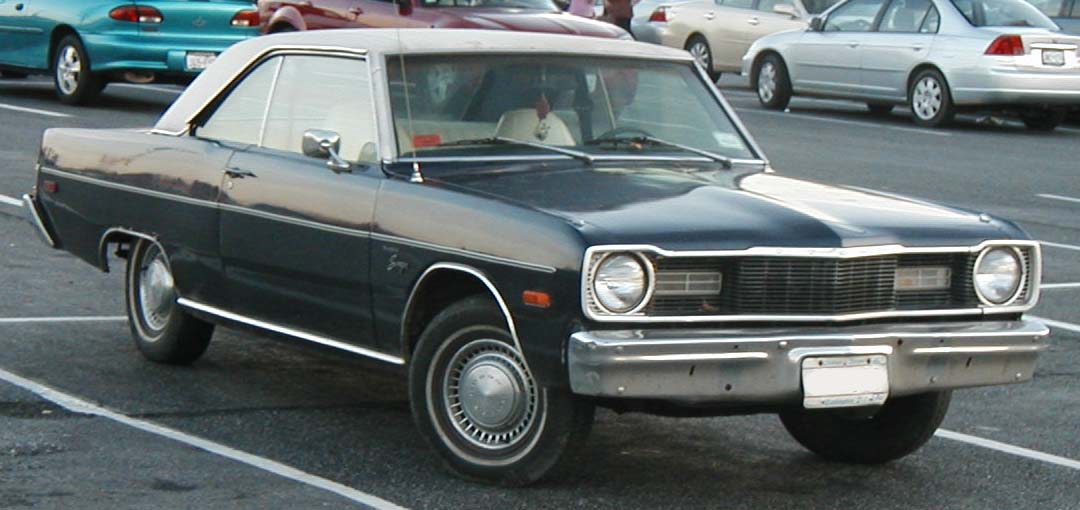
Dodge-Dart-Swinger.jpg

LFA_noflash.jpg
 
First of all Mr Moderator, apologies for (probably) putting this in the wrong forum. If there is a general comment forum, as opposed to asking general questions, I missed it. Please move me to the correct place. Thank you:mad:

My point - at last! - is that no-one I have spoken to likes Windows 7 and was much happier with Windows XP. I'm one of them. One of the people I spoke to didn't realise that XP was about to "die" (become unsupported).
Seven seems to be for people who want to get things done without too much thinking or expertise. Which is an insult from Microsoft for the more abler (and I'm not boasting) users who want to make top-notch DVDs and website and more . . .
So, here's a plea to whoever is left at Microsoft (the former top man had gone, I read): restore XP to the marketplace as Windows 9 (or 10 if version nine is too far underway). Yes, I would be happy to pay for it all over again just to be able to use it.
I seem to spend twice as much time trying to get Windows 7 to do what I want it to do as I actually do working on something.
The Library system is totally baffling to me. I once had something in SIX locations and deleted five as a waste of computer space and memory! I lost a DVD I was well into completing. I was left with just blank squares, some with question marks, where pictures used to be. No amount of trying to restore the files from the recycling bin brought them back.
Never had that problem with Windows XP.
Please Microsoft, give the more serious users a chance!:(
Well Dabber I must admit I was a big XP fan but mate it is just not up to 7 I'm afraid. It is slow and well cumbersome - may I suggest with respect that you tyr some of the tutorials at the top of this forum home page.
My personal favourite is the Bible chapter 1 - http://www.sevenforums.com/tutorials/11728-optimize-windows-7-a.html?filter[2]=Performance Maintenance

Just try that and then have a review and like the rest of us you will get used to it mate. :)
 

My Computer

Computer type
PC/Desktop
Computer Manufacturer/Model Number
Own build (new) Desk1 / Asus ROG Win 7 / Desk2 1st build
OS
Desk1 7 Home Prem / Desk2 10 Pro / Main lap Asus ROG 10 Pro 2 laptop Toshiba 7 Pro Asus P2520 7 & 10
CPU
Desk1 i5 3750K / Laptop i7 GTX 860M / Desk2 i5 2500
Motherboard
Desk1 Asus P877-V / Desk2 Gigabyte H67 UD3H / Laptop ?
Memory
Desk1 8GB (1866) / Desk2 16GB (1333) / Laptop 8Gb DDR3
Graphics Card(s)
Desk 1& 2NVidia GTX 650 & Laptops on board Intel
Sound Card
Desk 1 & 2 -XONAR DG Realtek High Def audio Laptop
Monitor(s) Displays
Desk 1 Benq HD 2450 / Desk2 Philips 24" / Laptop 17.5"
Screen Resolution
1920x1080 D1 & D2 & Laptop 1
Hard Drives
Desk1 Samsung 120GB 830 SSD
Asus ROG 256GB 850 Pro SSD
Desk2 Samsung 840 256 SSD
Toshiba 120GB EVO
PSU
Desk 1 Corsair HX 1050/ Laptop ? / Desk 2 Corsair HX 650
Case
Desk 1 Cooler HAF XM ? Toshiba laptop / Desk2 Coolermaster
Cooling
Fans on all Desk1 -2 Desk2 - all Coolermasters 5 Laptop ?
Keyboard
Desk 1 MS Sidewinder X6 Desk 2 MS Sidewinder X 4
Mouse
Desk 1&2 - Gigabyte MS 900 gamer - laptop - Logitec wireless
Internet Speed
ADSL2+
Other Info
One other Desktop (tester) and spare Toshba laptop both with SSD's
Running Kaspersky 2016 ISS on all machines config'd identically
Logitec audio stereo systems on each machine (x3)
Canon MG5250MFC
Router/modem TP-Link running WPA2SK

My Computer

Computer type
PC/Desktop
Computer Manufacturer/Model Number
Own build (new) Desk1 / Asus ROG Win 7 / Desk2 1st build
OS
Desk1 7 Home Prem / Desk2 10 Pro / Main lap Asus ROG 10 Pro 2 laptop Toshiba 7 Pro Asus P2520 7 & 10
CPU
Desk1 i5 3750K / Laptop i7 GTX 860M / Desk2 i5 2500
Motherboard
Desk1 Asus P877-V / Desk2 Gigabyte H67 UD3H / Laptop ?
Memory
Desk1 8GB (1866) / Desk2 16GB (1333) / Laptop 8Gb DDR3
Graphics Card(s)
Desk 1& 2NVidia GTX 650 & Laptops on board Intel
Sound Card
Desk 1 & 2 -XONAR DG Realtek High Def audio Laptop
Monitor(s) Displays
Desk 1 Benq HD 2450 / Desk2 Philips 24" / Laptop 17.5"
Screen Resolution
1920x1080 D1 & D2 & Laptop 1
Hard Drives
Desk1 Samsung 120GB 830 SSD
Asus ROG 256GB 850 Pro SSD
Desk2 Samsung 840 256 SSD
Toshiba 120GB EVO
PSU
Desk 1 Corsair HX 1050/ Laptop ? / Desk 2 Corsair HX 650
Case
Desk 1 Cooler HAF XM ? Toshiba laptop / Desk2 Coolermaster
Cooling
Fans on all Desk1 -2 Desk2 - all Coolermasters 5 Laptop ?
Keyboard
Desk 1 MS Sidewinder X6 Desk 2 MS Sidewinder X 4
Mouse
Desk 1&2 - Gigabyte MS 900 gamer - laptop - Logitec wireless
Internet Speed
ADSL2+
Other Info
One other Desktop (tester) and spare Toshba laptop both with SSD's
Running Kaspersky 2016 ISS on all machines config'd identically
Logitec audio stereo systems on each machine (x3)
Canon MG5250MFC
Router/modem TP-Link running WPA2SK
Well, it's still considered a once-great muscle car for the masses.

But just like we've seen in the XP Dual Boot thread here over the past year or so, it's pitifully showing its age and falling apart when faced with modern hardware. Just recently tens of thousands of comments have trickled down to a stop.

Meanwhile Win7 is as sleek, fast and flawless as a three year old Lexus which Dad's driving now.
 
Well, it's still considered a once-great muscle car for the masses.

But just like we've seen in the XP Dual Boot thread here over the past year or so, it's pitifully showing its age and falling apart when faced with modern hardware. Just recently tens of thousands of comments have trickled down to a stop.

Meanwhile Win7 is as sleek, fast and flawless as a three year old Lexus which Dad's driving now.
Hum Greg sounds a bit like the V6 Holden Commodore I had and the Mazda 6 hatchback now two very different horses. :)

Well for me out of the American cars I personally like the Mustang in any model:) I'm always surprised though at the lack of any real styling for the general run of the mill road cars in the US. Stuff like the Mustang , Corvette I could be wrong are what I would call exceptions to that rule. Hey but each to his own eh?

Now I wonder if that Dabber will be back I hope so because he is missing out on what you so rightly say is a pretty slick OS:)
 

My Computer

Computer type
PC/Desktop
Computer Manufacturer/Model Number
Own build (new) Desk1 / Asus ROG Win 7 / Desk2 1st build
OS
Desk1 7 Home Prem / Desk2 10 Pro / Main lap Asus ROG 10 Pro 2 laptop Toshiba 7 Pro Asus P2520 7 & 10
CPU
Desk1 i5 3750K / Laptop i7 GTX 860M / Desk2 i5 2500
Motherboard
Desk1 Asus P877-V / Desk2 Gigabyte H67 UD3H / Laptop ?
Memory
Desk1 8GB (1866) / Desk2 16GB (1333) / Laptop 8Gb DDR3
Graphics Card(s)
Desk 1& 2NVidia GTX 650 & Laptops on board Intel
Sound Card
Desk 1 & 2 -XONAR DG Realtek High Def audio Laptop
Monitor(s) Displays
Desk 1 Benq HD 2450 / Desk2 Philips 24" / Laptop 17.5"
Screen Resolution
1920x1080 D1 & D2 & Laptop 1
Hard Drives
Desk1 Samsung 120GB 830 SSD
Asus ROG 256GB 850 Pro SSD
Desk2 Samsung 840 256 SSD
Toshiba 120GB EVO
PSU
Desk 1 Corsair HX 1050/ Laptop ? / Desk 2 Corsair HX 650
Case
Desk 1 Cooler HAF XM ? Toshiba laptop / Desk2 Coolermaster
Cooling
Fans on all Desk1 -2 Desk2 - all Coolermasters 5 Laptop ?
Keyboard
Desk 1 MS Sidewinder X6 Desk 2 MS Sidewinder X 4
Mouse
Desk 1&2 - Gigabyte MS 900 gamer - laptop - Logitec wireless
Internet Speed
ADSL2+
Other Info
One other Desktop (tester) and spare Toshba laptop both with SSD's
Running Kaspersky 2016 ISS on all machines config'd identically
Logitec audio stereo systems on each machine (x3)
Canon MG5250MFC
Router/modem TP-Link running WPA2SK
We bought a Bugatti veyron and just decided to rip the engine out and put the engine from a Prius in it.

...because screw performance ... right?
 

My Computer

Computer Manufacturer/Model Number
Insane hobo technologies. ;-)
OS
Windows 7 x64
CPU
Intel i7 2600k
Motherboard
Asrock z68 extreme 4 gen 3
Memory
G.skill Ripjaw 16gigs @ 1866
Graphics Card(s)
Nvidia gtx580 (evga)
Sound Card
Integrated HD audio + hdmi
Monitor(s) Displays
24" ASUS widescreen + 42" insignia
Screen Resolution
1080p (1920x1080)
Hard Drives
128 Samsung 830
256 Samsung 840
3 x 1tb storage drive (various)
1 western digital 1tb (eSATA)
1 Seagate 1tb (eSATA)
PSU
1 kilowatt SLI/Crossfire rated Silverstone modular
Case
NZXT Phantom + additional 220 fan
Cooling
Zalmann
Keyboard
Microsoft wireless 3000 (v2)
Mouse
MS - wireless 5000 (bluetrack)
Internet Speed
depends on if you ask me or my provider.
Other Info
The above information is provided as is, and the author assumes no responsibility for issues it may cause with your sanity or fanboyism.
You don't miss ...

A few XP features that I miss:

  • XP had a built-in "Context Menu" editor.
  • XP handled "Read-only" files correctly.
  • XP Windows Explorer "Up" button.
  • XP Windows Explorer didn't have the annoying auto-scroll bug.

I don't miss any of that.

Windows Explorer? Is that anything like XYplorer which is Windows Explorer on steroids?

You don't miss correctly handled "Read-only" files? :confused:

I use FreeCommander when I have to do anything tricky.

XP had better tool tips (i.e. any comments that you added to pictures would appear in the tool tip).
 
Last edited:

My Computer

Computer type
PC/Desktop
Computer Manufacturer/Model Number
n/a
OS
W7 Ultimate SP1, LM19.2 MATE, W10 Home 1703, W10 Pro 1703 VM, #All 64 bit
CPU
AMD Phenom II x6 1100T, 3.3 GHz
Motherboard
ASUS M4A88T-M/USB3 (AM3)
Memory
12GB DDR3 1333 G-Skill (4GB x 2), G-Skill (2GB x 2)
Graphics Card(s)
NVIDIA GeForce GTX 660
Sound Card
Realtek?
Monitor(s) Displays
Samsung S23B350
Screen Resolution
1920x1080
Hard Drives
WD Green 2TB (SATA), WD Green 3TB (SATA), WD Blue 4TB (SATA), WD Blue 6TB (SATA)
PSU
Cooler Master
Case
Antec GX300 Tower
Cooling
3x Antec TRICOOL 120mm Fans
Mouse
Wired Optical
Internet Speed
DSL
Antivirus
Avast
Browser
Pale Moon (64 bit)
Other Info
2018-12-27 Upgraded HDDs
2015-12-10 Upgraded case, graphics card, storage
2015-08-15 Upgraded motherboard & RAM
2015-07-15 Upgraded LM17.1 to LM17.2
How does Windows 7 not handle read-only files correctly?
 

My Computer

Computer type
PC/Desktop
Computer Manufacturer/Model Number
Alienware Aurora ALX R4
OS
Windows 10 Pro (x64)
CPU
Intel Core i7-3930K (3.2GHz - 4.5GHz)
Motherboard
Alienware Aurora-R4 x79
Memory
4x Samsung 4GB PC3-12800 DDR3 (16GB 1600MHz)
Graphics Card(s)
Nvidia Geforce GTX 690
Sound Card
SteelSeries Siberia Elite
Monitor(s) Displays
Dell UltraSharp U3011
Screen Resolution
2560x1600
Hard Drives
Samsung 850 Pro 256 GB, Seagate 1TB Desktop Hybrid HDD, 2x Western Digital 4TB Green HDD
PSU
875W Some Dell PSU <.<
Case
Alienware Aurora ALX
Cooling
Custom Liquid Cooling (EK CPU & GPU blocks) dual EK 480RAD
Keyboard
Logitech G710+ Mechanical
Mouse
Logitech G700s
Internet Speed
Verizon Fios (50 mbps average)
Other Info
Server: Intel NUC D54250WYK: i5-4250U, 16GB, 256 GB mSATA, Windows Server 2012 R2
Yes, someone else said that.
Just two points (and I hope this isn't too naive) 1, the user folder is where? Already in XP?
2, I have many files (or signoposts to files) in various libraries - as the result of long battles. Presumably - as they are signposts - I won't need to move anything. Are the files in my XP user folder already or will I have to locate the files I want to work on and move them into XP?

I'm beginning to wish that having updated the hardware in my new computer I had deleted Windows 7 (sacriledge) and reinstalled Windows XP from the CD/DVD that I had originally put on my previous computer. I only needed more powerful hardware for video editing, etc, not a new OS, when I moved to a new computer. I did attempt to add XP in a dual boot arrangement but got the message (to the effect of) you cannot install XP as the current operating system - Windows 7 - is a newer version of Windows. (Never!?) And there were dire warnings that I could lose already-installed programmes if I attempted it.
The demise of XP was still in the furture - a little nearer now.
Yes, I have the article on dual boot installation from this forum.

you can open user folder from start menu. or you can put it on your desktop (just like my documents on xp) custumize desktop icons or right clock user folder on start menu and from context menu select show on desktop.
by default user foler is in C:\USERS\<username> you can change that.. (you said windows 7 doesnt allow thinkering you like) i would like to disappoint you it alows at least as much as xp. atill its even more to change documents, videos, music, pictures etc location just by clicking properities.
it is easier to setup dual boot when you start from installing older os first, of course it can be done the other way around but you need to do some more thinkering.

Well i get ir you dont like windows 7.. that is your choice.. many people i know like 7. xp was work horse for many years its time to move now.. because IMHO windows 7 is great successor.
If you have problem with 7 you can try to solve it there is a lot of helpful people here. but if you just want to complain how bad 7 is and how wonderful xp is all bunnies and rainbows.. there is no point to try and help you im sorry. Opinion is your freedom but dont over do it many people here can get your point from one or two posts. dont make it flame or troll wars. and dont forget its windows 7 forum not xp.
 

My Computer

Computer type
PC/Desktop
Computer Manufacturer/Model Number
Self Built PC
OS
Windows 7 pro 64bit. (SP1)
CPU
Intel core I5 2400
Motherboard
Gigabyte H61
Memory
8GB DDR3 Kingston
Graphics Card(s)
Gigabyte GF GTX650OC
Sound Card
Realtek HD audio
Monitor(s) Displays
LCD 20"
Screen Resolution
1600x900
Hard Drives
INTEL SSD 320 80GB +Seagate 7200.12 1TBx3
PSU
Coolermaster RX450W
Case
Coolermaster atx case
Cooling
stock cooler
Keyboard
logitech
Mouse
logitech
Internet Speed
FTTD 100mbps
What's all this rubbish about age and not wanting to learn?:mad:

I didn't pay all that money for a new computer (including Wndows 7) to leave it unused. I'd love to know how I do various jobs.

I've had enough of this thread. Over to you lot. I'm off . . .

BTW: The "Old Fogie Member" tag is just a joke. I feel great - and young at heart. As they say: "Age is just a number". See ya!

You can draw what ever conclusion you like nothing was directed towards you

You made a thread to post opinions and thoughts but your upset that Opinions come off borrish like .........I was simply saying I am proud of my Father even though he is a olderman that decided to get into computers about 4 years ago and stating he doesn't have issues getting around Win 7

Just thought I'd pop back to answer this comment. Whether the remarks were directed at me or not - all the others who dared to say they liked XP were under fire, too, I suppose - I was objecting to the idea that it was an age thing not to like Windows 7 and that I couldn't understand it because I didn't want to learn how to use it.
Did your father accept your views in the way you said them?
Most of the rest of the comments were sensible and I see there are some good ones that have just gone on (between my two latest posts).

I am thinking of starting a new thread (to avoid clogging up this one) asking people, particulartly Windows 7 lovers, what they use Windows 7 for. Serious work or just messing around with photos, distortions and the like?
Watch this space.
 

My Computer

Computer Manufacturer/Model Number
Microsoft Windows XP (preferred) and Microsoft Windows 7 (tolerated)
OS
Windows 7 Professional
Now I wonder if that Dabber will be back I hope so because he is missing out on what you so rightly say is a pretty slick OS:)

I'm still here in the background. Keeping my beady eyes on things.
The thread has turned to cars now, I see. A good way of diverting attention from the real issue.
 

My Computer

Computer Manufacturer/Model Number
Microsoft Windows XP (preferred) and Microsoft Windows 7 (tolerated)
OS
Windows 7 Professional
Well i get ir you dont like windows 7.. that is your choice.. many people i know like 7. xp was work horse for many years its time to move now.. because IMHO windows 7 is great successor.
If you have problem with 7 you can try to solve it there is a lot of helpful people here. but if you just want to complain how bad 7 is and how wonderful xp is all bunnies and rainbows.. there is no point to try and help you im sorry. Opinion is your freedom but dont over do it many people here can get your point from one or two posts. dont make it flame or troll wars. and dont forget its windows 7 forum not xp.

Bunnies and rainbows? Where are we going with this?
I didn't say 7 was bad. I found XP easy to use and I have difficulty with 7 (which I seem to be fighting against all the time).
I know it's a Windows 7 forum (I can read). That was what I was talking about, but that doesn't stop me mentioning XP. We have had the full range of previous Windows OSs. Are you going to object to their titles being mentioned? Someone even mentioned Windows 8 !
Two posts and you're out, is that it? No further points can be answered? You want the last word? O.k. I get it . . .
 

My Computer

Computer Manufacturer/Model Number
Microsoft Windows XP (preferred) and Microsoft Windows 7 (tolerated)
OS
Windows 7 Professional
I've just twigged that too and I am on the other side of the pond so it made the first image a bit of a puzzle. But I put my Baseball cap on backwards and all was clear:D
 

My Computer

Computer type
PC/Desktop
OS
Microsoft Windows 7 Home Premium 64-bit 7601 Multiprocessor Free Service Pack 1
CPU
Intel(R) Core(TM) i7-3770 CPU @ 3.40GHz
Motherboard
ASUSTeK COMPUTER INC. P8H77-M
Memory
8.00 GB
Graphics Card(s)
Intel(R) HD Graphics 4000
Sound Card
On Board
Monitor(s) Displays
Dell 24"
Screen Resolution
1920 x 1080
Hard Drives
(1) INTEL SSDSC2CT180A3 ATA Device (2) ST500DM002-1BD142 ATA Device (3) WDC WD3200AAKS-75L9A0 ATA Device (4) Generic- Compact Flash USB Device (5) Generic- MS/MS-Pro USB Device (6) Generic- SD/MMC USB Device (7) Generic- SM/xD-Picture USB
PSU
500w Corsair
Case
Cooler Master
Cooling
3 Fans
Keyboard
Logitech MK300
Mouse
Logitech WOM
Internet Speed
75Mb
Antivirus
Norton 360
Browser
Firefox, Opera, IE
Status
Not open for further replies.
Back
Top