
Icons and Previews not showing in Save As/Open Window

codlink

New member
Local time
8:24 AM
Messages
3
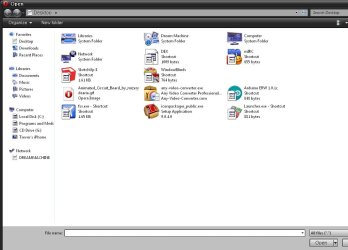
The other day I noticed that all of the icons and previews (for images) were not showing when I am in a program and open a window for Save As../Open, etc. This happens in all programs. Attached is an example.

When I open the file location from within my computer all icons and previews work.

Things I have tried so far:

Control Panel>Advanced System Settings>Performance Settings - Made sure Show Thumbnails instead of icons is check.

Going through every folder and making sure in folder options that always show icons, never thumbnails was unchecked. I have tried numerous different scenarios.

I even went and installed custom icons. That is why it now shows some icons. Before it showed no icons at all.

I am pretty knowledgeable when it comes to settings in windows and have been running Windows 7 since it came out. If anybody knows anything else I can try, please let me know.

Thanks
 

Attachments
  • IMG_0617.jpg
    IMG_0617.jpg
    84.9 KB · Views: 5

My Computer My Computer

At a glance

Windows 7 Ultimate x64 SP1AMD Phenom II x6 1100T @3.3Ghz8GB AData DDR3 800Mhz 9-9-9-282x EVGA GTX 580
Computer Manufacturer/Model Number
Custom
OS
Windows 7 Ultimate x64 SP1
CPU
AMD Phenom II x6 1100T @3.3Ghz
Motherboard
ASUS Crosshair IV Formula - Chipset: 890 FX
Memory
8GB AData DDR3 800Mhz 9-9-9-28
Graphics Card(s)
2x EVGA GTX 580
Monitor(s) Displays
x3 ASUS 1920x1080
Hard Drives
WD 10,000 RPM 320GB
WD 7,200 RPM 1 TB
PSU
Antec 1050w
Case
Antec 1200
Cooling
Custom water cooling. CPU and GPU
The other day I noticed that all of the icons and previews (for images) were not showing when I am in a program and open a window for Save As../Open, etc. This happens in all programs. Attached is an example.

When I open the file location from within my computer all icons and previews work.

Things I have tried so far:

Control Panel>Advanced System Settings>Performance Settings - Made sure Show Thumbnails instead of icons is check.

Going through every folder and making sure in folder options that always show icons, never thumbnails was unchecked. I have tried numerous different scenarios.

I even went and installed custom icons. That is why it now shows some icons. Before it showed no icons at all.

I am pretty knowledgeable when it comes to settings in windows and have been running Windows 7 since it came out. If anybody knows anything else I can try, please let me know.

Thanks

You could try the following;

To fix this problem, follow these steps:
Close all open windows if a Close Open Programs Interaction dialog box is displayed.
Verify the Max Cached Icons registry value that locates in the following registry subkey equals to 4096:
HKEY_LOCAL_MACHINE\Software\Microsoft\Windows\CurrentVersion\Explorer
Delete IconCache.db that locates in the following path:
Windows XP - %userprofile%\Local Settings\Application Data
Windows Vista or Windows 7 - %userprofile%\AppData\Local.

OR

http://www.sevenforums.com/tutorials/3606-shortcut-arrow-change-remove-restore.html

HTH
 

My Computer My Computer

At a glance

Windows 7 Professional x64Intel i5 quad processor16 GBRadeon HD 5770
Computer type
PC/Desktop
Computer Manufacturer/Model Number
Custom Built
OS
Windows 7 Professional x64
CPU
Intel i5 quad processor
Motherboard
DP67BG
Memory
16 GB
Graphics Card(s)
Radeon HD 5770
Sound Card
Realtek High Definition Audio
Monitor(s) Displays
Samsung SyncMaster
Screen Resolution
1920X1080
Hard Drives
WD 2TB (SATA Internal)
WD 1TB (USB External)
PSU
Corsair GS800
Case
Tower (Generic)
Cooling
3 Internal Fans
Keyboard
MS Wireless
Mouse
MS Optical Wired
Internet Speed
54 mbps
Antivirus
Emsisoft
Browser
IE-Version 9, Palemoon-Version 24.2.0
Sorry tried all of those and still the same.

I didn't have the Max Cached Icons key so I made it. No change..

Something has to be blocking the icons..
 

My Computer My Computer

At a glance

Windows 7 Ultimate x64 SP1AMD Phenom II x6 1100T @3.3Ghz8GB AData DDR3 800Mhz 9-9-9-282x EVGA GTX 580
Computer Manufacturer/Model Number
Custom
OS
Windows 7 Ultimate x64 SP1
CPU
AMD Phenom II x6 1100T @3.3Ghz
Motherboard
ASUS Crosshair IV Formula - Chipset: 890 FX
Memory
8GB AData DDR3 800Mhz 9-9-9-28
Graphics Card(s)
2x EVGA GTX 580
Monitor(s) Displays
x3 ASUS 1920x1080
Hard Drives
WD 10,000 RPM 320GB
WD 7,200 RPM 1 TB
PSU
Antec 1050w
Case
Antec 1200
Cooling
Custom water cooling. CPU and GPU
Sorry tried all of those and still the same.

I didn't have the Max Cached Icons key so I made it. No change..

Something has to be blocking the icons..

Have you checked for any recent Windows Updates? Sometimes an update can cause peculiar behavior.
 

My Computer My Computer

At a glance

Windows 7 Professional x64Intel i5 quad processor16 GBRadeon HD 5770
Computer type
PC/Desktop
Computer Manufacturer/Model Number
Custom Built
OS
Windows 7 Professional x64
CPU
Intel i5 quad processor
Motherboard
DP67BG
Memory
16 GB
Graphics Card(s)
Radeon HD 5770
Sound Card
Realtek High Definition Audio
Monitor(s) Displays
Samsung SyncMaster
Screen Resolution
1920X1080
Hard Drives
WD 2TB (SATA Internal)
WD 1TB (USB External)
PSU
Corsair GS800
Case
Tower (Generic)
Cooling
3 Internal Fans
Keyboard
MS Wireless
Mouse
MS Optical Wired
Internet Speed
54 mbps
Antivirus
Emsisoft
Browser
IE-Version 9, Palemoon-Version 24.2.0
Yes, I have updates recently.. Probably every few days... Bad part is that last time I updated Windows, there was like 20 of them. I may see if I can go back and see what updates were installed..

Good idea, thanks
 

My Computer My Computer

At a glance

Windows 7 Ultimate x64 SP1AMD Phenom II x6 1100T @3.3Ghz8GB AData DDR3 800Mhz 9-9-9-282x EVGA GTX 580
Computer Manufacturer/Model Number
Custom
OS
Windows 7 Ultimate x64 SP1
CPU
AMD Phenom II x6 1100T @3.3Ghz
Motherboard
ASUS Crosshair IV Formula - Chipset: 890 FX
Memory
8GB AData DDR3 800Mhz 9-9-9-28
Graphics Card(s)
2x EVGA GTX 580
Monitor(s) Displays
x3 ASUS 1920x1080
Hard Drives
WD 10,000 RPM 320GB
WD 7,200 RPM 1 TB
PSU
Antec 1050w
Case
Antec 1200
Cooling
Custom water cooling. CPU and GPU
Back
Top