Taskbar color

davidjc

New member
Local time
4:05 PM
Messages
6
I dont like the aero effect so I dont use it. I liked the dark grey/black task bar of vista, although on windows 7 the windows basic theme makes the task bar a nasty blue grey colour. So basically can I have the task bar from vista in windows 7?
 

My Computer

OS
windows 7
Yes,

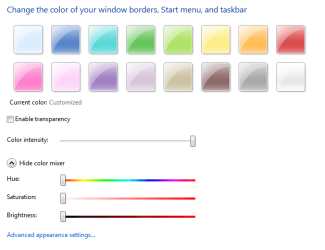
right click on desktop> personalize > windows color > turn off transparency > slide color intensity all the way to the right > make sure the rest of the color mixer slidesr are to the left all they way.
 

My Computer

OS
vista x64
CPU
E8600 Core Duo
Motherboard
EVGA 780i Sli
Memory
8 GB
Graphics Card(s)
BFG 8800 GTX
Yes,

right click on desktop> personalize > windows color > turn off transparency > slide color intensity all the way to the right > make sure the rest of the color mixer slidesr are to the left all they way.
He says he has aero turned off, which results in that it is not possible to change the color of the windows or the taskbar. ;)
 
They shoud have allowed you to change the color of the task bar in windows basic and also independently from the other parts of the window.
 

My Computer

OS
windows 7
He says he has aero turned off, which results in that it is not possible to change the color of the windows or the taskbar. ;)

Well if he wants it black he will have to turn on areo its why I posted what I did.

. I liked the dark grey/black task bar of vista, ?

And I gave him what he wanted
 

My Computer

OS
vista x64
CPU
E8600 Core Duo
Motherboard
EVGA 780i Sli
Memory
8 GB
Graphics Card(s)
BFG 8800 GTX
but i cant see why not to have aero turned on? :confused: Only if you have a Pentium 4 system with 512 Mb ram, it would make sence to me.
 
No i have a fast pc (e8500 @3.8ghz, 4gb ram, crucial ssd etc etc) but i just dont like the look of it for some reason, maybe i will just have to learn to like it.
 

My Computer

OS
windows 7
Well if he wants it black he will have to turn on areo its why I posted what I did.


And I gave him what he wanted

not true, i disabled transparency and made black:

First uncheck Enable transparency and move Colour intensity all the way right

snip1.PNG

then click Show colour mixer, move the sliders as shown

snip2.PNG

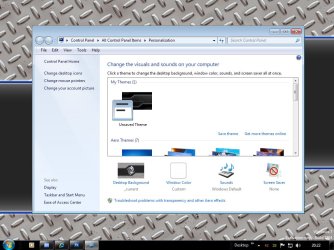
Oooh, look at that..we got black taskbar and window frames! :sarc:
is this not wot he wanted? :p
 

My Computer

OS
Windows 7 Ultimate 64Bit
CPU
AMD Athlon x4 650 3Ghz
Motherboard
ASUS
Memory
4gb
Graphics Card(s)
ATI Radeon 3000 series Onboard
not true, i disabled transparency and made black:

First uncheck Enable transparency and move Colour intensity all the way right

View attachment 22617

then click Show colour mixer, move the sliders as shown

View attachment 22618

Oooh, look at that..we got black taskbar and window frames! :sarc:
is this not wot he wanted? :p
Yeah, kinda, but he wanted it without aero on ;)
 
Just to make myself clear. I wanted a black/dark grey taskbar like in vista but with normal solid light blue/grey window frames.
 

My Computer

OS
windows 7
Aero gives you the glass beams over titlebars and taskbar thumbnails, desktop peek etc, so just turning transparency off isn't the same thing.
 

My Computer

Computer Manufacturer/Model Number
Self Built
OS
XP Pro SP3 x86/Vista SP2 x64/Win7 x64 Triple-boot
CPU
AMD64 X2 AM2 5000+
Motherboard
Asus MSN-X Plus
Memory
Corsair TWX 2Gb (2x1Gb) DDR2 800Mhz
Graphics Card(s)
PCI-X 2.0 Inno3D (NVidia) 9500GT 1Gb DDR2
Sound Card
Onboard Realtec ALC662-GR
Monitor(s) Displays
Relisys 17' CRT (model unknown)
Screen Resolution
1024x768
Hard Drives
750Gb Samsung 7200-3Gb/s 32Mb Cache SATA
PSU
500W
Cooling
Standard AMD CPU Fan, One side, front and rear case fan.
Keyboard
Microsoft Multimedia Keyboard
Mouse
Samsung Optical
Internet Speed
10M

My Computer

Computer Manufacturer/Model Number
Self Built
OS
XP Pro SP3 x86/Vista SP2 x64/Win7 x64 Triple-boot
CPU
AMD64 X2 AM2 5000+
Motherboard
Asus MSN-X Plus
Memory
Corsair TWX 2Gb (2x1Gb) DDR2 800Mhz
Graphics Card(s)
PCI-X 2.0 Inno3D (NVidia) 9500GT 1Gb DDR2
Sound Card
Onboard Realtec ALC662-GR
Monitor(s) Displays
Relisys 17' CRT (model unknown)
Screen Resolution
1024x768
Hard Drives
750Gb Samsung 7200-3Gb/s 32Mb Cache SATA
PSU
500W
Cooling
Standard AMD CPU Fan, One side, front and rear case fan.
Keyboard
Microsoft Multimedia Keyboard
Mouse
Samsung Optical
Internet Speed
10M
Thanks for the generator. I wil give it ago.
 

My Computer

OS
windows 7
not true, i disabled transparency and made black:

First uncheck Enable transparency and move Colour intensity all the way right

View attachment 22617

then click Show colour mixer, move the sliders as shown

View attachment 22618

Oooh, look at that..we got black taskbar and window frames! :sarc:
is this not wot he wanted? :p

After rereading both of our post post this is exaclty what I posted just without screen shots.
 
Last edited:

My Computer

OS
vista x64
CPU
E8600 Core Duo
Motherboard
EVGA 780i Sli
Memory
8 GB
Graphics Card(s)
BFG 8800 GTX
It's hiding in 'C:\Windows\Resources\Themes\Aero' but it just prevented me opening any windows whilst trying it, but I'm on Build 7264 x64.


If you still want to try it: (Make a restore point first!)
Take ownership of the file thats already there at 'C:\Windows\Resources\Themes\Aero',

Make a backup of the original 'aero.msstyles',

Switch theme to 'Windows Classic',

Restart PC so Aero gets unloaded,

Overwrite the existing file and then go themes and select it.
 

My Computer

Computer Manufacturer/Model Number
Self Built
OS
XP Pro SP3 x86/Vista SP2 x64/Win7 x64 Triple-boot
CPU
AMD64 X2 AM2 5000+
Motherboard
Asus MSN-X Plus
Memory
Corsair TWX 2Gb (2x1Gb) DDR2 800Mhz
Graphics Card(s)
PCI-X 2.0 Inno3D (NVidia) 9500GT 1Gb DDR2
Sound Card
Onboard Realtec ALC662-GR
Monitor(s) Displays
Relisys 17' CRT (model unknown)
Screen Resolution
1024x768
Hard Drives
750Gb Samsung 7200-3Gb/s 32Mb Cache SATA
PSU
500W
Cooling
Standard AMD CPU Fan, One side, front and rear case fan.
Keyboard
Microsoft Multimedia Keyboard
Mouse
Samsung Optical
Internet Speed
10M
Back
Top