)He says he has aero turned off, which results in that it is not possible to change the color of the windows or the taskbar.Yes,
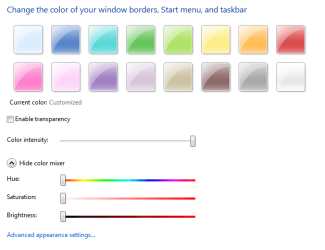
right click on desktop> personalize > windows color > turn off transparency > slide color intensity all the way to the right > make sure the rest of the color mixer slidesr are to the left all they way.

He says he has aero turned off, which results in that it is not possible to change the color of the windows or the taskbar.![]()
. I liked the dark grey/black task bar of vista, ?
Well if he wants it black he will have to turn on areo its why I posted what I did.
And I gave him what he wanted

Yeah, kinda, but he wanted it without aero onnot true, i disabled transparency and made black:
First uncheck Enable transparency and move Colour intensity all the way right
View attachment 22617
then click Show colour mixer, move the sliders as shown
View attachment 22618
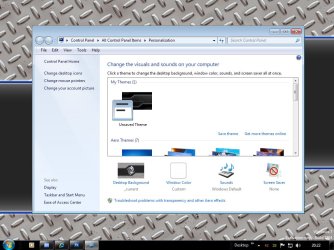
Oooh, look at that..we got black taskbar and window frames! :sarc:
is this not wot he wanted?![]()


not true, i disabled transparency and made black:
First uncheck Enable transparency and move Colour intensity all the way right
View attachment 22617
then click Show colour mixer, move the sliders as shown
View attachment 22618
Oooh, look at that..we got black taskbar and window frames! :sarc:
is this not wot he wanted?![]()
There's a tutorial here but requires resource editing:
http://www.sevenforums.com/tutorials/4315-taskbar-customize-skin.html
View attachment 22626