Sleep mode activated when PC not idle - why?

unbob

New member
Member
Local time
5:34 AM
Messages
26
OK, I've read all about Win7 sleep mode and (think) I understand everything I've read.

What I have not seen in my research and do not understand is why my PC enters sleep mode when it is not idle!

For example, I start a disk backup to an external drive, close the lid on my laptop (yes, I have set the sleep setting "do nothing" when the lid is closed), and then leave the computer to "do it's thing". The backup normally takes at least 15 minutes to run. However, my Win7 enters sleep mode within minutes while the backup job is running. Why?

This same problem occurs no matter what program I'm running - backup, video conversion, defrag, etc etc.

It seems that if I'm not using the mouse or keyboard, sleep mode is activated no matter what is currently running on my PC.

Yes, I want to utilize the Win7 sleep mode feature. No, I don't want sleep mode activated while my computer is busy running a job!

Can a resident 7F guru enlighten me? What am I missing?

Thx, Rob
 

My Computer My Computer

Computer Manufacturer/Model Number
HP dv6t-2100
OS
Windows 7 Home Premium 64bit.
CPU
Intel Core i5 CPU M 430 @ 2.27GHz, 2261 MHz
Memory
4GB
Hard Drives
Toshiba MK5056GSY
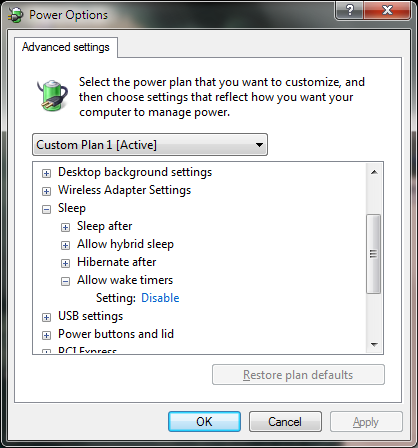
Sleep is set up to activate at a specific time, when you press a button or when you close your laptop. You can check to see what exactly it is doing by typing in POWERCFG.CPL in the Start Menu or browsing to Control Panel > Power Options. Once there you can click on Change Advanced Power Options to further define the options.

ObtTO.png
 

My Computer My Computer

Computer Manufacturer/Model Number
Me
OS
Windows 7 Pro x64
CPU
Intel Core i7 920
Motherboard
ASUS P6T Deluxe V2
Memory
Corsair XMS3 12GB (3x2GB) DDR3 1333
Graphics Card(s)
EVGA GTX 470 1280MB GDDR5 DX11
Monitor(s) Displays
ASUS VW246H | ACER AL2216W
Screen Resolution
3600x1080
Hard Drives
1x Corsair Vertex 3 SSD (120GB)
1x Corsair Vertex 2 SSD (60GB)
2x Western Digital Black (500GB/1TB)
1x External WD Green eSATA (1TB)
PSU
Corsair 850HX
Case
Velocity Micro FullTower
Keyboard
Logitech G110
Mouse
Logitech G500
Internet Speed
http://www.speedtest.net/result/1226664359.png
Antivirus
MSE
Browser
Chrome
Other Info
Logitech Z-5500 5.1 Surround Sound
Logitech C260 Webcam
Creative Fatal1ty Headset
Sleep mode is NOT activated at a certain time.
It is activated when you prompt it to, by clicking the sleep button, or leaving it idle.
IDLE means no MOUSE or KEYBOARD input, but not that the programs are still running. Windows cannot determine what programs that are running mean that it is not idle.
 

My Computer My Computer

OS
N/A
Sleep is set up to activate at a specific time, when you press a button or when you close your laptop. You can check to see what exactly it is doing by typing in POWERCFG.CPL in the Start Menu or browsing to Control Panel > Power Options. Once there you can click on Change Advanced Power Options to further define the options.

ObtTO.png
Thank you for the reply. However, your post does not answer my question - to wit: Why does my computer enter sleep mode when it is not idle?
 

My Computer My Computer

Computer Manufacturer/Model Number
HP dv6t-2100
OS
Windows 7 Home Premium 64bit.
CPU
Intel Core i5 CPU M 430 @ 2.27GHz, 2261 MHz
Memory
4GB
Hard Drives
Toshiba MK5056GSY
Look at my post: The computer determines when your computer is idle. It is considered IDLE when there is no MOUSE/KEYBOARD input for X minutes.
 

My Computer My Computer

OS
N/A
Sleep mode is NOT activated at a certain time.
It is activated when you prompt it to, by clicking the sleep button, or leaving it idle.
IDLE means no MOUSE or KEYBOARD input, but not that the programs are still running. Windows cannot determine what programs that are running mean that it is not idle.
Thanks for the reply. Your statement "IDLE means no MOUSE or KEYBOARD input" may be true (as defined by Microsoft).

However, "Idle" should mean "the processor is not executing any instructions and therefore not performing any work - it is thus in a 'wait-state'". This was/is true in the mainframe world but apparently not true in the PC world.

This is all very unfortunate since I cannot use the "sleep mode" feature at all if I want my PC to perform useful tasks while I'm "away" doing other activities. If this is true, it is ridiculous and outrageous.

I'm assuming this problem can be "worked-around" by using some sort of scripting to disable/enable sleep mode while in the interim running one or more programs.

Any comments or suggestions are welcome.
 

My Computer My Computer

Computer Manufacturer/Model Number
HP dv6t-2100
OS
Windows 7 Home Premium 64bit.
CPU
Intel Core i5 CPU M 430 @ 2.27GHz, 2261 MHz
Memory
4GB
Hard Drives
Toshiba MK5056GSY
Sleep mode is NOT activated at a certain time.
It is activated when you prompt it to, by clicking the sleep button, or leaving it idle.
IDLE means no MOUSE or KEYBOARD input, but not that the programs are still running. Windows cannot determine what programs that are running mean that it is not idle.
Please explain how this statement makes sense - "Windows cannot determine what programs that are running mean that it is not idle".

Windows is an OS. Therefore, it "knows" if programs are running (ie, the processor is executing instructions). If the processor is executing instructions, it is not idle.

If the user explicitly initiates a program that is actively running, why can't Windows determine that means the PC is not idle?
 

My Computer My Computer

Computer Manufacturer/Model Number
HP dv6t-2100
OS
Windows 7 Home Premium 64bit.
CPU
Intel Core i5 CPU M 430 @ 2.27GHz, 2261 MHz
Memory
4GB
Hard Drives
Toshiba MK5056GSY
I know a computer will sleep while MSE is running a scan. Certain functions aren't considered as keeping the computer "active". What backup program are you using?
 

My Computer My Computer

Computer Manufacturer/Model Number
HP p6608f
OS
Win 7 Home Premium x64
CPU
Intel Core i3-540 3.07 GHz
Motherboard
MS-7613 (Iona-GL8E)
Memory
4 GB (2 X 2) Dual-Channel PC-10600 DDR3 @ 665MHz (9-9-9-24)
Graphics Card(s)
Integrated Intel H57
Sound Card
Integrated Realtek ALC888S Audio
Monitor(s) Displays
17" SDM-HS73 (a vestige from my old computer)
Screen Resolution
1280 X 1024
Hard Drives
750GB SATA 7200 RPM
PSU
250W
Keyboard
HP USB keyboard
Mouse
HP USB optical mouse
Internet Speed
15Mbps/1Mbps
Computers have background process that run. For example, press CTRL+SHIFT+ESC and go to the Processes tab. There will be many processes, even though you might have no programs running at the moment. Trying to end all of them will crash your computer. Alas, your computer cannot distinguish whether a program counts as idle or not.
 

My Computer My Computer

OS
N/A
Set sleep to start in an hour or 2, if plugged in. Hopefully your jobs will be done by then. Problem solved.

If it`s going to sleep in mere minutes then that`s what you MUST have it set to. Just change it.
 

My Computer My Computer

Computer type
PC/Desktop
Computer Manufacturer/Model Number
Skylake Special #666
OS
Windows 10 Pro x64
CPU
Intel Core i7 6700K
Motherboard
Asus Sabertooth Z170 Mark 1
Memory
GSkill TridentZ RGB 16GB 3600 16-16-16-36
Graphics Card(s)
EVGA GTX 980 Ti SC x2
Sound Card
Realtek High Definition
Monitor(s) Displays
AOC G2460PG
Screen Resolution
1920 x 1080 144Hz
Hard Drives
Samsung 860 Pro 256GB, Seagate Barracuda 4TB x2
PSU
EVGA 1000 P2, EVGA White Custom Braided Cables
Case
Corsair Vengeance C70 Gunmetal Black
Cooling
Corsair H100i v2, Corsair ML120 x2, Thermal Grizzly Kryonaut
Keyboard
Logitech G910 Orion Spectrum
Mouse
Logitech G700s
Internet Speed
Verizon Fios Quantum Gateway 75/75
Antivirus
Windows Defender, Malwarebytes Free 3.8.3
Browser
Chrome
Other Info
Corsair SP120 x4, LG Blu-ray Drive, Durabrand HT-395 100 Watt Dolby Digital Amp, Corsair H2100 Wireless 7.1 Headset
Rather than sleep, is it your screensaver kicking in? If the screensaver is set to blank, it may kick in, even though the computer is not idle and has no keyboard or mouse movements.
 

My Computer My Computer

Computer type
PC/Desktop
Computer Manufacturer/Model Number
Custom Build
OS
Windows 7 Home Premium 64 bit
CPU
Intel Core i7-4790
Motherboard
GA-Z87X-D3H
Memory
G.SKILL 8GB (2 x 4GB) DDR3 F3-10666CL9D-8GBNT
Graphics Card(s)
AMD Radeon R7 250
Sound Card
Realtek ALC892
Monitor(s) Displays
Samsung UN32EH5000, Dell 1703FPT
Screen Resolution
1920 x 1080, 1280 x 1024
Hard Drives
WD5003AZEX
WD10EZEX
Samsung HD103SJ
Samsung 128 GB 840 PRO
PSU
SeaSonic M12II SS-500GM
Case
Fractal Design Define R4
Cooling
Zalman CNPS9900ALED
Keyboard
Logitech K800
Mouse
Logitech M705
Internet Speed
16 Mbps
Antivirus
Avast
Browser
Firefox
Other Info
Bose Companion 2 Multimedia Speakers
If that were happening, you could tell by the color of the powerlight, correct ?

But back to the OP`s question, why does the pc sleep when it is idle but running a program etc. has been answered ages ago. No keyboard input or mouse movement from a user.
 

My Computer My Computer

Computer type
PC/Desktop
Computer Manufacturer/Model Number
Skylake Special #666
OS
Windows 10 Pro x64
CPU
Intel Core i7 6700K
Motherboard
Asus Sabertooth Z170 Mark 1
Memory
GSkill TridentZ RGB 16GB 3600 16-16-16-36
Graphics Card(s)
EVGA GTX 980 Ti SC x2
Sound Card
Realtek High Definition
Monitor(s) Displays
AOC G2460PG
Screen Resolution
1920 x 1080 144Hz
Hard Drives
Samsung 860 Pro 256GB, Seagate Barracuda 4TB x2
PSU
EVGA 1000 P2, EVGA White Custom Braided Cables
Case
Corsair Vengeance C70 Gunmetal Black
Cooling
Corsair H100i v2, Corsair ML120 x2, Thermal Grizzly Kryonaut
Keyboard
Logitech G910 Orion Spectrum
Mouse
Logitech G700s
Internet Speed
Verizon Fios Quantum Gateway 75/75
Antivirus
Windows Defender, Malwarebytes Free 3.8.3
Browser
Chrome
Other Info
Corsair SP120 x4, LG Blu-ray Drive, Durabrand HT-395 100 Watt Dolby Digital Amp, Corsair H2100 Wireless 7.1 Headset
I know a computer will sleep while MSE is running a scan. Certain functions aren't considered as keeping the computer "active". What backup program are you using?
Yes, running an MSE scan is another good example of a running program being "put to sleep".

Re backup programs, I use Macrium Reflect, TeraByte Unlimited Image for Windows and 2BrightSparks SyncBackPro.
 

My Computer My Computer

Computer Manufacturer/Model Number
HP dv6t-2100
OS
Windows 7 Home Premium 64bit.
CPU
Intel Core i5 CPU M 430 @ 2.27GHz, 2261 MHz
Memory
4GB
Hard Drives
Toshiba MK5056GSY
Computers have background process that run. For example, press CTRL+SHIFT+ESC and go to the Processes tab. There will be many processes, even though you might have no programs running at the moment. Trying to end all of them will crash your computer. Alas, your computer cannot distinguish whether a program counts as idle or not.
"Trying to end all of them will crash your computer." Huh? No, I don't want any program or process to be forced to end by sleep mode. And, certainly, the OS can distinguish whether a program was initiated (as an application) by the user.

My whole point here is that I want any actively running application program to remain "enabled" and active until it completes either successfully or unsuccessfully and not be eligible to be "put to sleep".
 

My Computer My Computer

Computer Manufacturer/Model Number
HP dv6t-2100
OS
Windows 7 Home Premium 64bit.
CPU
Intel Core i5 CPU M 430 @ 2.27GHz, 2261 MHz
Memory
4GB
Hard Drives
Toshiba MK5056GSY
Set sleep to start in an hour or 2, if plugged in. Hopefully your jobs will be done by then. Problem solved.

If it`s going to sleep in mere minutes then that`s what you MUST have it set to. Just change it.
Sorry, that does not solve the problem.

I want sleep mode to activate in say 5 minutes when I leave the PC unless one or more application programs are running.

If there are no application programs running, I don't want the PC sitting there for 2 hours and wasting power (I'm solar powered so that's a big deal).
 

My Computer My Computer

Computer Manufacturer/Model Number
HP dv6t-2100
OS
Windows 7 Home Premium 64bit.
CPU
Intel Core i5 CPU M 430 @ 2.27GHz, 2261 MHz
Memory
4GB
Hard Drives
Toshiba MK5056GSY
I don`t think it`s possible, I would call Microsoft about it.

Or just change the sleep timer.:rolleyes:

Sleep mode, once known as Stand By or Suspend mode, saves energy but doesn’t quite turn the PC off. In Sleep mode, Windows saves what you're doing and then puts the computer to sleep — meaning into a special low-power mode. The computer isn't exactly off, and it restores itself quickly, which makes Sleep mode more effective as a way to shut down the computer.

http://answers.microsoft.com/en-us/...de-while/bcd680cc-4ae4-4476-82ea-c26d4c88b218

http://askville.amazon.com/programs...de-computer/AnswerViewer.do?requestId=1313988
 

My Computer My Computer

Computer type
PC/Desktop
Computer Manufacturer/Model Number
Skylake Special #666
OS
Windows 10 Pro x64
CPU
Intel Core i7 6700K
Motherboard
Asus Sabertooth Z170 Mark 1
Memory
GSkill TridentZ RGB 16GB 3600 16-16-16-36
Graphics Card(s)
EVGA GTX 980 Ti SC x2
Sound Card
Realtek High Definition
Monitor(s) Displays
AOC G2460PG
Screen Resolution
1920 x 1080 144Hz
Hard Drives
Samsung 860 Pro 256GB, Seagate Barracuda 4TB x2
PSU
EVGA 1000 P2, EVGA White Custom Braided Cables
Case
Corsair Vengeance C70 Gunmetal Black
Cooling
Corsair H100i v2, Corsair ML120 x2, Thermal Grizzly Kryonaut
Keyboard
Logitech G910 Orion Spectrum
Mouse
Logitech G700s
Internet Speed
Verizon Fios Quantum Gateway 75/75
Antivirus
Windows Defender, Malwarebytes Free 3.8.3
Browser
Chrome
Other Info
Corsair SP120 x4, LG Blu-ray Drive, Durabrand HT-395 100 Watt Dolby Digital Amp, Corsair H2100 Wireless 7.1 Headset
Rather than sleep, is it your screensaver kicking in? If the screensaver is set to blank, it may kick in, even though the computer is not idle and has no keyboard or mouse movements.
No, I'm not using a screensaver. When my PC sleeps, the fan stops, the screen goes black, all lighted "indicators" go black (except "plugged into power"), etc. Then when I move the mouse, the Windows login screen is displayed. It's in sleep mode for sure.
 

My Computer My Computer

Computer Manufacturer/Model Number
HP dv6t-2100
OS
Windows 7 Home Premium 64bit.
CPU
Intel Core i5 CPU M 430 @ 2.27GHz, 2261 MHz
Memory
4GB
Hard Drives
Toshiba MK5056GSY
Well, you have been told why it does it. I found a solution to stop it from doing it. Let me know if you`re interested.:party:
 

My Computer My Computer

Computer type
PC/Desktop
Computer Manufacturer/Model Number
Skylake Special #666
OS
Windows 10 Pro x64
CPU
Intel Core i7 6700K
Motherboard
Asus Sabertooth Z170 Mark 1
Memory
GSkill TridentZ RGB 16GB 3600 16-16-16-36
Graphics Card(s)
EVGA GTX 980 Ti SC x2
Sound Card
Realtek High Definition
Monitor(s) Displays
AOC G2460PG
Screen Resolution
1920 x 1080 144Hz
Hard Drives
Samsung 860 Pro 256GB, Seagate Barracuda 4TB x2
PSU
EVGA 1000 P2, EVGA White Custom Braided Cables
Case
Corsair Vengeance C70 Gunmetal Black
Cooling
Corsair H100i v2, Corsair ML120 x2, Thermal Grizzly Kryonaut
Keyboard
Logitech G910 Orion Spectrum
Mouse
Logitech G700s
Internet Speed
Verizon Fios Quantum Gateway 75/75
Antivirus
Windows Defender, Malwarebytes Free 3.8.3
Browser
Chrome
Other Info
Corsair SP120 x4, LG Blu-ray Drive, Durabrand HT-395 100 Watt Dolby Digital Amp, Corsair H2100 Wireless 7.1 Headset
Certain programs have a "Sleep/Shut down/Log off/etc." effect like Auslogics Disk Defrag, for example. You can tick this box and set it to shut down after defragging.
I don't know about this. You could schedule a task in the Task Scheduler to shut down when the program closes, but you'll need to make the program close once it's finished.
 

My Computer My Computer

OS
N/A
I use sleep and hibernate and they work well for me.
I have several programs open and running all the time.
Outlook, Excel, Anti-Virus, Anti-Malware, Utilities, Editors, Media, ......

I want the PC to sleep if I am idle (KB + mouse) even when these programs are running.
Upon wakeup they will be in the state they were before going to sleep.

Some programs may have a "prevent idling to sleep" option while they are running, and it sounds like that is what you want.
Some programs also prevent "idling to sleep" no matter what, because they are programmed that way.

I would not want to have to close all programs for sleep to work.
 

My Computer My Computer

Computer type
PC/Desktop
Computer Manufacturer/Model Number
home built
OS
Multi-Boot W7_Pro_x64 W8.1_Pro_x64 W10_Pro_x64 +Linux_VMs +Chromium_VM
CPU
AMD Athlon II x4 620
Motherboard
Gigabyte GA-MA785G-UD3H
Memory
6GB GSkill DDR2 800
Graphics Card(s)
AMD 4670 GPU + AMD 4200 IGP
Sound Card
on board Realtek ALC889A
Monitor(s) Displays
RCA 40" LCD TV, Insignia 32" LCD TV, HP 15" LCD monitor
Screen Resolution
1680 x 1050
Hard Drives
OCZ Vertex 3 120GB,
Samsung F3 1TB (3),
Several others - WD, Seagate, Hitachi, ...
PSU
Corsair 500 W
Case
Rosewill mid tower
Cooling
CM 90mm rifle
Keyboard
Gyration wireless, Logitech wireless, Dell USB wired
Mouse
Gyration wireless, Logitech wireless, V7 USB wired
Internet Speed
Spectrum - 100Mbps D / 10Mbps U
Antivirus
Avast, MBAM3, EMET, WinPatrol
Browser
Pale Moon, Firefox, IE
Other Info
2 multi-boot PC's
Mainly HTPC/Office/Gen purpose (no gaming).
Trendnet USB KVM.
LG DVD burner/Blue Ray Player.
Tray system for removable SATA backup drives.

Not currently OCd, under-volted.
I use Hybrid sleep, rarely re-boot or shutdown.

Hauppauge HD-PVR, Avermedia PCIe TV Tuner, Hauppauge PCI TV Tuner.
Back
Top