Wireless connects, but NO Internet

Johneeo

New member
Member
Local time
7:47 PM
Messages
30
W7 home premium - 64 bit OS - Dell Inspiron 5720.

Currently, I have a wireless network at home. No problem with 2 computers connected to it.

Wife just got new Dell computer. It recognizes the wireless, it connects, but, No internet.

I take the computer to work, and it connects right away to the wireless network, no problem, internet works perfectly.

I have spent hours researching this. I have totally uninstalled McAfee.

Suggestions welcome, TIA
 

My Computer

Computer Manufacturer/Model Number
Dell laptop D610
OS
Windows XP Pro
So wireless if connected to another wireless router?

When connected to wireless (and no internet) start a command prompt:
Code:
route print -4>route.txt
Post route.txt. route.txt may be deleted afterwards
 

My Computer

Computer type
Laptop
Computer Manufacturer/Model Number
ACER ASPIRE 5742G
OS
Microsoft Windows 7 Home Premium 64-bits 7601 Multiprocessor Free Service Pack 1
CPU
Intel(R) Core(TM) i3 CPU M 370 @ 2.40GHz
Motherboard
Acer Aspire 5742G
Memory
4,00 GB
Graphics Card(s)
ATI Mobility Radeon HD 5400 Series
Sound Card
(1) AMD High Definition Audio Device (2) Realtek High Defi
Screen Resolution
1366 x 768 x 32 bits (4294967296 colors) @ 60 Hz
Hard Drives
WDC WD5000BEVT-22ZAT0
So wireless if connected to another wireless router?

When connected to wireless (and no internet) start a command prompt:
Code:
route print -4>route.txt
Post route.txt. route.txt may be deleted afterwards

Not sure what you are asking. I have a wireless network. One router. I have two laptops that connect to it, have done so without problem for years.

I have tried to add a new laptop, simply want it to connect to the wireless. It does get connectivity. But, there is NO internet access.

Today, I brought that laptop to work, turned it on, and it immediately finds the wireless network, connects right away, and I CAN GET ON THE INTERNET. At home, I turn the computer on, it finds the wireless network, connects, but, I CANNOT GET ON THE INTERNET.
 

My Computer

Computer Manufacturer/Model Number
Dell laptop D610
OS
Windows XP Pro
So wireless if connected to another wireless router?

When connected to wireless (and no internet) start a command prompt:
Code:
route print -4>route.txt
Post route.txt. route.txt may be deleted afterwards

Not sure what you are asking. I have a wireless network. One router. I have two laptops that connect to it, have done so without problem for years.

I have tried to add a new laptop, simply want it to connect to the wireless. It does get connectivity. But, there is NO internet access.

Today, I brought that laptop to work, turned it on, and it immediately finds the wireless network, connects right away, and I CAN GET ON THE INTERNET. At home, I turn the computer on, it finds the wireless network, connects, but, I CANNOT GET ON THE INTERNET.
Just do the command I asked you to do and post the output file.
I simply want to know if it has a valid IP address, subnet mask etc.
 

My Computer

Computer type
Laptop
Computer Manufacturer/Model Number
ACER ASPIRE 5742G
OS
Microsoft Windows 7 Home Premium 64-bits 7601 Multiprocessor Free Service Pack 1
CPU
Intel(R) Core(TM) i3 CPU M 370 @ 2.40GHz
Motherboard
Acer Aspire 5742G
Memory
4,00 GB
Graphics Card(s)
ATI Mobility Radeon HD 5400 Series
Sound Card
(1) AMD High Definition Audio Device (2) Realtek High Defi
Screen Resolution
1366 x 768 x 32 bits (4294967296 colors) @ 60 Hz
Hard Drives
WDC WD5000BEVT-22ZAT0
I will do that when I get home.

Thanx for the help.
 

My Computer

Computer Manufacturer/Model Number
Dell laptop D610
OS
Windows XP Pro
I don't know if this tells you anything, but this is what I get at work where my wireless connection is working fine:

===========================================================================
Interface List
16...c0 18 85 bc ca c8 ......Bluetooth Device (Personal Area Network)
14...c2 18 85 bc 4a c7 ......Broadcom Virtual Wireless Adapter
13...c0 18 85 bc ca c7 ......Dell Wireless 1704 802.11b/g/n (2.4GHz)
11...84 8f 69 d1 e6 48 ......Realtek PCIe FE Family Controller
1...........................Software Loopback Interface 1
18...00 00 00 00 00 00 00 e0 Microsoft ISATAP Adapter
12...00 00 00 00 00 00 00 e0 Microsoft 6to4 Adapter
19...00 00 00 00 00 00 00 e0 Microsoft ISATAP Adapter #2
20...00 00 00 00 00 00 00 e0 Microsoft ISATAP Adapter #3
21...00 00 00 00 00 00 00 e0 Microsoft ISATAP Adapter #4
17...00 00 00 00 00 00 00 e0 Teredo Tunneling Pseudo-Interface
===========================================================================
IPv4 Route Table
===========================================================================
Active Routes:
Network Destination Netmask Gateway Interface Metric
0.0.0.0 0.0.0.0 172.31.0.1 172.31.3.20 25
127.0.0.0 255.0.0.0 On-link 127.0.0.1 306
127.0.0.1 255.255.255.255 On-link 127.0.0.1 306
127.255.255.255 255.255.255.255 On-link 127.0.0.1 306
172.31.0.0 255.255.0.0 On-link 172.31.3.20 281
172.31.3.20 255.255.255.255 On-link 172.31.3.20 281
172.31.255.255 255.255.255.255 On-link 172.31.3.20 281
224.0.0.0 240.0.0.0 On-link 127.0.0.1 306
224.0.0.0 240.0.0.0 On-link 172.31.3.20 281
255.255.255.255 255.255.255.255 On-link 127.0.0.1 306
255.255.255.255 255.255.255.255 On-link 172.31.3.20 281
===========================================================================
Persistent Routes:
None
 

My Computer

Computer Manufacturer/Model Number
Dell laptop D610
OS
Windows XP Pro
I don't know if this tells you anything, but this is what I get at work where my wireless connection is working fine:

===========================================================================
Interface List
16...c0 18 85 bc ca c8 ......Bluetooth Device (Personal Area Network)
14...c2 18 85 bc 4a c7 ......Broadcom Virtual Wireless Adapter
13...c0 18 85 bc ca c7 ......Dell Wireless 1704 802.11b/g/n (2.4GHz)
11...84 8f 69 d1 e6 48 ......Realtek PCIe FE Family Controller
1...........................Software Loopback Interface 1
18...00 00 00 00 00 00 00 e0 Microsoft ISATAP Adapter
12...00 00 00 00 00 00 00 e0 Microsoft 6to4 Adapter
19...00 00 00 00 00 00 00 e0 Microsoft ISATAP Adapter #2
20...00 00 00 00 00 00 00 e0 Microsoft ISATAP Adapter #3
21...00 00 00 00 00 00 00 e0 Microsoft ISATAP Adapter #4
17...00 00 00 00 00 00 00 e0 Teredo Tunneling Pseudo-Interface
===========================================================================
IPv4 Route Table
===========================================================================
Active Routes:
Network Destination Netmask Gateway Interface Metric
0.0.0.0 0.0.0.0 172.31.0.1 172.31.3.20 25
127.0.0.0 255.0.0.0 On-link 127.0.0.1 306
127.0.0.1 255.255.255.255 On-link 127.0.0.1 306
127.255.255.255 255.255.255.255 On-link 127.0.0.1 306
172.31.0.0 255.255.0.0 On-link 172.31.3.20 281
172.31.3.20 255.255.255.255 On-link 172.31.3.20 281
172.31.255.255 255.255.255.255 On-link 172.31.3.20 281
224.0.0.0 240.0.0.0 On-link 127.0.0.1 306
224.0.0.0 240.0.0.0 On-link 172.31.3.20 281
255.255.255.255 255.255.255.255 On-link 127.0.0.1 306
255.255.255.255 255.255.255.255 On-link 172.31.3.20 281
===========================================================================
Persistent Routes:
None
Only interested in output after: "IPv4 Route Table"
Do the command agian if it's NOT working and post its output
 

My Computer

Computer type
Laptop
Computer Manufacturer/Model Number
ACER ASPIRE 5742G
OS
Microsoft Windows 7 Home Premium 64-bits 7601 Multiprocessor Free Service Pack 1
CPU
Intel(R) Core(TM) i3 CPU M 370 @ 2.40GHz
Motherboard
Acer Aspire 5742G
Memory
4,00 GB
Graphics Card(s)
ATI Mobility Radeon HD 5400 Series
Sound Card
(1) AMD High Definition Audio Device (2) Realtek High Defi
Screen Resolution
1366 x 768 x 32 bits (4294967296 colors) @ 60 Hz
Hard Drives
WDC WD5000BEVT-22ZAT0
Following is what I get at home when I am connected to the wireless, but cannot access the internet:

IPv4 Route Table
===========================================================================
Active Routes:
Network Destination Netmask Gateway Interface Metric
0.0.0.0 0.0.0.0 192.168.1.1 192.168.1.10 30
127.0.0.0 255.0.0.0 On-link 127.0.0.1 306
127.0.0.1 255.255.255.255 On-link 127.0.0.1 306
127.255.255.255 255.255.255.255 On-link 127.0.0.1 306
192.168.1.0 255.255.255.0 On-link 192.168.1.10 286
192.168.1.10 255.255.255.255 On-link 192.168.1.10 286
192.168.1.255 255.255.255.255 On-link 192.168.1.10 286
224.0.0.0 240.0.0.0 On-link 127.0.0.1 306
224.0.0.0 240.0.0.0 On-link 192.168.1.10 286
255.255.255.255 255.255.255.255 On-link 127.0.0.1 306
255.255.255.255 255.255.255.255 On-link 192.168.1.10 286
===========================================================================
Persistent Routes:
None
 

My Computer

Computer Manufacturer/Model Number
Dell laptop D610
OS
Windows XP Pro
your ip address is 192.168.1.10. All computers in your house subnet use 192.168.1.*
default gateway has address 192.168.1.1

in command prompt:
ping 192.168.1.1
works? if not...works from another pc?

ping 173.194.66.94


works? if not...works from another pc?
 

My Computer

Computer type
Laptop
Computer Manufacturer/Model Number
ACER ASPIRE 5742G
OS
Microsoft Windows 7 Home Premium 64-bits 7601 Multiprocessor Free Service Pack 1
CPU
Intel(R) Core(TM) i3 CPU M 370 @ 2.40GHz
Motherboard
Acer Aspire 5742G
Memory
4,00 GB
Graphics Card(s)
ATI Mobility Radeon HD 5400 Series
Sound Card
(1) AMD High Definition Audio Device (2) Realtek High Defi
Screen Resolution
1366 x 768 x 32 bits (4294967296 colors) @ 60 Hz
Hard Drives
WDC WD5000BEVT-22ZAT0
Code:
tracert  173.194.66.94
output please
 

My Computer

Computer type
Laptop
Computer Manufacturer/Model Number
ACER ASPIRE 5742G
OS
Microsoft Windows 7 Home Premium 64-bits 7601 Multiprocessor Free Service Pack 1
CPU
Intel(R) Core(TM) i3 CPU M 370 @ 2.40GHz
Motherboard
Acer Aspire 5742G
Memory
4,00 GB
Graphics Card(s)
ATI Mobility Radeon HD 5400 Series
Sound Card
(1) AMD High Definition Audio Device (2) Realtek High Defi
Screen Resolution
1366 x 768 x 32 bits (4294967296 colors) @ 60 Hz
Hard Drives
WDC WD5000BEVT-22ZAT0
If McAfee is involved then you might want to read this.
http://us.mcafee.com/root/fix.html?eolexm=vste

I can't say why this machine connects to one network and not the other but if it has anything to do with DNS then McAfee will cause problems even after it's been disabled or uninstalled.
 

My Computer

Computer type
PC/Desktop
Computer Manufacturer/Model Number
Home built
OS
Windows 7 Ult, Windows 8.1 Pro,
CPU
Q9650-4.275GHz, E8600 4.5GHz, E6750-3.8GHz
Motherboard
Evga 780i FTW
Memory
G.Skill PC2 9600 1200Mhz 5 5 5 15 2T
Graphics Card(s)
GTX480
Sound Card
Asus Xonar D2
Monitor(s) Displays
HannsG
Screen Resolution
1680X1050
Hard Drives
GSkill Phoenix Pro 120GB SSD
PSU
ThermalTake Toughpower 1000Watt modular
Case
ThermalTake XaserV
Cooling
Xigmatek S1283
Keyboard
Logitech G15
Mouse
Logitech G9
Internet Speed
T1
If McAfee is involved then you might want to read this.
http://us.mcafee.com/root/fix.html?eolexm=vste

I can't say why this machine connects to one network and not the other but if it has anything to do with DNS then McAfee will cause problems even after it's been disabled or uninstalled.

Thanx for the reply.

I totally uninstalled McAfee.

It is weird. Last night, I fiddled with this and that, and it connected to the internet fine. Got up this morning, it is connected to the wireless network, but cannot access the internet. :mad:

I removed the computer from the network, re-installed it, still same thing.

When I get home, I wil follow Kaktu's instructions, see what that brings.
 

My Computer

Computer Manufacturer/Model Number
Dell laptop D610
OS
Windows XP Pro
Please post what I asked you to post
 

My Computer

Computer type
Laptop
Computer Manufacturer/Model Number
ACER ASPIRE 5742G
OS
Microsoft Windows 7 Home Premium 64-bits 7601 Multiprocessor Free Service Pack 1
CPU
Intel(R) Core(TM) i3 CPU M 370 @ 2.40GHz
Motherboard
Acer Aspire 5742G
Memory
4,00 GB
Graphics Card(s)
ATI Mobility Radeon HD 5400 Series
Sound Card
(1) AMD High Definition Audio Device (2) Realtek High Defi
Screen Resolution
1366 x 768 x 32 bits (4294967296 colors) @ 60 Hz
Hard Drives
WDC WD5000BEVT-22ZAT0
Code:
tracert  173.194.66.94
output please

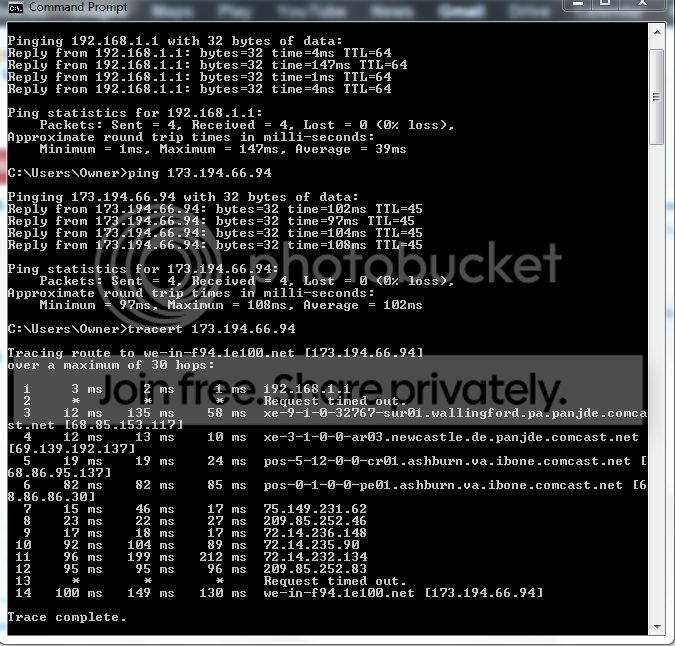
The following is what I receive using my laptop that works fine and connects to the internet. I will try to do the same for the laptop that cannot connect.

00snipCapture.jpg
 

My Computer

Computer Manufacturer/Model Number
Dell laptop D610
OS
Windows XP Pro
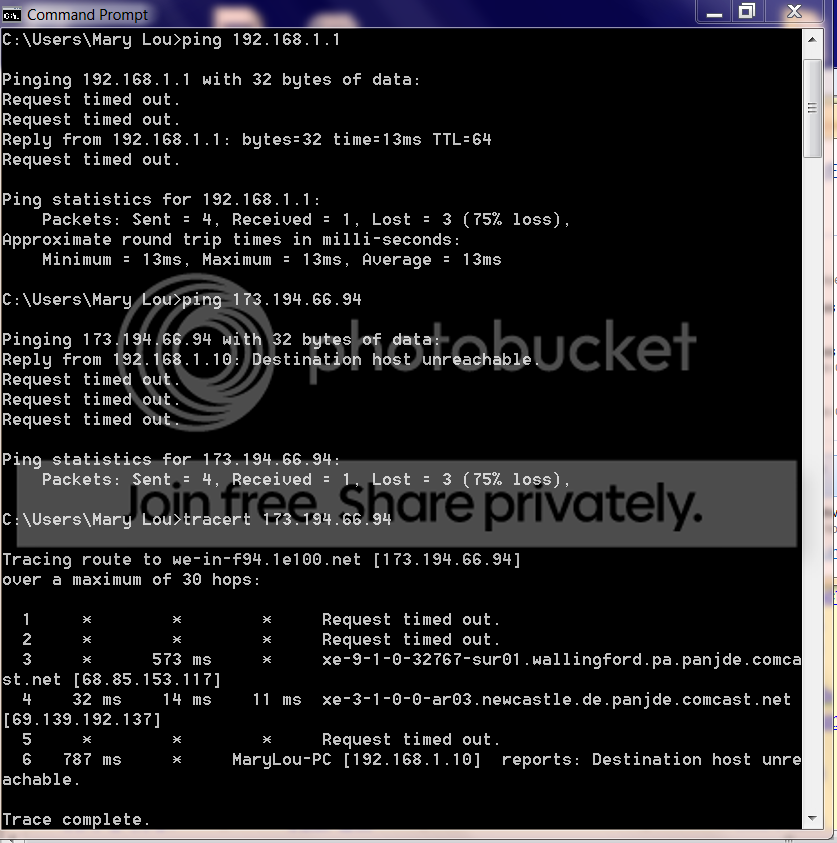
Here is info from the computer that has the problem of not connecting to the internet.

000Capture.png
 

My Computer

Computer Manufacturer/Model Number
Dell laptop D610
OS
Windows XP Pro
Look yourself to the output. It's working.... only a little bit unstable. You CAN access router, you CAN access internet.

PING www.microsoft.com

works as well?

Try to test when laptop is close to router
 

My Computer

Computer type
Laptop
Computer Manufacturer/Model Number
ACER ASPIRE 5742G
OS
Microsoft Windows 7 Home Premium 64-bits 7601 Multiprocessor Free Service Pack 1
CPU
Intel(R) Core(TM) i3 CPU M 370 @ 2.40GHz
Motherboard
Acer Aspire 5742G
Memory
4,00 GB
Graphics Card(s)
ATI Mobility Radeon HD 5400 Series
Sound Card
(1) AMD High Definition Audio Device (2) Realtek High Defi
Screen Resolution
1366 x 768 x 32 bits (4294967296 colors) @ 60 Hz
Hard Drives
WDC WD5000BEVT-22ZAT0
Look yourself to the output. It's working.... only a little bit unstable. You CAN access router, you CAN access internet.

PING www.microsoft.com

works as well?

Try to test when laptop is close to router

OMG!

I took the laptop to the room with the router. Worked fine. Took laptop down my basement. worked fine.

Took it to the kitchen, worked fine.

The only place it does not get connection is at the desk it was on:confused:. Unreal, it works everywhere but the desk, which is not any further than the basement or kitchen.

So, looks like problem solved.
thanx so much for all of your responses, very much appreciated.
 

My Computer

Computer Manufacturer/Model Number
Dell laptop D610
OS
Windows XP Pro
Look yourself to the output. It's working.... only a little bit unstable. You CAN access router, you CAN access internet.

PING www.microsoft.com

works as well?

Try to test when laptop is close to router

OMG!

I took the laptop to the room with the router. Worked fine. Took laptop down my basement. worked fine.

Took it to the kitchen, worked fine.

The only place it does not get connection is at the desk it was on:confused:. Unreal, it works everywhere but the desk, which is not any further than the basement or kitchen.

So, looks like problem solved.
thanx so much for all of your responses, very much appreciated.
ping and tracert are simple tools to test connectivity. ping by tcpip address and you know if it can reach the site (assuming that sites can respond back). tracert is sort of ping but stops after first hop, then second hop and so on. Then you know where it gets stucked.

What's so special to the desk where it's NOT working? Moving laptop from desk even further from router works?


Not only the distance to router matters! Also:
  • Any concrete with iron in between?
  • Many walls in between?
  • Position of antenne in laptop (compare with old transistor radio with antenne)
  • Neighbour's wireless router sending on same channel on close distance
  • Some electronic device close to laptop
 

My Computer

Computer type
Laptop
Computer Manufacturer/Model Number
ACER ASPIRE 5742G
OS
Microsoft Windows 7 Home Premium 64-bits 7601 Multiprocessor Free Service Pack 1
CPU
Intel(R) Core(TM) i3 CPU M 370 @ 2.40GHz
Motherboard
Acer Aspire 5742G
Memory
4,00 GB
Graphics Card(s)
ATI Mobility Radeon HD 5400 Series
Sound Card
(1) AMD High Definition Audio Device (2) Realtek High Defi
Screen Resolution
1366 x 768 x 32 bits (4294967296 colors) @ 60 Hz
Hard Drives
WDC WD5000BEVT-22ZAT0
Look yourself to the output. It's working.... only a little bit unstable. You CAN access router, you CAN access internet.

What's so special to the desk where it's NOT working? Moving laptop from desk even further from router works?


Not only the distance to router matters! Also:
  • Any concrete with iron in between?
  • Many walls in between?
  • Position of antenne in laptop (compare with old transistor radio with antenne)
  • Neighbour's wireless router sending on same channel on close distance
  • Some electronic device close to laptop

I really appreciate your responses, learned quite a bit in the process.

The only thing I can think caused the problem is maybe neighbor wireless. The desk it was on was next to the kitchen (first floor), above the basement, and the router is on the second floor.

No concrete, iron, pretty open space on first floor.
 

My Computer

Computer Manufacturer/Model Number
Dell laptop D610
OS
Windows XP Pro
Back
Top