Can´t find a folder in my external drive

skaenner

New member
Local time
5:51 AM
Messages
10
Can´t find a folder in my external drive

Hi

I have an external drive for backups and one of my folders, a huge folder, i'd say, it's around 40 gigs is missing. Well, actually it's not missing, because when i use the "search" option to find files, it shows me the files in there, but i can´t see it in the normal way.

So, it seems to be hidden in some way i just can´t explain. I've already set folder options to show hidden files and folders but it didn't turn out good.

skaenner
 

My Computer My Computer

At a glance

win 7 ultimate 32bitamd 8 core4 gb
OS
win 7 ultimate 32bit
CPU
amd 8 core
Memory
4 gb
Hi and welcome to the Forum.
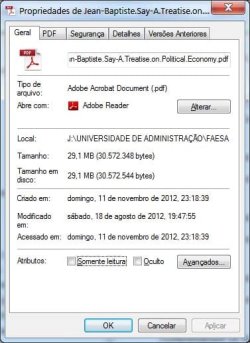
Search for one of the files known to be in the folder in question and right click on it. Choose "Properties" and there you will see the path to the file. Look at the name of the folder that contains the file. Perhaps you have been looking for the wrong name. One other point to check is when you first boot up your system before connecting to the internet does your clock show the correct time?
 

My Computer My Computer

At a glance

Microsoft Windows 7 Home Premium 64-bit 7601 ...Intel(R) Core(TM) i7-3770 CPU @ 3.40GHz8.00 GBIntel(R) HD Graphics 4000
Computer type
PC/Desktop
OS
Microsoft Windows 7 Home Premium 64-bit 7601 Multiprocessor Free Service Pack 1
CPU
Intel(R) Core(TM) i7-3770 CPU @ 3.40GHz
Motherboard
ASUSTeK COMPUTER INC. P8H77-M
Memory
8.00 GB
Graphics Card(s)
Intel(R) HD Graphics 4000
Sound Card
On Board
Monitor(s) Displays
Dell 24"
Screen Resolution
1920 x 1080
Hard Drives
(1) INTEL SSDSC2CT180A3 ATA Device (2) ST500DM002-1BD142 ATA Device (3) WDC WD3200AAKS-75L9A0 ATA Device (4) Generic- Compact Flash USB Device (5) Generic- MS/MS-Pro USB Device (6) Generic- SD/MMC USB Device (7) Generic- SM/xD-Picture USB
PSU
500w Corsair
Case
Cooler Master
Cooling
3 Fans
Keyboard
Logitech MK300
Mouse
Logitech WOM
Internet Speed
75Mb
Antivirus
Norton 360
Browser
Firefox, Opera, IE
  • Like
Reactions: whs
Hi Mitchell and thanks for responding.

No, i've checked all of these but it doesn't seem to be that. It's funny because i can access the files in the folder, i mean, if i search a folder name or a even a file name, i can access them using the search results.

I've already checked the permissions and all that stuff and they seem to be all right.

What could be doing that? Not to mention that it's been a pain in the **s to find files through the search engine rather than the usual way, i mean, opening them as everybody else.

skaenner
 

My Computer My Computer

At a glance

win 7 ultimate 32bitamd 8 core4 gb
OS
win 7 ultimate 32bit
CPU
amd 8 core
Memory
4 gb
So what do you see when you look at the path in "Properties"? Have you checked the PC time?
 

My Computer My Computer

At a glance

Microsoft Windows 7 Home Premium 64-bit 7601 ...Intel(R) Core(TM) i7-3770 CPU @ 3.40GHz8.00 GBIntel(R) HD Graphics 4000
Computer type
PC/Desktop
OS
Microsoft Windows 7 Home Premium 64-bit 7601 Multiprocessor Free Service Pack 1
CPU
Intel(R) Core(TM) i7-3770 CPU @ 3.40GHz
Motherboard
ASUSTeK COMPUTER INC. P8H77-M
Memory
8.00 GB
Graphics Card(s)
Intel(R) HD Graphics 4000
Sound Card
On Board
Monitor(s) Displays
Dell 24"
Screen Resolution
1920 x 1080
Hard Drives
(1) INTEL SSDSC2CT180A3 ATA Device (2) ST500DM002-1BD142 ATA Device (3) WDC WD3200AAKS-75L9A0 ATA Device (4) Generic- Compact Flash USB Device (5) Generic- MS/MS-Pro USB Device (6) Generic- SD/MMC USB Device (7) Generic- SM/xD-Picture USB
PSU
500w Corsair
Case
Cooler Master
Cooling
3 Fans
Keyboard
Logitech MK300
Mouse
Logitech WOM
Internet Speed
75Mb
Antivirus
Norton 360
Browser
Firefox, Opera, IE
Yep. I did. It seems to be OK. I'll post two pictures so that you can see the path. PC time is OK too.
Skaenner
 

Attachments

  • pic 1.jpg
    pic 1.jpg
    51.3 KB · Views: 20
  • pic 2.jpg
    pic 2.jpg
    55.8 KB · Views: 22

My Computer My Computer

At a glance

win 7 ultimate 32bitamd 8 core4 gb
OS
win 7 ultimate 32bit
CPU
amd 8 core
Memory
4 gb
Thanks for the screenshots but hey still don't show the folder in question unless it is "Jen Baptiste Say". Can you confirm the Folder name please? Have you tried adding the folder as a location in Libraries?
 

My Computer My Computer

At a glance

Microsoft Windows 7 Home Premium 64-bit 7601 ...Intel(R) Core(TM) i7-3770 CPU @ 3.40GHz8.00 GBIntel(R) HD Graphics 4000
Computer type
PC/Desktop
OS
Microsoft Windows 7 Home Premium 64-bit 7601 Multiprocessor Free Service Pack 1
CPU
Intel(R) Core(TM) i7-3770 CPU @ 3.40GHz
Motherboard
ASUSTeK COMPUTER INC. P8H77-M
Memory
8.00 GB
Graphics Card(s)
Intel(R) HD Graphics 4000
Sound Card
On Board
Monitor(s) Displays
Dell 24"
Screen Resolution
1920 x 1080
Hard Drives
(1) INTEL SSDSC2CT180A3 ATA Device (2) ST500DM002-1BD142 ATA Device (3) WDC WD3200AAKS-75L9A0 ATA Device (4) Generic- Compact Flash USB Device (5) Generic- MS/MS-Pro USB Device (6) Generic- SD/MMC USB Device (7) Generic- SM/xD-Picture USB
PSU
500w Corsair
Case
Cooler Master
Cooling
3 Fans
Keyboard
Logitech MK300
Mouse
Logitech WOM
Internet Speed
75Mb
Antivirus
Norton 360
Browser
Firefox, Opera, IE
The folder is Universidade de Administração. I mean, J:\Universidade de Administração.
 

My Computer My Computer

At a glance

win 7 ultimate 32bitamd 8 core4 gb
OS
win 7 ultimate 32bit
CPU
amd 8 core
Memory
4 gb
Have you tried doing a search for the folder name?
 

My Computer My Computer

At a glance

7 x64
OS
7 x64
The folder is Universidade de Administração. I mean, J:\Universidade de Administração.
If you are searching for "Universidade de Administração." then perhaps you are putting a stop(.) in when there isn't one! It shouldn't make any difference but have you tried the folder name in both Capitalisation and all caps mode?
I would ask again "Have you tried making that folder a location in Libraries?"
One extra request:
Can you open WE double click on the J drive and post a screensot of the contents please?
 

My Computer My Computer

At a glance

Microsoft Windows 7 Home Premium 64-bit 7601 ...Intel(R) Core(TM) i7-3770 CPU @ 3.40GHz8.00 GBIntel(R) HD Graphics 4000
Computer type
PC/Desktop
OS
Microsoft Windows 7 Home Premium 64-bit 7601 Multiprocessor Free Service Pack 1
CPU
Intel(R) Core(TM) i7-3770 CPU @ 3.40GHz
Motherboard
ASUSTeK COMPUTER INC. P8H77-M
Memory
8.00 GB
Graphics Card(s)
Intel(R) HD Graphics 4000
Sound Card
On Board
Monitor(s) Displays
Dell 24"
Screen Resolution
1920 x 1080
Hard Drives
(1) INTEL SSDSC2CT180A3 ATA Device (2) ST500DM002-1BD142 ATA Device (3) WDC WD3200AAKS-75L9A0 ATA Device (4) Generic- Compact Flash USB Device (5) Generic- MS/MS-Pro USB Device (6) Generic- SD/MMC USB Device (7) Generic- SM/xD-Picture USB
PSU
500w Corsair
Case
Cooler Master
Cooling
3 Fans
Keyboard
Logitech MK300
Mouse
Logitech WOM
Internet Speed
75Mb
Antivirus
Norton 360
Browser
Firefox, Opera, IE
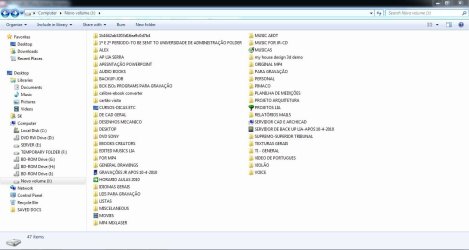
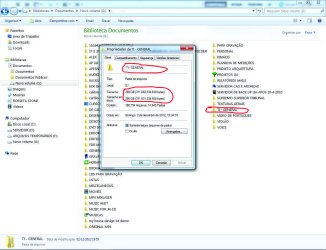
Here comes the screenshot. It's happened when i plug it to my laptop too btw. As you can see, the folder is not even displayed. I don't think it is related to size, because the TI general and Miscelaneous folders are much bigger than the Universidade de Adminstracao folder and they're displayed normally in volume J:\ .
 

Attachments

  • Screenshot.jpg
    Screenshot.jpg
    89.6 KB · Views: 17

My Computer My Computer

At a glance

win 7 ultimate 32bitamd 8 core4 gb
OS
win 7 ultimate 32bit
CPU
amd 8 core
Memory
4 gb
That folder is there but it has a 1º E 2º and some text in front of the name. Looks like some kind of hard link. Create a new folder with that name and see if you get a warning about the folder already being there. If you do then make a New folder of some other name, Open that 1º E 2º folder and copy out your docs to that new folder. Once that is done and everything gets copied over Delete that 1º E 2º folder.
 

My Computer My Computer

At a glance

7 x64
OS
7 x64

My Computer My Computer

At a glance

Microsoft Windows 7 Home Premium 64-bit 7601 ...Intel(R) Core(TM) i7-3770 CPU @ 3.40GHz8.00 GBIntel(R) HD Graphics 4000
Computer type
PC/Desktop
OS
Microsoft Windows 7 Home Premium 64-bit 7601 Multiprocessor Free Service Pack 1
CPU
Intel(R) Core(TM) i7-3770 CPU @ 3.40GHz
Motherboard
ASUSTeK COMPUTER INC. P8H77-M
Memory
8.00 GB
Graphics Card(s)
Intel(R) HD Graphics 4000
Sound Card
On Board
Monitor(s) Displays
Dell 24"
Screen Resolution
1920 x 1080
Hard Drives
(1) INTEL SSDSC2CT180A3 ATA Device (2) ST500DM002-1BD142 ATA Device (3) WDC WD3200AAKS-75L9A0 ATA Device (4) Generic- Compact Flash USB Device (5) Generic- MS/MS-Pro USB Device (6) Generic- SD/MMC USB Device (7) Generic- SM/xD-Picture USB
PSU
500w Corsair
Case
Cooler Master
Cooling
3 Fans
Keyboard
Logitech MK300
Mouse
Logitech WOM
Internet Speed
75Mb
Antivirus
Norton 360
Browser
Firefox, Opera, IE
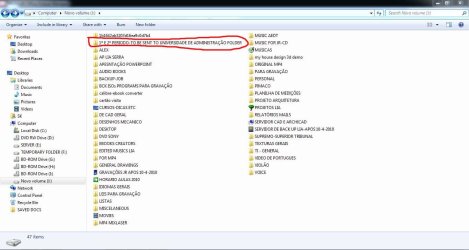
That Folder is already there. Although with some characters in front of it and it looks like it is pointing to some other folder on some other drive. Like a Hard Link or Junction point.

Search your complete system for that folder name.


Screenshot.jpg
 

My Computer My Computer

At a glance

7 x64
OS
7 x64
As Edwar says that folder is showing. But is it? Try just double clicking on it and seeing if you can navigate to the subfolder containing your files!
 
Last edited:

My Computer My Computer

At a glance

Microsoft Windows 7 Home Premium 64-bit 7601 ...Intel(R) Core(TM) i7-3770 CPU @ 3.40GHz8.00 GBIntel(R) HD Graphics 4000
Computer type
PC/Desktop
OS
Microsoft Windows 7 Home Premium 64-bit 7601 Multiprocessor Free Service Pack 1
CPU
Intel(R) Core(TM) i7-3770 CPU @ 3.40GHz
Motherboard
ASUSTeK COMPUTER INC. P8H77-M
Memory
8.00 GB
Graphics Card(s)
Intel(R) HD Graphics 4000
Sound Card
On Board
Monitor(s) Displays
Dell 24"
Screen Resolution
1920 x 1080
Hard Drives
(1) INTEL SSDSC2CT180A3 ATA Device (2) ST500DM002-1BD142 ATA Device (3) WDC WD3200AAKS-75L9A0 ATA Device (4) Generic- Compact Flash USB Device (5) Generic- MS/MS-Pro USB Device (6) Generic- SD/MMC USB Device (7) Generic- SM/xD-Picture USB
PSU
500w Corsair
Case
Cooler Master
Cooling
3 Fans
Keyboard
Logitech MK300
Mouse
Logitech WOM
Internet Speed
75Mb
Antivirus
Norton 360
Browser
Firefox, Opera, IE
Well, the folder "1º e 2º período - to be sent to universidade administração" that you marked is not the folder i'm looking for. This folder was created to keep the files i want place in the missing folder as soon as i find it.

Concerning the Library issue, do you think it's going to work all right, because i use this external drive only for backups. anyway, would it be possible to add a folder to a library if i can't find it in the normal way?
 
Last edited:

My Computer My Computer

At a glance

win 7 ultimate 32bitamd 8 core4 gb
OS
win 7 ultimate 32bit
CPU
amd 8 core
Memory
4 gb
The libraries work perfectly well with an external hard drive. That's what they are for really. It is better (IMHO) to give your external HD's dedicated letters towards the end of the alphabet say, V,W,X etc then the HD letter does not get altered by Windows if a new Removalbe drive gets aloocated a low alphabet letter. When this happens all lHD letters above that new one get upped a letter so Libraries would not recognise them!
Try to make the folder in question a "Location" I still think this is an issue with either folder size or number of files it contains. Split the folder up and i think your problem will be solved!
 

My Computer My Computer

At a glance

Microsoft Windows 7 Home Premium 64-bit 7601 ...Intel(R) Core(TM) i7-3770 CPU @ 3.40GHz8.00 GBIntel(R) HD Graphics 4000
Computer type
PC/Desktop
OS
Microsoft Windows 7 Home Premium 64-bit 7601 Multiprocessor Free Service Pack 1
CPU
Intel(R) Core(TM) i7-3770 CPU @ 3.40GHz
Motherboard
ASUSTeK COMPUTER INC. P8H77-M
Memory
8.00 GB
Graphics Card(s)
Intel(R) HD Graphics 4000
Sound Card
On Board
Monitor(s) Displays
Dell 24"
Screen Resolution
1920 x 1080
Hard Drives
(1) INTEL SSDSC2CT180A3 ATA Device (2) ST500DM002-1BD142 ATA Device (3) WDC WD3200AAKS-75L9A0 ATA Device (4) Generic- Compact Flash USB Device (5) Generic- MS/MS-Pro USB Device (6) Generic- SD/MMC USB Device (7) Generic- SM/xD-Picture USB
PSU
500w Corsair
Case
Cooler Master
Cooling
3 Fans
Keyboard
Logitech MK300
Mouse
Logitech WOM
Internet Speed
75Mb
Antivirus
Norton 360
Browser
Firefox, Opera, IE
Well, the folder "1º e 2º período - to be sent to universidade administração" that you marked is not the folder i'm looking for. This folder was created to keep the files i want place in the missing folder as soon as i find it.

Concerning the Library issue, do you think it's going to work all right, because i use this external drive only for backups. anyway, would it be possible to add a folder to a library if i can't find it in the normal way?

Do you have that same named folder on your internal drive? If you do then that 1° folder is pointing to it like a Junction point. Making it look like that named folder is on the external, when in fact it is not.

Have you tried to Create a New Folder with that name on the external? If you haven't give that a try. If you do not get a warning about the folder already existing then that folder Does Not exist on the external drive.

You need to start doing some of the Tests that have been suggested.
 

My Computer My Computer

At a glance

7 x64
OS
7 x64
I tried doing the tests but unless i've done something wrong, nothing happened. For a start, i tried to create another folder with the same name "Universidade de Administração" and as you can see in screenshot-1 i got a window warning me.

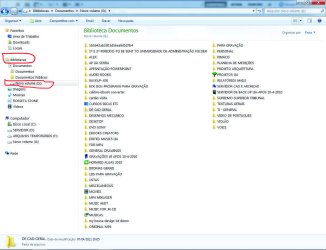
I also tried to add the volume (here Novo Volume G:\) to a library and nothing changed as you can see in screenshot-2. I also tried to place a file from the missing folder. it accepted the file, but didn't added the whole folder.

Now concerning the size, as you can see in screenshots 3 and 4, these folders are much bigger than the missing (or hidden, if you prefer) folder, that is around 40 gigs.

One thing is sure. The folder is there and the proof is that i can open some files from there. The files are hidden, by only god knows who or what! The problem is that if i want to move files from that folder, it'll be a helluva job, seeing that i'll have to move one by one using the search engine.
 

Attachments

  • scrnsht-1.jpg
    scrnsht-1.jpg
    121.3 KB · Views: 2
  • scrnsht-2.jpg
    scrnsht-2.jpg
    837.8 KB · Views: 2
  • scrnsht-3.jpg
    scrnsht-3.jpg
    876.6 KB · Views: 2
  • scrnsht-4.jpg
    scrnsht-4.jpg
    890.1 KB · Views: 2

My Computer My Computer

At a glance

win 7 ultimate 32bitamd 8 core4 gb
OS
win 7 ultimate 32bit
CPU
amd 8 core
Memory
4 gb
My only suggestion is to enable the Super Administrator in Windows 7 and see if you can see the folder whilst logged in to that account!
 

My Computer My Computer

At a glance

Microsoft Windows 7 Home Premium 64-bit 7601 ...Intel(R) Core(TM) i7-3770 CPU @ 3.40GHz8.00 GBIntel(R) HD Graphics 4000
Computer type
PC/Desktop
OS
Microsoft Windows 7 Home Premium 64-bit 7601 Multiprocessor Free Service Pack 1
CPU
Intel(R) Core(TM) i7-3770 CPU @ 3.40GHz
Motherboard
ASUSTeK COMPUTER INC. P8H77-M
Memory
8.00 GB
Graphics Card(s)
Intel(R) HD Graphics 4000
Sound Card
On Board
Monitor(s) Displays
Dell 24"
Screen Resolution
1920 x 1080
Hard Drives
(1) INTEL SSDSC2CT180A3 ATA Device (2) ST500DM002-1BD142 ATA Device (3) WDC WD3200AAKS-75L9A0 ATA Device (4) Generic- Compact Flash USB Device (5) Generic- MS/MS-Pro USB Device (6) Generic- SD/MMC USB Device (7) Generic- SM/xD-Picture USB
PSU
500w Corsair
Case
Cooler Master
Cooling
3 Fans
Keyboard
Logitech MK300
Mouse
Logitech WOM
Internet Speed
75Mb
Antivirus
Norton 360
Browser
Firefox, Opera, IE
Back
Top