All of my Partitions disappeared and I cannot make them active.

Brandon138

New member
Member
Local time
7:17 PM
Messages
67
Hello all, I am new to these forums so please forgive me if I put this post in the wrong area or something of that nature.

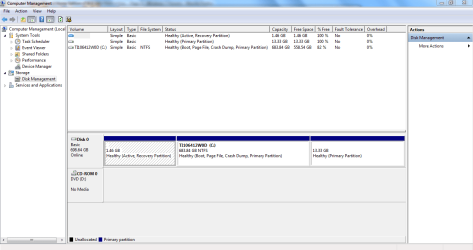
I'm running a 2 month old Toshiba Satellite PC, when suddenly all of my Partitions, except for my C: drive disappeared. My computer also failed to recognize my CD/DVD Rom drive, however, after searching around I was able to find a lot of people with the same problem and recovered that Partition and the use of the drive by deleting the upperfilters in my registry. But the other Partitions are still gone and marked as inactive in my Disk Management. This is what I am looking at:

Capture.PNG

As you can see, it shows an additional two partitions, but they cannot be made active by right clicking them. When I right click them, all options are "greyed out" making it impossible to preform and actions.

I tried using a couple partition recovery softwares, but to no avail, because I am not trying to recover lost partitions, I am trying to activate partitions that are already existing. I have norton 360 installed and ran several anti-virus programs that came up cold. However, I did find one gentlemen on youtube, that had the same problem and fixed it by restoring the computers factory default settings. This is the video: https://www.youtube.com/watch?v=G0qENIBLo5s That's almost identical to my problem, and like the gentlemen in the video states, there does not seem to be a lot of info available to this particular situation, unless I missed it.

This course of action seems a little drastic to me, and a bit risky, so before doing this, I wanted to get the opinion of this forum, and see if some of you individuals more knowledgeable than myself can help. Keep in mind, I'm ignorant to a lot of this stuff, so please explain gently.

Thank you in advance, Brandon.
 

My Computer My Computer

At a glance

Windows 7 Home Premium 64bit.
Computer Manufacturer/Model Number
Toshibua Satellite Pro s850 series
OS
Windows 7 Home Premium 64bit.
As this may be caused by an infection, install, update and run a full scan with Malwarebytes, in Safe Mode if necessary.

Next run Partition Wizard Partition Recovery Wizard - Video Help to try to recover the missing partition.

The only partition which should be marked Active is the one intended to boot Win7, which for your model is likely the Recovery partition. However it is missing it's System flag which signifies where the System boot files reside, so I would boot the Win7 DVD or System Repair Disk to run Startup Repair - Run up to 3 Separate Times to correct any problems with the boot files and config.

If you decide to start over you can try running Toshiba HDD Recovery Utility or get the superior Clean Reinstall - Factory OEM Windows 7 without the corrupting preinstalled bloatware.
 
malwarebytes, partition wizard, and the two recovery utility software you mentioned, are they costly programs? I do not mind restoring the factory setting like that man in the video mentioned, but im afraid that could go wrong, and since im already paying for norton 360 which was $100, and the new computer on top of that, im trying to keep the budget down with christmas coming up.
 

My Computer My Computer

At a glance

Windows 7 Home Premium 64bit.
Computer Manufacturer/Model Number
Toshibua Satellite Pro s850 series
OS
Windows 7 Home Premium 64bit.
Freebies

Those apps are free and Greg has posted links in his message to them.
 

My Computer My Computer

At a glance

win 7 X64 Ultimate SP1I3770KG Skill F3-14900CL9-4GBXL x 4NVIDIA GeForce GTX670 + Intel 4000
Computer Manufacturer/Model Number
BGC (Bob's Garage Crew)
OS
win 7 X64 Ultimate SP1
CPU
I3770K
Motherboard
Asus P8Z77-V Deluxe
Memory
G Skill F3-14900CL9-4GBXL x 4
Graphics Card(s)
NVIDIA GeForce GTX670 + Intel 4000
Sound Card
Realtek HD 5.1 (MOB)
Monitor(s) Displays
Asus VW224T (1)
Screen Resolution
1920 x 1080
Hard Drives
SATA Corsair Force GT 2.5" 180GB (System) Sata 3
OCZ Vertex3 120GB
OCZ Vertex 2 120GB 2.5" SATA II
ST31000524AS 1000.2GB
WD15EARS (External)
PSU
CoolerMaster 1000 Watt
Case
CoolerMaster HAF X
Cooling
CPU -- CoolerMaster 520N
Keyboard
MS Wireless 3000 V2
Mouse
MS Wireless 3000 V2
Internet Speed
Cable
Antivirus
Norton Internet Security
Browser
IE9
Other Info
AMI Bios 1805
OC'd 3%
Yes I'm sorry I had my links disabled, I will try step by step what you suggested, I appreciate the advice.
 

My Computer My Computer

At a glance

Windows 7 Home Premium 64bit.
Computer Manufacturer/Model Number
Toshibua Satellite Pro s850 series
OS
Windows 7 Home Premium 64bit.
If you can't get your money back from Norton, when it expires I'd replace it with free Microsoft Security Essentials.

We show you how to get and keep a perfect Win7 install using freeware.

Let us know how it goes.

Will do Greg, I just ran Malwarebytes and it found one infection, I removed it and rebooted. I then ran the scan again and it came up clean. I figured norton was not the best, but it came well recommended and friends had total me positive things, so whats done is done, i cannot fathom that it will hurt my system, right? But yes, I will not be renewing it.

I'm now about to run Partition Recovery Wizard, but I'm going to look for a tutorial first, because I'm not sure what exactly I'm doing with it. I ran EaseUs before, and I got to tell you, it messed with my computer, deleted files, moved things around, forced me to install spam tool bars, all of this without prompt or any command from myself, and was just generally a bad experience. I guess it's possible I used it wrong, but I was careful and read everything, and EaseUs came recommended from a lot of people on CNet, so I want to be careful. Thanks for input, I really appreciate it, my anxiety is through the roof. I will let you know how it works.
 

My Computer My Computer

At a glance

Windows 7 Home Premium 64bit.
Computer Manufacturer/Model Number
Toshibua Satellite Pro s850 series
OS
Windows 7 Home Premium 64bit.
I gave you a video showing how to run Recovery Wizard: Partition Wizard Partition Recovery Wizard Video Help.

Do a Quick Scan to see if it finds the partition, then if so select it to restore.

Yes I watched the video, but I'm a little slow when it comes to these things and I always feel better when I see someone explaining it step by step, so I found a youtube video were someone is using it. I can speak in front of crowd in a board room and explain ideas to are large group of people, but when it comes to operating a simple piece of software, a monkey could do a better job.

I'm running the scan now, I get a much better feeling for this software, it seems to be running good, the only thing is that I elected to run a full scan, I figured it could not hurt. I also took your suggestion and created a repair disk, in case this fails.

I will let you know the results, your attention to my situation is very appreciated, and thank you for putting up with my short comings.
 

My Computer My Computer

At a glance

Windows 7 Home Premium 64bit.
Computer Manufacturer/Model Number
Toshibua Satellite Pro s850 series
OS
Windows 7 Home Premium 64bit.
Help info on Partition Recovery Wizard of partition manager - Partition Wizard.

If you need help figuring out which is the Recovered partition you need, post back a screenshot of the maximized Partition Wizard results window:

Type Snipping Tool in Start Search box.
Open Tool, select Rectangular Snip,
Draw box around the results, save Snip, attach using Paper Clip in Reply box.

Got it, will do, the scan is about 60% finished, your right, quick scan would have been better. I will post as soon as it's done.
 

My Computer My Computer

At a glance

Windows 7 Home Premium 64bit.
Computer Manufacturer/Model Number
Toshibua Satellite Pro s850 series
OS
Windows 7 Home Premium 64bit.
This tutorial may explain it better:
http://www.partitionwizard.com/help/partition-recovery.html


It should label the missing partition Lost/Deleted for you to select, but if not you might have to figure it out by its position on the disk.

If you need help figuring out which is the Recovered partition you need, post back a screenshot of the maximized Partition Wizard results window:

Type Snipping Tool in Start Search box.
Open Tool, select Rectangular Snip,
Draw box around the results, save Snip, attach using Paper Clip in Reply box.
 
I'm sorry Greg, this is taking forever, but its at 89%. I'm just looking at the results it's found so far, and there are a whole bunch of partitions marked "boot" with with a used space of 2.45mb out of a total of 3.01mb and they are all marked "lost/deleted." The partition that I wanted to make visible again in the "my computer" screen(HHD Recovery Drive), is marked as "existing." Maybe that will all clear up when the scan finishes, but thats what I see so far, and post the picture of what I am talking about in a few minutes when it finishes.
 

My Computer My Computer

At a glance

Windows 7 Home Premium 64bit.
Computer Manufacturer/Model Number
Toshibua Satellite Pro s850 series
OS
Windows 7 Home Premium 64bit.
The only partition I see which is lost in your Disk Mgmt screenshot is the 13.33gb one:

245151d1355184041t-all-my-partitions-disappeared-i-cannot-make-them-active-capture.png


Recovery is apparently intact although it's files are always hidden. You can check by unhiding System and Hidden files at Control Panel>Folder Options>View. But it's marked Active therefore booting Win7 so if it will start then that partition is intact.

What's missing also is the System label on the Recovery partition. Did you run the 3 Startup Repairs I suggested to see if that resolves?
 
What's the problem? Partition table looks fine. It lists the two partitions as 100% free because it doesn't know it is a ntfs partition. Did it know before? Were drive letters assigned? Please do in elevated command prompt:
Code:
diskpart
sel  disk  0
sel part 1
det  part
sel part 3
det part
exit

Post output
 

My Computer My Computer

At a glance

Microsoft Windows 7 Home Premium 64-bits 7601...Intel(R) Core(TM) i3 CPU M 370 @ 2.40GHz4,00 GBATI Mobility Radeon HD 5400 Series
Computer type
Laptop
Computer Manufacturer/Model Number
ACER ASPIRE 5742G
OS
Microsoft Windows 7 Home Premium 64-bits 7601 Multiprocessor Free Service Pack 1
CPU
Intel(R) Core(TM) i3 CPU M 370 @ 2.40GHz
Motherboard
Acer Aspire 5742G
Memory
4,00 GB
Graphics Card(s)
ATI Mobility Radeon HD 5400 Series
Sound Card
(1) AMD High Definition Audio Device (2) Realtek High Defi
Screen Resolution
1366 x 768 x 32 bits (4294967296 colors) @ 60 Hz
Hard Drives
WDC WD5000BEVT-22ZAT0
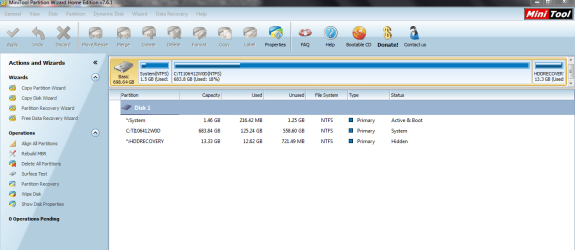
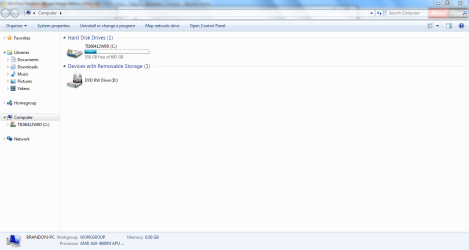
Okay, when Partition Wizard finished my computer Blue Screened, it said that a problem had been detected, and it was shutting down to prevent damage. It gave a name to the error but the computer turned off before i could write it down. However, I had just finished snipping the results, so here is everything, including my disk manager screen and my computer screen.Capture.PNG

capture2.PNG

Capture3.PNG

Capture4.PNG
 

My Computer My Computer

At a glance

Windows 7 Home Premium 64bit.
Computer Manufacturer/Model Number
Toshibua Satellite Pro s850 series
OS
Windows 7 Home Premium 64bit.
Would you now recommend that I run the system repair disk? And if so, how exactly do I go about it? I already made the disk, do I just stick it in and let it take over, or what?
 

My Computer My Computer

At a glance

Windows 7 Home Premium 64bit.
Computer Manufacturer/Model Number
Toshibua Satellite Pro s850 series
OS
Windows 7 Home Premium 64bit.
Okay, when Partition Wizard finished my computer Blue Screened, it said that a problem had been detected, and it was shutting down to prevent damage. It gave a name to the error but the computer turned off before i could write it down. However, I had just finished snipping the results, so here is everything, including my disk manager screen and my computer screen.View attachment 245189

View attachment 245190

View attachment 245191

View attachment 245192
What's wrong with the output?? It looks quite normal to me. The 13.33GB partition is just "hidden" as it was always most likely. What are you trying to achieve?
 

My Computer My Computer

At a glance

Microsoft Windows 7 Home Premium 64-bits 7601...Intel(R) Core(TM) i3 CPU M 370 @ 2.40GHz4,00 GBATI Mobility Radeon HD 5400 Series
Computer type
Laptop
Computer Manufacturer/Model Number
ACER ASPIRE 5742G
OS
Microsoft Windows 7 Home Premium 64-bits 7601 Multiprocessor Free Service Pack 1
CPU
Intel(R) Core(TM) i3 CPU M 370 @ 2.40GHz
Motherboard
Acer Aspire 5742G
Memory
4,00 GB
Graphics Card(s)
ATI Mobility Radeon HD 5400 Series
Sound Card
(1) AMD High Definition Audio Device (2) Realtek High Defi
Screen Resolution
1366 x 768 x 32 bits (4294967296 colors) @ 60 Hz
Hard Drives
WDC WD5000BEVT-22ZAT0
I was worried when all my partitions, except for my c: drive disappeared. I could not even use my CD/DVD drive, the computer did not know it was there. I was able to recover that by following the many fixes posted all over for that problem. But my D: partition never appeared again in the "my computer" screen. So I mentioned this concern on this forum and posted a picture of my disk management screen to ask if anything was amiss, and Greg gave me some ideas to try to fix it.

However, I just got really scared after running the partition wizard, because my computer has never "blue screened before." I am obviously ignorant when it comes to this, what do you think I should do, or are you saying there is no problem?

A letter was assigned to the recovery, it was D: and it disappeared, if that is normal, then I have no problem, but Greg told me to try a few things.
 

My Computer My Computer

At a glance

Windows 7 Home Premium 64bit.
Computer Manufacturer/Model Number
Toshibua Satellite Pro s850 series
OS
Windows 7 Home Premium 64bit.
What do you mean ALL your partitions ? How many did you have ?

Did you have a D: partition ? How big was it ?

I think you are fine.

Although, you should break C: in half to start storing your data on.
 

My Computer My Computer

At a glance

Windows 10 Pro x64Intel Core i7 6700KGSkill TridentZ RGB 16GB 3600 16-16-16-36EVGA GTX 980 Ti SC x2
Computer type
PC/Desktop
Computer Manufacturer/Model Number
Skylake Special #666
OS
Windows 10 Pro x64
CPU
Intel Core i7 6700K
Motherboard
Asus Sabertooth Z170 Mark 1
Memory
GSkill TridentZ RGB 16GB 3600 16-16-16-36
Graphics Card(s)
EVGA GTX 980 Ti SC x2
Sound Card
Realtek High Definition
Monitor(s) Displays
AOC G2460PG
Screen Resolution
1920 x 1080 144Hz
Hard Drives
Samsung 860 Pro 256GB, Seagate Barracuda 4TB x2
PSU
EVGA 1000 P2, EVGA White Custom Braided Cables
Case
Corsair Vengeance C70 Gunmetal Black
Cooling
Corsair H100i v2, Corsair ML120 x2, Thermal Grizzly Kryonaut
Keyboard
Logitech G910 Orion Spectrum
Mouse
Logitech G700s
Internet Speed
Verizon Fios Quantum Gateway 75/75
Antivirus
Windows Defender, Malwarebytes Free 3.8.3
Browser
Chrome
Other Info
Corsair SP120 x4, LG Blu-ray Drive, Durabrand HT-395 100 Watt Dolby Digital Amp, Corsair H2100 Wireless 7.1 Headset
I was worried when all my partitions, except for my c: drive disappeared. I could not even use my CD/DVD drive, the computer did not know it was there. I was able to recover that by following the many fixes posted all over for that problem. But my D: partition never appeared again in the "my computer" screen. So I mentioned this concern on this forum and posted a picture of my disk management screen to ask if anything was amiss, and Greg gave me some ideas to try to fix it.

However, I just got really scared after running the partition wizard, because my computer has never "blue screened before." I am obviously ignorant when it comes to this, what do you think I should do, or are you saying there is no problem?

A letter was assigned to the recovery, it was D: and it disappeared, if that is normal, then I have no problem, but Greg told me to try a few things.

Yes sir, I had a D: partition, I guess thats what I meant, the CD/DVD drive disappeared as well and I had to go into the registry manager to fix it, I learned how to do that in this forum.

If I'm confused, and just fighting a battle that does not need to be fought, then please tell me, I just want to make sure my computer appears healthy from your end.
 

My Computer My Computer

At a glance

Windows 7 Home Premium 64bit.
Computer Manufacturer/Model Number
Toshibua Satellite Pro s850 series
OS
Windows 7 Home Premium 64bit.
Back
Top