
Want to delete Win 8 partition on my primary HDD and install Win 8 Pro

lonewolf66

New member
Local time
5:29 PM
Messages
16
Hi I don't want to be redundant here but here is my situation and what I would like to do: Just dont want to mess things up :confused:
1) I currently have my my system set up for dual-boot with win7 and win 8 pro in separate partitions.
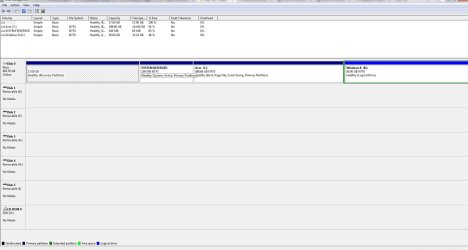
Here's how my Disk Management looks:
disk mng.JPG
What i would like to do is delete the win 8 partition and restore all that space back to my win 7 partition

2) After i do that I have a second HDD that has Win 7 pro(upgrade) on it from an HP system that I had that the MB was damaged in a lightning storm. I would like to install win 8 pro(retail) on this drive(clean install) and set my system to dual-boot from the separate HDD's.

My concern is what is the best way to do this and I do not want to mess up my MBR or anything when i do this.
Thx if you could help me
 

My Computer My Computer

At a glance

win7 / win8 proAMD Quad Core 2.2 ghz8gNvidia GeForce GT 240
Computer Manufacturer/Model Number
Acer Aspire M3470g
OS
win7 / win8 pro
CPU
AMD Quad Core 2.2 ghz
Motherboard
Acer
Memory
8g
Graphics Card(s)
Nvidia GeForce GT 240
Sound Card
Board
Monitor(s) Displays
22'
Hard Drives
500g
PSU
300w
Keyboard
Microsoft
Mouse
Razor Deathadder
Internet Speed
Cable
Here's what I'd do:
Delete K and extend C:

use a utility such as EasyBCD (scroll down for the free version) to remove the reference to K from your MBR, and to set the timeout to 0 (to bypass the OS selection menu on the hard drive)

completely remove the first drive, then connect the second drive and install (delete all partitions first)

connect the first drive again.

Now you can select your boot disk through your computer's BIOS. If you want to do it through MBR, then use EasyBCD.
 

My Computer My Computer

At a glance

Windows 8 Pro (32-bit)1.83GHz Intel Core Duo2GB 667MHz DDR2 SDRAM (PC2-5300) (upgrade)ATI Radeon X1600 with 128MB GDDR3 memory
Computer type
PC/Desktop
Computer Manufacturer/Model Number
Apple 17" iMac MA199LL (Early 2006)
OS
Windows 8 Pro (32-bit)
CPU
1.83GHz Intel Core Duo
Memory
2GB 667MHz DDR2 SDRAM (PC2-5300) (upgrade)
Graphics Card(s)
ATI Radeon X1600 with 128MB GDDR3 memory
Monitor(s) Displays
17-inch TFT active-matrix LCD, millions of colors
Screen Resolution
1440 x 900
Hard Drives
Hitachi 320GB HDT721032SLA360 7200RPM SATA II (upgrade)
Keyboard
Microsoft Wired Keyboard 600
Mouse
Microsoft Basic Optical Mouse v2.0
Internet Speed
4 Mbps
Antivirus
Microsoft Security Essentials
Browser
Google Chrome
Other Info
WEI:
Base Score: 3.9 Processor: 4.4 Memory 4.7
Graphics: 3.9 Gaming Graphics: 4.1 Primary HD: 5.9
+1, I can only emphasise to make 2 independent installations by disconnecting disk1 with Win7 when you install Win8 on disk2. Switching the boot sequence with the BIOS is a lot faster than via the double boot - for the Windows 7 system that is. It is also less messy regarding the bootmgr.
 

My Computer My Computer

At a glance

Vista, Windows7, Mint Mate, Zorin, Windows 8from 1.6GHz Duo to i7
Computer Manufacturer/Model Number
HP, Dell, Gateway, Toshiba - 4 laptops and 2 desktops
OS
Vista, Windows7, Mint Mate, Zorin, Windows 8
CPU
from 1.6GHz Duo to i7
Monitor(s) Displays
2x HP w2207
Hard Drives
5x HDD, 7x SSD, 12x Externals
Keyboard
with trackball - no mices
Mouse
Trackball mice
Internet Speed
DSL 6000
Just to fully understand my first HD will be back to its original form without losing any data with the steps you have given me. Then I will unplug this HDD from my motherboard sata port. Plug in the second HDD to that same sata port and reboot. Then insert my win 8 pro upgrade disk and REBOOT to do a clean install on this HD.
Then plug in the first HD to sata 0 and the second HD to sata 1 then reboot and from bios choose what drive i want to boot up to.
 

My Computer My Computer

At a glance

win7 / win8 proAMD Quad Core 2.2 ghz8gNvidia GeForce GT 240
Computer Manufacturer/Model Number
Acer Aspire M3470g
OS
win7 / win8 pro
CPU
AMD Quad Core 2.2 ghz
Motherboard
Acer
Memory
8g
Graphics Card(s)
Nvidia GeForce GT 240
Sound Card
Board
Monitor(s) Displays
22'
Hard Drives
500g
PSU
300w
Keyboard
Microsoft
Mouse
Razor Deathadder
Internet Speed
Cable
Correct. Except you need not change the Sata port for the second HD. Just unplug the first (win7) HD when you install on the second HD. This way you avoid that the BCD of Win8 is written to the first HD - it will get it's own bootmgr with it's BCD on the second HD.

Then replug the first HD and enter the BIOS boot sequence (after power-on) to select from where you want to boot.
 

My Computer My Computer

At a glance

Vista, Windows7, Mint Mate, Zorin, Windows 8from 1.6GHz Duo to i7
Computer Manufacturer/Model Number
HP, Dell, Gateway, Toshiba - 4 laptops and 2 desktops
OS
Vista, Windows7, Mint Mate, Zorin, Windows 8
CPU
from 1.6GHz Duo to i7
Monitor(s) Displays
2x HP w2207
Hard Drives
5x HDD, 7x SSD, 12x Externals
Keyboard
with trackball - no mices
Mouse
Trackball mice
Internet Speed
DSL 6000
Here's what I'd do:
Delete K and extend C:

use a utility such as EasyBCD (scroll down for the free version) to remove the reference to K from your MBR, and to set the timeout to 0 (to bypass the OS selection menu on the hard drive)

completely remove the first drive, then connect the second drive and install (delete all partitions first)

connect the first drive again.

Now you can select your boot disk through your computer's BIOS. If you want to do it through MBR, then use EasyBCD.
Ok so after I connect the 2nd HDD with win 7 pro on it I want to delete all the partitions on it has thrown me off a little... ???? And also how do I then upgrade this drive to win 8 pro...sorry confused
 

My Computer My Computer

At a glance

win7 / win8 proAMD Quad Core 2.2 ghz8gNvidia GeForce GT 240
Computer Manufacturer/Model Number
Acer Aspire M3470g
OS
win7 / win8 pro
CPU
AMD Quad Core 2.2 ghz
Motherboard
Acer
Memory
8g
Graphics Card(s)
Nvidia GeForce GT 240
Sound Card
Board
Monitor(s) Displays
22'
Hard Drives
500g
PSU
300w
Keyboard
Microsoft
Mouse
Razor Deathadder
Internet Speed
Cable
To get the cleanest slate on the new Win8 install I would wipe it first from Win8 installer Command Line using Diskpart Clean Command. To access it enter the Repair Options after booting the installer. Make sure all other HD's are unplugged first.

Then follow Clean Install with Windows 8 Upgrade.

In addition to the excellent advice you've already gotten I'd set the preferred OS to boot first in BIOS setup, so you only need to access BIOS Boot Menu key to boot the other.

If you prefer having a Windows Dual Boot menu, install EasyBCD (click Download - no Name or Email required) to add it from Win8.
 
Since this drive was originally on another computer, the current install won't exactly work with the new system. Deleting all partitions ensures that you are starting fresh with now weird partitions.
 

My Computer My Computer

At a glance

Windows 8 Pro (32-bit)1.83GHz Intel Core Duo2GB 667MHz DDR2 SDRAM (PC2-5300) (upgrade)ATI Radeon X1600 with 128MB GDDR3 memory
Computer type
PC/Desktop
Computer Manufacturer/Model Number
Apple 17" iMac MA199LL (Early 2006)
OS
Windows 8 Pro (32-bit)
CPU
1.83GHz Intel Core Duo
Memory
2GB 667MHz DDR2 SDRAM (PC2-5300) (upgrade)
Graphics Card(s)
ATI Radeon X1600 with 128MB GDDR3 memory
Monitor(s) Displays
17-inch TFT active-matrix LCD, millions of colors
Screen Resolution
1440 x 900
Hard Drives
Hitachi 320GB HDT721032SLA360 7200RPM SATA II (upgrade)
Keyboard
Microsoft Wired Keyboard 600
Mouse
Microsoft Basic Optical Mouse v2.0
Internet Speed
4 Mbps
Antivirus
Microsoft Security Essentials
Browser
Google Chrome
Other Info
WEI:
Base Score: 3.9 Processor: 4.4 Memory 4.7
Graphics: 3.9 Gaming Graphics: 4.1 Primary HD: 5.9
Correct. Except you need not change the Sata port for the second HD. Just unplug the first (win7) HD when you install on the second HD. This way you avoid that the BCD of Win8 is written to the first HD - it will get it's own bootmgr with it's BCD on the second HD.

Then replug the first HD and enter the BIOS boot sequence (after power-on) to select from where you want to boot.

ok i deleted and extend my c : drive with disk mng and it worked. then i opened EasyBCD and their was no reference to drive K anywhere... just showed my c: drive with windows 7?? an I ok to reboot now?
 
Last edited:

My Computer My Computer

At a glance

win7 / win8 proAMD Quad Core 2.2 ghz8gNvidia GeForce GT 240
Computer Manufacturer/Model Number
Acer Aspire M3470g
OS
win7 / win8 pro
CPU
AMD Quad Core 2.2 ghz
Motherboard
Acer
Memory
8g
Graphics Card(s)
Nvidia GeForce GT 240
Sound Card
Board
Monitor(s) Displays
22'
Hard Drives
500g
PSU
300w
Keyboard
Microsoft
Mouse
Razor Deathadder
Internet Speed
Cable
I just cant mess this up...Will my MBR be ok>?
 

My Computer My Computer

At a glance

win7 / win8 proAMD Quad Core 2.2 ghz8gNvidia GeForce GT 240
Computer Manufacturer/Model Number
Acer Aspire M3470g
OS
win7 / win8 pro
CPU
AMD Quad Core 2.2 ghz
Motherboard
Acer
Memory
8g
Graphics Card(s)
Nvidia GeForce GT 240
Sound Card
Board
Monitor(s) Displays
22'
Hard Drives
500g
PSU
300w
Keyboard
Microsoft
Mouse
Razor Deathadder
Internet Speed
Cable
Yes, as long as the boot files and Active flag remain on System Reserved boot partition as shown by the System Active flags..

But always have your WIn7 DVD or System Repair Disk standing by when doing partitioning operations.
 
The use of EasyBCD should only remove the reference to a nonexistent partition. My understanding of your setup is that once K is deleted, when your computer reboots it will act the same as before, except the boot option for Windows 8 does not boot anything.

On the other hand, Window 8 problably overwrote the MBR with a version that EasyBCd doesn't recognize. It should still work, but until you replace the MBR you will have a nonexsistant option in the boot menu.

This may be informative reading material: http://www.sevenforums.com/tutorials/210983-dual-boot-delete-os.html
 

My Computer My Computer

At a glance

Windows 8 Pro (32-bit)1.83GHz Intel Core Duo2GB 667MHz DDR2 SDRAM (PC2-5300) (upgrade)ATI Radeon X1600 with 128MB GDDR3 memory
Computer type
PC/Desktop
Computer Manufacturer/Model Number
Apple 17" iMac MA199LL (Early 2006)
OS
Windows 8 Pro (32-bit)
CPU
1.83GHz Intel Core Duo
Memory
2GB 667MHz DDR2 SDRAM (PC2-5300) (upgrade)
Graphics Card(s)
ATI Radeon X1600 with 128MB GDDR3 memory
Monitor(s) Displays
17-inch TFT active-matrix LCD, millions of colors
Screen Resolution
1440 x 900
Hard Drives
Hitachi 320GB HDT721032SLA360 7200RPM SATA II (upgrade)
Keyboard
Microsoft Wired Keyboard 600
Mouse
Microsoft Basic Optical Mouse v2.0
Internet Speed
4 Mbps
Antivirus
Microsoft Security Essentials
Browser
Google Chrome
Other Info
WEI:
Base Score: 3.9 Processor: 4.4 Memory 4.7
Graphics: 3.9 Gaming Graphics: 4.1 Primary HD: 5.9
What happens when you boot from that drive.
 

My Computer My Computer

At a glance

Vista, Windows7, Mint Mate, Zorin, Windows 8from 1.6GHz Duo to i7
Computer Manufacturer/Model Number
HP, Dell, Gateway, Toshiba - 4 laptops and 2 desktops
OS
Vista, Windows7, Mint Mate, Zorin, Windows 8
CPU
from 1.6GHz Duo to i7
Monitor(s) Displays
2x HP w2207
Hard Drives
5x HDD, 7x SSD, 12x Externals
Keyboard
with trackball - no mices
Mouse
Trackball mice
Internet Speed
DSL 6000
I just cant mess this up...Will my MBR be ok>?
OK first of all I would like to thank you all for all your excellent free advice but of course i would have messed something up:sarc: All went well but 2 things :
1) I need another sata cable cuz the 1 i have is too short :eek: Easily fixed!
2)here's the bad part,,, When I booted up the 2 hdd to do the win 8 pro install on it (booted from the win8 dvd). then i went into the install now screen , went to custom install to do a clean install . They're were to partitions on that HDD. 1 was system reserve 2nd was the rest of the HDD. So I deleted the system reserve then I loaded Win 8 on to that drive (all went well I thought) until the system rebooted and Win 8 started to load.
It said " getting system ready" for a bit then this light blue screen came up and said they're was an error code
(ie: 000000000001) then it begun to be locked in this loop of rebooting . I shut down for the night cuz it was late and hooked my first HDD back up( btw all is well with my first HDD.) thx
Anyway to get my System Reserve back on my #2 HDD.. I think that is where my problem is????When Win 8 trys to load. Any help would be appreciative. Thx
 

My Computer My Computer

At a glance

win7 / win8 proAMD Quad Core 2.2 ghz8gNvidia GeForce GT 240
Computer Manufacturer/Model Number
Acer Aspire M3470g
OS
win7 / win8 pro
CPU
AMD Quad Core 2.2 ghz
Motherboard
Acer
Memory
8g
Graphics Card(s)
Nvidia GeForce GT 240
Sound Card
Board
Monitor(s) Displays
22'
Hard Drives
500g
PSU
300w
Keyboard
Microsoft
Mouse
Razor Deathadder
Internet Speed
Cable
Back
Top