
lonewolf66
New member
- Local time
- 3:52 PM
- Messages
- 16
Hi I don't want to be redundant here but here is my situation and what I would like to do: Just dont want to mess things up 
1) I currently have my my system set up for dual-boot with win7 and win 8 pro in separate partitions.
Here's how my Disk Management looks:
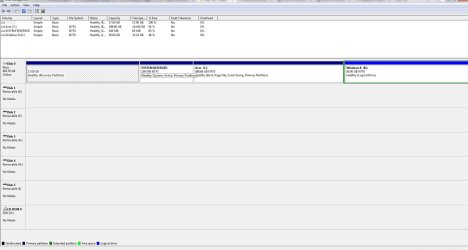
What i would like to do is delete the win 8 partition and restore all that space back to my win 7 partition
2) After i do that I have a second HDD that has Win 7 pro(upgrade) on it from an HP system that I had that the MB was damaged in a lightning storm. I would like to install win 8 pro(retail) on this drive(clean install) and set my system to dual-boot from the separate HDD's.
My concern is what is the best way to do this and I do not want to mess up my MBR or anything when i do this.
Thx if you could help me
1) I currently have my my system set up for dual-boot with win7 and win 8 pro in separate partitions.
Here's how my Disk Management looks:
What i would like to do is delete the win 8 partition and restore all that space back to my win 7 partition
2) After i do that I have a second HDD that has Win 7 pro(upgrade) on it from an HP system that I had that the MB was damaged in a lightning storm. I would like to install win 8 pro(retail) on this drive(clean install) and set my system to dual-boot from the separate HDD's.
My concern is what is the best way to do this and I do not want to mess up my MBR or anything when i do this.
Thx if you could help me
My Computer
At a glance
win7 / win8 proAMD Quad Core 2.2 ghz8gNvidia GeForce GT 240
- Computer Manufacturer/Model Number
- Acer Aspire M3470g
- OS
- win7 / win8 pro
- CPU
- AMD Quad Core 2.2 ghz
- Motherboard
- Acer
- Memory
- 8g
- Graphics Card(s)
- Nvidia GeForce GT 240
- Sound Card
- Board
- Monitor(s) Displays
- 22'
- Hard Drives
- 500g
- PSU
- 300w
- Keyboard
- Microsoft
- Mouse
- Razor Deathadder
- Internet Speed
- Cable


 Easily fixed!

