
Application not Responding - usually Outlook 2010 but can be anything

mlg3000

New member
Member
Local time
2:28 PM
Messages
46
I am desperately trying to track down some frequently repeating errors without having to do a complete repair install since the present installation is only about 5 months old.

Win 7 Prof 64 bit SP1 up to date. Cable modem bought myself Motorola Surfboard newest model. Apple Extreme router. I frequently use DNS other than those provided by my ISP for obvious reasons

Run Eset NOD and MBam as well as windows firewall. I also have five hard drives on the system all of which test ok. Two SSDs and three WD black caviars.

I frequently get a "not responding" in Outlook 2010 and I cannot track down something I am specifically doing when it happens. Here is the error message which I fear I don't know enough to interpret in a meaningful way. Hoping someone can help me do this.

Log Name: Application
Source: Application Error
Date: 12/18/2012 9:23:49 PM
Event ID: 1000
Task Category: (100)
Level: Error
Keywords: Classic
User: N/A
Computer: mg-PC
Description:
Faulting application name: OUTLOOK.EXE, version: 14.0.6126.5003, time stamp: 0x505b1685
Faulting module name: OUTLOOK.EXE, version: 14.0.6126.5003, time stamp: 0x505b1685
Exception code: 0xc0000005
Fault offset: 0x005f6701
Faulting process id: 0xf10
Faulting application start time: 0x01cddd5e9ee580f0
Faulting application path: E:\Program Files (x86)\Microsoft Office\Office14\OUTLOOK.EXE
Faulting module path: E:\Program Files (x86)\Microsoft Office\Office14\OUTLOOK.EXE
Report Id: 1f04eb5d-4983-11e2-87e8-485b390a4153
Event Xml:
<Event xmlns="http://schemas.microsoft.com/win/2004/08/events/event">
<System>
<Provider Name="Application Error" />
<EventID Qualifiers="0">1000</EventID>
<Level>2</Level>
<Task>100</Task>
<Keywords>0x80000000000000</Keywords>
<TimeCreated SystemTime="2012-12-19T02:23:49.000000000Z" />
<EventRecordID>120313</EventRecordID>
<Channel>Application</Channel>
<Computer>mg-PC</Computer>
<Security />
</System>
<EventData>
<Data>OUTLOOK.EXE</Data>
<Data>14.0.6126.5003</Data>
<Data>505b1685</Data>
<Data>OUTLOOK.EXE</Data>
<Data>14.0.6126.5003</Data>
<Data>505b1685</Data>
<Data>c0000005</Data>
<Data>005f6701</Data>
<Data>f10</Data>
<Data>01cddd5e9ee580f0</Data>
<Data>E:\Program Files (x86)\Microsoft Office\Office14\OUTLOOK.EXE</Data>
<Data>1f04eb5d-4983-11e2-87e8-485b390a4153</Data>
</EventData>
</Event>

Thanks.

Madeline
 

My Computer My Computer

At a glance

Win 7 64 Profi7 93024 gig 1333HIS ATI Radeon HD 6850
Computer Manufacturer/Model Number
Desktop made to order - Asus P6x58D Premium
OS
Win 7 64 Prof
CPU
i7 930
Motherboard
Asus P6x58D Premium
Memory
24 gig 1333
Graphics Card(s)
HIS ATI Radeon HD 6850
Sound Card
Creative
Monitor(s) Displays
NEC Multisync P241W
Screen Resolution
1920 x 1200
Hard Drives
2 WD 1tb each black caviar
1 WD black caviar 2tb
1 Plextor SSD SATA 6 256 gig
1 Intel generation 2 SSD 160 gig
PSU
i7 930
Case
Antec 183 (?)
Cooling
Zalman fan and heat pipe
Keyboard
Goldtouch
Mouse
Logitech G 700 used wirelessly
Internet Speed
19.6 Mbps up and 2.00 Mbps down
Other Info
5 usb 3 hard drives used for backup. Until recently also backed up with Crashplan but discovered it was the cause of endless VSS errors and open programs stopping responding. HP Laserjet and large Epson inkjet for photography. Very old Epson Scanner. Cyberpower UPS.
Thanks for that very thorough link. I do run Mbam but I will run it tonight in safe mode with networking, which I've not done.

I have 5 hard drives in my case (two are SSDs) and so, I immediately went to download Coretemp but my AV (Eset) immediately popped up:

I have 64 bit Speccy and just looked at it but am not sure how to interpret some of the numbers:
WD black caviar hard drives are 32,33,33 C - Outlook is on one of these.
SSDs are not read for temperature
CPU is 46 C
Motherboard is 39 C
Graphics card is 49 C

Please let me know if Speccy is OK to use and whether these numbers are ok.
Meanwhile, I'll run MBAM in safe mode and go through the other steps.

Thank you

Madeline
 

My Computer My Computer

At a glance

Win 7 64 Profi7 93024 gig 1333HIS ATI Radeon HD 6850
Computer Manufacturer/Model Number
Desktop made to order - Asus P6x58D Premium
OS
Win 7 64 Prof
CPU
i7 930
Motherboard
Asus P6x58D Premium
Memory
24 gig 1333
Graphics Card(s)
HIS ATI Radeon HD 6850
Sound Card
Creative
Monitor(s) Displays
NEC Multisync P241W
Screen Resolution
1920 x 1200
Hard Drives
2 WD 1tb each black caviar
1 WD black caviar 2tb
1 Plextor SSD SATA 6 256 gig
1 Intel generation 2 SSD 160 gig
PSU
i7 930
Case
Antec 183 (?)
Cooling
Zalman fan and heat pipe
Keyboard
Goldtouch
Mouse
Logitech G 700 used wirelessly
Internet Speed
19.6 Mbps up and 2.00 Mbps down
Other Info
5 usb 3 hard drives used for backup. Until recently also backed up with Crashplan but discovered it was the cause of endless VSS errors and open programs stopping responding. HP Laserjet and large Epson inkjet for photography. Very old Epson Scanner. Cyberpower UPS.
WD black caviar hard drives are 32,33,33 C - Outlook is on one of these.
SSDs are not read for temperature
CPU is 46 C
Motherboard is 39 C
Graphics card is 49 C

Hi,

Those temperatures are absolutely normal - it is usual that the SSD does not display a temperature, so nothing to worry about there.

I would proceed with Greg's suggestions.

Regards,
Golden
 

My Computer My Computer

At a glance

Windows 10 Pro x64 ; Xubuntu x64Intel i7 860 @ 2.80 GHz O/C'ed to 4.0GHz16GB Corsair Vengance DDR3 @ 661 MHz Dual Cha...EVGA NVidia GTX 560 1024MB
Computer type
PC/Desktop
Computer Manufacturer/Model Number
Golden Mk. I.4
OS
Windows 10 Pro x64 ; Xubuntu x64
CPU
Intel i7 860 @ 2.80 GHz O/C'ed to 4.0GHz
Motherboard
Gigabyte P55A-UD3R Rev.1. Award BIOS F13
Memory
16GB Corsair Vengance DDR3 @ 661 MHz Dual Channel (9-9-9-24)
Graphics Card(s)
EVGA NVidia GTX 560 1024MB
Sound Card
Realtek Integrated
Monitor(s) Displays
Dual Samsung SyncMaster 2494HS
Screen Resolution
1920*1080 and 1920*1080
Hard Drives
1*Samsung 840 EVO 120GB SSD;
1*OCZ Vertex 2 60GB SSD;
2*Samsung F3 SpinPoint 1TB in RAID0;
1*Samsung F1 SpinPoint 1TB;
2*Western Digital 1TB External USB 3.0
1*Western Digital 500GB External USB 3.0
1*Seagate 500GB External USB 2.0
PSU
Thermaltake ToughPower QFan 750W
Case
Thermaltake Element S VK60001W2Z
Cooling
Corsair H60 Water Cooling, 2*230mm and 2*80mm case fans
Keyboard
Logitech G110
Mouse
Logitech MX518
Looks like Coretemp has added an optional toolbar to its installer which is classed by some AV's as spyware so I'll replace its link with Speedfan. Thanks.

Google your exact processor model for Maximum temperature to compare. Thanks Colin, for checking that out.

With 5 HD's we should see your Disk Mgmt screenshot as something might be obvious and often is. Use the Snipping Tool in Start Menu, attach using paper clip in reply box. Maximize windows first.

Have you tried running only the OS HD to see if the problem persists, as that would prove its another HD's interference?
 
Madaline,

After you have tried Greg's suggestions above, can you try one other thing for me please?

Click and hold the CTRL key and then start Outlook - this will launch Outlook in Safe mode. Use it like this and see if the crash still occurs. Report back once you have had a chance to do that.

Regards,
Golden
 

My Computer My Computer

At a glance

Windows 10 Pro x64 ; Xubuntu x64Intel i7 860 @ 2.80 GHz O/C'ed to 4.0GHz16GB Corsair Vengance DDR3 @ 661 MHz Dual Cha...EVGA NVidia GTX 560 1024MB
Computer type
PC/Desktop
Computer Manufacturer/Model Number
Golden Mk. I.4
OS
Windows 10 Pro x64 ; Xubuntu x64
CPU
Intel i7 860 @ 2.80 GHz O/C'ed to 4.0GHz
Motherboard
Gigabyte P55A-UD3R Rev.1. Award BIOS F13
Memory
16GB Corsair Vengance DDR3 @ 661 MHz Dual Channel (9-9-9-24)
Graphics Card(s)
EVGA NVidia GTX 560 1024MB
Sound Card
Realtek Integrated
Monitor(s) Displays
Dual Samsung SyncMaster 2494HS
Screen Resolution
1920*1080 and 1920*1080
Hard Drives
1*Samsung 840 EVO 120GB SSD;
1*OCZ Vertex 2 60GB SSD;
2*Samsung F3 SpinPoint 1TB in RAID0;
1*Samsung F1 SpinPoint 1TB;
2*Western Digital 1TB External USB 3.0
1*Western Digital 500GB External USB 3.0
1*Seagate 500GB External USB 2.0
PSU
Thermaltake ToughPower QFan 750W
Case
Thermaltake Element S VK60001W2Z
Cooling
Corsair H60 Water Cooling, 2*230mm and 2*80mm case fans
Keyboard
Logitech G110
Mouse
Logitech MX518
Found some questionables


I went through all the suggestions for troubleshooting Win 7.

Ran Malwarebytes and SAS in safe mode and nothing showed.

Established a clean boot and over a period of about one and 1/2 days, nothing else appeared.
Didn't run memtest86 because I recently upgraded all my RAM and the problem has existed with both the old and new RAM

Ran checks on all my WD Caviars and they are ok

Intel SSD tests ok

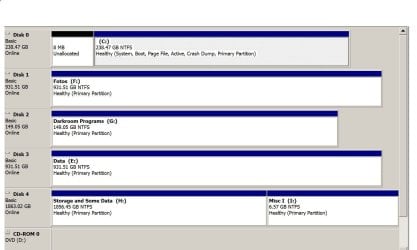
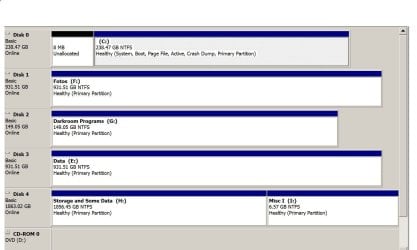
Plextor SSD can't be tested because Plextools wont run: I have a tiny partition in front of the drive which I can't get rid of and therefore, Plextools won't run. However, this existed when I had a different SSD as well so I have reason to think it's not Plextools. I will post my drives
report so you see what I mean. I don't know how to get rid of the tiny partition.

SFC/ Scannow was clean.

Although the Performance Monitor Numbers have stayed constant, there were several strange things I didn't understand in the Resource and Performance Monitor. I don't know if they're significant or not so I'm pasting them here.

TableNTFSPerformance Top: of 2

Query Result
HKLM\SYSTEM\CurrentControlSet\Control\FileSystem\NtfsDisable8dot3NameCreation 0x0
Key Value Type Result
HKLM\SYSTEM\CurrentControlSet\Control\FileSystem\NtfsDisable8dot3NameCreation 1 4 0x0


HKLM\SYSTEM\CurrentControlSet\Control\FileSystem\NtfsDisableLastAccessUpdate 0x0
Key Value Type Result
HKLM\SYSTEM\CurrentControlSet\Control\FileSystem\NtfsDisableLastAccessUpdate

tracerptHeader
error
errorCode: 0xc0000bf8
errorMessage: At least one of the input binary log files contain fewer than two data samples.

TableBasicDirty Top: of 1
Query Query Result
root\cimv2:SELECT __Relpath, Name, Description, FileSystem, VolumeDirty FROM Win32_LogicalDisk Where DriveType = 3 and VolumeDirty = true

and the last one is:

Property Value
ConfigManagerErrorCode 0
Description USB Input Device
Layout 00000409
Name Enhanced (101- or 102-key)
NumberOfFunctionKeys 12
PowerManagementSupported 0


Win32_Keyboard.DeviceID="HID\\VID_1532&PID_0021&MI_01&COL01\\8&266B15CD&0&0000"
Property Value
ConfigManagerErrorCode 0
Description Razer Naga Epic Dock
Layout 00000409
Name Enhanced (101- or 102-key)
NumberOfFunctionKeys 12
PowerManagementSupported 0

root\cimv2:SELECT * FROM Win32_PointingDevice 0x0
Returned Objects
Win32_PointingDevice.DeviceID="HID\\VID_0488&PID_0022&COL01\\7&2475ECD7&0&0000"
Property Value
ConfigManagerErrorCode 0
Description HID-compliant mouse
DeviceInterface 162
HardwareType HID-compliant mouse
InfFileName msmouse.inf
InfSection HID_Mouse_Inst
Name HID-compliant mouse
NumberOfButtons 0
PointingType 2
PowerManagementSupported 0

Win32_PointingDevice.DeviceID="USB\\VID_1532&PID_0021&MI_00\\7&24C6513B&0&0000"
Property Value
ConfigManagerErrorCode 0
Description USB Input Device
DeviceInterface 162
HardwareType USB Input Device
InfFileName input.inf
InfSection HID_Inst
Name USB Input Device
NumberOfButtons 0

I apologize for the length of this and hope that it sheds some light on the situation.

The next post asked for my hard drive layout and I will post it there.

Meanwhile, thanks in advance in any help or suggestions you can offer.

Madeline
 

My Computer My Computer

At a glance

Win 7 64 Profi7 93024 gig 1333HIS ATI Radeon HD 6850
Computer Manufacturer/Model Number
Desktop made to order - Asus P6x58D Premium
OS
Win 7 64 Prof
CPU
i7 930
Motherboard
Asus P6x58D Premium
Memory
24 gig 1333
Graphics Card(s)
HIS ATI Radeon HD 6850
Sound Card
Creative
Monitor(s) Displays
NEC Multisync P241W
Screen Resolution
1920 x 1200
Hard Drives
2 WD 1tb each black caviar
1 WD black caviar 2tb
1 Plextor SSD SATA 6 256 gig
1 Intel generation 2 SSD 160 gig
PSU
i7 930
Case
Antec 183 (?)
Cooling
Zalman fan and heat pipe
Keyboard
Goldtouch
Mouse
Logitech G 700 used wirelessly
Internet Speed
19.6 Mbps up and 2.00 Mbps down
Other Info
5 usb 3 hard drives used for backup. Until recently also backed up with Crashplan but discovered it was the cause of endless VSS errors and open programs stopping responding. HP Laserjet and large Epson inkjet for photography. Very old Epson Scanner. Cyberpower UPS.
Good work Madeline. Do you have any relief at all from the problem yet? You say something was resolved after Clean Boot.

Have you run Disk Check?

Another thing to try is in Control Panel>User accounts establish a test Admin-level account to see if the exact problems persist. If not you may choose to migrate over to it over time.

If that fails, another thing I try is shrinking C 20 gb to do a test install of Win7 to see if that resolves it, so likewise you can Dual Boot until you fully migrate over. Installer and tips to get it perfect here: Clean Reinstall - Factory OEM Windows 7
 
Disk Management Screen Shot

Looks like Coretemp has added an optional toolbar to its installer which is classed by some AV's as spyware so I'll replace its link with Speedfan. Thanks.

Google your exact processor model for Maximum temperature to compare. Thanks Colin, for checking that out.

With 5 HD's we should see your Disk Mgmt screenshot as something might be obvious and often is. Use the Snipping Tool in Start Menu, attach using paper clip in reply box. Maximize windows first.

Have you tried running only the OS HD to see if the problem persists, as that would prove its another HD's interference?

Here's the disk layout
 

My Computer My Computer

At a glance

Win 7 64 Profi7 93024 gig 1333HIS ATI Radeon HD 6850
Computer Manufacturer/Model Number
Desktop made to order - Asus P6x58D Premium
OS
Win 7 64 Prof
CPU
i7 930
Motherboard
Asus P6x58D Premium
Memory
24 gig 1333
Graphics Card(s)
HIS ATI Radeon HD 6850
Sound Card
Creative
Monitor(s) Displays
NEC Multisync P241W
Screen Resolution
1920 x 1200
Hard Drives
2 WD 1tb each black caviar
1 WD black caviar 2tb
1 Plextor SSD SATA 6 256 gig
1 Intel generation 2 SSD 160 gig
PSU
i7 930
Case
Antec 183 (?)
Cooling
Zalman fan and heat pipe
Keyboard
Goldtouch
Mouse
Logitech G 700 used wirelessly
Internet Speed
19.6 Mbps up and 2.00 Mbps down
Other Info
5 usb 3 hard drives used for backup. Until recently also backed up with Crashplan but discovered it was the cause of endless VSS errors and open programs stopping responding. HP Laserjet and large Epson inkjet for photography. Very old Epson Scanner. Cyberpower UPS.
Where? Attach file made with Snipping Tool using Paper Clip in reply box.
 
disk layout - I've tried to attach it and still can't see whether I was successful or not, but after I post this I'll know and if not, I'll do it again.

Madeline
 

My Computer My Computer

At a glance

Win 7 64 Profi7 93024 gig 1333HIS ATI Radeon HD 6850
Computer Manufacturer/Model Number
Desktop made to order - Asus P6x58D Premium
OS
Win 7 64 Prof
CPU
i7 930
Motherboard
Asus P6x58D Premium
Memory
24 gig 1333
Graphics Card(s)
HIS ATI Radeon HD 6850
Sound Card
Creative
Monitor(s) Displays
NEC Multisync P241W
Screen Resolution
1920 x 1200
Hard Drives
2 WD 1tb each black caviar
1 WD black caviar 2tb
1 Plextor SSD SATA 6 256 gig
1 Intel generation 2 SSD 160 gig
PSU
i7 930
Case
Antec 183 (?)
Cooling
Zalman fan and heat pipe
Keyboard
Goldtouch
Mouse
Logitech G 700 used wirelessly
Internet Speed
19.6 Mbps up and 2.00 Mbps down
Other Info
5 usb 3 hard drives used for backup. Until recently also backed up with Crashplan but discovered it was the cause of endless VSS errors and open programs stopping responding. HP Laserjet and large Epson inkjet for photography. Very old Epson Scanner. Cyberpower UPS.
disks again - madeline

trying again - must be tired
 

Attachments

  • Madelines disks.JPG
    Madelines disks.JPG
    126.1 KB · Views: 2

My Computer My Computer

At a glance

Win 7 64 Profi7 93024 gig 1333HIS ATI Radeon HD 6850
Computer Manufacturer/Model Number
Desktop made to order - Asus P6x58D Premium
OS
Win 7 64 Prof
CPU
i7 930
Motherboard
Asus P6x58D Premium
Memory
24 gig 1333
Graphics Card(s)
HIS ATI Radeon HD 6850
Sound Card
Creative
Monitor(s) Displays
NEC Multisync P241W
Screen Resolution
1920 x 1200
Hard Drives
2 WD 1tb each black caviar
1 WD black caviar 2tb
1 Plextor SSD SATA 6 256 gig
1 Intel generation 2 SSD 160 gig
PSU
i7 930
Case
Antec 183 (?)
Cooling
Zalman fan and heat pipe
Keyboard
Goldtouch
Mouse
Logitech G 700 used wirelessly
Internet Speed
19.6 Mbps up and 2.00 Mbps down
Other Info
5 usb 3 hard drives used for backup. Until recently also backed up with Crashplan but discovered it was the cause of endless VSS errors and open programs stopping responding. HP Laserjet and large Epson inkjet for photography. Very old Epson Scanner. Cyberpower UPS.
madelines disks

they said i had to enter more words - i'm persevering
 

Attachments

  • Madelines disks.JPG
    Madelines disks.JPG
    126.1 KB · Views: 2

My Computer My Computer

At a glance

Win 7 64 Profi7 93024 gig 1333HIS ATI Radeon HD 6850
Computer Manufacturer/Model Number
Desktop made to order - Asus P6x58D Premium
OS
Win 7 64 Prof
CPU
i7 930
Motherboard
Asus P6x58D Premium
Memory
24 gig 1333
Graphics Card(s)
HIS ATI Radeon HD 6850
Sound Card
Creative
Monitor(s) Displays
NEC Multisync P241W
Screen Resolution
1920 x 1200
Hard Drives
2 WD 1tb each black caviar
1 WD black caviar 2tb
1 Plextor SSD SATA 6 256 gig
1 Intel generation 2 SSD 160 gig
PSU
i7 930
Case
Antec 183 (?)
Cooling
Zalman fan and heat pipe
Keyboard
Goldtouch
Mouse
Logitech G 700 used wirelessly
Internet Speed
19.6 Mbps up and 2.00 Mbps down
Other Info
5 usb 3 hard drives used for backup. Until recently also backed up with Crashplan but discovered it was the cause of endless VSS errors and open programs stopping responding. HP Laserjet and large Epson inkjet for photography. Very old Epson Scanner. Cyberpower UPS.
Santa Claus perhaps :)? I'm a product of DOS with green and black screens and 5 1/4 floppies. Being a photographer, I guess I don't want to be distracted by artwork. But I get your point and may look at some of the links you suggested.

My whole situation got a lot worse yesterday. Wouldn't boot beyond the bios, put out a 3 paragraph blue screen which couldn't be read in half a second, and then rebooted. Blue screen did not respond to pause key. As far as I know, there were some Windows updates and the installation (now uninstalled) of a Razer Naga gaming mouse - I use the precision for photography.

Using the original Win 7 disk, it wouldn't boot in safe mode with or without networking, wouldn't boot to the command prompt - wouldn't boot, just show blue screen I could read and reboot! Using the repair function resulted in "can't repair" and the restore function went through the motions but the restores "failed".

Finally, after many ranting hours, I realized I couldn't use my backups because they are on external usb 3 ports and the drivers (Marvel I believe), weren't loading. I plugged the drives into usb 2 ports and they were seen by my two backup software programs (Norton Ghost 15 and Macrium Pro). I use Norton for full images every few weeks and Macrium for daily incrementals. I also use Crash Plan for cloud backup but forgot to turn it off!

Norton did a beautiful job of bringing drive C back but it was almost a month old. I then went through Macrium and hopefully found most of what was missing and added some stuff from my cloud backup.

Two Questions - I hope you don't mind -

First Question:
I restored this Plextor 256 SSD C drive without ever wiping or formatting it - just did a total restore from Norton. Is that ok? Would there have been a better way to do it? And if so, is it safe to leave? Plextools can't read it because of the 8 mb unallocated partition at the front so they can't evaluate it for me. What would have been the best way to clean the disk first, or did I not need to?

Second Question: The problem was either caused by a faulty windows update or the overly complex drivers and cloud software on the Razer Naga. Assuming it was the Razer Naga, do you know of a good gaming mouse for someone with small hands, that plays nicely with win 7? I will return the Naga either way and probably stay away from Razer products.

Thank you so much for all your help and I'd appreciate any advice you can offer about what happened yesterday re refusal to boot etc. And, if there's more I should do now beyond checking the event log, which I know is not happy yet.

Best wishes for a really good holiday and once again, thanks so much. It means a lot to have someone knowledgeable and responsible to go to when your trusted computer/companion fails.

Madeline
 

My Computer My Computer

At a glance

Win 7 64 Profi7 93024 gig 1333HIS ATI Radeon HD 6850
Computer Manufacturer/Model Number
Desktop made to order - Asus P6x58D Premium
OS
Win 7 64 Prof
CPU
i7 930
Motherboard
Asus P6x58D Premium
Memory
24 gig 1333
Graphics Card(s)
HIS ATI Radeon HD 6850
Sound Card
Creative
Monitor(s) Displays
NEC Multisync P241W
Screen Resolution
1920 x 1200
Hard Drives
2 WD 1tb each black caviar
1 WD black caviar 2tb
1 Plextor SSD SATA 6 256 gig
1 Intel generation 2 SSD 160 gig
PSU
i7 930
Case
Antec 183 (?)
Cooling
Zalman fan and heat pipe
Keyboard
Goldtouch
Mouse
Logitech G 700 used wirelessly
Internet Speed
19.6 Mbps up and 2.00 Mbps down
Other Info
5 usb 3 hard drives used for backup. Until recently also backed up with Crashplan but discovered it was the cause of endless VSS errors and open programs stopping responding. HP Laserjet and large Epson inkjet for photography. Very old Epson Scanner. Cyberpower UPS.
Back
Top