
I am desperately trying to track down some frequently repeating errors without having to do a complete repair install since the present installation is only about 5 months old.
Win 7 Prof 64 bit SP1 up to date. Cable modem bought myself Motorola Surfboard newest model. Apple Extreme router. I frequently use DNS other than those provided by my ISP for obvious reasons
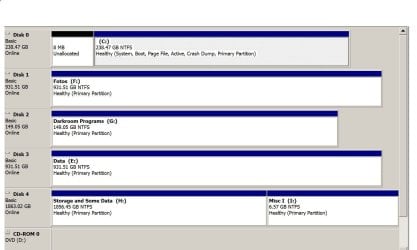
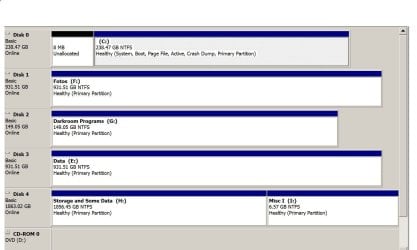
Run Eset NOD and MBam as well as windows firewall. I also have five hard drives on the system all of which test ok. Two SSDs and three WD black caviars.
I frequently get a "not responding" in Outlook 2010 and I cannot track down something I am specifically doing when it happens. Here is the error message which I fear I don't know enough to interpret in a meaningful way. Hoping someone can help me do this.
Log Name: Application
Source: Application Error
Date: 12/18/2012 9:23:49 PM
Event ID: 1000
Task Category: (100)
Level: Error
Keywords: Classic
User: N/A
Computer: mg-PC
Description:
Faulting application name: OUTLOOK.EXE, version: 14.0.6126.5003, time stamp: 0x505b1685
Faulting module name: OUTLOOK.EXE, version: 14.0.6126.5003, time stamp: 0x505b1685
Exception code: 0xc0000005
Fault offset: 0x005f6701
Faulting process id: 0xf10
Faulting application start time: 0x01cddd5e9ee580f0
Faulting application path: E:\Program Files (x86)\Microsoft Office\Office14\OUTLOOK.EXE
Faulting module path: E:\Program Files (x86)\Microsoft Office\Office14\OUTLOOK.EXE
Report Id: 1f04eb5d-4983-11e2-87e8-485b390a4153
Event Xml:
<Event xmlns="http://schemas.microsoft.com/win/2004/08/events/event">
<System>
<Provider Name="Application Error" />
<EventID Qualifiers="0">1000</EventID>
<Level>2</Level>
<Task>100</Task>
<Keywords>0x80000000000000</Keywords>
<TimeCreated SystemTime="2012-12-19T02:23:49.000000000Z" />
<EventRecordID>120313</EventRecordID>
<Channel>Application</Channel>
<Computer>mg-PC</Computer>
<Security />
</System>
<EventData>
<Data>OUTLOOK.EXE</Data>
<Data>14.0.6126.5003</Data>
<Data>505b1685</Data>
<Data>OUTLOOK.EXE</Data>
<Data>14.0.6126.5003</Data>
<Data>505b1685</Data>
<Data>c0000005</Data>
<Data>005f6701</Data>
<Data>f10</Data>
<Data>01cddd5e9ee580f0</Data>
<Data>E:\Program Files (x86)\Microsoft Office\Office14\OUTLOOK.EXE</Data>
<Data>E:\Program Files (x86)\Microsoft Office\Office14\OUTLOOK.EXE</Data>
<Data>1f04eb5d-4983-11e2-87e8-485b390a4153</Data>
</EventData>
</Event>
Thanks.
Madeline
Win 7 Prof 64 bit SP1 up to date. Cable modem bought myself Motorola Surfboard newest model. Apple Extreme router. I frequently use DNS other than those provided by my ISP for obvious reasons
Run Eset NOD and MBam as well as windows firewall. I also have five hard drives on the system all of which test ok. Two SSDs and three WD black caviars.
I frequently get a "not responding" in Outlook 2010 and I cannot track down something I am specifically doing when it happens. Here is the error message which I fear I don't know enough to interpret in a meaningful way. Hoping someone can help me do this.
Log Name: Application
Source: Application Error
Date: 12/18/2012 9:23:49 PM
Event ID: 1000
Task Category: (100)
Level: Error
Keywords: Classic
User: N/A
Computer: mg-PC
Description:
Faulting application name: OUTLOOK.EXE, version: 14.0.6126.5003, time stamp: 0x505b1685
Faulting module name: OUTLOOK.EXE, version: 14.0.6126.5003, time stamp: 0x505b1685
Exception code: 0xc0000005
Fault offset: 0x005f6701
Faulting process id: 0xf10
Faulting application start time: 0x01cddd5e9ee580f0
Faulting application path: E:\Program Files (x86)\Microsoft Office\Office14\OUTLOOK.EXE
Faulting module path: E:\Program Files (x86)\Microsoft Office\Office14\OUTLOOK.EXE
Report Id: 1f04eb5d-4983-11e2-87e8-485b390a4153
Event Xml:
<Event xmlns="http://schemas.microsoft.com/win/2004/08/events/event">
<System>
<Provider Name="Application Error" />
<EventID Qualifiers="0">1000</EventID>
<Level>2</Level>
<Task>100</Task>
<Keywords>0x80000000000000</Keywords>
<TimeCreated SystemTime="2012-12-19T02:23:49.000000000Z" />
<EventRecordID>120313</EventRecordID>
<Channel>Application</Channel>
<Computer>mg-PC</Computer>
<Security />
</System>
<EventData>
<Data>OUTLOOK.EXE</Data>
<Data>14.0.6126.5003</Data>
<Data>505b1685</Data>
<Data>OUTLOOK.EXE</Data>
<Data>14.0.6126.5003</Data>
<Data>505b1685</Data>
<Data>c0000005</Data>
<Data>005f6701</Data>
<Data>f10</Data>
<Data>01cddd5e9ee580f0</Data>
<Data>E:\Program Files (x86)\Microsoft Office\Office14\OUTLOOK.EXE</Data>
<Data>E:\Program Files (x86)\Microsoft Office\Office14\OUTLOOK.EXE</Data>
<Data>1f04eb5d-4983-11e2-87e8-485b390a4153</Data>
</EventData>
</Event>
Thanks.
Madeline
My Computer
At a glance
Win 7 64 Profi7 93024 gig 1333HIS ATI Radeon HD 6850
- Computer Manufacturer/Model Number
- Desktop made to order - Asus P6x58D Premium
- OS
- Win 7 64 Prof
- CPU
- i7 930
- Motherboard
- Asus P6x58D Premium
- Memory
- 24 gig 1333
- Graphics Card(s)
- HIS ATI Radeon HD 6850
- Sound Card
- Creative
- Monitor(s) Displays
- NEC Multisync P241W
- Screen Resolution
- 1920 x 1200
- Hard Drives
- 2 WD 1tb each black caviar
1 WD black caviar 2tb
1 Plextor SSD SATA 6 256 gig
1 Intel generation 2 SSD 160 gig
- PSU
- i7 930
- Case
- Antec 183 (?)
- Cooling
- Zalman fan and heat pipe
- Keyboard
- Goldtouch
- Mouse
- Logitech G 700 used wirelessly
- Internet Speed
- 19.6 Mbps up and 2.00 Mbps down
- Other Info
- 5 usb 3 hard drives used for backup. Until recently also backed up with Crashplan but discovered it was the cause of endless VSS errors and open programs stopping responding. HP Laserjet and large Epson inkjet for photography. Very old Epson Scanner. Cyberpower UPS.


 ? I'm a product of DOS with green and black screens and 5 1/4 floppies. Being a photographer, I guess I don't want to be distracted by artwork. But I get your point and may look at some of the links you suggested.