Solved Very quick & Easy question (For this forum)

Tony2012

New member
Member
Local time
3:24 PM
Messages
36
Long story short lads,

I want to up to 8GB but upon reading my motherboard specs I saw it said;

"2 x 1.8V DDR2 DIMM sockets supporting up to 4 GB"

And I couldn't word it right to put into google correctly and I knew someone here would know.

What I'm asking is, Does that mean it can only handle 4GB on the whole board of 4GB per slot?

If you're interested here's a link to my board....I'm more than likely going to upgrade it anyway.

http://ee.gigabyte.com/products/page/mb/ga-73pvm-s2h_10
 

My Computer My Computer

At a glance

MS Windows 7 Home PremiumIntel Pentium D @ 3.40GHz4.00 GB Single-Channel DDR2 @ 399MHz (5-4-4-17)AMD Radeon HD 7800 Series
Computer type
PC/Desktop
Computer Manufacturer/Model Number
Windows E5200
OS
MS Windows 7 Home Premium
CPU
Intel Pentium D @ 3.40GHz
Motherboard
Gigabyte Technology Co., Ltd. GA-73PVM-S2H (Socket 775)
Memory
4.00 GB Single-Channel DDR2 @ 399MHz (5-4-4-17)
Graphics Card(s)
AMD Radeon HD 7800 Series
Monitor(s) Displays
2
Screen Resolution
1600x900
Hard Drives
298GB Western Digital WDC WD3200AAJS-00RYA0 ATA Device (SATA)
Case
Antec
Cooling
2 fans
4 GB total.
 

My Computer My Computer

At a glance

Win 7 Ultimate x64FX-8350 @ 4.6 GHz so farADATA XPG V1 Series Black 8GB DDR3 1600Sapphire R9 270x Dual-X
Computer type
PC/Desktop
Computer Manufacturer/Model Number
Me
OS
Win 7 Ultimate x64
CPU
FX-8350 @ 4.6 GHz so far
Motherboard
Asus M5A97 EVO
Memory
ADATA XPG V1 Series Black 8GB DDR3 1600
Graphics Card(s)
Sapphire R9 270x Dual-X
Sound Card
Xonar DGX w/ Corsair Vengence 1300
Monitor(s) Displays
Acer S232HL Abid
Screen Resolution
1920x1080
Hard Drives
120 GB OCZ Vertex 3
500 GB Seagate 7200.12
PSU
Antec Earthwatts 650W Green
Case
Antec Three Hundred
Cooling
Cooler Master 212 EVO
Keyboard
Logitech G510
Mouse
Logitech G500s
Internet Speed
35000/3000
D'aw, welp...Time to find a new motherboard.

Thank's for the reply, mate.
 

My Computer My Computer

At a glance

MS Windows 7 Home PremiumIntel Pentium D @ 3.40GHz4.00 GB Single-Channel DDR2 @ 399MHz (5-4-4-17)AMD Radeon HD 7800 Series
Computer type
PC/Desktop
Computer Manufacturer/Model Number
Windows E5200
OS
MS Windows 7 Home Premium
CPU
Intel Pentium D @ 3.40GHz
Motherboard
Gigabyte Technology Co., Ltd. GA-73PVM-S2H (Socket 775)
Memory
4.00 GB Single-Channel DDR2 @ 399MHz (5-4-4-17)
Graphics Card(s)
AMD Radeon HD 7800 Series
Monitor(s) Displays
2
Screen Resolution
1600x900
Hard Drives
298GB Western Digital WDC WD3200AAJS-00RYA0 ATA Device (SATA)
Case
Antec
Cooling
2 fans
Only 4GB.
 

My Computer My Computer

At a glance

windows 7 home 64bitINTEL-CORE I716GB
Computer Manufacturer/Model Number
W530-3630QM1
OS
windows 7 home 64bit
CPU
INTEL-CORE I7
Memory
16GB
Hard Drives
750GB
Browser
Chrome
4 GB total.


Hi there
This isn't always strictly true == the 4GB limit on DDR2 was basically because DDR2 (unlike DDR3) memory slots are very rare to find in 2 X 4GB modules and if you CAN find them they are MUCH more expensive than the more modern DDR3 modules (which BTW won't fit in your mobo --different slots).

Another issue is the CPU -- if it's not 64 bit capable then there isn't any point in installing more than 4GB of memory in any case.

You'd be better off with a more modern MOBO --SATA disks / USB3 port(s) and numerous other improvements.

Cheers
jimbo
 

My Computer My Computer

At a glance

Linux CENTOS 7 / various Windows OS'es and se...Intel i7 Intel i58GB, 16GBOn Motherboard
Computer type
PC/Desktop
Computer Manufacturer/Model Number
Custom built, several laptops HP/ASUS
OS
Linux CENTOS 7 / various Windows OS'es and servers
CPU
Intel i7 Intel i5
Memory
8GB, 16GB
Graphics Card(s)
On Motherboard
Sound Card
Realtek HD audio
Monitor(s) Displays
Apple Cinema display, Samsung LCD
Screen Resolution
1920 X 1080
Hard Drives
4 X 1TB SATA
Mouse
Toshiba wireless laser
Internet Speed
> 20MB up
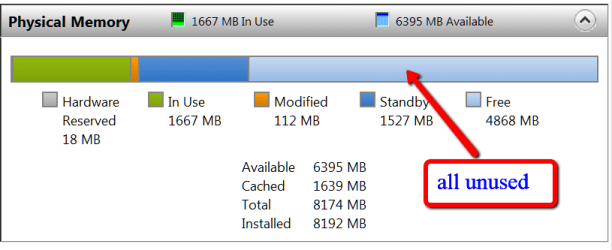
Unless you have very memory intensive applications, 8GB will not buy you much compared to 4GB. For 'normal' use, half of the 8GBs will be mostely empty - see in my case.
 

Attachments

  • 2012-12-24_1138.png
    2012-12-24_1138.png
    10.5 KB · Views: 7

My Computer My Computer

At a glance

Vista, Windows7, Mint Mate, Zorin, Windows 8from 1.6GHz Duo to i7
Computer Manufacturer/Model Number
HP, Dell, Gateway, Toshiba - 4 laptops and 2 desktops
OS
Vista, Windows7, Mint Mate, Zorin, Windows 8
CPU
from 1.6GHz Duo to i7
Monitor(s) Displays
2x HP w2207
Hard Drives
5x HDD, 7x SSD, 12x Externals
Keyboard
with trackball - no mices
Mouse
Trackball mice
Internet Speed
DSL 6000
Unless you have very memory intensive applications, 8GB will not buy you much compared to 4GB. For 'normal' use, half of the 8GBs will be mostely empty - see in my case.

A good use for extra memory (especially on a 64 bit machine) is if you run virtual machines -- these just EAT ram for breakfast.

Another good use for more RAM is if you run video editing or large applications like photoshop -- using RAM for "scratch" / temporary files is far faster than having these on a disk because of insufficient RAM to store these on RAM (even if you are using SSD's).

Cheers
jimbo
 

My Computer My Computer

At a glance

Linux CENTOS 7 / various Windows OS'es and se...Intel i7 Intel i58GB, 16GBOn Motherboard
Computer type
PC/Desktop
Computer Manufacturer/Model Number
Custom built, several laptops HP/ASUS
OS
Linux CENTOS 7 / various Windows OS'es and servers
CPU
Intel i7 Intel i5
Memory
8GB, 16GB
Graphics Card(s)
On Motherboard
Sound Card
Realtek HD audio
Monitor(s) Displays
Apple Cinema display, Samsung LCD
Screen Resolution
1920 X 1080
Hard Drives
4 X 1TB SATA
Mouse
Toshiba wireless laser
Internet Speed
> 20MB up
jimbo, you are right on virtual machines. But video editing does not really use more RAM - at least not the programs I use.
 

My Computer My Computer

At a glance

Vista, Windows7, Mint Mate, Zorin, Windows 8from 1.6GHz Duo to i7
Computer Manufacturer/Model Number
HP, Dell, Gateway, Toshiba - 4 laptops and 2 desktops
OS
Vista, Windows7, Mint Mate, Zorin, Windows 8
CPU
from 1.6GHz Duo to i7
Monitor(s) Displays
2x HP w2207
Hard Drives
5x HDD, 7x SSD, 12x Externals
Keyboard
with trackball - no mices
Mouse
Trackball mice
Internet Speed
DSL 6000
Back
Top