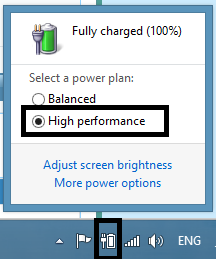
the problem is ... all the games work perfectly when the charger plugged in but when I plug it off all the games start to move slow and lag ..... even when its on high performance .. plz help
My Computer
At a glance
Windows 8 Profesional x64Core i78 GBNvidia GTS 525
the problem is ... all the games work perfectly when the charger plugged in but when I plug it off all the games start to move slow and lag ..... even when its on high performance .. plz help
That's exactly what I was thinking of, it could be a power profile issue. Did you select high performance from Windows or from Dell's power management software?
My Computer
At a glance
Windows 7 Ultimate x64 Service Pack 1AMD Athlon II x4 Propus 2.9 GHz2 x 4GB Corsair XMS 3 DDR3 -1600 CL9AMD Radeon HD 5850 1GB GDDR5
Computer type
PC/Desktop
Computer Manufacturer/Model Number
Custom Build
OS
Windows 7 Ultimate x64 Service Pack 1
CPU
AMD Athlon II x4 Propus 2.9 GHz
Motherboard
ASRock N68C-GS FX
Memory
2 x 4GB Corsair XMS 3 DDR3 -1600 CL9
Graphics Card(s)
AMD Radeon HD 5850 1GB GDDR5
Sound Card
On-board 6-Channel HD Audio
Monitor(s) Displays
18' LG Flatron E1942TC-BN on DVI, 18' Chimei 95ND on HDMI
Screen Resolution
1366 x 768 x 2
Hard Drives
1 x 500 GB Seagate
1 x 1 TB Western Digital Caviar Green
1 x 1 TB Hitachi Touro Mobile USB 3
If you have Optimus Technology I read somewhere this might help.
And if you havn't go and explore the advanced settings for the High Performance power plan, Control Panel --> Power Options --> Change Plan Settings --> Change Advanced Power Settings.
1. Since your battery is already configured to deliver 'High Performance', you may try updating the 'Display drivers' and 'BIOS' to see if that produces a better output. Please follow the sequence listed below:
- BIOS: Driver Details | Dell United States
Note: Before flashing the BIOS please check the following: Battery should have 10% or greater charge > Adapter should be connected > No external devices should be connected > All other programs should be closed and documents saved
2. If your laptop was shipped with 'nVidia Optimus Technology', you may also try to set 'nVIDIA GPU' as the 'preferred graphics adapter'. This will ensure that the laptop uses the 'Discrete GPU' only with 'graphic intensive applications' (desired programs):
- Right-click on the desktop and select 'nVidia Control Panel'
- Expand '3D Settings' and select 'Manage 3D settings'
- On the right-side window, click 'Global Settings' tab
- Under 'Preferred graphics processor' option, choose the desired graphics option (High performance nVidia processor)
You may also assign a 'default GPU' for each application/game:
- Launch 'nVidia Control Panel'
- Expand '3D Settings' and select 'Manage 3D settings'
- On the right-side window, click 'Program Settings' tab
- Under 'Select a program to customize' option, select the desired application
- Under 'Select the preferred graphics processor' for this program, choose the desired graphics option
These steps may help you to get an improved performance only on battery. However, I've also observed similar performance patterns with many different laptops in the past; my observation also suggests that laptops generally deliver a better performance with 'graphic intensive applications' when directly plugged into power socket.
Hope this helps. Do reply if you have any further questions. I would be glad to assist.