all games lags while charger is off

ShaGaGy

New member
Local time
8:15 PM
Messages
5
hello everybody

I got a problem with my dell inspiron N5110

Specs :
VGA : Nvidia GTS 525
Ram : 8 GB
Processor : Intel Core i7

the problem is ... all the games work perfectly when the charger plugged in but when I plug it off all the games start to move slow and lag ..... even when its on high performance .. plz help
 

My Computer My Computer

At a glance

Windows 8 Profesional x64Core i78 GBNvidia GTS 525
Computer Manufacturer/Model Number
Dell N5110
OS
Windows 8 Profesional x64
CPU
Core i7
Memory
8 GB
Graphics Card(s)
Nvidia GTS 525
Hard Drives
750 GB
hello everybody

I got a problem with my dell inspiron N5110

Specs :
VGA : Nvidia GTS 525
Ram : 8 GB
Processor : Intel Core i7

the problem is ... all the games work perfectly when the charger plugged in but when I plug it off all the games start to move slow and lag ..... even when its on high performance .. plz help

That's exactly what I was thinking of, it could be a power profile issue. Did you select high performance from Windows or from Dell's power management software?
 

My Computer My Computer

At a glance

Windows 7 Ultimate x64 Service Pack 1AMD Athlon II x4 Propus 2.9 GHz2 x 4GB Corsair XMS 3 DDR3 -1600 CL9AMD Radeon HD 5850 1GB GDDR5
Computer type
PC/Desktop
Computer Manufacturer/Model Number
Custom Build
OS
Windows 7 Ultimate x64 Service Pack 1
CPU
AMD Athlon II x4 Propus 2.9 GHz
Motherboard
ASRock N68C-GS FX
Memory
2 x 4GB Corsair XMS 3 DDR3 -1600 CL9
Graphics Card(s)
AMD Radeon HD 5850 1GB GDDR5
Sound Card
On-board 6-Channel HD Audio
Monitor(s) Displays
18' LG Flatron E1942TC-BN on DVI, 18' Chimei 95ND on HDMI
Screen Resolution
1366 x 768 x 2
Hard Drives
1 x 500 GB Seagate
1 x 1 TB Western Digital Caviar Green
1 x 1 TB Hitachi Touro Mobile USB 3
PSU
Seasonic S12II 520W
Case
Generic with Cable Management
Cooling
Deep Cool Gammaxx 200
Keyboard
Dragonwar Desert Eagle
Mouse
Logitech B85
Internet Speed
5Mb/s DL, 0.9Mb/s UL
Antivirus
ESET Nod32
Browser
Google Chrome 64 Bit
Other Info
LG G4 H818P - Rooted with Xposed Framework
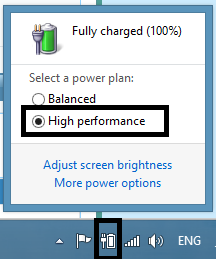
I don't know .... when I plug off the charger I go to the battery icon in the taskbar and I choose Hi Pr
 

My Computer My Computer

At a glance

Windows 8 Profesional x64Core i78 GBNvidia GTS 525
Computer Manufacturer/Model Number
Dell N5110
OS
Windows 8 Profesional x64
CPU
Core i7
Memory
8 GB
Graphics Card(s)
Nvidia GTS 525
Hard Drives
750 GB

My Computer My Computer

At a glance

Windows 7 Ultimate x64 Service Pack 1AMD Athlon II x4 Propus 2.9 GHz2 x 4GB Corsair XMS 3 DDR3 -1600 CL9AMD Radeon HD 5850 1GB GDDR5
Computer type
PC/Desktop
Computer Manufacturer/Model Number
Custom Build
OS
Windows 7 Ultimate x64 Service Pack 1
CPU
AMD Athlon II x4 Propus 2.9 GHz
Motherboard
ASRock N68C-GS FX
Memory
2 x 4GB Corsair XMS 3 DDR3 -1600 CL9
Graphics Card(s)
AMD Radeon HD 5850 1GB GDDR5
Sound Card
On-board 6-Channel HD Audio
Monitor(s) Displays
18' LG Flatron E1942TC-BN on DVI, 18' Chimei 95ND on HDMI
Screen Resolution
1366 x 768 x 2
Hard Drives
1 x 500 GB Seagate
1 x 1 TB Western Digital Caviar Green
1 x 1 TB Hitachi Touro Mobile USB 3
PSU
Seasonic S12II 520W
Case
Generic with Cable Management
Cooling
Deep Cool Gammaxx 200
Keyboard
Dragonwar Desert Eagle
Mouse
Logitech B85
Internet Speed
5Mb/s DL, 0.9Mb/s UL
Antivirus
ESET Nod32
Browser
Google Chrome 64 Bit
Other Info
LG G4 H818P - Rooted with Xposed Framework
WeWWi.png
 

My Computer My Computer

At a glance

Windows 8 Profesional x64Core i78 GBNvidia GTS 525
Computer Manufacturer/Model Number
Dell N5110
OS
Windows 8 Profesional x64
CPU
Core i7
Memory
8 GB
Graphics Card(s)
Nvidia GTS 525
Hard Drives
750 GB
That's certainly Windows.

Perhaps you need Dell's QuickSet software?

Driver Details | Dell United States

I personally never really owned a laptop So I'm not entirely too sure what to make of it.
 

My Computer My Computer

At a glance

Windows 7 Ultimate x64 Service Pack 1AMD Athlon II x4 Propus 2.9 GHz2 x 4GB Corsair XMS 3 DDR3 -1600 CL9AMD Radeon HD 5850 1GB GDDR5
Computer type
PC/Desktop
Computer Manufacturer/Model Number
Custom Build
OS
Windows 7 Ultimate x64 Service Pack 1
CPU
AMD Athlon II x4 Propus 2.9 GHz
Motherboard
ASRock N68C-GS FX
Memory
2 x 4GB Corsair XMS 3 DDR3 -1600 CL9
Graphics Card(s)
AMD Radeon HD 5850 1GB GDDR5
Sound Card
On-board 6-Channel HD Audio
Monitor(s) Displays
18' LG Flatron E1942TC-BN on DVI, 18' Chimei 95ND on HDMI
Screen Resolution
1366 x 768 x 2
Hard Drives
1 x 500 GB Seagate
1 x 1 TB Western Digital Caviar Green
1 x 1 TB Hitachi Touro Mobile USB 3
PSU
Seasonic S12II 520W
Case
Generic with Cable Management
Cooling
Deep Cool Gammaxx 200
Keyboard
Dragonwar Desert Eagle
Mouse
Logitech B85
Internet Speed
5Mb/s DL, 0.9Mb/s UL
Antivirus
ESET Nod32
Browser
Google Chrome 64 Bit
Other Info
LG G4 H818P - Rooted with Xposed Framework
didn't work !!
 

My Computer My Computer

At a glance

Windows 8 Profesional x64Core i78 GBNvidia GTS 525
Computer Manufacturer/Model Number
Dell N5110
OS
Windows 8 Profesional x64
CPU
Core i7
Memory
8 GB
Graphics Card(s)
Nvidia GTS 525
Hard Drives
750 GB

My Computer My Computer

At a glance

Windows 7 Ultimate x64 Service Pack 1AMD Athlon II x4 Propus 2.9 GHz2 x 4GB Corsair XMS 3 DDR3 -1600 CL9AMD Radeon HD 5850 1GB GDDR5
Computer type
PC/Desktop
Computer Manufacturer/Model Number
Custom Build
OS
Windows 7 Ultimate x64 Service Pack 1
CPU
AMD Athlon II x4 Propus 2.9 GHz
Motherboard
ASRock N68C-GS FX
Memory
2 x 4GB Corsair XMS 3 DDR3 -1600 CL9
Graphics Card(s)
AMD Radeon HD 5850 1GB GDDR5
Sound Card
On-board 6-Channel HD Audio
Monitor(s) Displays
18' LG Flatron E1942TC-BN on DVI, 18' Chimei 95ND on HDMI
Screen Resolution
1366 x 768 x 2
Hard Drives
1 x 500 GB Seagate
1 x 1 TB Western Digital Caviar Green
1 x 1 TB Hitachi Touro Mobile USB 3
PSU
Seasonic S12II 520W
Case
Generic with Cable Management
Cooling
Deep Cool Gammaxx 200
Keyboard
Dragonwar Desert Eagle
Mouse
Logitech B85
Internet Speed
5Mb/s DL, 0.9Mb/s UL
Antivirus
ESET Nod32
Browser
Google Chrome 64 Bit
Other Info
LG G4 H818P - Rooted with Xposed Framework
I already read that ... no answer for my problem
 

My Computer My Computer

At a glance

Windows 8 Profesional x64Core i78 GBNvidia GTS 525
Computer Manufacturer/Model Number
Dell N5110
OS
Windows 8 Profesional x64
CPU
Core i7
Memory
8 GB
Graphics Card(s)
Nvidia GTS 525
Hard Drives
750 GB
Indeed. I can't seem to find a solution either.

Maybe someone else can assist?
 

My Computer My Computer

At a glance

Windows 7 Ultimate x64 Service Pack 1AMD Athlon II x4 Propus 2.9 GHz2 x 4GB Corsair XMS 3 DDR3 -1600 CL9AMD Radeon HD 5850 1GB GDDR5
Computer type
PC/Desktop
Computer Manufacturer/Model Number
Custom Build
OS
Windows 7 Ultimate x64 Service Pack 1
CPU
AMD Athlon II x4 Propus 2.9 GHz
Motherboard
ASRock N68C-GS FX
Memory
2 x 4GB Corsair XMS 3 DDR3 -1600 CL9
Graphics Card(s)
AMD Radeon HD 5850 1GB GDDR5
Sound Card
On-board 6-Channel HD Audio
Monitor(s) Displays
18' LG Flatron E1942TC-BN on DVI, 18' Chimei 95ND on HDMI
Screen Resolution
1366 x 768 x 2
Hard Drives
1 x 500 GB Seagate
1 x 1 TB Western Digital Caviar Green
1 x 1 TB Hitachi Touro Mobile USB 3
PSU
Seasonic S12II 520W
Case
Generic with Cable Management
Cooling
Deep Cool Gammaxx 200
Keyboard
Dragonwar Desert Eagle
Mouse
Logitech B85
Internet Speed
5Mb/s DL, 0.9Mb/s UL
Antivirus
ESET Nod32
Browser
Google Chrome 64 Bit
Other Info
LG G4 H818P - Rooted with Xposed Framework
If you have Optimus Technology I read somewhere this might help.

And if you havn't go and explore the advanced settings for the High Performance power plan, Control Panel --> Power Options --> Change Plan Settings --> Change Advanced Power Settings.

Thats the best I can do.
 

My Computer My Computer

At a glance

Windows 7 Ultimate x64Intel Pentium Dual Core E5200 2.5GHz (3.77GHz...Corsair 4GB DDR2 (4x1GB CM2X1024-6400C4)Palit GeForce GTS 250 (1024MB)
Computer Manufacturer/Model Number
Self built
OS
Windows 7 Ultimate x64
CPU
Intel Pentium Dual Core E5200 2.5GHz (3.77GHz OC)
Motherboard
Asus P5Q-E
Memory
Corsair 4GB DDR2 (4x1GB CM2X1024-6400C4)
Graphics Card(s)
Palit GeForce GTS 250 (1024MB)
Sound Card
On Board (ADI AD2000B 8ch HD)
Monitor(s) Displays
Samsung 32in LCD TV
Screen Resolution
1360x768
Hard Drives
2 x 1TB Samsung 103SJ (Raid0)
2 x External 500GB Samsung 502IJ (NexStar 3 HD Enclosures)
PSU
550W Antec Neo HE 550
Case
Antec P180
Cooling
Xigmatex Red Scorpion CPU Cooler. 3x120mm Fans
Keyboard
Logitech MX5000 Laser (Combo)
Mouse
Logitech MX5000 Laser (Combo)
Internet Speed
ADSL2+ (avg 10 Mbps Down, 0.80 Mbps up)
Other Info
Gigabyte GN-WP01GS 54g Wireless Lan Card
Hi ShaGaGy,

1. Since your battery is already configured to deliver 'High Performance', you may try updating the 'Display drivers' and 'BIOS' to see if that produces a better output. Please follow the sequence listed below:
- BIOS: Driver Details | Dell United States
Note: Before flashing the BIOS please check the following: Battery should have 10% or greater charge > Adapter should be connected > No external devices should be connected > All other programs should be closed and documents saved

- Intel HD 3000: Driver Details | Dell United States
- nVidia GT525: Driver Details | Dell United States

2. If your laptop was shipped with 'nVidia Optimus Technology', you may also try to set 'nVIDIA GPU' as the 'preferred graphics adapter'. This will ensure that the laptop uses the 'Discrete GPU' only with 'graphic intensive applications' (desired programs):
- Right-click on the desktop and select 'nVidia Control Panel'
- Expand '3D Settings' and select 'Manage 3D settings'
- On the right-side window, click 'Global Settings' tab
- Under 'Preferred graphics processor' option, choose the desired graphics option (High performance nVidia processor)

You may also assign a 'default GPU' for each application/game:
- Launch 'nVidia Control Panel'
- Expand '3D Settings' and select 'Manage 3D settings'
- On the right-side window, click 'Program Settings' tab
- Under 'Select a program to customize' option, select the desired application
- Under 'Select the preferred graphics processor' for this program, choose the desired graphics option

These steps may help you to get an improved performance only on battery. However, I've also observed similar performance patterns with many different laptops in the past; my observation also suggests that laptops generally deliver a better performance with 'graphic intensive applications' when directly plugged into power socket.

Hope this helps. Do reply if you have any further questions. I would be glad to assist.

 

My Computer My Computer

At a glance

Windows 7 64bit
OS
Windows 7 64bit
Back
Top