How to read data from a faulty HDD

petko131

The Doctor VR~46
Power User
Local time
3:31 PM
Messages
247
Location
Србијa
Hi,
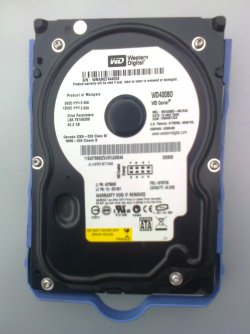
I have a WD400BD(40GB-1st image) HDD for my OS. Currently, this is the only hard drive in my PC that is connected.
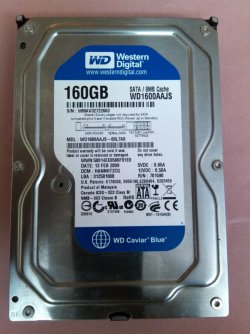
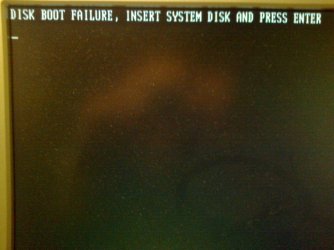
I also have a WD1600AAJS(160GB-2nd image) HDD witch is faulty. It is from my old PC and i really need to regain some important data. I tried to install Windows XP in order to run it separately, but the installation fails.

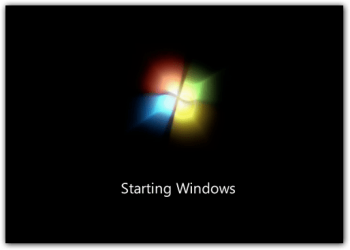
It doesn't have bad sectors, but for some reason i can't boot up with both drives connected simultaneously. Windows 7 freezes @ the starting screen (3rd image) and stays like that until I restart.
On my motherboard i have 4 SATA II ports- 40GB is connected to port #2 (#1 doesn't recognize it :shock: ).
I also have 4 sata cables, and i tried replacing them (suspecting on a bad cable :p) but nothing changes...

Any type of help will be gladly appreciated! :D
 

Attachments

  • WD400BD.jpg
    WD400BD.jpg
    229.9 KB · Views: 16
  • WD1600AAJS.jpg
    WD1600AAJS.jpg
    275 KB · Views: 14
  • Windows7_Beta_Boot_Screen.png
    Windows7_Beta_Boot_Screen.png
    9.6 KB · Views: 14

My Computer My Computer

At a glance

Windows 7 x86 UltimateIntel Pentium 4 (3.2GHz) @3.6GHz3 GB DDR2 (2GB @800MHz + 1GB @533MHz)-3 inuvi...ATI Radeon HD 5450 1GB DDR3
Computer Manufacturer/Model Number
Me, Myself and I (:
OS
Windows 7 x86 Ultimate
CPU
Intel Pentium 4 (3.2GHz) @3.6GHz
Motherboard
Asus P5N-D SLI
Memory
3 GB DDR2 (2GB @800MHz + 1GB @533MHz)-3 inuvidual sticks
Graphics Card(s)
ATI Radeon HD 5450 1GB DDR3
Sound Card
Realtek HD Audio
Monitor(s) Displays
Philips Brilliance 170p 17" DVI/VGA
Screen Resolution
1280x1024 @60 Hz
Hard Drives
WDC WD400BD-08LRAO 40 GB Blue Caviar-Sata II
PSU
LC-Power LC6480S Scorpio-480W 18A@ +12V
Cooling
CPU~Arctic Freezer 7 Pro; 2 92mm case fans; HDD fan;
Keyboard
Logitec Usb
Mouse
Dell optical mouse Usb
Internet Speed
2 Mb/s
Other Info
SOLD MY PC 6 MONTHS AGO IN ORDER TO BUY A MOTORCYCLE :D I don't need a PC :D
Is the "bad" drive detected in the BIOS?

As the good drive is not detected in slot 1 suggests a problem on the motherboard or BIOS. Reinstall the ASUS provided Intel motherboard chipset drivers and see if that helps.

Will Windows boot to Safe Mode with the "bad" drive connected? If you can get it booted to safe mode you can copy off what data you need, assuming the drive is not totally bad. However, as Windows will not boot with the drive connected suggests there is more wrong with the drive and you may not be able to recover the data.

This is a good lesson on why backups to a separate media is needed - not for IF its ever needed but for WHEN its needed.
 

My Computer My Computer

At a glance

Windows 10 64 bitIntel i7 6700K16GB Corsair DominatorIntel CPU Graphics
Computer type
PC/Desktop
Computer Manufacturer/Model Number
My Own Build
OS
Windows 10 64 bit
CPU
Intel i7 6700K
Motherboard
ASUS ROG Maximus VIII Hero
Memory
16GB Corsair Dominator
Graphics Card(s)
Intel CPU Graphics
Sound Card
RealTek
Monitor(s) Displays
27" Dell S2719dgf
Screen Resolution
2560X1440
Hard Drives
1 TB Samsung 850 EVO SSD for Win 10 Pro
500GB Samsung 850 EVO SSD for Win 10 Insider
2 TB drive for backup
PSU
EVGA Supernova 750G2
Case
BeQuiet Silent Base 600
Cooling
Deepcool Captain 120EX
Keyboard
Microsoft Wireless 2000
Mouse
Microsoft wireless
Internet Speed
100 MB/sec (Cable)
Antivirus
Microsoft Defender and Malwarebytes
Browser
Edge/Firefox
Other Info
Cakewalk (Sonar) by BandLab and Studio One 4.1 Pro recording studio software. MOTU 896Mk3 Hybrid recording interface, Frontier Tranzport wireless control unit, Behringer X-Touch Control Surface.
Five USB connected optical drives for CD Audio production using Nero BurningROM
As fireberd pointed out with the chipset driver, have you checked on the rest of your drivers to make sure that all are updated. Sometimes a BIOS update will help with these types of issues.
 

My Computer My Computer

At a glance

Windows 7 Ultimate 64 bitAMD Phenom II X4 965 Black EditionGSkill 4 X 2 GB PC 8500XFX Radeon HD 6790 D
Computer Manufacturer/Model Number
Custom built
OS
Windows 7 Ultimate 64 bit
CPU
AMD Phenom II X4 965 Black Edition
Motherboard
Gigabyte GA-MA790X-DS4
Memory
GSkill 4 X 2 GB PC 8500
Graphics Card(s)
XFX Radeon HD 6790 D
Sound Card
On board RealTek HD
Monitor(s) Displays
Dual monitors:Samsung SyncMaster S20B300
Screen Resolution
1600 X 900
Hard Drives
Seagate Barracuda 1TB (primary)
Seagate Barracuda 2 X 320 GB
PSU
Ultra X4 750 watt fully modular
Case
Thermaltake Overseer RX 1 full tower
Cooling
Core-Contact 92 mm CPU Cooler
Keyboard
Logitech G510
Mouse
Razor DeathAdder
Internet Speed
50/5 Mbps UL/DL
Other Info
Optical: Super Muliti DVD burner w/lightscribe, Hauppauge WinTV HVR-1800
Tried what you guys said, but no result... I can't start safe mode.
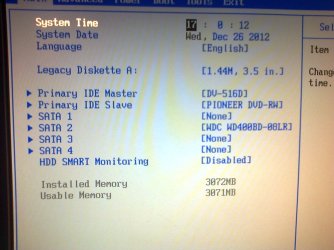
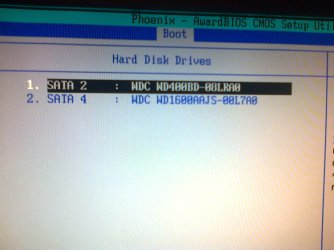
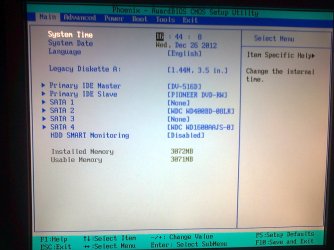
At first, BIOS recognized the 160 GB drive I exited it, and windows started loading (again only to the picture shown in my previous post). When i restarted and entered BIOS again, the 160 drive disapeard :eek: :shock:

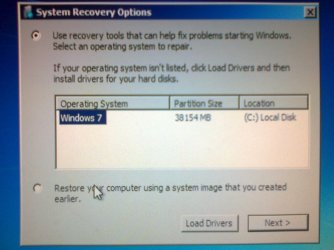
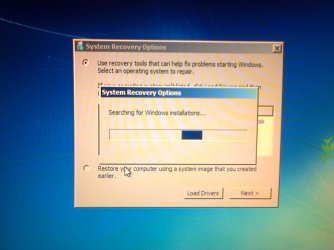
After i disconnected the 160 drive and booted up again, Windows demanded to start system repair (witch i did). Still no access to the files...

~Is there any possibility to save the drive and use it regularly, if we manage to repair it :o?
 

Attachments

  • Photo0349.jpg
    Photo0349.jpg
    336.8 KB · Views: 12
  • Photo0348.jpg
    Photo0348.jpg
    268.3 KB · Views: 12
  • Photo0347.jpg
    Photo0347.jpg
    301.5 KB · Views: 12
  • Photo0346.jpg
    Photo0346.jpg
    316.6 KB · Views: 12
  • Photo0345.jpg
    Photo0345.jpg
    318.3 KB · Views: 12

My Computer My Computer

At a glance

Windows 7 x86 UltimateIntel Pentium 4 (3.2GHz) @3.6GHz3 GB DDR2 (2GB @800MHz + 1GB @533MHz)-3 inuvi...ATI Radeon HD 5450 1GB DDR3
Computer Manufacturer/Model Number
Me, Myself and I (:
OS
Windows 7 x86 Ultimate
CPU
Intel Pentium 4 (3.2GHz) @3.6GHz
Motherboard
Asus P5N-D SLI
Memory
3 GB DDR2 (2GB @800MHz + 1GB @533MHz)-3 inuvidual sticks
Graphics Card(s)
ATI Radeon HD 5450 1GB DDR3
Sound Card
Realtek HD Audio
Monitor(s) Displays
Philips Brilliance 170p 17" DVI/VGA
Screen Resolution
1280x1024 @60 Hz
Hard Drives
WDC WD400BD-08LRAO 40 GB Blue Caviar-Sata II
PSU
LC-Power LC6480S Scorpio-480W 18A@ +12V
Cooling
CPU~Arctic Freezer 7 Pro; 2 92mm case fans; HDD fan;
Keyboard
Logitec Usb
Mouse
Dell optical mouse Usb
Internet Speed
2 Mb/s
Other Info
SOLD MY PC 6 MONTHS AGO IN ORDER TO BUY A MOTORCYCLE :D I don't need a PC :D
Does the faulty drive have a OS installed on it? As you stated in your original post that you tried to reinstall XP and it failed, which leads me to believe that with it being faulty and a bad install that it really messed up the drive.

Will the bad drive boot up if its the only drive plug in?
 

My Computer My Computer

At a glance

Windows 7 Ultimate 64 bitAMD Phenom II X4 965 Black EditionGSkill 4 X 2 GB PC 8500XFX Radeon HD 6790 D
Computer Manufacturer/Model Number
Custom built
OS
Windows 7 Ultimate 64 bit
CPU
AMD Phenom II X4 965 Black Edition
Motherboard
Gigabyte GA-MA790X-DS4
Memory
GSkill 4 X 2 GB PC 8500
Graphics Card(s)
XFX Radeon HD 6790 D
Sound Card
On board RealTek HD
Monitor(s) Displays
Dual monitors:Samsung SyncMaster S20B300
Screen Resolution
1600 X 900
Hard Drives
Seagate Barracuda 1TB (primary)
Seagate Barracuda 2 X 320 GB
PSU
Ultra X4 750 watt fully modular
Case
Thermaltake Overseer RX 1 full tower
Cooling
Core-Contact 92 mm CPU Cooler
Keyboard
Logitech G510
Mouse
Razor DeathAdder
Internet Speed
50/5 Mbps UL/DL
Other Info
Optical: Super Muliti DVD burner w/lightscribe, Hauppauge WinTV HVR-1800
I tried to boot from the bad HDD with win XP, but if failed. Now windows XP setup is running only with that drive connected, but it is going really slow :mad: half an hour for the 1st step of installation...
 

Attachments

  • Photo0351.jpg
    Photo0351.jpg
    320.5 KB · Views: 10

My Computer My Computer

At a glance

Windows 7 x86 UltimateIntel Pentium 4 (3.2GHz) @3.6GHz3 GB DDR2 (2GB @800MHz + 1GB @533MHz)-3 inuvi...ATI Radeon HD 5450 1GB DDR3
Computer Manufacturer/Model Number
Me, Myself and I (:
OS
Windows 7 x86 Ultimate
CPU
Intel Pentium 4 (3.2GHz) @3.6GHz
Motherboard
Asus P5N-D SLI
Memory
3 GB DDR2 (2GB @800MHz + 1GB @533MHz)-3 inuvidual sticks
Graphics Card(s)
ATI Radeon HD 5450 1GB DDR3
Sound Card
Realtek HD Audio
Monitor(s) Displays
Philips Brilliance 170p 17" DVI/VGA
Screen Resolution
1280x1024 @60 Hz
Hard Drives
WDC WD400BD-08LRAO 40 GB Blue Caviar-Sata II
PSU
LC-Power LC6480S Scorpio-480W 18A@ +12V
Cooling
CPU~Arctic Freezer 7 Pro; 2 92mm case fans; HDD fan;
Keyboard
Logitec Usb
Mouse
Dell optical mouse Usb
Internet Speed
2 Mb/s
Other Info
SOLD MY PC 6 MONTHS AGO IN ORDER TO BUY A MOTORCYCLE :D I don't need a PC :D
Do you have a external HD case which you can insert it into, so that you can boot from your PC and then you can connect the drive afterwards. You can get one for about £15 from PC World
Otherwise it is a visit to those HD Recovery professionals...
e.g. http://www.fields-data-recovery.co.uk/
 
Last edited:

My Computer My Computer

At a glance

Windows 7 Home Premium 32bitIntel Core 2 2.4GHz4GBATI Radeon 4850
Computer Manufacturer/Model Number
CCL Online OEM
OS
Windows 7 Home Premium 32bit
CPU
Intel Core 2 2.4GHz
Motherboard
Foxconn 946GZ7MA
Memory
4GB
Graphics Card(s)
ATI Radeon 4850
Sound Card
Realtek HD Audio
Monitor(s) Displays
Prolite E2407HDS
Screen Resolution
1920x1080
Hard Drives
2 x WDC 500 GB
Cooling
Fan
Keyboard
Microsoft Digital Media
Mouse
Optical Wheel Mouse
Internet Speed
14Mb/sec
Other Info
Internet ISP: Plusnet
DAMN Installation failed!!! fore some reason, the computer restarted but it didn't continue the setup.... No message was displayed, nothing... seem like it's totally dead :shock: :(
 

My Computer My Computer

At a glance

Windows 7 x86 UltimateIntel Pentium 4 (3.2GHz) @3.6GHz3 GB DDR2 (2GB @800MHz + 1GB @533MHz)-3 inuvi...ATI Radeon HD 5450 1GB DDR3
Computer Manufacturer/Model Number
Me, Myself and I (:
OS
Windows 7 x86 Ultimate
CPU
Intel Pentium 4 (3.2GHz) @3.6GHz
Motherboard
Asus P5N-D SLI
Memory
3 GB DDR2 (2GB @800MHz + 1GB @533MHz)-3 inuvidual sticks
Graphics Card(s)
ATI Radeon HD 5450 1GB DDR3
Sound Card
Realtek HD Audio
Monitor(s) Displays
Philips Brilliance 170p 17" DVI/VGA
Screen Resolution
1280x1024 @60 Hz
Hard Drives
WDC WD400BD-08LRAO 40 GB Blue Caviar-Sata II
PSU
LC-Power LC6480S Scorpio-480W 18A@ +12V
Cooling
CPU~Arctic Freezer 7 Pro; 2 92mm case fans; HDD fan;
Keyboard
Logitec Usb
Mouse
Dell optical mouse Usb
Internet Speed
2 Mb/s
Other Info
SOLD MY PC 6 MONTHS AGO IN ORDER TO BUY A MOTORCYCLE :D I don't need a PC :D

My Computer My Computer

At a glance

Windows 7 x86 UltimateIntel Pentium 4 (3.2GHz) @3.6GHz3 GB DDR2 (2GB @800MHz + 1GB @533MHz)-3 inuvi...ATI Radeon HD 5450 1GB DDR3
Computer Manufacturer/Model Number
Me, Myself and I (:
OS
Windows 7 x86 Ultimate
CPU
Intel Pentium 4 (3.2GHz) @3.6GHz
Motherboard
Asus P5N-D SLI
Memory
3 GB DDR2 (2GB @800MHz + 1GB @533MHz)-3 inuvidual sticks
Graphics Card(s)
ATI Radeon HD 5450 1GB DDR3
Sound Card
Realtek HD Audio
Monitor(s) Displays
Philips Brilliance 170p 17" DVI/VGA
Screen Resolution
1280x1024 @60 Hz
Hard Drives
WDC WD400BD-08LRAO 40 GB Blue Caviar-Sata II
PSU
LC-Power LC6480S Scorpio-480W 18A@ +12V
Cooling
CPU~Arctic Freezer 7 Pro; 2 92mm case fans; HDD fan;
Keyboard
Logitec Usb
Mouse
Dell optical mouse Usb
Internet Speed
2 Mb/s
Other Info
SOLD MY PC 6 MONTHS AGO IN ORDER TO BUY A MOTORCYCLE :D I don't need a PC :D
Is there any other way to enter the disk data?


As mentioned before, i tried to boot with safe mode, but to be honest, I didn' even get to the screen were you choose waether to start windows normaly or start safe mode even though i pressed F8 to enter the boot menu...

Maybe i can try instaling Linux... any other suggestions ?

P.s. I'm on my mobile so i can't do anything at the moment...
 

My Computer My Computer

At a glance

Windows 7 x86 UltimateIntel Pentium 4 (3.2GHz) @3.6GHz3 GB DDR2 (2GB @800MHz + 1GB @533MHz)-3 inuvi...ATI Radeon HD 5450 1GB DDR3
Computer Manufacturer/Model Number
Me, Myself and I (:
OS
Windows 7 x86 Ultimate
CPU
Intel Pentium 4 (3.2GHz) @3.6GHz
Motherboard
Asus P5N-D SLI
Memory
3 GB DDR2 (2GB @800MHz + 1GB @533MHz)-3 inuvidual sticks
Graphics Card(s)
ATI Radeon HD 5450 1GB DDR3
Sound Card
Realtek HD Audio
Monitor(s) Displays
Philips Brilliance 170p 17" DVI/VGA
Screen Resolution
1280x1024 @60 Hz
Hard Drives
WDC WD400BD-08LRAO 40 GB Blue Caviar-Sata II
PSU
LC-Power LC6480S Scorpio-480W 18A@ +12V
Cooling
CPU~Arctic Freezer 7 Pro; 2 92mm case fans; HDD fan;
Keyboard
Logitec Usb
Mouse
Dell optical mouse Usb
Internet Speed
2 Mb/s
Other Info
SOLD MY PC 6 MONTHS AGO IN ORDER TO BUY A MOTORCYCLE :D I don't need a PC :D
I have checked my BIOS drivers in system informations, and it says my current driver is 1101 from 5/18/2009. So then i went to the Asus manufactures site and searched for P5N-D BIOS Drivers
I selected my OS and downloaded the "newest" version- 1401 as a .zip file. I extracted the archive and a 1401.BIN file came out.
I don't know how to install this now, and some help would be good


p.s. I've reduced the OC on my CPU in order to keep it safe :geek:
 

Attachments

  • BIOS.PNG
    BIOS.PNG
    3.1 KB · Views: 8
  • BIN..PNG
    BIN..PNG
    128.9 KB · Views: 9

My Computer My Computer

At a glance

Windows 7 x86 UltimateIntel Pentium 4 (3.2GHz) @3.6GHz3 GB DDR2 (2GB @800MHz + 1GB @533MHz)-3 inuvi...ATI Radeon HD 5450 1GB DDR3
Computer Manufacturer/Model Number
Me, Myself and I (:
OS
Windows 7 x86 Ultimate
CPU
Intel Pentium 4 (3.2GHz) @3.6GHz
Motherboard
Asus P5N-D SLI
Memory
3 GB DDR2 (2GB @800MHz + 1GB @533MHz)-3 inuvidual sticks
Graphics Card(s)
ATI Radeon HD 5450 1GB DDR3
Sound Card
Realtek HD Audio
Monitor(s) Displays
Philips Brilliance 170p 17" DVI/VGA
Screen Resolution
1280x1024 @60 Hz
Hard Drives
WDC WD400BD-08LRAO 40 GB Blue Caviar-Sata II
PSU
LC-Power LC6480S Scorpio-480W 18A@ +12V
Cooling
CPU~Arctic Freezer 7 Pro; 2 92mm case fans; HDD fan;
Keyboard
Logitec Usb
Mouse
Dell optical mouse Usb
Internet Speed
2 Mb/s
Other Info
SOLD MY PC 6 MONTHS AGO IN ORDER TO BUY A MOTORCYCLE :D I don't need a PC :D
You need to create a DOS Boot disk (See Bootdisk.Com) and download and copy the Phoenix Award BIOS flash tool version 1.34 from the same ASUS site and the BIN file and run the exe tool with the bin file to update the BIOS.
 

My Computer My Computer

At a glance

Windows 7 Home Premium 32bitIntel Core 2 2.4GHz4GBATI Radeon 4850
Computer Manufacturer/Model Number
CCL Online OEM
OS
Windows 7 Home Premium 32bit
CPU
Intel Core 2 2.4GHz
Motherboard
Foxconn 946GZ7MA
Memory
4GB
Graphics Card(s)
ATI Radeon 4850
Sound Card
Realtek HD Audio
Monitor(s) Displays
Prolite E2407HDS
Screen Resolution
1920x1080
Hard Drives
2 x WDC 500 GB
Cooling
Fan
Keyboard
Microsoft Digital Media
Mouse
Optical Wheel Mouse
Internet Speed
14Mb/sec
Other Info
Internet ISP: Plusnet
I updated my BIOS to the latest version (1401), and then again tried to boot with the faulty drive.
At first the mobo screen appeared reaaalllyyy fast! (3 times faster then usual), and there was no BEEEP from the mobo. Then i hit DEL to enter setup (it took 20 sec to enter bios - 5 times longer then usual). Bios sees the 160 bad drive and every thing appears normal. Then I hit ESC and selected Windows7 for my os (I have a dual boot-but when I choose the other system it wont boot with it :rolleyes: -complicated).

Again the boot was stuck on the Windows loading screen, but i noticed the front panel LED light (HDD light) was blinking on every 2-3 seconds- that wasn't the case before.

After removing the bad drive windows booted up normal...
 

My Computer My Computer

At a glance

Windows 7 x86 UltimateIntel Pentium 4 (3.2GHz) @3.6GHz3 GB DDR2 (2GB @800MHz + 1GB @533MHz)-3 inuvi...ATI Radeon HD 5450 1GB DDR3
Computer Manufacturer/Model Number
Me, Myself and I (:
OS
Windows 7 x86 Ultimate
CPU
Intel Pentium 4 (3.2GHz) @3.6GHz
Motherboard
Asus P5N-D SLI
Memory
3 GB DDR2 (2GB @800MHz + 1GB @533MHz)-3 inuvidual sticks
Graphics Card(s)
ATI Radeon HD 5450 1GB DDR3
Sound Card
Realtek HD Audio
Monitor(s) Displays
Philips Brilliance 170p 17" DVI/VGA
Screen Resolution
1280x1024 @60 Hz
Hard Drives
WDC WD400BD-08LRAO 40 GB Blue Caviar-Sata II
PSU
LC-Power LC6480S Scorpio-480W 18A@ +12V
Cooling
CPU~Arctic Freezer 7 Pro; 2 92mm case fans; HDD fan;
Keyboard
Logitec Usb
Mouse
Dell optical mouse Usb
Internet Speed
2 Mb/s
Other Info
SOLD MY PC 6 MONTHS AGO IN ORDER TO BUY A MOTORCYCLE :D I don't need a PC :D
Can you boot form win7 install DVD, win7 system repair disk? Or advanced boot options (where you see safe mode) and select repair my computer. So you see this


Select command prompt there:
Code:
diskpart
list  disk

Is bad disk listed? Is the number 0,1,2 or ....?
 

My Computer My Computer

At a glance

Microsoft Windows 7 Home Premium 64-bits 7601...Intel(R) Core(TM) i3 CPU M 370 @ 2.40GHz4,00 GBATI Mobility Radeon HD 5400 Series
Computer type
Laptop
Computer Manufacturer/Model Number
ACER ASPIRE 5742G
OS
Microsoft Windows 7 Home Premium 64-bits 7601 Multiprocessor Free Service Pack 1
CPU
Intel(R) Core(TM) i3 CPU M 370 @ 2.40GHz
Motherboard
Acer Aspire 5742G
Memory
4,00 GB
Graphics Card(s)
ATI Mobility Radeon HD 5400 Series
Sound Card
(1) AMD High Definition Audio Device (2) Realtek High Defi
Screen Resolution
1366 x 768 x 32 bits (4294967296 colors) @ 60 Hz
Hard Drives
WDC WD5000BEVT-22ZAT0
No i can't :eek:
Every time i try the boot gets stuck @ the windows loading screen-even if i boot from system disk (In BIOS i set the DVD drive for 1st boot device).

I also tried to run safe mode, safe mode with networking and safe mode with command prompt. No use, every time it gets stuck on the driver loading screen (I left it for 20 min.).
Also tried out this tutorial but neither does option 1 or 2 work for me...
What should i do next?
 

My Computer My Computer

At a glance

Windows 7 x86 UltimateIntel Pentium 4 (3.2GHz) @3.6GHz3 GB DDR2 (2GB @800MHz + 1GB @533MHz)-3 inuvi...ATI Radeon HD 5450 1GB DDR3
Computer Manufacturer/Model Number
Me, Myself and I (:
OS
Windows 7 x86 Ultimate
CPU
Intel Pentium 4 (3.2GHz) @3.6GHz
Motherboard
Asus P5N-D SLI
Memory
3 GB DDR2 (2GB @800MHz + 1GB @533MHz)-3 inuvidual sticks
Graphics Card(s)
ATI Radeon HD 5450 1GB DDR3
Sound Card
Realtek HD Audio
Monitor(s) Displays
Philips Brilliance 170p 17" DVI/VGA
Screen Resolution
1280x1024 @60 Hz
Hard Drives
WDC WD400BD-08LRAO 40 GB Blue Caviar-Sata II
PSU
LC-Power LC6480S Scorpio-480W 18A@ +12V
Cooling
CPU~Arctic Freezer 7 Pro; 2 92mm case fans; HDD fan;
Keyboard
Logitec Usb
Mouse
Dell optical mouse Usb
Internet Speed
2 Mb/s
Other Info
SOLD MY PC 6 MONTHS AGO IN ORDER TO BUY A MOTORCYCLE :D I don't need a PC :D
No i can't :eek:
Every time i try the boot gets stuck @ the windows loading screen-even if i boot from system disk (In BIOS i set the DVD drive for 1st boot device).

I also tried to run safe mode, safe mode with networking and safe mode with command prompt. No use, every time it gets stuck on the driver loading screen (I left it for 20 min.).
Also tried out this tutorial but neither does option 1 or 2 work for me...
What should i do next?
Even boot from win7 install disk/win7 repair disk freeze at same point?
 

My Computer My Computer

At a glance

Microsoft Windows 7 Home Premium 64-bits 7601...Intel(R) Core(TM) i3 CPU M 370 @ 2.40GHz4,00 GBATI Mobility Radeon HD 5400 Series
Computer type
Laptop
Computer Manufacturer/Model Number
ACER ASPIRE 5742G
OS
Microsoft Windows 7 Home Premium 64-bits 7601 Multiprocessor Free Service Pack 1
CPU
Intel(R) Core(TM) i3 CPU M 370 @ 2.40GHz
Motherboard
Acer Aspire 5742G
Memory
4,00 GB
Graphics Card(s)
ATI Mobility Radeon HD 5400 Series
Sound Card
(1) AMD High Definition Audio Device (2) Realtek High Defi
Screen Resolution
1366 x 768 x 32 bits (4294967296 colors) @ 60 Hz
Hard Drives
WDC WD5000BEVT-22ZAT0
No i can't :eek:
Every time i try the boot gets stuck @ the windows loading screen-even if i boot from system disk (In BIOS i set the DVD drive for 1st boot device).

I also tried to run safe mode, safe mode with networking and safe mode with command prompt. No use, every time it gets stuck on the driver loading screen (I left it for 20 min.).
Also tried out this tutorial but neither does option 1 or 2 work for me...
What should i do next?
Even boot from win7 install disk/win7 repair disk freeze at same point?

Yes :(
 

My Computer My Computer

At a glance

Windows 7 x86 UltimateIntel Pentium 4 (3.2GHz) @3.6GHz3 GB DDR2 (2GB @800MHz + 1GB @533MHz)-3 inuvi...ATI Radeon HD 5450 1GB DDR3
Computer Manufacturer/Model Number
Me, Myself and I (:
OS
Windows 7 x86 Ultimate
CPU
Intel Pentium 4 (3.2GHz) @3.6GHz
Motherboard
Asus P5N-D SLI
Memory
3 GB DDR2 (2GB @800MHz + 1GB @533MHz)-3 inuvidual sticks
Graphics Card(s)
ATI Radeon HD 5450 1GB DDR3
Sound Card
Realtek HD Audio
Monitor(s) Displays
Philips Brilliance 170p 17" DVI/VGA
Screen Resolution
1280x1024 @60 Hz
Hard Drives
WDC WD400BD-08LRAO 40 GB Blue Caviar-Sata II
PSU
LC-Power LC6480S Scorpio-480W 18A@ +12V
Cooling
CPU~Arctic Freezer 7 Pro; 2 92mm case fans; HDD fan;
Keyboard
Logitec Usb
Mouse
Dell optical mouse Usb
Internet Speed
2 Mb/s
Other Info
SOLD MY PC 6 MONTHS AGO IN ORDER TO BUY A MOTORCYCLE :D I don't need a PC :D
No i can't :eek:
Every time i try the boot gets stuck @ the windows loading screen-even if i boot from system disk (In BIOS i set the DVD drive for 1st boot device).

I also tried to run safe mode, safe mode with networking and safe mode with command prompt. No use, every time it gets stuck on the driver loading screen (I left it for 20 min.).
Also tried out this tutorial but neither does option 1 or 2 work for me...
What should i do next?
Even boot from win7 install disk/win7 repair disk freeze at same point?

Yes :(
Win7 and windows boot disks check for disks and partitions on startup. But if my memory is fine... you tried to install winxp on that bad harddisk... correct? That winxp install CD booted fine?
 

My Computer My Computer

At a glance

Microsoft Windows 7 Home Premium 64-bits 7601...Intel(R) Core(TM) i3 CPU M 370 @ 2.40GHz4,00 GBATI Mobility Radeon HD 5400 Series
Computer type
Laptop
Computer Manufacturer/Model Number
ACER ASPIRE 5742G
OS
Microsoft Windows 7 Home Premium 64-bits 7601 Multiprocessor Free Service Pack 1
CPU
Intel(R) Core(TM) i3 CPU M 370 @ 2.40GHz
Motherboard
Acer Aspire 5742G
Memory
4,00 GB
Graphics Card(s)
ATI Mobility Radeon HD 5400 Series
Sound Card
(1) AMD High Definition Audio Device (2) Realtek High Defi
Screen Resolution
1366 x 768 x 32 bits (4294967296 colors) @ 60 Hz
Hard Drives
WDC WD5000BEVT-22ZAT0
I'm late to this party, but I'd like to ask a stupid question.

Why can't you put the suspect hd into an external enclosure - then plug it in after you reach the desktop? Don't try to boot with both connected.
 

My Computer My Computer

At a glance

W7 Home Premium 32bit
Computer Manufacturer/Model Number
8 home-builds from the 80's into 2004
OS
W7 Home Premium 32bit
Even boot from win7 install disk/win7 repair disk freeze at same point?

Yes :(
Win7 and windows boot disks check for disks and partitions on startup. But if my memory is fine... you tried to install winxp on that bad harddisk... correct? That winxp install CD booted fine?

correct! I did try to install XP on the bad drive, but it failed to install @ 2/3 of the setup. After that fail i put the HDD to side, and yesterday, after 2 months i tried again to do the same(in both cases the bad drive was only connected). This time, the setup failed @1/3 of installation process, and there was no BSOD or any message saying why the setup failed, just a restart and it didn't continue installing.
I was thinking about Ubuntu Linux. maybe to install it to he bad drive, pick up data to a Flash memory and try to format it... What do you say for that idea? Would it work?
p.s. I would have to download a pirate version of linux, because i don't know anyone who has it, and i can't buy it anywhere... :o
 

My Computer My Computer

At a glance

Windows 7 x86 UltimateIntel Pentium 4 (3.2GHz) @3.6GHz3 GB DDR2 (2GB @800MHz + 1GB @533MHz)-3 inuvi...ATI Radeon HD 5450 1GB DDR3
Computer Manufacturer/Model Number
Me, Myself and I (:
OS
Windows 7 x86 Ultimate
CPU
Intel Pentium 4 (3.2GHz) @3.6GHz
Motherboard
Asus P5N-D SLI
Memory
3 GB DDR2 (2GB @800MHz + 1GB @533MHz)-3 inuvidual sticks
Graphics Card(s)
ATI Radeon HD 5450 1GB DDR3
Sound Card
Realtek HD Audio
Monitor(s) Displays
Philips Brilliance 170p 17" DVI/VGA
Screen Resolution
1280x1024 @60 Hz
Hard Drives
WDC WD400BD-08LRAO 40 GB Blue Caviar-Sata II
PSU
LC-Power LC6480S Scorpio-480W 18A@ +12V
Cooling
CPU~Arctic Freezer 7 Pro; 2 92mm case fans; HDD fan;
Keyboard
Logitec Usb
Mouse
Dell optical mouse Usb
Internet Speed
2 Mb/s
Other Info
SOLD MY PC 6 MONTHS AGO IN ORDER TO BUY A MOTORCYCLE :D I don't need a PC :D
Back
Top