Disk activity not showing up in Resource Monitor?

gidyn

New member
Local time
5:13 AM
Messages
6
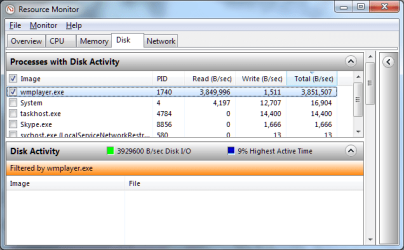
I've noticed that Windows Media Player is thrashing my hard drive whenever I play videos, so I tried to investigate with Resource Monitor. The "Processes with Disk Activity" pane shows it reading about 4Mb/s, but there's nothing to show for it in the "Disk Activity" pane.

Any ideas what's up?
 

Attachments

  • resource monitor.png
    resource monitor.png
    20.5 KB · Views: 23

My Computer My Computer

At a glance

Windows 7 Ultimate x64Intel i5-750G.Skill F3-12800CL9Q-16GBXL 16GbPowerColor HD 5750 1GB
OS
Windows 7 Ultimate x64
CPU
Intel i5-750
Motherboard
Asus P7P55D LE
Memory
G.Skill F3-12800CL9Q-16GBXL 16Gb
Graphics Card(s)
PowerColor HD 5750 1GB
Sound Card
Labtec Pulse 485 2.1
Monitor(s) Displays
Acer V243HBD 24", Samsung SM2343BW 23", AOC 2436Pwa 23.6"
Hard Drives
Samsung HD103SJ Spinpoint F3 1TB x2
PSU
Casecom 500W
Case
Casecom 6788
Cooling
Hyper 212+
Keyboard
Microsoft Natural Ergonomic Keyboard 4000
Mouse
Mercury KOB C1330
Hello gidyn and welcome to Seven Forums.

In Windows Xp and Windows Vista you would have to add additional performance counters to Task Manager to specifically monitor disk activity. The counters are I/O Reads, I/O Writes, I/O Read Bytes, and I/O Write Bytes. I'm on a work computer running XP so I can't verify if this will work on Windows 7 but you might give it a look.

Identify Processes That Cause High Disk Activity
 

My Computer My Computer

At a glance

Win 7 Pro 64-bitIntel i5 2.4 Ghz8GB DDR3Intel HD 3000
Computer type
Laptop
Computer Manufacturer/Model Number
Sony Vaio VPCEB47GM Laptop
OS
Win 7 Pro 64-bit
CPU
Intel i5 2.4 Ghz
Memory
8GB DDR3
Graphics Card(s)
Intel HD 3000
Sound Card
IDT High Definition
Monitor(s) Displays
15.6 WGXA Anti-Glare LED
Screen Resolution
1280x800
Hard Drives
640Gb 7200rpm
Antivirus
MSE
Browser
Opera (primary) with IE9 backup
Hello gidyn and welcome to Seven Forums.

In Windows Xp and Windows Vista you would have to add additional performance counters to Task Manager to specifically monitor disk activity. The counters are I/O Reads, I/O Writes, I/O Read Bytes, and I/O Write Bytes. I'm on a work computer running XP so I can't verify if this will work on Windows 7 but you might give it a look.

Identify Processes That Cause High Disk Activity

I'm using Resource Monitor, not Task Manager. Please see the screen shot in my original post.
 

My Computer My Computer

At a glance

Windows 7 Ultimate x64Intel i5-750G.Skill F3-12800CL9Q-16GBXL 16GbPowerColor HD 5750 1GB
OS
Windows 7 Ultimate x64
CPU
Intel i5-750
Motherboard
Asus P7P55D LE
Memory
G.Skill F3-12800CL9Q-16GBXL 16Gb
Graphics Card(s)
PowerColor HD 5750 1GB
Sound Card
Labtec Pulse 485 2.1
Monitor(s) Displays
Acer V243HBD 24", Samsung SM2343BW 23", AOC 2436Pwa 23.6"
Hard Drives
Samsung HD103SJ Spinpoint F3 1TB x2
PSU
Casecom 500W
Case
Casecom 6788
Cooling
Hyper 212+
Keyboard
Microsoft Natural Ergonomic Keyboard 4000
Mouse
Mercury KOB C1330
Hello gidyn and welcome to Seven Forums.

In Windows Xp and Windows Vista you would have to add additional performance counters to Task Manager to specifically monitor disk activity. The counters are I/O Reads, I/O Writes, I/O Read Bytes, and I/O Write Bytes. I'm on a work computer running XP so I can't verify if this will work on Windows 7 but you might give it a look.

Identify Processes That Cause High Disk Activity

I'm using Resource Monitor, not Task Manager. Please see the screen shot in my original post.


Resource Monitor is a part of Task Manager. See Step 2 under Here's How.

http://www.sevenforums.com/tutorials/12523-resource-monitor.html
 

My Computer My Computer

At a glance

Win 7 Pro 64-bitIntel i5 2.4 Ghz8GB DDR3Intel HD 3000
Computer type
Laptop
Computer Manufacturer/Model Number
Sony Vaio VPCEB47GM Laptop
OS
Win 7 Pro 64-bit
CPU
Intel i5 2.4 Ghz
Memory
8GB DDR3
Graphics Card(s)
Intel HD 3000
Sound Card
IDT High Definition
Monitor(s) Displays
15.6 WGXA Anti-Glare LED
Screen Resolution
1280x800
Hard Drives
640Gb 7200rpm
Antivirus
MSE
Browser
Opera (primary) with IE9 backup
Hello gidyn and welcome to Seven Forums.

In Windows Xp and Windows Vista you would have to add additional performance counters to Task Manager to specifically monitor disk activity. The counters are I/O Reads, I/O Writes, I/O Read Bytes, and I/O Write Bytes. I'm on a work computer running XP so I can't verify if this will work on Windows 7 but you might give it a look.

Identify Processes That Cause High Disk Activity

I'm using Resource Monitor, not Task Manager. Please see the screen shot in my original post.

What he meant is Resource Monitor uses ETW as the engine. Perfmon exposes ETW in Performance Monitor > Data Collector Sets > System > Event Trace Sessions. look for NtfsLog... it should be started.. as a matter of fact all the sessions should be started.
 

My Computer My Computer

At a glance

Windows 7 ultimate x64
Computer Manufacturer/Model Number
Nothing specific....what ever the clients provide for Repair
OS
Windows 7 ultimate x64
What he meant is Resource Monitor uses ETW as the engine. Perfmon exposes ETW in Performance Monitor > Data Collector Sets > System > Event Trace Sessions. look for NtfsLog... it should be started.. as a matter of fact all the sessions should be started.

NtfsLog is running, as are all the others. All other disk activity is monitored - it's just Media Player that somehow doesn't show up.
 

My Computer My Computer

At a glance

Windows 7 Ultimate x64Intel i5-750G.Skill F3-12800CL9Q-16GBXL 16GbPowerColor HD 5750 1GB
OS
Windows 7 Ultimate x64
CPU
Intel i5-750
Motherboard
Asus P7P55D LE
Memory
G.Skill F3-12800CL9Q-16GBXL 16Gb
Graphics Card(s)
PowerColor HD 5750 1GB
Sound Card
Labtec Pulse 485 2.1
Monitor(s) Displays
Acer V243HBD 24", Samsung SM2343BW 23", AOC 2436Pwa 23.6"
Hard Drives
Samsung HD103SJ Spinpoint F3 1TB x2
PSU
Casecom 500W
Case
Casecom 6788
Cooling
Hyper 212+
Keyboard
Microsoft Natural Ergonomic Keyboard 4000
Mouse
Mercury KOB C1330
ok

Clicked Monitor > Stop Monitoring ... wait for a few sec and then select Start Monitoring.. It should probably resolved by now.
 

My Computer My Computer

At a glance

Windows 7 ultimate x64
Computer Manufacturer/Model Number
Nothing specific....what ever the clients provide for Repair
OS
Windows 7 ultimate x64
Clicked Monitor > Stop Monitoring ... wait for a few sec and then select Start Monitoring.. It should probably resolved by now.
Tried it a few times.
 

My Computer My Computer

At a glance

Windows 7 Ultimate x64Intel i5-750G.Skill F3-12800CL9Q-16GBXL 16GbPowerColor HD 5750 1GB
OS
Windows 7 Ultimate x64
CPU
Intel i5-750
Motherboard
Asus P7P55D LE
Memory
G.Skill F3-12800CL9Q-16GBXL 16Gb
Graphics Card(s)
PowerColor HD 5750 1GB
Sound Card
Labtec Pulse 485 2.1
Monitor(s) Displays
Acer V243HBD 24", Samsung SM2343BW 23", AOC 2436Pwa 23.6"
Hard Drives
Samsung HD103SJ Spinpoint F3 1TB x2
PSU
Casecom 500W
Case
Casecom 6788
Cooling
Hyper 212+
Keyboard
Microsoft Natural Ergonomic Keyboard 4000
Mouse
Mercury KOB C1330
ok restart and check again..
 

My Computer My Computer

At a glance

Windows 7 ultimate x64
Computer Manufacturer/Model Number
Nothing specific....what ever the clients provide for Repair
OS
Windows 7 ultimate x64

My Computer My Computer

At a glance

Windows 7 Ultimate x64Intel i5-750G.Skill F3-12800CL9Q-16GBXL 16GbPowerColor HD 5750 1GB
OS
Windows 7 Ultimate x64
CPU
Intel i5-750
Motherboard
Asus P7P55D LE
Memory
G.Skill F3-12800CL9Q-16GBXL 16Gb
Graphics Card(s)
PowerColor HD 5750 1GB
Sound Card
Labtec Pulse 485 2.1
Monitor(s) Displays
Acer V243HBD 24", Samsung SM2343BW 23", AOC 2436Pwa 23.6"
Hard Drives
Samsung HD103SJ Spinpoint F3 1TB x2
PSU
Casecom 500W
Case
Casecom 6788
Cooling
Hyper 212+
Keyboard
Microsoft Natural Ergonomic Keyboard 4000
Mouse
Mercury KOB C1330
Right click on wmplayer.exe in resmon and select Analyze Wait Chain...

Post a snapshot of what you see there
 

My Computer My Computer

At a glance

Windows 7 ultimate x64
Computer Manufacturer/Model Number
Nothing specific....what ever the clients provide for Repair
OS
Windows 7 ultimate x64
Hmm it looks like your pointers to the perfmon Counters are corrupted, you have to rebuild these with LODCTR from a elevated command prompt:

Close resource monitor

Click Start, and Click Run and type cmd
At the prompt, type lodctr /r and press ENTER. This will repair the pointers with the system backup store.

This will definitely solve your problem.
 

My Computer My Computer

At a glance

Windows 7 ultimate x64
Computer Manufacturer/Model Number
Nothing specific....what ever the clients provide for Repair
OS
Windows 7 ultimate x64
Right click on wmplayer.exe in resmon and select Analyze Wait Chain...

Post a snapshot of what you see there
Strangely enough, I opened resource monitor again to do this, and now it's working! (I just fixed some broken shortcuts in the Public folder where the videos were - I don't know whether that had anything to do with it.)

The question now becomes, why is media player thrashing the hard drive? I've got 16Gb of RAM, but looping a 45MB video causes WMP to constantly read the file from disk (that's the 4Mb/s shown earlier).
 

My Computer My Computer

At a glance

Windows 7 Ultimate x64Intel i5-750G.Skill F3-12800CL9Q-16GBXL 16GbPowerColor HD 5750 1GB
OS
Windows 7 Ultimate x64
CPU
Intel i5-750
Motherboard
Asus P7P55D LE
Memory
G.Skill F3-12800CL9Q-16GBXL 16Gb
Graphics Card(s)
PowerColor HD 5750 1GB
Sound Card
Labtec Pulse 485 2.1
Monitor(s) Displays
Acer V243HBD 24", Samsung SM2343BW 23", AOC 2436Pwa 23.6"
Hard Drives
Samsung HD103SJ Spinpoint F3 1TB x2
PSU
Casecom 500W
Case
Casecom 6788
Cooling
Hyper 212+
Keyboard
Microsoft Natural Ergonomic Keyboard 4000
Mouse
Mercury KOB C1330
Back
Top