Solved Card Reader not Showing up in Disk Manager

Emmett42

New member
Local time
7:17 PM
Messages
7
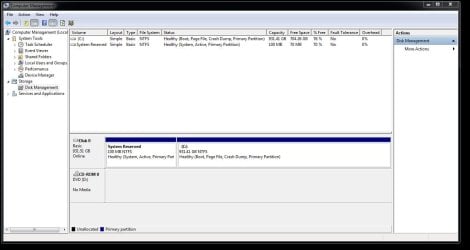
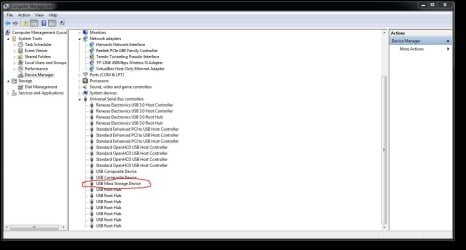
I have a Stratitec USB card reader that I am trying to use to read a 64 GB SD Card. It shows up in Device Manager as USB Mass Storage Device, with no ! or ? by the icon, but doesn't show up anywhere in Disk Management. I only see C: drive and System Reserved in Disk Management. I also do not see anything in Computer Devices. Also, whenever I plug it in for the first time it tries to install drivers but always fails after a bit, saying the Device is unplugged, when it is not. It says the drivers are up to date in Device Manager.
 

My Computer My Computer

Computer type
PC/Desktop
Computer Manufacturer/Model Number
custom build
OS
Windows 7 Professional 64 bit
CPU
AMD FX(tm)-6350 Six-Core
Motherboard
msi 970A-643
Memory
8GB
Graphics Card(s)
Radeon R9 280
Monitor(s) Displays
ASUS IPS HDMI VS239
Screen Resolution
1920 X 1080
Hard Drives
Seagate 1 TB

My Computer My Computer

Computer type
PC/Desktop
Computer Manufacturer/Model Number
Own build (new) Desk1 / Asus ROG Win 7 / Desk2 1st build
OS
Desk1 7 Home Prem / Desk2 10 Pro / Main lap Asus ROG 10 Pro 2 laptop Toshiba 7 Pro Asus P2520 7 & 10
CPU
Desk1 i5 3750K / Laptop i7 GTX 860M / Desk2 i5 2500
Motherboard
Desk1 Asus P877-V / Desk2 Gigabyte H67 UD3H / Laptop ?
Memory
Desk1 8GB (1866) / Desk2 16GB (1333) / Laptop 8Gb DDR3
Graphics Card(s)
Desk 1& 2NVidia GTX 650 & Laptops on board Intel
Sound Card
Desk 1 & 2 -XONAR DG Realtek High Def audio Laptop
Monitor(s) Displays
Desk 1 Benq HD 2450 / Desk2 Philips 24" / Laptop 17.5"
Screen Resolution
1920x1080 D1 & D2 & Laptop 1
Hard Drives
Desk1 Samsung 120GB 830 SSD
Asus ROG 256GB 850 Pro SSD
Desk2 Samsung 840 256 SSD
Toshiba 120GB EVO
PSU
Desk 1 Corsair HX 1050/ Laptop ? / Desk 2 Corsair HX 650
Case
Desk 1 Cooler HAF XM ? Toshiba laptop / Desk2 Coolermaster
Cooling
Fans on all Desk1 -2 Desk2 - all Coolermasters 5 Laptop ?
Keyboard
Desk 1 MS Sidewinder X6 Desk 2 MS Sidewinder X 4
Mouse
Desk 1&2 - Gigabyte MS 900 gamer - laptop - Logitec wireless
Internet Speed
ADSL2+
Other Info
One other Desktop (tester) and spare Toshba laptop both with SSD's
Running Kaspersky 2016 ISS on all machines config'd identically
Logitec audio stereo systems on each machine (x3)
Canon MG5250MFC
Router/modem TP-Link running WPA2SK
There is a 64 GB SD Card plugged in. It has some pictures and videos on it that I took and can access through my camera. No driver response is provoked. I cannot try DISKPART because it doesn't show up as a disk in the first place as shown in one of the image. The only thing that seems to happen is one of the USB Composite Devices in Device Manager changes to USB Mass Storage Device.
 

Attachments

  • NoDiskNumber.JPG
    NoDiskNumber.JPG
    77.8 KB · Views: 2
  • DeviceManager.JPG
    DeviceManager.JPG
    92.8 KB · Views: 2

My Computer My Computer

Computer type
PC/Desktop
Computer Manufacturer/Model Number
custom build
OS
Windows 7 Professional 64 bit
CPU
AMD FX(tm)-6350 Six-Core
Motherboard
msi 970A-643
Memory
8GB
Graphics Card(s)
Radeon R9 280
Monitor(s) Displays
ASUS IPS HDMI VS239
Screen Resolution
1920 X 1080
Hard Drives
Seagate 1 TB
Sorry late reply Emmet look first see this http://www.sevenforums.com/tutorials/52129-disk-clean-clean-all-diskpart-command.html

In Heres how follow point 1 (first option) go to point 4 it will give you further instructions > follow these and you should end up with a window as is shown beneath those instructions DO NOT go any further.

Now any disks and a SD card is classed as a disk will be listed as per that pic - let us know what you find.

I find this a surer way of finding what drives/disks I have installed.

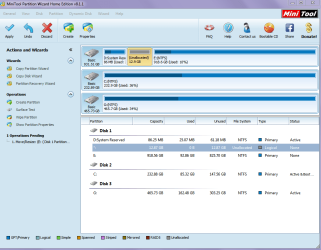
If your SD card is listed then run this https://www.partitionwizard.com/free-partition-manager.html and run it and if possible send back a pic of what you see. -it should look like the pic of my machine here and do not take any notice of what I have written on it - it is just to show what the program looks like.


run this https://www.partitionwizard.com/free-partition-manager.html and see if the drive comes up in that.
 

Attachments

  • MINI TOOL RESIZE 2.PNG
    MINI TOOL RESIZE 2.PNG
    41.2 KB · Views: 0

My Computer My Computer

Computer type
PC/Desktop
Computer Manufacturer/Model Number
Own build (new) Desk1 / Asus ROG Win 7 / Desk2 1st build
OS
Desk1 7 Home Prem / Desk2 10 Pro / Main lap Asus ROG 10 Pro 2 laptop Toshiba 7 Pro Asus P2520 7 & 10
CPU
Desk1 i5 3750K / Laptop i7 GTX 860M / Desk2 i5 2500
Motherboard
Desk1 Asus P877-V / Desk2 Gigabyte H67 UD3H / Laptop ?
Memory
Desk1 8GB (1866) / Desk2 16GB (1333) / Laptop 8Gb DDR3
Graphics Card(s)
Desk 1& 2NVidia GTX 650 & Laptops on board Intel
Sound Card
Desk 1 & 2 -XONAR DG Realtek High Def audio Laptop
Monitor(s) Displays
Desk 1 Benq HD 2450 / Desk2 Philips 24" / Laptop 17.5"
Screen Resolution
1920x1080 D1 & D2 & Laptop 1
Hard Drives
Desk1 Samsung 120GB 830 SSD
Asus ROG 256GB 850 Pro SSD
Desk2 Samsung 840 256 SSD
Toshiba 120GB EVO
PSU
Desk 1 Corsair HX 1050/ Laptop ? / Desk 2 Corsair HX 650
Case
Desk 1 Cooler HAF XM ? Toshiba laptop / Desk2 Coolermaster
Cooling
Fans on all Desk1 -2 Desk2 - all Coolermasters 5 Laptop ?
Keyboard
Desk 1 MS Sidewinder X6 Desk 2 MS Sidewinder X 4
Mouse
Desk 1&2 - Gigabyte MS 900 gamer - laptop - Logitec wireless
Internet Speed
ADSL2+
Other Info
One other Desktop (tester) and spare Toshba laptop both with SSD's
Running Kaspersky 2016 ISS on all machines config'd identically
Logitec audio stereo systems on each machine (x3)
Canon MG5250MFC
Router/modem TP-Link running WPA2SK
Please borrow a working Card Reader from a friend and try it on your PC. Insert your SD Card into the Card Reader and check whether everything is fine. If it works, then your Stratitec card reader may be defective.

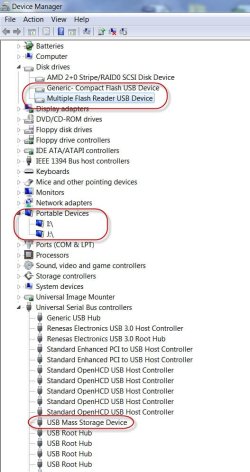
Just curious, I plugged in my Transcend TS-RDP8K card reader and observed the Device Manager. The encircled devices were shown. ( This is without any cards plugged into the Card Reader slots)

23-07-2016 18-30-45.jpg

I had a Sony Card Reader previously and after a few years it failed whereupon I bought this.
 
Last edited:

My Computer My Computer

OS
Windows 7 Home Premium 32 bit
I guess it is just the card reader. I plugged in a DYNEX Card Reader with my SD Card in it and it worked this time. The thing is, I tried this other card reader when I first experienced the problem and that one didn't work either so I thought I had narrowed it down to the computer. However, now the DYNEX Card reader works. It also had to install drivers before I could access it. I still have no luck with the Stratitec Card reader though.

When I plug in the DYNEX Reader it is asking me to format the disk. Wouldn't that erase the data though?
 

My Computer My Computer

Computer type
PC/Desktop
Computer Manufacturer/Model Number
custom build
OS
Windows 7 Professional 64 bit
CPU
AMD FX(tm)-6350 Six-Core
Motherboard
msi 970A-643
Memory
8GB
Graphics Card(s)
Radeon R9 280
Monitor(s) Displays
ASUS IPS HDMI VS239
Screen Resolution
1920 X 1080
Hard Drives
Seagate 1 TB
Check the specifications of the Dynex Card Reader. I have a feeling that that some older Card Readers may not be compatible with >32GB SDXC cards or even SDHC cards.

If your 64GB card is fine within the camera but asks to be formatted when plugged into the DYNEX, then try to get a newer Card Reader that can read SDXC cards :).
 

My Computer My Computer

OS
Windows 7 Home Premium 32 bit
Yep sorry late reply mate I get the same as Jumanji and just as a by the by I find SD card slots can be be very "sloppy" when fitting different cards and even brands of cars in them
 

My Computer My Computer

Computer type
PC/Desktop
Computer Manufacturer/Model Number
Own build (new) Desk1 / Asus ROG Win 7 / Desk2 1st build
OS
Desk1 7 Home Prem / Desk2 10 Pro / Main lap Asus ROG 10 Pro 2 laptop Toshiba 7 Pro Asus P2520 7 & 10
CPU
Desk1 i5 3750K / Laptop i7 GTX 860M / Desk2 i5 2500
Motherboard
Desk1 Asus P877-V / Desk2 Gigabyte H67 UD3H / Laptop ?
Memory
Desk1 8GB (1866) / Desk2 16GB (1333) / Laptop 8Gb DDR3
Graphics Card(s)
Desk 1& 2NVidia GTX 650 & Laptops on board Intel
Sound Card
Desk 1 & 2 -XONAR DG Realtek High Def audio Laptop
Monitor(s) Displays
Desk 1 Benq HD 2450 / Desk2 Philips 24" / Laptop 17.5"
Screen Resolution
1920x1080 D1 & D2 & Laptop 1
Hard Drives
Desk1 Samsung 120GB 830 SSD
Asus ROG 256GB 850 Pro SSD
Desk2 Samsung 840 256 SSD
Toshiba 120GB EVO
PSU
Desk 1 Corsair HX 1050/ Laptop ? / Desk 2 Corsair HX 650
Case
Desk 1 Cooler HAF XM ? Toshiba laptop / Desk2 Coolermaster
Cooling
Fans on all Desk1 -2 Desk2 - all Coolermasters 5 Laptop ?
Keyboard
Desk 1 MS Sidewinder X6 Desk 2 MS Sidewinder X 4
Mouse
Desk 1&2 - Gigabyte MS 900 gamer - laptop - Logitec wireless
Internet Speed
ADSL2+
Other Info
One other Desktop (tester) and spare Toshba laptop both with SSD's
Running Kaspersky 2016 ISS on all machines config'd identically
Logitec audio stereo systems on each machine (x3)
Canon MG5250MFC
Router/modem TP-Link running WPA2SK
Thank you guys! I will look into a new card reader.
 

My Computer My Computer

Computer type
PC/Desktop
Computer Manufacturer/Model Number
custom build
OS
Windows 7 Professional 64 bit
CPU
AMD FX(tm)-6350 Six-Core
Motherboard
msi 970A-643
Memory
8GB
Graphics Card(s)
Radeon R9 280
Monitor(s) Displays
ASUS IPS HDMI VS239
Screen Resolution
1920 X 1080
Hard Drives
Seagate 1 TB
Back
Top