audio makes me game lagg.

jordikok

New member
Member
VIP
Local time
4:26 AM
Messages
103
Location
Netherlands
Helo,

i got a weird problem..

when im playing games like modern warfare 2/3 cod4 battlefield 3, i get lagg spikes on different spots.

so i disabled me sound drivers and it seems to be running fine without any problem..

but when i turn it back on, i get the same issue again.

its a Realtek HD soundcard.

My Pc's specs:

500 GB HDD
Motherboard: Asrock N68-VS3 FX
420 Watt
Windows 7 Home Premium 64 bit
Graphics card: AMD HD7770 Ghz-Edition 1GB GDDR5
8GB DDR3-1600 (2X4GB) RAM
AMD FX-4170: 4X4.2Ghz Processor.
 

My Computer My Computer

OS
Windows 7 64 bit home premium
CPU
AMD FX-4170: 4X4.2Ghz
Motherboard
Asrock N68-VS3 FX
Memory
8GB DDR3-1600 (2X4GB)
Graphics Card(s)
AMD HD7770 Ghz-Edition 1GB GDDR5
Sound Card
Realtek audio
Monitor(s) Displays
Phillips 23"
Screen Resolution
1920x1080
Hard Drives
500 GB
PSU
420 Watt
Cooling
4 Fans
Keyboard
Medion
Mouse
Logitech
Internet Speed
50 MB
Hi there, Welcome to SevenForums.com,

Have you tried updating your sound/audio card drivers?

To do this

Go to Start > Search "Device Manager > Hit enter > Next expand "Sound, Video and game controllers > Right click one of them and click "Update Driver Software" to this for each device under Sound controllers.

Should look something like this:
iIcA


Let us know how you get on,
 

My Computer My Computer

Computer type
PC/Desktop
Computer Manufacturer/Model Number
Me :D
OS
Windows 7
CPU
AMD X6 1090T 4.02Ghz
Motherboard
ASUS Crosshair IV Formula
Memory
16.00GB
Graphics Card(s)
Nvidia Geforce 470
Sound Card
ASUS Xonar DX
Monitor(s) Displays
Dell 24" Monitor
Hard Drives
2TB WD
1TB WD
2TB WD
60 SSD
60 SSD
PSU
700W Crosshair
Case
Antec Three hundred
Cooling
Water Cooling
also, try to manage your startup programs with msconfig( type it in start). disable any non-regularly used programs
 

My Computer My Computer

OS
Windows 7 Ultimate x64
CPU
core i7.
also, try to manage your startup programs with msconfig( type it in start). disable any non-regularly used programs

This shouldn't affect him his computer is high spec enough to deal with a few programs with a Quad Core Processor and 8GB ram.
 

My Computer My Computer

Computer type
PC/Desktop
Computer Manufacturer/Model Number
Me :D
OS
Windows 7
CPU
AMD X6 1090T 4.02Ghz
Motherboard
ASUS Crosshair IV Formula
Memory
16.00GB
Graphics Card(s)
Nvidia Geforce 470
Sound Card
ASUS Xonar DX
Monitor(s) Displays
Dell 24" Monitor
Hard Drives
2TB WD
1TB WD
2TB WD
60 SSD
60 SSD
PSU
700W Crosshair
Case
Antec Three hundred
Cooling
Water Cooling
also, try to manage your startup programs with msconfig( type it in start). disable any non-regularly used programs

This shouldn't affect him his computer is high spec enough to deal with a few programs with a Quad Core Processor and 8GB ram.

it says, i already have the latest version when i try updating it,
and i also disabled the things i dont use, did not work either :(.
 

My Computer My Computer

OS
Windows 7 64 bit home premium
CPU
AMD FX-4170: 4X4.2Ghz
Motherboard
Asrock N68-VS3 FX
Memory
8GB DDR3-1600 (2X4GB)
Graphics Card(s)
AMD HD7770 Ghz-Edition 1GB GDDR5
Sound Card
Realtek audio
Monitor(s) Displays
Phillips 23"
Screen Resolution
1920x1080
Hard Drives
500 GB
PSU
420 Watt
Cooling
4 Fans
Keyboard
Medion
Mouse
Logitech
Internet Speed
50 MB
Welcome to the forum! :party::party::party:

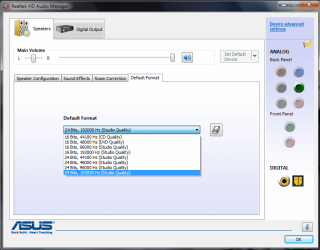
You can also try to lower the sound quality in Realtek HD audio manager (first try to update the driver, if it doesn't work then try this!)
As you can see from the attachment, you can customize the sound quality, and try out every combination to see if it will solve the lag
For my PC, the best setting is 24 Bits, 192000 Hz (Studio quality), and the poorest is 16 Bits, 44100 Hz (CD quality)
Your quality settings will be different, but it's the same point!
The higher the bit rate and frequency, the better the sound, and opposite. ;)
 

Attachments

  • Realtek.png
    Realtek.png
    34.5 KB · Views: 15

My Computer My Computer

Computer Manufacturer/Model Number
Me, Myself and I (:
OS
Windows 7 x86 Ultimate
CPU
Intel Pentium 4 (3.2GHz) @3.6GHz
Motherboard
Asus P5N-D SLI
Memory
3 GB DDR2 (2GB @800MHz + 1GB @533MHz)-3 inuvidual sticks
Graphics Card(s)
ATI Radeon HD 5450 1GB DDR3
Sound Card
Realtek HD Audio
Monitor(s) Displays
Philips Brilliance 170p 17" DVI/VGA
Screen Resolution
1280x1024 @60 Hz
Hard Drives
WDC WD400BD-08LRAO 40 GB Blue Caviar-Sata II
PSU
LC-Power LC6480S Scorpio-480W 18A@ +12V
Cooling
CPU~Arctic Freezer 7 Pro; 2 92mm case fans; HDD fan;
Keyboard
Logitec Usb
Mouse
Dell optical mouse Usb
Internet Speed
2 Mb/s
Other Info
SOLD MY PC 6 MONTHS AGO IN ORDER TO BUY A MOTORCYCLE :D I don't need a PC :D
also, try to manage your startup programs with msconfig( type it in start). disable any non-regularly used programs

This shouldn't affect him his computer is high spec enough to deal with a few programs with a Quad Core Processor and 8GB ram.

it says, i already have the latest version when i try updating it,
and i also disabled the things i dont use, did not work either :(.

Did you try to reinstall realtek HD audio manager? it solved my problem before?
First try what i wrote in the previous post!
 

My Computer My Computer

Computer Manufacturer/Model Number
Me, Myself and I (:
OS
Windows 7 x86 Ultimate
CPU
Intel Pentium 4 (3.2GHz) @3.6GHz
Motherboard
Asus P5N-D SLI
Memory
3 GB DDR2 (2GB @800MHz + 1GB @533MHz)-3 inuvidual sticks
Graphics Card(s)
ATI Radeon HD 5450 1GB DDR3
Sound Card
Realtek HD Audio
Monitor(s) Displays
Philips Brilliance 170p 17" DVI/VGA
Screen Resolution
1280x1024 @60 Hz
Hard Drives
WDC WD400BD-08LRAO 40 GB Blue Caviar-Sata II
PSU
LC-Power LC6480S Scorpio-480W 18A@ +12V
Cooling
CPU~Arctic Freezer 7 Pro; 2 92mm case fans; HDD fan;
Keyboard
Logitec Usb
Mouse
Dell optical mouse Usb
Internet Speed
2 Mb/s
Other Info
SOLD MY PC 6 MONTHS AGO IN ORDER TO BUY A MOTORCYCLE :D I don't need a PC :D
This shouldn't affect him his computer is high spec enough to deal with a few programs with a Quad Core Processor and 8GB ram.

it says, i already have the latest version when i try updating it,
and i also disabled the things i dont use, did not work either :(.

Did you try to reinstall realtek HD audio manager? it solved my problem before?
First try what i wrote in the previous post!

I tried to lower down the the audio settings, but nothing changed Still the same, how do i reinstal the realtek HD Audio manager?
 

My Computer My Computer

OS
Windows 7 64 bit home premium
CPU
AMD FX-4170: 4X4.2Ghz
Motherboard
Asrock N68-VS3 FX
Memory
8GB DDR3-1600 (2X4GB)
Graphics Card(s)
AMD HD7770 Ghz-Edition 1GB GDDR5
Sound Card
Realtek audio
Monitor(s) Displays
Phillips 23"
Screen Resolution
1920x1080
Hard Drives
500 GB
PSU
420 Watt
Cooling
4 Fans
Keyboard
Medion
Mouse
Logitech
Internet Speed
50 MB
it says, i already have the latest version when i try updating it,
and i also disabled the things i dont use, did not work either :(.

Did you try to reinstall realtek HD audio manager? it solved my problem before?
First try what i wrote in the previous post!

I tried to lower down the the audio settings, but nothing changed Still the same, how do i reinstal the realtek HD Audio manager?


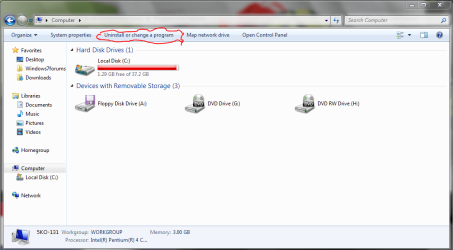
Open My Computer, then click on Uninstall or change a program (see attachment #1)
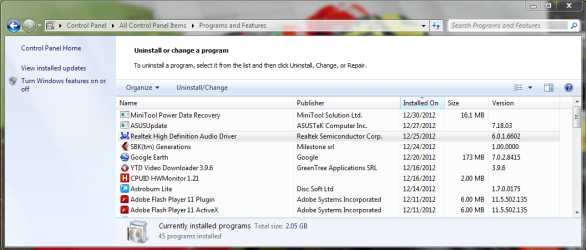
Then scroll down and find the realtek HD audio manager (see attachment #2)
Double click on it, and when it asks you if you want to remove the realtek audio driver, click YES
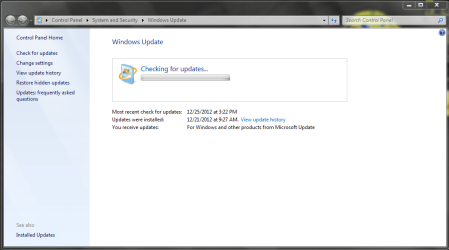
Then run Windows update (in start type in Windows update), and check for available updates for your computer(see attachment #3); after the check is done, download the AUDIO driver and install it.
Post reply of your progress, or if you need help!
 

Attachments

  • MY COMPUTER.PNG
    MY COMPUTER.PNG
    41.9 KB · Views: 19
  • Uninstall.PNG
    Uninstall.PNG
    53.4 KB · Views: 20
  • Update.PNG
    Update.PNG
    37.1 KB · Views: 18

My Computer My Computer

Computer Manufacturer/Model Number
Me, Myself and I (:
OS
Windows 7 x86 Ultimate
CPU
Intel Pentium 4 (3.2GHz) @3.6GHz
Motherboard
Asus P5N-D SLI
Memory
3 GB DDR2 (2GB @800MHz + 1GB @533MHz)-3 inuvidual sticks
Graphics Card(s)
ATI Radeon HD 5450 1GB DDR3
Sound Card
Realtek HD Audio
Monitor(s) Displays
Philips Brilliance 170p 17" DVI/VGA
Screen Resolution
1280x1024 @60 Hz
Hard Drives
WDC WD400BD-08LRAO 40 GB Blue Caviar-Sata II
PSU
LC-Power LC6480S Scorpio-480W 18A@ +12V
Cooling
CPU~Arctic Freezer 7 Pro; 2 92mm case fans; HDD fan;
Keyboard
Logitec Usb
Mouse
Dell optical mouse Usb
Internet Speed
2 Mb/s
Other Info
SOLD MY PC 6 MONTHS AGO IN ORDER TO BUY A MOTORCYCLE :D I don't need a PC :D
Allright, im doing the update now.
 

My Computer My Computer

OS
Windows 7 64 bit home premium
CPU
AMD FX-4170: 4X4.2Ghz
Motherboard
Asrock N68-VS3 FX
Memory
8GB DDR3-1600 (2X4GB)
Graphics Card(s)
AMD HD7770 Ghz-Edition 1GB GDDR5
Sound Card
Realtek audio
Monitor(s) Displays
Phillips 23"
Screen Resolution
1920x1080
Hard Drives
500 GB
PSU
420 Watt
Cooling
4 Fans
Keyboard
Medion
Mouse
Logitech
Internet Speed
50 MB
Okay, So i just did everything u said, but still does not work :(
 

My Computer My Computer

OS
Windows 7 64 bit home premium
CPU
AMD FX-4170: 4X4.2Ghz
Motherboard
Asrock N68-VS3 FX
Memory
8GB DDR3-1600 (2X4GB)
Graphics Card(s)
AMD HD7770 Ghz-Edition 1GB GDDR5
Sound Card
Realtek audio
Monitor(s) Displays
Phillips 23"
Screen Resolution
1920x1080
Hard Drives
500 GB
PSU
420 Watt
Cooling
4 Fans
Keyboard
Medion
Mouse
Logitech
Internet Speed
50 MB
make a snip of your game audio settings.
Did this problem appear immediately when you installed the game, or after some time of playing?
 

My Computer My Computer

Computer Manufacturer/Model Number
Me, Myself and I (:
OS
Windows 7 x86 Ultimate
CPU
Intel Pentium 4 (3.2GHz) @3.6GHz
Motherboard
Asus P5N-D SLI
Memory
3 GB DDR2 (2GB @800MHz + 1GB @533MHz)-3 inuvidual sticks
Graphics Card(s)
ATI Radeon HD 5450 1GB DDR3
Sound Card
Realtek HD Audio
Monitor(s) Displays
Philips Brilliance 170p 17" DVI/VGA
Screen Resolution
1280x1024 @60 Hz
Hard Drives
WDC WD400BD-08LRAO 40 GB Blue Caviar-Sata II
PSU
LC-Power LC6480S Scorpio-480W 18A@ +12V
Cooling
CPU~Arctic Freezer 7 Pro; 2 92mm case fans; HDD fan;
Keyboard
Logitec Usb
Mouse
Dell optical mouse Usb
Internet Speed
2 Mb/s
Other Info
SOLD MY PC 6 MONTHS AGO IN ORDER TO BUY A MOTORCYCLE :D I don't need a PC :D
wait!
i just found another (problem) i think,

i checked my taskmanager and it says CPU is 100% is this good or bad?
 

My Computer My Computer

OS
Windows 7 64 bit home premium
CPU
AMD FX-4170: 4X4.2Ghz
Motherboard
Asrock N68-VS3 FX
Memory
8GB DDR3-1600 (2X4GB)
Graphics Card(s)
AMD HD7770 Ghz-Edition 1GB GDDR5
Sound Card
Realtek audio
Monitor(s) Displays
Phillips 23"
Screen Resolution
1920x1080
Hard Drives
500 GB
PSU
420 Watt
Cooling
4 Fans
Keyboard
Medion
Mouse
Logitech
Internet Speed
50 MB
yeah it could be your cpu can't keep up with your game, or some background processes like av, scheduled defrag, etc. eating up your CPU thus making the audio and the whole game lag. Most likely, it's the second one. Try ending unnecessary programs while gaming and you should have less problems while you're gaming. I haven't seen any game use 100% CPU on 4 cores by itself.
 

My Computer My Computer

Computer type
Laptop
Computer Manufacturer/Model Number
Dell Optiplex SX270, Lenovo Z470
OS
Windows 7 Professional x64 SP1
CPU
Intel® Pentium® 4 @ 2.26 GHz, Intel Core i7-2670QM @ 2.20 GH
Motherboard
Dell, Lenovo
Memory
512MB Dual channel DDR SDRAM @ 400MHz 2.5-3-3-7, 8 GB DDR3
Graphics Card(s)
Intel 82865G, Nvidia GeForce 520M Graphics
Sound Card
SoundMax Integrated Audio, Integrated HD Audio
Monitor(s) Displays
LG W1952
Screen Resolution
1440x900, 1366 x 768
Hard Drives
40 GB 2.5" IDE 4200 RPM HDD, 500 GB 5400 RPM Sata 1.5 + 32 GB SSD
PSU
Dell 145 Watt, Lenovo 120 Watt Power Adapter
Case
Optiplex SX270 Small Form Factor, Laptop
Cooling
Dell Proprietary Air Cooling, Stock laptop cooling
Keyboard
Dell SK-8125 USB Keyboard
Mouse
Dell PS/2 2 button ball mouse with wheel scroll
Internet Speed
300 Mbit down / 20 Mbps up Time Warner Cable
Antivirus
MSE, Malwarebytes Scanner
Browser
Internet (Aizawa) Explorer 11
Other Info
Running Windows Server 2012 Datacenter on a virtual machine to run Metro Apps.
Okay, i will just reinstall windows 7, and see what happends..

I'll Post again tomorrow.
 

My Computer My Computer

OS
Windows 7 64 bit home premium
CPU
AMD FX-4170: 4X4.2Ghz
Motherboard
Asrock N68-VS3 FX
Memory
8GB DDR3-1600 (2X4GB)
Graphics Card(s)
AMD HD7770 Ghz-Edition 1GB GDDR5
Sound Card
Realtek audio
Monitor(s) Displays
Phillips 23"
Screen Resolution
1920x1080
Hard Drives
500 GB
PSU
420 Watt
Cooling
4 Fans
Keyboard
Medion
Mouse
Logitech
Internet Speed
50 MB
Okay, i will just reinstall windows 7, and see what happends..

I'll Post again tomorrow.

Wait, wait, wait!
reinstalling the OS is the last thing i would do!
Try deactivating your antivirus while gaming!
I got some extra fps doing that!!!
 

My Computer My Computer

Computer Manufacturer/Model Number
Me, Myself and I (:
OS
Windows 7 x86 Ultimate
CPU
Intel Pentium 4 (3.2GHz) @3.6GHz
Motherboard
Asus P5N-D SLI
Memory
3 GB DDR2 (2GB @800MHz + 1GB @533MHz)-3 inuvidual sticks
Graphics Card(s)
ATI Radeon HD 5450 1GB DDR3
Sound Card
Realtek HD Audio
Monitor(s) Displays
Philips Brilliance 170p 17" DVI/VGA
Screen Resolution
1280x1024 @60 Hz
Hard Drives
WDC WD400BD-08LRAO 40 GB Blue Caviar-Sata II
PSU
LC-Power LC6480S Scorpio-480W 18A@ +12V
Cooling
CPU~Arctic Freezer 7 Pro; 2 92mm case fans; HDD fan;
Keyboard
Logitec Usb
Mouse
Dell optical mouse Usb
Internet Speed
2 Mb/s
Other Info
SOLD MY PC 6 MONTHS AGO IN ORDER TO BUY A MOTORCYCLE :D I don't need a PC :D
Okay, i will just reinstall windows 7, and see what happends..

I'll Post again tomorrow.

Wait, wait, wait!
reinstalling the OS is the last thing i would do!
Try deactivating your antivirus while gaming!
I got some extra fps doing that!!!

Do you have any software for temperature monitoring???
Try CDUID HWmonitor and post back your readings.
What does task manager say for the ram, how much usage does it have @ load?
 

My Computer My Computer

Computer Manufacturer/Model Number
Me, Myself and I (:
OS
Windows 7 x86 Ultimate
CPU
Intel Pentium 4 (3.2GHz) @3.6GHz
Motherboard
Asus P5N-D SLI
Memory
3 GB DDR2 (2GB @800MHz + 1GB @533MHz)-3 inuvidual sticks
Graphics Card(s)
ATI Radeon HD 5450 1GB DDR3
Sound Card
Realtek HD Audio
Monitor(s) Displays
Philips Brilliance 170p 17" DVI/VGA
Screen Resolution
1280x1024 @60 Hz
Hard Drives
WDC WD400BD-08LRAO 40 GB Blue Caviar-Sata II
PSU
LC-Power LC6480S Scorpio-480W 18A@ +12V
Cooling
CPU~Arctic Freezer 7 Pro; 2 92mm case fans; HDD fan;
Keyboard
Logitec Usb
Mouse
Dell optical mouse Usb
Internet Speed
2 Mb/s
Other Info
SOLD MY PC 6 MONTHS AGO IN ORDER TO BUY A MOTORCYCLE :D I don't need a PC :D
Okay, i will just reinstall windows 7, and see what happends..

I'll Post again tomorrow.

Wait, wait, wait!
reinstalling the OS is the last thing i would do!
Try deactivating your antivirus while gaming!
I got some extra fps doing that!!!

hey, i already reinstalled win 7 but still lagg issues with sound on/ sound of, and the CPU ussage is now about 1-30%
while not playing a game, and i also downloaded that program and make a picture, 62510820c8e24e1faac4f3d7e590550e.png
 

My Computer My Computer

OS
Windows 7 64 bit home premium
CPU
AMD FX-4170: 4X4.2Ghz
Motherboard
Asrock N68-VS3 FX
Memory
8GB DDR3-1600 (2X4GB)
Graphics Card(s)
AMD HD7770 Ghz-Edition 1GB GDDR5
Sound Card
Realtek audio
Monitor(s) Displays
Phillips 23"
Screen Resolution
1920x1080
Hard Drives
500 GB
PSU
420 Watt
Cooling
4 Fans
Keyboard
Medion
Mouse
Logitech
Internet Speed
50 MB
Okay, i will just reinstall windows 7, and see what happends..

I'll Post again tomorrow.

Wait, wait, wait!
reinstalling the OS is the last thing i would do!
Try deactivating your antivirus while gaming!
I got some extra fps doing that!!!

hey, i already reinstalled win 7 but still lagg issues with sound on/ sound off, and the CPU ussage is now about 1-30%
while not playing a game, and i also downloaded that program and make a picture, 62510820c8e24e1faac4f3d7e590550e.png

So that means you have the same issues even with sound on and OFF???
That is then a different kind of problem... did you try to lower the Graphics settings???
 

My Computer My Computer

Computer Manufacturer/Model Number
Me, Myself and I (:
OS
Windows 7 x86 Ultimate
CPU
Intel Pentium 4 (3.2GHz) @3.6GHz
Motherboard
Asus P5N-D SLI
Memory
3 GB DDR2 (2GB @800MHz + 1GB @533MHz)-3 inuvidual sticks
Graphics Card(s)
ATI Radeon HD 5450 1GB DDR3
Sound Card
Realtek HD Audio
Monitor(s) Displays
Philips Brilliance 170p 17" DVI/VGA
Screen Resolution
1280x1024 @60 Hz
Hard Drives
WDC WD400BD-08LRAO 40 GB Blue Caviar-Sata II
PSU
LC-Power LC6480S Scorpio-480W 18A@ +12V
Cooling
CPU~Arctic Freezer 7 Pro; 2 92mm case fans; HDD fan;
Keyboard
Logitec Usb
Mouse
Dell optical mouse Usb
Internet Speed
2 Mb/s
Other Info
SOLD MY PC 6 MONTHS AGO IN ORDER TO BUY A MOTORCYCLE :D I don't need a PC :D
Back
Top