Show Us Your Rig [4]

Status
Not open for further replies.
Thanks guys.

My last SSD was an Intel X25-M 120GB on an Intel SATA II port, so the 840Pro on a SATA III port does seem noticeably faster. Was going to get an 830 but they were out of stock so got the 840Pro ;)
From the research I did, the difference between the 830 and 840Pro would only be noticeable in benchmarks, so if you have an 830 I wouldn't worry about upgrading. Unless you have to have the latest.

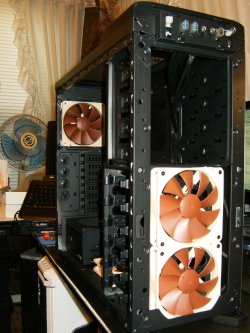
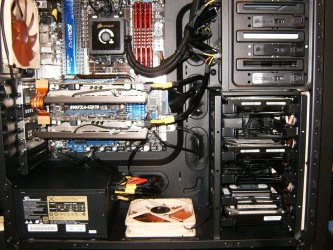
The Nocs are great, even with the color, wouldn't trade them for anything.
 

My Computer My Computer

At a glance

Windows 7 Ult x64 - SP1/ Windows 8 Pro x64Intel Core i5-3570K 4.6GHz8GB (2X4GB) DDR3 1600 Corsair Vengeance CL8 1.5vSapphire HD 7770 Vapor-X OC 1GB DDR5
Computer type
PC/Desktop
Computer Manufacturer/Model Number
76~2.0
OS
Windows 7 Ult x64 - SP1/ Windows 8 Pro x64
CPU
Intel Core i5-3570K 4.6GHz
Motherboard
Gigabyte GA-Z77X UD3H, f18
Memory
8GB (2X4GB) DDR3 1600 Corsair Vengeance CL8 1.5v
Graphics Card(s)
Sapphire HD 7770 Vapor-X OC 1GB DDR5
Sound Card
Onboard VIA VT2021
Monitor(s) Displays
22" LCD Dell
Screen Resolution
1680x1050
Hard Drives
Samsung 840Pro 128GB SSD,
Seagate Barracuda 500GB SATA2 7200rpm 32MB cache, Seagate Barracuda 1TB SATA2 7200rpm 32MB cache,
PSU
Corsair HX650W
Case
Cooler Master Storm Scout
Cooling
Corsair H80 2x12cm Noctua NF P12 , 2x14cm case fans
Keyboard
Logitech Wave
Mouse
CM Sentinel
Internet Speed
Dismal
Antivirus
Avast
Browser
Opera Next
Other Info
Haswell laptop: HP Envy 17t-j, i7-4700MQ, GeForce 740M 2GB DDR3, 17.3" Full HD 1920x1080, 16GB RAM, Samsung 840 Pro 128GB, 1TB Hitachi 7200 HDD,
Desktop: eSATA ports,
External eSATA Seagate 500GB SATA2 7200rpm,
External WD USB 500GB
Looks great Dave. Yeah, I like seeing the tan and brown Nocs, you know your covered for cooling :thumbsup:

A Guy
 

My Computer My Computer

At a glance

Windows 10 Home x64INTEL Core i5-750 Quad-Core 3.37GHzHyperX Fury Black Series 8GB (2 x 4GB) 1866MhzEVGA GeForce GTX 750 Superclocked 1GB 128-Bit...
Computer type
PC/Desktop
OS
Windows 10 Home x64
CPU
INTEL Core i5-750 Quad-Core 3.37GHz
Motherboard
ASUS P7P55D
Memory
HyperX Fury Black Series 8GB (2 x 4GB) 1866Mhz
Graphics Card(s)
EVGA GeForce GTX 750 Superclocked 1GB 128-Bit GDDR5
Monitor(s) Displays
LG 32MA68HY 32" IPS
Screen Resolution
1920 x 1080
Hard Drives
Samsung 840 Evo 120GB, SEAGATE 500GB Barracuda® 7200.12, SATA 3 Gb/s, 7200 RPM, 16MB cache
PSU
ANTEC TruePower New TP-550, 80 PLUS, 550W
Case
ANTEC Three Hundred Illusion
Cooling
COOLER MASTER Hyper 212 Plus, 4 x 120mm 1 x 140mm Noctua's
Internet Speed
85 + Mbps
Antivirus
Avast
Browser
Vivaldi
Aparantly the Corsair Air series fans are on par with the Noctua's but 2 for the price of 1 Noc :p
 

My Computer My Computer

At a glance

Win7 Home Premium x64 SP1i7 4770k8Gb Kingston HyperX Beast 2400MHz @2133MHz 11...MSI GTX 780ti Gaming Oc x2
Computer type
PC/Desktop
Computer Manufacturer/Model Number
Custom build
OS
Win7 Home Premium x64 SP1
CPU
i7 4770k
Motherboard
Asus maximus VI Hero
Memory
8Gb Kingston HyperX Beast 2400MHz @2133MHz 11-12-11-30
Graphics Card(s)
MSI GTX 780ti Gaming Oc x2
Sound Card
Onboard ROG SupremeFX
Monitor(s) Displays
Asus VG248QE
Screen Resolution
3840X1080 144Hz
Hard Drives
Samung Evo 256Gb, OCZ Agility4 128Gb
1x1TB hitachi storage
PSU
EVGA Supernova 1000w Platinum
Case
Corsair Air 540
Cooling
Corsair H100i
Keyboard
Coolermaster Quickfire Pro
Mouse
Corsair M65 RGB
Internet Speed
74mb dwn/16up
Antivirus
MSE,Malwarebytes
Browser
Chrome
Lady Fitzgerald, I'm surprised to find someone as fanatic as me. But, forget images. I have 2 drives and use Paragon Migrate. It is made especially for SSDs, but will work on spinners just as well. I clone my OS to another drive at least once a week, alternating weeks between drives. So, I always have 2 copies of my OS. If my drive died tonight, I wouldn't even lose an email, and would be back up and running in less than 5 minutes. To me, that is well worth the $19.95 it costs. Yes, I have a lot of hard drives. I think I should get some more. I'm sure I would find a use for them. Actually, I have been waiting for them to drop in price, back to where they were.

Mayhap we value our data more than most people. I'm trying to be as paperless as possible since it takes up less space, can be backed up easily, and is easier to organize. The only paper documents I keep as paper are the ones I'm legally required to keep, such as my birth certificate (it seems silly I have prove to someone I was born; like I was hatched?), titles, some receipts for warranties (for the anal companies that won't accept a copy of a receipt), etc. (and all of those are copied). I've ripped all my CDs to large bit rate mp3s and will be ripping all my DVDs and copying my VHS tapes (I'll keep the original disks for a while until I am sure the copies are good, then they will be destroyed since I don't have room for them). I've scanned a little over half of my huge book collection since I don't have room for them and I will NOT give them up. The scanning process involves cutting off the spines so they are automatically destroyed in the process. I can't afford to not be anal about backups!

In addition to multiple backups (all media can fail so redundancy is vital), having backups in multiple locations is vital. For example, if one has all of their backups in their home, a fire, flood, theft, etc. can cause total loss. Having at least one backup offsite will help to prevent total loss. The problem with most offsite backups (such as keeping HDDs in a bank vault) is the media still can fail and the backups are almost always out of data. Hence the need for the redundancy of both onsite and offsite backups.

Using the cloud for backups is usually the most up to date backup one can have since the backup usually takes place either immediately or soon after the data is created, especially if the software is set to do the backups automatically. The downside of cloud backups is a lack of security (unless the data is encrypted before uploading), the large use of bandwidth (which can knock some users out of the water due to usage caps), and instability. Free cloud storage sites are infamous for disappearing with little or no warning. Some sites are unrealiable (such as CrashPlan; their servers are notoriously slow although using the service to reciprocally store encrypted data on another person's computer seems to work well). Mozy was comparable to Carbonite until recently when Mozy dropped their unlimited data plan. I still use Carbonite to back up my desktop (I don't keep much data on my notebook and none of it is critical although I still back it up just to make restoration easier and faster). Still, even Carbonite has been known to lose data (rare but it does happen) and they could always go belly up. Also, recovering a few TB of data from them would take forever (and I'm pushing 64, I don't have much time left!) or expensive if I had them mail me HDDs with my data on them. Carbonite is still useful as an always up to date offsite back up to replace lost data an out of date HHD setting in a bank vault might be missing. Again, no matter the backup scheme, onsite and offsite redundancy is vital to avoid total data loss.

I experimented with clones initially—what could be faster than swapping out HDDs?—but backups always took too long since they always had to be full backups so I switched to images since I can use incremental or differential backups with them). I'm using the paid version of Macrium Reflect. I make a full backup roughly once a week (right now, I'm probably going to extend that interval because it takes too long to do a full backup) and, anytime I put vital data on a machine, I do a differential back up. The only thing a differential backup backs up is data that was added or changed since the last full backup (incrementals back up data added or changed since the last incremental backup). All the backup images have to be present for recovery but I keep each set of associated images in their own folder so that isn't an issue. I never modify original files, working from copies instead, so versioning isn't an issue (if I lose a file completely, it stays on Carbonite for at least a month anyway). Not having to frequently make full back ups save me a lot of time (yeah, I'm lazy) and my HDDS a lot of wear and tear.
 

My Computer My Computer

At a glance

Win 7 Ultimate 64 bitIntel i7-3930KKingston HyperX Genesis 32GB Kit (8x4GB Modul...MSI R7850 Twin Frozr 2GD5/OC Radeon HD 7850 2...
Computer type
PC/Desktop
Computer Manufacturer/Model Number
Custom Build
OS
Win 7 Ultimate 64 bit
CPU
Intel i7-3930K
Motherboard
ASUS P9X79 WS
Memory
Kingston HyperX Genesis 32GB Kit (8x4GB Modules) 1600MHz DDR
Graphics Card(s)
MSI R7850 Twin Frozr 2GD5/OC Radeon HD 7850 2GB 256-bit GDDR
Sound Card
Asus Xonar Essence STX
Monitor(s) Displays
3x Asus VG248QE 24", Vizio 32" TV
Screen Resolution
1920 x 1080, ?
Hard Drives
Samsung 128GB 840 Pro SSD (1),
Samsung 4TB 850 EVO SSDs (4)
Samsung 4TB 850 EVO SSDs (16) external backup drives used in 2.5" hot swap bays in the computer.
PSU
Corsair HX750w
Case
Antec Two Hundred v2 (modified)
Cooling
Cooler Master GeminII S524 120mm (fan replaced with a 140mm)
Keyboard
Logitech G510s
Mouse
Logitech M525 (two in use)
Internet Speed
=< 32Mbps down, 8Mbps up
Antivirus
AVAST!, MBAM, SAS, Spybot S&D (all but MBAM free) Glary Util
Browser
IE11
Other Info
LSI 9211-8i HBA card (8 SATA III ports), 2.5" & 3.5" Hot Swap Bays, HooToo HT-CR001 PCI-E to USB 3.0 Internal Hub + 6 Slot Card Reader, and LG Model CH12LS28 BD-ROM Optical Drive. Also, ScanSnap S1500 ADF duplexing scanner, Canon 9000F flat bed scanner, Corsair SP2500 2.1 speakers, Samsung CLP 415nw laser color printer, Cyberpower PP2200SW UPS
Nice job, Dave. Real clean and neat. No doubt you will love the rig and the Noctua fans are fantastic. The color kind of grows on you, but the performance is unquestioned and unheard. I've had to open the case to make sure they are still running. All around great job. I'm anxious to hear whether you think the Samsung 840 Pro is worth the extra money over the 830.

The warranty increase from three years to five years alone should make the extra money worth it (it better, I've got one the way!).
 
Last edited:

My Computer My Computer

At a glance

Win 7 Ultimate 64 bitIntel i7-3930KKingston HyperX Genesis 32GB Kit (8x4GB Modul...MSI R7850 Twin Frozr 2GD5/OC Radeon HD 7850 2...
Computer type
PC/Desktop
Computer Manufacturer/Model Number
Custom Build
OS
Win 7 Ultimate 64 bit
CPU
Intel i7-3930K
Motherboard
ASUS P9X79 WS
Memory
Kingston HyperX Genesis 32GB Kit (8x4GB Modules) 1600MHz DDR
Graphics Card(s)
MSI R7850 Twin Frozr 2GD5/OC Radeon HD 7850 2GB 256-bit GDDR
Sound Card
Asus Xonar Essence STX
Monitor(s) Displays
3x Asus VG248QE 24", Vizio 32" TV
Screen Resolution
1920 x 1080, ?
Hard Drives
Samsung 128GB 840 Pro SSD (1),
Samsung 4TB 850 EVO SSDs (4)
Samsung 4TB 850 EVO SSDs (16) external backup drives used in 2.5" hot swap bays in the computer.
PSU
Corsair HX750w
Case
Antec Two Hundred v2 (modified)
Cooling
Cooler Master GeminII S524 120mm (fan replaced with a 140mm)
Keyboard
Logitech G510s
Mouse
Logitech M525 (two in use)
Internet Speed
=< 32Mbps down, 8Mbps up
Antivirus
AVAST!, MBAM, SAS, Spybot S&D (all but MBAM free) Glary Util
Browser
IE11
Other Info
LSI 9211-8i HBA card (8 SATA III ports), 2.5" & 3.5" Hot Swap Bays, HooToo HT-CR001 PCI-E to USB 3.0 Internal Hub + 6 Slot Card Reader, and LG Model CH12LS28 BD-ROM Optical Drive. Also, ScanSnap S1500 ADF duplexing scanner, Canon 9000F flat bed scanner, Corsair SP2500 2.1 speakers, Samsung CLP 415nw laser color printer, Cyberpower PP2200SW UPS
If the 840 is as reliable as the 830 has been, you will not be disappointed.
 

My Computers My Computers

  • At a glance

    Windows 11 ProRyzen 9 5900X32GB G Skill DDR4-3600EVGA RTX 3080 FTW 3 Ultra
    Computer type
    PC/Desktop
    Computer Manufacturer/Model Number
    ALWAYS UNDER CONSTRUCTION
    OS
    Windows 11 Pro
    CPU
    Ryzen 9 5900X
    Motherboard
    Asus X570 Crosshair Viii Hero
    Memory
    32GB G Skill DDR4-3600
    Graphics Card(s)
    EVGA RTX 3080 FTW 3 Ultra
    Sound Card
    On Board/Sennheiser PC37X Headset
    Monitor(s) Displays
    3 X Asus 27"
    Screen Resolution
    2560x1440
    Hard Drives
    2 X 1 TB NVME drives
    PSU
    EVGA 850
    Case
    Phanteks Eclipse P400A
    Cooling
    EVGA 280 AIO
    Keyboard
    Logitech G510s/ Logitech G13
    Mouse
    Logitech G502
    Internet Speed
    24/1
    Antivirus
    ESET/MBAM Pro/SAS Pro
    Browser
    Chrome/ Firefox/ Edge
  • At a glance

    Windows 11 ProIntel Ultra 9 288V32 GB LPDDR5X 8533
    Computer type
    Laptop
    System Manufacturer/Model Number
    Dell 16 Plus
    OS
    Windows 11 Pro
    CPU
    Intel Ultra 9 288V
    Memory
    32 GB LPDDR5X 8533
    Monitor(s) Displays
    16" Mini-LED HDR600 Touch 90 Hz
    Screen Resolution
    2560X1600
    Hard Drives
    1 TB NVME
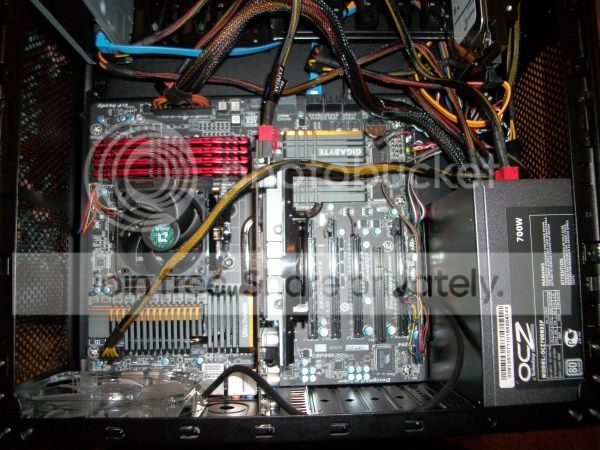
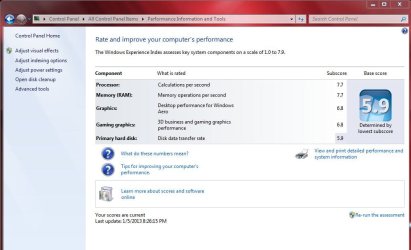
Just upgraded to an i5 3570k, Gigabyte Z77X UD3H and a Samsung 840Pro 128GB.
Found a slim fan for the top case, the CPU cooler and both fans now fit inside the case.
View attachment 248646

Nice rig Dave!
Is that an H80 you are running with the nocs?
I'm trying to decide between an Antec 620, an H70 core, an H80 and and H100. How does the thing with the performance setting button on the pump work? You have to change it all the time or you just set it to, let's say medium, and leave it be?
Are your nocs connected to the fan control on the pump/cold plate or to a fan header on your mobo?
Are the stock fans very noisy?
I'm asking because in a week or so I will take the whole thing apart when I get a new mobo, and I might as well change the cooler and get done with it all at the same time.
Thanks and sorry for flooding you with questions.
J
 

My Computer My Computer

At a glance

Windows 7 Ultimate x64 SP1AMD FX 8320 4.8GHz, 1.475V4 x GSkill Ripjaws Z 4GB 1600 CL82 x ASUS HD7870 2GB DirectCu II
Computer type
PC/Desktop
Computer Manufacturer/Model Number
Custom built
OS
Windows 7 Ultimate x64 SP1
CPU
AMD FX 8320 4.8GHz, 1.475V
Motherboard
ASUS Crosshair V Formula-Z
Memory
4 x GSkill Ripjaws Z 4GB 1600 CL8
Graphics Card(s)
2 x ASUS HD7870 2GB DirectCu II
Sound Card
M-Audio Firewire 410
Monitor(s) Displays
2 x Samsung Syncmaster SA300
Screen Resolution
1600x900
Hard Drives
1 x Seagate Barracuda 2TB, 7200 rpm, 64 mb cache - Kingston HyperX 3K 120GB (OS) - Corsair FORCE Series 180GB (Games & Apps)
PSU
Corsair TX850M
Case
NZXT Switch 810
Cooling
Custom Water. XSPC Raystorm, Laing DDC 3.2T PWM, 360+120 rad
Keyboard
Corsair Vengeance 650
Mouse
Elephant Leviathan 3200 DPI
Internet Speed
Too slow
I've found that with Noctua fans you can run the Corsair pump at performance and the fans at full 12 volt either off the PSU or the mobo fan headers and you won't hear a thing with the side panels on. My H100 with four Noc's and in Performance makes so little noise that it makes no sense to throttle the pump or fans back.
 

My Computer My Computer

At a glance

Windows 7 Ultimate 64i7 3770k OC'd 4.6 @ 1.17v, also FX 8120 & i5 ...32 gb G.Skill Sniper DDR3 10-12-12-31 @ 2133XFX Radeon 7870 2GB DDR5
Computer type
PC/Desktop
Computer Manufacturer/Model Number
A blend of brains, brawn and dumb luck.
OS
Windows 7 Ultimate 64
CPU
i7 3770k OC'd 4.6 @ 1.17v, also FX 8120 & i5 miniITX
Motherboard
MSI P67A-GD80 b3
Memory
32 gb G.Skill Sniper DDR3 10-12-12-31 @ 2133
Graphics Card(s)
XFX Radeon 7870 2GB DDR5
Sound Card
Sound Blaster Z Series Card
Monitor(s) Displays
(2) LG LED 23" 1920 x 1080 2ms Monitors via mini d-port
Screen Resolution
1680 X 1050 p
Hard Drives
Samsung 256 gb 830 SSD sata III
(1) 1 tb WD Black
(2) 1 tb Hitachi deskmates/sata II
(2) 1 tb WD green/sata II
(2) 3 tb Seagate Barracuda
(1) 120 gb OCZ Vertex SS
(1) Drobo 5N w/5 Seagate 3tb
PSU
EVGA modular 1000G2 80% gold rating & APC 1200 RS
Case
CoolerMaster Storm Styker
Cooling
7 case fans 140mm & 120mm, NZXT Kraken X60
Keyboard
(2) Logitech Illuminated Keyboards (1) usb (1) wireless
Mouse
Logitech G700 & T-BC21 - nano nx for the laptop
Internet Speed
Basic 120mbps down
Antivirus
Trend Micro Titanium Max Security & Malwarebytes Premium
Browser
Chrome and IE 10
Other Info
5 Noctua case fans + 3 Noctua in p/p on NZXT cooler
Integrated hot swap drive bays for 2.5" Drives
(2) Lite-on dvd/cd/Blu Ray optical 22X
Integrated fan controller and led on/off
HP Officejet Pro 8630 all-n-one
Hot-swappable 3.5" hard drive bay
Netgear Nighthawk router
Asus USB 3 & sata 6 PCIe card
Vantec IDE to sata adptr./Ultra sata adptr
Lenovo L420 i5 lappy with m sata
Drobo 5N advanced NAS
I've found that with Noctua fans you can run the Corsair pump at performance and the fans at full 12 volt either off the PSU or the mobo fan headers and you won't hear a thing with the side panels on. My H100 with four Noc's and in Performance makes so little noise that it makes no sense to throttle the pump or fans back.

Thanks Alan.
Noctuas are difficult to come by down here, so I'll probably get some DeepCools, Spectre Pros or NZXTs performance, wich are the best you can get in these latitudes. They are mcuch noisier than Noctuas though.
Should I run them through the connector on the pump assembly or through a mobo header so they can be regulated?
Is your airflow through the radiator sucking air from outside the case or from within the case?
Does having push/pull on the H100 make a big difference?
One more question and that's all, I promise: is the connector on the H100 3 pin or 4 pin (PWM). Corsair's site does not specify.
Thanks again,
J
 

My Computer My Computer

At a glance

Windows 7 Ultimate x64 SP1AMD FX 8320 4.8GHz, 1.475V4 x GSkill Ripjaws Z 4GB 1600 CL82 x ASUS HD7870 2GB DirectCu II
Computer type
PC/Desktop
Computer Manufacturer/Model Number
Custom built
OS
Windows 7 Ultimate x64 SP1
CPU
AMD FX 8320 4.8GHz, 1.475V
Motherboard
ASUS Crosshair V Formula-Z
Memory
4 x GSkill Ripjaws Z 4GB 1600 CL8
Graphics Card(s)
2 x ASUS HD7870 2GB DirectCu II
Sound Card
M-Audio Firewire 410
Monitor(s) Displays
2 x Samsung Syncmaster SA300
Screen Resolution
1600x900
Hard Drives
1 x Seagate Barracuda 2TB, 7200 rpm, 64 mb cache - Kingston HyperX 3K 120GB (OS) - Corsair FORCE Series 180GB (Games & Apps)
PSU
Corsair TX850M
Case
NZXT Switch 810
Cooling
Custom Water. XSPC Raystorm, Laing DDC 3.2T PWM, 360+120 rad
Keyboard
Corsair Vengeance 650
Mouse
Elephant Leviathan 3200 DPI
Internet Speed
Too slow
Any good premium fan that has good static pressure will do but the quieter the better. Nocuta's are by no means the only game in town. I've tried with outside air pushed through and then pulled into the case as well as case air pushed then pulled out the top and or back when using the H100 or the H50 unit's. I'm now running the H100 with only two fans and my new favorite the Thermaltake Extreme running only two fans again. My goal was to run both with 4 fans but to my amazement the huge cases wouldn't allow what my previous Thermaltake Element V did with ease? In reality I think push pull barely does anything but add cost and slightly higher noise and energy use. Then regarding the connector on the H100 pump, yes I run the fans both on the H100 and the Thermaltake Extreme this way and it works fine and keeps the wiring a bit cleaner in the case sometimes. Regarding the flow of the air again it makes little difference and more has to do with if you like positive pressure inside the case or not. All things being equal I'm currently liking cool air into the case exhausting over the ram them being pulled out the back of the case via a 140mm Noc.
 

My Computer My Computer

At a glance

Windows 7 Ultimate 64i7 3770k OC'd 4.6 @ 1.17v, also FX 8120 & i5 ...32 gb G.Skill Sniper DDR3 10-12-12-31 @ 2133XFX Radeon 7870 2GB DDR5
Computer type
PC/Desktop
Computer Manufacturer/Model Number
A blend of brains, brawn and dumb luck.
OS
Windows 7 Ultimate 64
CPU
i7 3770k OC'd 4.6 @ 1.17v, also FX 8120 & i5 miniITX
Motherboard
MSI P67A-GD80 b3
Memory
32 gb G.Skill Sniper DDR3 10-12-12-31 @ 2133
Graphics Card(s)
XFX Radeon 7870 2GB DDR5
Sound Card
Sound Blaster Z Series Card
Monitor(s) Displays
(2) LG LED 23" 1920 x 1080 2ms Monitors via mini d-port
Screen Resolution
1680 X 1050 p
Hard Drives
Samsung 256 gb 830 SSD sata III
(1) 1 tb WD Black
(2) 1 tb Hitachi deskmates/sata II
(2) 1 tb WD green/sata II
(2) 3 tb Seagate Barracuda
(1) 120 gb OCZ Vertex SS
(1) Drobo 5N w/5 Seagate 3tb
PSU
EVGA modular 1000G2 80% gold rating & APC 1200 RS
Case
CoolerMaster Storm Styker
Cooling
7 case fans 140mm & 120mm, NZXT Kraken X60
Keyboard
(2) Logitech Illuminated Keyboards (1) usb (1) wireless
Mouse
Logitech G700 & T-BC21 - nano nx for the laptop
Internet Speed
Basic 120mbps down
Antivirus
Trend Micro Titanium Max Security & Malwarebytes Premium
Browser
Chrome and IE 10
Other Info
5 Noctua case fans + 3 Noctua in p/p on NZXT cooler
Integrated hot swap drive bays for 2.5" Drives
(2) Lite-on dvd/cd/Blu Ray optical 22X
Integrated fan controller and led on/off
HP Officejet Pro 8630 all-n-one
Hot-swappable 3.5" hard drive bay
Netgear Nighthawk router
Asus USB 3 & sata 6 PCIe card
Vantec IDE to sata adptr./Ultra sata adptr
Lenovo L420 i5 lappy with m sata
Drobo 5N advanced NAS
My H100 didn't work right with the fans plugged into the pump. They stayed the same level no matter which setting I put it on. But, as Alan said, with Nocs, it made no difference anyway. Some have better temps pushing air out, I, again like Alan, had better luck pushing cooler outside air into the case and out the back. I'm a firm believer in positive air flow anyway. But, I think it just depends on the case and the amount and direction of air flow. Try it both ways and see which works better for you. As far as push/pull vs. Push, most tests I've seen seem to agree 2-3C difference if any at all. I guess in theory it would have to help, but in practice makes little difference. And static pressure is much more important than the amount of air flow with radiators.
 

My Computers My Computers

  • At a glance

    Windows 11 ProRyzen 9 5900X32GB G Skill DDR4-3600EVGA RTX 3080 FTW 3 Ultra
    Computer type
    PC/Desktop
    Computer Manufacturer/Model Number
    ALWAYS UNDER CONSTRUCTION
    OS
    Windows 11 Pro
    CPU
    Ryzen 9 5900X
    Motherboard
    Asus X570 Crosshair Viii Hero
    Memory
    32GB G Skill DDR4-3600
    Graphics Card(s)
    EVGA RTX 3080 FTW 3 Ultra
    Sound Card
    On Board/Sennheiser PC37X Headset
    Monitor(s) Displays
    3 X Asus 27"
    Screen Resolution
    2560x1440
    Hard Drives
    2 X 1 TB NVME drives
    PSU
    EVGA 850
    Case
    Phanteks Eclipse P400A
    Cooling
    EVGA 280 AIO
    Keyboard
    Logitech G510s/ Logitech G13
    Mouse
    Logitech G502
    Internet Speed
    24/1
    Antivirus
    ESET/MBAM Pro/SAS Pro
    Browser
    Chrome/ Firefox/ Edge
  • At a glance

    Windows 11 ProIntel Ultra 9 288V32 GB LPDDR5X 8533
    Computer type
    Laptop
    System Manufacturer/Model Number
    Dell 16 Plus
    OS
    Windows 11 Pro
    CPU
    Intel Ultra 9 288V
    Memory
    32 GB LPDDR5X 8533
    Monitor(s) Displays
    16" Mini-LED HDR600 Touch 90 Hz
    Screen Resolution
    2560X1600
    Hard Drives
    1 TB NVME
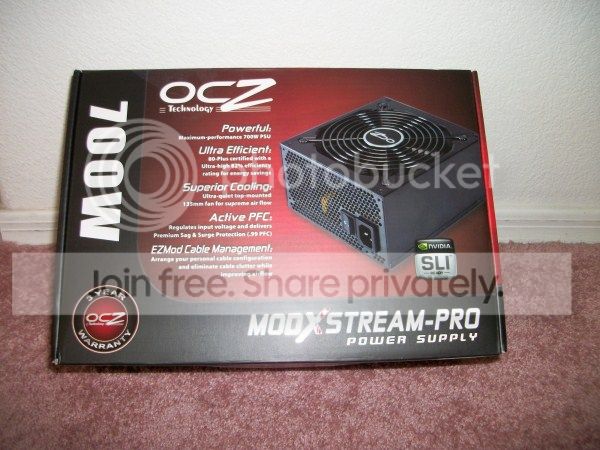
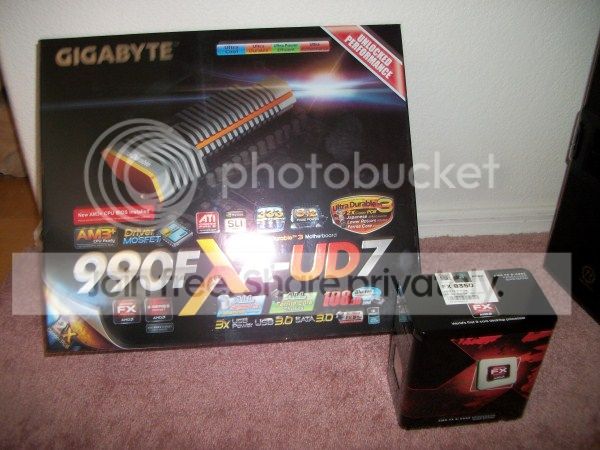
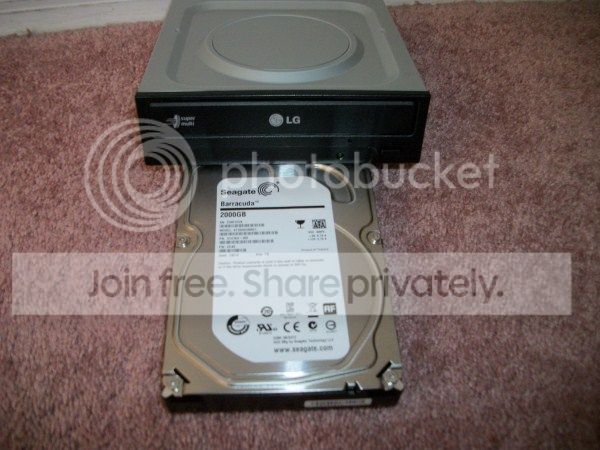
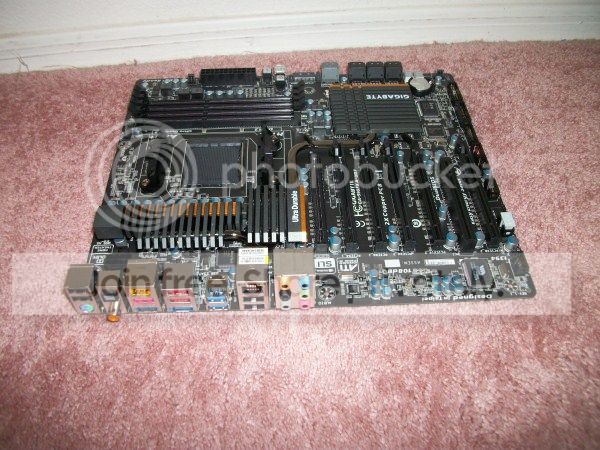
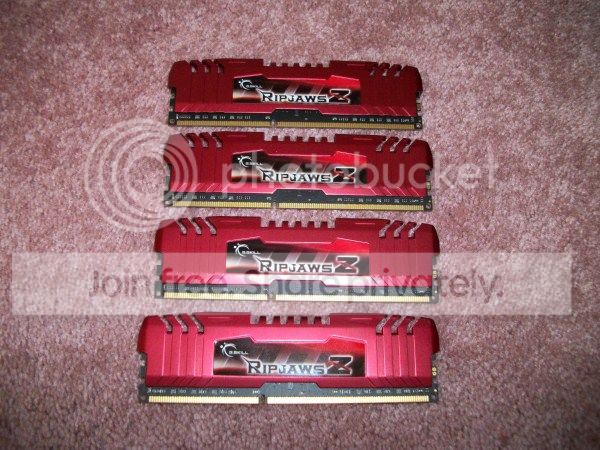
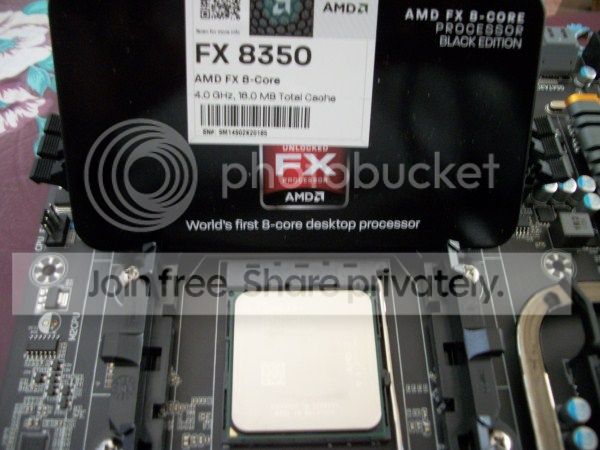
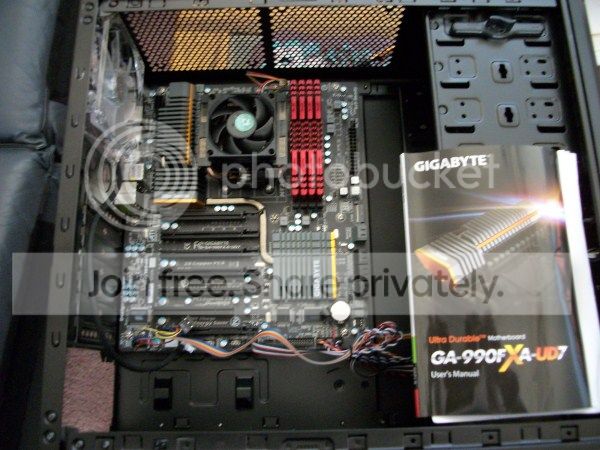
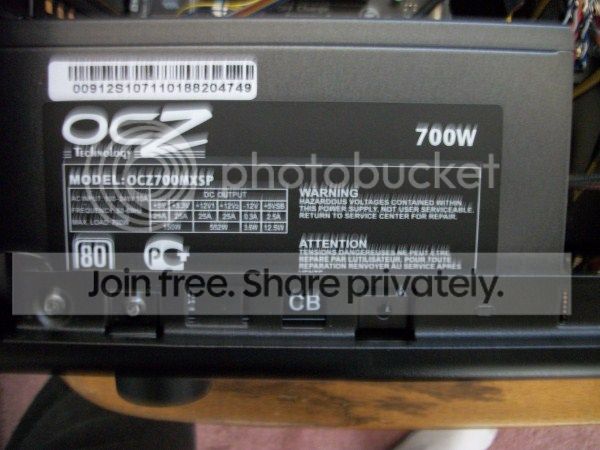
Another Doc Outta the Box!!

Got a new MB & CPU yesterday for a Science Experiment :cool:

Managed to throw all this together this afternoon :huh:

AMD-FX-8350 Build
Thermaltake V3 Black Edition VL80001W2Z
OCZ 700 watt OCZ700MXSP Power Supply
GigaByte GA-990FxA-UD7 Motherboard
AMD FX 8350 8-Core CPU Black Edition 4.0 GHz
Seagate 2TB Hard Drive
LG Super Multi OEM DVD-R/W Sata Optical Drive
GSkill RipJaws-Z 4 x 4GB DDR3 Memory sticks
EVGA nVidia GeForce 9800 GT 1GB DDR3 PCI-E 2.0 Video Card

Windows 7 Enterprise Edition SP1 (x64)


100_0369.jpg


100_0370.jpg


100_0371.jpg


100_0374.jpg


100_0375.jpg


100_0378.jpg


100_0393.jpg


100_0396.jpg


100_0397.jpg


100_0400.jpg


100_0401.jpg


Installed Win7 Enterprise from a USB stick in 15 minutes :eek:


Then it is Treat time for Doc & the two Cats :party:

100_0367.jpg


AMD-FX-8350_wei.JPG


:thumbsup:
 
Last edited:

My Computer My Computer

At a glance

Win7 Enterprise, Win7 x86 (Ult 7600), Win7 x6...AMD fx8350 4ghz, AMD-32 2400mhz, AMD-64 3200m...2gb, 4gb on the Ult 7600, 4gb on Technet RTM,...Draw my own Graphics, several nVidia cards
Computer type
PC/Desktop
Computer Manufacturer/Model Number
Built them myself, Science Experiments !
OS
Win7 Enterprise, Win7 x86 (Ult 7600), Win7 x64 Ult 7600, TechNet RTM on AMD x64 (2.8Ghz)
CPU
AMD fx8350 4ghz, AMD-32 2400mhz, AMD-64 3200mhz, AMDx64 2.8G
Motherboard
SIS 755, ECS-K8M890M-M (Ult 7600), GigaByte & others
Memory
2gb, 4gb on the Ult 7600, 4gb on Technet RTM, 32gb on FX8350
Graphics Card(s)
Draw my own Graphics, several nVidia cards
Sound Card
on motherboard
Monitor(s) Displays
19" flat scr, 28" I-Inc widescr,22" Emprex Widescr, 23" Acer
Screen Resolution
1280 x 1024, 1440 x 900, 1920 x 1080
Hard Drives
6 pata Ide HD's & 2 Sata HD's
added 80gb external on Ult 7600 computer,
numerous extra 1tb, 2TB, 3Tb SATA HD's
A collection of ext HD Docks w/ HDs
PSU
430w, 550w, 600w, 700, 800, etc
Case
All Generic Full Towers
Cooling
Open Air & a few fans, some w/ colored LEDs
Keyboard
Compaq & Dell recycled from GoodWill
Mouse
Made in China Optical Wired Mouse
Internet Speed
Fast Cable InterNet
Antivirus
AVG Free on 24 different Desktops, NO Problems!
Browser
IE 8 is preferred, but use FireFox sometimes
Other Info
Linksys Routers, switches, & Hubs
Too Many USB Flash Drives to count, Biggest is 64GB !
Eight computers in my home network.
Sixteen computers at my business network.
Linked via TeamViewer !
Lots of old used spare computer parts everywhere!
My H100 didn't work right with the fans plugged into the pump. They stayed the same level no matter which setting I put it on. But, as Alan said, with Nocs, it made no difference anyway. Some have better temps pushing air out, I, again like Alan, had better luck pushing cooler outside air into the case and out the back. I'm a firm believer in positive air flow anyway. But, I think it just depends on the case and the amount and direction of air flow. Try it both ways and see which works better for you. As far as push/pull vs. Push, most tests I've seen seem to agree 2-3C difference if any at all. I guess in theory it would have to help, but in practice makes little difference. And static pressure is much more important than the amount of air flow with radiators.

Alan, Steve,
I will be getting the the H100 then, with quietest high static pressure fans I can lay my hands on.
That's unless I decide to go custom water cooling, but that would take twice (or more) the money I'm planning to spend on the H100 and I don't now if I have the level of proficiency required to pull it off.
I'll report back (with pics) in about a week or so, when new mobo and cooler arrive.
Once again, Thanks a lot for your help.
J
 

My Computer My Computer

At a glance

Windows 7 Ultimate x64 SP1AMD FX 8320 4.8GHz, 1.475V4 x GSkill Ripjaws Z 4GB 1600 CL82 x ASUS HD7870 2GB DirectCu II
Computer type
PC/Desktop
Computer Manufacturer/Model Number
Custom built
OS
Windows 7 Ultimate x64 SP1
CPU
AMD FX 8320 4.8GHz, 1.475V
Motherboard
ASUS Crosshair V Formula-Z
Memory
4 x GSkill Ripjaws Z 4GB 1600 CL8
Graphics Card(s)
2 x ASUS HD7870 2GB DirectCu II
Sound Card
M-Audio Firewire 410
Monitor(s) Displays
2 x Samsung Syncmaster SA300
Screen Resolution
1600x900
Hard Drives
1 x Seagate Barracuda 2TB, 7200 rpm, 64 mb cache - Kingston HyperX 3K 120GB (OS) - Corsair FORCE Series 180GB (Games & Apps)
PSU
Corsair TX850M
Case
NZXT Switch 810
Cooling
Custom Water. XSPC Raystorm, Laing DDC 3.2T PWM, 360+120 rad
Keyboard
Corsair Vengeance 650
Mouse
Elephant Leviathan 3200 DPI
Internet Speed
Too slow
Darn Doc, those science experiments can get expensive. I spend a lot less for Pizza. I bet you didn't get all of that for $150. You must be trying to break the rig building record. One every 2 weeks or so? Nice build there. Well done. But, eating Pizza doesn't qualify as a science experiment, depending on where you buy it of course. That will be a nice rig. Congrats.
 

My Computers My Computers

  • At a glance

    Windows 11 ProRyzen 9 5900X32GB G Skill DDR4-3600EVGA RTX 3080 FTW 3 Ultra
    Computer type
    PC/Desktop
    Computer Manufacturer/Model Number
    ALWAYS UNDER CONSTRUCTION
    OS
    Windows 11 Pro
    CPU
    Ryzen 9 5900X
    Motherboard
    Asus X570 Crosshair Viii Hero
    Memory
    32GB G Skill DDR4-3600
    Graphics Card(s)
    EVGA RTX 3080 FTW 3 Ultra
    Sound Card
    On Board/Sennheiser PC37X Headset
    Monitor(s) Displays
    3 X Asus 27"
    Screen Resolution
    2560x1440
    Hard Drives
    2 X 1 TB NVME drives
    PSU
    EVGA 850
    Case
    Phanteks Eclipse P400A
    Cooling
    EVGA 280 AIO
    Keyboard
    Logitech G510s/ Logitech G13
    Mouse
    Logitech G502
    Internet Speed
    24/1
    Antivirus
    ESET/MBAM Pro/SAS Pro
    Browser
    Chrome/ Firefox/ Edge
  • At a glance

    Windows 11 ProIntel Ultra 9 288V32 GB LPDDR5X 8533
    Computer type
    Laptop
    System Manufacturer/Model Number
    Dell 16 Plus
    OS
    Windows 11 Pro
    CPU
    Intel Ultra 9 288V
    Memory
    32 GB LPDDR5X 8533
    Monitor(s) Displays
    16" Mini-LED HDR600 Touch 90 Hz
    Screen Resolution
    2560X1600
    Hard Drives
    1 TB NVME
My H100 didn't work right with the fans plugged into the pump. They stayed the same level no matter which setting I put it on. But, as Alan said, with Nocs, it made no difference anyway. Some have better temps pushing air out, I, again like Alan, had better luck pushing cooler outside air into the case and out the back. I'm a firm believer in positive air flow anyway. But, I think it just depends on the case and the amount and direction of air flow. Try it both ways and see which works better for you. As far as push/pull vs. Push, most tests I've seen seem to agree 2-3C difference if any at all. I guess in theory it would have to help, but in practice makes little difference. And static pressure is much more important than the amount of air flow with radiators.

Alan, Steve,
I will be getting the the H100 then, with quietest high static pressure fans I can lay my hands on.
That's unless I decide to go custom water cooling, but that would take twice (or more) the money I'm planning to spend on the H100 and I don't now if I have the level of proficiency required to pull it off.
Once again, Thanks a lot for your help.

If I can do it, anyone can. It will cost a lot more, but a lot more performance too.
 

My Computers My Computers

  • At a glance

    Windows 11 ProRyzen 9 5900X32GB G Skill DDR4-3600EVGA RTX 3080 FTW 3 Ultra
    Computer type
    PC/Desktop
    Computer Manufacturer/Model Number
    ALWAYS UNDER CONSTRUCTION
    OS
    Windows 11 Pro
    CPU
    Ryzen 9 5900X
    Motherboard
    Asus X570 Crosshair Viii Hero
    Memory
    32GB G Skill DDR4-3600
    Graphics Card(s)
    EVGA RTX 3080 FTW 3 Ultra
    Sound Card
    On Board/Sennheiser PC37X Headset
    Monitor(s) Displays
    3 X Asus 27"
    Screen Resolution
    2560x1440
    Hard Drives
    2 X 1 TB NVME drives
    PSU
    EVGA 850
    Case
    Phanteks Eclipse P400A
    Cooling
    EVGA 280 AIO
    Keyboard
    Logitech G510s/ Logitech G13
    Mouse
    Logitech G502
    Internet Speed
    24/1
    Antivirus
    ESET/MBAM Pro/SAS Pro
    Browser
    Chrome/ Firefox/ Edge
  • At a glance

    Windows 11 ProIntel Ultra 9 288V32 GB LPDDR5X 8533
    Computer type
    Laptop
    System Manufacturer/Model Number
    Dell 16 Plus
    OS
    Windows 11 Pro
    CPU
    Intel Ultra 9 288V
    Memory
    32 GB LPDDR5X 8533
    Monitor(s) Displays
    16" Mini-LED HDR600 Touch 90 Hz
    Screen Resolution
    2560X1600
    Hard Drives
    1 TB NVME
Got a new MB & CPU yesterday for a Science Experiment :cool:

Managed to throw all this together this afternoon :huh:


Installed Win7 Enterprise from a USB stick in 15 minutes :eek:


Then it is Treat time for Doc & the two Cats :party:

100_0367.jpg

:thumbsup:

A very good afternoon Jack! Are Cat Treats and Domino's better than Pringles? ;)
 

My Computer My Computer

At a glance

Windows 7 Ultimate X64 SP1Intel i5-2550K, Differing ~4.4-4.8GHz No buil...16GB G.Skill Sniper 1866MHz @ 2133MHz 2x8GBASUS GTX650TIB-DC2OC-2GD5, (650TI Boost)
Computer type
PC/Desktop
Computer Manufacturer/Model Number
Home Built Desktop By DataTech
OS
Windows 7 Ultimate X64 SP1
CPU
Intel i5-2550K, Differing ~4.4-4.8GHz No built in GPU
Motherboard
ASUS P8Z68-V PRO/GEN3
Memory
16GB G.Skill Sniper 1866MHz @ 2133MHz 2x8GB
Graphics Card(s)
ASUS GTX650TIB-DC2OC-2GD5, (650TI Boost)
Sound Card
Onboard Realtek 5-1
Monitor(s) Displays
Samsung P2570HD
Screen Resolution
1920x1080
Hard Drives
Samsung 840 Pro 256GB SSD for OS, 500GB Seagate Constellation (Enterprise drive) for Data
PSU
Corsair HX650W
Case
Inwin Dragon Rider
Cooling
Hyper 212 EVO w/two Noctua fans, push-pull, @1300 RPM
Keyboard
E-Z Eyes, bright yellow keys with large characters
Mouse
steelseries SENSEI Laser Pro Gaming
Internet Speed
48-51Mbs Mbs down, 11 Mbs up Xfinity Cable
Antivirus
Norton Internet Security 2013
Browser
IE 10, Opera, Pale Moon if needed
Other Info
4 case fans, LG BluRay-RE, ASUS DVD-RW, Mr. Fusion power supply, 1.21 gigawatts.
Just upgraded to an i5 3570k, Gigabyte Z77X UD3H and a Samsung 840Pro 128GB.
Found a slim fan for the top case, the CPU cooler and both fans now fit inside the case.
View attachment 248646

Nice rig Dave!
Is that an H80 you are running with the nocs?
I'm trying to decide between an Antec 620, an H70 core, an H80 and and H100. How does the thing with the performance setting button on the pump work? You have to change it all the time or you just set it to, let's say medium, and leave it be?
Are your nocs connected to the fan control on the pump/cold plate or to a fan header on your mobo?
Are the stock fans very noisy?
I'm asking because in a week or so I will take the whole thing apart when I get a new mobo, and I might as well change the cooler and get done with it all at the same time.
Thanks and sorry for flooding you with questions.
J

Agree with linnemeyerhere and essenbe.

Yes, it's an H-80.
Normally find the setting you like and leave it, if you're doing OC testing you can turn it to high if not already there.
The stock Corsair fans on high are very noisy. The Nocs on high are virtually silent.
Connect the rad fans to the cooling block, which has 4 pin connectors, you can use a 3 pin also.

Mine is currently setup taking air from outside which gets exhausted out the top fan. Very little difference having it setup the other way, like essenbe says, it's mainly to keep positive pressure in the case.


Got a new MB & CPU yesterday for a Science Experiment :cool:

Managed to throw all this together this afternoon :huh:

AMD-FX-8350 Build
Thermaltake V3 Black Edition VL80001W2Z
OCZ 700 watt OCZ700MXSP Power Supply
GigaByte GA-990FxA-UD7 Motherboard
AMD FX 8350 8-Core CPU Black Edition 4.0 GHz
Seagate 2TB Hard Drive
LG Super Multi OEM DVD-R/W Sata Optical Drive
GSkill RipJaws-Z 4 x 4GB DDR3 Memory sticks
EVGA nVidia GeForce 9800 GT 1GB DDR3 PCI-E 2.0 Video Card

Windows 7 Enterprise Edition SP1 (x64)
Nice build Doc, looks great :cool:
 

My Computer My Computer

At a glance

Windows 7 Ult x64 - SP1/ Windows 8 Pro x64Intel Core i5-3570K 4.6GHz8GB (2X4GB) DDR3 1600 Corsair Vengeance CL8 1.5vSapphire HD 7770 Vapor-X OC 1GB DDR5
Computer type
PC/Desktop
Computer Manufacturer/Model Number
76~2.0
OS
Windows 7 Ult x64 - SP1/ Windows 8 Pro x64
CPU
Intel Core i5-3570K 4.6GHz
Motherboard
Gigabyte GA-Z77X UD3H, f18
Memory
8GB (2X4GB) DDR3 1600 Corsair Vengeance CL8 1.5v
Graphics Card(s)
Sapphire HD 7770 Vapor-X OC 1GB DDR5
Sound Card
Onboard VIA VT2021
Monitor(s) Displays
22" LCD Dell
Screen Resolution
1680x1050
Hard Drives
Samsung 840Pro 128GB SSD,
Seagate Barracuda 500GB SATA2 7200rpm 32MB cache, Seagate Barracuda 1TB SATA2 7200rpm 32MB cache,
PSU
Corsair HX650W
Case
Cooler Master Storm Scout
Cooling
Corsair H80 2x12cm Noctua NF P12 , 2x14cm case fans
Keyboard
Logitech Wave
Mouse
CM Sentinel
Internet Speed
Dismal
Antivirus
Avast
Browser
Opera Next
Other Info
Haswell laptop: HP Envy 17t-j, i7-4700MQ, GeForce 740M 2GB DDR3, 17.3" Full HD 1920x1080, 16GB RAM, Samsung 840 Pro 128GB, 1TB Hitachi 7200 HDD,
Desktop: eSATA ports,
External eSATA Seagate 500GB SATA2 7200rpm,
External WD USB 500GB
Doc,

The new build is a kickin build for it's budget. With just a tap or two in the bios that will OC it into the next level with ease and some voltage. You'll have to tell us how you like the new 8 core once it settles in. I love and miss mine as I just stare at it waiting for the time I can set it up again.

Here's a picture of my build in it's budget case. Looks similar !

HPIM2604.jpg

HPIM2639.jpg

HPIM2641.jpg

HPIM2643.jpg

HPIM2652.jpg

It's only a FX 8120 though...........lol !
Note: In this build I've opted for case air exhausted out the rad and top of case.

Dave,

I really like my new i7 3770k build, I think you'll just love the i5 and it overclocks with ease as well. Your systems wiring and spec's are top flight and the care you took shows.....great work !
 

My Computer My Computer

At a glance

Windows 7 Ultimate 64i7 3770k OC'd 4.6 @ 1.17v, also FX 8120 & i5 ...32 gb G.Skill Sniper DDR3 10-12-12-31 @ 2133XFX Radeon 7870 2GB DDR5
Computer type
PC/Desktop
Computer Manufacturer/Model Number
A blend of brains, brawn and dumb luck.
OS
Windows 7 Ultimate 64
CPU
i7 3770k OC'd 4.6 @ 1.17v, also FX 8120 & i5 miniITX
Motherboard
MSI P67A-GD80 b3
Memory
32 gb G.Skill Sniper DDR3 10-12-12-31 @ 2133
Graphics Card(s)
XFX Radeon 7870 2GB DDR5
Sound Card
Sound Blaster Z Series Card
Monitor(s) Displays
(2) LG LED 23" 1920 x 1080 2ms Monitors via mini d-port
Screen Resolution
1680 X 1050 p
Hard Drives
Samsung 256 gb 830 SSD sata III
(1) 1 tb WD Black
(2) 1 tb Hitachi deskmates/sata II
(2) 1 tb WD green/sata II
(2) 3 tb Seagate Barracuda
(1) 120 gb OCZ Vertex SS
(1) Drobo 5N w/5 Seagate 3tb
PSU
EVGA modular 1000G2 80% gold rating & APC 1200 RS
Case
CoolerMaster Storm Styker
Cooling
7 case fans 140mm & 120mm, NZXT Kraken X60
Keyboard
(2) Logitech Illuminated Keyboards (1) usb (1) wireless
Mouse
Logitech G700 & T-BC21 - nano nx for the laptop
Internet Speed
Basic 120mbps down
Antivirus
Trend Micro Titanium Max Security & Malwarebytes Premium
Browser
Chrome and IE 10
Other Info
5 Noctua case fans + 3 Noctua in p/p on NZXT cooler
Integrated hot swap drive bays for 2.5" Drives
(2) Lite-on dvd/cd/Blu Ray optical 22X
Integrated fan controller and led on/off
HP Officejet Pro 8630 all-n-one
Hot-swappable 3.5" hard drive bay
Netgear Nighthawk router
Asus USB 3 & sata 6 PCIe card
Vantec IDE to sata adptr./Ultra sata adptr
Lenovo L420 i5 lappy with m sata
Drobo 5N advanced NAS
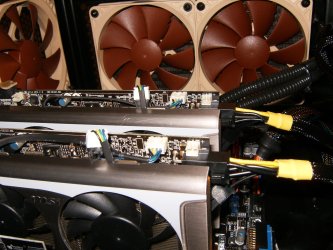
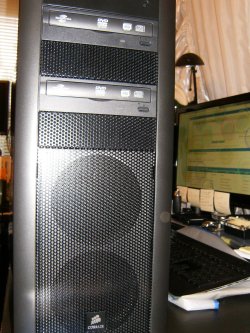
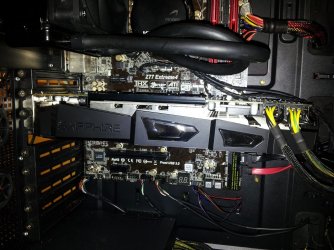
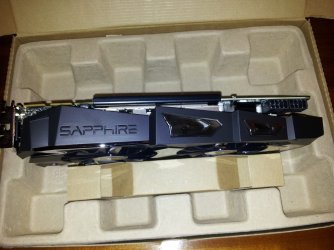
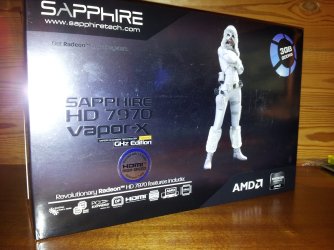
I thought I would post a few pics as I think a few of you would like to see what I replaced the 660ti with.

The benchmark pics are with the card overclocked.

Paul.
 

Attachments

  • heavenOC.PNG
    heavenOC.PNG
    15.1 KB · Views: 4
  • 20130108_174200.jpg
    20130108_174200.jpg
    210.3 KB · Views: 4
  • 20130108_173258.jpg
    20130108_173258.jpg
    124 KB · Views: 4
  • 20130108_173215.jpg
    20130108_173215.jpg
    165.7 KB · Views: 5
  • 20130108_173114.jpg
    20130108_173114.jpg
    165.6 KB · Views: 4
  • 7970OC.PNG
    7970OC.PNG
    26.2 KB · Views: 3

My Computer My Computer

At a glance

Windows 7 Professional 64 bit
OS
Windows 7 Professional 64 bit
Nice 1 Paul.
Thats a bit of a beast enit mate :D
 

My Computer My Computer

At a glance

Win7 Home Premium x64 SP1i7 4770k8Gb Kingston HyperX Beast 2400MHz @2133MHz 11...MSI GTX 780ti Gaming Oc x2
Computer type
PC/Desktop
Computer Manufacturer/Model Number
Custom build
OS
Win7 Home Premium x64 SP1
CPU
i7 4770k
Motherboard
Asus maximus VI Hero
Memory
8Gb Kingston HyperX Beast 2400MHz @2133MHz 11-12-11-30
Graphics Card(s)
MSI GTX 780ti Gaming Oc x2
Sound Card
Onboard ROG SupremeFX
Monitor(s) Displays
Asus VG248QE
Screen Resolution
3840X1080 144Hz
Hard Drives
Samung Evo 256Gb, OCZ Agility4 128Gb
1x1TB hitachi storage
PSU
EVGA Supernova 1000w Platinum
Case
Corsair Air 540
Cooling
Corsair H100i
Keyboard
Coolermaster Quickfire Pro
Mouse
Corsair M65 RGB
Internet Speed
74mb dwn/16up
Antivirus
MSE,Malwarebytes
Browser
Chrome
Status
Not open for further replies.
Back
Top