CPU high temperature

babuja

New member
Local time
7:29 PM
Messages
21
Hi,

I've noticed that in my Asus N82JV the fan works a lot of time.

66732088.jpg


So i've installed Speed fan and this is the info I get after 5 min using the computer.

fotografia1v.jpg


Everything is burning out...

What cold be the problem and how to solve this issue?

tnks
 

My Computer My Computer

At a glance

W7 64 Home
OS
W7 64 Home
Most times the cause is dirt in the box or bad connection of the fan on the CPU (bad paste or bad seating). Start by blowing out the dirt with compressed air - cans are available at Home Depot, etc.

Getting to the CPU may require professional help. Work on a laptop is not obvious.
 

My Computer My Computer

At a glance

Vista, Windows7, Mint Mate, Zorin, Windows 8from 1.6GHz Duo to i7
Computer Manufacturer/Model Number
HP, Dell, Gateway, Toshiba - 4 laptops and 2 desktops
OS
Vista, Windows7, Mint Mate, Zorin, Windows 8
CPU
from 1.6GHz Duo to i7
Monitor(s) Displays
2x HP w2207
Hard Drives
5x HDD, 7x SSD, 12x Externals
Keyboard
with trackball - no mices
Mouse
Trackball mice
Internet Speed
DSL 6000
I would use hardware monitor Speedfan isn't accurate in my account

try HW monitor and see if there is a difference |MG| HWMonitor 1.21 Download

Speed fan once said my system was running something like 140c my machine would be on fire try this and see what it yeilds

Also follow the advice of blowing it out with a strong can of air
 

My Computer My Computer

At a glance

Windows 10 Home Premium 64bit sp1Intel I7-6700K @ 4.6 Ghz 1.344 volts everyday OC32GB G-Skill TridentZ 3200mhz 16-18-18-38 DDR4Sli Gigabyte Windforce GTX 980 G1
Computer type
PC/Desktop
Computer Manufacturer/Model Number
CoreI7-6700K MrFingerIII Special Builds
OS
Windows 10 Home Premium 64bit sp1
CPU
Intel I7-6700K @ 4.6 Ghz 1.344 volts everyday OC
Motherboard
Asrock Fatality K6 Z170 Socket 1151
Memory
32GB G-Skill TridentZ 3200mhz 16-18-18-38 DDR4
Graphics Card(s)
Sli Gigabyte Windforce GTX 980 G1
Sound Card
AC97 Creative Rage Tactic 3D Headphones Bluetooth
Monitor(s) Displays
27" Asus ROG Swift PG278Q G-Sync 48" Vizio Smart HD TV
Screen Resolution
2560x1440p 27"- 48" Currently Gaming at 2560x1440p Res 2K
Hard Drives
250GB Samsung Evo840SSD Seagate baracuda 500 GB WD Mybook 500Gb 1TB Seagate Barracuda
PSU
HX1050w Corsair Silver 80plus certified crosfire/sli
Case
Enthod Pro Full Tower
Cooling
Corsair H110i GT 280 mm High Performance WaterBlock
Keyboard
Logitech wireless keyboard
Mouse
Logitech wireless mouse
Internet Speed
Cox Cable 100+ mb
Antivirus
WebRoot Spysweeper with Antivirus
Browser
IE-10, Chrome, Opera
Other Info
My Other Rig is a AMD FX8320E @4.6Ghz 16GB Ballistic Sport Ram
Mobo Asrock Fatality 990FX 120GB OCZ SSD 1TB Seagate Barracuda Corsair H75 Cooling PSU Corsair CX750
GPU GTX Gigabyte 970G1
I would use hardware monitor Speedfan isn't accurate in my account

try HW monitor and see if there is a difference |MG| HWMonitor 1.21 Download

Speed fan once said my system was running something like 140c my machine would be on fire try this and see what it yeilds

Also follow the advice of blowing it out with a strong can of air

I've installed HWMonitor 1.21 Download and the result is the same and similar to Speedfan.

I'll try to blow out the dirt with compressed air and see if there's any improvement.

tnks guys.
 

My Computer My Computer

At a glance

W7 64 Home
OS
W7 64 Home
Again ASUS...
its the problem with your brand, asus use special kind of fan system called spiral fan which is much powerful than the others, also tell me, do you have core i7 CPU, because its normal temperature may reach to 100oc
i have asus too, i can even warm up my tea with its fan. have my advice, every time you don't perform high process with your computer change your power setting to balance mode, its simple in asus, use Fn+space, it gradually slow down your fan rotation and CPU work
 

My Computer My Computer

At a glance

Windows 7 Ultimate x64core i7.
OS
Windows 7 Ultimate x64
CPU
core i7.
... do you have core i7 CPU

No, it's a i5 CPU.

So it´s normal this high temperatures in Asus?

..have my advice, every time you don't perform high process with your computer change your power setting to balance mode, its simple in asus, use Fn+space, it gradually slow down your fan rotation and CPU work

I'll also try that, tnks ;)
 

My Computer My Computer

At a glance

W7 64 Home
OS
W7 64 Home
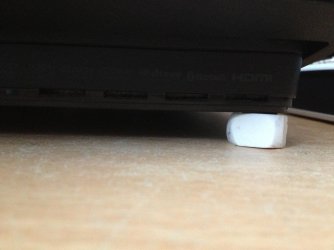
No computer should have temperatures like yours, as suggested before clean out the dust. Let the laptop cool down over night and then cut a big rubber into 4 pieces and stand the machine up with it in the four corners of the laptop. (Like I did with my PS3 below)

Leave the machine on for a couple hours and monitor the temperatures (don't use any high processes such as gaming or editing). we want to see how well your machine can perform when idle.

Photo 2013-01-06 11.36.08.jpg

If your temperatures are still high then we are looking at a more internal cause (thermal paste problem .... etc). If they have cooled down then this will indicate external environments affecting the laptop so consider changing the position of where you use the laptop as this might be causing the increased heat.

Hope This Helps,
Josh
 

My Computer My Computer

At a glance

Windows 7 Professional x64 SP1 ; Windows Serv...Intel Core i5 2400 @ 3.10GHz8.0GB DDR3 @ 665MHz (2GBx4)AMD Radeon HD 6870
Computer type
PC/Desktop
Computer Manufacturer/Model Number
Custom Built
OS
Windows 7 Professional x64 SP1 ; Windows Server 2012 R2 Standard
CPU
Intel Core i5 2400 @ 3.10GHz
Motherboard
Foxconn H67MP-S/-V/H67MP
Memory
8.0GB DDR3 @ 665MHz (2GBx4)
Graphics Card(s)
AMD Radeon HD 6870
Sound Card
Realtek High Definition Audio
Monitor(s) Displays
AOC 2243W & SMB1930NW
Screen Resolution
1440x900 & 1920x1080
Hard Drives
977GB Seagate ST31000524AS ATA Drive (SATA)
250GB WD iSCSI attached Drive
PSU
750W Gaming PSU
Case
Novatech Night
Cooling
Fan
Keyboard
Dell Standard PS/2 Keyboard
Mouse
R.A.T 07 Gaming Mouse
Internet Speed
Download: 10 Mbps Ping: 30ms Upload: 0.81 Mbps
Browser
Google Chrome
Other Info
Optiarc DVD RW AD-5260S ATA Device
Tnks Josh,

I´ll try to find a compressor and blow dirt and dust out.

Maybe this king of cooler is a good option:

thumb_medium_995670_Cooler-para-Portatil-Trust-Cyclone_1.jpeg
 

My Computer My Computer

At a glance

W7 64 Home
OS
W7 64 Home
You can give it a go but try the alternative I suggested first because it may not work and the last thing I want you to do is to purchase something that is of no use to you. Laptops generally have their motherboard close the edge of the case so ensuring that there is an airflow or cooling underneath should help.

Josh
 

My Computer My Computer

At a glance

Windows 7 Professional x64 SP1 ; Windows Serv...Intel Core i5 2400 @ 3.10GHz8.0GB DDR3 @ 665MHz (2GBx4)AMD Radeon HD 6870
Computer type
PC/Desktop
Computer Manufacturer/Model Number
Custom Built
OS
Windows 7 Professional x64 SP1 ; Windows Server 2012 R2 Standard
CPU
Intel Core i5 2400 @ 3.10GHz
Motherboard
Foxconn H67MP-S/-V/H67MP
Memory
8.0GB DDR3 @ 665MHz (2GBx4)
Graphics Card(s)
AMD Radeon HD 6870
Sound Card
Realtek High Definition Audio
Monitor(s) Displays
AOC 2243W & SMB1930NW
Screen Resolution
1440x900 & 1920x1080
Hard Drives
977GB Seagate ST31000524AS ATA Drive (SATA)
250GB WD iSCSI attached Drive
PSU
750W Gaming PSU
Case
Novatech Night
Cooling
Fan
Keyboard
Dell Standard PS/2 Keyboard
Mouse
R.A.T 07 Gaming Mouse
Internet Speed
Download: 10 Mbps Ping: 30ms Upload: 0.81 Mbps
Browser
Google Chrome
Other Info
Optiarc DVD RW AD-5260S ATA Device
Tnks Josh,

I´ll try to find a compressor and blow dirt and dust out.

Maybe this king of cooler is a good option:

thumb_medium_995670_Cooler-para-Portatil-Trust-Cyclone_1.jpeg

this is not a good idea if you have sth like this, your HDD must work in horizontal form and no problem if you have a bit slope (the eraser was a good idea), but this is about 45 deg and would cause harm to your HDD. i have one a bit different , but sometime i use a book back of the laptop to make it a bit higher from the ground, be careful not to cover the threads
and you see you can change its slope

and another question for you , do you use those covers ( plastic ones ) for your keyboard??
they say they are water proof, but they actually prevent the ventilation process, some of the air flow comes from your keyboad
 

My Computer My Computer

At a glance

Windows 7 Ultimate x64core i7.
OS
Windows 7 Ultimate x64
CPU
core i7.
Aye, As long as it is risen then that should do and then you should monitor the temperature. I just use rubbers because they are a poor heat conductor

Josh
 

My Computer My Computer

At a glance

Windows 7 Professional x64 SP1 ; Windows Serv...Intel Core i5 2400 @ 3.10GHz8.0GB DDR3 @ 665MHz (2GBx4)AMD Radeon HD 6870
Computer type
PC/Desktop
Computer Manufacturer/Model Number
Custom Built
OS
Windows 7 Professional x64 SP1 ; Windows Server 2012 R2 Standard
CPU
Intel Core i5 2400 @ 3.10GHz
Motherboard
Foxconn H67MP-S/-V/H67MP
Memory
8.0GB DDR3 @ 665MHz (2GBx4)
Graphics Card(s)
AMD Radeon HD 6870
Sound Card
Realtek High Definition Audio
Monitor(s) Displays
AOC 2243W & SMB1930NW
Screen Resolution
1440x900 & 1920x1080
Hard Drives
977GB Seagate ST31000524AS ATA Drive (SATA)
250GB WD iSCSI attached Drive
PSU
750W Gaming PSU
Case
Novatech Night
Cooling
Fan
Keyboard
Dell Standard PS/2 Keyboard
Mouse
R.A.T 07 Gaming Mouse
Internet Speed
Download: 10 Mbps Ping: 30ms Upload: 0.81 Mbps
Browser
Google Chrome
Other Info
Optiarc DVD RW AD-5260S ATA Device
You can give it a go but try the alternative I suggested first because it may not work and the last thing I want you to do is to purchase something that is of no use to you. Laptops generally have their motherboard close the edge of the case so ensuring that there is an airflow or cooling underneath should help.

Josh

Yes, first i'll blow dust off and then see the result.

Tnks Josh,

I´ll try to find a compressor and blow dirt and dust out.

Maybe this king of cooler is a good option:

thumb_medium_995670_Cooler-para-Portatil-Trust-Cyclone_1.jpeg
...and another question for you , do you use those covers ( plastic ones ) for your keyboard??
they say they are water proof, but they actually prevent the ventilation process, some of the air flow comes from your keyboad

No plastics.
 

My Computer My Computer

At a glance

W7 64 Home
OS
W7 64 Home
Back
Top