Motherboard temperature?

egoran

New member
Member
Local time
3:12 AM
Messages
42
Hey all,

I've installed a prog called Speccy to check out temperatures while playing games and the thing that concerns me is that my motherboard gets really hot (around 80'C) while the game is on, but when idle it is about 40-45'C...

Is that too hot??

I'll attach a snapshot so someone with that program can see what are my PC specs..

Cheers guys and thanks for the help :)
 

Attachments

My Computer My Computer

OS
Windows 7 Ultimate x64
CPU
Intel Core i3 2100 @ 3.10GHz
Motherboard
MSI H61M-P22 (MS-7680)
Memory
8.00 GB Dual-Channel DDR3 @ 665MHz
Graphics Card(s)
AMD Radeon HD 6770 (MSI)
Monitor(s) Displays
Panasonic-TV (1920x1080@60Hz)
Hard Drives
466GB Seagate ST9500325AS ATA Device (SATA)

My Computer My Computer

Computer type
PC/Desktop
Computer Manufacturer/Model Number
Self-Built
OS
Windows 7 Professional X64
CPU
Core i7 (2nd gen) i7-2600K / 3.40GHz
Motherboard
ASUS P8Z77-V Intel 7 Series Motherboard
Memory
DDR3 2400MHz (OC) 16gb
Graphics Card(s)
Intel(R) HD Graphics 3000, -1988 Mb
Sound Card
8 ChannelsAudio Chipset Realtek ALC892
Monitor(s) Displays
LG 29UM65 Black 29"
Screen Resolution
2560 x 1080
Hard Drives
840 EVO 250 GB SSD ;2tb (2);Seagate;1tb Seagate; 750 gb Seagate; wd ext (2) 750 gb,WD 2tb X 2;WD 3TB Black
PSU
750 watt
Case
Thermaltake RX -1
Cooling
2120mm Fans Included 1Other Fan Ports 5x 200mm Fan Ports
Keyboard
Microsoft Digital Media Pro
Mouse
Microsoft Wireless 6000
Internet Speed
U-verse 18 mbps
Antivirus
MSE
Browser
Firefox, Chrome and my favorite: Pale Moon
Other Info
HdHomerun Dual Tuner.
SRS Audio Lab,
Pioneer BDR 208-DBK
PS3-What a difference in my Surround Sound Receiver!
HP 4540s - My new Toy.
Epson R280 Printer- To personalize my Dvds.
Canon MP 560 - For scanning.
What type of mobo do you have? Have you checked with you mobo manufacturer for the temp tolerances? Is this a laptop or desktop? If a desktop is this a custom build or retail PC? Could you fill in your system specs in your user profile area.
 

My Computer My Computer

Computer Manufacturer/Model Number
Custom built
OS
Windows 7 Ultimate 64 bit
CPU
AMD Phenom II X4 965 Black Edition
Motherboard
Gigabyte GA-MA790X-DS4
Memory
GSkill 4 X 2 GB PC 8500
Graphics Card(s)
XFX Radeon HD 6790 D
Sound Card
On board RealTek HD
Monitor(s) Displays
Dual monitors:Samsung SyncMaster S20B300
Screen Resolution
1600 X 900
Hard Drives
Seagate Barracuda 1TB (primary)
Seagate Barracuda 2 X 320 GB
PSU
Ultra X4 750 watt fully modular
Case
Thermaltake Overseer RX 1 full tower
Cooling
Core-Contact 92 mm CPU Cooler
Keyboard
Logitech G510
Mouse
Razor DeathAdder
Internet Speed
50/5 Mbps UL/DL
Other Info
Optical: Super Muliti DVD burner w/lightscribe, Hauppauge WinTV HVR-1800
Hey bassfisher,

It is store bought desktop PC connected to a TV via HDMI cable,

Win7 64bit
CPU: Intel Core i3 2100 @ 3.10GHz
RAM: 8.00 GB Dual-Channel DDR3 @ 665MHz
Motherboard: MSI H61M-P22 (MS-7680)
GPU: AMD Radeon HD 6770 (MSI)
HDD: 466GB Seagate ST9500325AS ATA Device (SATA)
Audio: Realtek High Definition Audio

Could you please maybe tell me how to setup SpeedFan properly (step by step if it is not too much of a bother, that software is quite complicated for me) , I've been reading/watching tutorials but it seems every PC configuration needs it's own setup in SpeedFan. That would be a huge help

Please tell me if you need any more info..

Cheers mate!!
 

My Computer My Computer

OS
Windows 7 Ultimate x64
CPU
Intel Core i3 2100 @ 3.10GHz
Motherboard
MSI H61M-P22 (MS-7680)
Memory
8.00 GB Dual-Channel DDR3 @ 665MHz
Graphics Card(s)
AMD Radeon HD 6770 (MSI)
Monitor(s) Displays
Panasonic-TV (1920x1080@60Hz)
Hard Drives
466GB Seagate ST9500325AS ATA Device (SATA)
Anyone pls? :D
 

My Computer My Computer

OS
Windows 7 Ultimate x64
CPU
Intel Core i3 2100 @ 3.10GHz
Motherboard
MSI H61M-P22 (MS-7680)
Memory
8.00 GB Dual-Channel DDR3 @ 665MHz
Graphics Card(s)
AMD Radeon HD 6770 (MSI)
Monitor(s) Displays
Panasonic-TV (1920x1080@60Hz)
Hard Drives
466GB Seagate ST9500325AS ATA Device (SATA)

My Computer My Computer

Computer type
PC/Desktop
Computer Manufacturer/Model Number
Custom Build
OS
Windows 7 Home Premium 32-Bit - Build 7600 SP1
CPU
Intel Core i3-2120 3.30Ghz
Motherboard
Asus P8Z68-V LX Intel Z68 Socket H2 ATX
Memory
Kingston 4 GB DDR3 1333 mhz
Graphics Card(s)
AMD Radeon HD6670
Sound Card
Sound Blaster Audigy SE 24-Bit
Monitor(s) Displays
Asus VE228
Screen Resolution
1440 X 900
Hard Drives
OCZ Vertex 3 120 GB Sata 3 SSD ==
Kingston SH103/S3 120 G Hyper X 120 GB SSD ==
Western Digital 500 GB Caviar Green 7200 RPM ==
PSU
Corsair CX600M == 600 Watt
Case
NZXT Apollo - Silver with Clear Side Panel
Cooling
Three 120 mm Fans
Keyboard
Microsoft Natural 4000
Mouse
Microsoft Custom Optical 3000
Internet Speed
AT&T Fiber Optic Wireless Network
Antivirus
Microsoft Security Essentials
Browser
Chrome
Other Info
120 mm Blue LED Fan -- Three Blue LED Lazer Light Sticks
Hey bigmck,

That is a snapshot file of a application called Speccy, one of the members that helped me with BSOD issue recommended me to upload it for him, so I figured that everyone here uses it.. My bad, sorry.
Anyways I have written down my PC specs and the problem in posts above, so please help me with these temperatures if possible.

Cheers!
 

My Computer My Computer

OS
Windows 7 Ultimate x64
CPU
Intel Core i3 2100 @ 3.10GHz
Motherboard
MSI H61M-P22 (MS-7680)
Memory
8.00 GB Dual-Channel DDR3 @ 665MHz
Graphics Card(s)
AMD Radeon HD 6770 (MSI)
Monitor(s) Displays
Panasonic-TV (1920x1080@60Hz)
Hard Drives
466GB Seagate ST9500325AS ATA Device (SATA)
bump?
 

My Computer My Computer

OS
Windows 7 Ultimate x64
CPU
Intel Core i3 2100 @ 3.10GHz
Motherboard
MSI H61M-P22 (MS-7680)
Memory
8.00 GB Dual-Channel DDR3 @ 665MHz
Graphics Card(s)
AMD Radeon HD 6770 (MSI)
Monitor(s) Displays
Panasonic-TV (1920x1080@60Hz)
Hard Drives
466GB Seagate ST9500325AS ATA Device (SATA)
why haven't you downloaded and used realtemp ?
 

My Computer My Computer

Computer Manufacturer/Model Number
built my own
OS
win7 ultimate / virtual box
CPU
Intel Core i7 3770K,1155, Ivy Bridge
Motherboard
MSI Z77A-G43
Memory
GSkill Ripjaws Z Series 1600 CL 9.0 16GB
Graphics Card(s)
KFA2 GeForce GTX 670 EX OC 2048MB GDDR5 PCI-E gfx card
Sound Card
onboard Nvidia HDMI audio
Monitor(s) Displays
ASUS VK222H 22" widescreen LCD monitor
Screen Resolution
1680x1050
Hard Drives
Kingston 128gb SSD
OCZ Vertex 90gb SSD
500GB WDCaviar 16mb 5000KS
320GB WDCaviar 16mb 3200AAKS sata 2
1TB Samsung 16mb HD103SJ sata 2
PSU
Corsair HX 750W ATX2.2 Modular
Cooling
Antec 25 Kuhler H2O 620
Keyboard
logitech
Mouse
logitech MX518
Internet Speed
7mb adsl
why haven't you downloaded and used realtemp ?

Because the OP may be intemidated by it. I looked at the screenshots on the website that was linked and was a bit overwhelmed. I use Speccy because it's easy to read at a glance. It will indicate if the CPU temperature is in operating range with a little, vertical bar graph (it looks more like a box). As long as the box doesn't get filled with a solid color, the maximum operating temperature hasn't been exceeded. Still, it's usually not good to continuously run anything near its max capacity.
 

My Computer My Computer

Computer type
PC/Desktop
Computer Manufacturer/Model Number
Custom Build
OS
Win 7 Ultimate 64 bit
CPU
Intel i7-3930K
Motherboard
ASUS P9X79 WS
Memory
Kingston HyperX Genesis 32GB Kit (8x4GB Modules) 1600MHz DDR
Graphics Card(s)
MSI R7850 Twin Frozr 2GD5/OC Radeon HD 7850 2GB 256-bit GDDR
Sound Card
Asus Xonar Essence STX
Monitor(s) Displays
3x Asus VG248QE 24", Vizio 32" TV
Screen Resolution
1920 x 1080, ?
Hard Drives
Samsung 128GB 840 Pro SSD (1),
Samsung 4TB 850 EVO SSDs (4)
Samsung 4TB 850 EVO SSDs (16) external backup drives used in 2.5" hot swap bays in the computer.
PSU
Corsair HX750w
Case
Antec Two Hundred v2 (modified)
Cooling
Cooler Master GeminII S524 120mm (fan replaced with a 140mm)
Keyboard
Logitech G510s
Mouse
Logitech M525 (two in use)
Internet Speed
=< 32Mbps down, 8Mbps up
Antivirus
AVAST!, MBAM, SAS, Spybot S&D (all but MBAM free) Glary Util
Browser
IE11
Other Info
LSI 9211-8i HBA card (8 SATA III ports), 2.5" & 3.5" Hot Swap Bays, HooToo HT-CR001 PCI-E to USB 3.0 Internal Hub + 6 Slot Card Reader, and LG Model CH12LS28 BD-ROM Optical Drive. Also, ScanSnap S1500 ADF duplexing scanner, Canon 9000F flat bed scanner, Corsair SP2500 2.1 speakers, Samsung CLP 415nw laser color printer, Cyberpower PP2200SW UPS
I think your problem is it's a store bought (retail) PC. And most likely it just has the bare minimum mobo which probably doesn't have the means to let speedfan take control of those senors to adjust fan speeds. As in laptops, except for those really high end gaming laptops and that's because those laptops use all high end and high quality hardware. So even if you do figure out how to setup speed fan it wouldn't work anyway do to the low end mobo on your retail PC.
 

My Computer My Computer

Computer Manufacturer/Model Number
Custom built
OS
Windows 7 Ultimate 64 bit
CPU
AMD Phenom II X4 965 Black Edition
Motherboard
Gigabyte GA-MA790X-DS4
Memory
GSkill 4 X 2 GB PC 8500
Graphics Card(s)
XFX Radeon HD 6790 D
Sound Card
On board RealTek HD
Monitor(s) Displays
Dual monitors:Samsung SyncMaster S20B300
Screen Resolution
1600 X 900
Hard Drives
Seagate Barracuda 1TB (primary)
Seagate Barracuda 2 X 320 GB
PSU
Ultra X4 750 watt fully modular
Case
Thermaltake Overseer RX 1 full tower
Cooling
Core-Contact 92 mm CPU Cooler
Keyboard
Logitech G510
Mouse
Razor DeathAdder
Internet Speed
50/5 Mbps UL/DL
Other Info
Optical: Super Muliti DVD burner w/lightscribe, Hauppauge WinTV HVR-1800
realtemp is accurate and made for intel CPU's with no setup required ...........

As a guess It's likely the CPU is fitted with a stock fan, a comment from the OP would be useful.
 

My Computer My Computer

Computer Manufacturer/Model Number
built my own
OS
win7 ultimate / virtual box
CPU
Intel Core i7 3770K,1155, Ivy Bridge
Motherboard
MSI Z77A-G43
Memory
GSkill Ripjaws Z Series 1600 CL 9.0 16GB
Graphics Card(s)
KFA2 GeForce GTX 670 EX OC 2048MB GDDR5 PCI-E gfx card
Sound Card
onboard Nvidia HDMI audio
Monitor(s) Displays
ASUS VK222H 22" widescreen LCD monitor
Screen Resolution
1680x1050
Hard Drives
Kingston 128gb SSD
OCZ Vertex 90gb SSD
500GB WDCaviar 16mb 5000KS
320GB WDCaviar 16mb 3200AAKS sata 2
1TB Samsung 16mb HD103SJ sata 2
PSU
Corsair HX 750W ATX2.2 Modular
Cooling
Antec 25 Kuhler H2O 620
Keyboard
logitech
Mouse
logitech MX518
Internet Speed
7mb adsl
realtemp is accurate and made for intel CPU's with no setup required ...........

As a guess It's likely the CPU is fitted with a stock fan, a comment from the OP would be useful.

The OP hasn't signed on in three days. Not much interest I don't guess.
 

My Computer My Computer

Computer type
PC/Desktop
Computer Manufacturer/Model Number
Custom Build
OS
Windows 7 Home Premium 32-Bit - Build 7600 SP1
CPU
Intel Core i3-2120 3.30Ghz
Motherboard
Asus P8Z68-V LX Intel Z68 Socket H2 ATX
Memory
Kingston 4 GB DDR3 1333 mhz
Graphics Card(s)
AMD Radeon HD6670
Sound Card
Sound Blaster Audigy SE 24-Bit
Monitor(s) Displays
Asus VE228
Screen Resolution
1440 X 900
Hard Drives
OCZ Vertex 3 120 GB Sata 3 SSD ==
Kingston SH103/S3 120 G Hyper X 120 GB SSD ==
Western Digital 500 GB Caviar Green 7200 RPM ==
PSU
Corsair CX600M == 600 Watt
Case
NZXT Apollo - Silver with Clear Side Panel
Cooling
Three 120 mm Fans
Keyboard
Microsoft Natural 4000
Mouse
Microsoft Custom Optical 3000
Internet Speed
AT&T Fiber Optic Wireless Network
Antivirus
Microsoft Security Essentials
Browser
Chrome
Other Info
120 mm Blue LED Fan -- Three Blue LED Lazer Light Sticks
Hey guys! Sorry for not turning in, ok downloaded realtemp, but can't figure it out... Not really tech savvy :D I'll post a screenshot and if I need to do anything else, please tell me!

Cheers
 

Attachments

  • Untitled.png
    Untitled.png
    11.7 KB · Views: 6

My Computer My Computer

OS
Windows 7 Ultimate x64
CPU
Intel Core i3 2100 @ 3.10GHz
Motherboard
MSI H61M-P22 (MS-7680)
Memory
8.00 GB Dual-Channel DDR3 @ 665MHz
Graphics Card(s)
AMD Radeon HD 6770 (MSI)
Monitor(s) Displays
Panasonic-TV (1920x1080@60Hz)
Hard Drives
466GB Seagate ST9500325AS ATA Device (SATA)
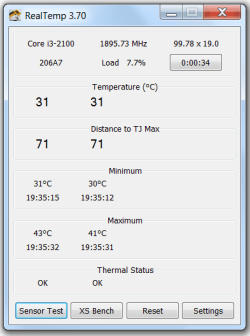
Hey guys! Sorry for not turning in, ok downloaded realtemp, but can't figure it out... Not really tech savvy :D I'll post a screenshot and if I need to do anything else, please tell me!

Cheers

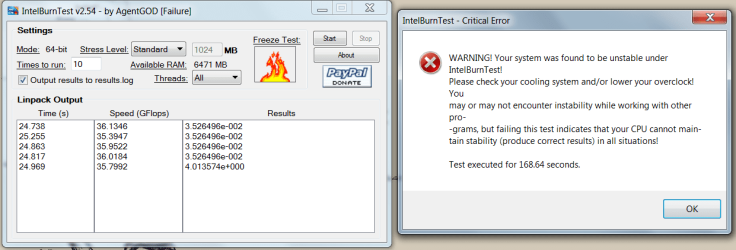
The test shows that your temps are fine.
You can also press Sensor test.

You can also run this program - it will put the comp under stress and tell you if the comp is stable. IntelBurnTest - The new stress-testing program
 

My Computer My Computer

Computer type
PC/Desktop
Computer Manufacturer/Model Number
Self-Built
OS
Windows 7 Professional X64
CPU
Core i7 (2nd gen) i7-2600K / 3.40GHz
Motherboard
ASUS P8Z77-V Intel 7 Series Motherboard
Memory
DDR3 2400MHz (OC) 16gb
Graphics Card(s)
Intel(R) HD Graphics 3000, -1988 Mb
Sound Card
8 ChannelsAudio Chipset Realtek ALC892
Monitor(s) Displays
LG 29UM65 Black 29"
Screen Resolution
2560 x 1080
Hard Drives
840 EVO 250 GB SSD ;2tb (2);Seagate;1tb Seagate; 750 gb Seagate; wd ext (2) 750 gb,WD 2tb X 2;WD 3TB Black
PSU
750 watt
Case
Thermaltake RX -1
Cooling
2120mm Fans Included 1Other Fan Ports 5x 200mm Fan Ports
Keyboard
Microsoft Digital Media Pro
Mouse
Microsoft Wireless 6000
Internet Speed
U-verse 18 mbps
Antivirus
MSE
Browser
Firefox, Chrome and my favorite: Pale Moon
Other Info
HdHomerun Dual Tuner.
SRS Audio Lab,
Pioneer BDR 208-DBK
PS3-What a difference in my Surround Sound Receiver!
HP 4540s - My new Toy.
Epson R280 Printer- To personalize my Dvds.
Canon MP 560 - For scanning.
Hey guys! Sorry for not turning in, ok downloaded realtemp, but can't figure it out... Not really tech savvy :D I'll post a screenshot and if I need to do anything else, please tell me!

Cheers

I see the max temps here show 43°C and 41°C. Is that while gaming?
 

My Computer My Computer

Computer type
PC/Desktop
Hey guys! Sorry for not turning in, ok downloaded realtemp, but can't figure it out... Not really tech savvy :D I'll post a screenshot and if I need to do anything else, please tell me!

Cheers

The test shows that your temps are fine.
You can also press Sensor test.

You can also run this program - it will put the comp under stress and tell you if the comp is stable. IntelBurnTest - The new stress-testing program

Ok, here is the result with this program.. not good :(
Any solutions or is it time to take it to the place I bought it from? If so, what should I complain about (what exactly is the problem). Thanks!
 

Attachments

  • Untitled.png
    Untitled.png
    35.2 KB · Views: 26

My Computer My Computer

OS
Windows 7 Ultimate x64
CPU
Intel Core i3 2100 @ 3.10GHz
Motherboard
MSI H61M-P22 (MS-7680)
Memory
8.00 GB Dual-Channel DDR3 @ 665MHz
Graphics Card(s)
AMD Radeon HD 6770 (MSI)
Monitor(s) Displays
Panasonic-TV (1920x1080@60Hz)
Hard Drives
466GB Seagate ST9500325AS ATA Device (SATA)
That instability could have also been caused by heat. When you run programs like Intel Burn Test, it's best to have Real Temp open at the same time so that you can keep a close watch on the temperatures.
 

My Computer My Computer

Computer type
PC/Desktop
it's kind of strange for a such low-end processor to fail that test. Who installed the current CPU cooler? If you did it, you sure you placed it correctly and applied thermal paste?

if you don't pass that test and everything was done right, you either need a better CPU cooler or better air circulation inside the case. Try doing the test with the case of the PC open. Anyway, you probably going to solve with 30$ or so for a new mid-range CPU cooler to replace whatever is up now.
 

My Computer My Computer

Computer type
PC/Desktop
Computer Manufacturer/Model Number
custom built
OS
Win 7 Pro 64-bit 7601
CPU
AMD Phenom 9650 QuadCore, revision DR-B3
Motherboard
ASUS M4A78
Memory
5 GB yes I run 2x 2GB and 1x 1GB, different brand, spank me.
Graphics Card(s)
NVIDIA GeForce 9800 GT 512 Mb, unknown manufacturer.
Sound Card
Crappy Realtek Integrated Audio
Monitor(s) Displays
Fujitsu Siemens P19-3P
Screen Resolution
1280 x 1024 x 32 bits @ 60 Hz Oh yeah, 4:3 rocks!
Hard Drives
(1) MAXTOR S TM3320613AS SATA Disk Device (2) STM35004 18AS SATA Disk Device (3) TOSHIBA USB 2.5"-HDD
PSU
whatever, around 450w
Case
Scavenged from old company PC, 10+ years old
Cooling
CPU fan, GPU fan, case fan, nothing fancy
Keyboard
Microsoft, PS/2, white.
Mouse
Optical, logitec.
Internet Speed
effective max speeds: 70-ish kB/s down 30-ish kB/s up
Antivirus
Avira, free edition.
Browser
Firefox with FXChrome to make it look like Google Chrome :P
Other Info
Was discarded by previous owner due to "horrible performance".
Was running Win Xp from a IDE drive. Yeah. Was a pain.
SATA II drive and Win7 and it zips away! Yay!
It is a store bough PC so all I did is plug it in the power :)
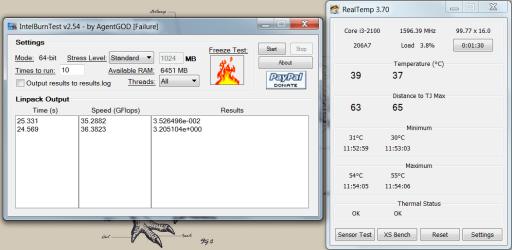
It is still under warranty so I can't open the case because of it. That is why I'm interested in what is wrong so I can tell that to the ppl in the store.. I'll upload the burnin test again with realtemp next to it.. As much as I can figure it out it maxes out at 55'C..

Is that motherboard or a processor temp? (don't laugh if it is the same thing) :D

So basically all I need from you good people that are trying to help me is to figure out what to say to the tech support when I turn my PC back because it is obviously hardware problem..

Cheers!
 

Attachments

  • Untitled.png
    Untitled.png
    39.7 KB · Views: 15

My Computer My Computer

OS
Windows 7 Ultimate x64
CPU
Intel Core i3 2100 @ 3.10GHz
Motherboard
MSI H61M-P22 (MS-7680)
Memory
8.00 GB Dual-Channel DDR3 @ 665MHz
Graphics Card(s)
AMD Radeon HD 6770 (MSI)
Monitor(s) Displays
Panasonic-TV (1920x1080@60Hz)
Hard Drives
466GB Seagate ST9500325AS ATA Device (SATA)
Back
Top