Motherboard temperature?

theres nothing wrong with those temperatures on the CPU.

Where you testing and asking because you where getting crashes or just because Speccy said your temps where high ?

do you have any reason to believe your system is faulty ?
 

My Computer My Computer

Computer Manufacturer/Model Number
built my own
OS
win7 ultimate / virtual box
CPU
Intel Core i7 3770K,1155, Ivy Bridge
Motherboard
MSI Z77A-G43
Memory
GSkill Ripjaws Z Series 1600 CL 9.0 16GB
Graphics Card(s)
KFA2 GeForce GTX 670 EX OC 2048MB GDDR5 PCI-E gfx card
Sound Card
onboard Nvidia HDMI audio
Monitor(s) Displays
ASUS VK222H 22" widescreen LCD monitor
Screen Resolution
1680x1050
Hard Drives
Kingston 128gb SSD
OCZ Vertex 90gb SSD
500GB WDCaviar 16mb 5000KS
320GB WDCaviar 16mb 3200AAKS sata 2
1TB Samsung 16mb HD103SJ sata 2
PSU
Corsair HX 750W ATX2.2 Modular
Cooling
Antec 25 Kuhler H2O 620
Keyboard
logitech
Mouse
logitech MX518
Internet Speed
7mb adsl
..... motherboard gets really hot (around 80'C) while the game is on, but when idle it is about 40-45'C...

Is that too hot??
I just want to remind people that the OP actually stated it was the motherboard temp he was concerned about not the CPU. I suggest you double check and clear that up as well. Maybe the mobo is overheating.

My system usally crashes when the mobo hits 45C - 50C even though my CPU is fine. During gaming I have to crank the case fans up.
 

My Computer My Computer

Computer Manufacturer/Model Number
Self built
OS
Windows 7 Ultimate x64
CPU
Intel Pentium Dual Core E5200 2.5GHz (3.77GHz OC)
Motherboard
Asus P5Q-E
Memory
Corsair 4GB DDR2 (4x1GB CM2X1024-6400C4)
Graphics Card(s)
Palit GeForce GTS 250 (1024MB)
Sound Card
On Board (ADI AD2000B 8ch HD)
Monitor(s) Displays
Samsung 32in LCD TV
Screen Resolution
1360x768
Hard Drives
2 x 1TB Samsung 103SJ (Raid0)
2 x External 500GB Samsung 502IJ (NexStar 3 HD Enclosures)
PSU
550W Antec Neo HE 550
Case
Antec P180
Cooling
Xigmatex Red Scorpion CPU Cooler. 3x120mm Fans
Keyboard
Logitech MX5000 Laser (Combo)
Mouse
Logitech MX5000 Laser (Combo)
Internet Speed
ADSL2+ (avg 10 Mbps Down, 0.80 Mbps up)
Other Info
Gigabyte GN-WP01GS 54g Wireless Lan Card
When playing games like FarCry3, Hitman, Borderlands 2 (though they are NOT set high details and textures and so on..) after 10mins games either crash to desktop or everything freezes and a strange buzzing sound starts and I need to manually restart the PC.. I am aware that my PC is low-end but it should be more than capable to play those games ok on normal settings. When just working on PC everything seems to be ok.. If it was only one game that is crashing I wouldn't be alarmed, but seems whenever it is on heavy load it crashes.

Couple of weeks ago I took my PC to the shop because of BSOD prob and they changed that component that regulates power and voltages (sorry, don't know the English word for it) so that can't be a problem. That problem is gone now, but now this is happening..
 

My Computer My Computer

OS
Windows 7 Ultimate x64
CPU
Intel Core i3 2100 @ 3.10GHz
Motherboard
MSI H61M-P22 (MS-7680)
Memory
8.00 GB Dual-Channel DDR3 @ 665MHz
Graphics Card(s)
AMD Radeon HD 6770 (MSI)
Monitor(s) Displays
Panasonic-TV (1920x1080@60Hz)
Hard Drives
466GB Seagate ST9500325AS ATA Device (SATA)
I don't know how helpful this will be, but let's try HWMonitor (it's free):

http://www.cpuid.com/softwares/hwmonitor.html

It shows temps (along with other things), and maybe one of us can figure out what temps are for what. So what you'll do is leave this open while trying to play games. Then, we can compare its temps to what Speccy says.

What you're describing sounds to me like something somewhere in your system is overheating. I mean, you said they replaced the power supply, so like you said: that can't be the problem, unless the power supply they replaced it with is just as bad as the other one.
 

My Computer My Computer

Computer type
PC/Desktop
Is that motherboard or a processor temp? (don't laugh if it is the same thing)
Processor. And the temperature is ok, as told by that program.

Hmmm, the test is basically "do this complex math" and since it is repeated a few times the results in the panel (those strings of numbers) should be the same. You notice that the last one is different in either the first pass and the second time you ran it?

This means there is something screwing with the data elaboration even without overheating the CPU.

I'd have a look at RAM, and hope that is the cuprit, otherwise it's a faulty CPU.
Follow this tutorial.
 

My Computer My Computer

Computer type
PC/Desktop
Computer Manufacturer/Model Number
custom built
OS
Win 7 Pro 64-bit 7601
CPU
AMD Phenom 9650 QuadCore, revision DR-B3
Motherboard
ASUS M4A78
Memory
5 GB yes I run 2x 2GB and 1x 1GB, different brand, spank me.
Graphics Card(s)
NVIDIA GeForce 9800 GT 512 Mb, unknown manufacturer.
Sound Card
Crappy Realtek Integrated Audio
Monitor(s) Displays
Fujitsu Siemens P19-3P
Screen Resolution
1280 x 1024 x 32 bits @ 60 Hz Oh yeah, 4:3 rocks!
Hard Drives
(1) MAXTOR S TM3320613AS SATA Disk Device (2) STM35004 18AS SATA Disk Device (3) TOSHIBA USB 2.5"-HDD
PSU
whatever, around 450w
Case
Scavenged from old company PC, 10+ years old
Cooling
CPU fan, GPU fan, case fan, nothing fancy
Keyboard
Microsoft, PS/2, white.
Mouse
Optical, logitec.
Internet Speed
effective max speeds: 70-ish kB/s down 30-ish kB/s up
Antivirus
Avira, free edition.
Browser
Firefox with FXChrome to make it look like Google Chrome :P
Other Info
Was discarded by previous owner due to "horrible performance".
Was running Win Xp from a IDE drive. Yeah. Was a pain.
SATA II drive and Win7 and it zips away! Yay!
RAM is definitely a possibility.
Hardware Monitor is good for showing min & max for a range of sensors including fan speeds.

With Hardware Monitor I would open it then let the computer idle for 5 mins then run a game but not too long, you don't want it freeze cause if you have to hard reset you'll lose Hardware Monitors readings. Try to play for a minimum of 20mins to 30mins or if that length of time is not possible just play for what you think will be safe.
 

My Computer My Computer

Computer Manufacturer/Model Number
Self built
OS
Windows 7 Ultimate x64
CPU
Intel Pentium Dual Core E5200 2.5GHz (3.77GHz OC)
Motherboard
Asus P5Q-E
Memory
Corsair 4GB DDR2 (4x1GB CM2X1024-6400C4)
Graphics Card(s)
Palit GeForce GTS 250 (1024MB)
Sound Card
On Board (ADI AD2000B 8ch HD)
Monitor(s) Displays
Samsung 32in LCD TV
Screen Resolution
1360x768
Hard Drives
2 x 1TB Samsung 103SJ (Raid0)
2 x External 500GB Samsung 502IJ (NexStar 3 HD Enclosures)
PSU
550W Antec Neo HE 550
Case
Antec P180
Cooling
Xigmatex Red Scorpion CPU Cooler. 3x120mm Fans
Keyboard
Logitech MX5000 Laser (Combo)
Mouse
Logitech MX5000 Laser (Combo)
Internet Speed
ADSL2+ (avg 10 Mbps Down, 0.80 Mbps up)
Other Info
Gigabyte GN-WP01GS 54g Wireless Lan Card
Thanks guys for showing interest in my problem!
I ran memtest+ about month ago during whole night (because I thought RAM was causing BSODs, but it was power supply, it is now changed for a new one) and there were no errors, but I'll run it again tonight..

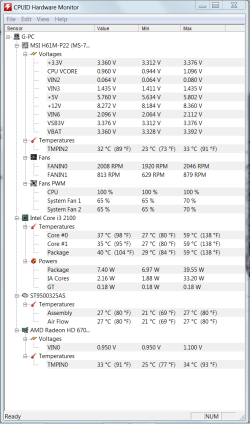
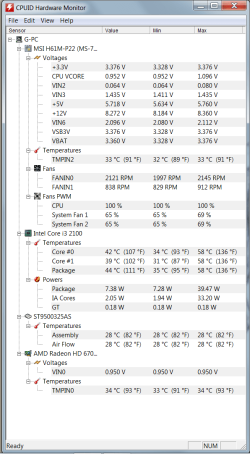
This morning I ran intel burn test again first thing when I turned PC on and it worked OK (10 passes), no errors and I was recording temperatures with HWmonitor (I'll upload the pic), but after that I tried the same test a couple of times and it always crashed on second or third pass, and temps look the same as the time it passed the test...
 

Attachments

  • uspesno.png
    uspesno.png
    34.3 KB · Views: 14

My Computer My Computer

OS
Windows 7 Ultimate x64
CPU
Intel Core i3 2100 @ 3.10GHz
Motherboard
MSI H61M-P22 (MS-7680)
Memory
8.00 GB Dual-Channel DDR3 @ 665MHz
Graphics Card(s)
AMD Radeon HD 6770 (MSI)
Monitor(s) Displays
Panasonic-TV (1920x1080@60Hz)
Hard Drives
466GB Seagate ST9500325AS ATA Device (SATA)
This is what HW temps look like when test fails
 

Attachments

  • neuspesno.png
    neuspesno.png
    33 KB · Views: 18

My Computer My Computer

OS
Windows 7 Ultimate x64
CPU
Intel Core i3 2100 @ 3.10GHz
Motherboard
MSI H61M-P22 (MS-7680)
Memory
8.00 GB Dual-Channel DDR3 @ 665MHz
Graphics Card(s)
AMD Radeon HD 6770 (MSI)
Monitor(s) Displays
Panasonic-TV (1920x1080@60Hz)
Hard Drives
466GB Seagate ST9500325AS ATA Device (SATA)
temperatures look great albeit with your fan running at 100%

what stands out for me is the low voltage on the 12v rail , with a quality PSU that should sit solidly around 12v with a maybe 1v allowable either side.

a poor PSU will allow voltages under load to drop and any of your devices like CPU and Ram will begin to generate errors due to lack of voltage.

I would keep that screenshot and ask them for another decent power supply not just another swop out cheap and cheerful ?

If you get the opportunity maybe ask them what make and model PSU they have fitted.
 

My Computer My Computer

Computer Manufacturer/Model Number
built my own
OS
win7 ultimate / virtual box
CPU
Intel Core i7 3770K,1155, Ivy Bridge
Motherboard
MSI Z77A-G43
Memory
GSkill Ripjaws Z Series 1600 CL 9.0 16GB
Graphics Card(s)
KFA2 GeForce GTX 670 EX OC 2048MB GDDR5 PCI-E gfx card
Sound Card
onboard Nvidia HDMI audio
Monitor(s) Displays
ASUS VK222H 22" widescreen LCD monitor
Screen Resolution
1680x1050
Hard Drives
Kingston 128gb SSD
OCZ Vertex 90gb SSD
500GB WDCaviar 16mb 5000KS
320GB WDCaviar 16mb 3200AAKS sata 2
1TB Samsung 16mb HD103SJ sata 2
PSU
Corsair HX 750W ATX2.2 Modular
Cooling
Antec 25 Kuhler H2O 620
Keyboard
logitech
Mouse
logitech MX518
Internet Speed
7mb adsl
temperatures look great albeit with your fan running at 100%

what stands out for me is the low voltage on the 12v rail , with a quality PSU that should sit solidly around 12v with a maybe 1v allowable either side.

a poor PSU will allow voltages under load to drop and any of your devices like CPU and Ram will begin to generate errors due to lack of voltage.

I would keep that screenshot and ask them for another decent power supply not just another swop out cheap and cheerful ?

If you get the opportunity maybe ask them what make and model PSU they have fitted.

Thanks for the info mate!
I can hear my fan running all the time at 100% even if pc is idle, and it is kinda annoying.. Is there a way to set it to lower speed, or to set it so it could adjust itself automatically when higher RPM speed is needed? If there is a way to do so, please explain it to me, I've tried Speedfan but I guess I'm too stupid to configure it properly :)
 

My Computer My Computer

OS
Windows 7 Ultimate x64
CPU
Intel Core i3 2100 @ 3.10GHz
Motherboard
MSI H61M-P22 (MS-7680)
Memory
8.00 GB Dual-Channel DDR3 @ 665MHz
Graphics Card(s)
AMD Radeon HD 6770 (MSI)
Monitor(s) Displays
Panasonic-TV (1920x1080@60Hz)
Hard Drives
466GB Seagate ST9500325AS ATA Device (SATA)
temperatures look great albeit with your fan running at 100%

what stands out for me is the low voltage on the 12v rail , with a quality PSU that should sit solidly around 12v with a maybe 1v allowable either side.

a poor PSU will allow voltages under load to drop and any of your devices like CPU and Ram will begin to generate errors due to lack of voltage.

I would keep that screenshot and ask them for another decent power supply not just another swop out cheap and cheerful ?

If you get the opportunity maybe ask them what make and model PSU they have fitted.

If the +12V were that low, then his system wouldn't even function. It probably wouldn't even turn on.

These voltages are best measured with a physical meter connected directly to the cables instead of using software. Software is notorious for being inaccurate when it comes to PSU voltages.
 

My Computer My Computer

Computer type
PC/Desktop
I agree voltage monitors are notoriously inaccurate but they can be indicative and I have seen systems run with voltages dropping under stress to below 9v ish when PSU's are faulty.

measuring with a meter is the shops problem I reckon and he cant break the warranty by opening the box ;)

re the fan you need to know if its a speed controlled version and then set it in the BIOS, at this stage that might be something else to ask the supplier about ..........
 

My Computer My Computer

Computer Manufacturer/Model Number
built my own
OS
win7 ultimate / virtual box
CPU
Intel Core i7 3770K,1155, Ivy Bridge
Motherboard
MSI Z77A-G43
Memory
GSkill Ripjaws Z Series 1600 CL 9.0 16GB
Graphics Card(s)
KFA2 GeForce GTX 670 EX OC 2048MB GDDR5 PCI-E gfx card
Sound Card
onboard Nvidia HDMI audio
Monitor(s) Displays
ASUS VK222H 22" widescreen LCD monitor
Screen Resolution
1680x1050
Hard Drives
Kingston 128gb SSD
OCZ Vertex 90gb SSD
500GB WDCaviar 16mb 5000KS
320GB WDCaviar 16mb 3200AAKS sata 2
1TB Samsung 16mb HD103SJ sata 2
PSU
Corsair HX 750W ATX2.2 Modular
Cooling
Antec 25 Kuhler H2O 620
Keyboard
logitech
Mouse
logitech MX518
Internet Speed
7mb adsl
I agree voltage monitors are notoriously inaccurate but they can be indicative and I have seen systems run with voltages dropping under stress to below 9v ish when PSU's are faulty.

As measured with a meter, or with software?


measuring with a meter is the shops problem I reckon and he cant break the warranty by opening the box ;)

re the fan you need to know if its a speed controlled version and then set it in the BIOS, at this stage that might be something else to ask the supplier about ..........

Before I upgraded to Sandy Bridge, I had an E8400 in the Gigabyte EP45-UD3P. HWMonitor showed about 8V for my +12V, yet my system was working perfectly for everything I do with it. I had the same PSU that I have now (the original HX650). With my new parts for Sandy Bridge, I don't have a +12V measurement in HWMonitor. Everest is showing me 0.061V, and HWiNFO is showing 12.00V. ASUS AI Suite II is showing 12.00V too.

So, I guess I would recommend giving HWiNFO a try (it's free):

HWiNFO, HWiNFO32 & HWiNFO64 - Hardware Information and Analysis Tools

HWiNFO64 Download
 

My Computer My Computer

Computer type
PC/Desktop
I agree voltage monitors are notoriously inaccurate but they can be indicative and I have seen systems run with voltages dropping under stress to below 9v ish when PSU's are faulty.

As measured with a meter, or with software?

software so agreed inaccurate but as i stated before indicative and it did highlight a PSU fault.

to truly measure PSU output I do have a socket that links on to a motherboard plug but 9/10 I have found software for most probes that give an accurate enough reading by comparing outputs in windows to outputs in BIOS.

To the OP what are the voltage readings in BIOS ?
 

My Computer My Computer

Computer Manufacturer/Model Number
built my own
OS
win7 ultimate / virtual box
CPU
Intel Core i7 3770K,1155, Ivy Bridge
Motherboard
MSI Z77A-G43
Memory
GSkill Ripjaws Z Series 1600 CL 9.0 16GB
Graphics Card(s)
KFA2 GeForce GTX 670 EX OC 2048MB GDDR5 PCI-E gfx card
Sound Card
onboard Nvidia HDMI audio
Monitor(s) Displays
ASUS VK222H 22" widescreen LCD monitor
Screen Resolution
1680x1050
Hard Drives
Kingston 128gb SSD
OCZ Vertex 90gb SSD
500GB WDCaviar 16mb 5000KS
320GB WDCaviar 16mb 3200AAKS sata 2
1TB Samsung 16mb HD103SJ sata 2
PSU
Corsair HX 750W ATX2.2 Modular
Cooling
Antec 25 Kuhler H2O 620
Keyboard
logitech
Mouse
logitech MX518
Internet Speed
7mb adsl
I agree voltage monitors are notoriously inaccurate but they can be indicative and I have seen systems run with voltages dropping under stress to below 9v ish when PSU's are faulty.

As measured with a meter, or with software?

software so agreed inaccurate but as i stated before indicative and it did highlight a PSU fault.

to truly measure PSU output I do have a socket that links on to a motherboard plug but 9/10 I have found software for most probes that give an accurate enough reading by comparing outputs in windows to outputs in BIOS.

To the OP what are the voltage readings in BIOS ?

Maybe, but I had an ~8V reading for my +12V back when I had an E8400 in the Gigabyte EP45-UD3P. I had the same PSU then as I do now. The reason for the +12V reading back then was due to the BIOS reading I was getting. My current motherboard shows +12.00 in the BIOS, and so does HWiNFO and even ASUS AI Suite II, but I have no +12V reading at all in HWMonitor.

So I'm just saying, it could also be nothing.
 

My Computer My Computer

Computer type
PC/Desktop
I agree voltage monitors are notoriously inaccurate but they can be indicative and I have seen systems run with voltages dropping under stress to below 9v ish when PSU's are faulty.

As measured with a meter, or with software?

software so agreed inaccurate but as i stated before indicative and it did highlight a PSU fault.

to truly measure PSU output I do have a socket that links on to a motherboard plug but 9/10 I have found software for most probes that give an accurate enough reading by comparing outputs in windows to outputs in BIOS.

To the OP what are the voltage readings in BIOS ?

Voltages readings in BIOS are ok, so for that +12 is around 11.5.. I think I have figured out what was the problem! My fans were stuck to 100% all the time, even when idle, so I have changed that in BIOS so now they run at 40%, but when game is on fans get up to 80% and temps are still fine according to HWmonitor! That stress test still says that PC running unstable, but all games and programs are running fine and without crashes so far!
Could have that 100% fan speed (and thus consuming unnecessary power) been the problem all along?
 

My Computer My Computer

OS
Windows 7 Ultimate x64
CPU
Intel Core i3 2100 @ 3.10GHz
Motherboard
MSI H61M-P22 (MS-7680)
Memory
8.00 GB Dual-Channel DDR3 @ 665MHz
Graphics Card(s)
AMD Radeon HD 6770 (MSI)
Monitor(s) Displays
Panasonic-TV (1920x1080@60Hz)
Hard Drives
466GB Seagate ST9500325AS ATA Device (SATA)
As measured with a meter, or with software?

software so agreed inaccurate but as i stated before indicative and it did highlight a PSU fault.

to truly measure PSU output I do have a socket that links on to a motherboard plug but 9/10 I have found software for most probes that give an accurate enough reading by comparing outputs in windows to outputs in BIOS.

To the OP what are the voltage readings in BIOS ?

Voltages readings in BIOS are ok, so for that +12 is around 11.5.. I think I have figured out what was the problem! My fans were stuck to 100% all the time, even when idle, so I have changed that in BIOS so now they run at 40%, but when game is on fans get up to 80% and temps are still fine according to HWmonitor! That stress test still says that PC running unstable, but all games and programs are running fine and without crashes so far!
Could have that 100% fan speed (and thus consuming unnecessary power) been the problem all along?

Does HWMonitor say 11.5V? Or does it still say about 8V?
 

My Computer My Computer

Computer type
PC/Desktop
Don't worry about that mine reads something like 11.71 I think it has a misreading when it come to accurate voltages

me and a few others came to that conclusion but temps are dead on
 

My Computer My Computer

Computer type
PC/Desktop
Computer Manufacturer/Model Number
CoreI7-6700K MrFingerIII Special Builds
OS
Windows 10 Home Premium 64bit sp1
CPU
Intel I7-6700K @ 4.6 Ghz 1.344 volts everyday OC
Motherboard
Asrock Fatality K6 Z170 Socket 1151
Memory
32GB G-Skill TridentZ 3200mhz 16-18-18-38 DDR4
Graphics Card(s)
Sli Gigabyte Windforce GTX 980 G1
Sound Card
AC97 Creative Rage Tactic 3D Headphones Bluetooth
Monitor(s) Displays
27" Asus ROG Swift PG278Q G-Sync 48" Vizio Smart HD TV
Screen Resolution
2560x1440p 27"- 48" Currently Gaming at 2560x1440p Res 2K
Hard Drives
250GB Samsung Evo840SSD Seagate baracuda 500 GB WD Mybook 500Gb 1TB Seagate Barracuda
PSU
HX1050w Corsair Silver 80plus certified crosfire/sli
Case
Enthod Pro Full Tower
Cooling
Corsair H110i GT 280 mm High Performance WaterBlock
Keyboard
Logitech wireless keyboard
Mouse
Logitech wireless mouse
Internet Speed
Cox Cable 100+ mb
Antivirus
WebRoot Spysweeper with Antivirus
Browser
IE-10, Chrome, Opera
Other Info
My Other Rig is a AMD FX8320E @4.6Ghz 16GB Ballistic Sport Ram
Mobo Asrock Fatality 990FX 120GB OCZ SSD 1TB Seagate Barracuda Corsair H75 Cooling PSU Corsair CX750
GPU GTX Gigabyte 970G1
Back
Top