The “cmd” command to show the all the connected machines on network

Jamal NUMAN

New member
Member
VIP
Local time
8:06 PM
Messages
144
The “cmd” command to show the all the connected machines on network

The “cmd” command to show the all the connected machines on the network,

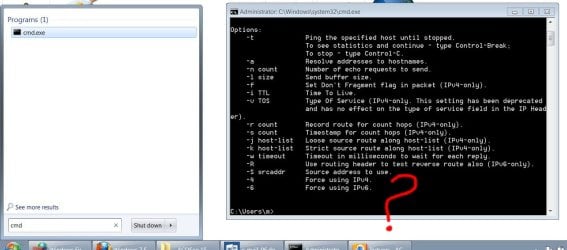
I’m looking for a command that is executed from the cmd (attached) to show all the connected machines on the network

Thank you

Best

Jamal
 

Attachments

  • Clip.jpg
    Clip.jpg
    91.1 KB · Views: 29

My Computer My Computer

OS
Windows 7 Ultimate x64
The “cmd” command to show the all the connected machines on the network,

I’m looking for a command that is executed from the cmd (attached) to show all the connected machines on the network

Thank you

Best

Jamal

Type 'ipconfig/all' to show a list of all connected devices on the network.

Then use the default gateway & type it in the address bar of the browser to access your Router...that page will show you all comps/devices using your internet connection.

HTH
 

My Computer My Computer

Computer type
PC/Desktop
Computer Manufacturer/Model Number
Custom Built
OS
Windows 7 Professional x64
CPU
Intel i5 quad processor
Motherboard
DP67BG
Memory
16 GB
Graphics Card(s)
Radeon HD 5770
Sound Card
Realtek High Definition Audio
Monitor(s) Displays
Samsung SyncMaster
Screen Resolution
1920X1080
Hard Drives
WD 2TB (SATA Internal)
WD 1TB (USB External)
PSU
Corsair GS800
Case
Tower (Generic)
Cooling
3 Internal Fans
Keyboard
MS Wireless
Mouse
MS Optical Wired
Internet Speed
54 mbps
Antivirus
Emsisoft
Browser
IE-Version 9, Palemoon-Version 24.2.0
Thank you for the answer “Sir George”,

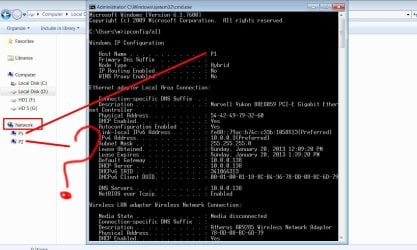
What I wanted is to show exclusively the machines on the network that are displayed under the “network” (attached).

is that possible with cmd command?

Best

Jamal
 

Attachments

  • Clip_6.jpg
    Clip_6.jpg
    118.1 KB · Views: 27

My Computer My Computer

OS
Windows 7 Ultimate x64
Thank you for the answer “Sir George”,

What I wanted is to show exclusively the machines on the network that are displayed under the “network” (attached).

is that possible with cmd command?

Best

Jamal

I don't know of any way to do it. Does that mean it can't be done, I don't know.
 

My Computer My Computer

Computer type
PC/Desktop
Computer Manufacturer/Model Number
Custom Built
OS
Windows 7 Professional x64
CPU
Intel i5 quad processor
Motherboard
DP67BG
Memory
16 GB
Graphics Card(s)
Radeon HD 5770
Sound Card
Realtek High Definition Audio
Monitor(s) Displays
Samsung SyncMaster
Screen Resolution
1920X1080
Hard Drives
WD 2TB (SATA Internal)
WD 1TB (USB External)
PSU
Corsair GS800
Case
Tower (Generic)
Cooling
3 Internal Fans
Keyboard
MS Wireless
Mouse
MS Optical Wired
Internet Speed
54 mbps
Antivirus
Emsisoft
Browser
IE-Version 9, Palemoon-Version 24.2.0
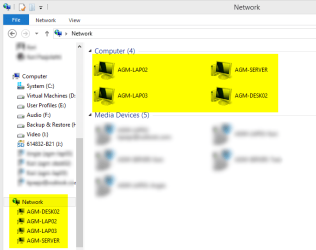
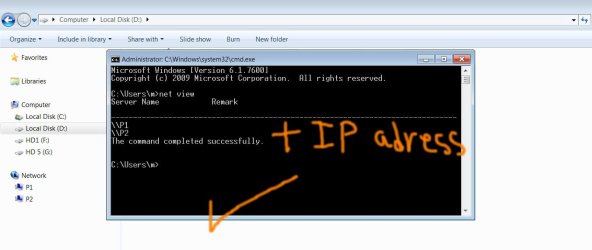
The highlighted computers here:

Net_View_2.png

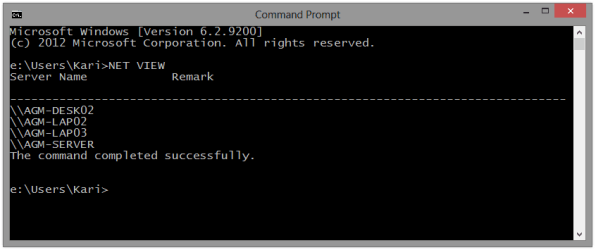
can be shown in command prompt with command NET VIEW:

Net_View.png
(Click to enlarge.)

Kari
 

My Computer My Computer

Computer type
Laptop
Computer Manufacturer/Model Number
HP ENVY 17-1150eg
OS
Windows 10 Pro x64 EN-GB
CPU
1.6 GHz Intel Core i7-720QM Processor
Memory
6 GB
Graphics Card(s)
ATI Mobility Radeon HD 5850 Graphics
Sound Card
Beats sound system with integrated subwoofer
Monitor(s) Displays
17" laptop display, 22" LED and 32" Full HD TV through HDMI
Screen Resolution
1600*900 (1), 1920*1080 (2&3)
Hard Drives
Internal: 2 x 500 GB SATA Hard Disk Drive 7200 rpm
External: 2TB for backups, 3TB USB3 network drive for media
Cooling
As Envy runs a bit warm, I have it on a Cooler Master pad
Keyboard
Logitech diNovo Media Desktop Laser (bluetooth)
Mouse
Logitech Performance Mouse MX
Internet Speed
50/10 Mbps VDSL
Antivirus
Windows Defender 4.3.9431.0
Browser
Maxthon 3.5.2., IE11
Always beat me to the punch Kari. And your examples are amazing like always. Good work.
 

My Computer My Computer

OS
Windows 7 Ultimate x64
The info Kari provided is probably what the OP wanted (given the OP's screenshot in post 3) but just to be clear, the NET VIEW query may not show every computer on a network as mentioned in the thread title and in the OP.

NET VIEW might not be able to traverse different subnets in a complex network and (even on simple, single subnet networks) there are ways to hide computers from the NET VIEW query - this being one way:
How to Hide the Server's Computer Name from Other Computers in the Domain

Disabling NetBIOS over TCP/IP can also hide a computer from various listings... and yet you can still get to it if you know it's name or IP.

I'm not trying to be picky - I'm just thinking of those that find this thread later on. Maybe those that know a certain computer is on their network, but it is not showing via Windows (file) Explorer or via NET VIEW.
 

My Computer My Computer

Computer type
Laptop
Computer Manufacturer/Model Number
Employer provided Dell Latitude
OS
W7 Pro SP1 64bit
CPU
i7
Memory
8GB
Graphics Card(s)
Intel HD Graphics
Hard Drives
crappy SSD
Antivirus
Employer mandated Symantec Endpoint Protection
Browser
Pale Moon 64bit, IE11 64bit & Chrome 64bit
UsernameIssues, you have a valid point there. However, and please correct me if I am wrong, hiding a computer from NET VIEW query also hides it from Windows Explorer > Network view.

If I read OP's question correctly he wants to use a command that shows in command prompt the same computers than he can see in Windows Explorer > Network; hiding a computer from network would hide it both in Windows Explorer > Network and NET VIEW query, ergo command prompt NET VIEW query shows exactly the same computers than Explorer, which is what OP asked.

Kari
 

My Computer My Computer

Computer type
Laptop
Computer Manufacturer/Model Number
HP ENVY 17-1150eg
OS
Windows 10 Pro x64 EN-GB
CPU
1.6 GHz Intel Core i7-720QM Processor
Memory
6 GB
Graphics Card(s)
ATI Mobility Radeon HD 5850 Graphics
Sound Card
Beats sound system with integrated subwoofer
Monitor(s) Displays
17" laptop display, 22" LED and 32" Full HD TV through HDMI
Screen Resolution
1600*900 (1), 1920*1080 (2&3)
Hard Drives
Internal: 2 x 500 GB SATA Hard Disk Drive 7200 rpm
External: 2TB for backups, 3TB USB3 network drive for media
Cooling
As Envy runs a bit warm, I have it on a Cooler Master pad
Keyboard
Logitech diNovo Media Desktop Laser (bluetooth)
Mouse
Logitech Performance Mouse MX
Internet Speed
50/10 Mbps VDSL
Antivirus
Windows Defender 4.3.9431.0
Browser
Maxthon 3.5.2., IE11
UsernameIssues, you have a valid point there. However, and please correct me if I am wrong, hiding a computer from NET VIEW query also hides it from Windows Explorer > Network view.

If I read OP's question correctly he wants to use a command that shows in command prompt the same computers than he can see in Windows Explorer > Network; hiding a computer from network would hide it both in Windows Explorer > Network and NET VIEW query, ergo command prompt NET VIEW query shows exactly the same computers than Explorer, which is what OP asked.

Kari
I really fear coming across as being argumentative or picky or worse: "look what I think I know" - hence my repeated caveats that I'm posting this just for the sake of clarity. Google will index this thread based on its title (and post content - but more weight is given to the title). I don't want folks to use NET VIEW and think that they have a listing of all of the computers on the network. (Mixed operating systems can mess these lists up as well.)

Look at the original post. It does not mention Windows Explorer. Now look at post #3 - it clarifies (and considerably modifies) the original request. Your answer speaks specifically to the request made in post #3. (And for most people on a home network, that is a perfectly good answer.)

I VPN'd into my office. NET VIEW showed 55 computers (in reality there are 1000s of computers on the network at the moment). The Windows Explorer > Network view showed 58 computers. If I go to START > RUN and type in a UNC to a computer that I know is not on the same subnet as my office computer, that computer is added to the view shown in Windows Explorer > Network, but is still not shown in NET VIEW.

I don't have any computers that I'm willing to test by hiding them - so I cannot speak specifically to your question about "are they hidden from both lists". I don't even know enough to say how NET VIEW's list differs from Windows Explorer > Network list to predict which method of hiding might hide a computer from one list or the other. Maybe NET VIEW depends on NetBIOS over TCP/IP. Maybe Windows Explorer > Network depends on the computer browser service.

All I know is what I've seen in the past - not why I've seen it :-)
 

My Computer My Computer

Computer type
Laptop
Computer Manufacturer/Model Number
Employer provided Dell Latitude
OS
W7 Pro SP1 64bit
CPU
i7
Memory
8GB
Graphics Card(s)
Intel HD Graphics
Hard Drives
crappy SSD
Antivirus
Employer mandated Symantec Endpoint Protection
Browser
Pale Moon 64bit, IE11 64bit & Chrome 64bit
UsernameIssues, you have a valid point there. However, and please correct me if I am wrong, hiding a computer from NET VIEW query also hides it from Windows Explorer > Network view.

If I read OP's question correctly he wants to use a command that shows in command prompt the same computers than he can see in Windows Explorer > Network; hiding a computer from network would hide it both in Windows Explorer > Network and NET VIEW query, ergo command prompt NET VIEW query shows exactly the same computers than Explorer, which is what OP asked.

Kari
I really fear coming across as being argumentative or picky or worse: "look what I think I know" - hence my repeated caveats that I'm posting this just for the sake of clarity. Google will index this thread based on its title (and post content - but more weight is given to the title). I don't want folks to use NET VIEW and think that they have a listing of all of the computers on the network. (Mixed operating systems can mess these lists up as well.)

Look at the original post. It does not mention Windows Explorer. Now look at post #3 - it clarifies (and considerably modifies) the original request. Your answer speaks specifically to the request made in post #3. (And for most people on a home network, that is a perfectly good answer.)

I VPN'd into my office. NET VIEW showed 55 computers (in reality there are 1000s of computers on the network at the moment). The Windows Explorer > Network view showed 58 computers. If I go to START > RUN and type in a UNC to a computer that I know is not on the same subnet as my office computer, that computer is added to the view shown in Windows Explorer > Network, but is still not shown in NET VIEW.

I don't have any computers that I'm willing to test by hiding them - so I cannot speak specifically to your question about "are they hidden from both lists". I don't even know enough to say how NET VIEW's list differs from Windows Explorer > Network list to predict which method of hiding might hide a computer from one list or the other. Maybe NET VIEW depends on NetBIOS over TCP/IP. Maybe Windows Explorer > Network depends on the computer browser service.

All I know is what I've seen in the past - not why I've seen it :-)

You are of course right, and I was not trying to prove otherwise. I simply answered OP's question.

Sometimes we need to "read between the lines" to really understand what OP means and answer to that question, a question which might sometimes be slightly different than that what OP actually posted. In doing so we should IMO not think so much about what Google search later shows but OP's actual issue and answer that as well as we can.

My "reading between the lines" this time:
My answer was posted after user posted a screenshot telling very clearly he wants to show computers shown in Explorer > Network in command prompt, and after another member had answered it might not be possible.

As OP's screenshot only shows two PCs and because I had just before read another thread of the same OP which also mentioned the same two PCs, plus other "between the lines" reading, I was and still am quite sure he needs this information for his own either home or small business network. And, of course, were it a thousand PC corporate network with multiple subnets he wouldn't need to ask the question here.

I am sorry but now I think you are a bit picky, splitting hairs as we say in Finnish. My answer to the OP is (never been modest ;)) the best given in this thread. Sorry Google if you now index wrong information, wasn't even thinking of that, and never will; I was and will be thinking the best possible answer to the OP's issue, all things considered, and post it if I know it.
Kari
 

My Computer My Computer

Computer type
Laptop
Computer Manufacturer/Model Number
HP ENVY 17-1150eg
OS
Windows 10 Pro x64 EN-GB
CPU
1.6 GHz Intel Core i7-720QM Processor
Memory
6 GB
Graphics Card(s)
ATI Mobility Radeon HD 5850 Graphics
Sound Card
Beats sound system with integrated subwoofer
Monitor(s) Displays
17" laptop display, 22" LED and 32" Full HD TV through HDMI
Screen Resolution
1600*900 (1), 1920*1080 (2&3)
Hard Drives
Internal: 2 x 500 GB SATA Hard Disk Drive 7200 rpm
External: 2TB for backups, 3TB USB3 network drive for media
Cooling
As Envy runs a bit warm, I have it on a Cooler Master pad
Keyboard
Logitech diNovo Media Desktop Laser (bluetooth)
Mouse
Logitech Performance Mouse MX
Internet Speed
50/10 Mbps VDSL
Antivirus
Windows Defender 4.3.9431.0
Browser
Maxthon 3.5.2., IE11
How come my blackberry doesn't show up when I type NET VIEW in cmd even though its on my network?
 

My Computer My Computer

OS
Windows 7 Professional x64
CPU
AMD Phenom™ 9500 Quad-Core Processor
Motherboard
MCP61PM-HM (Nettle3)
Memory
8 GB DDR2 OCZ
Graphics Card(s)
Power Color 5750
Monitor(s) Displays
HP w2207h
Hard Drives
2x Seagate ST336032 0AS SCSI 326 GB,
WD Caviar Black 600 GB,
WD Caviar Black 1 TB
PSU
Corsair TX 650w
Case
Cooler Master 690 Advanced
Can you see it in Explorer > Network and command prompt > ipconfig?
 

My Computer My Computer

Computer type
Laptop
Computer Manufacturer/Model Number
HP ENVY 17-1150eg
OS
Windows 10 Pro x64 EN-GB
CPU
1.6 GHz Intel Core i7-720QM Processor
Memory
6 GB
Graphics Card(s)
ATI Mobility Radeon HD 5850 Graphics
Sound Card
Beats sound system with integrated subwoofer
Monitor(s) Displays
17" laptop display, 22" LED and 32" Full HD TV through HDMI
Screen Resolution
1600*900 (1), 1920*1080 (2&3)
Hard Drives
Internal: 2 x 500 GB SATA Hard Disk Drive 7200 rpm
External: 2TB for backups, 3TB USB3 network drive for media
Cooling
As Envy runs a bit warm, I have it on a Cooler Master pad
Keyboard
Logitech diNovo Media Desktop Laser (bluetooth)
Mouse
Logitech Performance Mouse MX
Internet Speed
50/10 Mbps VDSL
Antivirus
Windows Defender 4.3.9431.0
Browser
Maxthon 3.5.2., IE11
Can you see it in Explorer > Network and command prompt > ipconfig?

I'm not sure what you mean by Explorer > Network and command prompt > but when I type ipconfig in cmd it doesn't show up.
 

My Computer My Computer

OS
Windows 7 Professional x64
CPU
AMD Phenom™ 9500 Quad-Core Processor
Motherboard
MCP61PM-HM (Nettle3)
Memory
8 GB DDR2 OCZ
Graphics Card(s)
Power Color 5750
Monitor(s) Displays
HP w2207h
Hard Drives
2x Seagate ST336032 0AS SCSI 326 GB,
WD Caviar Black 600 GB,
WD Caviar Black 1 TB
PSU
Corsair TX 650w
Case
Cooler Master 690 Advanced
Windows Explorer > Network can be viewed by clicking Network on the left side navigation pane:

251189d1358717964-cmd-command-show-all-connected-machines-network-net_view_2.png


Highlighted part of Explorer screenshot above shows computers belonging to same subnet.

Command ipconfig /all in Command Prompt also shows computers and devices in your network.

If your device is not shown in these, it will not belong to same subnet or as UsernameIssues has told previously in this thread it is hidden from network. In this case you need to change network settings on your device (Blackberry).

I have absolutely no knowledge of Blackberries so I can not help you in that.

Kari
 

My Computer My Computer

Computer type
Laptop
Computer Manufacturer/Model Number
HP ENVY 17-1150eg
OS
Windows 10 Pro x64 EN-GB
CPU
1.6 GHz Intel Core i7-720QM Processor
Memory
6 GB
Graphics Card(s)
ATI Mobility Radeon HD 5850 Graphics
Sound Card
Beats sound system with integrated subwoofer
Monitor(s) Displays
17" laptop display, 22" LED and 32" Full HD TV through HDMI
Screen Resolution
1600*900 (1), 1920*1080 (2&3)
Hard Drives
Internal: 2 x 500 GB SATA Hard Disk Drive 7200 rpm
External: 2TB for backups, 3TB USB3 network drive for media
Cooling
As Envy runs a bit warm, I have it on a Cooler Master pad
Keyboard
Logitech diNovo Media Desktop Laser (bluetooth)
Mouse
Logitech Performance Mouse MX
Internet Speed
50/10 Mbps VDSL
Antivirus
Windows Defender 4.3.9431.0
Browser
Maxthon 3.5.2., IE11
Oh, no it doesn't show up. It shows up in my router though.
 

My Computer My Computer

OS
Windows 7 Professional x64
CPU
AMD Phenom™ 9500 Quad-Core Processor
Motherboard
MCP61PM-HM (Nettle3)
Memory
8 GB DDR2 OCZ
Graphics Card(s)
Power Color 5750
Monitor(s) Displays
HP w2207h
Hard Drives
2x Seagate ST336032 0AS SCSI 326 GB,
WD Caviar Black 600 GB,
WD Caviar Black 1 TB
PSU
Corsair TX 650w
Case
Cooler Master 690 Advanced
The only way to see everything on a network is to scan it with tools like nmap and use the network ID as your target.
 

My Computer My Computer

OS
Windows 7 Ultimate x64
~~~
I am sorry but now I think you are a bit picky, splitting hairs as we say in Finnish. My answer to the OP is (never been modest ;)) the best given in this thread. Sorry Google if you now index wrong information, wasn't even thinking of that, and never will; I was and will be thinking the best possible answer to the OP's issue, all things considered, and post it if I know it.

Kari
Thank you taking the time to explain. I was probably overly concerned with those that find this thread via Google after some frustrating searches of my own that led to one dead end after another.
 

My Computer My Computer

Computer type
Laptop
Computer Manufacturer/Model Number
Employer provided Dell Latitude
OS
W7 Pro SP1 64bit
CPU
i7
Memory
8GB
Graphics Card(s)
Intel HD Graphics
Hard Drives
crappy SSD
Antivirus
Employer mandated Symantec Endpoint Protection
Browser
Pale Moon 64bit, IE11 64bit & Chrome 64bit
Than you guys for the input. This is very useful.

I do agree, Kari is a star.

May I have another question? How to have the IP address of the machines (exclusively the machines)?

Best

Jamal
 

Attachments

  • Clip_16.jpg
    Clip_16.jpg
    58.1 KB · Views: 7

My Computer My Computer

OS
Windows 7 Ultimate x64
The only command I know to show IPs of all networked PCs is ipconfig /all.
 

My Computer My Computer

Computer type
Laptop
Computer Manufacturer/Model Number
HP ENVY 17-1150eg
OS
Windows 10 Pro x64 EN-GB
CPU
1.6 GHz Intel Core i7-720QM Processor
Memory
6 GB
Graphics Card(s)
ATI Mobility Radeon HD 5850 Graphics
Sound Card
Beats sound system with integrated subwoofer
Monitor(s) Displays
17" laptop display, 22" LED and 32" Full HD TV through HDMI
Screen Resolution
1600*900 (1), 1920*1080 (2&3)
Hard Drives
Internal: 2 x 500 GB SATA Hard Disk Drive 7200 rpm
External: 2TB for backups, 3TB USB3 network drive for media
Cooling
As Envy runs a bit warm, I have it on a Cooler Master pad
Keyboard
Logitech diNovo Media Desktop Laser (bluetooth)
Mouse
Logitech Performance Mouse MX
Internet Speed
50/10 Mbps VDSL
Antivirus
Windows Defender 4.3.9431.0
Browser
Maxthon 3.5.2., IE11
If your dns server is setup correctly. You should be able to use

nslookup FQDN

FQDN= fully qualified domain name.

Find your fqdn with
echo %COMPUTERNAME%.%USERDNSDOMAIN%


example from work:
C:\Documents and Settings\CParman>echo %COMPUTERNAME%.%USERDNSDOMAIN%
CPARMAN-8DFCMF1.CORP

update:
%USERDNSDOMAIN% only works on a domain :mad:

So you can get it with the ipconfig /all output.

Code:
C:\Documents and Settings\CParman>ipconfig /all

Windows IP Configuration

        Host Name . . . . . . . . . . . . : cparman-8dfcmf1
        Primary Dns Suffix  . . . . . . . : CORP
 
Last edited:

My Computer My Computer

OS
Windows 7 Ultimate x64
Back
Top