
Strange sporadic graphic issues, graphic lock ups (with Pictures)

PartyFerret

New member
Member
Local time
6:29 AM
Messages
28
Location
Darmstadt, Hessen Germany
Hello all,

I think I have only seen something like this once :huh: and the problem was attributed to damaged RAM. This time around, the RAM seems to be in perfect working condition (tested with Memtest) and the problem still remains. I am starting to wonder if the graphic chip is not having issues. Take a look at the attached photo and tell me your opinions. I ran FurMark yesterday on this notebook for 6 hours and did not see this happen, but the customer insists that this graphic issue still sporadically occurs. The Nvidia graphic drivers are the newest version.

Specs:

Samsung Series 5 Ultrabook NP530U4C-S02DE

Intel Core i5 2537M 1.40 GHz / 8 GB DDR-3 @ 1033 MHz

500GB SATA-II HDD

Intel MH76 Chipset

1 GB Nvidia GeForce GT 620 with Optimus Technology
 

Attachments
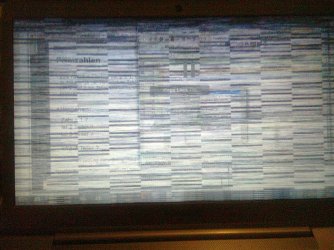
  • Foto0136.jpg
    Foto0136.jpg
    340.7 KB · Views: 9

My Computer My Computer

At a glance

Windows 8 Professional 64-Bit
OS
Windows 8 Professional 64-Bit
I think i read somewhere here in fact... that the newest drivers were causing a similar issue, try rolling back the drivers, and check if the newest drivers do support the GT 620. Ask if the customer installed drivers properly, and if the issue started with the install of the drivers. if so, you have the culprit.

Then you could try reinstalling the proper way, or leave it with the old drivers for the mean time.
 

My Computer My Computer

At a glance

Windows 7 professional X64AMD A10-5800K OC@ 4.4Ghz.8GB Kingston HyperX Blu 1333mhzXFX HD7870 2GB Core Edition
Computer type
PC/Desktop
OS
Windows 7 professional X64
CPU
AMD A10-5800K OC@ 4.4Ghz.
Motherboard
Gigabyte F2A85X-UP4
Memory
8GB Kingston HyperX Blu 1333mhz
Graphics Card(s)
XFX HD7870 2GB Core Edition
Monitor(s) Displays
Acer AL2216W
Screen Resolution
1680x1050
Hard Drives
Seagate Barracuda 500gb 7200rpm
Seagate Barracuda 1.5TB 7200rpm
PSU
Cooler Master Silent Pro M 850W
Case
Thermaltake Commander MS-I
Cooling
Cooler Master N520
Mouse
Logitech M504
Internet Speed
10Mbps
I think the best approach is to keep a log for a short while, when does this happen? (during what activity and duration), can it be rectified with a reboot ?
I doubt RAM would be a problem, but have seen exactly that with Vram damage, usually overheating or old age.
 

My Computer My Computer

At a glance

Windows 7 home premium x64AMD FX-4100 AM3+ 3.6GHz 12MB Black EditionCrsair vengeance 12Gb DDR3 1600MHz CL9Asus GTX 560 1GB
Computer Manufacturer/Model Number
DIY
OS
Windows 7 home premium x64
CPU
AMD FX-4100 AM3+ 3.6GHz 12MB Black Edition
Motherboard
Asus M5A97 Pro
Memory
Crsair vengeance 12Gb DDR3 1600MHz CL9
Graphics Card(s)
Asus GTX 560 1GB
Sound Card
Realtek onboard
Monitor(s) Displays
Hanns G 1680x1050 native
Hard Drives
OCZ 128Gb Petrol ssd
2x500 Gb Samsung
PSU
OCZ StealthXstream II 500W
Internet Speed
8Mb or better
Impossible for me to reproduce the error because it is sporadic so bad, it happens maybe once a week. The notebook is only just over a month old (purchased in mid-December 2012). I have even stress tested the graphics with FurMark for 6 consecutive hours without a problem. Rebooting would not rectify the issue per se, but would only get it into working order again. Drivers are the newest version. Reverted to the older version drivers and the error never showed once. If overheating was causing this, then FurMark would have certainly caused it to happen after a while. Not even a peep out of a BSOD, mangeled screen, or anything for that matter since it was delievered to me.
 

My Computer My Computer

At a glance

Windows 8 Professional 64-Bit
OS
Windows 8 Professional 64-Bit
Strange is that ever since these crazy screens started coming that never has one BSOD shown, nor has there been a single dump in the Minidump folder.
 

My Computer My Computer

At a glance

Windows 8 Professional 64-Bit
OS
Windows 8 Professional 64-Bit
Impossible for me to reproduce the error because it is sporadic so bad, it happens maybe once a week. The notebook is only just over a month old (purchased in mid-December 2012). I have even stress tested the graphics with FurMark for 6 consecutive hours without a problem. Rebooting would not rectify the issue per se, but would only get it into working order again. Drivers are the newest version. Reverted to the older version drivers and the error never showed once. If overheating was causing this, then FurMark would have certainly caused it to happen after a while. Not even a peep out of a BSOD, mangeled screen, or anything for that matter since it was delievered to me.
Seems to me that it may have beent he drivers as I mentioned in the post above.
Interesting how Nvidia drivers are going down the drain recently.
 

My Computer My Computer

At a glance

Windows 7 professional X64AMD A10-5800K OC@ 4.4Ghz.8GB Kingston HyperX Blu 1333mhzXFX HD7870 2GB Core Edition
Computer type
PC/Desktop
OS
Windows 7 professional X64
CPU
AMD A10-5800K OC@ 4.4Ghz.
Motherboard
Gigabyte F2A85X-UP4
Memory
8GB Kingston HyperX Blu 1333mhz
Graphics Card(s)
XFX HD7870 2GB Core Edition
Monitor(s) Displays
Acer AL2216W
Screen Resolution
1680x1050
Hard Drives
Seagate Barracuda 500gb 7200rpm
Seagate Barracuda 1.5TB 7200rpm
PSU
Cooler Master Silent Pro M 850W
Case
Thermaltake Commander MS-I
Cooling
Cooler Master N520
Mouse
Logitech M504
Internet Speed
10Mbps
Back
Top