Cannot turn on Network Discovery and File Sharing

EmperorNortonI

New member
Member
Local time
9:57 AM
Messages
37
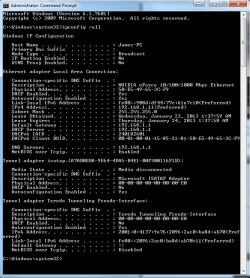
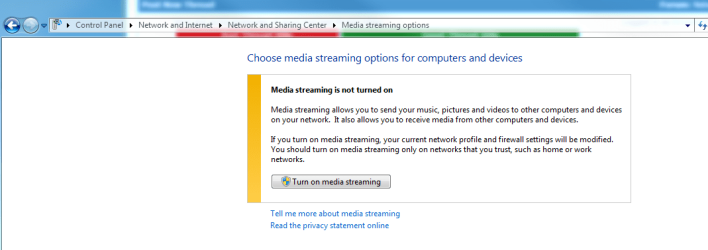
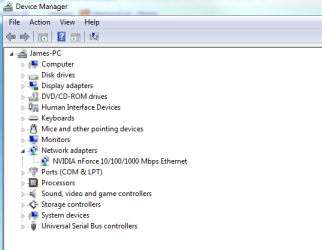
My computer was infected with some trojans. I managed to clean it up with Microsoft Security Essentials and Spybot S&D. It's running much more smoothly now, but I'm still having one annoying problem. I can't turn on Network Discovery and File Sharing, and I no longer get the option to join my homegroup. When I click Network in my computer a pop up that says "Network Discovery and File Sharing are Turned Off. Network Computers and Devices are Not Visible. Click to change ..." as shown in the screenshot below. I click it, it goes away for second, then comes right back. I don't get the option to join my homegroup, and when I create one, and try to turn on media streaming options, I click the button shown below in the third screenshot, but nothing happens.

I tried going through the automated troubleshooting, but it couldn't fix the issue. I also tried restoring windows firewall to default settings but it didn't work. I did, however, get network discovery to work after I disabled my firewall completely, but I would like to be able to fix this problem without completely turning off my firewall. Unfortunately, I have no restore points from before this issue started happening, perhaps the virus got rid of them all. I'd like to avoid doing a full system restore if possible because it's working okay otherwise and I have a lot of stuff on this computer that will be difficult to back up and recover later.

Code:
iBUYPOWER Gamer Power 579Q6
General Spec 
Brand 
iBUYPOWER 
Model 
Gamer Power 579Q6 
Type 
Gaming 
Processor 
AMD Phenom II X6 1090T 3.2GHz 
Processor Main Features 
64 bit Six-Core Processor 
Cache Per Processor 
6 x 512KB L2 Cache
6MB L3 Cache 
Memory 
4GB DDR3 1333MHz 
Hard Drive 
1.5TB SATA-II 
Optical Drive 1 
DVD±RW Drive with Dual Layer media support 
Graphics 
AMD Radeon HD 6850 (1 GB) 
Audio 
Sound card - Integrated 
Ethernet 
Gigabit Ethernet 
Power Supply 
700W 
Keyboard 
iBUYPOWER USB Deluxe Keyboard 
Mouse 
iBUYPOWER USB Mouse 
Operating System 
Windows 7 Home Premium 64-bit 
Special Features 
XION ECHO Gaming Tower 
CPU 
CPU Type 
Phenom II X6 
Installed Qty 
1 
CPU Speed 
1090T(3.2GHz) 
L2 Cache Per CPU 
6 x 512KB 
L3 Cache Per CPU 
6MB 
CPU Socket Type 
AM3 
CPU Main Features 
64 bit Six-Core Processor 
Graphics 
GPU/VPU Type 
AMD Radeon HD 6850 (1 GB) 
Graphics Interface 
PCI Express x16 
Memory 
Memory Capacity 
4GB DDR3 
Memory Speed 
DDR3 1333 
Form Factor 
DIMM 240-pin 
Memory Spec 
2GB x 2 
Memory Slot (Total) 
2 
Memory Slot (Available) 
0 
Maximum Memory Supported 
8GB 
Hard Drive 
HDD Capacity 
1.5TB 
HDD Interface 
SATA II 
Optical Drive 
Optical Drive Type 
DVD±RW 
Optical Drive Spec 
24X DL DVD+/-RW Drive 
Audio 
Audio Chipset 
Integrated 
Audio Channels 
8 channels 
Communications 
LAN Chipset 
Integrated 
LAN Speed 
10/100/1000Mbps 
Front Panel Ports 
Front USB 
2 x USB 2.0 
Front Audio Ports 
2 
Back Panel Ports 
COM 
1 
PS/2 
2 
Video Ports 
1 VGA 
Rear USB 
4 x USB 2.0 
RJ45 
1 port 
Rear Audio Ports 
3 ports 
Expansion 
External Bays 
4 x external 5.25" drive bays 
Internal Bays 
5 x internal 3.5" drive bay 
PCI Slots (Available/Total) 
1 x PCI-Express x16
1 x PCI-Express x1
1 x PCI 
Mouse 
Mouse Type 
iBUYPOWER USB Mouse 
Keyboard 
Keyboard Type 
iBUYPOWER USB Deluxe Keyboard 
Physical Spec 
Dimensions 
19.4" x 7.9" x 16.9" 
Weight 
28 lbs
 

Attachments

  • network error.PNG
    network error.PNG
    42.7 KB · Views: 11
  • ipcnofig screenshot.PNG
    ipcnofig screenshot.PNG
    22.6 KB · Views: 17
  • media streaming error.PNG
    media streaming error.PNG
    21.4 KB · Views: 15
  • network card.PNG
    network card.PNG
    14.4 KB · Views: 15
  • system info.PNG
    system info.PNG
    60.3 KB · Views: 12
Last edited:

My Computer My Computer

Computer Manufacturer/Model Number
Asus Essentio CG1330
OS
Windows 7 Home Premium 64 bit Edition
CPU
AMD Phenom(TM) II X6 1045T Processor 2.70 GHz
Motherboard
North Bridge: AMD 760G South Bridge: AMD SB710
Memory
8.00 GB 4 x DIMM Slots Dual Channel DDR3 1333 MHz. Support m
Graphics Card(s)
NVidia Geforce GTS 250
Sound Card
VIA High Definition Audio
Monitor(s) Displays
Samsung Syncmaster T260 HD and Generic PnP Monitor
Hard Drives
SATA
3.5" 500G ~ 4TB
PSU
CORSAIR Enthusiast Series TX650 V2 650W ATX12V v2.31/ EPS12V
Case
Asus Essentio CG1330
Cooling
Processor, Video Card, and Case fans
Last edited:

My Computer My Computer

Computer type
PC/Desktop
Computer Manufacturer/Model Number
Home built
OS
Windows 7 Ult, Windows 8.1 Pro,
CPU
Q9650-4.275GHz, E8600 4.5GHz, E6750-3.8GHz
Motherboard
Evga 780i FTW
Memory
G.Skill PC2 9600 1200Mhz 5 5 5 15 2T
Graphics Card(s)
GTX480
Sound Card
Asus Xonar D2
Monitor(s) Displays
HannsG
Screen Resolution
1680X1050
Hard Drives
GSkill Phoenix Pro 120GB SSD
PSU
ThermalTake Toughpower 1000Watt modular
Case
ThermalTake XaserV
Cooling
Xigmatek S1283
Keyboard
Logitech G15
Mouse
Logitech G9
Internet Speed
T1
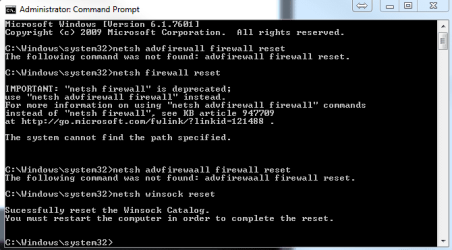
I've tried the steps listed in that thread to no avail. I'm unable to reset the firewall to default settings. I started following the steps in your second link, and came across the error in the screenshot when I tried to run "netsh advfirewall firewall reset". It looks like the command can't be found ...
 

Attachments

  • cannot reset firewall.PNG
    cannot reset firewall.PNG
    10.1 KB · Views: 18

My Computer My Computer

Computer Manufacturer/Model Number
Asus Essentio CG1330
OS
Windows 7 Home Premium 64 bit Edition
CPU
AMD Phenom(TM) II X6 1045T Processor 2.70 GHz
Motherboard
North Bridge: AMD 760G South Bridge: AMD SB710
Memory
8.00 GB 4 x DIMM Slots Dual Channel DDR3 1333 MHz. Support m
Graphics Card(s)
NVidia Geforce GTS 250
Sound Card
VIA High Definition Audio
Monitor(s) Displays
Samsung Syncmaster T260 HD and Generic PnP Monitor
Hard Drives
SATA
3.5" 500G ~ 4TB
PSU
CORSAIR Enthusiast Series TX650 V2 650W ATX12V v2.31/ EPS12V
Case
Asus Essentio CG1330
Cooling
Processor, Video Card, and Case fans
I've tried the steps listed in that thread to no avail. I'm unable to reset the firewall to default settings. I started following the steps in your second link, and came across the error in the screenshot when I tried to run "netsh advfirewall firewall reset". It looks like the command can't be found ...

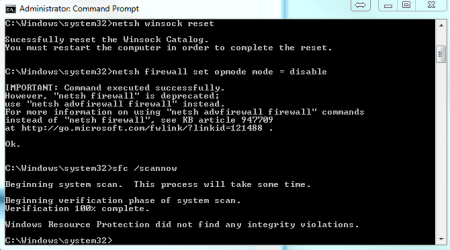
Have you tried running the sfc/scannow command to see if there are any missing system files?
 

My Computer My Computer

Computer type
PC/Desktop
Computer Manufacturer/Model Number
Home built
OS
Windows 7 Ult, Windows 8.1 Pro,
CPU
Q9650-4.275GHz, E8600 4.5GHz, E6750-3.8GHz
Motherboard
Evga 780i FTW
Memory
G.Skill PC2 9600 1200Mhz 5 5 5 15 2T
Graphics Card(s)
GTX480
Sound Card
Asus Xonar D2
Monitor(s) Displays
HannsG
Screen Resolution
1680X1050
Hard Drives
GSkill Phoenix Pro 120GB SSD
PSU
ThermalTake Toughpower 1000Watt modular
Case
ThermalTake XaserV
Cooling
Xigmatek S1283
Keyboard
Logitech G15
Mouse
Logitech G9
Internet Speed
T1
Yes, it didn't find any integrity violations. I did not restart the computer after resetting the winsock though. Not sure if that would have made a difference.

Anyway, i did all the steps and restarted the computer, it's still not working. I created a Windows 7 repair disc, I'm going to try and run that and hopefully it will fix it.
 

Attachments

  • results of scan.PNG
    results of scan.PNG
    11.3 KB · Views: 16

My Computer My Computer

Computer Manufacturer/Model Number
Asus Essentio CG1330
OS
Windows 7 Home Premium 64 bit Edition
CPU
AMD Phenom(TM) II X6 1045T Processor 2.70 GHz
Motherboard
North Bridge: AMD 760G South Bridge: AMD SB710
Memory
8.00 GB 4 x DIMM Slots Dual Channel DDR3 1333 MHz. Support m
Graphics Card(s)
NVidia Geforce GTS 250
Sound Card
VIA High Definition Audio
Monitor(s) Displays
Samsung Syncmaster T260 HD and Generic PnP Monitor
Hard Drives
SATA
3.5" 500G ~ 4TB
PSU
CORSAIR Enthusiast Series TX650 V2 650W ATX12V v2.31/ EPS12V
Case
Asus Essentio CG1330
Cooling
Processor, Video Card, and Case fans
All the repair disc did was get me into the same menu that I could have gotten into had I pushed F8 on startup. I ran a startup repair, but it found no errors. Windows starts fine. I have no restore point to go back to, nor a backup that I can restore to.

One thing I noticed was that in services, UPnP was not started and was set to manual. I set it to automatic and started it, but it's still not working.
 

My Computer My Computer

Computer Manufacturer/Model Number
Asus Essentio CG1330
OS
Windows 7 Home Premium 64 bit Edition
CPU
AMD Phenom(TM) II X6 1045T Processor 2.70 GHz
Motherboard
North Bridge: AMD 760G South Bridge: AMD SB710
Memory
8.00 GB 4 x DIMM Slots Dual Channel DDR3 1333 MHz. Support m
Graphics Card(s)
NVidia Geforce GTS 250
Sound Card
VIA High Definition Audio
Monitor(s) Displays
Samsung Syncmaster T260 HD and Generic PnP Monitor
Hard Drives
SATA
3.5" 500G ~ 4TB
PSU
CORSAIR Enthusiast Series TX650 V2 650W ATX12V v2.31/ EPS12V
Case
Asus Essentio CG1330
Cooling
Processor, Video Card, and Case fans
I have had this issue two times, once on my own PC and once on neighbors which I maintain.

On both occasions the only thing that helped was a new clean install. Those malware turns so many services off, even deletes some of them, it seems to be quite a difficult task to clear.

Just my two cents...

Kari
 

My Computer My Computer

Computer type
Laptop
Computer Manufacturer/Model Number
HP ENVY 17-1150eg
OS
Windows 10 Pro x64 EN-GB
CPU
1.6 GHz Intel Core i7-720QM Processor
Memory
6 GB
Graphics Card(s)
ATI Mobility Radeon HD 5850 Graphics
Sound Card
Beats sound system with integrated subwoofer
Monitor(s) Displays
17" laptop display, 22" LED and 32" Full HD TV through HDMI
Screen Resolution
1600*900 (1), 1920*1080 (2&3)
Hard Drives
Internal: 2 x 500 GB SATA Hard Disk Drive 7200 rpm
External: 2TB for backups, 3TB USB3 network drive for media
Cooling
As Envy runs a bit warm, I have it on a Cooler Master pad
Keyboard
Logitech diNovo Media Desktop Laser (bluetooth)
Mouse
Logitech Performance Mouse MX
Internet Speed
50/10 Mbps VDSL
Antivirus
Windows Defender 4.3.9431.0
Browser
Maxthon 3.5.2., IE11
I'd rather not do a clean install. I have too much on my computer, and honestly, other than this issue it's working fine. I can live with it, even if I have to shut off windows firewall every time I want to share media. Still, it'd be nice if there was an faster solution than a clean install.
 

My Computer My Computer

Computer Manufacturer/Model Number
Asus Essentio CG1330
OS
Windows 7 Home Premium 64 bit Edition
CPU
AMD Phenom(TM) II X6 1045T Processor 2.70 GHz
Motherboard
North Bridge: AMD 760G South Bridge: AMD SB710
Memory
8.00 GB 4 x DIMM Slots Dual Channel DDR3 1333 MHz. Support m
Graphics Card(s)
NVidia Geforce GTS 250
Sound Card
VIA High Definition Audio
Monitor(s) Displays
Samsung Syncmaster T260 HD and Generic PnP Monitor
Hard Drives
SATA
3.5" 500G ~ 4TB
PSU
CORSAIR Enthusiast Series TX650 V2 650W ATX12V v2.31/ EPS12V
Case
Asus Essentio CG1330
Cooling
Processor, Video Card, and Case fans
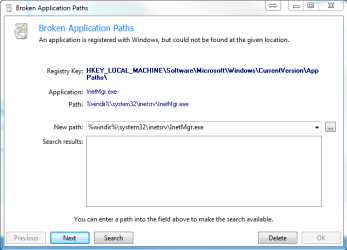
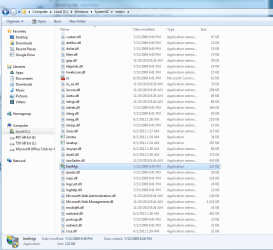
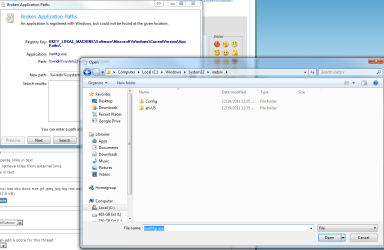
I ran Spybot S&D's system repair, it reports that a registry key is pointing to a service called InetMgr.exe that it can't find. When I click search and go to the directory where it's supposed to be, none of the files show up. However, if I browse there from windows explorer, it shows all of the file, including the missing InetMgr.exe. I can't get spybot to recognize its existence. I can copy the file to desktop, but I'm not sure if I should point the registry key there. Why wouldn't it show up in spybot's search, but it does show up in explorer?


Also, I attached a list of my services. I tried enabling some more of them, but to no effect.
 

Attachments

  • services.txt
    services.txt
    47.8 KB · Views: 1
  • but it's right there!.PNG
    but it's right there!.PNG
    47.8 KB · Views: 10
  • Inet not showing in search.PNG
    Inet not showing in search.PNG
    53.5 KB · Views: 7
  • Inet missing.PNG
    Inet missing.PNG
    13.9 KB · Views: 13

My Computer My Computer

Computer Manufacturer/Model Number
Asus Essentio CG1330
OS
Windows 7 Home Premium 64 bit Edition
CPU
AMD Phenom(TM) II X6 1045T Processor 2.70 GHz
Motherboard
North Bridge: AMD 760G South Bridge: AMD SB710
Memory
8.00 GB 4 x DIMM Slots Dual Channel DDR3 1333 MHz. Support m
Graphics Card(s)
NVidia Geforce GTS 250
Sound Card
VIA High Definition Audio
Monitor(s) Displays
Samsung Syncmaster T260 HD and Generic PnP Monitor
Hard Drives
SATA
3.5" 500G ~ 4TB
PSU
CORSAIR Enthusiast Series TX650 V2 650W ATX12V v2.31/ EPS12V
Case
Asus Essentio CG1330
Cooling
Processor, Video Card, and Case fans
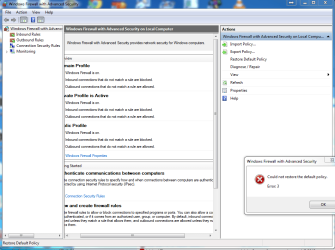
I uninstalled MSE to see if it would have any effect. It didn't. But now I get an error message at least when I try to restore the default firewall policies. Error code 3.

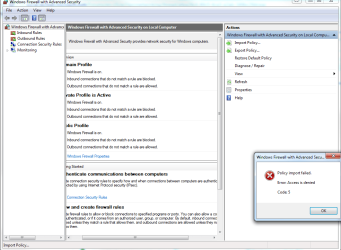
I tried importing a policy from another computer that was working, but it failed. Error code 5.
 

Attachments

  • could not restore default policy.PNG
    could not restore default policy.PNG
    49.1 KB · Views: 5
  • importing policy failed.PNG
    importing policy failed.PNG
    39.8 KB · Views: 6

My Computer My Computer

Computer Manufacturer/Model Number
Asus Essentio CG1330
OS
Windows 7 Home Premium 64 bit Edition
CPU
AMD Phenom(TM) II X6 1045T Processor 2.70 GHz
Motherboard
North Bridge: AMD 760G South Bridge: AMD SB710
Memory
8.00 GB 4 x DIMM Slots Dual Channel DDR3 1333 MHz. Support m
Graphics Card(s)
NVidia Geforce GTS 250
Sound Card
VIA High Definition Audio
Monitor(s) Displays
Samsung Syncmaster T260 HD and Generic PnP Monitor
Hard Drives
SATA
3.5" 500G ~ 4TB
PSU
CORSAIR Enthusiast Series TX650 V2 650W ATX12V v2.31/ EPS12V
Case
Asus Essentio CG1330
Cooling
Processor, Video Card, and Case fans
This is exactly what has happened to me

It looks like this thread ran out of gas and that's too bad. I've struggled through the exact same steps with the same effect.

Can anyone help??
 

My Computer My Computer

Computer type
PC/Desktop
Computer Manufacturer/Model Number
HP
OS
Windows 7 Professional
CPU
Intel Core Duo
Memory
6GB
Graphics Card(s)
ATI Radeon
Hard Drives
650 GB
Antivirus
Security Essentials
Browser
IE9
I wasn't able to solve it. I had to resort to a full factory reset. Sorry.
 

My Computer My Computer

Computer Manufacturer/Model Number
Asus Essentio CG1330
OS
Windows 7 Home Premium 64 bit Edition
CPU
AMD Phenom(TM) II X6 1045T Processor 2.70 GHz
Motherboard
North Bridge: AMD 760G South Bridge: AMD SB710
Memory
8.00 GB 4 x DIMM Slots Dual Channel DDR3 1333 MHz. Support m
Graphics Card(s)
NVidia Geforce GTS 250
Sound Card
VIA High Definition Audio
Monitor(s) Displays
Samsung Syncmaster T260 HD and Generic PnP Monitor
Hard Drives
SATA
3.5" 500G ~ 4TB
PSU
CORSAIR Enthusiast Series TX650 V2 650W ATX12V v2.31/ EPS12V
Case
Asus Essentio CG1330
Cooling
Processor, Video Card, and Case fans

My Computer My Computer

Computer type
PC/Desktop
Computer Manufacturer/Model Number
HP
OS
Windows 7 Professional
CPU
Intel Core Duo
Memory
6GB
Graphics Card(s)
ATI Radeon
Hard Drives
650 GB
Antivirus
Security Essentials
Browser
IE9
Back
Top