Solved Installing Win7 on an MSI MEG Z590 ACE

Use the update and drivers attached at the bottom of all my posts.

USB3_Win7_2021 Integrate into boot.wim image 2 and winre.wim image1 as well as whatever image in install.wim

My updater would have done all that for you.
Update your Win 7 installation media

Alternatively, get a win10 installation media and replace sources\install.wim with your updated win7 install.wim.
That way you will be using win10 boot.wim

But you will still need to integrate the update and drivers mentioned above into your win7 install.wim and preferably also into winre.wim
 

My Computers My Computers

  • At a glance

    7 X64i5 84002x8gb 3200mhz
    Computer type
    PC/Desktop
    OS
    7 X64
    CPU
    i5 8400
    Motherboard
    gigabyte b365m ds3h
    Memory
    2x8gb 3200mhz
    Hard Drives
    various
    PSU
    pure power 11 400w cm
    Case
    Coolermaster
    Cooling
    cryorig m9i
  • At a glance

    7x64g54008gb ddr4 2400
    Computer type
    PC/Desktop
    OS
    7x64
    CPU
    g5400
    Motherboard
    ga b365m ds3h
    Memory
    8gb ddr4 2400
    PSU
    xfx pro 450w
Thank you so much! I greatly appreciate all of your help.

- - - Updated - - -

USB drivers work perfectly. Thank you! I really appreciate your help and patience. Is there anything special that has to be done to install it on a hard drive larger than 2 TB?
 

My Computers My Computers

  • At a glance

    Windows 7 Ultimate x64Intel Core i9-10900kCorsair Vengeance RGB Pro SL 128GB DDR4 3200 ...MSI Gaming Radeon RX 6750 XT 192-bit 12GB GDD...
    Computer type
    PC/Desktop
    Computer Manufacturer/Model Number
    MSI
    OS
    Windows 7 Ultimate x64
    CPU
    Intel Core i9-10900k
    Motherboard
    MSI MEG Z590 ACE
    Memory
    Corsair Vengeance RGB Pro SL 128GB DDR4 3200 (PC4-25600)
    Graphics Card(s)
    MSI Gaming Radeon RX 6750 XT 192-bit 12GB GDDR6 Triple Fans
    Sound Card
    ASUS Xonar Essence STX II
    Monitor(s) Displays
    Dell
    Screen Resolution
    1920x1200
    Hard Drives
    WDC WD6004FZWX-00BKVA0 x2, WDC WD4005FZBX-00K5WB0 x2, WDC WD40PURZ-85TTDY0 x2
    PSU
    MSI MEG Ai1300P
    Case
    Phanteks Enthoo Pro (PH-ES614PTG_BK)
    Cooling
    NH-D15 Black
    Keyboard
    HP KB-0316 German
    Mouse
    Evoluent VerticalMouse 4 (Left-Handed)
    Internet Speed
    365 Mbps
    Antivirus
    AVG Internet Security (Annual Subscription)
    Browser
    Firefox
    Other Info
    Optical Drives: Pioneer BDR-S13UB, LG WH14NS40
  • Computer type
    PC/Desktop
    Antivirus
    AVG Internet Security
the disk needs to be gpt partition style to access more than 2 tb.

Install win7 in efi mode.
 

My Computers My Computers

  • At a glance

    7 X64i5 84002x8gb 3200mhz
    Computer type
    PC/Desktop
    OS
    7 X64
    CPU
    i5 8400
    Motherboard
    gigabyte b365m ds3h
    Memory
    2x8gb 3200mhz
    Hard Drives
    various
    PSU
    pure power 11 400w cm
    Case
    Coolermaster
    Cooling
    cryorig m9i
  • At a glance

    7x64g54008gb ddr4 2400
    Computer type
    PC/Desktop
    OS
    7x64
    CPU
    g5400
    Motherboard
    ga b365m ds3h
    Memory
    8gb ddr4 2400
    PSU
    xfx pro 450w
I wasn't sure if GPT booting was absolutely dependent upon UEFI. I've not managed to get Win 7 to work in UEFI, which is why I went though the setup issues w/ CSM – and using a 2 TB hard drive is fine. In my current build the boot drive and one older 2 TB drive is MBR, but my backup drives and data drives are GPT. I don't mind maintaining that setup. I'm just grateful that it works so far! :-)
 

My Computers My Computers

  • At a glance

    Windows 7 Ultimate x64Intel Core i9-10900kCorsair Vengeance RGB Pro SL 128GB DDR4 3200 ...MSI Gaming Radeon RX 6750 XT 192-bit 12GB GDD...
    Computer type
    PC/Desktop
    Computer Manufacturer/Model Number
    MSI
    OS
    Windows 7 Ultimate x64
    CPU
    Intel Core i9-10900k
    Motherboard
    MSI MEG Z590 ACE
    Memory
    Corsair Vengeance RGB Pro SL 128GB DDR4 3200 (PC4-25600)
    Graphics Card(s)
    MSI Gaming Radeon RX 6750 XT 192-bit 12GB GDDR6 Triple Fans
    Sound Card
    ASUS Xonar Essence STX II
    Monitor(s) Displays
    Dell
    Screen Resolution
    1920x1200
    Hard Drives
    WDC WD6004FZWX-00BKVA0 x2, WDC WD4005FZBX-00K5WB0 x2, WDC WD40PURZ-85TTDY0 x2
    PSU
    MSI MEG Ai1300P
    Case
    Phanteks Enthoo Pro (PH-ES614PTG_BK)
    Cooling
    NH-D15 Black
    Keyboard
    HP KB-0316 German
    Mouse
    Evoluent VerticalMouse 4 (Left-Handed)
    Internet Speed
    365 Mbps
    Antivirus
    AVG Internet Security (Annual Subscription)
    Browser
    Firefox
    Other Info
    Optical Drives: Pioneer BDR-S13UB, LG WH14NS40
  • Computer type
    PC/Desktop
    Antivirus
    AVG Internet Security
csm is required for win7 efi boot. Only win7 x64 ( also called amd64 or 64 bit ) can boot in efi mode

If you want to access the full capacity of disks over 2tb, you need gpt partitioning. Which is fine for a storage disk if you are booting windows in bios mode from an mbr disk.

However, if you want to boot windows from a gpt disk, you should use efi boot.

*******************************************************************************************


It is not all that complicated.

bios boot:

bios finds the bootable disk from the mbr code with an active marker. ( the mbr is not inside a partition it is at the start of the disk )

bios hands control to the mbr executable code.

the mbr code hands control the the pbr ( sometimes called vbr ) code on the active partition.

The pbr code starts up bootmgr.

bootmgr has a look in the bcd store to find out where winload.exe is.

then he starts winload.exe and with a good following wind, windows will appear as if by magic.

***********************************************************************

efi boot:

bios ( or more accurately the efi firmware) searches for an efi folder containing the efi version of bootmgr
\EFI\MICROSOFT\BOOT\BOOTMGFW.EFI

then it hands control to bootmgfw.efi which has look in the bcd store to find out where winload.efi is.

there is less chainloading and it doesnt need a partition marked active.

However most bios ( or more accurately efi firmware ) will only look on fat32 formatted partitions where it expects to find the efi folder and contents.

***********************************************************
Partitioning:

The usual gpt/efi boot setup as a minimum is a small fat32 formatted "efi system partition" at least 100mb which is where the efi folder lives. Because that is what bios ( or efi firmware) will be looking for.

The efi system partition has a special ID which is C12A7328-F81F-11D2-BA4B-00A0C93EC93B. It is important because some essential tools like bcdedit won't find it without that ID

And a large ntfs formatted partition for windows.

******************************************************************

If you use windows setup to do the installation, it usually also creates a tiny msr partition ( unclear what that is for and it is not essential ) and also a separate "recovery" partition where it deposits winre.wim. But it not a requirement to have a separate "recovery" partition, winre.wim can live happily on the main windows partition.

This is the ms picture of how it looks in a typical installation using windows setup.exe to do the installation to a blank disk

dep-win10-partitions-uefi.png

That is the gist of it. It is not necessary to know all of the long words and technical details.
 
Last edited:

My Computers My Computers

  • At a glance

    7 X64i5 84002x8gb 3200mhz
    Computer type
    PC/Desktop
    OS
    7 X64
    CPU
    i5 8400
    Motherboard
    gigabyte b365m ds3h
    Memory
    2x8gb 3200mhz
    Hard Drives
    various
    PSU
    pure power 11 400w cm
    Case
    Coolermaster
    Cooling
    cryorig m9i
  • At a glance

    7x64g54008gb ddr4 2400
    Computer type
    PC/Desktop
    OS
    7x64
    CPU
    g5400
    Motherboard
    ga b365m ds3h
    Memory
    8gb ddr4 2400
    PSU
    xfx pro 450w
I'd love to be able to use a 6 tb hard drive as the boot drive rather than a 2 tb. So do I use a program like WinNTSetup to allocate the partitions beforehand? I've read about that before (and watched YouTube videos of people who had done it). Did it fail b/c I didn't have CSM enabled? What exactly do you do, if you don't mind? I REALLY, REALLY appreciate all this this; it's so enlightening.
 

My Computers My Computers

  • At a glance

    Windows 7 Ultimate x64Intel Core i9-10900kCorsair Vengeance RGB Pro SL 128GB DDR4 3200 ...MSI Gaming Radeon RX 6750 XT 192-bit 12GB GDD...
    Computer type
    PC/Desktop
    Computer Manufacturer/Model Number
    MSI
    OS
    Windows 7 Ultimate x64
    CPU
    Intel Core i9-10900k
    Motherboard
    MSI MEG Z590 ACE
    Memory
    Corsair Vengeance RGB Pro SL 128GB DDR4 3200 (PC4-25600)
    Graphics Card(s)
    MSI Gaming Radeon RX 6750 XT 192-bit 12GB GDDR6 Triple Fans
    Sound Card
    ASUS Xonar Essence STX II
    Monitor(s) Displays
    Dell
    Screen Resolution
    1920x1200
    Hard Drives
    WDC WD6004FZWX-00BKVA0 x2, WDC WD4005FZBX-00K5WB0 x2, WDC WD40PURZ-85TTDY0 x2
    PSU
    MSI MEG Ai1300P
    Case
    Phanteks Enthoo Pro (PH-ES614PTG_BK)
    Cooling
    NH-D15 Black
    Keyboard
    HP KB-0316 German
    Mouse
    Evoluent VerticalMouse 4 (Left-Handed)
    Internet Speed
    365 Mbps
    Antivirus
    AVG Internet Security (Annual Subscription)
    Browser
    Firefox
    Other Info
    Optical Drives: Pioneer BDR-S13UB, LG WH14NS40
  • Computer type
    PC/Desktop
    Antivirus
    AVG Internet Security
I usually initialize the disk to gpt and create the esp/msr and windows partition using diskgenius . Free version is fine. It is very good and I recommend it for os migration ( sometimes called cloning ) and plenty of other things
DiskGenius Download Center | Free Download DiskGenius

Then apply the windows image to the the windows partition and populate the esp partition using bcdboot command. I am too lazy to bother to with dism or wimlib commands to apply the windows image, so I use dism++ for that part. It is handy for a lot other things too. There arent any instructions, but it is easy to figure out by clickng around on the options and dropdowns.
https://github.com/Chuyu-Team/Dism-.../download/v10.1.1002.2/Dism++10.1.1002.1B.zip

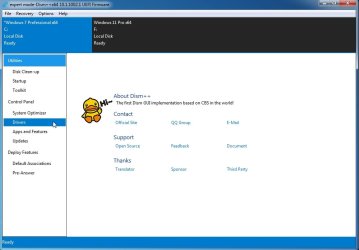
here are just a couple of the things that can be done with dism++

Dism++ add updates and drivers

Backup the activation


I prefer win8/10/11 bcdboot because they have the /f switch which is useful across modes. Cant do that with win7 bcdboot.
View attachment bcdboot-selection.zip

The command goes like this:

bcdboot windowspartitionletter:\windows /s esppartitionletter: /f uefi or bios or all

e.g.

bcdboot d:\windows /s z: /f uefi

it is not necessary to assign a letter to the esp partition, it will accept the device path instead \Device\HarddiskVolume12 or whatever it is for the esp partition.

Alternatively, winntsetup is an easy gui for the job, but you still need to create the partitions first. It has some other useful abilities for anybody a bit beyond beginner. JFX has used a customized wimlib.dll in v533 so dont try and update that file
winntsetup
 
Last edited:

My Computers My Computers

  • At a glance

    7 X64i5 84002x8gb 3200mhz
    Computer type
    PC/Desktop
    OS
    7 X64
    CPU
    i5 8400
    Motherboard
    gigabyte b365m ds3h
    Memory
    2x8gb 3200mhz
    Hard Drives
    various
    PSU
    pure power 11 400w cm
    Case
    Coolermaster
    Cooling
    cryorig m9i
  • At a glance

    7x64g54008gb ddr4 2400
    Computer type
    PC/Desktop
    OS
    7x64
    CPU
    g5400
    Motherboard
    ga b365m ds3h
    Memory
    8gb ddr4 2400
    PSU
    xfx pro 450w
Thank you so much!! I will do this tomorrow; can't wait to finally finish this build.
 

My Computers My Computers

  • At a glance

    Windows 7 Ultimate x64Intel Core i9-10900kCorsair Vengeance RGB Pro SL 128GB DDR4 3200 ...MSI Gaming Radeon RX 6750 XT 192-bit 12GB GDD...
    Computer type
    PC/Desktop
    Computer Manufacturer/Model Number
    MSI
    OS
    Windows 7 Ultimate x64
    CPU
    Intel Core i9-10900k
    Motherboard
    MSI MEG Z590 ACE
    Memory
    Corsair Vengeance RGB Pro SL 128GB DDR4 3200 (PC4-25600)
    Graphics Card(s)
    MSI Gaming Radeon RX 6750 XT 192-bit 12GB GDDR6 Triple Fans
    Sound Card
    ASUS Xonar Essence STX II
    Monitor(s) Displays
    Dell
    Screen Resolution
    1920x1200
    Hard Drives
    WDC WD6004FZWX-00BKVA0 x2, WDC WD4005FZBX-00K5WB0 x2, WDC WD40PURZ-85TTDY0 x2
    PSU
    MSI MEG Ai1300P
    Case
    Phanteks Enthoo Pro (PH-ES614PTG_BK)
    Cooling
    NH-D15 Black
    Keyboard
    HP KB-0316 German
    Mouse
    Evoluent VerticalMouse 4 (Left-Handed)
    Internet Speed
    365 Mbps
    Antivirus
    AVG Internet Security (Annual Subscription)
    Browser
    Firefox
    Other Info
    Optical Drives: Pioneer BDR-S13UB, LG WH14NS40
  • Computer type
    PC/Desktop
    Antivirus
    AVG Internet Security
I'm not sure what I'm doing wrong. Everything was set up properly and the installation seemed to work fine, but I'm getting a BSOD on something; the last thing that loads in safe boot in some AMD driver – which is well past the disk.sys that plagued me before – so at least that's progress. I had integrated the AMD graphics drivers into the Windows 7 iso – could that be the problem?
 

My Computers My Computers

  • At a glance

    Windows 7 Ultimate x64Intel Core i9-10900kCorsair Vengeance RGB Pro SL 128GB DDR4 3200 ...MSI Gaming Radeon RX 6750 XT 192-bit 12GB GDD...
    Computer type
    PC/Desktop
    Computer Manufacturer/Model Number
    MSI
    OS
    Windows 7 Ultimate x64
    CPU
    Intel Core i9-10900k
    Motherboard
    MSI MEG Z590 ACE
    Memory
    Corsair Vengeance RGB Pro SL 128GB DDR4 3200 (PC4-25600)
    Graphics Card(s)
    MSI Gaming Radeon RX 6750 XT 192-bit 12GB GDDR6 Triple Fans
    Sound Card
    ASUS Xonar Essence STX II
    Monitor(s) Displays
    Dell
    Screen Resolution
    1920x1200
    Hard Drives
    WDC WD6004FZWX-00BKVA0 x2, WDC WD4005FZBX-00K5WB0 x2, WDC WD40PURZ-85TTDY0 x2
    PSU
    MSI MEG Ai1300P
    Case
    Phanteks Enthoo Pro (PH-ES614PTG_BK)
    Cooling
    NH-D15 Black
    Keyboard
    HP KB-0316 German
    Mouse
    Evoluent VerticalMouse 4 (Left-Handed)
    Internet Speed
    365 Mbps
    Antivirus
    AVG Internet Security (Annual Subscription)
    Browser
    Firefox
    Other Info
    Optical Drives: Pioneer BDR-S13UB, LG WH14NS40
  • Computer type
    PC/Desktop
    Antivirus
    AVG Internet Security
I cannot get this to work and I just do not understand why – no idea what I keep doing wrong; it's back to BSOD after disk.sys. I'm so upset over this I can't stand it.

- - - Updated - - -

I got it, thanks for your help! I used FlashBoot to install the OS directly to the hard drive. I had tried this before w/ WinNTSetup and it always hung after disk.sys; not sure why one worked but not the other, as both were correctly formatted to EFI.
 

My Computers My Computers

  • At a glance

    Windows 7 Ultimate x64Intel Core i9-10900kCorsair Vengeance RGB Pro SL 128GB DDR4 3200 ...MSI Gaming Radeon RX 6750 XT 192-bit 12GB GDD...
    Computer type
    PC/Desktop
    Computer Manufacturer/Model Number
    MSI
    OS
    Windows 7 Ultimate x64
    CPU
    Intel Core i9-10900k
    Motherboard
    MSI MEG Z590 ACE
    Memory
    Corsair Vengeance RGB Pro SL 128GB DDR4 3200 (PC4-25600)
    Graphics Card(s)
    MSI Gaming Radeon RX 6750 XT 192-bit 12GB GDDR6 Triple Fans
    Sound Card
    ASUS Xonar Essence STX II
    Monitor(s) Displays
    Dell
    Screen Resolution
    1920x1200
    Hard Drives
    WDC WD6004FZWX-00BKVA0 x2, WDC WD4005FZBX-00K5WB0 x2, WDC WD40PURZ-85TTDY0 x2
    PSU
    MSI MEG Ai1300P
    Case
    Phanteks Enthoo Pro (PH-ES614PTG_BK)
    Cooling
    NH-D15 Black
    Keyboard
    HP KB-0316 German
    Mouse
    Evoluent VerticalMouse 4 (Left-Handed)
    Internet Speed
    365 Mbps
    Antivirus
    AVG Internet Security (Annual Subscription)
    Browser
    Firefox
    Other Info
    Optical Drives: Pioneer BDR-S13UB, LG WH14NS40
  • Computer type
    PC/Desktop
    Antivirus
    AVG Internet Security
Is everything working?
 

My Computers My Computers

  • At a glance

    7 X64i5 84002x8gb 3200mhz
    Computer type
    PC/Desktop
    OS
    7 X64
    CPU
    i5 8400
    Motherboard
    gigabyte b365m ds3h
    Memory
    2x8gb 3200mhz
    Hard Drives
    various
    PSU
    pure power 11 400w cm
    Case
    Coolermaster
    Cooling
    cryorig m9i
  • At a glance

    7x64g54008gb ddr4 2400
    Computer type
    PC/Desktop
    OS
    7x64
    CPU
    g5400
    Motherboard
    ga b365m ds3h
    Memory
    8gb ddr4 2400
    PSU
    xfx pro 450w
Yes, it's now just a matter of setting it up and collecting drivers, then merging the older system into it. 12 of the USB hubs work automatically w/ just the drivers you sent and the Intel modded eXtensible HostController from Cannonkong. The GPU (MSI Radeon RX 6750 XT) natively supports Win 7, so that was not a problem at all. :-) The correct version – Windows 7 Ultimate SP1 6.1.7601.26769 (Oct 2023) is displayed and everything seems fine so far!

- - - Updated - - -

Might you happen to know offhand why FlashBoot worked, but WinNTSetup didn't? Is this something you have encountered before?
 

My Computers My Computers

  • At a glance

    Windows 7 Ultimate x64Intel Core i9-10900kCorsair Vengeance RGB Pro SL 128GB DDR4 3200 ...MSI Gaming Radeon RX 6750 XT 192-bit 12GB GDD...
    Computer type
    PC/Desktop
    Computer Manufacturer/Model Number
    MSI
    OS
    Windows 7 Ultimate x64
    CPU
    Intel Core i9-10900k
    Motherboard
    MSI MEG Z590 ACE
    Memory
    Corsair Vengeance RGB Pro SL 128GB DDR4 3200 (PC4-25600)
    Graphics Card(s)
    MSI Gaming Radeon RX 6750 XT 192-bit 12GB GDDR6 Triple Fans
    Sound Card
    ASUS Xonar Essence STX II
    Monitor(s) Displays
    Dell
    Screen Resolution
    1920x1200
    Hard Drives
    WDC WD6004FZWX-00BKVA0 x2, WDC WD4005FZBX-00K5WB0 x2, WDC WD40PURZ-85TTDY0 x2
    PSU
    MSI MEG Ai1300P
    Case
    Phanteks Enthoo Pro (PH-ES614PTG_BK)
    Cooling
    NH-D15 Black
    Keyboard
    HP KB-0316 German
    Mouse
    Evoluent VerticalMouse 4 (Left-Handed)
    Internet Speed
    365 Mbps
    Antivirus
    AVG Internet Security (Annual Subscription)
    Browser
    Firefox
    Other Info
    Optical Drives: Pioneer BDR-S13UB, LG WH14NS40
  • Computer type
    PC/Desktop
    Antivirus
    AVG Internet Security
As far as I know it uses the same usb3 drivers that you already have. It also does some mod that allows win7 to run without csm support.

If you have csm turned on, I dont know why that would make a difference.

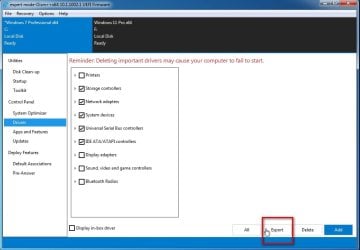
Export the drivers from your running win7 using dism++ ( except the graphics card drivers) and post them up in a zip. So we can see if it has added something to circumvent the disk.sys hang.

https://github.com/Chuyu-Team/Dism-.../download/v10.1.1002.2/Dism++10.1.1002.1B.zip

dism++-exportdrivers1.jpg

dism++-exportdrivers2.jpg
 

My Computers My Computers

  • At a glance

    7 X64i5 84002x8gb 3200mhz
    Computer type
    PC/Desktop
    OS
    7 X64
    CPU
    i5 8400
    Motherboard
    gigabyte b365m ds3h
    Memory
    2x8gb 3200mhz
    Hard Drives
    various
    PSU
    pure power 11 400w cm
    Case
    Coolermaster
    Cooling
    cryorig m9i
  • At a glance

    7x64g54008gb ddr4 2400
    Computer type
    PC/Desktop
    OS
    7x64
    CPU
    g5400
    Motherboard
    ga b365m ds3h
    Memory
    8gb ddr4 2400
    PSU
    xfx pro 450w
I'm in CSM/UEFI mode, so yeah, and the ISO was identical, but WinNTSetup never progressed past disk.sys. Read that people had success w/ FlashBoot so I tried that and it was flawless. The boot time from the post beep to the login screen is 4 seconds, which is hilarious.

Can the Thunderbolt ports function under Win 7? They aren't needed; would just be icing on the cake. Also, is it possible to make this a dual boot 7/11 system? I've not researched that yet; if not (since Win 11 requires secure boot, I have heard?) it's not a big deal at all; 11 would just be the cherry on top. I can always build a new personal PC to run more recent software.

- - - Updated - - -

Thanks! I will upload that shortly.
 

My Computers My Computers

  • At a glance

    Windows 7 Ultimate x64Intel Core i9-10900kCorsair Vengeance RGB Pro SL 128GB DDR4 3200 ...MSI Gaming Radeon RX 6750 XT 192-bit 12GB GDD...
    Computer type
    PC/Desktop
    Computer Manufacturer/Model Number
    MSI
    OS
    Windows 7 Ultimate x64
    CPU
    Intel Core i9-10900k
    Motherboard
    MSI MEG Z590 ACE
    Memory
    Corsair Vengeance RGB Pro SL 128GB DDR4 3200 (PC4-25600)
    Graphics Card(s)
    MSI Gaming Radeon RX 6750 XT 192-bit 12GB GDDR6 Triple Fans
    Sound Card
    ASUS Xonar Essence STX II
    Monitor(s) Displays
    Dell
    Screen Resolution
    1920x1200
    Hard Drives
    WDC WD6004FZWX-00BKVA0 x2, WDC WD4005FZBX-00K5WB0 x2, WDC WD40PURZ-85TTDY0 x2
    PSU
    MSI MEG Ai1300P
    Case
    Phanteks Enthoo Pro (PH-ES614PTG_BK)
    Cooling
    NH-D15 Black
    Keyboard
    HP KB-0316 German
    Mouse
    Evoluent VerticalMouse 4 (Left-Handed)
    Internet Speed
    365 Mbps
    Antivirus
    AVG Internet Security (Annual Subscription)
    Browser
    Firefox
    Other Info
    Optical Drives: Pioneer BDR-S13UB, LG WH14NS40
  • Computer type
    PC/Desktop
    Antivirus
    AVG Internet Security
You could also copy out the contents of the esp partition, zip it and upload it so we can see if it has added/changed anything there.

Simple way to do that is with diskgenius ( free version will do )

click the ep partition in the left pane. Select the files tab and rt click the contents > Copy To and copy it a folder called something sensible like exported-esp. Then zip it up.

DiskGenius Download Center | Free Download DiskGenius
 

My Computers My Computers

  • At a glance

    7 X64i5 84002x8gb 3200mhz
    Computer type
    PC/Desktop
    OS
    7 X64
    CPU
    i5 8400
    Motherboard
    gigabyte b365m ds3h
    Memory
    2x8gb 3200mhz
    Hard Drives
    various
    PSU
    pure power 11 400w cm
    Case
    Coolermaster
    Cooling
    cryorig m9i
  • At a glance

    7x64g54008gb ddr4 2400
    Computer type
    PC/Desktop
    OS
    7x64
    CPU
    g5400
    Motherboard
    ga b365m ds3h
    Memory
    8gb ddr4 2400
    PSU
    xfx pro 450w
I will do that shortly; promise. If I had to venture a guess, the EFI partition would be the issue.
 

My Computers My Computers

  • At a glance

    Windows 7 Ultimate x64Intel Core i9-10900kCorsair Vengeance RGB Pro SL 128GB DDR4 3200 ...MSI Gaming Radeon RX 6750 XT 192-bit 12GB GDD...
    Computer type
    PC/Desktop
    Computer Manufacturer/Model Number
    MSI
    OS
    Windows 7 Ultimate x64
    CPU
    Intel Core i9-10900k
    Motherboard
    MSI MEG Z590 ACE
    Memory
    Corsair Vengeance RGB Pro SL 128GB DDR4 3200 (PC4-25600)
    Graphics Card(s)
    MSI Gaming Radeon RX 6750 XT 192-bit 12GB GDDR6 Triple Fans
    Sound Card
    ASUS Xonar Essence STX II
    Monitor(s) Displays
    Dell
    Screen Resolution
    1920x1200
    Hard Drives
    WDC WD6004FZWX-00BKVA0 x2, WDC WD4005FZBX-00K5WB0 x2, WDC WD40PURZ-85TTDY0 x2
    PSU
    MSI MEG Ai1300P
    Case
    Phanteks Enthoo Pro (PH-ES614PTG_BK)
    Cooling
    NH-D15 Black
    Keyboard
    HP KB-0316 German
    Mouse
    Evoluent VerticalMouse 4 (Left-Handed)
    Internet Speed
    365 Mbps
    Antivirus
    AVG Internet Security (Annual Subscription)
    Browser
    Firefox
    Other Info
    Optical Drives: Pioneer BDR-S13UB, LG WH14NS40
  • Computer type
    PC/Desktop
    Antivirus
    AVG Internet Security
Can the Thunderbolt ports function under Win 7? They aren't needed; would just be icing on the cake.

There are win7 thunderbolt drivers, I dont know if they work with your ports/thunderbolt version.
Find the ID by looking in msinfo32 >components>problem devices.
You can export it to a text file for easy reading . Click problem devices to highlight it, then click File>Export to a text file.

Also, is it possible to make this a dual boot 7/11 system?

Yes, easily.

I've not researched that yet; if not (since Win 11 requires secure boot, I have heard?)

No, it doesn't require secure boot if you install it the sensible way. You can see from the dism++ screenshot in my previous post, I have csm on and secure boot off.

However, I don't know what effect it would have on any flashboot modded files on your existing esp partition.

So it is best to install win11 to a separate disk and use the esp partition on that separate disk to boot it.

Download the iso file from ms ( not the mct thing ).

Partition the target disk first. Minimum is an esp partition (fat32) of at least 100mb and a larger partition for the os.

If you use diskenius, initialize the disk to gpt. Then rt click the unallocated space and select create esp/msr and just accept the defaults and say yes when it asks to format the esp immediately. Click Save All at top left. Then create an ntfs partition for the os. Click Save All at top left.

Then from within win7, use winntsetup to browse to the iso ( it will mount it automatically using imdisk) , apply the image to the target os partition and it will also create the boot critical files on the target esp partition you have selected.

Then select to boot into the win11 disk using the one time boot menu. Not sure what key that is on your mobo. It is F12 on gigabyte. Just looked it up, apparently it is F11 on msi motherboards . Tap F11 a couple of times after the beep. You will get the timing after a couple of tries. On my mobo it is about a second after the beep. Or when you see the msi logo.
 
Last edited:

My Computers My Computers

  • At a glance

    7 X64i5 84002x8gb 3200mhz
    Computer type
    PC/Desktop
    OS
    7 X64
    CPU
    i5 8400
    Motherboard
    gigabyte b365m ds3h
    Memory
    2x8gb 3200mhz
    Hard Drives
    various
    PSU
    pure power 11 400w cm
    Case
    Coolermaster
    Cooling
    cryorig m9i
  • At a glance

    7x64g54008gb ddr4 2400
    Computer type
    PC/Desktop
    OS
    7x64
    CPU
    g5400
    Motherboard
    ga b365m ds3h
    Memory
    8gb ddr4 2400
    PSU
    xfx pro 450w
I never put more than one OS on a drive. Typically, my builds have 4-6-8 drives b/c they multitask as servers in some cases. I try to avoid partitioning drives wherever possible.
 

My Computers My Computers

  • At a glance

    Windows 7 Ultimate x64Intel Core i9-10900kCorsair Vengeance RGB Pro SL 128GB DDR4 3200 ...MSI Gaming Radeon RX 6750 XT 192-bit 12GB GDD...
    Computer type
    PC/Desktop
    Computer Manufacturer/Model Number
    MSI
    OS
    Windows 7 Ultimate x64
    CPU
    Intel Core i9-10900k
    Motherboard
    MSI MEG Z590 ACE
    Memory
    Corsair Vengeance RGB Pro SL 128GB DDR4 3200 (PC4-25600)
    Graphics Card(s)
    MSI Gaming Radeon RX 6750 XT 192-bit 12GB GDDR6 Triple Fans
    Sound Card
    ASUS Xonar Essence STX II
    Monitor(s) Displays
    Dell
    Screen Resolution
    1920x1200
    Hard Drives
    WDC WD6004FZWX-00BKVA0 x2, WDC WD4005FZBX-00K5WB0 x2, WDC WD40PURZ-85TTDY0 x2
    PSU
    MSI MEG Ai1300P
    Case
    Phanteks Enthoo Pro (PH-ES614PTG_BK)
    Cooling
    NH-D15 Black
    Keyboard
    HP KB-0316 German
    Mouse
    Evoluent VerticalMouse 4 (Left-Handed)
    Internet Speed
    365 Mbps
    Antivirus
    AVG Internet Security (Annual Subscription)
    Browser
    Firefox
    Other Info
    Optical Drives: Pioneer BDR-S13UB, LG WH14NS40
  • Computer type
    PC/Desktop
    Antivirus
    AVG Internet Security
I have some win7 tbt drivers dont know if they will work with your device. Version 16.3.61.2

- This is the last software package supporting Thunderbolt 1 and 2 host controllers
- This is the last software package supporting Windows* 7 and 8.1

%TbtBusDrv_DeviceDesc1575% = TbtBusDrv_Device, PCI\VEN_8086&DEV_1575&CC_0880
%TbtBusDrv_DeviceDesc1577% = TbtBusDrv_Device, PCI\VEN_8086&DEV_1577&CC_0880
%TbtBusDrv_DeviceDesc15BF% = TbtBusDrv_Device, PCI\VEN_8086&DEV_15BF&CC_0880
%TbtBusDrv_DeviceDesc15D2% = TbtBusDrv_Device, PCI\VEN_8086&DEV_15D2&CC_0880
%TbtBusDrv_DeviceDesc15D9% = TbtBusDrv_Device, PCI\VEN_8086&DEV_15D9&CC_0880
%TbtBusDrv_DeviceDesc156A% = TbtBusDrv_Device, PCI\VEN_8086&DEV_156A&CC_0880
%TbtBusDrv_DeviceDesc156C% = TbtBusDrv_Device, PCI\VEN_8086&DEV_156C&CC_0880
%TbtBusDrv_DeviceDesc1566% = TbtBusDrv_Device, PCI\VEN_8086&DEV_1566&CC_0880
%TbtBusDrv_DeviceDesc1568% = TbtBusDrv_Device, PCI\VEN_8086&DEV_1568&CC_0880
%TbtBusDrv_DeviceDesc157D% = TbtBusDrv_Device, PCI\VEN_8086&DEV_157D&CC_0880

- - - Updated - - -

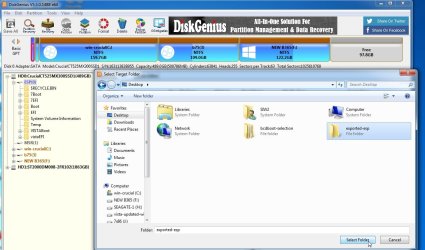
Click esp partition in the left pane

Click the Files tab

Highlight the contents ,rt click and select Copy To

( you wont have all that stuff on your esp partitition, I have been playing around with mine )

diskgenius-copy-files.jpg

diskgenius-copy-files2.jpg
 

My Computers My Computers

  • At a glance

    7 X64i5 84002x8gb 3200mhz
    Computer type
    PC/Desktop
    OS
    7 X64
    CPU
    i5 8400
    Motherboard
    gigabyte b365m ds3h
    Memory
    2x8gb 3200mhz
    Hard Drives
    various
    PSU
    pure power 11 400w cm
    Case
    Coolermaster
    Cooling
    cryorig m9i
  • At a glance

    7x64g54008gb ddr4 2400
    Computer type
    PC/Desktop
    OS
    7x64
    CPU
    g5400
    Motherboard
    ga b365m ds3h
    Memory
    8gb ddr4 2400
    PSU
    xfx pro 450w
Here are the two files:

- - - Updated - - -

It's not letting me upload – still working on it.

- - - Updated - - -

View attachment msinfo32.txt

- - - Updated - - -


efi.7z Processing...x

- - - Updated - - -

Keeps telling me upload of file failed – processing. Is there another way to do it?

- - - Updated - - -

Here are the specs of the motherboard as well:
MSI MEG Z590 ACE Gaming Motherboard ATX - Supports Intel Core 11th Gen Processors, LGA 1200 - Mystic Light, 16+2+1 Phase 90A SPS, DDR4 Boost (5600MHz/OC), 2 x PCIe 4.0 x16, 4 x M.2 Gen4/3 x4, Wi-Fi 6E

- - - Updated - - -

The Thunderbolt ports WORK; they even support 4k video.

- - - Updated - - -

The 4 Hub-GL850G USB 2.0 internal ports were fine; they are identical to the ones on this mb. All the external USB ports from the chipset also work – so I'm not sure about the one error that I get in the msinfo32 file.

- - - Updated - - -

The internal chipset ports are not working, though; not sure why – but they aren't needed; 14 functional USB ports is more than sufficient.
 

My Computers My Computers

  • At a glance

    Windows 7 Ultimate x64Intel Core i9-10900kCorsair Vengeance RGB Pro SL 128GB DDR4 3200 ...MSI Gaming Radeon RX 6750 XT 192-bit 12GB GDD...
    Computer type
    PC/Desktop
    Computer Manufacturer/Model Number
    MSI
    OS
    Windows 7 Ultimate x64
    CPU
    Intel Core i9-10900k
    Motherboard
    MSI MEG Z590 ACE
    Memory
    Corsair Vengeance RGB Pro SL 128GB DDR4 3200 (PC4-25600)
    Graphics Card(s)
    MSI Gaming Radeon RX 6750 XT 192-bit 12GB GDDR6 Triple Fans
    Sound Card
    ASUS Xonar Essence STX II
    Monitor(s) Displays
    Dell
    Screen Resolution
    1920x1200
    Hard Drives
    WDC WD6004FZWX-00BKVA0 x2, WDC WD4005FZBX-00K5WB0 x2, WDC WD40PURZ-85TTDY0 x2
    PSU
    MSI MEG Ai1300P
    Case
    Phanteks Enthoo Pro (PH-ES614PTG_BK)
    Cooling
    NH-D15 Black
    Keyboard
    HP KB-0316 German
    Mouse
    Evoluent VerticalMouse 4 (Left-Handed)
    Internet Speed
    365 Mbps
    Antivirus
    AVG Internet Security (Annual Subscription)
    Browser
    Firefox
    Other Info
    Optical Drives: Pioneer BDR-S13UB, LG WH14NS40
  • Computer type
    PC/Desktop
    Antivirus
    AVG Internet Security
Back
Top