Computer freezes for some seconds, then resumes

Derek10

New member
Member
Local time
10:57 PM
Messages
87
I am facing an annoying problem, occasionally specially when browsing, the computer freezes randomly for 10 seconds, during the freeze, HD light is on and it sounds like it's heavily working, mouse won't move at all, music plays for two seconds then silent. I have checked with AV, chkdsk, and hard disk SMART and all is fine.

Thanks
 

My Computer My Computer

At a glance

Windows 7 Ultimate 64-bit SP1Intel Celeron G5302 GB DDR3 Kingston 1333 (1066)POV Nvidia Geforce GT530
Computer Manufacturer/Model Number
Custom
OS
Windows 7 Ultimate 64-bit SP1
CPU
Intel Celeron G530
Motherboard
Gigabyte GA-H61M-S2-B3
Memory
2 GB DDR3 Kingston 1333 (1066)
Graphics Card(s)
POV Nvidia Geforce GT530
Sound Card
Onboard
Monitor(s) Displays
Samsung SyncMaster S19B150
Screen Resolution
1366x768
Hard Drives
Laptop HDD TOSHIBA MK3265GSX
PSU
Generic 500W
Cooling
Stock
Keyboard
Logitech S 510 Wireless
Mouse
IBM MO28UO
Internet Speed
30 mbps
Do you have automatic updates turned on? That's one of the first things to DISABLE, as that will install updates without your permission and without you knowing about it.

Something you could try is running MSCONFIG from the start area, opening the Startup Tab, disabling ALL the items, rebooting -- and seeing if the problem now goes away. IF it does, that means it's due to one of the items being loaded during Startup.
 

My Computer My Computer

At a glance

Win7 Pro 32-bit, Win8 Pro 32-bitAMD Phenom II X6 1090T4GB ddr3 1300AMD HD 4290 onboard
Computer type
PC/Desktop
Computer Manufacturer/Model Number
Custom
OS
Win7 Pro 32-bit, Win8 Pro 32-bit
CPU
AMD Phenom II X6 1090T
Motherboard
Gigabyte
Memory
4GB ddr3 1300
Graphics Card(s)
AMD HD 4290 onboard
Sound Card
Builtin Realtek HD Audio
Monitor(s) Displays
Samsung 24" widescreen, LG 23" widescreen
Screen Resolution
1920x1200/1920x1080
Hard Drives
Kingston 256GB SSD
Keyboard
Logitech Illuminated Keyboard
Mouse
Logitech M705 wireless mouse
Antivirus
Norton Av 2013
Browser
IE v10
Many thanks, it was enabled so I have disabled it now (set it to check for updates but let me choose to download and install them) and I disabled things at startup, I will see if it freezes again and report back the result :)
 

My Computer My Computer

At a glance

Windows 7 Ultimate 64-bit SP1Intel Celeron G5302 GB DDR3 Kingston 1333 (1066)POV Nvidia Geforce GT530
Computer Manufacturer/Model Number
Custom
OS
Windows 7 Ultimate 64-bit SP1
CPU
Intel Celeron G530
Motherboard
Gigabyte GA-H61M-S2-B3
Memory
2 GB DDR3 Kingston 1333 (1066)
Graphics Card(s)
POV Nvidia Geforce GT530
Sound Card
Onboard
Monitor(s) Displays
Samsung SyncMaster S19B150
Screen Resolution
1366x768
Hard Drives
Laptop HDD TOSHIBA MK3265GSX
PSU
Generic 500W
Cooling
Stock
Keyboard
Logitech S 510 Wireless
Mouse
IBM MO28UO
Internet Speed
30 mbps
Win7 is fully automated for drivers and important Security and Performance patches which are delivered via Automatic Windows Updates. I would install all Important and Optional Updates after enabling Automatically deliver drivers via Windows Update (Step 3). Set Updates to Automatic and to receive recommended the same as Important.

Windows Updates causing issues happens less than one in a million.

In your case the hang is likely caused by an issue that can be traced using the Troubleshooting Steps for Windows 7 including establishing a Clean Boot as suggested by Mark, however you should leave your AV, gadgets, sync to start with Windows.

Users get in trouble when they try to apply the old XPired rules for Windows which no longer apply to the first fully automated OS.
 
Win7 is fully automated for drivers and important Security and Performance patches which are delivered via Automatic Windows Updates. I would install all Important and Optional Updates after enabling Automatically deliver drivers via Windows Update (Step 3). Set Updates to Automatic and to receive recommended the same as Important.

Windows Updates causing issues happens less than one in a million.

In your case the hang is likely caused by an issue that can be traced using the Troubleshooting Steps for Windows 7 including establishing a Clean Boot as suggested by Mark, however you should leave your AV, gadgets, sync to start with Windows.

Users get in trouble when they try to apply the old XPired rules for Windows which no longer apply to the first fully automated OS.


Many thanks
Then I should re-enable it again right? It was on Install updates automatically, now it's on check but let me choose as per Mark advise, besides I've disabled all startup programs but MSE, and it didn't happened so far but I will need to check for a day to get the result

I have enabled the Recommended updates as important checkbox and I've received 4 updates they are now installing, they may solve it too :D.
 

My Computer My Computer

At a glance

Windows 7 Ultimate 64-bit SP1Intel Celeron G5302 GB DDR3 Kingston 1333 (1066)POV Nvidia Geforce GT530
Computer Manufacturer/Model Number
Custom
OS
Windows 7 Ultimate 64-bit SP1
CPU
Intel Celeron G530
Motherboard
Gigabyte GA-H61M-S2-B3
Memory
2 GB DDR3 Kingston 1333 (1066)
Graphics Card(s)
POV Nvidia Geforce GT530
Sound Card
Onboard
Monitor(s) Displays
Samsung SyncMaster S19B150
Screen Resolution
1366x768
Hard Drives
Laptop HDD TOSHIBA MK3265GSX
PSU
Generic 500W
Cooling
Stock
Keyboard
Logitech S 510 Wireless
Mouse
IBM MO28UO
Internet Speed
30 mbps
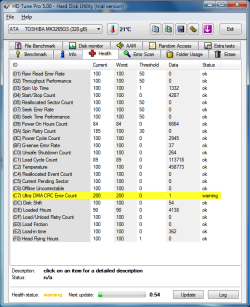
Today it made it again can it be my hard drive? is this SMART data fine (the CRC error ocurred long time ago with an old motherboard)

attachment.php
 

Attachments

  • Untitled.png
    Untitled.png
    30.3 KB · Views: 46

My Computer My Computer

At a glance

Windows 7 Ultimate 64-bit SP1Intel Celeron G5302 GB DDR3 Kingston 1333 (1066)POV Nvidia Geforce GT530
Computer Manufacturer/Model Number
Custom
OS
Windows 7 Ultimate 64-bit SP1
CPU
Intel Celeron G530
Motherboard
Gigabyte GA-H61M-S2-B3
Memory
2 GB DDR3 Kingston 1333 (1066)
Graphics Card(s)
POV Nvidia Geforce GT530
Sound Card
Onboard
Monitor(s) Displays
Samsung SyncMaster S19B150
Screen Resolution
1366x768
Hard Drives
Laptop HDD TOSHIBA MK3265GSX
PSU
Generic 500W
Cooling
Stock
Keyboard
Logitech S 510 Wireless
Mouse
IBM MO28UO
Internet Speed
30 mbps
Back
Top