Solved USB 3.0 Fresco not working with Samsung HDD (Code 10)

dorruk

New member
Member
Local time
10:00 AM
Messages
60
I own a Samsung M3 Portable 1TB which works with every USB 2.0 hub but only with USB 3.0.

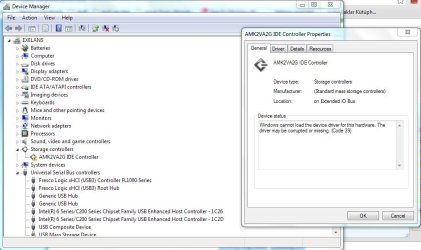
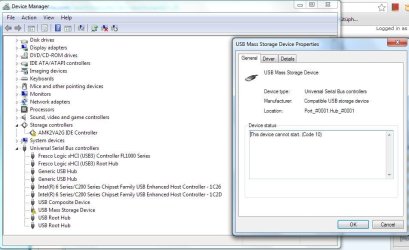
The 3.0 hub is run by Fresco Logic Controller on an Asus motherboard. It is giving a Code 10. I downloaded the drivers from Asus' official website just for my PC's specific model. It is up to date according to Windows Update.

On the other hand, the storage controller says "Corrupt driver". Windows Update says "Cannot find driver" when searched online. There's no driver for the storage controller on the Asus' website.

Thanks in advance.
 

Attachments
  • Samsung hard drive.JPG
    Samsung hard drive.JPG
    75.1 KB · Views: 22
  • Samsung hard drive 2.JPG
    Samsung hard drive 2.JPG
    77.1 KB · Views: 23

My Computer My Computer

At a glance

Win 8 duals Win 7 64bit2.90GHz with Intel TurboBoost4 GBNvidia GForce GT 550M Cuda 2GB
Computer Manufacturer/Model Number
Asus N53SN
OS
Win 8 duals Win 7 64bit
CPU
2.90GHz with Intel TurboBoost
Memory
4 GB
Graphics Card(s)
Nvidia GForce GT 550M Cuda 2GB
Sound Card
Realtek
Screen Resolution
1366x768
Hard Drives
640 GB SATA Internal
1 TB Samsung External
Internet Speed
9.2 Mbit
Bump.

Should I uninstall the IDE controller driver? I'm afraid that I never will be able to find the driver again and ruin my PC.
 

My Computer My Computer

At a glance

Win 8 duals Win 7 64bit2.90GHz with Intel TurboBoost4 GBNvidia GForce GT 550M Cuda 2GB
Computer Manufacturer/Model Number
Asus N53SN
OS
Win 8 duals Win 7 64bit
CPU
2.90GHz with Intel TurboBoost
Memory
4 GB
Graphics Card(s)
Nvidia GForce GT 550M Cuda 2GB
Sound Card
Realtek
Screen Resolution
1366x768
Hard Drives
640 GB SATA Internal
1 TB Samsung External
Internet Speed
9.2 Mbit

My Computer My Computer

At a glance

Windows 7 Home Premium 64bitIntel Core i3-32408GB DDR3 SDRAMEVGA GeForce GT 620
Computer type
PC/Desktop
Computer Manufacturer/Model Number
Dell Inspiron 660
OS
Windows 7 Home Premium 64bit
CPU
Intel Core i3-3240
Motherboard
Dell 084J0R
Memory
8GB DDR3 SDRAM
Graphics Card(s)
EVGA GeForce GT 620
Sound Card
Intel Panther Point PCH High Definition Audio
Monitor(s) Displays
Acer G205HV
Screen Resolution
1600 x 900
Hard Drives
Sandisk SSD 64GB SDSSDP064G
Seagate HDD 1TB ST1000DM003-1CH162
PSU
Dell 300W
Case
Dell Inspiron
Keyboard
Logitech Wireless K320/B350
Mouse
Microsoft
Internet Speed
25Mbps/4Mbps
Antivirus
Avast
Browser
Mozilla Firefox

Solution for Code 39 says: "Reinstall drivers".
And so I did. But now the controller name has changed from AMK2VA2G to AM8EDA6T. But the problem still persists.

Nothing much I could do about Code 10 because solution is to update the drivers and they are up to date.

Another thing: The problem with the storage controller with Code 39 is always there, regardless to whatever device is plugged/unplugged. But Mass Storage gives Code 10 only when the specific HDD is plugged into the 3.0 port.

In this way, Code 39 is a more general problem but Code 10 is specific to my HDD. But there's a chance that one problem may be tied to another.
 

My Computer My Computer

At a glance

Win 8 duals Win 7 64bit2.90GHz with Intel TurboBoost4 GBNvidia GForce GT 550M Cuda 2GB
Computer Manufacturer/Model Number
Asus N53SN
OS
Win 8 duals Win 7 64bit
CPU
2.90GHz with Intel TurboBoost
Memory
4 GB
Graphics Card(s)
Nvidia GForce GT 550M Cuda 2GB
Sound Card
Realtek
Screen Resolution
1366x768
Hard Drives
640 GB SATA Internal
1 TB Samsung External
Internet Speed
9.2 Mbit
After reinstallation, the controller moved from the "Storage Controllers" section to "Other devices". Does that mean anything?

Anyways, the last thing I did was to go to Control Panel and under "Devices", there was this troubleshoot option. It removed the warning sign next to it. So Code 39 for the IDE controller is fixed, besides with the Mass Storage Code 10. :)

But now, when I plug my HDD to 3.0, the computer won't recognize the drive at all. Device Manager does not refresh, or the computer does make that "plugged in" sound. The problem is still there but now computer thinks that everything is working correctly.
 

My Computer My Computer

At a glance

Win 8 duals Win 7 64bit2.90GHz with Intel TurboBoost4 GBNvidia GForce GT 550M Cuda 2GB
Computer Manufacturer/Model Number
Asus N53SN
OS
Win 8 duals Win 7 64bit
CPU
2.90GHz with Intel TurboBoost
Memory
4 GB
Graphics Card(s)
Nvidia GForce GT 550M Cuda 2GB
Sound Card
Realtek
Screen Resolution
1366x768
Hard Drives
640 GB SATA Internal
1 TB Samsung External
Internet Speed
9.2 Mbit
Solved by reinstalling the drivers.
I followed these steps:
1)Unplug the drive
2)Go to Computer > Right Click > Manage > Device Manager
3)Expand Universal Serial Bus Controllers > Right click and uninstall all drivers related to USB
4)Plug the drive back and let Windows Update search and install the drivers automatically.
 

My Computer My Computer

At a glance

Win 8 duals Win 7 64bit2.90GHz with Intel TurboBoost4 GBNvidia GForce GT 550M Cuda 2GB
Computer Manufacturer/Model Number
Asus N53SN
OS
Win 8 duals Win 7 64bit
CPU
2.90GHz with Intel TurboBoost
Memory
4 GB
Graphics Card(s)
Nvidia GForce GT 550M Cuda 2GB
Sound Card
Realtek
Screen Resolution
1366x768
Hard Drives
640 GB SATA Internal
1 TB Samsung External
Internet Speed
9.2 Mbit
...
1. After reinstallation, the controller moved from the "Storage Controllers" section to "Other devices". Does that mean anything?

2. Anyways, the last thing I did was to go to Control Panel and under "Devices", there was this troubleshoot option. It removed the warning sign next to it. So Code 39 for the IDE controller is fixed, besides with the Mass Storage Code 10. :)

3. But now, when I plug my HDD to 3.0, the computer won't recognize the drive at all. Device Manager does not refresh, or the computer does make that "plugged in" sound. The problem is still there but now computer thinks that everything is working correctly.
Sorry I'm late on this.
1. It means it can't find the driver.
2. Troubleshooting options rarely work.
3. USB 3.0 has been slow to be adopted & drivers are spotty for some chips. Renesas still has no drivers on their website, get them from Intel. Linux has only recently released support for USB 3.0. Don't know about Fresco but here is their website: FRESCO LOGIC INC.===Leap into SuperSpeed=== which says: "If you need to get specific USB drivers, please contact vendors / manufactures of your product set."

If Samsung works anything like Western Digital, the SCSI driver is not needed. WD calls it the SES driver.

Just found out Samsung hard drives are made by Seagate.
http://www.seagate.com/support/external-hard-drives/desktop-hard-drives/m-series/
 
Last edited:

My Computer My Computer

At a glance

Windows 7 Home Premium 64bitIntel Core i3-32408GB DDR3 SDRAMEVGA GeForce GT 620
Computer type
PC/Desktop
Computer Manufacturer/Model Number
Dell Inspiron 660
OS
Windows 7 Home Premium 64bit
CPU
Intel Core i3-3240
Motherboard
Dell 084J0R
Memory
8GB DDR3 SDRAM
Graphics Card(s)
EVGA GeForce GT 620
Sound Card
Intel Panther Point PCH High Definition Audio
Monitor(s) Displays
Acer G205HV
Screen Resolution
1600 x 900
Hard Drives
Sandisk SSD 64GB SDSSDP064G
Seagate HDD 1TB ST1000DM003-1CH162
PSU
Dell 300W
Case
Dell Inspiron
Keyboard
Logitech Wireless K320/B350
Mouse
Microsoft
Internet Speed
25Mbps/4Mbps
Antivirus
Avast
Browser
Mozilla Firefox
Oh well, as I have mentioned, it seems as the solution was to uninstall everything and leave the rest to Windows Update.
Now the warning sign is gone and I transfer files at 100 MB/s

Thanks for your help.
 

My Computer My Computer

At a glance

Win 8 duals Win 7 64bit2.90GHz with Intel TurboBoost4 GBNvidia GForce GT 550M Cuda 2GB
Computer Manufacturer/Model Number
Asus N53SN
OS
Win 8 duals Win 7 64bit
CPU
2.90GHz with Intel TurboBoost
Memory
4 GB
Graphics Card(s)
Nvidia GForce GT 550M Cuda 2GB
Sound Card
Realtek
Screen Resolution
1366x768
Hard Drives
640 GB SATA Internal
1 TB Samsung External
Internet Speed
9.2 Mbit

My Computer My Computer

At a glance

Windows 7 Home Premium 64bitIntel Core i3-32408GB DDR3 SDRAMEVGA GeForce GT 620
Computer type
PC/Desktop
Computer Manufacturer/Model Number
Dell Inspiron 660
OS
Windows 7 Home Premium 64bit
CPU
Intel Core i3-3240
Motherboard
Dell 084J0R
Memory
8GB DDR3 SDRAM
Graphics Card(s)
EVGA GeForce GT 620
Sound Card
Intel Panther Point PCH High Definition Audio
Monitor(s) Displays
Acer G205HV
Screen Resolution
1600 x 900
Hard Drives
Sandisk SSD 64GB SDSSDP064G
Seagate HDD 1TB ST1000DM003-1CH162
PSU
Dell 300W
Case
Dell Inspiron
Keyboard
Logitech Wireless K320/B350
Mouse
Microsoft
Internet Speed
25Mbps/4Mbps
Antivirus
Avast
Browser
Mozilla Firefox
Back
Top