Solved Windows 7 64-bit using too much physical memory

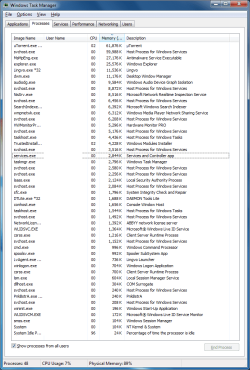
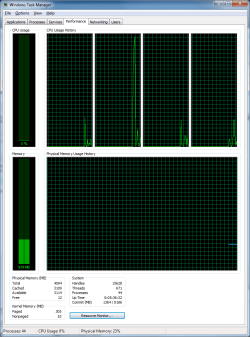
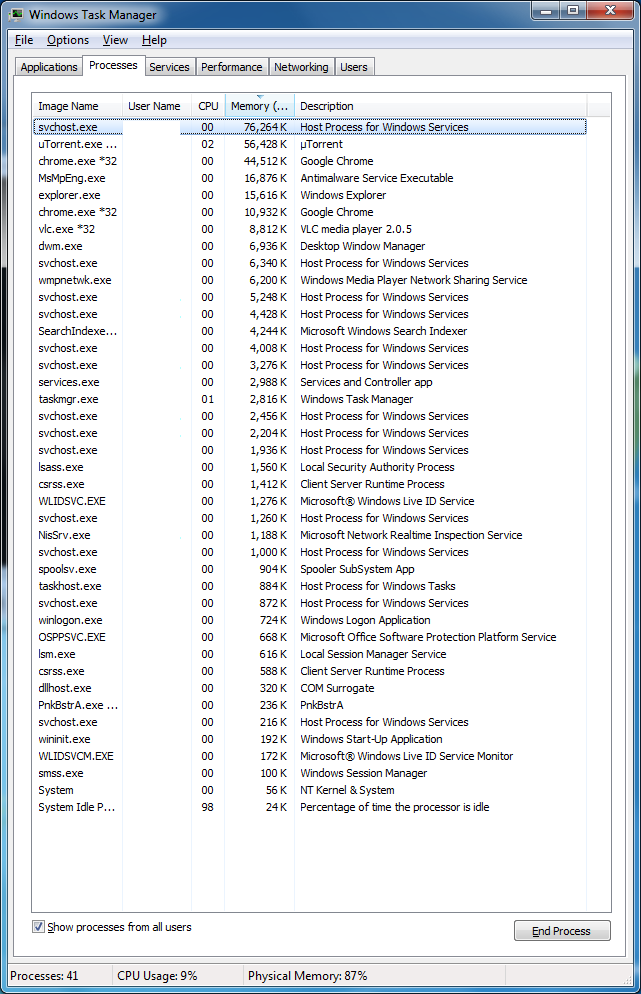
Without Chrome running:
c9ea85f7667229668207173cc30b33f2.png

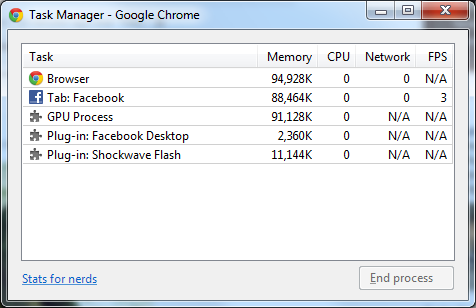
Looks like Chrome is actually running!

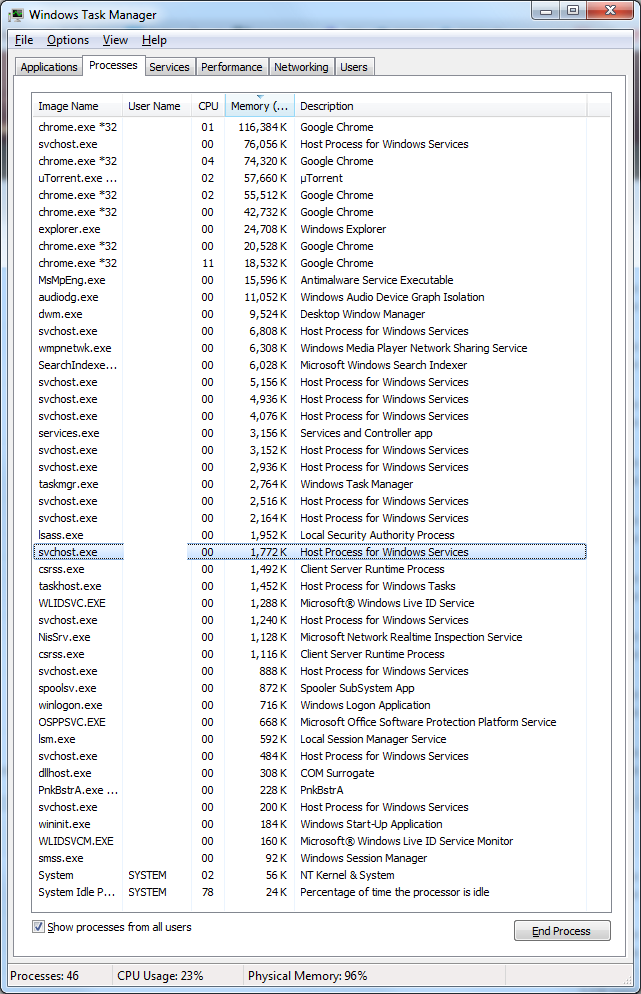
With Chrome running:
895c41ed78b43cc06614a409a8ae41c9.png


WHAT THE ****.

I'm getting tired of this shit. Several minutes after restarting the computer, physical memory reaches 70%+ with only Microsoft services running.

There is a possibility that you could be infected which would explain the high memory usage, but as I'm still training to be a security analyst, I am unable to help you with that one.

Have you considered a RAM upgrade?

Tom
 

My Computer

Computer type
PC/Desktop
Computer Manufacturer/Model Number
Build #1
OS
Windows 8.1 Pro x64
CPU
Intel i7 3770K @4.5GHz
Motherboard
ASUS P8Z77-V PRO
Memory
Corsair Vengeance 2x4GB DDR3 1600MHz Low Profile (White)
Graphics Card(s)
Gigabyte Radeon HD 7850 (2GB GDDR5)
Sound Card
Integrated on motherboard
Monitor(s) Displays
23" LG LCD/LED IPS
Screen Resolution
1920*1080
Hard Drives
Samsung EVO 128GB SSD
Seagate Barracuda 2GB 7200rpm
2x Seagate FreeAgent [500gb]
PSU
Corsair TX650W V2 (80+ Bronze)
Case
NZXT Phantom 410 White
Cooling
Corsair H100 Water Cooler
Keyboard
Microsoft Desktop 2000 Wireless Keyboard
Mouse
Microsoft Desktop 2000 Wireless Mouse
Internet Speed
95 Mb/s Download 70 Mb/s Upload
Antivirus
MSE + MBAM Pro
Browser
Firefox
Thank you for your help, but are you really suggesting me to upgrade RAM? I think it's software that causes the problem, not hardware.
 
Last edited:

My Computer

OS
Windows 7 Ultimate x64 SP1
CPU
Intel Core i5 750 @ 2.67 GHz
Motherboard
Asus P7P55D
Memory
2x2GB
Graphics Card(s)
Asus GeForce GTS 250 1GB
Monitor(s) Displays
LG M2262D
Screen Resolution
1920x1080 @ 60 Hz
Hard Drives
Samsung HD753LJ 700GB
Mouse
SteelSeries Kinzu
Internet Speed
22 Mbit/s
Let's see what, if any adware/junk may be running.

Download AdWareCleaner AdwCleaner Download to your desktop
1.Right-click on adwcleaner.exe and select Run As Administrator to launch the application.
2.Click on Delete button.
3.Confirm each time with OK.
4.Your computer will be rebooted automatically. A text file will open after the restart. Please post the content of that logfile in your reply.
Note: You can find the logfile at C:\AdwCleaner[Sn].txt as well - n is the order number.
AdwareCleaner.jpg
 

My Computer

Computer type
PC/Desktop
Computer Manufacturer/Model Number
Bruce ... somewhere in his 40's
OS
Windows 7 Ultimate 32bit SP1
CPU
Intel(R) Core(TM)2 Quad CPU @ 2.40GHz, 2400 MHz
Motherboard
INTEL/D975XBX2
Memory
4 GB
Graphics Card(s)
ATI Radeon HD 2600 Pro
Monitor(s) Displays
Samsung SyncMaster 914v
Screen Resolution
1280 x 1024
Hard Drives
2/500GB each ... ST3500630AS ATA Device.
One is not connected
PSU
Rocketfish 700 W
Case
G.Skill Gigabyte Chassis
Keyboard
Standard PS/2 Keyboard
Mouse
Microsoft PS/2 Mouse
Internet Speed
DSL
Antivirus
Avira Internet Security
Browser
IE 11
Other Info
ATI HDMI Audio
Code:
# AdwCleaner v2.111 - Logfile created 02/07/2013 at 18:22:22
# Updated 05/02/2013 by Xplode
# Operating system : Windows 7 Ultimate Service Pack 1 (64 bits)
# User : User123 - User123-PC
# Boot Mode : Normal
# Running from : C:\Users\User123\Desktop\AdwCleaner.exe
# Option [Delete]


***** [Services] *****


***** [Files / Folders] *****

Folder Deleted : C:\ProgramData\Ask

***** [Registry] *****

Key Deleted : HKCU\Software\APN PIP
Key Deleted : HKCU\Software\PIP
Key Deleted : HKCU\Software\Softonic
Key Deleted : HKLM\Software\PIP
Key Deleted : HKLM\SOFTWARE\Classes\Interface\{79FB5FC8-44B9-4AF5-BADD-CCE547F953E5}

***** [Internet Browsers] *****

-\\ Internet Explorer v9.0.8112.16457

[OK] Registry is clean.

-\\ Mozilla Firefox v18.0.1 (en-US)

File : C:\Users\User123\AppData\Roaming\Mozilla\Firefox\Profiles\18hhu4g1.default\prefs.js

[OK] File is clean.

-\\ Google Chrome v24.0.1312.57

File : C:\Users\User123\AppData\Local\Google\Chrome\User Data\Default\Preferences

Deleted [l.20] : urls_to_restore_on_startup = [ "hxxp://search.conduit.com/?ctid=CT2786678&SearchSource=48"[...]
Deleted [l.3569] : urls_to_restore_on_startup = [ "hxxp://search.conduit.com/?ctid=CT2786678&SearchSource=48" ]

-\\ Opera v12.12.1707.0

File : C:\Users\User123\AppData\Roaming\Opera\Opera\operaprefs.ini

[OK] File is clean.

*************************

AdwCleaner[S1].txt - [1390 octets] - [07/02/2013 18:22:22]

########## EOF - C:\AdwCleaner[S1].txt - [1450 octets] ##########
 

My Computer

OS
Windows 7 Ultimate x64 SP1
CPU
Intel Core i5 750 @ 2.67 GHz
Motherboard
Asus P7P55D
Memory
2x2GB
Graphics Card(s)
Asus GeForce GTS 250 1GB
Monitor(s) Displays
LG M2262D
Screen Resolution
1920x1080 @ 60 Hz
Hard Drives
Samsung HD753LJ 700GB
Mouse
SteelSeries Kinzu
Internet Speed
22 Mbit/s
Please download (free version) Malwarebytes' Anti-Malware to your desktop
Malwarebytes : Malwarebytes Anti-Malware removes malware including viruses, spyware, worms and trojans, plus it protects your computer
* Double-click mbam-setup.exe and follow the prompts to install the program.Right click to run as Administrator, using Windows 7 or Vista.
* At the end, be sure a checkmark is placed next to Update Malwarebytes' Anti-Malware and Launch Malwarebytes' Anti-Malware, then click Finish.
* If an update is found, it will download and install the latest version.
* Once the program has loaded, select Perform full scan, then click Scan.
* When the scan is complete, click OK, then Show Results to view the results.
* Be sure that everything is checked, and click Remove Selected.
* When completed, a log will open in Notepad. Please save it to a convenient location. Copy and Paste that log into your next reply.
 

My Computer

Computer type
PC/Desktop
Computer Manufacturer/Model Number
Bruce ... somewhere in his 40's
OS
Windows 7 Ultimate 32bit SP1
CPU
Intel(R) Core(TM)2 Quad CPU @ 2.40GHz, 2400 MHz
Motherboard
INTEL/D975XBX2
Memory
4 GB
Graphics Card(s)
ATI Radeon HD 2600 Pro
Monitor(s) Displays
Samsung SyncMaster 914v
Screen Resolution
1280 x 1024
Hard Drives
2/500GB each ... ST3500630AS ATA Device.
One is not connected
PSU
Rocketfish 700 W
Case
G.Skill Gigabyte Chassis
Keyboard
Standard PS/2 Keyboard
Mouse
Microsoft PS/2 Mouse
Internet Speed
DSL
Antivirus
Avira Internet Security
Browser
IE 11
Other Info
ATI HDMI Audio
No threats were detected.
 

My Computer

OS
Windows 7 Ultimate x64 SP1
CPU
Intel Core i5 750 @ 2.67 GHz
Motherboard
Asus P7P55D
Memory
2x2GB
Graphics Card(s)
Asus GeForce GTS 250 1GB
Monitor(s) Displays
LG M2262D
Screen Resolution
1920x1080 @ 60 Hz
Hard Drives
Samsung HD753LJ 700GB
Mouse
SteelSeries Kinzu
Internet Speed
22 Mbit/s
Physical memory 89%... Are there any superfluous processes running?
 

Attachments

  • 1.png
    1.png
    124.6 KB · Views: 12

My Computer

OS
Windows 7 Ultimate x64 SP1
CPU
Intel Core i5 750 @ 2.67 GHz
Motherboard
Asus P7P55D
Memory
2x2GB
Graphics Card(s)
Asus GeForce GTS 250 1GB
Monitor(s) Displays
LG M2262D
Screen Resolution
1920x1080 @ 60 Hz
Hard Drives
Samsung HD753LJ 700GB
Mouse
SteelSeries Kinzu
Internet Speed
22 Mbit/s
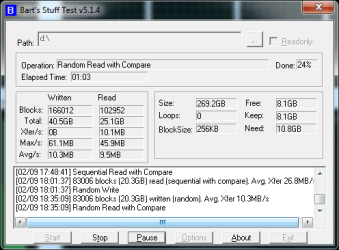
I'm starting to think that HDD might be the main culprit.
 

My Computer

OS
Windows 7 Ultimate x64 SP1
CPU
Intel Core i5 750 @ 2.67 GHz
Motherboard
Asus P7P55D
Memory
2x2GB
Graphics Card(s)
Asus GeForce GTS 250 1GB
Monitor(s) Displays
LG M2262D
Screen Resolution
1920x1080 @ 60 Hz
Hard Drives
Samsung HD753LJ 700GB
Mouse
SteelSeries Kinzu
Internet Speed
22 Mbit/s
Guys, does this screenshot tell you anything?
 

Attachments

  • Untitled.png
    Untitled.png
    51.4 KB · Views: 25

My Computer

OS
Windows 7 Ultimate x64 SP1
CPU
Intel Core i5 750 @ 2.67 GHz
Motherboard
Asus P7P55D
Memory
2x2GB
Graphics Card(s)
Asus GeForce GTS 250 1GB
Monitor(s) Displays
LG M2262D
Screen Resolution
1920x1080 @ 60 Hz
Hard Drives
Samsung HD753LJ 700GB
Mouse
SteelSeries Kinzu
Internet Speed
22 Mbit/s

My Computer

Computer type
PC/Desktop
Computer Manufacturer/Model Number
Bruce ... somewhere in his 40's
OS
Windows 7 Ultimate 32bit SP1
CPU
Intel(R) Core(TM)2 Quad CPU @ 2.40GHz, 2400 MHz
Motherboard
INTEL/D975XBX2
Memory
4 GB
Graphics Card(s)
ATI Radeon HD 2600 Pro
Monitor(s) Displays
Samsung SyncMaster 914v
Screen Resolution
1280 x 1024
Hard Drives
2/500GB each ... ST3500630AS ATA Device.
One is not connected
PSU
Rocketfish 700 W
Case
G.Skill Gigabyte Chassis
Keyboard
Standard PS/2 Keyboard
Mouse
Microsoft PS/2 Mouse
Internet Speed
DSL
Antivirus
Avira Internet Security
Browser
IE 11
Other Info
ATI HDMI Audio
After reading all the thread, I'm beginning to think that uTorrent is eating too much memory. It's normally very lightweight but in your case it's using more than 50MB which sounds excessive to me (unless you're dealing with MANY torrents at once).

But anyway, in the last screenshot, no program is using an exorbitant amount of memory really, and Chrome is not even running. I'm thinking that maybe some faulty driver may have something to do. Have you updated all important drivers recently?
 

My Computer

Computer type
Laptop
Computer Manufacturer/Model Number
Toshiba Sattelite A665-S6092
OS
Windows 7 Ultimate x64
CPU
Intel Core i7-740QM
Memory
8 GB DDR3
Graphics Card(s)
NVIDIA GeForce 330GT
Screen Resolution
1366x768
Hard Drives
Samsung 840 SSD 500GB
1TB USB3 external HD
Cooling
Coolermaster Notepal U3 notebook cooling pad
Internet Speed
3mbps ASDL
Antivirus
ClamWin 0.98.7
Browser
Opera 12.17 x86 (main), Firefox 38 (sec), IE11 (last resort)
Out of curiosity when using a large amount of memory could you upload an screenshot of Task Manager sorted by the "Peak Working Set". You will need to add the column by clicking View > Select Columns and putting a check in "Memory - Peak Working Set"
 

My Computer

Computer Manufacturer/Model Number
Self built
OS
Windows 7 Ultimate x64
CPU
Intel Pentium Dual Core E5200 2.5GHz (3.77GHz OC)
Motherboard
Asus P5Q-E
Memory
Corsair 4GB DDR2 (4x1GB CM2X1024-6400C4)
Graphics Card(s)
Palit GeForce GTS 250 (1024MB)
Sound Card
On Board (ADI AD2000B 8ch HD)
Monitor(s) Displays
Samsung 32in LCD TV
Screen Resolution
1360x768
Hard Drives
2 x 1TB Samsung 103SJ (Raid0)
2 x External 500GB Samsung 502IJ (NexStar 3 HD Enclosures)
PSU
550W Antec Neo HE 550
Case
Antec P180
Cooling
Xigmatex Red Scorpion CPU Cooler. 3x120mm Fans
Keyboard
Logitech MX5000 Laser (Combo)
Mouse
Logitech MX5000 Laser (Combo)
Internet Speed
ADSL2+ (avg 10 Mbps Down, 0.80 Mbps up)
Other Info
Gigabyte GN-WP01GS 54g Wireless Lan Card
///
 

Attachments

  • 1.png
    1.png
    163.4 KB · Views: 17

My Computer

OS
Windows 7 Ultimate x64 SP1
CPU
Intel Core i5 750 @ 2.67 GHz
Motherboard
Asus P7P55D
Memory
2x2GB
Graphics Card(s)
Asus GeForce GTS 250 1GB
Monitor(s) Displays
LG M2262D
Screen Resolution
1920x1080 @ 60 Hz
Hard Drives
Samsung HD753LJ 700GB
Mouse
SteelSeries Kinzu
Internet Speed
22 Mbit/s
I just uninstalled Google Chrome...
 

Attachments

  • 1.png
    1.png
    86.7 KB · Views: 16

My Computer

OS
Windows 7 Ultimate x64 SP1
CPU
Intel Core i5 750 @ 2.67 GHz
Motherboard
Asus P7P55D
Memory
2x2GB
Graphics Card(s)
Asus GeForce GTS 250 1GB
Monitor(s) Displays
LG M2262D
Screen Resolution
1920x1080 @ 60 Hz
Hard Drives
Samsung HD753LJ 700GB
Mouse
SteelSeries Kinzu
Internet Speed
22 Mbit/s
uTorrent sometimes, on some torrents, uses a lot of memory which you can't see in Task Manager, because Windows, automatically, caches the parts of the upload/download from disk into RAM, for faster access I suppose.

You can disable windows caching in uTorrent settings, but maybe updating is also a solution because I haven't seen this kind of behavior on my system in over a year.
 

My Computer

Computer Manufacturer/Model Number
Asus N73SV
OS
Windows 7 x64 Ultimate SP1
CPU
Core i7-2630QM
Motherboard
Intel HM 65
Memory
6 GB DDR3
Graphics Card(s)
Nvidia GT 540M / Intel HD 3000 - Optimus switching
Sound Card
HD Audio (Intel Azalia/Realtek) ALC269
Monitor(s) Displays
LED flat panel
Screen Resolution
1920 x 1080
Hard Drives
2x Seagate Momentus 640 GB - 1,28 TB in total
Internet Speed
4 MB/256 kbps
Other Info
External HDs

WD Elements 1,5 TB
WD MyBook 500 GB
uTorrent sometimes, on some torrents, uses a lot of memory which you can't see in Task Manager, because Windows, automatically, caches the parts of the upload/download from disk into RAM, for faster access I suppose.

You can disable windows caching in uTorrent settings, but maybe updating is also a solution because I haven't seen this kind of behavior on my system in over a year.
I just disabled caching in uTorrent. I hope it will solve the problem.
 

Attachments

  • 1.png
    1.png
    68.4 KB · Views: 25

My Computer

OS
Windows 7 Ultimate x64 SP1
CPU
Intel Core i5 750 @ 2.67 GHz
Motherboard
Asus P7P55D
Memory
2x2GB
Graphics Card(s)
Asus GeForce GTS 250 1GB
Monitor(s) Displays
LG M2262D
Screen Resolution
1920x1080 @ 60 Hz
Hard Drives
Samsung HD753LJ 700GB
Mouse
SteelSeries Kinzu
Internet Speed
22 Mbit/s
You could also stop using utorrents remove the program from your system and see how things work out.
 

My Computer

Computer type
PC/Desktop
Computer Manufacturer/Model Number
Home made Desktop
OS
Windows 10 Pro. 64/ version 1709 Windows 7 Pro/64
CPU
Intel i7-6800K @ 4.3
Motherboard
ASUS X-99 Deluxe II
Memory
Corsair Platinum 16 gig @2400
Graphics Card(s)
EVGA GTX 1070 OC
Monitor(s) Displays
Asus 27" LED LCD/VE278Q
Screen Resolution
1920-1080 or 1280-720 HDMI
Hard Drives
INTEL SSD 730-240 Gb Sata 3.0/
PSU
EVGA Platium 1200W
Case
Phanteks Luxe Tempered Glass 8 fans/ one radiator
Cooling
XSPC/ Water Cooled CPU
Keyboard
Das 4 Professional
Mouse
Logitech M705/MX Anywhere 2-S
Internet Speed
100 mbits
Antivirus
Microsoft Security Essentials/ Malwarebytes Premium 3.0/ SAS
Browser
I.E. 11 default/Firefox/ ISP Time Warner Cable/Spectrum
Other Info
LG BluRay Burner/
Sound system-KLipsch-THX/
Icy Dock ssd Hot Swap bays.
Ya, I am having the same damn issue as well. Just posted a thread about this.
 

My Computer

OS
Windows 7 Professional, 64Bit
It was uTorrent's fault! Seeding takes up too much memory.

Guys, huge thanks for help. I'm marking this thread as solved.
 

My Computer

OS
Windows 7 Ultimate x64 SP1
CPU
Intel Core i5 750 @ 2.67 GHz
Motherboard
Asus P7P55D
Memory
2x2GB
Graphics Card(s)
Asus GeForce GTS 250 1GB
Monitor(s) Displays
LG M2262D
Screen Resolution
1920x1080 @ 60 Hz
Hard Drives
Samsung HD753LJ 700GB
Mouse
SteelSeries Kinzu
Internet Speed
22 Mbit/s
How did you list all the processes Google Chrome uses

Lingvo.exe which is part of ABBYY Dictionary software uses a fair bit of your memory. Jack already mentioned uTorrent. Chrome is also using a lot. Do you have a lot of addons installed? Or did you just have a lot of tabs open?

Tom
I also think that Chrome is the main culprit.

Only 1 tab opened:

ec7b2223bc5434c3b2f883e747d85293.png


uTorrent.exe 2908 0.49 29,876 K 30,076 K µTorrent BitTorre

This might be a clue.
A bit too much for uTorrent?
Hi Plainview,
What tool/program did you use to display the all the process that Chrome was using?
 

My Computer

Computer type
PC/Desktop
Computer Manufacturer/Model Number
Custom Build
OS
Windows 7 Ultimate x64
CPU
Q9450
Motherboard
ASUS
Memory
8Gig
Graphics Card(s)
Radeon
Hard Drives
5
Antivirus
Windows
Browser
Many
Back
Top