
You are using an out of date browser. It may not display this or other websites correctly.
You should upgrade or use an alternative browser.
You should upgrade or use an alternative browser.
WIFI only connects after running troubleshooter....
- Thread starter Ongkanon
- Start date


ok ,sorry for delay , sidetracked by child 
the reason i asked about the Nvidea was i found a thread here that tackled the problem and worked. shame as it may have provided a solution...
Broadcom 802.11n Network Adapter not working on Windows 7 64bit
the reason i asked about the Nvidea was i found a thread here that tackled the problem and worked. shame as it may have provided a solution...
I.a. Disable Device sleep on disconnect
Some newer Nvidia Ethernet drivers have a feature called Device sleep on disconnect. This is the culprit. Normally, it should only put the Ethernet adapter to sleep when the cable is disconnected, but it's buggy and thus kills the wireless connection as well.
Follow these steps to disable this feature on your Nvidia Ethernet Adapter:
1. Open the Windows Device Manager by hitting Win+Pause, then click on Device Manager on the left side.
2. Double-click on Network adapters.
3. Double-click on NVIDIA nForce Networking Controller (yes, that's the wired Ethernet adapter indeed).
4. Click on the Advanced tab.
5. Select Device sleep on disconnect.
6. Set the Value to Disabled.
7. Click OK and wireless should work again (might require a reboot afterwards, but probably not).
Broadcom 802.11n Network Adapter not working on Windows 7 64bit
My Computer
At a glance
Microsoft Windows 7 Home Premium 64-bit 7600IIx4 amd athelon 635 processor2x2gbati radeon HD 5450
- Computer Manufacturer/Model Number
- Hewlett packard/p6512uk
- OS
- Microsoft Windows 7 Home Premium 64-bit 7600
- CPU
- IIx4 amd athelon 635 processor
- Motherboard
- FOXCONN 2AA9
- Memory
- 2x2gb
- Graphics Card(s)
- ati radeon HD 5450
- Sound Card
- (1) Realtek High Definition Audio (2) AMD High Definition
- Monitor(s) Displays
- samsung lcd tv 32"
- Screen Resolution
- 1360x 768
- Hard Drives
- (1) WDC WD10 01FAES-60Z2A0 SATA Disk Device (2) Maxtor OneTouch USB Device (3) ST310003 33AS USB Device (4) WD My Book 1111 USB Device
- PSU
- ?
- Cooling
- air!
- Keyboard
- wireless hp
- Mouse
- wireless Hp,optical
- Internet Speed
- 1.10mb/s
- Antivirus
- MSE
- Browser
- Firefox
just had a look at the realtek family controller on my desktop and there is no Device sleep on disconnect.
so no option to change there.
sorry.
im about out of ideas,
so no option to change there.
sorry.
im about out of ideas,
My Computer
At a glance
Microsoft Windows 7 Home Premium 64-bit 7600IIx4 amd athelon 635 processor2x2gbati radeon HD 5450
- Computer Manufacturer/Model Number
- Hewlett packard/p6512uk
- OS
- Microsoft Windows 7 Home Premium 64-bit 7600
- CPU
- IIx4 amd athelon 635 processor
- Motherboard
- FOXCONN 2AA9
- Memory
- 2x2gb
- Graphics Card(s)
- ati radeon HD 5450
- Sound Card
- (1) Realtek High Definition Audio (2) AMD High Definition
- Monitor(s) Displays
- samsung lcd tv 32"
- Screen Resolution
- 1360x 768
- Hard Drives
- (1) WDC WD10 01FAES-60Z2A0 SATA Disk Device (2) Maxtor OneTouch USB Device (3) ST310003 33AS USB Device (4) WD My Book 1111 USB Device
- PSU
- ?
- Cooling
- air!
- Keyboard
- wireless hp
- Mouse
- wireless Hp,optical
- Internet Speed
- 1.10mb/s
- Antivirus
- MSE
- Browser
- Firefox
Thanks for your help.
I am at a loss. I may try a repair or clean install.
Just reading through event logs to see if anything jumps out that may help.
I am at a loss. I may try a repair or clean install.
Just reading through event logs to see if anything jumps out that may help.
My Computer
At a glance
Windows 7 Home Premium x64
- Computer Manufacturer/Model Number
- Lenovo Ideapad Z585
- OS
- Windows 7 Home Premium x64
- Local time
- 5:03 AM
- Messages
- 8,138
Do you still have the file named BCMWL664.SYS on your computer?Files are:
C:\Windows\System32\Drivers\BCMWL664.SYS
and
C:\Windows\System32\drivers\vwifibus.sys
If so, please right click on it from within the Windows (file) Explorer
...select Properties from the context menu
...select the tab named Details
Please post a screenshot of that tab.
My Computer
At a glance
W7 Pro SP1 64biti78GBIntel HD Graphics
- Computer type
- Laptop
- Computer Manufacturer/Model Number
- Employer provided Dell Latitude
- OS
- W7 Pro SP1 64bit
- CPU
- i7
- Memory
- 8GB
- Graphics Card(s)
- Intel HD Graphics
- Hard Drives
- crappy SSD
- Antivirus
- Employer mandated Symantec Endpoint Protection
- Browser
- Pale Moon 64bit, IE11 64bit & Chrome 64bit

- Local time
- 5:03 AM
- Messages
- 8,138
When you tried to install the Lenovo drivers that were for Windows 8, it should have unpacked the 177+KB file into a folder named C:\drivers
If you still have that folder, look in:
C:\drivers\6. Wireless LAN Driver (CyberTan, Liteon)\Broadcom\inf
If the driver files are newer - or if you just want to try them - you can use the device manager method of updating the driver and browse to that "inf" folder.
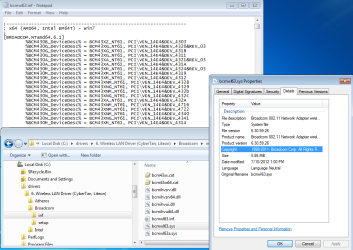
If you still have that folder, look in:
C:\drivers\6. Wireless LAN Driver (CyberTan, Liteon)\Broadcom\inf
If the driver files are newer - or if you just want to try them - you can use the device manager method of updating the driver and browse to that "inf" folder.
My Computer
At a glance
W7 Pro SP1 64biti78GBIntel HD Graphics
- Computer type
- Laptop
- Computer Manufacturer/Model Number
- Employer provided Dell Latitude
- OS
- W7 Pro SP1 64bit
- CPU
- i7
- Memory
- 8GB
- Graphics Card(s)
- Intel HD Graphics
- Hard Drives
- crappy SSD
- Antivirus
- Employer mandated Symantec Endpoint Protection
- Browser
- Pale Moon 64bit, IE11 64bit & Chrome 64bit
I don't have the file c:\drivers\6. Wireless LAN Driver (CyberTan, Liteon)\Broadcom\inf.
I click on c: then onto drivers then a file called Wifi Driver (Broadcom, Liteon).
I click into the Broadcom file, setup, INF driver only and this is the result (I hope this is what you mean?)
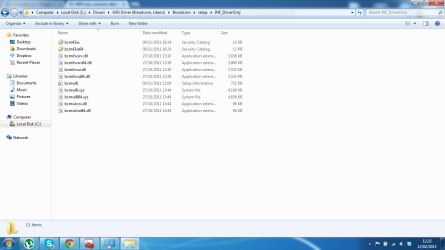
I click on c: then onto drivers then a file called Wifi Driver (Broadcom, Liteon).
I click into the Broadcom file, setup, INF driver only and this is the result (I hope this is what you mean?)
My Computer
At a glance
Windows 7 Home Premium x64
- Computer Manufacturer/Model Number
- Lenovo Ideapad Z585
- OS
- Windows 7 Home Premium x64
I tried to update from device manager as you suggested.
Windows won't let me as the most recent driver is already installed.
Windows won't let me as the most recent driver is already installed.
My Computer
At a glance
Windows 7 Home Premium x64
- Computer Manufacturer/Model Number
- Lenovo Ideapad Z585
- OS
- Windows 7 Home Premium x64
- Local time
- 5:03 AM
- Messages
- 8,138
Bummer - let me see if I can find the file that I got from the Lenovo site again.
My Computer
At a glance
W7 Pro SP1 64biti78GBIntel HD Graphics
- Computer type
- Laptop
- Computer Manufacturer/Model Number
- Employer provided Dell Latitude
- OS
- W7 Pro SP1 64bit
- CPU
- i7
- Memory
- 8GB
- Graphics Card(s)
- Intel HD Graphics
- Hard Drives
- crappy SSD
- Antivirus
- Employer mandated Symantec Endpoint Protection
- Browser
- Pale Moon 64bit, IE11 64bit & Chrome 64bit
I managed to install the INF file by uninstalling the original file via device manager.
Installed ok but nothing has changed in the device driver properties, still shows same versions etc.
Installed ok but nothing has changed in the device driver properties, still shows same versions etc.
My Computer
At a glance
Windows 7 Home Premium x64
- Computer Manufacturer/Model Number
- Lenovo Ideapad Z585
- OS
- Windows 7 Home Premium x64
- Local time
- 5:03 AM
- Messages
- 8,138
Please visit this Lenovo website:
Lenovo Support - Drivers & Software (GB)
Select your computer - but select Windows 8
(It does not matter which W8 you pick.)
The file that you will be downloading will be named 1awl08w8.exe
The website shows it to be 49.4MB
It should create
C:\drivers\5. Wireless LAN Driver (Liteon, Combo)\Broadcom\6.30.59.26\Driver\Win8
Those files are the same as the ones that I got from the rather large download that I can no longer find (and I do know why I cannot find it - but I'll not bore you with that now). The INF file in the Win 8 folder points to Win7 also. Please try those drivers.

Lenovo Support - Drivers & Software (GB)
Select your computer - but select Windows 8
(It does not matter which W8 you pick.)
The file that you will be downloading will be named 1awl08w8.exe
The website shows it to be 49.4MB
It should create
C:\drivers\5. Wireless LAN Driver (Liteon, Combo)\Broadcom\6.30.59.26\Driver\Win8
Those files are the same as the ones that I got from the rather large download that I can no longer find (and I do know why I cannot find it - but I'll not bore you with that now). The INF file in the Win 8 folder points to Win7 also. Please try those drivers.
My Computer
At a glance
W7 Pro SP1 64biti78GBIntel HD Graphics
- Computer type
- Laptop
- Computer Manufacturer/Model Number
- Employer provided Dell Latitude
- OS
- W7 Pro SP1 64bit
- CPU
- i7
- Memory
- 8GB
- Graphics Card(s)
- Intel HD Graphics
- Hard Drives
- crappy SSD
- Antivirus
- Employer mandated Symantec Endpoint Protection
- Browser
- Pale Moon 64bit, IE11 64bit & Chrome 64bit
No luck Windows was unable to install your network controller.
I have noticed that the driver you suggest is not available from my model of laptop ideapad z585
I have noticed that the driver you suggest is not available from my model of laptop ideapad z585
My Computer
At a glance
Windows 7 Home Premium x64
- Computer Manufacturer/Model Number
- Lenovo Ideapad Z585
- OS
- Windows 7 Home Premium x64
- Local time
- 5:03 AM
- Messages
- 8,138
edit: okay - when you get the time...
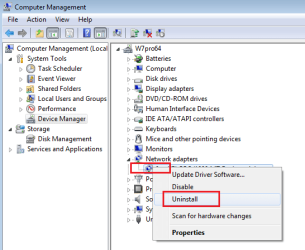
You mentioned doing this:
...uninstalling the original file via device manager
Please do that again - but do not install the new driver from that Win 8 folder just yet.
Uninstall the adapter
...then scan for new devices (edit: should be "scan for hardware changes")
...then browse to the Win 8 folder.
You mentioned doing this:
...uninstalling the original file via device manager
Please do that again - but do not install the new driver from that Win 8 folder just yet.
Uninstall the adapter
...then scan for new devices (edit: should be "scan for hardware changes")
...then browse to the Win 8 folder.
Last edited:
My Computer
At a glance
W7 Pro SP1 64biti78GBIntel HD Graphics
- Computer type
- Laptop
- Computer Manufacturer/Model Number
- Employer provided Dell Latitude
- OS
- W7 Pro SP1 64bit
- CPU
- i7
- Memory
- 8GB
- Graphics Card(s)
- Intel HD Graphics
- Hard Drives
- crappy SSD
- Antivirus
- Employer mandated Symantec Endpoint Protection
- Browser
- Pale Moon 64bit, IE11 64bit & Chrome 64bit
For info these are the only software options available to me via lenovo support, device and drivers. I had to download the file you recommended be searching for the file name.
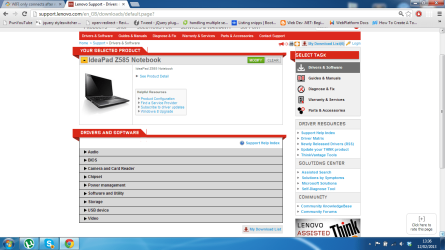
My Computer
At a glance
Windows 7 Home Premium x64
- Computer Manufacturer/Model Number
- Lenovo Ideapad Z585
- OS
- Windows 7 Home Premium x64
- Local time
- 5:03 AM
- Messages
- 8,138
For info these are the only software options available to me via lenovo support, device and drivers. I had to download the file you recommended be searching for the file name.
View attachment 254815
Their website is flaky. I tried to get back to that file for the screenshot below and it found no files. I tried several times - then finally cleared cookies and cache:

My Computer
At a glance
W7 Pro SP1 64biti78GBIntel HD Graphics
- Computer type
- Laptop
- Computer Manufacturer/Model Number
- Employer provided Dell Latitude
- OS
- W7 Pro SP1 64bit
- CPU
- i7
- Memory
- 8GB
- Graphics Card(s)
- Intel HD Graphics
- Hard Drives
- crappy SSD
- Antivirus
- Employer mandated Symantec Endpoint Protection
- Browser
- Pale Moon 64bit, IE11 64bit & Chrome 64bit
Sorry but how do you scan for new devices?? Noob when it comes to windows 7!
If its scan for new hardware, thats what I did previously. Uninstalled the driver via device manager, you then get an unknown networking device in the tree. I then updated the driver for that device by going to the Inf file.
If its scan for new hardware, thats what I did previously. Uninstalled the driver via device manager, you then get an unknown networking device in the tree. I then updated the driver for that device by going to the Inf file.
My Computer
At a glance
Windows 7 Home Premium x64
- Computer Manufacturer/Model Number
- Lenovo Ideapad Z585
- OS
- Windows 7 Home Premium x64
OK done it all again, system will not let me install the windows 8 driver. I am back where I started.
Would a clean or repair install resolve this issue, I have been at this for days now and its getting a tad frustrating!
Would a clean or repair install resolve this issue, I have been at this for days now and its getting a tad frustrating!
My Computer
At a glance
Windows 7 Home Premium x64
- Computer Manufacturer/Model Number
- Lenovo Ideapad Z585
- OS
- Windows 7 Home Premium x64
Similar threads

- Replies
- 10
- Views
- 4K
- Replies
- 6
- Views
- 3K

- Replies
- 12
- Views
- 7K
- Replies
- 1
- Views
- 4K

- Replies
- 1
- Views
- 2K
