
Unidentified home network with Wifi only internet

PBzeer

New member
Member
Local time
9:07 AM
Messages
62
I've read countless threads (here and elsewhere), but have found nothing that really describes my problem.

First of all, some background. I live on a boat and the only available Internet connection is by Wifi. There are no landline or cable connections available.

I have two Toshiba laptops, one running 7 Pro 32 and one running 7 Pro 64. They are networked by direct ethernet cable connection. (The network works fine once you get past the unidentified public network to unidentified home network) And I can connect to the Internet by Wifi from either laptop or both at once. (DHCP is enabled on both adapters)

I have tried, with no success and considerable frustration, to make my home network "identifiable", so I don't have to reset the network location on both machines anytime there is a break in the connection (eg: restart, shutdown)

Everything I have tried that makes the home network identified though, has kept me from connecting to the Internet by Wifi. It appears to me, that once the home network is identified (specific DNS, valid IPs) that Windows wants to connect the network, rather than the individual laptops, to the Internet, and so, though I can connect to the Wifi network itself (and it says I have Internet access), I'm "invisible", evidently, (no gateway ?) to the Wifi ISP.

I have worked manually, through Properties of the adapters, and have tried a wired only router (Trendnet TW100-S4W1CA) (also a Network switch, which didn't solve the unidentified problem) When using the router, as soon as I unplug from it, I have Internet connectivity by Wifi (without having to reconnect). The only thing I haven't tried is using ICS, as I'm not sure how vulnerable I would be on the Wifi.

I hope I've presented the problem clearly, but I'll try to put it more basically. Is there a way to use a wired router with no Internet connection to create a home network and still be able to connect to the Internet by Wifi?
 

My Computer My Computer

At a glance

Windows 7 Professional 32 bit and 64 bitAMD A-6 / Intel i74 gigs / 8 gigsRaedon HD / NVIDIA GeForce 740M (Intel HD 460...
Computer type
Laptop
Computer Manufacturer/Model Number
Toshiba L755D-S5204 (32 bit) / Toshiba L70-ABT3N22 (64 bit)
OS
Windows 7 Professional 32 bit and 64 bit
CPU
AMD A-6 / Intel i7
Memory
4 gigs / 8 gigs
Graphics Card(s)
Raedon HD / NVIDIA GeForce 740M (Intel HD 4600 onboard)
Other Info
Intel NUC5i5RYH - 16 GB RAM, 250 GB Samsung m2 SSD, 7 Pro x64, Intel HD 6000 onboard graphics, Realtek onboard audio, integrated wireless. Running this and laptops through Toshiba Dynadock for external monitor and 5.1 speakers.

IntelNUC5i3RYH added.

My Computer My Computer

At a glance

Windows 7 Ult, Windows 8.1 Pro,Q9650-4.275GHz, E8600 4.5GHz, E6750-3.8GHzG.Skill PC2 9600 1200Mhz 5 5 5 15 2TGTX480
Computer type
PC/Desktop
Computer Manufacturer/Model Number
Home built
OS
Windows 7 Ult, Windows 8.1 Pro,
CPU
Q9650-4.275GHz, E8600 4.5GHz, E6750-3.8GHz
Motherboard
Evga 780i FTW
Memory
G.Skill PC2 9600 1200Mhz 5 5 5 15 2T
Graphics Card(s)
GTX480
Sound Card
Asus Xonar D2
Monitor(s) Displays
HannsG
Screen Resolution
1680X1050
Hard Drives
GSkill Phoenix Pro 120GB SSD
PSU
ThermalTake Toughpower 1000Watt modular
Case
ThermalTake XaserV
Cooling
Xigmatek S1283
Keyboard
Logitech G15
Mouse
Logitech G9
Internet Speed
T1
As with all the other posts I have read, none of that really addresses my problem, as they all deal with connecting a LAN (homenetwork) to a WAN (modem connected Internet). I'm not trying to connect my wired network (LAN) to a shared Internet connection (WAN). I'm trying to connect the individual machines to the Wifi (wireless) network.

I can either have an identified home network and no Wifi Internet. Or I can have an unidentified home network and have Wifi Internet. In other words, having one, seems to preclude having the other.

When computer A and computer B are wired (Ethernet adapter) to the LAN ports of the wired only router (no wireless on the router), it creates an identifiable home network.

I can then connect computer A or B or both, with their wireless adapter, to the Wifi network. (I'm not trying to connect the home network (shared connection) to the Internet, only the individual machines)

The problem occurs when I try to actually connect to an Internet site. The Wifi ISP does not "see" my request, unless I unplug from the router.

Logically, I have to assume that since the router has been assigned the default gateway, the wireless adapter has none to enable it to connect to the Wifi ISP, since once unplugged from the router, I can connect.
 

My Computer My Computer

At a glance

Windows 7 Professional 32 bit and 64 bitAMD A-6 / Intel i74 gigs / 8 gigsRaedon HD / NVIDIA GeForce 740M (Intel HD 460...
Computer type
Laptop
Computer Manufacturer/Model Number
Toshiba L755D-S5204 (32 bit) / Toshiba L70-ABT3N22 (64 bit)
OS
Windows 7 Professional 32 bit and 64 bit
CPU
AMD A-6 / Intel i7
Memory
4 gigs / 8 gigs
Graphics Card(s)
Raedon HD / NVIDIA GeForce 740M (Intel HD 4600 onboard)
Other Info
Intel NUC5i5RYH - 16 GB RAM, 250 GB Samsung m2 SSD, 7 Pro x64, Intel HD 6000 onboard graphics, Realtek onboard audio, integrated wireless. Running this and laptops through Toshiba Dynadock for external monitor and 5.1 speakers.

IntelNUC5i3RYH added.
I'd like to help but I can't figure out what you are talking about.

Are you saying that when connected to wireless the machines aren't picking up the default gateway but with wired it does?

I think that a screen shot of the problem would be more helpful.
 

My Computer My Computer

At a glance

Windows 7 Ult, Windows 8.1 Pro,Q9650-4.275GHz, E8600 4.5GHz, E6750-3.8GHzG.Skill PC2 9600 1200Mhz 5 5 5 15 2TGTX480
Computer type
PC/Desktop
Computer Manufacturer/Model Number
Home built
OS
Windows 7 Ult, Windows 8.1 Pro,
CPU
Q9650-4.275GHz, E8600 4.5GHz, E6750-3.8GHz
Motherboard
Evga 780i FTW
Memory
G.Skill PC2 9600 1200Mhz 5 5 5 15 2T
Graphics Card(s)
GTX480
Sound Card
Asus Xonar D2
Monitor(s) Displays
HannsG
Screen Resolution
1680X1050
Hard Drives
GSkill Phoenix Pro 120GB SSD
PSU
ThermalTake Toughpower 1000Watt modular
Case
ThermalTake XaserV
Cooling
Xigmatek S1283
Keyboard
Logitech G15
Mouse
Logitech G9
Internet Speed
T1
Hopefully, this helps.
 

Attachments

  • 007.jpg
    007.jpg
    34.7 KB · Views: 6

My Computer My Computer

At a glance

Windows 7 Professional 32 bit and 64 bitAMD A-6 / Intel i74 gigs / 8 gigsRaedon HD / NVIDIA GeForce 740M (Intel HD 460...
Computer type
Laptop
Computer Manufacturer/Model Number
Toshiba L755D-S5204 (32 bit) / Toshiba L70-ABT3N22 (64 bit)
OS
Windows 7 Professional 32 bit and 64 bit
CPU
AMD A-6 / Intel i7
Memory
4 gigs / 8 gigs
Graphics Card(s)
Raedon HD / NVIDIA GeForce 740M (Intel HD 4600 onboard)
Other Info
Intel NUC5i5RYH - 16 GB RAM, 250 GB Samsung m2 SSD, 7 Pro x64, Intel HD 6000 onboard graphics, Realtek onboard audio, integrated wireless. Running this and laptops through Toshiba Dynadock for external monitor and 5.1 speakers.

IntelNUC5i3RYH added.
That is a little strange with the problem showing up when trying to connect wirelessly.

If this is one of those ISP issued modem/routers then toss it out and get a standard modem and a stand alone third party router. Those combo modem/router ISP issued deals aren't compatible with many systems "despite what they tell you".

If this is your own router then try updating the firmware.

There are over 200 listed examples in the link I posted with about the same number of possible causes but in this case I'd say the ISP issued modem/router is the problem.

http://pocketpccentral.net/blog/200...cess-no-internet-connection-problem-resolved/
 
Last edited:

My Computer My Computer

At a glance

Windows 7 Ult, Windows 8.1 Pro,Q9650-4.275GHz, E8600 4.5GHz, E6750-3.8GHzG.Skill PC2 9600 1200Mhz 5 5 5 15 2TGTX480
Computer type
PC/Desktop
Computer Manufacturer/Model Number
Home built
OS
Windows 7 Ult, Windows 8.1 Pro,
CPU
Q9650-4.275GHz, E8600 4.5GHz, E6750-3.8GHz
Motherboard
Evga 780i FTW
Memory
G.Skill PC2 9600 1200Mhz 5 5 5 15 2T
Graphics Card(s)
GTX480
Sound Card
Asus Xonar D2
Monitor(s) Displays
HannsG
Screen Resolution
1680X1050
Hard Drives
GSkill Phoenix Pro 120GB SSD
PSU
ThermalTake Toughpower 1000Watt modular
Case
ThermalTake XaserV
Cooling
Xigmatek S1283
Keyboard
Logitech G15
Mouse
Logitech G9
Internet Speed
T1
There is no modem involved. I neither have one, nor have anything to connect one to other than my stand-alone, non-wireless router. The router is used only to create an identifiable LAN, by ethernet cable, not to connect to the Internet. Nor am I trying to connect the network to the Internet.

The problem is ... why can't I connect to the Internet using my wireless adapter (which is not involved in the LAN) when I am connected to the router. (If I plugged into the router right now, I would lose my Internet connection. If I tried to connect to the Internet (by wireless) while connected to the router, I wouldn't get a connection)

This isn't a hardware problem. If I am connected laptop to laptop, then the network has no connection specific DNS, so it remains unidentified. If I connect through the router, I then have a connection specific DNS, but no gateway for the wireless adapter to communicate with the Wifi ISP.

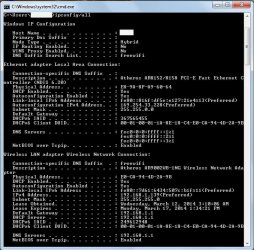
Here it is without the router (it's not even hooked up right now):
 

Attachments

  • 008.jpg
    008.jpg
    78.9 KB · Views: 16

My Computer My Computer

At a glance

Windows 7 Professional 32 bit and 64 bitAMD A-6 / Intel i74 gigs / 8 gigsRaedon HD / NVIDIA GeForce 740M (Intel HD 460...
Computer type
Laptop
Computer Manufacturer/Model Number
Toshiba L755D-S5204 (32 bit) / Toshiba L70-ABT3N22 (64 bit)
OS
Windows 7 Professional 32 bit and 64 bit
CPU
AMD A-6 / Intel i7
Memory
4 gigs / 8 gigs
Graphics Card(s)
Raedon HD / NVIDIA GeForce 740M (Intel HD 4600 onboard)
Other Info
Intel NUC5i5RYH - 16 GB RAM, 250 GB Samsung m2 SSD, 7 Pro x64, Intel HD 6000 onboard graphics, Realtek onboard audio, integrated wireless. Running this and laptops through Toshiba Dynadock for external monitor and 5.1 speakers.

IntelNUC5i3RYH added.
I finally resolved many problems similar to this by resetting my router to default (I have a Belkin). Apparently it saved prior information (not necessarily the original one??) and when I changed the SSID, passwords, etc., it conflicted with everything else.
Try resetting your router to default, but don't forget to save your prior settings. I knew them by heart since I was dealing with this for so long!! :mad:
Hope this helps. It's so frustrating. I did so much research of bad connections, conflicting IP's, access to internet even if it said I didn't... I had a lot of problems. All fixed by resetting router.
 

My Computer My Computer

At a glance

Windows 7 Pro 32bit
Computer type
Laptop
OS
Windows 7 Pro 32bit
Thanks, but I already tried that.
 

My Computer My Computer

At a glance

Windows 7 Professional 32 bit and 64 bitAMD A-6 / Intel i74 gigs / 8 gigsRaedon HD / NVIDIA GeForce 740M (Intel HD 460...
Computer type
Laptop
Computer Manufacturer/Model Number
Toshiba L755D-S5204 (32 bit) / Toshiba L70-ABT3N22 (64 bit)
OS
Windows 7 Professional 32 bit and 64 bit
CPU
AMD A-6 / Intel i7
Memory
4 gigs / 8 gigs
Graphics Card(s)
Raedon HD / NVIDIA GeForce 740M (Intel HD 4600 onboard)
Other Info
Intel NUC5i5RYH - 16 GB RAM, 250 GB Samsung m2 SSD, 7 Pro x64, Intel HD 6000 onboard graphics, Realtek onboard audio, integrated wireless. Running this and laptops through Toshiba Dynadock for external monitor and 5.1 speakers.

IntelNUC5i3RYH added.
There is no modem involved. I neither have one, nor have anything to connect one to other than my stand-alone, non-wireless router. The router is used only to create an identifiable LAN, by ethernet cable, not to connect to the Internet. Nor am I trying to connect the network to the Internet.

The problem is ... why can't I connect to the Internet using my wireless adapter (which is not involved in the LAN) when I am connected to the router. (If I plugged into the router right now, I would lose my Internet connection. If I tried to connect to the Internet (by wireless) while connected to the router, I wouldn't get a connection)

This isn't a hardware problem. If I am connected laptop to laptop, then the network has no connection specific DNS, so it remains unidentified. If I connect through the router, I then have a connection specific DNS, but no gateway for the wireless adapter to communicate with the Wifi ISP.

Here it is without the router (it's not even hooked up right now):


Man I can sure pick the strange ones lately. First you say you don't want internet, then you say you can't connect to the internet?

Either use a modem or you won't have an internet connection, it's that simple.
 

My Computer My Computer

At a glance

Windows 7 Ult, Windows 8.1 Pro,Q9650-4.275GHz, E8600 4.5GHz, E6750-3.8GHzG.Skill PC2 9600 1200Mhz 5 5 5 15 2TGTX480
Computer type
PC/Desktop
Computer Manufacturer/Model Number
Home built
OS
Windows 7 Ult, Windows 8.1 Pro,
CPU
Q9650-4.275GHz, E8600 4.5GHz, E6750-3.8GHz
Motherboard
Evga 780i FTW
Memory
G.Skill PC2 9600 1200Mhz 5 5 5 15 2T
Graphics Card(s)
GTX480
Sound Card
Asus Xonar D2
Monitor(s) Displays
HannsG
Screen Resolution
1680X1050
Hard Drives
GSkill Phoenix Pro 120GB SSD
PSU
ThermalTake Toughpower 1000Watt modular
Case
ThermalTake XaserV
Cooling
Xigmatek S1283
Keyboard
Logitech G15
Mouse
Logitech G9
Internet Speed
T1
~~~
Either use a modem or you won't have an internet connection, it's that simple.
The OP is getting internet access from via Wi-Fi from a Wireless Access Point (WAP) that the OP does not control. The ipconfig screenshot mentioned "freewifi" - so, I'm guessing that this Wi-Fi signal is free to all of the boats in the area.

The problem comes when the OP adds a home network into the mix (e.g. ties two laptops together via a LAN cables and one router). That network is fine as long as the OP can change the network type to Home. But once one of the laptops connects to the free Wi-Fi, that local network changes to the Unidentified network type.

Goal:
Have the local network remain as the Home network type while using the free Wi-Fi on another network.

I don't know how to solve the OP's issue - but maybe I've described the network setup and the issue close enough for you or other forum members to help.
 

My Computer My Computer

At a glance

W7 Pro SP1 64biti78GBIntel HD Graphics
Computer type
Laptop
Computer Manufacturer/Model Number
Employer provided Dell Latitude
OS
W7 Pro SP1 64bit
CPU
i7
Memory
8GB
Graphics Card(s)
Intel HD Graphics
Hard Drives
crappy SSD
Antivirus
Employer mandated Symantec Endpoint Protection
Browser
Pale Moon 64bit, IE11 64bit & Chrome 64bit
~~~
Either use a modem or you won't have an internet connection, it's that simple.
The OP is getting internet access from via Wi-Fi from a Wireless Access Point (WAP) that the OP does not control. The ipconfig screenshot mentioned "freewifi" - so, I'm guessing that this Wi-Fi signal is free to all of the boats in the area.

The problem comes when the OP adds a home network into the mix (e.g. ties two laptops together via a LAN cables and one router). That network is fine as long as the OP can change the network type to Home. But once one of the laptops connects to the free Wi-Fi, that local network changes to the Unidentified network type.

Goal:
Have the local network remain as the Home network type while using the free Wi-Fi on another network.

I don't know how to solve the OP's issue - but maybe I've described the network setup and the issue close enough for you or other forum members to help.

Yes that describes it better "didn't realize there was a free a/p" but I believe with those free WiFi signals that often times they will prevent a person from extending the network beyond a single connection although sharing files should be possible if the machines are all using the same default gateway. A router could be used but you would need to know the gateway of the A/P etc.

Also I'd say that pseudo connections like this are variable and unreliable by nature and may require ICS "internet connection sharing" or a simple AdHoc network in order to share files etc. A router isn't even required if this is the case.

The link shows how to set up basic AdHoc to share files but you can use connectify or a virtual router software for this as well.

I should also mention that trying to share a wireless connection to an Ethernet connection isn't really what these software's are for. They are basically set up for sharing wireless to wireless as wireless to Ethernet can be unreliable.

http://www.dummies.com/how-to/content/configuring-an-ad-hoc-mode-wlan-with-windows-7.html

http://virtualrouter.codeplex.com/

http://www.connectify.me/
 

My Computer My Computer

At a glance

Windows 7 Ult, Windows 8.1 Pro,Q9650-4.275GHz, E8600 4.5GHz, E6750-3.8GHzG.Skill PC2 9600 1200Mhz 5 5 5 15 2TGTX480
Computer type
PC/Desktop
Computer Manufacturer/Model Number
Home built
OS
Windows 7 Ult, Windows 8.1 Pro,
CPU
Q9650-4.275GHz, E8600 4.5GHz, E6750-3.8GHz
Motherboard
Evga 780i FTW
Memory
G.Skill PC2 9600 1200Mhz 5 5 5 15 2T
Graphics Card(s)
GTX480
Sound Card
Asus Xonar D2
Monitor(s) Displays
HannsG
Screen Resolution
1680X1050
Hard Drives
GSkill Phoenix Pro 120GB SSD
PSU
ThermalTake Toughpower 1000Watt modular
Case
ThermalTake XaserV
Cooling
Xigmatek S1283
Keyboard
Logitech G15
Mouse
Logitech G9
Internet Speed
T1
I should also mention that trying to share a wireless connection to an Ethernet connection isn't really what these software's are for.

I'm not trying to "share" the connection, nor to connect the network to the wireless internet connection.

The screen shot shows my Ethernet connection (LAN via direct cable connection) and my Wireless Internet connection. In this setup, the Ethernet LAN functions normally, and being connected to it does not interfere with connecting to the Internet via the Wireless adapter. The only problem with this setup is that Win 7 will not "identify" the LAN network, thus making it an "unidentified public" network, which then must be manually set to private.

At this point I have a working, unidentified LAN and Wifi Internet to the individual laptops. (the internet connection is not shared through the network)

So, the initial problem was how to make the LAN identifiable. After working through the properties of the adapters (IP, gateway, etc. settings), the best fix was using a router (setting all changes back to default). And, because of the situation, it had to be a wired only router.

I hook up the router, Win 7 recognizes the network which I then set to Home (location type) and name. Now I have an identified LAN. So the initial problem has been solved. Which then creates a different problem, as I can no longer connect to the Internet via the Wireless adapter of either laptop ... unless I disconnect from the router.

The TCP/IP values previously assigned to the wireless adapter have now been assigned to the ethernet adapter, leaving the wireless adapter "unidentifiable" to the Wifi ISP. Unless I disconnect from the router, at which time the wireless adapter "takes back" the TCP/IP values.

It appears that to give the Ethernet LAN the necessary TCP/IP values to create an identifiable network, prevents the Wireless adapter from obtaining the TCP/IP values necessary to connect to the Wifi ISP.

So what we have is ....

Option 1: Working Wireless Internet connection and unidentified Ethernet LAN (which must be reset manually after any interruption).

Option 2: Working identified Ethernet LAN (which does not need reset) and no Wireless Internet connection. (Wireless being the only available Internet connection)

Option 3: A working identified Ethernet LAN, and a working Wireless Internet connection. Which has proven, to this point, to be impossible.

Now, here's what I'm not trying to do ...

I'm not trying to connect the LAN to the Internet.
I'm not trying to share an Internet connection.
I'm not trying to connect a modem.

I don't know how to explain it any better. Usernameissues almost got what the problem is, but not quite.
 

My Computer My Computer

At a glance

Windows 7 Professional 32 bit and 64 bitAMD A-6 / Intel i74 gigs / 8 gigsRaedon HD / NVIDIA GeForce 740M (Intel HD 460...
Computer type
Laptop
Computer Manufacturer/Model Number
Toshiba L755D-S5204 (32 bit) / Toshiba L70-ABT3N22 (64 bit)
OS
Windows 7 Professional 32 bit and 64 bit
CPU
AMD A-6 / Intel i7
Memory
4 gigs / 8 gigs
Graphics Card(s)
Raedon HD / NVIDIA GeForce 740M (Intel HD 4600 onboard)
Other Info
Intel NUC5i5RYH - 16 GB RAM, 250 GB Samsung m2 SSD, 7 Pro x64, Intel HD 6000 onboard graphics, Realtek onboard audio, integrated wireless. Running this and laptops through Toshiba Dynadock for external monitor and 5.1 speakers.

IntelNUC5i3RYH added.
Back
Top