WIFI only connects after running troubleshooter....

Not sure if this is relevant.

Again in Device Manager, driver file details lists two files.

One is a Broadcom file, the other a Microsoft file.

Also do you have any idea what to look for on the Broadcom site, I enter the details you would expect and get lots of hits to stuff I don't understand.

For Broadcom not sure but there may be a driver version number when you look in Device Manager.

One of those driver files may be some soft of wireless connection software which can be problematic.

I can't see the software from here but you only want the driver and not the connection software.
 

My Computer My Computer

At a glance

Windows 7 Ult, Windows 8.1 Pro,Q9650-4.275GHz, E8600 4.5GHz, E6750-3.8GHzG.Skill PC2 9600 1200Mhz 5 5 5 15 2TGTX480
Computer type
PC/Desktop
Computer Manufacturer/Model Number
Home built
OS
Windows 7 Ult, Windows 8.1 Pro,
CPU
Q9650-4.275GHz, E8600 4.5GHz, E6750-3.8GHz
Motherboard
Evga 780i FTW
Memory
G.Skill PC2 9600 1200Mhz 5 5 5 15 2T
Graphics Card(s)
GTX480
Sound Card
Asus Xonar D2
Monitor(s) Displays
HannsG
Screen Resolution
1680X1050
Hard Drives
GSkill Phoenix Pro 120GB SSD
PSU
ThermalTake Toughpower 1000Watt modular
Case
ThermalTake XaserV
Cooling
Xigmatek S1283
Keyboard
Logitech G15
Mouse
Logitech G9
Internet Speed
T1
Files are:

C:\Windows\System32\Drivers\BCMWL664.SYS

and

C:\Windows\System32\drivers\vwifibus.sys
 

My Computer My Computer

At a glance

Windows 7 Home Premium x64
Computer Manufacturer/Model Number
Lenovo Ideapad Z585
OS
Windows 7 Home Premium x64
Well thats me done! No closer to solving this and getting very frustrated.
 

My Computer My Computer

At a glance

Windows 7 Home Premium x64
Computer Manufacturer/Model Number
Lenovo Ideapad Z585
OS
Windows 7 Home Premium x64
So here we are again, I though I would kick off by listing the conclusion of the trouble shooting report produced everytime I go through the process of trying to connect.

Basically it tells me:

Root cause:
Wireless association to "network" failed.
A response was not received from the router access point.

Detailed root cause:
Wireless association to this network failed. Windows did not receive any response from the wireless router or access point.

Repair option:
Look for causes of low wireless signal quality.
The signal is weak do to distance or interference.
Windows help and support blah blah blah......
 

My Computer My Computer

At a glance

Windows 7 Home Premium x64
Computer Manufacturer/Model Number
Lenovo Ideapad Z585
OS
Windows 7 Home Premium x64
I have also discovered that the machine connects everytime if I disable the security options on the router, could it be a problem with WPA2?
 

My Computer My Computer

At a glance

Windows 7 Home Premium x64
Computer Manufacturer/Model Number
Lenovo Ideapad Z585
OS
Windows 7 Home Premium x64
Forget that, the connect to an unsecured network appears to be intermittent as well.

I am now at a loss as to what to do and I have to work this weekend so will not get chance to carry on trying to resolve issues.

Some thoughts:

1. Should I buy a new router?
2. Would a clean install of Windows 7 help (I have the Windows DVD and product key)?
3. Should I consider getting the network adapter in laptop swapped?

Frustrating!!
 

My Computer My Computer

At a glance

Windows 7 Home Premium x64
Computer Manufacturer/Model Number
Lenovo Ideapad Z585
OS
Windows 7 Home Premium x64
I have re set everything on the router and on the computers to WPA security.

I don't know what has happened but now when I try to connect, I still have to do the troubleshooting but on checking the associated report, get this:

"windows couldn't automatically bind ip protocol stack to the network adapater"

I am now working through what seems like a ton of information and a whole lot of different solutions to try and fix it.

Have to go to work in a couple of hours so if I don't reply to your posts I am not being rude!
 

My Computer My Computer

At a glance

Windows 7 Home Premium x64
Computer Manufacturer/Model Number
Lenovo Ideapad Z585
OS
Windows 7 Home Premium x64
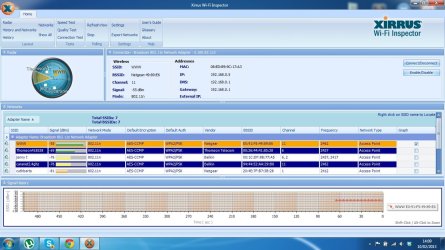
Well I thought you mentioned having 5 bars signal strength earlier. Maybe if you can post the Xirrus wifi inspector read out it will tell me more.

Wi-Fi Inspector | Xirrus
 

My Computer My Computer

At a glance

Windows 7 Ult, Windows 8.1 Pro,Q9650-4.275GHz, E8600 4.5GHz, E6750-3.8GHzG.Skill PC2 9600 1200Mhz 5 5 5 15 2TGTX480
Computer type
PC/Desktop
Computer Manufacturer/Model Number
Home built
OS
Windows 7 Ult, Windows 8.1 Pro,
CPU
Q9650-4.275GHz, E8600 4.5GHz, E6750-3.8GHz
Motherboard
Evga 780i FTW
Memory
G.Skill PC2 9600 1200Mhz 5 5 5 15 2T
Graphics Card(s)
GTX480
Sound Card
Asus Xonar D2
Monitor(s) Displays
HannsG
Screen Resolution
1680X1050
Hard Drives
GSkill Phoenix Pro 120GB SSD
PSU
ThermalTake Toughpower 1000Watt modular
Case
ThermalTake XaserV
Cooling
Xigmatek S1283
Keyboard
Logitech G15
Mouse
Logitech G9
Internet Speed
T1
I did have good signal strength when it connected. Despite this new development I can still connect following troubleshooter. Sorry I can't do anymore today. A night shift beckons.
 

My Computer My Computer

At a glance

Windows 7 Home Premium x64
Computer Manufacturer/Model Number
Lenovo Ideapad Z585
OS
Windows 7 Home Premium x64
I have installed the Wi-Fi inspector. What information do you want me to post?
 

My Computer My Computer

At a glance

Windows 7 Home Premium x64
Computer Manufacturer/Model Number
Lenovo Ideapad Z585
OS
Windows 7 Home Premium x64
This is the connection test result:


Connection Test Results

Test Address Summary Result
DNS Reachable 192.168.0.1 Ping: 5 of 5, 6 msec latency Pass
Gateway Reachable 192.168.0.1 Ping: 5 of 5, 3 msec latency Pass
DNS Lookup Google IP address: 173.194.78.147 Pass
Internet Reachable 173.194.78.147 Ping: 5 of 5, 21 msec latency Pass
 

My Computer My Computer

At a glance

Windows 7 Home Premium x64
Computer Manufacturer/Model Number
Lenovo Ideapad Z585
OS
Windows 7 Home Premium x64
As stated previously when connected there are no problems or issues. It is getting connected to start with.

To recap when I turn on my laptop Wi-Fi does not connect, I have the Bars Icon in the system tray with what looks like an orange start on it. I right click, and it shows available networks, I click on my network then click on connect.

The orange star/flower turns into a swirling blue symbol and within a second (if that) I get a message saying windows cannot connect me to the network.

I run the trouble shooter, it tells me there may be a problem with the network driver. I click on an option worded similar to try these administrator solutions, a process runs again, I get the message that issue is fixed and then around 30 seconds or so later, it connects.

I have uninstalled and re installed the broadcom driver for the adapter about 20 times but it makes no difference.
 

My Computer My Computer

At a glance

Windows 7 Home Premium x64
Computer Manufacturer/Model Number
Lenovo Ideapad Z585
OS
Windows 7 Home Premium x64
I have news.

I decided to go over everything again. With regards to the driver for the network adapter I noticed that it is packaged as a Broadcomm/Atheros driver.

I checked the files contained within the driver package and found two setup options. I uninstalled the driver again via device manager and used the setup option I hadn't used before. Its labeled as Setup.exe by Acresso Software Inc. File Version 15.0.0.498.

I ran the setup and now the computer starts and Wi-Fi shows limited connectivity and after about 30 seconds connects normally.

I am not having to run the troubleshooter anymore.

Assume there is an issue with the packed Atheros/Broadcom driver set, but I may be wrong.

I just need to sort out the limited connectivity issue now (I hope) and we are there.
 

My Computer My Computer

At a glance

Windows 7 Home Premium x64
Computer Manufacturer/Model Number
Lenovo Ideapad Z585
OS
Windows 7 Home Premium x64
I have news.

I decided to go over everything again. With regards to the driver for the network adapter I noticed that it is packaged as a Broadcomm/Atheros driver.

I checked the files contained within the driver package and found two setup options. I uninstalled the driver again via device manager and used the setup option I hadn't used before. Its labeled as Setup.exe by Acresso Software Inc. File Version 15.0.0.498.

I ran the setup and now the computer starts and Wi-Fi shows limited connectivity and after about 30 seconds connects normally.

I am not having to run the troubleshooter anymore.

Assume there is an issue with the packed Atheros/Broadcom driver set, but I may be wrong.

I just need to sort out the limited connectivity issue now (I hope) and we are there.

That is what I was referring too when I mentioned the connection software, sometimes it causes problems and should be removed or installed without the connection software.

I have installed the Wi-Fi inspector. What information do you want me to post?

I'd like to see a screen shot of what it shows please. :)

You might also try changing to the 802.11n Only setting in your routers wireless set up page. It may be having problems auto negotiating the mixed setting.
 

My Computer My Computer

At a glance

Windows 7 Ult, Windows 8.1 Pro,Q9650-4.275GHz, E8600 4.5GHz, E6750-3.8GHzG.Skill PC2 9600 1200Mhz 5 5 5 15 2TGTX480
Computer type
PC/Desktop
Computer Manufacturer/Model Number
Home built
OS
Windows 7 Ult, Windows 8.1 Pro,
CPU
Q9650-4.275GHz, E8600 4.5GHz, E6750-3.8GHz
Motherboard
Evga 780i FTW
Memory
G.Skill PC2 9600 1200Mhz 5 5 5 15 2T
Graphics Card(s)
GTX480
Sound Card
Asus Xonar D2
Monitor(s) Displays
HannsG
Screen Resolution
1680X1050
Hard Drives
GSkill Phoenix Pro 120GB SSD
PSU
ThermalTake Toughpower 1000Watt modular
Case
ThermalTake XaserV
Cooling
Xigmatek S1283
Keyboard
Logitech G15
Mouse
Logitech G9
Internet Speed
T1
Alas I have to work again, our timezones appear to be incompatible!!!!!

I am posting from my phone.

I will do as you request when I get the chance (I do struggle with screen prints and the like).

Thanks for your help so far.
 

My Computer My Computer

At a glance

Windows 7 Home Premium x64
Computer Manufacturer/Model Number
Lenovo Ideapad Z585
OS
Windows 7 Home Premium x64
It appears that I may have been a little optimistic because today at log on, Wi-Fi did not connect, until I had run troubleshooter.

I thought it would be prudent to post the content of the troublshooter reporter:

Windows Network Diagnostics Publisher details

Issues found
There might be a problem with the driver for the Wireless Network Connection adapter.
There might be a problem with the driver for the Wireless Network Connection adapter
Windows couldn't automatically bind the IP protocol stack to the network adapter - Fixed
Set up the wireless network adapter - Completed
The wireless network adapter is experiencing problems - Not run

Issues found Detection details

6 There might be a problem with the driver for the Wireless Network Connection adapter Fixed

Windows couldn't automatically bind the IP protocol stack to the network adapter.
Set up the wireless network adapter Completed

Set up the network adapter to communicate with this network. This ensures that both Internet Protocol Version 4 (TCP/IPv4) and Internet Protocol Version 6 (TCP/IPv6) can be used on the network adapter.

Network Diagnostics Log:

File Name: 55078789-E582-41D8-A1B4-3169EA108FCB.Repair.Admin.0.etl

The wireless network adapter is experiencing problems -Not run

Windows Help and Support can provide more information about resolving driver or hardware issues.

System is not connected and signals.

This leads me to a question, is there a way of completely removing the driver data from the wireless adapter?

There are currently 5 files shown when I check driver details they are:

Issues found Detection details

6 There might be a problem with the driver for the Wireless Network Connection adapter Fixed

Windows couldn't automatically bind the IP protocol stack to the network adapter.
Set up the wireless network adapter Completed

Set up the network adapter to communicate with this network. This ensures that both Internet Protocol Version 4 (TCP/IPv4) and Internet Protocol Version 6 (TCP/IPv6) can be used on the network adapter.
Network Diagnostics Log
File Name: 55078789-E582-41D8-A1B4-3169EA108FCB.Repair.Admin.0.etl


The wireless network adapter is experiencing problems Not run

Windows Help and Support can provide more information about resolving driver or hardware issues.


c:\Windows\system32\bcmihvsrv64.dll
c:\Windows\system32\bcmihvui64.dll
c:\Windows\system32\bcmwlcoi.dll
c:\Windows\system32\Drivers\BCMWL664.SYS
c:\Windows\system32\drivers\vwifibus.sys

When I uninstall the driver through device manager, these files stay as they are, they are not removed.

Just a thought!
 
Last edited:

My Computer My Computer

At a glance

Windows 7 Home Premium x64
Computer Manufacturer/Model Number
Lenovo Ideapad Z585
OS
Windows 7 Home Premium x64

My Computer My Computer

At a glance

W7 Pro SP1 64biti78GBIntel HD Graphics
Computer type
Laptop
Computer Manufacturer/Model Number
Employer provided Dell Latitude
OS
W7 Pro SP1 64bit
CPU
i7
Memory
8GB
Graphics Card(s)
Intel HD Graphics
Hard Drives
crappy SSD
Antivirus
Employer mandated Symantec Endpoint Protection
Browser
Pale Moon 64bit, IE11 64bit & Chrome 64bit
Wi-Fi Inspector:

Untitled.jpg
 

My Computer My Computer

At a glance

Windows 7 Home Premium x64
Computer Manufacturer/Model Number
Lenovo Ideapad Z585
OS
Windows 7 Home Premium x64
Just noticed there is a Broadcom 802.11 Network Adapter shown in the installed program list.

I tried to uninstall with a view to reinstalling the driver again and I get this error message:

The removal of Broadcom Wireless Utility cannot continue due to error code:

c\:build\KIRIN_REL_5_100_82_112\win_external_wl\src\tools\app\bcmwls\Update.cpp 59.

I had been uninstalling via the device driver option in device manager and then re installing and hadn't noticed this.

Any ideas? could it be connected with connection issues?
 

My Computer My Computer

At a glance

Windows 7 Home Premium x64
Computer Manufacturer/Model Number
Lenovo Ideapad Z585
OS
Windows 7 Home Premium x64
You should be able to remove that wireless utility with out errors.

I'm not sure why it's doing that but that is the connection software I was referring too earlier. Those can cause problem with connections and do so on a regular basis.

Did you try changing the routers wireless settings to use 802.11n Only setting? There should be a mixed setting and the N only setting.
 

My Computer My Computer

At a glance

Windows 7 Ult, Windows 8.1 Pro,Q9650-4.275GHz, E8600 4.5GHz, E6750-3.8GHzG.Skill PC2 9600 1200Mhz 5 5 5 15 2TGTX480
Computer type
PC/Desktop
Computer Manufacturer/Model Number
Home built
OS
Windows 7 Ult, Windows 8.1 Pro,
CPU
Q9650-4.275GHz, E8600 4.5GHz, E6750-3.8GHz
Motherboard
Evga 780i FTW
Memory
G.Skill PC2 9600 1200Mhz 5 5 5 15 2T
Graphics Card(s)
GTX480
Sound Card
Asus Xonar D2
Monitor(s) Displays
HannsG
Screen Resolution
1680X1050
Hard Drives
GSkill Phoenix Pro 120GB SSD
PSU
ThermalTake Toughpower 1000Watt modular
Case
ThermalTake XaserV
Cooling
Xigmatek S1283
Keyboard
Logitech G15
Mouse
Logitech G9
Internet Speed
T1
Back
Top