Solved Accessing XP files via enclosure...Acer netbook

stephennity

Banned
Local time
6:05 PM
Messages
90
Hi.....not sure where I should place this request for help so decided to post in the general discussion.


Several years ago my old desktop packed up and I have just tried to acces the files from the old IDE hard drive via an external enclosure into my Acer netbook with windows 7 starter as the OS ...also tried this with another Acer netbook which has the full windows 7 OS installed.

The IDE hard drive was/is partitioned...I have drive E and an F drive...I can access the files on E but when I try to access the files on the other partition of F drive,I get a message that the files can`t be accessed...I did a bit of searcching and what comes up is that the drive F is NTFS and I can`t access it via windows...a message says Windows cannot access the files.

Can somebody give me some advice on how I can access the F drive please ? ...I`ve lots of my own recorded music on there from several years ago that I have nowhere else.

And can somebody please explain what has happened here as how can one partition/drive be accessed but not the other ? ...the F drive was placed there in it`s own partition by a friend when one time my older computer needed the OS re-installing and the files were saved from the old OS and partitioned into the F drive from the crashed computer when the new OS was installed...i had needed to have the music saved and it was placed in a separate drive/partition.

The OS on the IDE hard drive is XP Pro.

I hope I have explained this problem properly !

Thanks,

Stephennity.
 

My Computer My Computer

At a glance

Windows 7 32 bit Home premium
OS
Windows 7 32 bit Home premium
It would be helpful to have the verbatim error message, or you can google it yourself to see how others solved it.

If it permissioning issues then try Take Ownership Shortcut.

If the condition of the partition is in doubt, check its file system first with Disk Check or Partition Wizard Check File System which sometimes will revive failing externals. If probs persist check the HD's condition using Partition Wizard Partition surface test.

Finally there may be problems with a USB connection using the enclosure, so you might want to try an internal connection to SATA using a converter cable.
 
Thanks gregrocker...

The verbatim message is just "file F inaccessible" with the dramatic orchestral sounding "dmpmff" !...guess that won`t help much.

I`ll have a check of the leads etc and see what happens...the last time the hard drive was used in the old computer it worked fine...nothing ever easy !

Thanks anyhow for the reply...I`ll come back with the results.

Stephennity.
 

My Computer My Computer

At a glance

Windows 7 32 bit Home premium
OS
Windows 7 32 bit Home premium
" the F drive was placed there in it`s own partition by a friend when one time my older computer needed the OS re-installing and the files were saved from the old OS and partitioned into the F drive from the crashed computer when the new OS was installed "

Did your friend copy / move the files or use a backup or image program ? If so you may need a lot more help than I can give, but I am sure someone here will.
Art.
 

My Computer My Computer

At a glance

Win7 sp1 Pro 64bit / XP sp2 Pro (games only)Intel Core 2 Duo E8400 @ 3.00GHz8.00 GB Dual-Channel DDR2 @ 400MHz (5-5-5-18)1024MB GeForce GTX 560
Computer type
PC/Desktop
Computer Manufacturer/Model Number
Home built
OS
Win7 sp1 Pro 64bit / XP sp2 Pro (games only)
CPU
Intel Core 2 Duo E8400 @ 3.00GHz
Motherboard
Intel Corporation DP35DP (CPU1)
Memory
8.00 GB Dual-Channel DDR2 @ 400MHz (5-5-5-18)
Graphics Card(s)
1024MB GeForce GTX 560
Sound Card
NVIDIA High Definition Audio
Monitor(s) Displays
SyncMaster (2048x1152@60Hz)
Hard Drives
240GB Sandisc Extreme Pro SSD
244GB Seagate ST3250410AS
488GB Seagate ST500DM002-1BD142
931GB Western Digital WDC WD1003FZEX
PSU
Corsair 720
Case
ATX
Keyboard
HID Keyboard Device Logitech
Mouse
HID-compliant mouse Microsoft
Other Info
TSSTcorp CDDVDW SH-S223L

HL-DT-ST BD-RE BH12LS35
Did your friend copy / move the files or use a backup or image program ?
Art.


Hmmm.....I`ll need to go and ask him which will take some time but thanks for the reply...once the old computer was reset/re-installed etc with the new OS and the saved files in the separate partition (drive F) everything worked fine from then on...it was later on the computer became unusable but nothing to do with the HDD...it has been left sitting for about 2 years and I only just got round to trying to recover the files...and it`s here the problems began.

When I clicked on the properties of the F drive/partition there was nothing seemed to be there although I know the F drive is full of data etc...I guess I have a few headaches coming my way if I want to access this...ggrrr.
 

My Computer My Computer

At a glance

Windows 7 32 bit Home premium
OS
Windows 7 32 bit Home premium
Just a thought here...does the iSCSI initiator have anything to do/offer here ?

I ask as this has been disabled by the AVG start-up "helper"...I am wondering if this would help me access the files...:confused:
 

My Computer My Computer

At a glance

Windows 7 32 bit Home premium
OS
Windows 7 32 bit Home premium
The error indicates that whatever you're clicking on is either a file that's been abandoned or a link to a partition/file that is no longer linked.

Were these files your friend backed up definitely on a partition, one which you've accessed before for these same files? Can we see a screenshot of maximized Disk Mgmt or Partition Wizard drive map and listings, using Snipping Tool in Start Menu?

I would uninstall the AVG bloatware which isn't recommended by anyone here. Replace it with Microsoft Security Essentials and the Win7 firewall

Waiting to hear the results of the steps I gave you.
 
...
The verbatim message is just "file F inaccessible" ...
If this is the correct verbatim message then F isn't a drive or a partition but a file on the drive with a filename of F. If that is the case, you'll need to find out what program was used to create that file to be able to open it.

When the drive was in your desktop machine, were you able to open that?
 

My Computer My Computer

At a glance

W10 Pro desktop, W11 laptop, W11 Pro tablet (...3.7Ghz 8700K i7, i7-11800H, i7-1065G716G desktop, 16G laptop, 4G tabletAMD Radeon RX580, RTX 3060, Intel Iris Plus
Computer type
PC/Desktop
Computer Manufacturer/Model Number
Home Built desktop, Dell G15 5511 Gaming laptop,MS Surface Pro 7 tablet
OS
W10 Pro desktop, W11 laptop, W11 Pro tablet (all 64-bit)
CPU
3.7Ghz 8700K i7, i7-11800H, i7-1065G7
Motherboard
ASUS TUF Z370-Pro Gaming in desktop
Memory
16G desktop, 16G laptop, 4G tablet
Graphics Card(s)
AMD Radeon RX580, RTX 3060, Intel Iris Plus
Sound Card
High Definition Audio (Built-in to mobo)
Monitor(s) Displays
Samsung U32J59 32" (2x), 15.6", 12"
Screen Resolution
3840x2160, 3840x2160, 1920x1080, 2160x1440
Hard Drives
500G SSD for OS; 2T, 10T & 15T HDDs for Data on Desktop, 1TB SSD laptop, 128G SSD tablet.
PSU
Corsair CX 750M
Case
Antec 100
Cooling
CM 212+
Keyboard
IBM Model M - used continuously since 1986
Mouse
Microsoft Pro IntelliMouse
Internet Speed
400M down 8M up
Antivirus
Windows Defender
Browser
FireFox
Other Info
Built my first computer (8Mhz 8088cpu, 640K RAM, 20MB HDD, 2 360K floppy drives) in 1985 and have been building them for myself, relatives and friends ever since.
Strollin...yes...when the desktop was running all the files were fully accessible worked fine from the separate drive...I can`t remember how may files are in there but it`s a good amount...although there were many music files created with software such as Cubase/Logic/etc they were also converted to various type of file to enable playing on stuff such as media player...so aside from the software files they were also saved as wav/mp3/etc...I just can`t remember specifically but definitely all encompassing progs like media player.

Also.the icon by the side for the external enclosure has the 2 drives as E and F

gregrocker...yes I`m about to run through these.
 

My Computer My Computer

At a glance

Windows 7 32 bit Home premium
OS
Windows 7 32 bit Home premium
What icon? Can we see some screenshots requested so we know what you're talking about?

Try clicking on the actual drives in Computer.
 
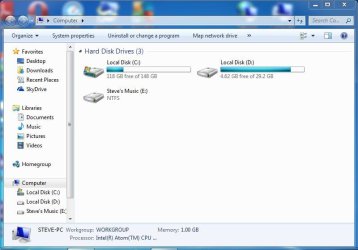
Here is a screen shot of "computer" showing the external IDE drives now as D and E ...this is because {nothing ever being easy} my netbook seems to have lost the screenshot/snip feature so I am now using another netbook.


C is my internal harddrive.

D and E are the 3.5" IDE


The D is accessible...E is not accessible...when trying to use the checkdisk feature in "properties", a message then says windows does not recognise the file [E]...I have tried this on several computers with the same result.

I do not have time at the moment to go through the other steps but will later on.

Just to add for info...at the time of the saving of the music files,I do not know how they were saved into this drive as it was somebody else doing it...but they all were accessible.
 

Attachments

  • XP Pro Drives D and E.JPG
    XP Pro Drives D and E.JPG
    49.4 KB · Views: 5

My Computer My Computer

At a glance

Windows 7 32 bit Home premium
OS
Windows 7 32 bit Home premium
Hi chaps....note the perky difference ? I have managed to access the files in the drive...by entering into "properties" and looking there thoroughly(:o),came upon the security tab...it took a little messing around as I have never seen this before but eventually the magic words were inserted and it became accessible...I`m no techie and this may seem an obvious thing to do but not to myself I am afraid to say...however,I shall not forget...and am relieved to say the least as the files are important for some arrangement work I have.

Thanks for all the assistance that led me there guys ! :party:
 

My Computer My Computer

At a glance

Windows 7 32 bit Home premium
OS
Windows 7 32 bit Home premium
Back
Top