Discuss Skyrim

How can I increase the speed of walking? the AI seem to walk a bit faster than my character (I am not carrying too much weight). Thanks.
 
Last edited:

My Computer My Computer

Computer type
PC/Desktop
Computer Manufacturer/Model Number
custom build
OS
Windows 7 Professional 64bit
CPU
Intel i7-5960X
Motherboard
EVGA X99 Classified
Memory
64GB Corsair Dominator 2400MHz
Graphics Card(s)
3 EVGA GTX980's
Sound Card
on board
Monitor(s) Displays
3 Dell E2715H 27"
Screen Resolution
1920x1080 (5760x1080)
Hard Drives
Samsung 950 Pro 1TB M.2 SSD,
Western Digital Black 2TB HDD's x5
Western Digital Black 1TB HDD's x3
PSU
Corsair AX1200i
Case
Corsair 750D
Cooling
Corsair H110i GT
Keyboard
Corsair K70
Mouse
Corsair M45
Internet Speed
250 down/10 up
Antivirus
Microsoft Security Essentials
Browser
IE 11, Google Chrome
How can I increase the speed of walking? the AI seem to walk a bit faster than my character (I am not carrying too much weight). Thanks.

Toggle your Caps Lock key back and forth to change walking speed.

That said, you might want to look at your keyboard commands in the game's setting to see what else you may be missing :)
 

My Computer My Computer

Computer type
PC/Desktop
Computer Manufacturer/Model Number
Custom built by me.
OS
Windows 10 Pro
CPU
Intel Core i7-4770K (3.5Ghz)
Motherboard
Gigabyte G1 Sniper 5 (F10 Bios)
Memory
32 gig Corsair Dominator Platinum (4x8Gig)
Graphics Card(s)
Sapphire Tri-X R9 Fury
Sound Card
Soundblaster ZXR
Monitor(s) Displays
NEC PA242W 24" LCD Monitor
Screen Resolution
1920 x 1200
Hard Drives
Primary - Samsung 850 Pro (512gig), Samsung 840 Pro (256gig), 2TB WD Caviar Black.
PSU
EVGA Supernova 1000 G2
Case
Cooler Master HAF X
Cooling
Corsair H100i with Corsair Air Series SP120 Quiet Fans
Keyboard
Logitech Wireless Wave
Mouse
Logitech Performance MX
Internet Speed
High Speed Cable
Antivirus
Norton Security
Browser
IE11
Other Info
Memory Timings - 1866MHz @ 9-9-9-27-1T @ 1.5 volts
That's only to change from walk to run/sprint. I want to change the actual speed of walking. I didn't see anything in the configuration files so I guess I will need to find a mod to do it.
 

My Computer My Computer

Computer type
PC/Desktop
Computer Manufacturer/Model Number
custom build
OS
Windows 7 Professional 64bit
CPU
Intel i7-5960X
Motherboard
EVGA X99 Classified
Memory
64GB Corsair Dominator 2400MHz
Graphics Card(s)
3 EVGA GTX980's
Sound Card
on board
Monitor(s) Displays
3 Dell E2715H 27"
Screen Resolution
1920x1080 (5760x1080)
Hard Drives
Samsung 950 Pro 1TB M.2 SSD,
Western Digital Black 2TB HDD's x5
Western Digital Black 1TB HDD's x3
PSU
Corsair AX1200i
Case
Corsair 750D
Cooling
Corsair H110i GT
Keyboard
Corsair K70
Mouse
Corsair M45
Internet Speed
250 down/10 up
Antivirus
Microsoft Security Essentials
Browser
IE 11, Google Chrome

My Computer My Computer

Computer Manufacturer/Model Number
Custom Built
OS
Windows 7 Professional x64
CPU
Intel Core i7 2600k - 3.4 GHz
Motherboard
Asus Maximus IV Z68 - Extreme
Memory
4x4 Ripjaws X79 Series 2133 MHz (9-11-10-28)
Graphics Card(s)
1x eVGA GTX 580 - 3GB Classified
Sound Card
Realtek ALC 889 HD Audio
Monitor(s) Displays
Full HD Philips TV 32"
Screen Resolution
1920x1080
Hard Drives
1x Crucial m4 SSD 512 GB
PSU
800W Coolermaster Silentpro Gold
Case
Sentey - Renegade GS-6200
Cooling
Stock
Keyboard
Logitech K800 Wireless
Mouse
Logitech Performance MX Laser
Internet Speed
10MB Internet Connection
Thanks Alex. I'm looking at it now. I hate how I have to run every couple of seconds to catch up to a NPC that is just walking.
 

My Computer My Computer

Computer type
PC/Desktop
Computer Manufacturer/Model Number
custom build
OS
Windows 7 Professional 64bit
CPU
Intel i7-5960X
Motherboard
EVGA X99 Classified
Memory
64GB Corsair Dominator 2400MHz
Graphics Card(s)
3 EVGA GTX980's
Sound Card
on board
Monitor(s) Displays
3 Dell E2715H 27"
Screen Resolution
1920x1080 (5760x1080)
Hard Drives
Samsung 950 Pro 1TB M.2 SSD,
Western Digital Black 2TB HDD's x5
Western Digital Black 1TB HDD's x3
PSU
Corsair AX1200i
Case
Corsair 750D
Cooling
Corsair H110i GT
Keyboard
Corsair K70
Mouse
Corsair M45
Internet Speed
250 down/10 up
Antivirus
Microsoft Security Essentials
Browser
IE 11, Google Chrome
That's only to change from walk to run/sprint. I want to change the actual speed of walking. I didn't see anything in the configuration files so I guess I will need to find a mod to do it.

You weren't specific in what you were looking for but I see Alex took care of it. Anyway I use character enhancement mods so I wouldn't have known about that one anyway.

Thanks Alex :)
 

My Computer My Computer

Computer type
PC/Desktop
Computer Manufacturer/Model Number
Custom built by me.
OS
Windows 10 Pro
CPU
Intel Core i7-4770K (3.5Ghz)
Motherboard
Gigabyte G1 Sniper 5 (F10 Bios)
Memory
32 gig Corsair Dominator Platinum (4x8Gig)
Graphics Card(s)
Sapphire Tri-X R9 Fury
Sound Card
Soundblaster ZXR
Monitor(s) Displays
NEC PA242W 24" LCD Monitor
Screen Resolution
1920 x 1200
Hard Drives
Primary - Samsung 850 Pro (512gig), Samsung 840 Pro (256gig), 2TB WD Caviar Black.
PSU
EVGA Supernova 1000 G2
Case
Cooler Master HAF X
Cooling
Corsair H100i with Corsair Air Series SP120 Quiet Fans
Keyboard
Logitech Wireless Wave
Mouse
Logitech Performance MX
Internet Speed
High Speed Cable
Antivirus
Norton Security
Browser
IE11
Other Info
Memory Timings - 1866MHz @ 9-9-9-27-1T @ 1.5 volts
- do bigger characters take larger steps..??

just a thought, as my Wood-elf in Oblivion could barely see over the counter in the shops..:geek:
 

My Computer My Computer

Computer type
PC/Desktop
Computer Manufacturer/Model Number
benchtec, built to personal specs
OS
Windows10 Pro - 64Bit vs.10547
CPU
i7-965 Extreme Edition (8 Cores) at 3.3GHz (no OC)
Motherboard
BloodRageX58 (Socket1366)
Memory
12G Corsair Dominator DDR3 - tripled
Graphics Card(s)
2xAMD SapphireNITRO R9 380(4G) crossfire
Sound Card
Sonar(SB)X-Fi onboard
Monitor(s) Displays
SyncMaster P2050 20"
Screen Resolution
1600x900 (widescreen)
Hard Drives
480G\OCZSolid3SSD, 64G\OCZVertex3SSD,60G\OCZVertex2SSD, 1TB\spinpointF1SATAHDD
PSU
1200w Power Station Gold
Case
ANTEC 900/2 all blue lights, etc..
Cooling
Noctua SE1366 NH-U12P - a tight fit, but a monster cooler!!
Keyboard
Logitech G19 (wired)
Mouse
Logitech G9 Laser (wired)
Internet Speed
150mb unlimited
Browser
IE11(RP)
Other Info
Xbox One, Nokia735 Windows10 mobile, LG HD/DVD/Blu-Ray r/w, CyberlinkPowerDVD15, LogitechZ5500-SS(5.1), LogitechG35Phones-SS(7.1),MSOffice 2007,CorelDrawX7,Painter2016, Wacom Intuos Pro-SE
- do bigger characters take larger steps..??

just a thought, as my Wood-elf in Oblivion could barely see over the counter in the shops..:geek:

I think so, though i'm not sure. I remember that each race had a separate scale, like high elf had 1.1, and imperials had 1, and that does influence on the speed, though i'm not sure if its the same for skyrim
 

My Computer My Computer

Computer Manufacturer/Model Number
Custom Built
OS
Windows 7 Professional x64
CPU
Intel Core i7 2600k - 3.4 GHz
Motherboard
Asus Maximus IV Z68 - Extreme
Memory
4x4 Ripjaws X79 Series 2133 MHz (9-11-10-28)
Graphics Card(s)
1x eVGA GTX 580 - 3GB Classified
Sound Card
Realtek ALC 889 HD Audio
Monitor(s) Displays
Full HD Philips TV 32"
Screen Resolution
1920x1080
Hard Drives
1x Crucial m4 SSD 512 GB
PSU
800W Coolermaster Silentpro Gold
Case
Sentey - Renegade GS-6200
Cooling
Stock
Keyboard
Logitech K800 Wireless
Mouse
Logitech Performance MX Laser
Internet Speed
10MB Internet Connection
It looks to me that every character in Skyrim walks at the same speed (giants and animals are a different story).
I'm using the speed mod that Alex made and it helps alot. It may need some tweaking though.
 

My Computer My Computer

Computer type
PC/Desktop
Computer Manufacturer/Model Number
custom build
OS
Windows 7 Professional 64bit
CPU
Intel i7-5960X
Motherboard
EVGA X99 Classified
Memory
64GB Corsair Dominator 2400MHz
Graphics Card(s)
3 EVGA GTX980's
Sound Card
on board
Monitor(s) Displays
3 Dell E2715H 27"
Screen Resolution
1920x1080 (5760x1080)
Hard Drives
Samsung 950 Pro 1TB M.2 SSD,
Western Digital Black 2TB HDD's x5
Western Digital Black 1TB HDD's x3
PSU
Corsair AX1200i
Case
Corsair 750D
Cooling
Corsair H110i GT
Keyboard
Corsair K70
Mouse
Corsair M45
Internet Speed
250 down/10 up
Antivirus
Microsoft Security Essentials
Browser
IE 11, Google Chrome
- do bigger characters take larger steps..??

just a thought, as my Wood-elf in Oblivion could barely see over the counter in the shops..:geek:

Yeah, High Elves are the fastest in game, although it's not as visible as it should be. Me, I'd kindly play small races cuz it doesn't matter. You can be half the normal character height and you still run fast enough to get to cover during a dragon attack while your well-paid "law enforcers" take care of things. Adios!
 

My Computer My Computer

OS
Windows 7 Home Premium 64bit
You don't need to mod the game. If "bAllowconsole=" is set to "1" in your Skyrim.ini file. Usually located in, C:/Users/yourPCname/MyDocuments/MyGames/Skyrim then you can console edit the game by pressing the "~" key while playing. It will open up a dialogue box where you can type in commands on the lower half of the screen. You can edit the .ini file using notepad.

You can then adjust your speed without a mod by typing player.setav speedmult 100. 100 is the default setting, so if you want to increase your regular walking speed, I'd go 125 and adjust up or down until you find that sweet spot you want.

Be careful, setting your speed too high can lead to more frequent crashing. You can outrun the cell buffers and it won't be able to load fast enough to keep up with you if you overdo it.

BTW, the Skyrim.ini and SkyrimPrefs.ini can be tweaked to get the most out of the game depending on how your system is set up and what it can handle. I've got my settings well above mere 'Ultra' but I've got a nice system that can handle it. Depending on your hardware, you may be able to turn certain elements of the game up, or even down so it runs better on your machine.

Here is a great online guide that can explain how to go about it if you're interested:
Optimize : The Elder Scrolls V: Skyrim Tweak Guide | GeForce

MAKE SURE AND BACK UP YOUR ORIGINAL SKYRIM.INI AND SKYRIMPREFS.INI BEFORE YOU CHANGE ANYTHING.

Normally I frown on saying things in all caps, but that's important. It can be difficult to set things right and you may be forced to reinstall if you do not have a backup you can put back in if you mess up.

Also, changing the uGridsToLoad value cannot be reversed. If you use a higher value, then you cannot turn it back down without starting a new game. So if it start's crashing your 200+ hour saves because you overreached your system's abilities, you can't turn it back down again. Well, you can turn it down, but it will make your game extremely unstable to the point it's just best to start over. It's the only way to regain stability. It can even corrupt previous saves, so be warned it's best to not mess with that setting unless you're very early on in the game, or you're sure your system can handle the load.

You've been warned, but it's worth tweaking to get the most out of Skyrim. Just make sure you back up your .ini settings, savefiles, [in MyDocuments] and if possible "data" folder [in ProgramFilesx86/steam/steamapps/common/Skyrim] first. If you make good backups, you shouldn't have to worry about 'breaking your game' messing around with this stuff.

 

My Computer My Computer

Computer type
PC/Desktop
Computer Manufacturer/Model Number
Home built
OS
Windows 7 Home premium
CPU
I7 3770 3.4
Motherboard
Republic of Gamers Maximus V
Memory
Corsair Vengance ddr3 8gb x2 1600 [@ 2400]
Graphics Card(s)
AMD 7970 6GB x3 [currently x2 until x3 is actually useful]
Sound Card
N/A
Monitor(s) Displays
Visio 47" 3D/Acer 27" 3D
Screen Resolution
1920x1080 120mhz Passive 3D
Hard Drives
Samsung 830 series SSD 512gb x2
Seagate 2tb x2
Segate 750 Gb
PSU
1500w
Case
Coolermaster
Cooling
Noctua D14
Keyboard
Logitech g10
Mouse
Naga Razer
Internet Speed
30mb Cable
Antivirus
Like I'd tell.
Browser
Waterfox mostly.
You don't need to mod the game. If "bAllowconsole=" is set to "1" in your Skyrim.ini file. Usually located in, C:/Users/yourPCname/MyDocuments/MyGames/Skyrim then you can console edit the game by pressing the "~" key while playing. It will open up a dialogue box where you can type in commands on the lower half of the screen. You can edit the .ini file using notepad.

You can then adjust your speed without a mod by typing player.setav speedmult 100. 100 is the default setting, so if you want to increase your regular walking speed, I'd go 125 and adjust up or down until you find that sweet spot you want.

Be careful, setting your speed too high can lead to more frequent crashing. You can outrun the cell buffers and it won't be able to load fast enough to keep up with you if you overdo it.

BTW, the Skyrim.ini and SkyrimPrefs.ini can be tweaked to get the most out of the game depending on how your system is set up and what it can handle. I've got my settings well above mere 'Ultra' but I've got a nice system that can handle it. Depending on your hardware, you may be able to turn certain elements of the game up, or even down so it runs better on your machine.

Here is a great online guide that can explain how to go about it if you're interested:
Optimize : The Elder Scrolls V: Skyrim Tweak Guide | GeForce

MAKE SURE AND BACK UP YOUR ORIGINAL SKYRIM.INI AND SKYRIMPREFS.INI BEFORE YOU CHANGE ANYTHING.

Normally I frown on saying things in all caps, but that's important. It can be difficult to set things right and you may be forced to reinstall if you do not have a backup you can put back in if you mess up.

Also, changing the uGridsToLoad value cannot be reversed. If you use a higher value, then you cannot turn it back down without starting a new game. So if it start's crashing your 200+ hour saves because you overreached your system's abilities, you can't turn it back down again. Well, you can turn it down, but it will make your game extremely unstable to the point it's just best to start over. It's the only way to regain stability. It can even corrupt previous saves, so be warned it's best to not mess with that setting unless you're very early on in the game, or you're sure your system can handle the load.

You've been warned, but it's worth tweaking to get the most out of Skyrim. Just make sure you back up your .ini settings, savefiles, [in MyDocuments] and if possible "data" folder [in ProgramFilesx86/steam/steamapps/common/Skyrim] first. If you make good backups, you shouldn't have to worry about 'breaking your game' messing around with this stuff.

There is only one problem with this, speedmult affects all speeds, including running, walking, and sprinting, so if you do speedmovemult 125 you'll get 25% faster running sprinting and walking. Besides, this setting is known to cause bugs.
 

My Computer My Computer

Computer Manufacturer/Model Number
Custom Built
OS
Windows 7 Professional x64
CPU
Intel Core i7 2600k - 3.4 GHz
Motherboard
Asus Maximus IV Z68 - Extreme
Memory
4x4 Ripjaws X79 Series 2133 MHz (9-11-10-28)
Graphics Card(s)
1x eVGA GTX 580 - 3GB Classified
Sound Card
Realtek ALC 889 HD Audio
Monitor(s) Displays
Full HD Philips TV 32"
Screen Resolution
1920x1080
Hard Drives
1x Crucial m4 SSD 512 GB
PSU
800W Coolermaster Silentpro Gold
Case
Sentey - Renegade GS-6200
Cooling
Stock
Keyboard
Logitech K800 Wireless
Mouse
Logitech Performance MX Laser
Internet Speed
10MB Internet Connection
Be careful, setting your speed too high can lead to more frequent crashing. You can outrun the cell buffers and it won't be able to load fast enough to keep up with you if you overdo it.

There is only one problem with this, speedmult affects all speeds, including running, walking, and sprinting, so if you do speedmovemult 125 you'll get 25% faster running sprinting and walking. Besides, this setting is known to cause bugs.

I mentioned the bugs. It's best to keep it reasonable. I wouldn't go over 125, but it seems like OP would be satisfied with around 105-110. That will make keeping up with NPCs easy, without overdoing it. At settings that low, I've never noticed any issues with the game.

I hardly ever sprint anyway. Most of the problems come from moving too fast in exterior cells. The only time I recall needing to actually sprint is in the dungeon with the horn you've got to fetch for the Greybeards, or maybe the occasional blades trap. Running and walking is usually enough, and I keep mine at round 112 and it's bug free near as I can tell.

The problems start cropping up when you start running around faster than the cell buffers can load.

Whatever works best for you though. I'd rather have that extra mod slot and just adjust the .ini myself.
 

My Computer My Computer

Computer type
PC/Desktop
Computer Manufacturer/Model Number
Home built
OS
Windows 7 Home premium
CPU
I7 3770 3.4
Motherboard
Republic of Gamers Maximus V
Memory
Corsair Vengance ddr3 8gb x2 1600 [@ 2400]
Graphics Card(s)
AMD 7970 6GB x3 [currently x2 until x3 is actually useful]
Sound Card
N/A
Monitor(s) Displays
Visio 47" 3D/Acer 27" 3D
Screen Resolution
1920x1080 120mhz Passive 3D
Hard Drives
Samsung 830 series SSD 512gb x2
Seagate 2tb x2
Segate 750 Gb
PSU
1500w
Case
Coolermaster
Cooling
Noctua D14
Keyboard
Logitech g10
Mouse
Naga Razer
Internet Speed
30mb Cable
Antivirus
Like I'd tell.
Browser
Waterfox mostly.
Why do you need a walking mod???

I've got like 500 hours in this game and I've yet to need, let alone worry about, any walking speed mods. And I don't even own or use a horse :confused:
 

My Computer My Computer

Computer type
PC/Desktop
Computer Manufacturer/Model Number
Custom built by me.
OS
Windows 10 Pro
CPU
Intel Core i7-4770K (3.5Ghz)
Motherboard
Gigabyte G1 Sniper 5 (F10 Bios)
Memory
32 gig Corsair Dominator Platinum (4x8Gig)
Graphics Card(s)
Sapphire Tri-X R9 Fury
Sound Card
Soundblaster ZXR
Monitor(s) Displays
NEC PA242W 24" LCD Monitor
Screen Resolution
1920 x 1200
Hard Drives
Primary - Samsung 850 Pro (512gig), Samsung 840 Pro (256gig), 2TB WD Caviar Black.
PSU
EVGA Supernova 1000 G2
Case
Cooler Master HAF X
Cooling
Corsair H100i with Corsair Air Series SP120 Quiet Fans
Keyboard
Logitech Wireless Wave
Mouse
Logitech Performance MX
Internet Speed
High Speed Cable
Antivirus
Norton Security
Browser
IE11
Other Info
Memory Timings - 1866MHz @ 9-9-9-27-1T @ 1.5 volts
Why do you need a walking mod???

I've got like 500 hours in this game and I've yet to need, let alone worry about, any walking speed mods. And I don't even own or use a horse :confused:

Why do you need any mods? Why put a mod in that makes the characters naked if you remove their armor, doubles the size of textures in the game, adds different types of dragons and mobs, or puts a palace into the game for you to store your vast collection of crap into display cases in a giant museum no one but you will ever see?

Because you can.

I like being able to get from place to place at a slightly faster clip than the game provides you with. I don't like to 'feel slow' and Skyrim's base walking/running speed feels a bit slow to me, and I don't feel like sprinting everywhere I go and being out of stamina all the time.
 

My Computer My Computer

Computer type
PC/Desktop
Computer Manufacturer/Model Number
Home built
OS
Windows 7 Home premium
CPU
I7 3770 3.4
Motherboard
Republic of Gamers Maximus V
Memory
Corsair Vengance ddr3 8gb x2 1600 [@ 2400]
Graphics Card(s)
AMD 7970 6GB x3 [currently x2 until x3 is actually useful]
Sound Card
N/A
Monitor(s) Displays
Visio 47" 3D/Acer 27" 3D
Screen Resolution
1920x1080 120mhz Passive 3D
Hard Drives
Samsung 830 series SSD 512gb x2
Seagate 2tb x2
Segate 750 Gb
PSU
1500w
Case
Coolermaster
Cooling
Noctua D14
Keyboard
Logitech g10
Mouse
Naga Razer
Internet Speed
30mb Cable
Antivirus
Like I'd tell.
Browser
Waterfox mostly.
I think you're being a little to sensitive, and are missing the point. I've been gaming for sometime and do, and have used mods. In fact I'm using two in Skyrim right now: Dovahkiins Warehouse and Bedroom, and Dovakiin's hideout.

That said, I'm still a little lost on why you need a "walking mod"? It's a friendly question, not a contentious one ;)
 

My Computer My Computer

Computer type
PC/Desktop
Computer Manufacturer/Model Number
Custom built by me.
OS
Windows 10 Pro
CPU
Intel Core i7-4770K (3.5Ghz)
Motherboard
Gigabyte G1 Sniper 5 (F10 Bios)
Memory
32 gig Corsair Dominator Platinum (4x8Gig)
Graphics Card(s)
Sapphire Tri-X R9 Fury
Sound Card
Soundblaster ZXR
Monitor(s) Displays
NEC PA242W 24" LCD Monitor
Screen Resolution
1920 x 1200
Hard Drives
Primary - Samsung 850 Pro (512gig), Samsung 840 Pro (256gig), 2TB WD Caviar Black.
PSU
EVGA Supernova 1000 G2
Case
Cooler Master HAF X
Cooling
Corsair H100i with Corsair Air Series SP120 Quiet Fans
Keyboard
Logitech Wireless Wave
Mouse
Logitech Performance MX
Internet Speed
High Speed Cable
Antivirus
Norton Security
Browser
IE11
Other Info
Memory Timings - 1866MHz @ 9-9-9-27-1T @ 1.5 volts
I think you're being a little to sensitive, and are missing the point. I've been gaming for sometime and do, and have used mods. In fact I'm using two in Skyrim right now: Dovahkiins Warehouse and Bedroom, and Dovakiin's hideout.

That said, I'm still a little lost on why you need a "walking mod"? It's a friendly question, not a contentious one ;)

Hmm, you read into that a little too much. I wasn't being sensitive, just making a point that you don't 'need' any mod really. They're just a way to customize the game to your liking. A big advantage we PC gamers have over consoles.

I like getting around a little faster than the set walking speed. Not so fast that I'm missing anything. I'm not zipping around at warp speed. Just enough that I can outrun most enemies if I need to without sprinting, and make trips from one city to the next on foot a little quicker. Yes, there's fast travel, but you have to get to those map markers at least once first. Speeding your character up a little can make it a little less of a chore to do.


It also makes sneaking a little less tedious, not that you can disregard all patience, but being a little more light footed can make things go smoother.

I do use a sword quit a bit, but I usually wear light armor and do a lot of ranged/magic combat. Having a slightly speedier character helps with that. I've done the 'tank' build as well, but I usually prefer light and agile over being a massive damage sponge.

It's just a customization preference, not a 'need'.

I like Deus Mons for a housing mod myself. I also load the Leveler's Tower as well, but that's a massive cheat and I don't usually save games I use it with. It's just a toy to mess with when I'm just running around goofing off in Skyrim.
 

My Computer My Computer

Computer type
PC/Desktop
Computer Manufacturer/Model Number
Home built
OS
Windows 7 Home premium
CPU
I7 3770 3.4
Motherboard
Republic of Gamers Maximus V
Memory
Corsair Vengance ddr3 8gb x2 1600 [@ 2400]
Graphics Card(s)
AMD 7970 6GB x3 [currently x2 until x3 is actually useful]
Sound Card
N/A
Monitor(s) Displays
Visio 47" 3D/Acer 27" 3D
Screen Resolution
1920x1080 120mhz Passive 3D
Hard Drives
Samsung 830 series SSD 512gb x2
Seagate 2tb x2
Segate 750 Gb
PSU
1500w
Case
Coolermaster
Cooling
Noctua D14
Keyboard
Logitech g10
Mouse
Naga Razer
Internet Speed
30mb Cable
Antivirus
Like I'd tell.
Browser
Waterfox mostly.
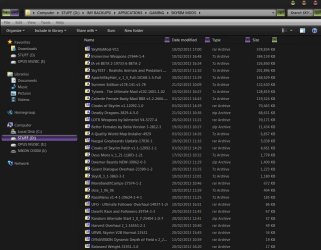
Mods make Skyrim a whole let better IMO, it adds so much more to the game and the best thing is that modding is free unlike Bethesda's pricey DLC content. Here is my Mod folder at present.
 

Attachments

  • Clipboard01.jpg
    Clipboard01.jpg
    87 KB · Views: 4

My Computer My Computer

Computer type
PC/Desktop
Computer Manufacturer/Model Number
Self Built
OS
Windows 7 Home Premium (64 bit)
CPU
Intel I5 2500K 3.3Ghz Stock
Motherboard
Asus P8H 61-M LE USB 3
Memory
8Gig Kingston DDRIII HyperX Blue 1333 Mhz
Graphics Card(s)
AMD Sapphire 7870 2GB
Sound Card
Creative Fatality Pro
Monitor(s) Displays
27" BENQ LED
Screen Resolution
1920X1080
Hard Drives
1 x OCZ Agility 3 120GB SSD
1 x Seagate 250GB
1 x Western Digital 1000GB
1 x HP 500GB
PSU
700W Coolermaster Stealth Pro etc
Case
Coolermaster Scout
Cooling
Some fans
Keyboard
Some Logitech type.
Mouse
Logitech MX518
Internet Speed
Wireless 8mb
Other Info
Canon Scanner
Epson Printer
Nikon DSLR 3000
Wacom Tablet
Let me be clear here, I like mods, I use mods, I have some with Skyrim. What I don't get is the walking speed mods!

Anyway if you haven't heard give the Dragonborn DLC a go. It's pretty good, and better than Dawnguard.
 

My Computer My Computer

Computer type
PC/Desktop
Computer Manufacturer/Model Number
Custom built by me.
OS
Windows 10 Pro
CPU
Intel Core i7-4770K (3.5Ghz)
Motherboard
Gigabyte G1 Sniper 5 (F10 Bios)
Memory
32 gig Corsair Dominator Platinum (4x8Gig)
Graphics Card(s)
Sapphire Tri-X R9 Fury
Sound Card
Soundblaster ZXR
Monitor(s) Displays
NEC PA242W 24" LCD Monitor
Screen Resolution
1920 x 1200
Hard Drives
Primary - Samsung 850 Pro (512gig), Samsung 840 Pro (256gig), 2TB WD Caviar Black.
PSU
EVGA Supernova 1000 G2
Case
Cooler Master HAF X
Cooling
Corsair H100i with Corsair Air Series SP120 Quiet Fans
Keyboard
Logitech Wireless Wave
Mouse
Logitech Performance MX
Internet Speed
High Speed Cable
Antivirus
Norton Security
Browser
IE11
Other Info
Memory Timings - 1866MHz @ 9-9-9-27-1T @ 1.5 volts
1.9 Beta update

Seems Bethesda released a beta update a couple of week ago that adds new features and fixes some bugs.

NEW FEATURES
  • Legendary difficulty setting
  • Legendary Skills – Skills of 100 can be made Legendary. This will reset the skill to 15, return its Perks and allow the skill to affect leveling again. This effectively removes the overall level cap.
To opt in the beta...

With recent changes to Steam, you’ll want to take the following steps to opt into the beta.
  • Within your Steam Library, right click on The Elder Scrolls V: Skyrim.
  • Select Properties
  • Select the Beta tab and opt in using the drop box.
For a complete list of bug fixes go here: Now on Steam: Skyrim 1.9 Beta Update | Bethesda Blog
 

My Computer My Computer

Computer type
PC/Desktop
Computer Manufacturer/Model Number
Custom built by me.
OS
Windows 10 Pro
CPU
Intel Core i7-4770K (3.5Ghz)
Motherboard
Gigabyte G1 Sniper 5 (F10 Bios)
Memory
32 gig Corsair Dominator Platinum (4x8Gig)
Graphics Card(s)
Sapphire Tri-X R9 Fury
Sound Card
Soundblaster ZXR
Monitor(s) Displays
NEC PA242W 24" LCD Monitor
Screen Resolution
1920 x 1200
Hard Drives
Primary - Samsung 850 Pro (512gig), Samsung 840 Pro (256gig), 2TB WD Caviar Black.
PSU
EVGA Supernova 1000 G2
Case
Cooler Master HAF X
Cooling
Corsair H100i with Corsair Air Series SP120 Quiet Fans
Keyboard
Logitech Wireless Wave
Mouse
Logitech Performance MX
Internet Speed
High Speed Cable
Antivirus
Norton Security
Browser
IE11
Other Info
Memory Timings - 1866MHz @ 9-9-9-27-1T @ 1.5 volts
Back
Top