email error windows live mail/server error 0x800CCC90

Wait, I missed this post. Are you saying that it works? If that's true, use the new account.
Well, I tried something and it worked; I took the att ID and password and pugged it in to a new account in windows live and it will receive messages sent from bellsouth webmail sent from my bellsouth account.
Windows live new account received it when the original account was still in the send / receive failure.
Got to test some more to see what I have.

xgdude
I agree, use the new account if that works.
 

My Computer My Computer

Computer type
PC/Desktop
Computer Manufacturer/Model Number
home built
OS
Multi-Boot W7_Pro_x64 W8.1_Pro_x64 W10_Pro_x64 +Linux_VMs +Chromium_VM
CPU
AMD Athlon II x4 620
Motherboard
Gigabyte GA-MA785G-UD3H
Memory
6GB GSkill DDR2 800
Graphics Card(s)
AMD 4670 GPU + AMD 4200 IGP
Sound Card
on board Realtek ALC889A
Monitor(s) Displays
RCA 40" LCD TV, Insignia 32" LCD TV, HP 15" LCD monitor
Screen Resolution
1680 x 1050
Hard Drives
OCZ Vertex 3 120GB,
Samsung F3 1TB (3),
Several others - WD, Seagate, Hitachi, ...
PSU
Corsair 500 W
Case
Rosewill mid tower
Cooling
CM 90mm rifle
Keyboard
Gyration wireless, Logitech wireless, Dell USB wired
Mouse
Gyration wireless, Logitech wireless, V7 USB wired
Internet Speed
Spectrum - 100Mbps D / 10Mbps U
Antivirus
Avast, MBAM3, EMET, WinPatrol
Browser
Pale Moon, Firefox, IE
Other Info
2 multi-boot PC's
Mainly HTPC/Office/Gen purpose (no gaming).
Trendnet USB KVM.
LG DVD burner/Blue Ray Player.
Tray system for removable SATA backup drives.

Not currently OCd, under-volted.
I use Hybrid sleep, rarely re-boot or shutdown.

Hauppauge HD-PVR, Avermedia PCIe TV Tuner, Hauppauge PCI TV Tuner.
Well, I have finally reached my limit of frustration with AT&T and made the move to another email souirce. I went with Gmail an entirely new email provider. I deleted my account in Windows Essentials Live Mail and will continue to receive my Att/bellsouth email as webmail and make the transition gradually. I left my wife's account with Att/bellsouth in WE Live Mail and her account there has had no problems sending and receiving.

I am abandoning the pursuit of excellelce we experienced together in this thread. I want to express my thanks to all of you who contributed to the search for truth. It has truly been an educational experience for me and a satisfying one. I wish you all the very best for the future. My only regret is I am unable to check the problem solved box.It's a shame that there are multitudes who share the problem I had and they no doubt are approaching their level of frustration. To them I apologize for giving up the fight.

xgdude
 

My Computer My Computer

Computer type
PC/Desktop
Computer Manufacturer/Model Number
HP Pavilion p 6380t
OS
Microsoft Windows 7 Home Premium 64-bit 7601 Multiprocessor Free Service Pack 1
CPU
Intel(R) Core(TM)2 Quad CPU Q8300 @ 2.50GHz
Motherboard
PEGATRON CORPORATION Eureka3
Memory
4.00 GB
Graphics Card(s)
(1) Intel(R) G45/G43 Express Chipset (2) Intel(R) G45/G43
Sound Card
(1) Realtek High Definition Audio (2) USB Audio Device
Screen Resolution
800 x 600 x 32 bits (4294967296 colors) @ 99 Hz
Hard Drives
(1) WDC WD6400AAKS-65A7B2 ATA Device (2) WDC WD50 00AAKS-65A7B2 USB Device
Antivirus
Avast premiere
Browser
IE 10
Thanks for posting the update. Do you access your wife's ATT account on the same machine (same WEmail) or is her access on a different machine? That would tell us that it isn't WEmail or communication related (firewall, router) or the date the account was set up. It would point directly to your account on the ATT side.

The odd thing is that you said that if you used the "new" ATT account, it worked. This is where I got confused - not knowing what was different between your BS and ATT accounts. If you haven't completly given up, you might try this last ditch effort


Backup your wife's account (export account) just to be safe. From the drop down menu (upper left) select export email -> @account, select your wife's account and click export. Accept or change the folder & file name (remember where you put it).

Exit WEmail

Navigate to %userprofile%\AppData\Local\Microsoft\Windows Live Mail\
Create a new folder: BStest
Navigate to the folder associated with your wife's account
Copy account*.oeaccount to ..\BStest (the ..\ says up one level)

Navigate to %userprofile%\AppData\Local\Microsoft\Windows Live Mail\BStest
edit the .oeaccount file and change the following attribute value pairs to your account information.
Pay attention to the values you're chaning, if your wife's account has [email protected] in the username attribute, you should have your fully qualified name there - if she only has the login part "wife" then you should only have your login part there.

Account_Name is what you see in the left pane of WEmail, so I filled in a test value.
SMTP_Display_Name is what recipients see in the from feild, I filled in a placeholder- you can change it later.
That leaves
POP3_User_Name:
SMTP_Email_Address:
<Account_Name type="SZ">BSxgdude</Account_Name>
<SMTP_Display_Name type="SZ">xgdude</SMTP_Display_Name>

<POP3_User_Name type="SZ">
</POP3_User_Name>

<SMTP_Email_Address type="SZ">
</SMTP_Email_Address>
Save your modifications in the BStest folder, then fire up WEmail. A new account should be present on the left pane. You will be prompted for your password since the "import" blanks it out.

Ask if you have any questions. The only cautions are -
don't mistakenly change your wifes account file
don't use an exisiting account name in the file or as the filename WEmail will create a accountname (1) - that's just housekeeping though.
This "import" will create all eMail folders in the new account (inbox, sent items, draft...), so don't worry about that.

Maybe, it will solve the mystery.

Bill
.
 

My Computer My Computer

Computer type
Laptop
Computer Manufacturer/Model Number
HP Pavilion dv6-6c10us
OS
x64 (6.3.9600) Win8.1 Pro & soon dual boot x64 (6.1.7601) Win7_SP1 HomePrem
CPU
AMD A6-3420M APU with Radeon(tm) HD Graphics
Motherboard
Hewlett-Packard 1805
Memory
6.00 GB
Graphics Card(s)
AMD Radeon(TM) HD 6520G
Sound Card
(1) AMD High Definition Audio Device (2) IDT High Definiti
Monitor(s) Displays
HP W2072a 20" LCD (1600 x 900) @ 60 Hz
Screen Resolution
1366 x 768 x 32 bits (4294967296 colors) @ 60 Hz
Hard Drives
ST640LM0 00 HM641JI SATA Disk Device
Keyboard
Logitech k520 wireless KB
Mouse
Logitech m320 wireless mouse (bundled with KB)
Internet Speed
15/5 | 54 MB Wireless 'n'
Antivirus
Realtime: Defender or Avast | On-demand: Malwarebytes, ESET
Browser
IE 11 on Win8, IE 10 on win 7
Other Info
Media: [Gimp, Audacity, VLC] || Comm: [WEmail 2012, Skype] || Productivity: [OpenOffice,| Textpad] || Utils: [Sysinternals, cCleaner, Speccy, Defraggler]
of course you said you're taking a different tact with Gmail.

It's up to you dude ;) if you want to put any more effort in to the ATT issue.
 

My Computer My Computer

Computer type
Laptop
Computer Manufacturer/Model Number
HP Pavilion dv6-6c10us
OS
x64 (6.3.9600) Win8.1 Pro & soon dual boot x64 (6.1.7601) Win7_SP1 HomePrem
CPU
AMD A6-3420M APU with Radeon(tm) HD Graphics
Motherboard
Hewlett-Packard 1805
Memory
6.00 GB
Graphics Card(s)
AMD Radeon(TM) HD 6520G
Sound Card
(1) AMD High Definition Audio Device (2) IDT High Definiti
Monitor(s) Displays
HP W2072a 20" LCD (1600 x 900) @ 60 Hz
Screen Resolution
1366 x 768 x 32 bits (4294967296 colors) @ 60 Hz
Hard Drives
ST640LM0 00 HM641JI SATA Disk Device
Keyboard
Logitech k520 wireless KB
Mouse
Logitech m320 wireless mouse (bundled with KB)
Internet Speed
15/5 | 54 MB Wireless 'n'
Antivirus
Realtime: Defender or Avast | On-demand: Malwarebytes, ESET
Browser
IE 11 on Win8, IE 10 on win 7
Other Info
Media: [Gimp, Audacity, VLC] || Comm: [WEmail 2012, Skype] || Productivity: [OpenOffice,| Textpad] || Utils: [Sysinternals, cCleaner, Speccy, Defraggler]
Let me see if I can explain what happened when I am not sure what did happen:
Some time in the past ATT was promoting switching to attt.net so I logged on and created a new Att email account. I used my bellsouth account as the other email address and created an account complete with new user name and password. I had not used it since because it was a different account than my bellsouth account. When my live mail really quit sending and receiving I used my att account info and created a live mail account. As soon as the account appeared in live mail my bellsouth mail downloaded into the new account. It never worked again so I removed the account from live mail.

Something I discovered today, my wife's email which continued to work when my account was shut down, had the Incoming mail server as POP.att.yahoo.com and Outgoing server as smtp.att.yahoo.com.
Since I have already removed my account I tried to creat my bellsouth account in Live mail using the same settings in live mail that my wife's account has.

Youguessed it; Wife's will send/receive and mine won't send/receive.

Now, on to the problem. Bill, I created the backup file for my wiife's Live account and I have the recreated account for me in Live. I navigated to the location specified and it lists two accounts but does not identify the accounf. I tried properties and was unable to distinguish betwee them. I also tried to create a new folder for Bellsouthtest by right clicking and there was no new option. How do i create a newfolder. Next, how do I identify wife''s account?
If idenified how do i copy it to Bellsouthtest folder. Your instruction iam not familisr with, *.oeaccount to..\BStest . And does the up one level occur automaatically. I think your instructions are for me to modify theentries that are my wife,s in thhe BStest folder by substituting with my bellsouth account entries; zzzizs that right?

Sorry, I don't understand more. Yourinstructions regarding account name, am i to type in "SZ">BSxgdude</Account Name> and for the display name what follows the = ?


xgdude
 

My Computer My Computer

Computer type
PC/Desktop
Computer Manufacturer/Model Number
HP Pavilion p 6380t
OS
Microsoft Windows 7 Home Premium 64-bit 7601 Multiprocessor Free Service Pack 1
CPU
Intel(R) Core(TM)2 Quad CPU Q8300 @ 2.50GHz
Motherboard
PEGATRON CORPORATION Eureka3
Memory
4.00 GB
Graphics Card(s)
(1) Intel(R) G45/G43 Express Chipset (2) Intel(R) G45/G43
Sound Card
(1) Realtek High Definition Audio (2) USB Audio Device
Screen Resolution
800 x 600 x 32 bits (4294967296 colors) @ 99 Hz
Hard Drives
(1) WDC WD6400AAKS-65A7B2 ATA Device (2) WDC WD50 00AAKS-65A7B2 USB Device
Antivirus
Avast premiere
Browser
IE 10
Sorry, most times I'm too long winded, other times I forget that members have different skill levels and I don't provide enough information. More information is better - thanks for your update.

I think you accomplished what I was trying to suggest - in a different way, but there are many paths to the same destination. At least you attempted to accomplish, success is such a subject term.

So here's what I understand:
You switched to ATT
You created a new ATT eMail account on ATT.net
and specified your BellSouth.net eMail as the other address (for recovery and notifications?)You did not use the ATT.net eMail address
You continued to use your BellSouth.net eMail addressWhen send/recv stopped working, you created an eMail account in Windows Essentials Mail (WEMail) for your ATT.net ID

.....Some time in the past ATT was promoting switching to att.net so I logged on and created a new Att email account. I used my bellsouth account as the other email address and created an account complete with new user name and password. I had not used it since because it was a different account than my bellsouth account. When my live mail really quit sending and receiving I used my ATT account info and created a live mail account.

WEMail immediately rcvd msgs from your BellSouth.net account
-> I'm a little confused - but ATT may have done this in the background for you
--> it all depends on what ATT meant by other eMaill address when you set up your promo ATT account
--> ATT could have meant that it would convert your other eMaill address to the new ATT address.
--> I really don't know the answer to that. You'd have to contact ATTIt never worked again is a bit vague. Did you get the send/recv error? Did you get any error or did you just not get any eMail?
-> You removed the ATT eMail account from WEMail
As soon as the account appeared in live mail my bellsouth mail downloaded into the new account. It never worked again so I removed the account from live mail.

I thought about suggesting using the ATT yahoo servers, but couldn't find good information. There were a few possibilities.
You tried to create an eMail account in WEMail for your BellSouth.net ID - using your wife's eMail account as an example. Great thinking by the way - it's always easier to build a test account if you have a working example. Easier, but not always successful.
The eMail account you set up in WEMail using the information from your wife's account works - it sends/recv mail from/to your wife's Bellsouth.net ID
-> Yours won't? Again, I'm a little confused. You removed your BellSouth.net account in WEMail, then recreated it using information in your wife's WEMaill account as a basis.
Something I discovered today, my wife's email which continued to work when my account was shut down, had the Incoming mail server as POP.att.yahoo.com and Outgoing server as smtp.att.yahoo.com.
Since I have already removed my account I tried to create my bellsouth account in Live mail using the same settings in live mail that my wife's account has.

You guessed it; Wife's will send/receive and mine won't send/receive.

Yeah, that's my fault. I thought you could hear what I was thinking ;)
WEMail identifies the account using part of the eMail address, sometimes it's not all that obvious and you have to look inside the folder at the .oeaccount file.
-> Properties on the folder won't help
Now, on to the problem. Bill, I created the backup file for my wife's Live account and I have the recreated account for me in Live. I navigated to the location specified and it lists two accounts but does not identify the account. I tried properties and was unable to distinguish between them.

Again my fault... are you sure you don't hear what I'm thinking, I'm thinking awfully loud :p
I'm just going to skip the explanation in this post, we'll come back around if you still want to try
-> I should have said "In Windows Explorer..."
I also tried to create a new folder for Bellsouth test by right clicking and there was no new option. How do i create a new folder. Next, how do I identify wife's account?
If identified how do i copy it to Bellsouth test folder.


Basically I was saying
In Windows Explorer, create a new folder called BStest under Windows Live Mail.
Then navigate to the folder that contains your wife's eMail account for WEMail.
--> it wasn't appear ant which folder it was
Copy *.oeaccount to the BStest folder you created in step 1
Navigate back to the BStest folder
Edit the .oeaccount file in BStest - change values for four of the tags
I provided values for the 1srt two tags, you'll need to provide the values for the two that are red, bold, italicized
<Account_Name type="SZ">BSxgdude</Account_Name>
<SMTP_Display_Name type="SZ">xgdude</SMTP_Display_Name>

<POP3_User_Name type="SZ">BellSouthLoginValue</POP3_User_Name>
<SMTP_Email_Address type="SZ">BellSouthEmailAddr</SMTP_Email_Address>
But I didn't...

Yes, that's correct - you read my mind.

I think you got there by manually creating the accounts in WEMail. Additionally you have a copy of your wife's account that works in your WEMail, yet your newly created account for your original Bellsouth.net does not work (send/recv)

Your instruction I am not familiar with, *.oeaccount to..\BStest . And does the up one level occur automatically. I think your instructions are for me to modify the entries that are my wife's in the BStest folder by substituting with my bellsouth account entries; zzzizs that right?

Is your wife's original WEMail account on a different machine or
do you have separate logins on the same machine?

So, lets' try it this way. Forget about all the copy/edit/"import" stuff

You have a working WEMail account for your wife's BellSouth ID configured in you WEMail client, correct?
This account is separate from her real WEMail account, correct?

If that is NOT her main account in WEMail (hence my previous questions), then yep you understand the concept.

Change that account to use your BellSouth.net login and eMail address (the other two values are display only and won't affect send/recv operation)

In WEMail, you can right click on the eMail account in the left pane and rename it so you know it's the one you're testing

 

My Computer My Computer

Computer type
Laptop
Computer Manufacturer/Model Number
HP Pavilion dv6-6c10us
OS
x64 (6.3.9600) Win8.1 Pro & soon dual boot x64 (6.1.7601) Win7_SP1 HomePrem
CPU
AMD A6-3420M APU with Radeon(tm) HD Graphics
Motherboard
Hewlett-Packard 1805
Memory
6.00 GB
Graphics Card(s)
AMD Radeon(TM) HD 6520G
Sound Card
(1) AMD High Definition Audio Device (2) IDT High Definiti
Monitor(s) Displays
HP W2072a 20" LCD (1600 x 900) @ 60 Hz
Screen Resolution
1366 x 768 x 32 bits (4294967296 colors) @ 60 Hz
Hard Drives
ST640LM0 00 HM641JI SATA Disk Device
Keyboard
Logitech k520 wireless KB
Mouse
Logitech m320 wireless mouse (bundled with KB)
Internet Speed
15/5 | 54 MB Wireless 'n'
Antivirus
Realtime: Defender or Avast | On-demand: Malwarebytes, ESET
Browser
IE 11 on Win8, IE 10 on win 7
Other Info
Media: [Gimp, Audacity, VLC] || Comm: [WEmail 2012, Skype] || Productivity: [OpenOffice,| Textpad] || Utils: [Sysinternals, cCleaner, Speccy, Defraggler]
Phew!!!! See long winded!
 

My Computer My Computer

Computer type
Laptop
Computer Manufacturer/Model Number
HP Pavilion dv6-6c10us
OS
x64 (6.3.9600) Win8.1 Pro & soon dual boot x64 (6.1.7601) Win7_SP1 HomePrem
CPU
AMD A6-3420M APU with Radeon(tm) HD Graphics
Motherboard
Hewlett-Packard 1805
Memory
6.00 GB
Graphics Card(s)
AMD Radeon(TM) HD 6520G
Sound Card
(1) AMD High Definition Audio Device (2) IDT High Definiti
Monitor(s) Displays
HP W2072a 20" LCD (1600 x 900) @ 60 Hz
Screen Resolution
1366 x 768 x 32 bits (4294967296 colors) @ 60 Hz
Hard Drives
ST640LM0 00 HM641JI SATA Disk Device
Keyboard
Logitech k520 wireless KB
Mouse
Logitech m320 wireless mouse (bundled with KB)
Internet Speed
15/5 | 54 MB Wireless 'n'
Antivirus
Realtime: Defender or Avast | On-demand: Malwarebytes, ESET
Browser
IE 11 on Win8, IE 10 on win 7
Other Info
Media: [Gimp, Audacity, VLC] || Comm: [WEmail 2012, Skype] || Productivity: [OpenOffice,| Textpad] || Utils: [Sysinternals, cCleaner, Speccy, Defraggler]
Now, Let me see if I can recreate what I have done this morning. First let me say that yesterday I re-created my account in WELive mail and it was blocked and wouldnot sendor receive. This morning it was sending and receiving. So all I did this morning is probably moot inasmuch as Live mail was working when I did all this.

I started by creating a second account for my wife using the same settings as her original account. I tested it and it will send and receive. I then proceeded to edit her secondary account changing the items to fit my email account. In other words I converted a mirror image ofher account andthen chaged it to myaccount by editing items that were unique to me. In Live mail I opened accounts (selecting the account that was my wife's secondary account). I selected properties and made the following changes:

General Tab: changed name from my wife's name to my name by changing the first name, last name remained the same. Changed the first part of the email adress by changing the first part (part before the @ )to make it my email address instead of her's.

Servers Tab:Changed username and password to my email adress and password. I left the Incoming mail and outgoing mail the same as her's. (POP.att.yahoo.com & smtp.att.yahoo.com).

Security and Advanced tabs: (No change)

I then went toatt webmail and signed in under my old email (bellsouth)and sent two emails ; one to my bellsouth account and one to my wife's email account. Both were received in WE Live mail.
the email sent to my bellsouth address was additionally received by the email clone created from my wife's account.

Keep in mind that when I sarted this Live mail was working properly.

Additional information: My wife's account is the same as when created, when I originally received my email addresss from Bellsouth; Hers was a second account to my default account. My wife uses the same desktop pc that I do.
 

My Computer My Computer

Computer type
PC/Desktop
Computer Manufacturer/Model Number
HP Pavilion p 6380t
OS
Microsoft Windows 7 Home Premium 64-bit 7601 Multiprocessor Free Service Pack 1
CPU
Intel(R) Core(TM)2 Quad CPU Q8300 @ 2.50GHz
Motherboard
PEGATRON CORPORATION Eureka3
Memory
4.00 GB
Graphics Card(s)
(1) Intel(R) G45/G43 Express Chipset (2) Intel(R) G45/G43
Sound Card
(1) Realtek High Definition Audio (2) USB Audio Device
Screen Resolution
800 x 600 x 32 bits (4294967296 colors) @ 99 Hz
Hard Drives
(1) WDC WD6400AAKS-65A7B2 ATA Device (2) WDC WD50 00AAKS-65A7B2 USB Device
Antivirus
Avast premiere
Browser
IE 10
Well done. You got where I wanted to take you.


Now, how many eMail accounts show on the left pane of WEmail - 2 or 3?
  1. Your "old" recreated account using att.net servers
  2. Your "new" account using att.yahoo servers
  3. your wife's account using att.yahoo servers
To keep a little bit of your sanity, edit your "old" recreated WEmail accout and
untick "Include this account when recieveing...." on the General tab (bottom area)

Doing this will disable that account from any mail processing and keep the focus on your "new" account.

Try sending mail to yourself and your wife from WEmail, not the web based mail. This will test outbound and inbound.

See if it holds together for a few days.

Well done indeed!
 

My Computer My Computer

Computer type
Laptop
Computer Manufacturer/Model Number
HP Pavilion dv6-6c10us
OS
x64 (6.3.9600) Win8.1 Pro & soon dual boot x64 (6.1.7601) Win7_SP1 HomePrem
CPU
AMD A6-3420M APU with Radeon(tm) HD Graphics
Motherboard
Hewlett-Packard 1805
Memory
6.00 GB
Graphics Card(s)
AMD Radeon(TM) HD 6520G
Sound Card
(1) AMD High Definition Audio Device (2) IDT High Definiti
Monitor(s) Displays
HP W2072a 20" LCD (1600 x 900) @ 60 Hz
Screen Resolution
1366 x 768 x 32 bits (4294967296 colors) @ 60 Hz
Hard Drives
ST640LM0 00 HM641JI SATA Disk Device
Keyboard
Logitech k520 wireless KB
Mouse
Logitech m320 wireless mouse (bundled with KB)
Internet Speed
15/5 | 54 MB Wireless 'n'
Antivirus
Realtime: Defender or Avast | On-demand: Malwarebytes, ESET
Browser
IE 11 on Win8, IE 10 on win 7
Other Info
Media: [Gimp, Audacity, VLC] || Comm: [WEmail 2012, Skype] || Productivity: [OpenOffice,| Textpad] || Utils: [Sysinternals, cCleaner, Speccy, Defraggler]
You ain't gonna believe this one !!!
I atttempted to send a testemail from my wiffe's account in WE Live to both her account and my account. An unknown error occured and I closed WE Live before reading the details. A notice reported i had unsentmail in the Outbox. When I reopened the Outbox tried to send and errror message indicated a problem in outgoingport 25. I checked and sure enough the port was changd from 465 to 25. I changed it bac and tried to send the Outbox mail and another error indicated a server requires authentication was the problem. I checked and sure enough the box was unchecked. I checked it and the Outbox email was sent without a problem. It was received by both my original account and my cloned account and was received by my wife's account.

Now I know the port change and authentication change actually happened because I have screen shots of the account settings made before the change. How in the world could those settings change all by themselves? I still have the three accounts showing in the left pane in WE Live and will check them as new mail is received.

I honestly don't believe this is a solved problem yet since WE Live was sending and receiving when this phase of testing began.

xgdude
 

My Computer My Computer

Computer type
PC/Desktop
Computer Manufacturer/Model Number
HP Pavilion p 6380t
OS
Microsoft Windows 7 Home Premium 64-bit 7601 Multiprocessor Free Service Pack 1
CPU
Intel(R) Core(TM)2 Quad CPU Q8300 @ 2.50GHz
Motherboard
PEGATRON CORPORATION Eureka3
Memory
4.00 GB
Graphics Card(s)
(1) Intel(R) G45/G43 Express Chipset (2) Intel(R) G45/G43
Sound Card
(1) Realtek High Definition Audio (2) USB Audio Device
Screen Resolution
800 x 600 x 32 bits (4294967296 colors) @ 99 Hz
Hard Drives
(1) WDC WD6400AAKS-65A7B2 ATA Device (2) WDC WD50 00AAKS-65A7B2 USB Device
Antivirus
Avast premiere
Browser
IE 10
Keep the thread open until you're satisfied it is "resolved" - at least a viable workaround.

I don't know why WEmail does that, but it's been that way since Outlook Express - WEmail just inherited it.
The issue is the SMTP port doesn't stick when you specify SSL - worse it reverts back to the default SMTP port #.
I'm sure that you set it correctly, but might not have noticed it change when you ticked the SSL box.

Don't know why the authentication error happened, perhaps related to the SSL port issue. Did you exit and relaunch WEmail between attempts? Sometimes that's all it takes.

Did you exclude your "old" recreated account from the receive process? If the "old" account gets an error, it will only confuse things, so please un-tick the box on that account if you haven't already.
..... edit your "old" recreated WEmail accout and

untick "Include this account when recieveing...." on the General tab (bottom area)

Doing this will disable that account from any mail processing and keep the focus on your "new" account.
You're really getting quite good at trouble shooting.

Bill
.
 

My Computer My Computer

Computer type
Laptop
Computer Manufacturer/Model Number
HP Pavilion dv6-6c10us
OS
x64 (6.3.9600) Win8.1 Pro & soon dual boot x64 (6.1.7601) Win7_SP1 HomePrem
CPU
AMD A6-3420M APU with Radeon(tm) HD Graphics
Motherboard
Hewlett-Packard 1805
Memory
6.00 GB
Graphics Card(s)
AMD Radeon(TM) HD 6520G
Sound Card
(1) AMD High Definition Audio Device (2) IDT High Definiti
Monitor(s) Displays
HP W2072a 20" LCD (1600 x 900) @ 60 Hz
Screen Resolution
1366 x 768 x 32 bits (4294967296 colors) @ 60 Hz
Hard Drives
ST640LM0 00 HM641JI SATA Disk Device
Keyboard
Logitech k520 wireless KB
Mouse
Logitech m320 wireless mouse (bundled with KB)
Internet Speed
15/5 | 54 MB Wireless 'n'
Antivirus
Realtime: Defender or Avast | On-demand: Malwarebytes, ESET
Browser
IE 11 on Win8, IE 10 on win 7
Other Info
Media: [Gimp, Audacity, VLC] || Comm: [WEmail 2012, Skype] || Productivity: [OpenOffice,| Textpad] || Utils: [Sysinternals, cCleaner, Speccy, Defraggler]
This issue has got to a point beyond my ability to help :(
I never set up my Bellsouth / at&t account like what I'm reading now :confused:

I don't want to jump in and confuse the issue more, but, as an fyi...
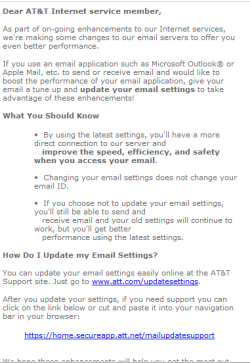
I re-read an email from at&t about the server changes, and the OLD Yahoo or NEW att servers should work!

With this post, I'll drop off posting to this thread unless someone has a question for me.
I'll follow it out of curiosity and to learn.

Screen print of an email I received about the server changes:

ATTSP04.PNG
 

My Computer My Computer

Computer type
PC/Desktop
Computer Manufacturer/Model Number
home built
OS
Multi-Boot W7_Pro_x64 W8.1_Pro_x64 W10_Pro_x64 +Linux_VMs +Chromium_VM
CPU
AMD Athlon II x4 620
Motherboard
Gigabyte GA-MA785G-UD3H
Memory
6GB GSkill DDR2 800
Graphics Card(s)
AMD 4670 GPU + AMD 4200 IGP
Sound Card
on board Realtek ALC889A
Monitor(s) Displays
RCA 40" LCD TV, Insignia 32" LCD TV, HP 15" LCD monitor
Screen Resolution
1680 x 1050
Hard Drives
OCZ Vertex 3 120GB,
Samsung F3 1TB (3),
Several others - WD, Seagate, Hitachi, ...
PSU
Corsair 500 W
Case
Rosewill mid tower
Cooling
CM 90mm rifle
Keyboard
Gyration wireless, Logitech wireless, Dell USB wired
Mouse
Gyration wireless, Logitech wireless, V7 USB wired
Internet Speed
Spectrum - 100Mbps D / 10Mbps U
Antivirus
Avast, MBAM3, EMET, WinPatrol
Browser
Pale Moon, Firefox, IE
Other Info
2 multi-boot PC's
Mainly HTPC/Office/Gen purpose (no gaming).
Trendnet USB KVM.
LG DVD burner/Blue Ray Player.
Tray system for removable SATA backup drives.

Not currently OCd, under-volted.
I use Hybrid sleep, rarely re-boot or shutdown.

Hauppauge HD-PVR, Avermedia PCIe TV Tuner, Hauppauge PCI TV Tuner.
Looks like we were a little premature in celerating success; This afternoon I retured to the pc and logged in to WE live mail and immediately received the prompt to enter my password for the "clone account"; theone I created from my wife'saccount for myself. I enterd the password and it rejected it. I continued by sending emails from my clone account and my original account to my wifes account and my accounts, and was unable to send/receive from the WE Live Mail. The error message was the same as before "an incorrect password was entered, Server Error 0x800CCC9.

No, I didn't have the original Email account unticked at that time.

When I was done testing I exited WE Live and went to my webmail account;there I found two of my test emails had been received in webmai: (1) test of my eriginalemail account and the cloned account sent from my wife's Account. (2) Outgoing from cloned account to both my original account and my wife's account. It appears I can't send or receive only in WE Live mail but can send to webmail and receive from WE Live an receive from WE Live in webmail.

The next issue:
When I went back to webmail Ifound a message from "Mailer Daemon at Yahoo.com to my email address
stating they were unable to deliever my email to the following address:
[email protected]: remote host said 550 requuested action not taken: mailbox unavailable.
I did NOT send this email. The body contains a lot of data that means nothing to me. I tried to copy it to Paint and was unable to. Does this mean I have a trojan sending out mail from my pc? If you want to see it let me know how to get it to you.
 

My Computer My Computer

Computer type
PC/Desktop
Computer Manufacturer/Model Number
HP Pavilion p 6380t
OS
Microsoft Windows 7 Home Premium 64-bit 7601 Multiprocessor Free Service Pack 1
CPU
Intel(R) Core(TM)2 Quad CPU Q8300 @ 2.50GHz
Motherboard
PEGATRON CORPORATION Eureka3
Memory
4.00 GB
Graphics Card(s)
(1) Intel(R) G45/G43 Express Chipset (2) Intel(R) G45/G43
Sound Card
(1) Realtek High Definition Audio (2) USB Audio Device
Screen Resolution
800 x 600 x 32 bits (4294967296 colors) @ 99 Hz
Hard Drives
(1) WDC WD6400AAKS-65A7B2 ATA Device (2) WDC WD50 00AAKS-65A7B2 USB Device
Antivirus
Avast premiere
Browser
IE 10
Thanks David,

Yeah, I read that the old servers would work, but found a number of references to "old" servers (probably transition to ATT). I too will watch the outcome, I think the dude might have a workable solution - if it remains stable.

If not, the dude can decide if it worth his time to persue with ATT - sometimes barking works, sometimes a little sweetness is required. Dude has a contingency plan to establish a new free eMail account elsewhere if the problem persists.

I thought your forwarding idea was a reasonable suggestion, perhaps dude can use that if needed during a transition period.

I'm hoping the old servers will allow hiim to keep using his original eMail address.

Thanks for your valuable input as a Bellsouth user and all-around seven guru,

Bill
.
 

My Computer My Computer

Computer type
Laptop
Computer Manufacturer/Model Number
HP Pavilion dv6-6c10us
OS
x64 (6.3.9600) Win8.1 Pro & soon dual boot x64 (6.1.7601) Win7_SP1 HomePrem
CPU
AMD A6-3420M APU with Radeon(tm) HD Graphics
Motherboard
Hewlett-Packard 1805
Memory
6.00 GB
Graphics Card(s)
AMD Radeon(TM) HD 6520G
Sound Card
(1) AMD High Definition Audio Device (2) IDT High Definiti
Monitor(s) Displays
HP W2072a 20" LCD (1600 x 900) @ 60 Hz
Screen Resolution
1366 x 768 x 32 bits (4294967296 colors) @ 60 Hz
Hard Drives
ST640LM0 00 HM641JI SATA Disk Device
Keyboard
Logitech k520 wireless KB
Mouse
Logitech m320 wireless mouse (bundled with KB)
Internet Speed
15/5 | 54 MB Wireless 'n'
Antivirus
Realtime: Defender or Avast | On-demand: Malwarebytes, ESET
Browser
IE 11 on Win8, IE 10 on win 7
Other Info
Media: [Gimp, Audacity, VLC] || Comm: [WEmail 2012, Skype] || Productivity: [OpenOffice,| Textpad] || Utils: [Sysinternals, cCleaner, Speccy, Defraggler]
I can't tell when that msgs was sent or the bounce back ws returned. I also can't tell if the bug is on the web based eMail or on your machine. So let's find out.

First, change your password on att.net (web based client and service provider [phne, cable, internet]- if that's different)
DO THIS on a known clean machine (work, a friend)

Then,
What Malware do you have on your machine? Is it up to date, do you run regular scans?

Download and run FULL system scans - tick/select all drives: PUP, PUM, and archives

Run each one at a time, and report after each scan if any threats were found, if and how they were resolved (quarantine, removed, ignored)


On Demand scans


After running each of the above demand scanners, download ONE and only ONE of the real-time apps.


Real time protection (use only one)


On a known clean machine - create a bootable disc for offline scanner


Bootable Offline scanners:
When all scan report nothing found, change your password again to something new. Remember to change the password for the account in WEmail so it doesn't seem like the same problem.
 
Last edited:

My Computer My Computer

Computer type
Laptop
Computer Manufacturer/Model Number
HP Pavilion dv6-6c10us
OS
x64 (6.3.9600) Win8.1 Pro & soon dual boot x64 (6.1.7601) Win7_SP1 HomePrem
CPU
AMD A6-3420M APU with Radeon(tm) HD Graphics
Motherboard
Hewlett-Packard 1805
Memory
6.00 GB
Graphics Card(s)
AMD Radeon(TM) HD 6520G
Sound Card
(1) AMD High Definition Audio Device (2) IDT High Definiti
Monitor(s) Displays
HP W2072a 20" LCD (1600 x 900) @ 60 Hz
Screen Resolution
1366 x 768 x 32 bits (4294967296 colors) @ 60 Hz
Hard Drives
ST640LM0 00 HM641JI SATA Disk Device
Keyboard
Logitech k520 wireless KB
Mouse
Logitech m320 wireless mouse (bundled with KB)
Internet Speed
15/5 | 54 MB Wireless 'n'
Antivirus
Realtime: Defender or Avast | On-demand: Malwarebytes, ESET
Browser
IE 11 on Win8, IE 10 on win 7
Other Info
Media: [Gimp, Audacity, VLC] || Comm: [WEmail 2012, Skype] || Productivity: [OpenOffice,| Textpad] || Utils: [Sysinternals, cCleaner, Speccy, Defraggler]
ok, please untick receive on the "old" account. I won't be able to help more if you don't do that, I've chased too many ghost problems.


The password error might be real or it might be a ghost. WEmail and it's predecessors get confused sometimes and all it takes is a 2nd attempt to correct.
 

My Computer My Computer

Computer type
Laptop
Computer Manufacturer/Model Number
HP Pavilion dv6-6c10us
OS
x64 (6.3.9600) Win8.1 Pro & soon dual boot x64 (6.1.7601) Win7_SP1 HomePrem
CPU
AMD A6-3420M APU with Radeon(tm) HD Graphics
Motherboard
Hewlett-Packard 1805
Memory
6.00 GB
Graphics Card(s)
AMD Radeon(TM) HD 6520G
Sound Card
(1) AMD High Definition Audio Device (2) IDT High Definiti
Monitor(s) Displays
HP W2072a 20" LCD (1600 x 900) @ 60 Hz
Screen Resolution
1366 x 768 x 32 bits (4294967296 colors) @ 60 Hz
Hard Drives
ST640LM0 00 HM641JI SATA Disk Device
Keyboard
Logitech k520 wireless KB
Mouse
Logitech m320 wireless mouse (bundled with KB)
Internet Speed
15/5 | 54 MB Wireless 'n'
Antivirus
Realtime: Defender or Avast | On-demand: Malwarebytes, ESET
Browser
IE 11 on Win8, IE 10 on win 7
Other Info
Media: [Gimp, Audacity, VLC] || Comm: [WEmail 2012, Skype] || Productivity: [OpenOffice,| Textpad] || Utils: [Sysinternals, cCleaner, Speccy, Defraggler]
xgdue: the links in my post re: Malware wre broken. I fixed them and hopefully fixed the template I used.

Did you run the scans and was anything found/fixed?

Bill
.
 

My Computer My Computer

Computer type
Laptop
Computer Manufacturer/Model Number
HP Pavilion dv6-6c10us
OS
x64 (6.3.9600) Win8.1 Pro & soon dual boot x64 (6.1.7601) Win7_SP1 HomePrem
CPU
AMD A6-3420M APU with Radeon(tm) HD Graphics
Motherboard
Hewlett-Packard 1805
Memory
6.00 GB
Graphics Card(s)
AMD Radeon(TM) HD 6520G
Sound Card
(1) AMD High Definition Audio Device (2) IDT High Definiti
Monitor(s) Displays
HP W2072a 20" LCD (1600 x 900) @ 60 Hz
Screen Resolution
1366 x 768 x 32 bits (4294967296 colors) @ 60 Hz
Hard Drives
ST640LM0 00 HM641JI SATA Disk Device
Keyboard
Logitech k520 wireless KB
Mouse
Logitech m320 wireless mouse (bundled with KB)
Internet Speed
15/5 | 54 MB Wireless 'n'
Antivirus
Realtime: Defender or Avast | On-demand: Malwarebytes, ESET
Browser
IE 11 on Win8, IE 10 on win 7
Other Info
Media: [Gimp, Audacity, VLC] || Comm: [WEmail 2012, Skype] || Productivity: [OpenOffice,| Textpad] || Utils: [Sysinternals, cCleaner, Speccy, Defraggler]
I grow weary of this mess. In preparation of what I perceived to be the inevitable I purchased, downloaded, and installed another email client known as postbox. I plugged in my accounts both bellsouth and att.. It's been running a few days and when I did test emails run from the webmail logged in as bellsouth, it received mail with no problem. During instalation postbox requested to be default mail and I allowed. When I went to log in at WE Live it flagged it was not default so I allowed. Now when I logged in to postbox it givs the same error,or similar message, " sending of password did not succeed. Mail server inbound.att.net responded:Incorrect user name or password."

What do you make of that?

So far, this is what I have done:
Ran full scan on Malwarebytes = no infection
KasperskyTDSS kille = no infection
ESET Online Scanner = 4 infections All were avariet oof Win32 Adware iin RealRegistry Cleaner, all 4 quarantined and removed.
Avast full scan is running now will report any threat later. I plan to go into control panel and make postbox default again.


xgdude
 

My Computer My Computer

Computer type
PC/Desktop
Computer Manufacturer/Model Number
HP Pavilion p 6380t
OS
Microsoft Windows 7 Home Premium 64-bit 7601 Multiprocessor Free Service Pack 1
CPU
Intel(R) Core(TM)2 Quad CPU Q8300 @ 2.50GHz
Motherboard
PEGATRON CORPORATION Eureka3
Memory
4.00 GB
Graphics Card(s)
(1) Intel(R) G45/G43 Express Chipset (2) Intel(R) G45/G43
Sound Card
(1) Realtek High Definition Audio (2) USB Audio Device
Screen Resolution
800 x 600 x 32 bits (4294967296 colors) @ 99 Hz
Hard Drives
(1) WDC WD6400AAKS-65A7B2 ATA Device (2) WDC WD50 00AAKS-65A7B2 USB Device
Antivirus
Avast premiere
Browser
IE 10
Ok, thanks.

When Avast finishes, post the results.

Did you install RealRegistry Cleaner or is it a rogue cling-on?
In general, there isn't a need for any of the so-called tuneup utilities - there are some good/safe ones (Pirirform cCleaner is one trusted app).

follow this next:
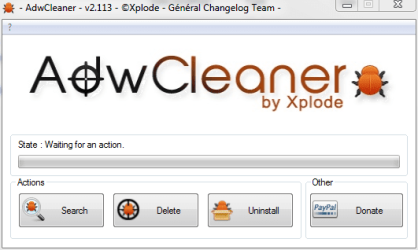
Download AdWareCleaner AdwCleaner Download to your desktop

1.Right-click on adwcleaner.exe
--> select Run As Administrator to launch the application.

2.Click on Delete button.

AdwCleaner.PNG

3.Confirm each time with OK.

4.Your computer will be rebooted automatically.
--> A text file will open after the restart.
--> Please post the content of that logfile in your reply.

Note: You can find the logfile at C:\AdwCleaner[Sn].txt as well - n is the order number.
 
Last edited:

My Computer My Computer

Computer type
Laptop
Computer Manufacturer/Model Number
HP Pavilion dv6-6c10us
OS
x64 (6.3.9600) Win8.1 Pro & soon dual boot x64 (6.1.7601) Win7_SP1 HomePrem
CPU
AMD A6-3420M APU with Radeon(tm) HD Graphics
Motherboard
Hewlett-Packard 1805
Memory
6.00 GB
Graphics Card(s)
AMD Radeon(TM) HD 6520G
Sound Card
(1) AMD High Definition Audio Device (2) IDT High Definiti
Monitor(s) Displays
HP W2072a 20" LCD (1600 x 900) @ 60 Hz
Screen Resolution
1366 x 768 x 32 bits (4294967296 colors) @ 60 Hz
Hard Drives
ST640LM0 00 HM641JI SATA Disk Device
Keyboard
Logitech k520 wireless KB
Mouse
Logitech m320 wireless mouse (bundled with KB)
Internet Speed
15/5 | 54 MB Wireless 'n'
Antivirus
Realtime: Defender or Avast | On-demand: Malwarebytes, ESET
Browser
IE 11 on Win8, IE 10 on win 7
Other Info
Media: [Gimp, Audacity, VLC] || Comm: [WEmail 2012, Skype] || Productivity: [OpenOffice,| Textpad] || Utils: [Sysinternals, cCleaner, Speccy, Defraggler]
Let's make sure your machine is clean, there is possibly one more scan after adwCleaner - depends on what it finds/cleans

Then we'll check system file integrity and one or two system files
 

My Computer My Computer

Computer type
Laptop
Computer Manufacturer/Model Number
HP Pavilion dv6-6c10us
OS
x64 (6.3.9600) Win8.1 Pro & soon dual boot x64 (6.1.7601) Win7_SP1 HomePrem
CPU
AMD A6-3420M APU with Radeon(tm) HD Graphics
Motherboard
Hewlett-Packard 1805
Memory
6.00 GB
Graphics Card(s)
AMD Radeon(TM) HD 6520G
Sound Card
(1) AMD High Definition Audio Device (2) IDT High Definiti
Monitor(s) Displays
HP W2072a 20" LCD (1600 x 900) @ 60 Hz
Screen Resolution
1366 x 768 x 32 bits (4294967296 colors) @ 60 Hz
Hard Drives
ST640LM0 00 HM641JI SATA Disk Device
Keyboard
Logitech k520 wireless KB
Mouse
Logitech m320 wireless mouse (bundled with KB)
Internet Speed
15/5 | 54 MB Wireless 'n'
Antivirus
Realtime: Defender or Avast | On-demand: Malwarebytes, ESET
Browser
IE 11 on Win8, IE 10 on win 7
Other Info
Media: [Gimp, Audacity, VLC] || Comm: [WEmail 2012, Skype] || Productivity: [OpenOffice,| Textpad] || Utils: [Sysinternals, cCleaner, Speccy, Defraggler]
Back
Top