PC freezing after system recovery

SubbinBlazer

New member
Member
Local time
11:56 AM
Messages
57
Location
So Cal
Hey there, the PC is a windows 7 home premium 64bit emachines tower. I purchased the tower at wally world for $400 which I thought was a good deal since i already had a monitor and other components.

Now to the fun stuff. I stopped using this PC for a while and let my nephew and his friends play with it. What they did I'm unsure, but the case is that it would freeze and stuff. Some how I managed to back up all the files and after that it kept freezing. Gave up on it then a few days later I turned it on to attempt to restore it to a previous restore point that I had made almost when i bought it. Luckily, it went smoothly and the PC was working fine. I then decided to start from a fresh start, so I typed in recovery and was able to restore my PC to factory settings, so I did that (yesterday and it was working fine).

Today I turned on the PC with the intentions of importing some old files that I had on a external hard drive and I got an error. I was prompeted if I wanted to repair which was recommended or start windows normally. I hit repair and 10 sec after the screen went Clear. I was confused, so I waited a while and nothing. I then forced shut down the tower by holding down the power button and gave it another go and the same thing happend. I then tried the "start windows normally" option and it froze on the part when it says, "starting windows."

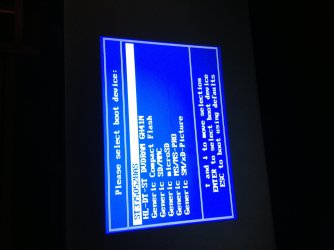
I'm now stuck and not sure if the hard drive is shot or not. I searched and saw that some people suggest to insert the wn 7 operating system disc and boot from it and make a new partition, but I'm not quite sure how to boot from the disc. When I hit the F12 key when the PC starts I get these options below as shown on the pic. Any help is greatly appreciated.
 

Attachments
  • Boot options F12.jpg
    Boot options F12.jpg
    448.8 KB · Views: 6
  • image.jpg
    image.jpg
    773 KB · Views: 2
Last edited:

My Computer My Computer

At a glance

Windows 7 Home Premium 32bit
Computer Manufacturer/Model Number
Dell Vostro 3500
OS
Windows 7 Home Premium 32bit
Hit arrow keys to select DVDRAM and press enter. Follow the prompts to repair Windows.

If you get it up and running, best to perform a deep scan for possible infections, regardless of whether or not you have re-installed Windows. Do you have malware (antivirus) software? If not, see if you can download the excellent free Malwarebytes. Install, let it update itself, then run a full scan.
 

My Computer My Computer

At a glance

Windows 7 Home Premium 64bit SP1AMD FX 8120 3.10GHz8GB
Computer Manufacturer/Model Number
Asus CM1831 Tower
OS
Windows 7 Home Premium 64bit SP1
CPU
AMD FX 8120 3.10GHz
Memory
8GB
Browser
Google Chrome
Other Info
xplorer2; Office 2007
Hit arrow keys to select DVDRAM and press enter. Follow the prompts to repair Windows.

If you get it up and running, best to perform a deep scan for possible infections, regardless of whether or not you have re-installed Windows. Do you have malware (antivirus) software? If not, see if you can download the excellent free Malwarebytes. Install, let it update itself, then run a full scan.


I tried that and it turned to that clear screen after mike 10 sec.
 

My Computer My Computer

At a glance

Windows 7 Home Premium 32bit
Computer Manufacturer/Model Number
Dell Vostro 3500
OS
Windows 7 Home Premium 32bit
If you're running the original emachine factory preinstall that is a corrupt bloated install which throttles Win7 native performance. Best to wipe the HD to get a perfect Clean Reinstall - Factory OEM Windows 7 using the installer provided for your licensed version, activated with the Product Key on the COA sticker on machine.

During booted Custom install be sure to delete all partitions using Drive Options shown in Steps 6/7 of Clean Install Windows 7 to create new partition(s) as you wish, format and begin install.

If you'd rather try repairing the current Win7 use the DVD provided in Step 5 of Troubleshooting Windows 7 Failure to Start to run Startup Repair a few times to see what it finds. Everything else that can be done to start unbootable Win7 is also there including how to rescue your files to do the reinstall.
 
  • Like
Reactions: Arc
Forgive my asking but are you certain the Windows setup disc was inserted? Have you had any trouble with the CD/DVD drive? Can you hear the drive spin when you try booting from the setup disc?

Sure feels like a hardware problem. You might try re-seating the memory module(s)... remove/ re-insert repeatedly, to help clean the contacts. But if the system refuses to boot from optical or HDD, you may need to create a bootable drive on a memory card (using another computer of course). This is typically done using a USB thumb drive but you'd need to know if your system can boot from USB. There may be an option for USB further down on the list shown in your first image.
 

My Computer My Computer

At a glance

Windows 7 Home Premium 64bit SP1AMD FX 8120 3.10GHz8GB
Computer Manufacturer/Model Number
Asus CM1831 Tower
OS
Windows 7 Home Premium 64bit SP1
CPU
AMD FX 8120 3.10GHz
Memory
8GB
Browser
Google Chrome
Other Info
xplorer2; Office 2007
If you're running the original emachine factory preinstall that is a corrupt bloated install which throttles Win7 native performance. Best to wipe the HD to get a perfect Clean Reinstall - Factory OEM Windows 7 using the installer provided for your licensed version, activated with the Product Key on the COA sticker on machine.

During booted Custom install be sure to delete all partitions using Drive Options shown in Steps 6/7 of Clean Install Windows 7 to create new partition(s) as you wish, format and begin install.

If you'd rather try repairing the current Win7 use the DVD provided in Step 5 of Troubleshooting Windows 7 Failure to Start to run Startup Repair a few times to see what it finds. Everything else that can be done to start unbootable Win7 is also there including how to rescue your files to do the reinstall.


Thanks for that. I'd rather wipe the hard drive and start fresh. Had a few questions since I'm not quite comfortable.

I was going over the thread, "Clean Reinstall - Factory OEM Windows 7" Since I have Windows 7 home premium 64 bit includes service pack 1 anytime upgrade disc, do I skip steps 1 and 2? Prior to the state that I am now, I had saved my files on a external hard drive, so I skip step 3 aswell, right?

As far as step 4, I'm assuming I still have to do that since the only disc's I have for the emachines et1331g-03w is the windows 7 home premium SP164 and 32bit (two discs) which I had aquired from microsoft for $15. Appreciate your time. thanks
 

My Computer My Computer

At a glance

Windows 7 Home Premium 32bit
Computer Manufacturer/Model Number
Dell Vostro 3500
OS
Windows 7 Home Premium 32bit
Forgive my asking but are you certain the Windows setup disc was inserted? Have you had any trouble with the CD/DVD drive? Can you hear the drive spin when you try booting from the setup disc?

Sure feels like a hardware problem. You might try re-seating the memory module(s)... remove/ re-insert repeatedly, to help clean the contacts. But if the system refuses to boot from optical or HDD, you may need to create a bootable drive on a memory card (using another computer of course). This is typically done using a USB thumb drive but you'd need to know if your system can boot from USB. There may be an option for USB further down on the list shown in your first image.
The day before I got this error which was when I did the system restore the dvd/cd rom was working properly. Even when I had done the recovery option right after the system restore the PC loaded up fine and the DVD/CD rom was still working. As far as it working right now, I believe it is since I hear it when I insert the disc, but I need to double check. As far as the USB boot option, I elieve it has that aswell, but i need to double check. Thanks for the feedback guys.
 

My Computer My Computer

At a glance

Windows 7 Home Premium 32bit
Computer Manufacturer/Model Number
Dell Vostro 3500
OS
Windows 7 Home Premium 32bit
After a few attempts and curse words, the PC decided to boot off the Win 7 DVD and I hit "repair" and it went through the process and is now working. This isn't the method I wanted to go with since the beginning, but it'll work. I will definitly keep this thread on the look out in the fure for when I'm ready to wipe everything out and start from a clean hard drive. one more question, how's IE8 working out for you guys? I've thought of updating it to IE9 is it worth it or should I stick with IE8? Thanks alot!
 

My Computer My Computer

At a glance

Windows 7 Home Premium 32bit
Computer Manufacturer/Model Number
Dell Vostro 3500
OS
Windows 7 Home Premium 32bit
Use the latest version of IE9 which is fine and is required for secure browsing. It will be pushed through with Important and Optional Windows Updates, all of which should be installed to have Win7 optimum performance. Set Updates to Automatic, accept Recommended like Important in the settings.
 
Use the latest version of IE9 which is fine and is required for secure browsing. It will be pushed through with Important and Optional Windows Updates, all of which should be installed to have Win7 optimum performance. Set Updates to Automatic, accept Recommended like Important in the settings.


Ok, great. I did set it to download automatically, but do not update since I like to see what is going to be updated before it updates.

If I choose the automatic which is recommended, will the option updates download/update aswell? I'm assuming not, but just want to make sure.
 

My Computer My Computer

At a glance

Windows 7 Home Premium 32bit
Computer Manufacturer/Model Number
Dell Vostro 3500
OS
Windows 7 Home Premium 32bit
No you need to okay the optionals. But it's all good. Updates errors are one in a million.
 
Well guys, the PC was working fine yesterday, but when I turned on the PC today I got the same error. I hit F12 to boot from DVDRam, but it freezes. I want to wipe it out as shown on the link above, What do I do? :(
 

My Computer My Computer

At a glance

Windows 7 Home Premium 32bit
Computer Manufacturer/Model Number
Dell Vostro 3500
OS
Windows 7 Home Premium 32bit
First run the Dell Diagnostics Utility - How to Run the to assure the hardware is sound.

Then work through the steps to Clean Reinstall - Factory OEM Windows 7.

As it says in the Note to Dell Owners at end, since Recovery partition will not boot after install, during Install you should delete all the partitions except the small OEM Diagnostics Tools partition at the end of the HD, if the diagnostics still boot and run - if not delete that partition too. Use the Drive Options tools shown in Steps 6/7 of Clean Install Windows 7 to Delete each partition, then create a New partition in the space, highlight it and click Next to begin install.
 
First run the Dell Diagnostics Utility - How to Run the to assure the hardware is sound.

Then work through the steps to Clean Reinstall - Factory OEM Windows 7.

As it says in the Note to Dell Owners at end, since Recovery partition will not boot after install, during Install you should delete all the partitions except the small OEM Diagnostics Tools partition at the end of the HD, if the diagnostics still boot and run - if not delete that partition too. Use the Drive Options tools shown in Steps 6/7 of Clean Install Windows 7 to Delete each partition, then create a New partition in the space, highlight it and click Next to begin install.


I'll give that a shot. I'm assuming the Dell link you provided is the same for the machine (emachines et1331g-03w)I'm working with?
 

My Computer My Computer

At a glance

Windows 7 Home Premium 32bit
Computer Manufacturer/Model Number
Dell Vostro 3500
OS
Windows 7 Home Premium 32bit
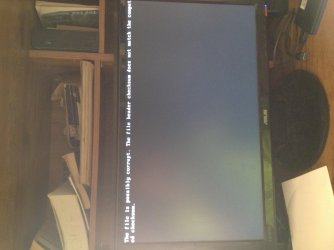
Got this error after the Emachines screen which gives me the option to boot F12. When i hit F12, i looked for the diagnostic tool and it wasnt there. When i tried to boot from DVDRAM, the compiter froze after it prompts me to push any key. Froze in 2 attempts. When i attempt to turn on the computer, the tower turns on but the monitor stays asleep. I did hear a constant beep tone coming out of the tower in three occasions. Are these symptoms signs of a bad hardrive? If i were to purchase a new hardrive, should the computer work properly once windows 7 is installed?
 

Attachments

  • image.jpg
    image.jpg
    652.5 KB · Views: 1

My Computer My Computer

At a glance

Windows 7 Home Premium 32bit
Computer Manufacturer/Model Number
Dell Vostro 3500
OS
Windows 7 Home Premium 32bit
Ok, I gave it another shot.....

I booted the PC from the DVD (Win 7 disc). Then the screen said "windows is loading files". After a few minutes, the screen turned to where i choose a language. Then i was given the option to upgrade or custom, and here is where im stuck...

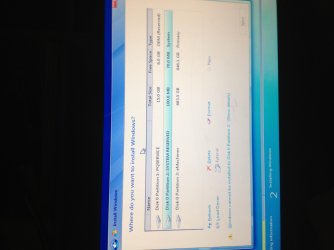
As shown on the picture, i have those partitions. I want to have a fresh install so what do i do? Im not able to click to make a new partition because the option is faded/dim. I am able to delete the partitions because that option is not faded/dim. I clicked on the eMachines option just to see what it says an it says what's on the other image. Is it referring to the files that i already backed up on my external hard-rive? If so, i don't care about those. I want to start fresh... Please help, i don't know what to do.
 

Attachments

  • partitions.jpg
    partitions.jpg
    381.8 KB · Views: 3
  • eMachinesnoption.jpg
    eMachinesnoption.jpg
    671 KB · Views: 1

My Computer My Computer

At a glance

Windows 7 Home Premium 32bit
Computer Manufacturer/Model Number
Dell Vostro 3500
OS
Windows 7 Home Premium 32bit
PMFJI but since you want a fresh install, AND you're certain you have external backups of your personal data (IE, on CD or DVD) take the option to delete both of the large partitions. This will wipe out the old Windows setup. Then you should be able to create a new partition in the unused space. The new partition will be EMPTY and Windows setup should allow you to proceed with your fresh install in the new partition. Do NOT delete partitions unless you're certain you do not need any of the files on the partition.
 

My Computer My Computer

At a glance

Windows 7 Home Premium 64bit SP1AMD FX 8120 3.10GHz8GB
Computer Manufacturer/Model Number
Asus CM1831 Tower
OS
Windows 7 Home Premium 64bit SP1
CPU
AMD FX 8120 3.10GHz
Memory
8GB
Browser
Google Chrome
Other Info
xplorer2; Office 2007
You want to delete at least the last two partitions, and if you have no intention of even running Acer factory Recovery or have made your Recovery Disks, you can delete the first partition too.

Once you delete these partitions, the New button will light up so you can choose it to create new Partition(s) as you wish. If you have no specfiic partition scheme then create one large partition with all of the available space for install, Format it, then highlight it to click Next to begin install. Ignore the small boot partition it creates at front of drive.

These choices are all discussed in Clean Reinstall - Factory OEM Windows 7 which you should be following closely if you want a perfect install.
 
Hey guys, thanks for that information. I'm currently using the desktop that I wiped out. It seems to be running like it should. Currently doing all updates and saving some bookmarks. I restarted it a few times also and it seems to be hassle free. I will be using Microsoft essentials security and malwarebytes on the PC. I don't do any downloads from sites I shouldn't be going to, so i feel that I should be safe. I will also be making another account for the nepphews or possibly just let them use the guest account. They're the ones that use to use it and eventually stopped; since they had messed it up. LOL I'm glad I didn't need to replace the hard drive. I'm sorry that the info I needed could've been found on that link, I guess I was just overwhelmed that I missed it. Thanks a bunch guys!
 

My Computer My Computer

At a glance

Windows 7 Home Premium 32bit
Computer Manufacturer/Model Number
Dell Vostro 3500
OS
Windows 7 Home Premium 32bit
Back
Top