
Solved How to increase size of windows partition in dualboot?

chromium

New member
Member
Local time
2:35 PM
Messages
56
Ok so i originally had windows 7 and i decided to install win8 in a dualboot.
I wasnt expecting to use win8 to be very good, and i didnt plan on using it too much so i only gave it a 50gb partition.

Now i want to make it bigger (probably around 100gb)
So how can i extend the partition into my win7 partition?
Do i need to shrink the win7 partition then merge the unallocated space it makes with my win8 partition?

Also i really prefer to use disk management, and no thrid party hard drive software.
I've had some bad experience with Easeus in particular (see my older posts for more info if youd like)

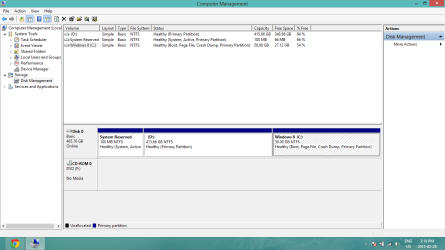
Ive attached a screenshot of my disk management for a visual reference

Thanks
 

Attachments
  • screenshot.png
    screenshot.png
    37.4 KB · Views: 9

My Computer My Computer

At a glance

Windows 7 Home Premium 64BitIntel Core i5-2450m @ 2.5GHz6GB
Computer type
Laptop
OS
Windows 7 Home Premium 64Bit
CPU
Intel Core i5-2450m @ 2.5GHz
Memory
6GB

My Computer My Computer

At a glance

Win7 Home Premium 64xIntel Core 2 Duo P7450 / 2.13 GHz (2.29 with ...4 GB PC-6400 Hyundai (2X2) at 800MhzNVIDIA GeForce GTX 260M 1GB DDR3 VRAM
Computer type
Laptop
Computer Manufacturer/Model Number
ASUS G60-RBBX05
OS
Win7 Home Premium 64x
CPU
Intel Core 2 Duo P7450 / 2.13 GHz (2.29 with Extreme Turbo)
Memory
4 GB PC-6400 Hyundai (2X2) at 800Mhz
Graphics Card(s)
NVIDIA GeForce GTX 260M 1GB DDR3 VRAM
Monitor(s) Displays
16" LED Backlit
Screen Resolution
1366 x 768 on laptop 1600x1050 max res on 22" external mon
Hard Drives
OCZ Agility 3 60GB SSD / 320 GB - Serial ATA-150 - 7200 rpm
PSU
6-cell Lithium ion { lasts 1.5 hours }
Case
ASUS G60 Laptop
Keyboard
Chicklet type back-lit (white light) keyboard
Mouse
Logitech G9 Laser Mouse 3200dpi and 1000 reports per minute
Internet Speed
Comcast 8.60mb/s up - 3.11mb/s down
Antivirus
MSE
Browser
Firefox
Other Info
General mid-budget gaming Comp. Low batterylife - High FrameRates - currently overheating problems :(

2nd Rig: Case: Rosewill BLACKHAWK Gaming ATX Mid Tower Computer Case

Mobo: GIGABYTE GA-990FXA-UD3
CPU: AMD FX-6200 Zambezi 3.8GHz (4.1GHz Turbo)
Heatsink: COOLER MASTER V8 CPU Cooler
RAM: Patriot Viper 3 8GB (2 x 4GB) 240-Pin DDR3 SDRAM 1866 (PC3 15000)
GPU: SAPPHIRE Radeon HD 6850 1GB 2
Only thing I would warn is that if the unallocated space is freed up on the other side of the D: drive then the c: drive won't be able to extend into it. This would be fixable with 3rd party tools, but I am not certain on this happening. there are posts in those two tutorials about that as well. again, Im not an expert on partitions. I have done partitioning, but never ran into problems that needed expert help.
 

My Computer My Computer

At a glance

Win7 Home Premium 64xIntel Core 2 Duo P7450 / 2.13 GHz (2.29 with ...4 GB PC-6400 Hyundai (2X2) at 800MhzNVIDIA GeForce GTX 260M 1GB DDR3 VRAM
Computer type
Laptop
Computer Manufacturer/Model Number
ASUS G60-RBBX05
OS
Win7 Home Premium 64x
CPU
Intel Core 2 Duo P7450 / 2.13 GHz (2.29 with Extreme Turbo)
Memory
4 GB PC-6400 Hyundai (2X2) at 800Mhz
Graphics Card(s)
NVIDIA GeForce GTX 260M 1GB DDR3 VRAM
Monitor(s) Displays
16" LED Backlit
Screen Resolution
1366 x 768 on laptop 1600x1050 max res on 22" external mon
Hard Drives
OCZ Agility 3 60GB SSD / 320 GB - Serial ATA-150 - 7200 rpm
PSU
6-cell Lithium ion { lasts 1.5 hours }
Case
ASUS G60 Laptop
Keyboard
Chicklet type back-lit (white light) keyboard
Mouse
Logitech G9 Laser Mouse 3200dpi and 1000 reports per minute
Internet Speed
Comcast 8.60mb/s up - 3.11mb/s down
Antivirus
MSE
Browser
Firefox
Other Info
General mid-budget gaming Comp. Low batterylife - High FrameRates - currently overheating problems :(

2nd Rig: Case: Rosewill BLACKHAWK Gaming ATX Mid Tower Computer Case

Mobo: GIGABYTE GA-990FXA-UD3
CPU: AMD FX-6200 Zambezi 3.8GHz (4.1GHz Turbo)
Heatsink: COOLER MASTER V8 CPU Cooler
RAM: Patriot Viper 3 8GB (2 x 4GB) 240-Pin DDR3 SDRAM 1866 (PC3 15000)
GPU: SAPPHIRE Radeon HD 6850 1GB 2
Only thing I would warn is that if the unallocated space is freed up on the other side of the D: drive then the c: drive won't be able to extend into it. This would be fixable with 3rd party tools, but I am not certain on this happening. there are posts in those two tutorials about that as well. again, Im not an expert on partitions. I have done partitioning, but never ran into problems that needed expert help.

thanks. this is exactly what im scared will happen.
It happened last time and disk management would merge because the partitions werent beside each other,
then when i used easeus everything just got corrupted.

I guess ill just wait for an expert response...i really dont want to screw up
 

My Computer My Computer

At a glance

Windows 7 Home Premium 64BitIntel Core i5-2450m @ 2.5GHz6GB
Computer type
Laptop
OS
Windows 7 Home Premium 64Bit
CPU
Intel Core i5-2450m @ 2.5GHz
Memory
6GB
I would also back up all your data prior to doing anything with them. Also, I have seen experts on here do some pretty amazing things....
 

My Computer My Computer

At a glance

Win7 Home Premium 64xIntel Core 2 Duo P7450 / 2.13 GHz (2.29 with ...4 GB PC-6400 Hyundai (2X2) at 800MhzNVIDIA GeForce GTX 260M 1GB DDR3 VRAM
Computer type
Laptop
Computer Manufacturer/Model Number
ASUS G60-RBBX05
OS
Win7 Home Premium 64x
CPU
Intel Core 2 Duo P7450 / 2.13 GHz (2.29 with Extreme Turbo)
Memory
4 GB PC-6400 Hyundai (2X2) at 800Mhz
Graphics Card(s)
NVIDIA GeForce GTX 260M 1GB DDR3 VRAM
Monitor(s) Displays
16" LED Backlit
Screen Resolution
1366 x 768 on laptop 1600x1050 max res on 22" external mon
Hard Drives
OCZ Agility 3 60GB SSD / 320 GB - Serial ATA-150 - 7200 rpm
PSU
6-cell Lithium ion { lasts 1.5 hours }
Case
ASUS G60 Laptop
Keyboard
Chicklet type back-lit (white light) keyboard
Mouse
Logitech G9 Laser Mouse 3200dpi and 1000 reports per minute
Internet Speed
Comcast 8.60mb/s up - 3.11mb/s down
Antivirus
MSE
Browser
Firefox
Other Info
General mid-budget gaming Comp. Low batterylife - High FrameRates - currently overheating problems :(

2nd Rig: Case: Rosewill BLACKHAWK Gaming ATX Mid Tower Computer Case

Mobo: GIGABYTE GA-990FXA-UD3
CPU: AMD FX-6200 Zambezi 3.8GHz (4.1GHz Turbo)
Heatsink: COOLER MASTER V8 CPU Cooler
RAM: Patriot Viper 3 8GB (2 x 4GB) 240-Pin DDR3 SDRAM 1866 (PC3 15000)
GPU: SAPPHIRE Radeon HD 6850 1GB 2
I would look for a 3rd party Partitioning software, which fully supports Windows 8, uEFI, GPT & Secure Boot.
Which is signed by Microsoft.


Paragon Partition Manager Free Edition - Free Download

i really dont want to use 3rd party software.
Can i just shrink the D: partition (win7), and then extend my C: (win8) into the unallocated space?
See my screenshot to see what im talking about
 

My Computer My Computer

At a glance

Windows 7 Home Premium 64BitIntel Core i5-2450m @ 2.5GHz6GB
Computer type
Laptop
OS
Windows 7 Home Premium 64Bit
CPU
Intel Core i5-2450m @ 2.5GHz
Memory
6GB
 

My Computer My Computer

At a glance

Microsoft Windows 10 Pro Insider Preview 64-bitIntel(R) Core(TM) i3-4130 CPU @ 3.40GHzCorsair Vengence 4GB x2 (8.00GB Dual-Channel ...2047MB GeForce GTS 450 (ZOTAC International)
Computer type
PC/Desktop
Computer Manufacturer/Model Number
Self Assembled
OS
Microsoft Windows 10 Pro Insider Preview 64-bit
CPU
Intel(R) Core(TM) i3-4130 CPU @ 3.40GHz
Motherboard
Gigabyte Technology Co., Ltd. B85M-D3H
Memory
Corsair Vengence 4GB x2 (8.00GB Dual-Channel DDR3 @ 798MHz)
Graphics Card(s)
2047MB GeForce GTS 450 (ZOTAC International)
Sound Card
Onboard (Realtek High Definition Audio)
Monitor(s) Displays
LG Flatron E2040T
Screen Resolution
1600x900
Hard Drives
Western Digital 1 TB
Seagate 500 GB
PSU
Corsair VS550
Case
Cooler Master K380
Cooling
Cooler Master Seidon 120V Plus
Keyboard
Logitech MK260r
Mouse
Logitech MK260r
Internet Speed
PMPL Broadband
Antivirus
Windows Defender + MBAM
Browser
Firefox
Other Info
Dell Studio 15" Laptop

My Computer My Computer

At a glance

Windows 10 Pro x64 ; Xubuntu x64Intel i7 860 @ 2.80 GHz O/C'ed to 4.0GHz16GB Corsair Vengance DDR3 @ 661 MHz Dual Cha...EVGA NVidia GTX 560 1024MB
Computer type
PC/Desktop
Computer Manufacturer/Model Number
Golden Mk. I.4
OS
Windows 10 Pro x64 ; Xubuntu x64
CPU
Intel i7 860 @ 2.80 GHz O/C'ed to 4.0GHz
Motherboard
Gigabyte P55A-UD3R Rev.1. Award BIOS F13
Memory
16GB Corsair Vengance DDR3 @ 661 MHz Dual Channel (9-9-9-24)
Graphics Card(s)
EVGA NVidia GTX 560 1024MB
Sound Card
Realtek Integrated
Monitor(s) Displays
Dual Samsung SyncMaster 2494HS
Screen Resolution
1920*1080 and 1920*1080
Hard Drives
1*Samsung 840 EVO 120GB SSD;
1*OCZ Vertex 2 60GB SSD;
2*Samsung F3 SpinPoint 1TB in RAID0;
1*Samsung F1 SpinPoint 1TB;
2*Western Digital 1TB External USB 3.0
1*Western Digital 500GB External USB 3.0
1*Seagate 500GB External USB 2.0
PSU
Thermaltake ToughPower QFan 750W
Case
Thermaltake Element S VK60001W2Z
Cooling
Corsair H60 Water Cooling, 2*230mm and 2*80mm case fans
Keyboard
Logitech G110
Mouse
Logitech MX518

Thanks ill use that, but wont this work through disk management?:
-shrink the D: partition (Windows 7)
-format the unallocated space partition that it makes to ntfs
-extend my C: (win8) into the ntfs space?
See my screenshot to see what im talking about
 

My Computer My Computer

At a glance

Windows 7 Home Premium 64BitIntel Core i5-2450m @ 2.5GHz6GB
Computer type
Laptop
OS
Windows 7 Home Premium 64Bit
CPU
Intel Core i5-2450m @ 2.5GHz
Memory
6GB
You don't have any choice but to use 3rd party to resize Win8 to the left. We recommend free Partition Wizard bootable CD which has helped here resize countless thousands of complicated partitioning operations without a single failure - whereas all other managers (including PW Home version) except for Disk Mgmt can fail with data loss.

So you'd shrink Win7 in Disk Mgmt: Partition or Volume - Shrink

Then you'd boot PW CD, follow these video steps to resize Win8 partition to the left: Partition Wizard Resize Partition - Video Help.

If for some reason Disk Mgmt doesn't give you enough shrinkage, use PW on Win7 to resize from the right.
 
You don't have any choice but to use 3rd party to resize Win8 to the left. We recommend free Partition Wizard bootable CD which has helped here resize countless thousands of complicated partitioning operations without a single failure - whereas all other managers (including PW Home version) except for Disk Mgmt can fail with data loss.

So you'd shrink Win7 in Disk Mgmt: Partition or Volume - Shrink

Then you'd boot PW CD, follow these video steps to resize Win8 partition to the left: Partition Wizard Resize Partition - Video Help.

If for some reason Disk Mgmt doesn't give you enough shrinkage, use PW on Win7 to resize from the right.

ok thanks for clarifying that i have to use 3rd party. i guess ill do it later when i have enough courage to do it , lol :confused:
 

My Computer My Computer

At a glance

Windows 7 Home Premium 64BitIntel Core i5-2450m @ 2.5GHz6GB
Computer type
Laptop
OS
Windows 7 Home Premium 64Bit
CPU
Intel Core i5-2450m @ 2.5GHz
Memory
6GB
I agree with Arc, Golden and Greg . I use the PW boot cd and it`s never failed me and so easy to use.:p
 

My Computer My Computer

At a glance

Windows 10 Pro x64Intel Core i7 6700KGSkill TridentZ RGB 16GB 3600 16-16-16-36EVGA GTX 980 Ti SC x2
Computer type
PC/Desktop
Computer Manufacturer/Model Number
Skylake Special #666
OS
Windows 10 Pro x64
CPU
Intel Core i7 6700K
Motherboard
Asus Sabertooth Z170 Mark 1
Memory
GSkill TridentZ RGB 16GB 3600 16-16-16-36
Graphics Card(s)
EVGA GTX 980 Ti SC x2
Sound Card
Realtek High Definition
Monitor(s) Displays
AOC G2460PG
Screen Resolution
1920 x 1080 144Hz
Hard Drives
Samsung 860 Pro 256GB, Seagate Barracuda 4TB x2
PSU
EVGA 1000 P2, EVGA White Custom Braided Cables
Case
Corsair Vengeance C70 Gunmetal Black
Cooling
Corsair H100i v2, Corsair ML120 x2, Thermal Grizzly Kryonaut
Keyboard
Logitech G910 Orion Spectrum
Mouse
Logitech G700s
Internet Speed
Verizon Fios Quantum Gateway 75/75
Antivirus
Windows Defender, Malwarebytes Free 3.8.3
Browser
Chrome
Other Info
Corsair SP120 x4, LG Blu-ray Drive, Durabrand HT-395 100 Watt Dolby Digital Amp, Corsair H2100 Wireless 7.1 Headset
Just make sure to back up any crucial data. Everyone should do this anyway just as common practice. You're in good hands here...
 

My Computer My Computer

At a glance

Win7 Home Premium 64xIntel Core 2 Duo P7450 / 2.13 GHz (2.29 with ...4 GB PC-6400 Hyundai (2X2) at 800MhzNVIDIA GeForce GTX 260M 1GB DDR3 VRAM
Computer type
Laptop
Computer Manufacturer/Model Number
ASUS G60-RBBX05
OS
Win7 Home Premium 64x
CPU
Intel Core 2 Duo P7450 / 2.13 GHz (2.29 with Extreme Turbo)
Memory
4 GB PC-6400 Hyundai (2X2) at 800Mhz
Graphics Card(s)
NVIDIA GeForce GTX 260M 1GB DDR3 VRAM
Monitor(s) Displays
16" LED Backlit
Screen Resolution
1366 x 768 on laptop 1600x1050 max res on 22" external mon
Hard Drives
OCZ Agility 3 60GB SSD / 320 GB - Serial ATA-150 - 7200 rpm
PSU
6-cell Lithium ion { lasts 1.5 hours }
Case
ASUS G60 Laptop
Keyboard
Chicklet type back-lit (white light) keyboard
Mouse
Logitech G9 Laser Mouse 3200dpi and 1000 reports per minute
Internet Speed
Comcast 8.60mb/s up - 3.11mb/s down
Antivirus
MSE
Browser
Firefox
Other Info
General mid-budget gaming Comp. Low batterylife - High FrameRates - currently overheating problems :(

2nd Rig: Case: Rosewill BLACKHAWK Gaming ATX Mid Tower Computer Case

Mobo: GIGABYTE GA-990FXA-UD3
CPU: AMD FX-6200 Zambezi 3.8GHz (4.1GHz Turbo)
Heatsink: COOLER MASTER V8 CPU Cooler
RAM: Patriot Viper 3 8GB (2 x 4GB) 240-Pin DDR3 SDRAM 1866 (PC3 15000)
GPU: SAPPHIRE Radeon HD 6850 1GB 2
Thanks for the help everyone . jus to summarize is this what i need to do?:

-boot partition wizard CD
-shrink win7 partition by going to move/resize and dragging right side to the left
-increase win8 partition by going to move/resize and dragging left side to the empty space on the left
-hit apply and reboot

Also, will doing this affect my MBR in anyway?
 

My Computer My Computer

At a glance

Windows 7 Home Premium 64BitIntel Core i5-2450m @ 2.5GHz6GB
Computer type
Laptop
OS
Windows 7 Home Premium 64Bit
CPU
Intel Core i5-2450m @ 2.5GHz
Memory
6GB
can someone please quickly confirm that what i wrote above is good.
I just want an experts response before i do it.
 

My Computer My Computer

At a glance

Windows 7 Home Premium 64BitIntel Core i5-2450m @ 2.5GHz6GB
Computer type
Laptop
OS
Windows 7 Home Premium 64Bit
CPU
Intel Core i5-2450m @ 2.5GHz
Memory
6GB
Yes, that should work fine. But have your Win7 DVD or Repair CD standing by in case you need to run Repair after resizing, which only happens about 5% of the time and then only when the resizing is done on the boot sector which is at the other end of the HD.
 
Last edited:
thanks everyone, i followed what i summarized above with the help of you guys and it worked flawlessly.
I didnt have to use win7 repair dvd and i didnt encounter any issues. Partition wizard is actually quite good and fast.

Thanks again
 

My Computer My Computer

At a glance

Windows 7 Home Premium 64BitIntel Core i5-2450m @ 2.5GHz6GB
Computer type
Laptop
OS
Windows 7 Home Premium 64Bit
CPU
Intel Core i5-2450m @ 2.5GHz
Memory
6GB
thanks everyone, i followed what i summarized above with the help of you guys and it worked flawlessly.
I didnt have to use win7 repair dvd and i didnt encounter any issues. Partition wizard is actually quite good and fast.

Thanks again

Good to know :)

Partition Wizard is a great tool, undoubtedly.
 

My Computer My Computer

At a glance

Microsoft Windows 10 Pro Insider Preview 64-bitIntel(R) Core(TM) i3-4130 CPU @ 3.40GHzCorsair Vengence 4GB x2 (8.00GB Dual-Channel ...2047MB GeForce GTS 450 (ZOTAC International)
Computer type
PC/Desktop
Computer Manufacturer/Model Number
Self Assembled
OS
Microsoft Windows 10 Pro Insider Preview 64-bit
CPU
Intel(R) Core(TM) i3-4130 CPU @ 3.40GHz
Motherboard
Gigabyte Technology Co., Ltd. B85M-D3H
Memory
Corsair Vengence 4GB x2 (8.00GB Dual-Channel DDR3 @ 798MHz)
Graphics Card(s)
2047MB GeForce GTS 450 (ZOTAC International)
Sound Card
Onboard (Realtek High Definition Audio)
Monitor(s) Displays
LG Flatron E2040T
Screen Resolution
1600x900
Hard Drives
Western Digital 1 TB
Seagate 500 GB
PSU
Corsair VS550
Case
Cooler Master K380
Cooling
Cooler Master Seidon 120V Plus
Keyboard
Logitech MK260r
Mouse
Logitech MK260r
Internet Speed
PMPL Broadband
Antivirus
Windows Defender + MBAM
Browser
Firefox
Other Info
Dell Studio 15" Laptop
Back
Top