Solved IE10 A Bit Of A No Go For Me

xxxdannyxxx

Do You Believe
Guru
Gold Member
VIP
Local time
10:47 AM
Messages
2,615
Location
England
Hi Guys

I tried to install IE10 Last night but got an error on reboot saying IE could not be started or something like that so I rolled back to IE9.
Today I thought I would try again and ran an sfc /scannow first to restore my modded system files first to see if that was the issue (icons etc) and it installed fine. Played with it for an hour or so with no problems and then added back my modified system files in both system32 and systemwow64 (imageres.dll, imagesp1.dll, shell32.dll, zipfldr.dll, devicecentre.dll, authui.dll, enabled custom themes by patching resourses, custom start menu button, and changed logon and logoff text) As I do with all my windows.
Now IE10 will not start again, it just sits there trying to load for 5-6 seconds and bombs out.
It seems like it doesn't like one or more of the system files been altered. Anyone here with modded system files having the same sort of issues at all.

Danny
 

My Computer My Computer

At a glance

Windows 7 Home Premium x64 SP1intel(R)core(TM)2 duo CPU T6600 @ 2.20GHz3 gb ddr3ati radeon hd4570/512mb
Computer Manufacturer/Model Number
acer aspire 5935g
OS
Windows 7 Home Premium x64 SP1
CPU
intel(R)core(TM)2 duo CPU T6600 @ 2.20GHz
Motherboard
intel gm45/gm47 revision 07
Memory
3 gb ddr3
Graphics Card(s)
ati radeon hd4570/512mb
Monitor(s) Displays
lop156wh2-tle1 15.3 flat
Screen Resolution
1366x768
Hard Drives
OCZ-Agility3 60gig ssd
320gig external hdd
500gig external hdd
Mouse
Optical
Internet Speed
30Mbps Down/30Mbps Up
Hey Danny -

Maybe it's because you're on the wrong side of the pond. :p

I've got a few modded system files and IE10 installed just fine. Only suggestion I have is to uninstall IE10 one more time, restore defaults with SFC, and then reinstall the mods one at a time to see which one breaks IE10. Then you can decide if it's something you can do without or go back to IE9 and give IE10 a couple of months to iron out any issues. I kinda seem to recall some similar problems when IE9 first came out.

Lee
 

My Computer My Computer

At a glance

Win 7 Pro 64-bitIntel i5 2.4 Ghz8GB DDR3Intel HD 3000
Computer type
Laptop
Computer Manufacturer/Model Number
Sony Vaio VPCEB47GM Laptop
OS
Win 7 Pro 64-bit
CPU
Intel i5 2.4 Ghz
Memory
8GB DDR3
Graphics Card(s)
Intel HD 3000
Sound Card
IDT High Definition
Monitor(s) Displays
15.6 WGXA Anti-Glare LED
Screen Resolution
1280x800
Hard Drives
640Gb 7200rpm
Antivirus
MSE
Browser
Opera (primary) with IE9 backup
Hey Danny -

Maybe it's because you're on the wrong side of the pond. :p

I've got a few modded system files and IE10 installed just fine. Only suggestion I have is to uninstall IE10 one more time, restore defaults with SFC, and then reinstall the mods one at a time to see which one breaks IE10. Then you can decide if it's something you can do without or go back to IE9 and give IE10 a couple of months to iron out any issues. I kinda seem to recall some similar problems when IE9 first came out.

That was my plan I've just rerun sfc /scannow without uninstalling IE10 and it works again now, just gonna do one mod at a time see which one it may be. My moneys on the Universal theme patcher for custom themes, its the only one that would make any sense.
 

My Computer My Computer

At a glance

Windows 7 Home Premium x64 SP1intel(R)core(TM)2 duo CPU T6600 @ 2.20GHz3 gb ddr3ati radeon hd4570/512mb
Computer Manufacturer/Model Number
acer aspire 5935g
OS
Windows 7 Home Premium x64 SP1
CPU
intel(R)core(TM)2 duo CPU T6600 @ 2.20GHz
Motherboard
intel gm45/gm47 revision 07
Memory
3 gb ddr3
Graphics Card(s)
ati radeon hd4570/512mb
Monitor(s) Displays
lop156wh2-tle1 15.3 flat
Screen Resolution
1366x768
Hard Drives
OCZ-Agility3 60gig ssd
320gig external hdd
500gig external hdd
Mouse
Optical
Internet Speed
30Mbps Down/30Mbps Up
I think you're on the right track, Danny. Universal theme patcher would be my guess too. BTW, hope all is well with you and the family.
 

My Computer My Computer

At a glance

Win 7 Pro 64-bitIntel i5 2.4 Ghz8GB DDR3Intel HD 3000
Computer type
Laptop
Computer Manufacturer/Model Number
Sony Vaio VPCEB47GM Laptop
OS
Win 7 Pro 64-bit
CPU
Intel i5 2.4 Ghz
Memory
8GB DDR3
Graphics Card(s)
Intel HD 3000
Sound Card
IDT High Definition
Monitor(s) Displays
15.6 WGXA Anti-Glare LED
Screen Resolution
1280x800
Hard Drives
640Gb 7200rpm
Antivirus
MSE
Browser
Opera (primary) with IE9 backup
Wow how wrong was I. This is really odd, it broke again after I added my customised imageres.dll, imagesp1.dll, shell32.dll, zipfldr.dll, devicecentre.dll. All was ok with Universal Theme Patcher and custom Themes. I cannot understand what the link would be between IE and those icon files.

P.S I'm very well Thankyou Lee just 5 weeks to go before our 3rd baby is due, getting excited again now. Hope you are well also.

Danny
 

My Computer My Computer

At a glance

Windows 7 Home Premium x64 SP1intel(R)core(TM)2 duo CPU T6600 @ 2.20GHz3 gb ddr3ati radeon hd4570/512mb
Computer Manufacturer/Model Number
acer aspire 5935g
OS
Windows 7 Home Premium x64 SP1
CPU
intel(R)core(TM)2 duo CPU T6600 @ 2.20GHz
Motherboard
intel gm45/gm47 revision 07
Memory
3 gb ddr3
Graphics Card(s)
ati radeon hd4570/512mb
Monitor(s) Displays
lop156wh2-tle1 15.3 flat
Screen Resolution
1366x768
Hard Drives
OCZ-Agility3 60gig ssd
320gig external hdd
500gig external hdd
Mouse
Optical
Internet Speed
30Mbps Down/30Mbps Up
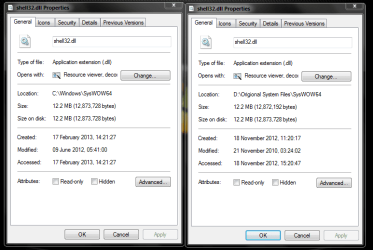
Well I have found the issue a recent update My guess is the platform update has updated the shell32 folder in both system32 and systemWOW64 its now a different size to the original one although I cant see any icon changes. Just means I have to now modify the new ones with my icons (or at least I hope that's all is is.

Capture.PNG

Left is new one Right is original one
 

My Computer My Computer

At a glance

Windows 7 Home Premium x64 SP1intel(R)core(TM)2 duo CPU T6600 @ 2.20GHz3 gb ddr3ati radeon hd4570/512mb
Computer Manufacturer/Model Number
acer aspire 5935g
OS
Windows 7 Home Premium x64 SP1
CPU
intel(R)core(TM)2 duo CPU T6600 @ 2.20GHz
Motherboard
intel gm45/gm47 revision 07
Memory
3 gb ddr3
Graphics Card(s)
ati radeon hd4570/512mb
Monitor(s) Displays
lop156wh2-tle1 15.3 flat
Screen Resolution
1366x768
Hard Drives
OCZ-Agility3 60gig ssd
320gig external hdd
500gig external hdd
Mouse
Optical
Internet Speed
30Mbps Down/30Mbps Up
That's kinda confusing, Danny. It also looks like the file path changed from D:\Origional (SP?) System Files to C:\Windows.

Congratulations on #3! That's awesome. Maybe you'll be celebrating Easter Sunday (3/31) in the maternity ward.
 

My Computer My Computer

At a glance

Win 7 Pro 64-bitIntel i5 2.4 Ghz8GB DDR3Intel HD 3000
Computer type
Laptop
Computer Manufacturer/Model Number
Sony Vaio VPCEB47GM Laptop
OS
Win 7 Pro 64-bit
CPU
Intel i5 2.4 Ghz
Memory
8GB DDR3
Graphics Card(s)
Intel HD 3000
Sound Card
IDT High Definition
Monitor(s) Displays
15.6 WGXA Anti-Glare LED
Screen Resolution
1280x800
Hard Drives
640Gb 7200rpm
Antivirus
MSE
Browser
Opera (primary) with IE9 backup
That's kinda confusing, Danny. It also looks like the file path changed from D:\Origional (SP?) System Files to C:\Windows.

Congratulations on #3! That's awesome. Maybe you'll be celebrating Easter Sunday (3/31) in the maternity ward.

Thanks Lee yes due on the 2nd April so may well be.

The file path is only different because the D:\Origional location are just my backup copies:) Think I may have been wrong anyway still struggling with it

Edit - I have spent some time on it now and for some reason IE10 is linked to the shell32.dll file. As soon as I change a single icon in the .dll IE10 refuses to start even though its installed correctly
 
Last edited:

My Computer My Computer

At a glance

Windows 7 Home Premium x64 SP1intel(R)core(TM)2 duo CPU T6600 @ 2.20GHz3 gb ddr3ati radeon hd4570/512mb
Computer Manufacturer/Model Number
acer aspire 5935g
OS
Windows 7 Home Premium x64 SP1
CPU
intel(R)core(TM)2 duo CPU T6600 @ 2.20GHz
Motherboard
intel gm45/gm47 revision 07
Memory
3 gb ddr3
Graphics Card(s)
ati radeon hd4570/512mb
Monitor(s) Displays
lop156wh2-tle1 15.3 flat
Screen Resolution
1366x768
Hard Drives
OCZ-Agility3 60gig ssd
320gig external hdd
500gig external hdd
Mouse
Optical
Internet Speed
30Mbps Down/30Mbps Up
I'm having issues to, ie4uinit.exe The application was unable to start, I also use custom themes and icons, so im about to just restore my system back to IE9! ..BOOOOOOO :mad:

like i ever used IE9, never unless I needed to download media rights to play music in WMP12
 
Last edited:

My Computer My Computer

At a glance

7 Home Premium x64 SP1FX 4100 Black Edition 3.6GHz Quad-Core Socket...Kingston HyperX blu 8GB DDR3-1333ATI Radeon HD 4650 1GB DDR2 HDMI
Computer Manufacturer/Model Number
Custom Machine.
OS
7 Home Premium x64 SP1
CPU
FX 4100 Black Edition 3.6GHz Quad-Core Socket AM3+
Motherboard
ASUS M5A78L-M LX PLUS (AM3R2)
Memory
Kingston HyperX blu 8GB DDR3-1333
Graphics Card(s)
ATI Radeon HD 4650 1GB DDR2 HDMI
Sound Card
Realtek ALC887 8-channel high definition audio
Monitor(s) Displays
HP 2159m 21.5-inch 1080p HDMI LCD Monitor
Screen Resolution
1920x1080
PSU
Cooler Master eXtreme Power Plus 500 Watt
Case
Thermaltake V3 Black Edition ATX Mid Tower
Cooling
CoolerMaster Hyper 212 Plus
I'm having issues to, ie4uinit.exe The application was unable to start, I also use custom themes and icons, so im about to just restore my system back to IE9! ..BOOOOOOO :mad:

like i ever used IE9, never unless I needed to download media rights to play music in WMP12

Same error codes as me:mad:
 

My Computer My Computer

At a glance

Windows 7 Home Premium x64 SP1intel(R)core(TM)2 duo CPU T6600 @ 2.20GHz3 gb ddr3ati radeon hd4570/512mb
Computer Manufacturer/Model Number
acer aspire 5935g
OS
Windows 7 Home Premium x64 SP1
CPU
intel(R)core(TM)2 duo CPU T6600 @ 2.20GHz
Motherboard
intel gm45/gm47 revision 07
Memory
3 gb ddr3
Graphics Card(s)
ati radeon hd4570/512mb
Monitor(s) Displays
lop156wh2-tle1 15.3 flat
Screen Resolution
1366x768
Hard Drives
OCZ-Agility3 60gig ssd
320gig external hdd
500gig external hdd
Mouse
Optical
Internet Speed
30Mbps Down/30Mbps Up
I also modified my system files such as shell32.dll, imageres.dll, authui.dll, explorerframe.dll, explorer.exe and many more; :D fortunately IE10 loves to stay with them in my win 7! It just works so well and fast! thanks IE :)
 

My Computer My Computer

At a glance

Windows 7 SP1 Ultimate x86
OS
Windows 7 SP1 Ultimate x86
I also modified my system files such as shell32.dll, imageres.dll, authui.dll, explorerframe.dll, explorer.exe and many more; :D fortunately IE10 loves to stay with them in my win 7! It just works so well and fast! thanks IE :)

Mmmm interesting that you are using 32bit so only will have eddited the system32 files whereas Warlockz and myself are running 64bit so had to eddit the sysWOW64 files also.
 

My Computer My Computer

At a glance

Windows 7 Home Premium x64 SP1intel(R)core(TM)2 duo CPU T6600 @ 2.20GHz3 gb ddr3ati radeon hd4570/512mb
Computer Manufacturer/Model Number
acer aspire 5935g
OS
Windows 7 Home Premium x64 SP1
CPU
intel(R)core(TM)2 duo CPU T6600 @ 2.20GHz
Motherboard
intel gm45/gm47 revision 07
Memory
3 gb ddr3
Graphics Card(s)
ati radeon hd4570/512mb
Monitor(s) Displays
lop156wh2-tle1 15.3 flat
Screen Resolution
1366x768
Hard Drives
OCZ-Agility3 60gig ssd
320gig external hdd
500gig external hdd
Mouse
Optical
Internet Speed
30Mbps Down/30Mbps Up
Hi Guys

I tried to install IE10 Last night but got an error on reboot saying IE could not be started or something like that so I rolled back to IE9.
Today I thought I would try again and ran an sfc /scannow first to restore my modded system files first to see if that was the issue (icons etc) and it installed fine. Played with it for an hour or so with no problems and then added back my modified system files in both system32 and systemwow64 (imageres.dll, imagesp1.dll, shell32.dll, zipfldr.dll, devicecentre.dll, authui.dll, enabled custom themes by patching resourses, custom start menu button, and changed logon and logoff text) As I do with all my windows.
Now IE10 will not start again, it just sits there trying to load for 5-6 seconds and bombs out.
It seems like it doesn't like one or more of the system files been altered. Anyone here with modded system files having the same sort of issues at all.

Danny

Don't tell me ..... is this the error you received? : "ie4uinit.exe The application was unable to start correctly"

I too have been trying to install IE 10 for about three days now and no matter that I do I always get that very same error.

If the problem is a few modified .dll files that is preventing IE 10 from installing then Microsoft can keep IE 10, I'm not going to change my whole system setup JUST to accommodate IE 10.
 

My Computer My Computer

At a glance

Windows 8 Pro / Windows 7 Home Premium x64 du...6 gigsNvidia GEForce 9400 GT
Computer type
PC/Desktop
Computer Manufacturer/Model Number
HP
OS
Windows 8 Pro / Windows 7 Home Premium x64 dual boot
Memory
6 gigs
Graphics Card(s)
Nvidia GEForce 9400 GT
Screen Resolution
1600 x 900
Hard Drives
Internal - Western Digital 600 gb HDD
Internal - Western Digital 250 gb HDD
External - Western Digital 1 TB HDD
Antivirus
Avast!
Browser
Pale Moon
Hi Guys

I tried to install IE10 Last night but got an error on reboot saying IE could not be started or something like that so I rolled back to IE9.
Today I thought I would try again and ran an sfc /scannow first to restore my modded system files first to see if that was the issue (icons etc) and it installed fine. Played with it for an hour or so with no problems and then added back my modified system files in both system32 and systemwow64 (imageres.dll, imagesp1.dll, shell32.dll, zipfldr.dll, devicecentre.dll, authui.dll, enabled custom themes by patching resourses, custom start menu button, and changed logon and logoff text) As I do with all my windows.
Now IE10 will not start again, it just sits there trying to load for 5-6 seconds and bombs out.
It seems like it doesn't like one or more of the system files been altered. Anyone here with modded system files having the same sort of issues at all.

Danny

Don't tell me ..... is this the error you received? : "ie4uinit.exe The application was unable to start correctly"

I too have been trying to install IE 10 for about three days now and no matter that I do I always get that very same error.

If the problem is a few modified .dll files that is preventing IE 10 from installing then Microsoft can keep IE 10, I'm not going to change my whole system setup JUST to accommodate IE 10.

:ditto:

It will install fine if you put all the system files back to default.
 

My Computer My Computer

At a glance

Windows 7 Home Premium x64 SP1intel(R)core(TM)2 duo CPU T6600 @ 2.20GHz3 gb ddr3ati radeon hd4570/512mb
Computer Manufacturer/Model Number
acer aspire 5935g
OS
Windows 7 Home Premium x64 SP1
CPU
intel(R)core(TM)2 duo CPU T6600 @ 2.20GHz
Motherboard
intel gm45/gm47 revision 07
Memory
3 gb ddr3
Graphics Card(s)
ati radeon hd4570/512mb
Monitor(s) Displays
lop156wh2-tle1 15.3 flat
Screen Resolution
1366x768
Hard Drives
OCZ-Agility3 60gig ssd
320gig external hdd
500gig external hdd
Mouse
Optical
Internet Speed
30Mbps Down/30Mbps Up
It will install fine if you put all the system files back to default.

I don't care if it installs fine if all files are at their default, because if I ever mod them again IE 10 will go back to not working.

I'm not going to run a "plain Jane" vanilla Windows 7 just so I can run IE 10. Every other version of Internet Explorer up until now has installed and ran just fine whether the sytem was modded or not.

I guess it's time to make Chrome my default browser, Microsoft has some serious issues these days.
 

My Computer My Computer

At a glance

Windows 8 Pro / Windows 7 Home Premium x64 du...6 gigsNvidia GEForce 9400 GT
Computer type
PC/Desktop
Computer Manufacturer/Model Number
HP
OS
Windows 8 Pro / Windows 7 Home Premium x64 dual boot
Memory
6 gigs
Graphics Card(s)
Nvidia GEForce 9400 GT
Screen Resolution
1600 x 900
Hard Drives
Internal - Western Digital 600 gb HDD
Internal - Western Digital 250 gb HDD
External - Western Digital 1 TB HDD
Antivirus
Avast!
Browser
Pale Moon
ie4uinit.exe The application was unable to start correctly"

I am getting the same error and I am not going to remove all of my themes just to see what IE 10 is like. Firefox is my default browser anyway.
 

My Computer My Computer

At a glance

Win 10 Pro 64Intel Core i7 960 @3.20 GHz24.0 GB DDR3EVGA GTX 750Ti
Computer type
PC/Desktop
Computer Manufacturer/Model Number
Custom Build
OS
Win 10 Pro 64
CPU
Intel Core i7 960 @3.20 GHz
Motherboard
MSI MS7522
Memory
24.0 GB DDR3
Graphics Card(s)
EVGA GTX 750Ti
Monitor(s) Displays
LG E2341 23 Inch
Screen Resolution
1920x1080
Hard Drives
1TB Western Dgital 1002FAEX-00Y9A0
1TB Hitachi HDS721010CLA322
PSU
700 Watt
Case
Haf 912
Cooling
Fans
Keyboard
Logitech MK710
Mouse
Logitech M705
Internet Speed
Cable
Antivirus
AIS 2015 .10.0.2225
Browser
Firefox 49
Other Info
MalwareBytes Anti-Rootkit utility
ie4uinit.exe The application was unable to start correctly"

I am getting the same error and I am not going to remove all of my themes just to see what IE 10 is like. Firefox is my default browser anyway.

I am guessing this is just an initial glitch and will be ironed out eventually but like you im unwilling to sacrifice my custom themes and icons for a browser I don't use by default anyway. It is specifically the shell32.dll causing the issues.

Danny
 

My Computer My Computer

At a glance

Windows 7 Home Premium x64 SP1intel(R)core(TM)2 duo CPU T6600 @ 2.20GHz3 gb ddr3ati radeon hd4570/512mb
Computer Manufacturer/Model Number
acer aspire 5935g
OS
Windows 7 Home Premium x64 SP1
CPU
intel(R)core(TM)2 duo CPU T6600 @ 2.20GHz
Motherboard
intel gm45/gm47 revision 07
Memory
3 gb ddr3
Graphics Card(s)
ati radeon hd4570/512mb
Monitor(s) Displays
lop156wh2-tle1 15.3 flat
Screen Resolution
1366x768
Hard Drives
OCZ-Agility3 60gig ssd
320gig external hdd
500gig external hdd
Mouse
Optical
Internet Speed
30Mbps Down/30Mbps Up
I am guessing this is just an initial glitch and will be ironed out eventually but like you im unwilling to sacrifice my custom themes and icons for a browser I don't use by default anyway. It is specifically the shell32.dll causing the issues.

Danny

Don't know if you've considered this, Danny, but if you have a Microsoft account (Hotmail, MSN, Live, etc) you could post your issue on the IE feedback site. Maybe others have experienced the same issue and have a solution, or maybe it will get Microsoft's attention a bit sooner rather than later.

Internet Explorer Feedback Program | Microsoft Connect
 

My Computer My Computer

At a glance

Win 7 Pro 64-bitIntel i5 2.4 Ghz8GB DDR3Intel HD 3000
Computer type
Laptop
Computer Manufacturer/Model Number
Sony Vaio VPCEB47GM Laptop
OS
Win 7 Pro 64-bit
CPU
Intel i5 2.4 Ghz
Memory
8GB DDR3
Graphics Card(s)
Intel HD 3000
Sound Card
IDT High Definition
Monitor(s) Displays
15.6 WGXA Anti-Glare LED
Screen Resolution
1280x800
Hard Drives
640Gb 7200rpm
Antivirus
MSE
Browser
Opera (primary) with IE9 backup
I am guessing this is just an initial glitch and will be ironed out eventually but like you im unwilling to sacrifice my custom themes and icons for a browser I don't use by default anyway. It is specifically the shell32.dll causing the issues.

Danny

Don't know if you've considered this, Danny, but if you have a Microsoft account (Hotmail, MSN, Live, etc) you could post your issue on the IE feedback site. Maybe others have experienced the same issue and have a solution, or maybe it will get Microsoft's attention a bit sooner rather than later.

Internet Explorer Feedback Program | Microsoft Connect

Yes I might just do that, although with the amount of bad reports circulating about IE10 at the moment I would guess they are aware. I notice a few others have chipped in with the same issue, would be good if anyone out there actually manged to install IE10 with a custom shell32.dll would chip in aswel. Just interested more than anything because I can't find any link at all between IE and that .dll
(I know Jerry and Archie for 2 are big on customizing their icons, either of you managed to get it installed without the error)

Danny
 

My Computer My Computer

At a glance

Windows 7 Home Premium x64 SP1intel(R)core(TM)2 duo CPU T6600 @ 2.20GHz3 gb ddr3ati radeon hd4570/512mb
Computer Manufacturer/Model Number
acer aspire 5935g
OS
Windows 7 Home Premium x64 SP1
CPU
intel(R)core(TM)2 duo CPU T6600 @ 2.20GHz
Motherboard
intel gm45/gm47 revision 07
Memory
3 gb ddr3
Graphics Card(s)
ati radeon hd4570/512mb
Monitor(s) Displays
lop156wh2-tle1 15.3 flat
Screen Resolution
1366x768
Hard Drives
OCZ-Agility3 60gig ssd
320gig external hdd
500gig external hdd
Mouse
Optical
Internet Speed
30Mbps Down/30Mbps Up
IE10error_zpsc43921ea.png


Above is the exact error that I am getting.

Perform the following steps to install Internet Explorer 10.


Step 1:

Place the computer in Clean boot state.


You can start Windows by using a minimal set of drivers and startup programs. This kind of startup is known as a "clean boot." A clean boot helps eliminate software conflicts.

To set the computer in clean boot, follow the steps from the link: How to perform a clean boot

Note: After checking in clean boot, follow step: 3 from the article to reset the computer to normal boot.


Step 2:


Install the prerequisites manually before installing Internet Explorer 10.

Refer to the link “How to obtain prerequisite updates for Internet Explorer 10 for Windows 7 that fail to install” to install prerequisite for Internet Explorer 10.


Step 3:

Download and install Internet Explorer 10 manually from Microsoft download centre and then check if you are able to install it.

You can download Internet Explorer 10 from this link “Download Internet Explorer 10”.


Step 4:


After installing Internet Explorer 10, reset the computer to Normal boot.


Follow step: 3 from the link “How to perform a clean boot” to reset the computer to normal boot.


I hope this helps you to fix the issue. If the issue persists or you have any other issues with Windows, please do post it in Microsoft Community. We would be happy to help you.

Someone at the MS site suggested I try this. It did nothing but remove my av and caused me more headaches. I am now done with trying to instal IE 10 and I have also removed IE 9.
 

My Computer My Computer

At a glance

Win 10 Pro 64Intel Core i7 960 @3.20 GHz24.0 GB DDR3EVGA GTX 750Ti
Computer type
PC/Desktop
Computer Manufacturer/Model Number
Custom Build
OS
Win 10 Pro 64
CPU
Intel Core i7 960 @3.20 GHz
Motherboard
MSI MS7522
Memory
24.0 GB DDR3
Graphics Card(s)
EVGA GTX 750Ti
Monitor(s) Displays
LG E2341 23 Inch
Screen Resolution
1920x1080
Hard Drives
1TB Western Dgital 1002FAEX-00Y9A0
1TB Hitachi HDS721010CLA322
PSU
700 Watt
Case
Haf 912
Cooling
Fans
Keyboard
Logitech MK710
Mouse
Logitech M705
Internet Speed
Cable
Antivirus
AIS 2015 .10.0.2225
Browser
Firefox 49
Other Info
MalwareBytes Anti-Rootkit utility
Back
Top