Your computer was unable to start, Startup Repair.

I suggested you wipe the HD of possibly problematic code and then follow the steps to get a perfect Clean Reinstall. Have you done that yet?

Pay special attention to how drivers are handled in Win7 since you have a problem with a driver which Win7 may not want.
 
I suggested you wipe the HD of possibly problematic code and then follow the steps to get a perfect Clean Reinstall. Have you done that yet?

Pay special attention to how drivers are handled in Win7 since you have a problem with a driver which Win7 may not want.


I formatted my harddisk when im doing a clean install for my Window 7 OEM version.. Im stilling having this problem. I have no idea which driver was give a problem, after the start-up repair, everything was normal.
 

My Computer My Computer

At a glance

Microsoft Windows 7 Home Premium 64-bit 7601 ...Intel(R) Core(TM)2 Duo CPU E8400 @ 3.00GHz6GB RAMNVIDIA GeForce 9600 GT (Microsoft Corporation...
Computer type
PC/Desktop
Computer Manufacturer/Model Number
Custom Build
OS
Microsoft Windows 7 Home Premium 64-bit 7601 Multiprocessor Free Service Pack 1
CPU
Intel(R) Core(TM)2 Duo CPU E8400 @ 3.00GHz
Motherboard
Gigabyte Technology Co., Ltd. EP43-UD3L
Memory
6GB RAM
Graphics Card(s)
NVIDIA GeForce 9600 GT (Microsoft Corporation - WDDM v1.1)
Sound Card
High Definition Audio Device
Formatting does nothing to get rid of possibly interfering boot code.
 
Below i attach the blue screen error video here again for everything to see.

Blue screen on window 7 - YouTube

The blue screen was blinking so fast, lucky i manage to video it down and i will list down the log below.


A problem has been dectected and windows has been shut down to prevent damage to your computer.

SYSTEM_SERVICE_EXPEPTION

If this is the first time you've seen this stop error screen, restart your computer. If this screen appers again, follow these step:

Check to make sure any new hardware or software is properly installed. If this is a new installation, ask your hardware or software manufacturer for any windows update you might need.

If problems continue, disable or remove any newly installed hardware or software. Disable BIOS memory options such as caching or shadowing. If you need to use safe mode to remove or disable components, restart your computer, press F8 to select Advanced Startup Options, and then select Safe Mode.

Technical infomation:

***STOP:0x0000003B (0x00000000C0000005, 0xFFFFF8800516E489, 0xFFFFF88005E7B6D0, x0000000000000000)

*** nvlddmkm.sys - Address FFFFF8800516E489 base at FFFFF22004 84 9000, Datastam? 50f94c87


Collecting data for crash dump ...
Initializing disk for crash dump ...
Beginning dump of physical memory.
Dumping physical memory to disk: 65

After this screen, it will auto restart...

 

My Computer My Computer

At a glance

Microsoft Windows 7 Home Premium 64-bit 7601 ...Intel(R) Core(TM)2 Duo CPU E8400 @ 3.00GHz6GB RAMNVIDIA GeForce 9600 GT (Microsoft Corporation...
Computer type
PC/Desktop
Computer Manufacturer/Model Number
Custom Build
OS
Microsoft Windows 7 Home Premium 64-bit 7601 Multiprocessor Free Service Pack 1
CPU
Intel(R) Core(TM)2 Duo CPU E8400 @ 3.00GHz
Motherboard
Gigabyte Technology Co., Ltd. EP43-UD3L
Memory
6GB RAM
Graphics Card(s)
NVIDIA GeForce 9600 GT (Microsoft Corporation - WDDM v1.1)
Sound Card
High Definition Audio Device
I suggested you wipe the HD of possibly problematic code and then follow the steps to get a perfect Clean Reinstall. Have you done that yet?

Pay special attention to how drivers are handled in Win7 since you have a problem with a driver which Win7 may not want.


As what you mention, format does not solve, how can i wipe the HD possibly problematic code?
 

My Computer My Computer

At a glance

Microsoft Windows 7 Home Premium 64-bit 7601 ...Intel(R) Core(TM)2 Duo CPU E8400 @ 3.00GHz6GB RAMNVIDIA GeForce 9600 GT (Microsoft Corporation...
Computer type
PC/Desktop
Computer Manufacturer/Model Number
Custom Build
OS
Microsoft Windows 7 Home Premium 64-bit 7601 Multiprocessor Free Service Pack 1
CPU
Intel(R) Core(TM)2 Duo CPU E8400 @ 3.00GHz
Motherboard
Gigabyte Technology Co., Ltd. EP43-UD3L
Memory
6GB RAM
Graphics Card(s)
NVIDIA GeForce 9600 GT (Microsoft Corporation - WDDM v1.1)
Sound Card
High Definition Audio Device
Try updating your Nvidia display or chipset drivers, if necessary in Safe Mode.

If you recently updated one of those Nvidia drivers, try rolling it back in Device Manager, or if required boot into the Win7 DVD System Recovery Options to System Restore to before it was changed.

As to doing the reinstall after wiping the HD, the blue links in earlier posts explain how each is done. Apparently you didn't click on them to try to understand them better.

This lack of attention to detail if applied to the reinstall you did likely left you with a mess which is why I suggested you start over, wipe the HD with Diskpart Clean Command to get a perfect Clean Reinstall - Factory OEM Windows 7
 
Try updating your Nvidia display or chipset drivers, if necessary in Safe Mode.

If you recently updated one of those Nvidia drivers, try rolling it back in Device Manager, or if required boot into the Win7 DVD System Recovery Options to System Restore to before it was changed.

As to doing the reinstall after wiping the HD, the blue links in earlier posts explain how each is done. Apparently you didn't click on them to try to understand them better.

This lack of attention to detail if applied to the reinstall you did likely left you with a mess which is why I suggested you start over, wipe the HD with Diskpart Clean Command to get a perfect Clean Reinstall - Factory OEM Windows 7


I have updated my Nvidia display recently so i have to rollback to the previous driver and update them in safe mode?
So you recommand me to do this first before wiping the HD?


You got me wrong and im sorry for causing some misunderstanding.


8. Unplug all other HD's and peripherals except ethernet, Boot the Windows 7 installer, choose Custom Install, then Drive Options (Advanced) to Delete all partitions not needed, repartition as desired following illustrated steps given here: Clean Install Windows 7.

I have no idea how can i do this? I just plug in my ethernet wire? or my display and ethernet wire? my keyboard? Im on a DIY computer..
 

My Computer My Computer

At a glance

Microsoft Windows 7 Home Premium 64-bit 7601 ...Intel(R) Core(TM)2 Duo CPU E8400 @ 3.00GHz6GB RAMNVIDIA GeForce 9600 GT (Microsoft Corporation...
Computer type
PC/Desktop
Computer Manufacturer/Model Number
Custom Build
OS
Microsoft Windows 7 Home Premium 64-bit 7601 Multiprocessor Free Service Pack 1
CPU
Intel(R) Core(TM)2 Duo CPU E8400 @ 3.00GHz
Motherboard
Gigabyte Technology Co., Ltd. EP43-UD3L
Memory
6GB RAM
Graphics Card(s)
NVIDIA GeForce 9600 GT (Microsoft Corporation - WDDM v1.1)
Sound Card
High Definition Audio Device
This lack of attention to detail if applied to the reinstall you did likely left you with a mess which is why I suggested you start over, wipe the HD with Diskpart Clean Command to get a perfect Clean Reinstall - Factory OEM Windows 7[/QUOTE]

Yes this is what i need. So i should roll back my driver first and install my new driver via safe mode and wipe the HD with Diskpart clean command?
 

My Computer My Computer

At a glance

Microsoft Windows 7 Home Premium 64-bit 7601 ...Intel(R) Core(TM)2 Duo CPU E8400 @ 3.00GHz6GB RAMNVIDIA GeForce 9600 GT (Microsoft Corporation...
Computer type
PC/Desktop
Computer Manufacturer/Model Number
Custom Build
OS
Microsoft Windows 7 Home Premium 64-bit 7601 Multiprocessor Free Service Pack 1
CPU
Intel(R) Core(TM)2 Duo CPU E8400 @ 3.00GHz
Motherboard
Gigabyte Technology Co., Ltd. EP43-UD3L
Memory
6GB RAM
Graphics Card(s)
NVIDIA GeForce 9600 GT (Microsoft Corporation - WDDM v1.1)
Sound Card
High Definition Audio Device
There is no need to roll back or install any driver if you're about to wipe everything out with Clean command, then Reinstall. Folllow the steps carefully. Ask back any questions you have.
 
There is no need to roll back or install any driver if you're about to wipe everything out with Clean command, then Reinstall. Folllow the steps carefully. Ask back any questions you have.

Alright, i will update here once again if i have any problems.

Thanks for your help. :D
 

My Computer My Computer

At a glance

Microsoft Windows 7 Home Premium 64-bit 7601 ...Intel(R) Core(TM)2 Duo CPU E8400 @ 3.00GHz6GB RAMNVIDIA GeForce 9600 GT (Microsoft Corporation...
Computer type
PC/Desktop
Computer Manufacturer/Model Number
Custom Build
OS
Microsoft Windows 7 Home Premium 64-bit 7601 Multiprocessor Free Service Pack 1
CPU
Intel(R) Core(TM)2 Duo CPU E8400 @ 3.00GHz
Motherboard
Gigabyte Technology Co., Ltd. EP43-UD3L
Memory
6GB RAM
Graphics Card(s)
NVIDIA GeForce 9600 GT (Microsoft Corporation - WDDM v1.1)
Sound Card
High Definition Audio Device
8. Unplug all other HD's and peripherals except ethernet, Boot the Windows 7 installer, choose Custom Install, then Drive Options (Advanced) to Delete all partitions not needed, repartition as desired following illustrated steps given here: Clean Install Windows 7.

What does this mean? I'm sorry, not that good with computers..
 

My Computer My Computer

At a glance

Microsoft Windows 7 Home Premium 64-bit 7601 ...Intel(R) Core(TM)2 Duo CPU E8400 @ 3.00GHz6GB RAMNVIDIA GeForce 9600 GT (Microsoft Corporation...
Computer type
PC/Desktop
Computer Manufacturer/Model Number
Custom Build
OS
Microsoft Windows 7 Home Premium 64-bit 7601 Multiprocessor Free Service Pack 1
CPU
Intel(R) Core(TM)2 Duo CPU E8400 @ 3.00GHz
Motherboard
Gigabyte Technology Co., Ltd. EP43-UD3L
Memory
6GB RAM
Graphics Card(s)
NVIDIA GeForce 9600 GT (Microsoft Corporation - WDDM v1.1)
Sound Card
High Definition Audio Device
Nothing should remain plugged into the PC except the power cable, ethernet cable, your monitor, mouse and keyboard.

The first link shows how to boot a disk or installer stick.

The second link provides illustrated steps for how to proceed with the actual physical install from the booted disk, including Steps 6/7 how to delete all partitions (recommended) to create New ones as you desire, Format them before installing to first large partition. Ignore the 100mb System Reserved partition the installer will create for booting the OS.
 
Before i upgrade my OS to window 7, i was on Window XP

Maybe Jacee was just using it as a ReadMe :)

We`ve given the OP plenty of help, if he reads the tutorials and gives an honest attempt, we will always be here for more.

Yes AddRAM, I wondered if the PC could run Windows 7.
 

My Computer My Computer

At a glance

Windows 7 Ultimate 32bit SP1Intel(R) Core(TM)2 Quad CPU @ 2.40GHz, 2400 MHz4 GBATI Radeon HD 2600 Pro
Computer type
PC/Desktop
Computer Manufacturer/Model Number
Bruce ... somewhere in his 40's
OS
Windows 7 Ultimate 32bit SP1
CPU
Intel(R) Core(TM)2 Quad CPU @ 2.40GHz, 2400 MHz
Motherboard
INTEL/D975XBX2
Memory
4 GB
Graphics Card(s)
ATI Radeon HD 2600 Pro
Monitor(s) Displays
Samsung SyncMaster 914v
Screen Resolution
1280 x 1024
Hard Drives
2/500GB each ... ST3500630AS ATA Device.
One is not connected
PSU
Rocketfish 700 W
Case
G.Skill Gigabyte Chassis
Keyboard
Standard PS/2 Keyboard
Mouse
Microsoft PS/2 Mouse
Internet Speed
DSL
Antivirus
Avira Internet Security
Browser
IE 11
Other Info
ATI HDMI Audio
3 gHz Core 2 Duo with 6gb RAM should run 64 bit Win7 no problem.

We'll make sure it gets installed correctly and is set up perfectly.

Slong let us know your progress. Did it start up connected to web? If not install the ethernet driver from the Support Downloads webpage for your model to get online to do all Important and Optional Updates. There will be several rounds which you can do while you set up your desktop, install Adobe Reader, Flash Player, Java, and your programs.

Then check Device Manager to see if any drivers are still missing after all rounds of Updates are installed.
 
Thanks guys for your help. Re-install my os last night and was too late so I went to sleep without trying.. Will update you guys tonight :)
 

My Computer My Computer

At a glance

Microsoft Windows 7 Home Premium 64-bit 7601 ...Intel(R) Core(TM)2 Duo CPU E8400 @ 3.00GHz6GB RAMNVIDIA GeForce 9600 GT (Microsoft Corporation...
Computer type
PC/Desktop
Computer Manufacturer/Model Number
Custom Build
OS
Microsoft Windows 7 Home Premium 64-bit 7601 Multiprocessor Free Service Pack 1
CPU
Intel(R) Core(TM)2 Duo CPU E8400 @ 3.00GHz
Motherboard
Gigabyte Technology Co., Ltd. EP43-UD3L
Memory
6GB RAM
Graphics Card(s)
NVIDIA GeForce 9600 GT (Microsoft Corporation - WDDM v1.1)
Sound Card
High Definition Audio Device
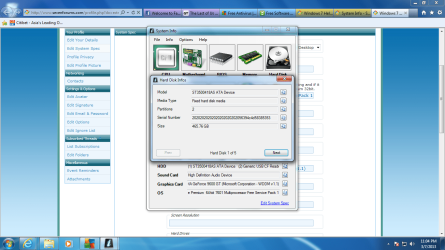
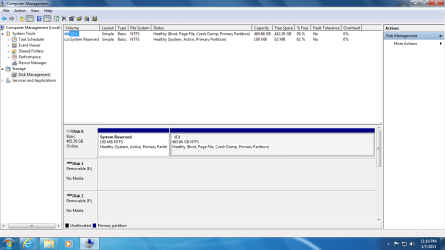
Hi guys, manage to reinstalled my OS and currently everything is fine.
BUT i lost my "D" drive :(

Any information i need to share?
 

My Computer My Computer

At a glance

Microsoft Windows 7 Home Premium 64-bit 7601 ...Intel(R) Core(TM)2 Duo CPU E8400 @ 3.00GHz6GB RAMNVIDIA GeForce 9600 GT (Microsoft Corporation...
Computer type
PC/Desktop
Computer Manufacturer/Model Number
Custom Build
OS
Microsoft Windows 7 Home Premium 64-bit 7601 Multiprocessor Free Service Pack 1
CPU
Intel(R) Core(TM)2 Duo CPU E8400 @ 3.00GHz
Motherboard
Gigabyte Technology Co., Ltd. EP43-UD3L
Memory
6GB RAM
Graphics Card(s)
NVIDIA GeForce 9600 GT (Microsoft Corporation - WDDM v1.1)
Sound Card
High Definition Audio Device
What D drive? Was this a partition on your hard drive, as it was wiped clean with the commands given as I repeatedly told you? You should have backed up your files first, and files should always be backed up anyway.

If it's a separate HD then it may need to have a drive letter assigned in Disk Mgmt: Drive Letter - Add, Change, or Remove in Windows 7 - Windows 7 Forums

Post back a screenshot of Disk Management - Post a Screen Capture Image - Windows 7 Forums


I just love you, you will always be there to guide us. Don't know how should i thanks you man..
I didn't save any files because i'm getting fed-up of the blue screen, so i delete all the partitions as mentions.. Thanks
 

Attachments

  • harddrive.png
    harddrive.png
    103.5 KB · Views: 4

My Computer My Computer

At a glance

Microsoft Windows 7 Home Premium 64-bit 7601 ...Intel(R) Core(TM)2 Duo CPU E8400 @ 3.00GHz6GB RAMNVIDIA GeForce 9600 GT (Microsoft Corporation...
Computer type
PC/Desktop
Computer Manufacturer/Model Number
Custom Build
OS
Microsoft Windows 7 Home Premium 64-bit 7601 Multiprocessor Free Service Pack 1
CPU
Intel(R) Core(TM)2 Duo CPU E8400 @ 3.00GHz
Motherboard
Gigabyte Technology Co., Ltd. EP43-UD3L
Memory
6GB RAM
Graphics Card(s)
NVIDIA GeForce 9600 GT (Microsoft Corporation - WDDM v1.1)
Sound Card
High Definition Audio Device
Thanks for your help.. .VERY VERY APPERCAITE!
 

Attachments

  • Untitled.png
    Untitled.png
    46.1 KB · Views: 3

My Computer My Computer

At a glance

Microsoft Windows 7 Home Premium 64-bit 7601 ...Intel(R) Core(TM)2 Duo CPU E8400 @ 3.00GHz6GB RAMNVIDIA GeForce 9600 GT (Microsoft Corporation...
Computer type
PC/Desktop
Computer Manufacturer/Model Number
Custom Build
OS
Microsoft Windows 7 Home Premium 64-bit 7601 Multiprocessor Free Service Pack 1
CPU
Intel(R) Core(TM)2 Duo CPU E8400 @ 3.00GHz
Motherboard
Gigabyte Technology Co., Ltd. EP43-UD3L
Memory
6GB RAM
Graphics Card(s)
NVIDIA GeForce 9600 GT (Microsoft Corporation - WDDM v1.1)
Sound Card
High Definition Audio Device
Back
Top