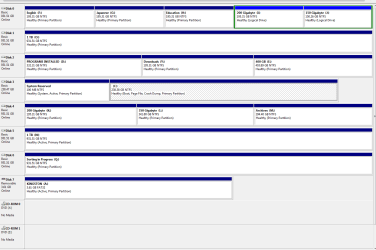
Disk Management (Snap in) shows swaped Disk0=D and Disk1=C

BostonDriver

New member
Member
Local time
1:38 PM
Messages
53
When starting a backup (Acronis), I noticed that my C: drive was now "Disk 1" and my D: drive now "Disk 0".

I verified this using Computer Management > Disk Management

I had this happen with Disk2=E and Disk3=F becoming Disk2=F and Disk3=E. I've removed them from the system as a result. It's also why I'm doing a full C: image backup.

Is there a reason the disk to drive letter is changing?

I'm using Windows 7 Pro, 64bit

Thanks
 

My Computer My Computer

At a glance

Windows 7 64bitQuad Core Xeon16GBNVidia FX 500
Computer Manufacturer/Model Number
Dell Precision 690
OS
Windows 7 64bit
CPU
Quad Core Xeon
Motherboard
Intel 5000x
Memory
16GB
Graphics Card(s)
NVidia FX 500
Sound Card
(Built In) Sigmatel STAC9200 High Defintion
Monitor(s) Displays
Dell P1100
Screen Resolution
1600x1200
Hard Drives
4x1TB Western Digital Caviar Black
PSU
1KW
Case
Tower
Cooling
SpeedFan a must
Keyboard
PS/2 via KVM
Mouse
PS/2 via KVM
Internet Speed
Ask Comcast
Other Info
Grub boots Win7, Fedora 13 and FreeBSD 8.2
On a SATA controller there is no order to attached drives. All SATA drives are treated the same and managed (initially) by the BIOS/UEFI without any preference to one over another. Old folks like me who remember IDE drives and the importance of Master/Slave positioning get hung up on the drive order, but we will learn!
So the short answer is fugetaboutit.

Long answer: The BIOS/UEFI is only concerned with finding the bootable drives and locating the boot manager files. Once a boot manager is found it hands off control. The OS then controls the partition management and disk order. Each physical hard drive has a unique identifying number that the system and OS can keep track of. Windows will assign Disk 0 to the first drive it encounters and record it that way by identifier. You would think the first drive it would recognize would be the one plugged into SATA port 1 but that is not always the case, sometimes it is just the drive that is ready and accessed first.

So if you really need to arrange the drives "in order" then the thing to do is to shut down > disconnect all hard drives except the one with the OS > Optional: make sure the drive is connected to SATA port 1 > start the computer and let Windows load fully > check DM to see that the one hard drive is Disk 0 > Shut down again > connect the hard drive you want to be Disk 1 > Start up, and so on.

The "correct" order should stick after that.
Hope that helps!
 

My Computer My Computer

At a glance

Windows 7 64 Bit Home Premium SP1i7-3820GSkill F3-14900CL9Q - 16GBEVGA GeForce GTX660 - Driver 352.86
Computer type
PC/Desktop
Computer Manufacturer/Model Number
Home Built - Jan 2013
OS
Windows 7 64 Bit Home Premium SP1
CPU
i7-3820
Motherboard
Asus P9X79-PRO - Bios 4608
Memory
GSkill F3-14900CL9Q - 16GB
Graphics Card(s)
EVGA GeForce GTX660 - Driver 352.86
Sound Card
On board Realtek ALC898
Monitor(s) Displays
Acer S271HL
Screen Resolution
1920 x 1080
Hard Drives
#1- Samsung 840 Pro Series
#2- Western Digital WD1002FAEX Sata3 Black
#3- Western Digital WD1002FAEX Sata3 Black
PSU
Corsair CMPSU-850TX-V2 - 850 watt (by Seasonic)
Case
Corsair Obsidian 550D
Cooling
Standard 3 120mm case fans, Cooler Master Hyper 212 EVO
Keyboard
MS KC-0405
Mouse
Intellimouse 5-button
Internet Speed
56 Mbits/Sec (on a good day)
Antivirus
Avast & Malwarebytes
Browser
Firefox
Other Info
Asus DVD - DRW-24B1ST 24X
Old folks like me who remember IDE drives and the importance of Master/Slave positioning get hung up on the drive order, but we will learn!
So the short answer is fugetaboutit.

Old folks like me remember VM/370 and card punches :o

On the same HW (I swap some of the disks) booting FreeBSD and Fedora keep things "in order", even before I started using UUID. So I wanted to check and understand what was going on.

So if you really need to arrange the drives "in order" then the thing to do is to shut down > disconnect all hard drives except the one with the OS > Optional: make sure the drive is connected to SATA port 1 > start the computer and let Windows load fully > check DM to see that the one hard drive is Disk 0 > Shut down again > connect the hard drive you want to be Disk 1 > Start up, and so on.

I did this once. But I change drives so often I'm guessing "un-did" things. I'll live.

Thanks for the reply
 

My Computer My Computer

At a glance

Windows 7 64bitQuad Core Xeon16GBNVidia FX 500
Computer Manufacturer/Model Number
Dell Precision 690
OS
Windows 7 64bit
CPU
Quad Core Xeon
Motherboard
Intel 5000x
Memory
16GB
Graphics Card(s)
NVidia FX 500
Sound Card
(Built In) Sigmatel STAC9200 High Defintion
Monitor(s) Displays
Dell P1100
Screen Resolution
1600x1200
Hard Drives
4x1TB Western Digital Caviar Black
PSU
1KW
Case
Tower
Cooling
SpeedFan a must
Keyboard
PS/2 via KVM
Mouse
PS/2 via KVM
Internet Speed
Ask Comcast
Other Info
Grub boots Win7, Fedora 13 and FreeBSD 8.2
Ah yes... If you are changing the drives out often then just let thing be. The system doesn't care so why should we?
 

My Computer My Computer

At a glance

Windows 7 64 Bit Home Premium SP1i7-3820GSkill F3-14900CL9Q - 16GBEVGA GeForce GTX660 - Driver 352.86
Computer type
PC/Desktop
Computer Manufacturer/Model Number
Home Built - Jan 2013
OS
Windows 7 64 Bit Home Premium SP1
CPU
i7-3820
Motherboard
Asus P9X79-PRO - Bios 4608
Memory
GSkill F3-14900CL9Q - 16GB
Graphics Card(s)
EVGA GeForce GTX660 - Driver 352.86
Sound Card
On board Realtek ALC898
Monitor(s) Displays
Acer S271HL
Screen Resolution
1920 x 1080
Hard Drives
#1- Samsung 840 Pro Series
#2- Western Digital WD1002FAEX Sata3 Black
#3- Western Digital WD1002FAEX Sata3 Black
PSU
Corsair CMPSU-850TX-V2 - 850 watt (by Seasonic)
Case
Corsair Obsidian 550D
Cooling
Standard 3 120mm case fans, Cooler Master Hyper 212 EVO
Keyboard
MS KC-0405
Mouse
Intellimouse 5-button
Internet Speed
56 Mbits/Sec (on a good day)
Antivirus
Avast & Malwarebytes
Browser
Firefox
Other Info
Asus DVD - DRW-24B1ST 24X
...So if you really need to arrange the drives "in order" then the thing to do is to shut down > disconnect all hard drives except the one with the OS > Optional: make sure the drive is connected to SATA port 1 > start the computer and let Windows load fully > check DM to see that the one hard drive is Disk 0 > Shut down again > connect the hard drive you want to be Disk 1 > Start up, and so on.

The "correct" order should stick after that.
Hope that helps!

Sorry, I've found that doesn't always work. In my case, as soon as I add back second drive after the boot drive, the boot drive changes to disk 1 and the second drive becomes 0. I've also tried swapping ports, spitting into the wind, etc. to no avail.
 

My Computer My Computer

At a glance

Win 7 Ultimate 64 bitIntel i7-3930KKingston HyperX Genesis 32GB Kit (8x4GB Modul...MSI R7850 Twin Frozr 2GD5/OC Radeon HD 7850 2...
Computer type
PC/Desktop
Computer Manufacturer/Model Number
Custom Build
OS
Win 7 Ultimate 64 bit
CPU
Intel i7-3930K
Motherboard
ASUS P9X79 WS
Memory
Kingston HyperX Genesis 32GB Kit (8x4GB Modules) 1600MHz DDR
Graphics Card(s)
MSI R7850 Twin Frozr 2GD5/OC Radeon HD 7850 2GB 256-bit GDDR
Sound Card
Asus Xonar Essence STX
Monitor(s) Displays
3x Asus VG248QE 24", Vizio 32" TV
Screen Resolution
1920 x 1080, ?
Hard Drives
Samsung 128GB 840 Pro SSD (1),
Samsung 4TB 850 EVO SSDs (4)
Samsung 4TB 850 EVO SSDs (16) external backup drives used in 2.5" hot swap bays in the computer.
PSU
Corsair HX750w
Case
Antec Two Hundred v2 (modified)
Cooling
Cooler Master GeminII S524 120mm (fan replaced with a 140mm)
Keyboard
Logitech G510s
Mouse
Logitech M525 (two in use)
Internet Speed
=< 32Mbps down, 8Mbps up
Antivirus
AVAST!, MBAM, SAS, Spybot S&D (all but MBAM free) Glary Util
Browser
IE11
Other Info
LSI 9211-8i HBA card (8 SATA III ports), 2.5" & 3.5" Hot Swap Bays, HooToo HT-CR001 PCI-E to USB 3.0 Internal Hub + 6 Slot Card Reader, and LG Model CH12LS28 BD-ROM Optical Drive. Also, ScanSnap S1500 ADF duplexing scanner, Canon 9000F flat bed scanner, Corsair SP2500 2.1 speakers, Samsung CLP 415nw laser color printer, Cyberpower PP2200SW UPS
I wonder why that is? I have 4 rigs going and the hard drives stay put. Maybe they are just afraid of me!
 

My Computer My Computer

At a glance

Windows 7 64 Bit Home Premium SP1i7-3820GSkill F3-14900CL9Q - 16GBEVGA GeForce GTX660 - Driver 352.86
Computer type
PC/Desktop
Computer Manufacturer/Model Number
Home Built - Jan 2013
OS
Windows 7 64 Bit Home Premium SP1
CPU
i7-3820
Motherboard
Asus P9X79-PRO - Bios 4608
Memory
GSkill F3-14900CL9Q - 16GB
Graphics Card(s)
EVGA GeForce GTX660 - Driver 352.86
Sound Card
On board Realtek ALC898
Monitor(s) Displays
Acer S271HL
Screen Resolution
1920 x 1080
Hard Drives
#1- Samsung 840 Pro Series
#2- Western Digital WD1002FAEX Sata3 Black
#3- Western Digital WD1002FAEX Sata3 Black
PSU
Corsair CMPSU-850TX-V2 - 850 watt (by Seasonic)
Case
Corsair Obsidian 550D
Cooling
Standard 3 120mm case fans, Cooler Master Hyper 212 EVO
Keyboard
MS KC-0405
Mouse
Intellimouse 5-button
Internet Speed
56 Mbits/Sec (on a good day)
Antivirus
Avast & Malwarebytes
Browser
Firefox
Other Info
Asus DVD - DRW-24B1ST 24X
I wonder why that is? I have 4 rigs going and the hard drives stay put. Maybe they are just afraid of me!

Wanna come over and scare mine?
 

My Computer My Computer

At a glance

Win 7 Ultimate 64 bitIntel i7-3930KKingston HyperX Genesis 32GB Kit (8x4GB Modul...MSI R7850 Twin Frozr 2GD5/OC Radeon HD 7850 2...
Computer type
PC/Desktop
Computer Manufacturer/Model Number
Custom Build
OS
Win 7 Ultimate 64 bit
CPU
Intel i7-3930K
Motherboard
ASUS P9X79 WS
Memory
Kingston HyperX Genesis 32GB Kit (8x4GB Modules) 1600MHz DDR
Graphics Card(s)
MSI R7850 Twin Frozr 2GD5/OC Radeon HD 7850 2GB 256-bit GDDR
Sound Card
Asus Xonar Essence STX
Monitor(s) Displays
3x Asus VG248QE 24", Vizio 32" TV
Screen Resolution
1920 x 1080, ?
Hard Drives
Samsung 128GB 840 Pro SSD (1),
Samsung 4TB 850 EVO SSDs (4)
Samsung 4TB 850 EVO SSDs (16) external backup drives used in 2.5" hot swap bays in the computer.
PSU
Corsair HX750w
Case
Antec Two Hundred v2 (modified)
Cooling
Cooler Master GeminII S524 120mm (fan replaced with a 140mm)
Keyboard
Logitech G510s
Mouse
Logitech M525 (two in use)
Internet Speed
=< 32Mbps down, 8Mbps up
Antivirus
AVAST!, MBAM, SAS, Spybot S&D (all but MBAM free) Glary Util
Browser
IE11
Other Info
LSI 9211-8i HBA card (8 SATA III ports), 2.5" & 3.5" Hot Swap Bays, HooToo HT-CR001 PCI-E to USB 3.0 Internal Hub + 6 Slot Card Reader, and LG Model CH12LS28 BD-ROM Optical Drive. Also, ScanSnap S1500 ADF duplexing scanner, Canon 9000F flat bed scanner, Corsair SP2500 2.1 speakers, Samsung CLP 415nw laser color printer, Cyberpower PP2200SW UPS
Heh Heh. That could be my new thing. Instead of the Horse Whisperer, I can be the Hard Drive Frightener!

I suspect that in cases like yours, and possibly the OP's too, is that the hard disk that you want to be Disk 0 is just slower to be enumerated (recognized and 'named' by the base system) then the faster drive that "steals the spot" every time you start up. Keep in mind that by speed I am not talking about data transfer speed - this is just the speed of the firmware to announce it's presence to the BIOS/UEFI.

Here is the MS explanation of the phenomenon in case anyone thinks I'm making this up ;):
Disk drive numbers may not correspond as expected to the SATA channel numbers when you install Windows on a computer that has multiple SATA or RAID disks

I have seen posts where people claim that they could go into the BIOS and change the order of the drives there - making their target Disk 0 to be listed as SATA 1. I am skeptical. The only way I know of to change the BIOS order is to physically plug the target drive into SATA port 1. But I only know the BIOS I have worked with - I may not know what I do not know about other BIOS/UEFI setups.
 

My Computer My Computer

At a glance

Windows 7 64 Bit Home Premium SP1i7-3820GSkill F3-14900CL9Q - 16GBEVGA GeForce GTX660 - Driver 352.86
Computer type
PC/Desktop
Computer Manufacturer/Model Number
Home Built - Jan 2013
OS
Windows 7 64 Bit Home Premium SP1
CPU
i7-3820
Motherboard
Asus P9X79-PRO - Bios 4608
Memory
GSkill F3-14900CL9Q - 16GB
Graphics Card(s)
EVGA GeForce GTX660 - Driver 352.86
Sound Card
On board Realtek ALC898
Monitor(s) Displays
Acer S271HL
Screen Resolution
1920 x 1080
Hard Drives
#1- Samsung 840 Pro Series
#2- Western Digital WD1002FAEX Sata3 Black
#3- Western Digital WD1002FAEX Sata3 Black
PSU
Corsair CMPSU-850TX-V2 - 850 watt (by Seasonic)
Case
Corsair Obsidian 550D
Cooling
Standard 3 120mm case fans, Cooler Master Hyper 212 EVO
Keyboard
MS KC-0405
Mouse
Intellimouse 5-button
Internet Speed
56 Mbits/Sec (on a good day)
Antivirus
Avast & Malwarebytes
Browser
Firefox
Other Info
Asus DVD - DRW-24B1ST 24X
...I suspect that in cases like yours, and possibly the OP's too, is that the hard disk that you want to be Disk 0 is just slower to be enumerated (recognized and 'named' by the base system) then the faster drive that "steals the spot" every time you start up...

A 2TB WD Black spinner is faster than a 128GB Samsung 840 Pro SSD? :confused:

Put on your most frightening face when you come over.
 

My Computer My Computer

At a glance

Win 7 Ultimate 64 bitIntel i7-3930KKingston HyperX Genesis 32GB Kit (8x4GB Modul...MSI R7850 Twin Frozr 2GD5/OC Radeon HD 7850 2...
Computer type
PC/Desktop
Computer Manufacturer/Model Number
Custom Build
OS
Win 7 Ultimate 64 bit
CPU
Intel i7-3930K
Motherboard
ASUS P9X79 WS
Memory
Kingston HyperX Genesis 32GB Kit (8x4GB Modules) 1600MHz DDR
Graphics Card(s)
MSI R7850 Twin Frozr 2GD5/OC Radeon HD 7850 2GB 256-bit GDDR
Sound Card
Asus Xonar Essence STX
Monitor(s) Displays
3x Asus VG248QE 24", Vizio 32" TV
Screen Resolution
1920 x 1080, ?
Hard Drives
Samsung 128GB 840 Pro SSD (1),
Samsung 4TB 850 EVO SSDs (4)
Samsung 4TB 850 EVO SSDs (16) external backup drives used in 2.5" hot swap bays in the computer.
PSU
Corsair HX750w
Case
Antec Two Hundred v2 (modified)
Cooling
Cooler Master GeminII S524 120mm (fan replaced with a 140mm)
Keyboard
Logitech G510s
Mouse
Logitech M525 (two in use)
Internet Speed
=< 32Mbps down, 8Mbps up
Antivirus
AVAST!, MBAM, SAS, Spybot S&D (all but MBAM free) Glary Util
Browser
IE11
Other Info
LSI 9211-8i HBA card (8 SATA III ports), 2.5" & 3.5" Hot Swap Bays, HooToo HT-CR001 PCI-E to USB 3.0 Internal Hub + 6 Slot Card Reader, and LG Model CH12LS28 BD-ROM Optical Drive. Also, ScanSnap S1500 ADF duplexing scanner, Canon 9000F flat bed scanner, Corsair SP2500 2.1 speakers, Samsung CLP 415nw laser color printer, Cyberpower PP2200SW UPS
So if you really need to arrange the drives "in order" then the thing to do is to shut down > disconnect all hard drives except the one with the OS > Optional: make sure the drive is connected to SATA port 1 > start the computer and let Windows load fully > check DM to see that the one hard drive is Disk 0 > Shut down again > connect the hard drive you want to be Disk 1 > Start up, and so on.

The "correct" order should stick after that.
Not wishing to be disruptive or rambunctious here, but I can assure you the above suggestion does not work. Please see attached snippet of my clean install.

As with all installs, I place my SSD on SATA 1 and Optical 1 on SATA 5. I set SATA 1-6 to AHCI (opticals don't need IDE, happy with AHCI). When I do a clean install (hundreds so far), I never, ever connect the other drives - just the OS/Programs drive at SATA 1, and the Boot Optical on SATA 5.

Result: Win 7 Ultimate 64 bit arranges the drives in a nicely chaotic order.

Oh, am I too remember card punches and then CP/M. I just didn't have the courage to admit it. :geek:
 

Attachments

  • Computer Management -3-13-13.PNG
    Computer Management -3-13-13.PNG
    26.5 KB · Views: 9

My Computer My Computer

At a glance

Win 7-64
OS
Win 7-64
So if you really need to arrange the drives "in order" then the thing to do is to shut down > disconnect all hard drives except the one with the OS > Optional: make sure the drive is connected to SATA port 1 > start the computer and let Windows load fully > check DM to see that the one hard drive is Disk 0 > Shut down again > connect the hard drive you want to be Disk 1 > Start up, and so on.

The "correct" order should stick after that.
Not wishing to be disruptive or rambunctious here, but I can assure you the above suggestion does not work. Please see attached snippet of my clean install.

As with all installs, I place my SSD on SATA 1 and Optical 1 on SATA 5. I set SATA 1-6 to AHCI (opticals don't need IDE, happy with AHCI). When I do a clean install (hundreds so far), I never, ever connect the other drives - just the OS/Programs drive at SATA 1, and the Boot Optical on SATA 5.

Result: Win 7 Ultimate 64 bit arranges the drives in a nicely chaotic order.

Oh, am I too remember card punches and then CP/M. I just didn't have the courage to admit it. :geek:

My recent build had the same experience.

I don't remember card punchers but I remember the cards and having to file them (even worse was the huge data cards and the machine that was used to manually heat transfer the data onto them, one line at a time). I do remember notch punchers for 5.25" floppy disks (and have one knocking about somewhere along with a bunch of the floppies.
 

My Computer My Computer

At a glance

Win 7 Ultimate 64 bitIntel i7-3930KKingston HyperX Genesis 32GB Kit (8x4GB Modul...MSI R7850 Twin Frozr 2GD5/OC Radeon HD 7850 2...
Computer type
PC/Desktop
Computer Manufacturer/Model Number
Custom Build
OS
Win 7 Ultimate 64 bit
CPU
Intel i7-3930K
Motherboard
ASUS P9X79 WS
Memory
Kingston HyperX Genesis 32GB Kit (8x4GB Modules) 1600MHz DDR
Graphics Card(s)
MSI R7850 Twin Frozr 2GD5/OC Radeon HD 7850 2GB 256-bit GDDR
Sound Card
Asus Xonar Essence STX
Monitor(s) Displays
3x Asus VG248QE 24", Vizio 32" TV
Screen Resolution
1920 x 1080, ?
Hard Drives
Samsung 128GB 840 Pro SSD (1),
Samsung 4TB 850 EVO SSDs (4)
Samsung 4TB 850 EVO SSDs (16) external backup drives used in 2.5" hot swap bays in the computer.
PSU
Corsair HX750w
Case
Antec Two Hundred v2 (modified)
Cooling
Cooler Master GeminII S524 120mm (fan replaced with a 140mm)
Keyboard
Logitech G510s
Mouse
Logitech M525 (two in use)
Internet Speed
=< 32Mbps down, 8Mbps up
Antivirus
AVAST!, MBAM, SAS, Spybot S&D (all but MBAM free) Glary Util
Browser
IE11
Other Info
LSI 9211-8i HBA card (8 SATA III ports), 2.5" & 3.5" Hot Swap Bays, HooToo HT-CR001 PCI-E to USB 3.0 Internal Hub + 6 Slot Card Reader, and LG Model CH12LS28 BD-ROM Optical Drive. Also, ScanSnap S1500 ADF duplexing scanner, Canon 9000F flat bed scanner, Corsair SP2500 2.1 speakers, Samsung CLP 415nw laser color printer, Cyberpower PP2200SW UPS
This forum is beginning to sound like a bunch of old farts commiserating at the local nursing home. I may need to look elsewhere for people more my age. :cool:

Btw, I was just kidding about remember all that old stuff.

Pacman anyone? A game of checkers perhaps? :shock:
 

My Computer My Computer

At a glance

Win 7-64
OS
Win 7-64
This forum is beginning to sound like a bunch of old farts commiserating at the local nursing home. I may need to look elsewhere for people more my age. :cool:

Btw, I was just kidding about remember all that old stuff.

Pacman anyone? A game of checkers perhaps? :shock:

Of course you were kidding. Btw, I prefer flatulent geriatric.
 

My Computer My Computer

At a glance

Win 7 Ultimate 64 bitIntel i7-3930KKingston HyperX Genesis 32GB Kit (8x4GB Modul...MSI R7850 Twin Frozr 2GD5/OC Radeon HD 7850 2...
Computer type
PC/Desktop
Computer Manufacturer/Model Number
Custom Build
OS
Win 7 Ultimate 64 bit
CPU
Intel i7-3930K
Motherboard
ASUS P9X79 WS
Memory
Kingston HyperX Genesis 32GB Kit (8x4GB Modules) 1600MHz DDR
Graphics Card(s)
MSI R7850 Twin Frozr 2GD5/OC Radeon HD 7850 2GB 256-bit GDDR
Sound Card
Asus Xonar Essence STX
Monitor(s) Displays
3x Asus VG248QE 24", Vizio 32" TV
Screen Resolution
1920 x 1080, ?
Hard Drives
Samsung 128GB 840 Pro SSD (1),
Samsung 4TB 850 EVO SSDs (4)
Samsung 4TB 850 EVO SSDs (16) external backup drives used in 2.5" hot swap bays in the computer.
PSU
Corsair HX750w
Case
Antec Two Hundred v2 (modified)
Cooling
Cooler Master GeminII S524 120mm (fan replaced with a 140mm)
Keyboard
Logitech G510s
Mouse
Logitech M525 (two in use)
Internet Speed
=< 32Mbps down, 8Mbps up
Antivirus
AVAST!, MBAM, SAS, Spybot S&D (all but MBAM free) Glary Util
Browser
IE11
Other Info
LSI 9211-8i HBA card (8 SATA III ports), 2.5" & 3.5" Hot Swap Bays, HooToo HT-CR001 PCI-E to USB 3.0 Internal Hub + 6 Slot Card Reader, and LG Model CH12LS28 BD-ROM Optical Drive. Also, ScanSnap S1500 ADF duplexing scanner, Canon 9000F flat bed scanner, Corsair SP2500 2.1 speakers, Samsung CLP 415nw laser color printer, Cyberpower PP2200SW UPS
For those of you old people who care, mine are in the correct order in Disk Management and diskpart. I set up my machine the way TV said in the beginning. I suspect that they will stay that way until I add a new disk or replace one. The drive letters do not matter. The order in which they are presented into the computer do. It seems to me, Windows assigns them a unique number when first presented to it and they are listed in the order of those numbers. If you introduce a new disk it is given a new number and will be listed sequentially in that order. If you place a disk from another machine that has already been assigned a unique number, the ordering system for Windows is thrown off. At least that's what I think.
 

My Computers My Computers

  • At a glance

    Windows 11 ProRyzen 9 5900X32GB G Skill DDR4-3600EVGA RTX 3080 FTW 3 Ultra
    Computer type
    PC/Desktop
    Computer Manufacturer/Model Number
    ALWAYS UNDER CONSTRUCTION
    OS
    Windows 11 Pro
    CPU
    Ryzen 9 5900X
    Motherboard
    Asus X570 Crosshair Viii Hero
    Memory
    32GB G Skill DDR4-3600
    Graphics Card(s)
    EVGA RTX 3080 FTW 3 Ultra
    Sound Card
    On Board/Sennheiser PC37X Headset
    Monitor(s) Displays
    3 X Asus 27"
    Screen Resolution
    2560x1440
    Hard Drives
    2 X 1 TB NVME drives
    PSU
    EVGA 850
    Case
    Phanteks Eclipse P400A
    Cooling
    EVGA 280 AIO
    Keyboard
    Logitech G510s/ Logitech G13
    Mouse
    Logitech G502
    Internet Speed
    24/1
    Antivirus
    ESET/MBAM Pro/SAS Pro
    Browser
    Chrome/ Firefox/ Edge
  • At a glance

    Windows 11 ProIntel Ultra 9 288V32 GB LPDDR5X 8533
    Computer type
    Laptop
    System Manufacturer/Model Number
    Dell 16 Plus
    OS
    Windows 11 Pro
    CPU
    Intel Ultra 9 288V
    Memory
    32 GB LPDDR5X 8533
    Monitor(s) Displays
    16" Mini-LED HDR600 Touch 90 Hz
    Screen Resolution
    2560X1600
    Hard Drives
    1 TB NVME
Of course you were kidding.
Yes, let no one misunderstand my odd brand of humor. For what it's worth I was the class clown in school - kinda carried on into life.

I can still remember my 5th grade teacher, "Dennis, go to the principal's office. You know the way by now." :devil:
 

My Computer My Computer

At a glance

Win 7-64
OS
Win 7-64
We are in the middle of the onslaught of technology, but some things never change.
 

My Computers My Computers

  • At a glance

    Windows 11 ProRyzen 9 5900X32GB G Skill DDR4-3600EVGA RTX 3080 FTW 3 Ultra
    Computer type
    PC/Desktop
    Computer Manufacturer/Model Number
    ALWAYS UNDER CONSTRUCTION
    OS
    Windows 11 Pro
    CPU
    Ryzen 9 5900X
    Motherboard
    Asus X570 Crosshair Viii Hero
    Memory
    32GB G Skill DDR4-3600
    Graphics Card(s)
    EVGA RTX 3080 FTW 3 Ultra
    Sound Card
    On Board/Sennheiser PC37X Headset
    Monitor(s) Displays
    3 X Asus 27"
    Screen Resolution
    2560x1440
    Hard Drives
    2 X 1 TB NVME drives
    PSU
    EVGA 850
    Case
    Phanteks Eclipse P400A
    Cooling
    EVGA 280 AIO
    Keyboard
    Logitech G510s/ Logitech G13
    Mouse
    Logitech G502
    Internet Speed
    24/1
    Antivirus
    ESET/MBAM Pro/SAS Pro
    Browser
    Chrome/ Firefox/ Edge
  • At a glance

    Windows 11 ProIntel Ultra 9 288V32 GB LPDDR5X 8533
    Computer type
    Laptop
    System Manufacturer/Model Number
    Dell 16 Plus
    OS
    Windows 11 Pro
    CPU
    Intel Ultra 9 288V
    Memory
    32 GB LPDDR5X 8533
    Monitor(s) Displays
    16" Mini-LED HDR600 Touch 90 Hz
    Screen Resolution
    2560X1600
    Hard Drives
    1 TB NVME
For those of you old people who care, mine are in the correct order in Disk Management and diskpart. I set up my machine the way TV said in the beginning. I suspect that they will stay that way until I add a new disk or replace one. The drive letters do not matter. The order in which they are presented into the computer do. It seems to me, Windows assigns them a unique number when first presented to it and they are listed in the order of those numbers. If you introduce a new disk it is given a new number and will be listed sequentially in that order. If you place a disk from another machine that has already been assigned a unique number, the ordering system for Windows is thrown off. At least that's what I think.

You may be onto something there. I originally formatted and tested the SSD in a USB dock connected to my notebook but, when I put it in my new computer and installed the OS, I deleted the partition I had put on it. The E:/ drive was brand new and also formatted and tested the same way. The F:/ drive was originally in my XP machine and had the C:/ partition removed and the remaining partition expanded and relettered and renamed also using a dock connected to my notebook.

Would reformatting the two spinners while inatalled in the new machime fix the issue? Or would I be spinning my wheels?
 

My Computer My Computer

At a glance

Win 7 Ultimate 64 bitIntel i7-3930KKingston HyperX Genesis 32GB Kit (8x4GB Modul...MSI R7850 Twin Frozr 2GD5/OC Radeon HD 7850 2...
Computer type
PC/Desktop
Computer Manufacturer/Model Number
Custom Build
OS
Win 7 Ultimate 64 bit
CPU
Intel i7-3930K
Motherboard
ASUS P9X79 WS
Memory
Kingston HyperX Genesis 32GB Kit (8x4GB Modules) 1600MHz DDR
Graphics Card(s)
MSI R7850 Twin Frozr 2GD5/OC Radeon HD 7850 2GB 256-bit GDDR
Sound Card
Asus Xonar Essence STX
Monitor(s) Displays
3x Asus VG248QE 24", Vizio 32" TV
Screen Resolution
1920 x 1080, ?
Hard Drives
Samsung 128GB 840 Pro SSD (1),
Samsung 4TB 850 EVO SSDs (4)
Samsung 4TB 850 EVO SSDs (16) external backup drives used in 2.5" hot swap bays in the computer.
PSU
Corsair HX750w
Case
Antec Two Hundred v2 (modified)
Cooling
Cooler Master GeminII S524 120mm (fan replaced with a 140mm)
Keyboard
Logitech G510s
Mouse
Logitech M525 (two in use)
Internet Speed
=< 32Mbps down, 8Mbps up
Antivirus
AVAST!, MBAM, SAS, Spybot S&D (all but MBAM free) Glary Util
Browser
IE11
Other Info
LSI 9211-8i HBA card (8 SATA III ports), 2.5" & 3.5" Hot Swap Bays, HooToo HT-CR001 PCI-E to USB 3.0 Internal Hub + 6 Slot Card Reader, and LG Model CH12LS28 BD-ROM Optical Drive. Also, ScanSnap S1500 ADF duplexing scanner, Canon 9000F flat bed scanner, Corsair SP2500 2.1 speakers, Samsung CLP 415nw laser color printer, Cyberpower PP2200SW UPS
I think spinning your wheels. That unique identifier is on the firmware side of things so formatting will do nothing to change any of that.

The key here for everyone is that it just doesn't matter (to the OS. To we humans it drives us nuts).

Now here is what I am thinking: if the OS is keeping track of these identifiers then they are most likely recorded and ordered in the registry. That means there must be a way to tweak that list (or kill the system in trying). Maybe we can get that guy who wanted to compress his disk to give a try! :devil:
 

My Computer My Computer

At a glance

Windows 7 64 Bit Home Premium SP1i7-3820GSkill F3-14900CL9Q - 16GBEVGA GeForce GTX660 - Driver 352.86
Computer type
PC/Desktop
Computer Manufacturer/Model Number
Home Built - Jan 2013
OS
Windows 7 64 Bit Home Premium SP1
CPU
i7-3820
Motherboard
Asus P9X79-PRO - Bios 4608
Memory
GSkill F3-14900CL9Q - 16GB
Graphics Card(s)
EVGA GeForce GTX660 - Driver 352.86
Sound Card
On board Realtek ALC898
Monitor(s) Displays
Acer S271HL
Screen Resolution
1920 x 1080
Hard Drives
#1- Samsung 840 Pro Series
#2- Western Digital WD1002FAEX Sata3 Black
#3- Western Digital WD1002FAEX Sata3 Black
PSU
Corsair CMPSU-850TX-V2 - 850 watt (by Seasonic)
Case
Corsair Obsidian 550D
Cooling
Standard 3 120mm case fans, Cooler Master Hyper 212 EVO
Keyboard
MS KC-0405
Mouse
Intellimouse 5-button
Internet Speed
56 Mbits/Sec (on a good day)
Antivirus
Avast & Malwarebytes
Browser
Firefox
Other Info
Asus DVD - DRW-24B1ST 24X
Well, that debunks my theory. But, it was a good try. For those of you here that don't know, never doubt TVeblen. He is the Master of all things. I do not recall ever being on a thread with him and he did not know the answer, and it was the correct answer, or not knowable.
 

My Computers My Computers

  • At a glance

    Windows 11 ProRyzen 9 5900X32GB G Skill DDR4-3600EVGA RTX 3080 FTW 3 Ultra
    Computer type
    PC/Desktop
    Computer Manufacturer/Model Number
    ALWAYS UNDER CONSTRUCTION
    OS
    Windows 11 Pro
    CPU
    Ryzen 9 5900X
    Motherboard
    Asus X570 Crosshair Viii Hero
    Memory
    32GB G Skill DDR4-3600
    Graphics Card(s)
    EVGA RTX 3080 FTW 3 Ultra
    Sound Card
    On Board/Sennheiser PC37X Headset
    Monitor(s) Displays
    3 X Asus 27"
    Screen Resolution
    2560x1440
    Hard Drives
    2 X 1 TB NVME drives
    PSU
    EVGA 850
    Case
    Phanteks Eclipse P400A
    Cooling
    EVGA 280 AIO
    Keyboard
    Logitech G510s/ Logitech G13
    Mouse
    Logitech G502
    Internet Speed
    24/1
    Antivirus
    ESET/MBAM Pro/SAS Pro
    Browser
    Chrome/ Firefox/ Edge
  • At a glance

    Windows 11 ProIntel Ultra 9 288V32 GB LPDDR5X 8533
    Computer type
    Laptop
    System Manufacturer/Model Number
    Dell 16 Plus
    OS
    Windows 11 Pro
    CPU
    Intel Ultra 9 288V
    Memory
    32 GB LPDDR5X 8533
    Monitor(s) Displays
    16" Mini-LED HDR600 Touch 90 Hz
    Screen Resolution
    2560X1600
    Hard Drives
    1 TB NVME
That is not true:geek::o
 

My Computer My Computer

At a glance

Windows 7 64 Bit Home Premium SP1i7-3820GSkill F3-14900CL9Q - 16GBEVGA GeForce GTX660 - Driver 352.86
Computer type
PC/Desktop
Computer Manufacturer/Model Number
Home Built - Jan 2013
OS
Windows 7 64 Bit Home Premium SP1
CPU
i7-3820
Motherboard
Asus P9X79-PRO - Bios 4608
Memory
GSkill F3-14900CL9Q - 16GB
Graphics Card(s)
EVGA GeForce GTX660 - Driver 352.86
Sound Card
On board Realtek ALC898
Monitor(s) Displays
Acer S271HL
Screen Resolution
1920 x 1080
Hard Drives
#1- Samsung 840 Pro Series
#2- Western Digital WD1002FAEX Sata3 Black
#3- Western Digital WD1002FAEX Sata3 Black
PSU
Corsair CMPSU-850TX-V2 - 850 watt (by Seasonic)
Case
Corsair Obsidian 550D
Cooling
Standard 3 120mm case fans, Cooler Master Hyper 212 EVO
Keyboard
MS KC-0405
Mouse
Intellimouse 5-button
Internet Speed
56 Mbits/Sec (on a good day)
Antivirus
Avast & Malwarebytes
Browser
Firefox
Other Info
Asus DVD - DRW-24B1ST 24X
Back
Top