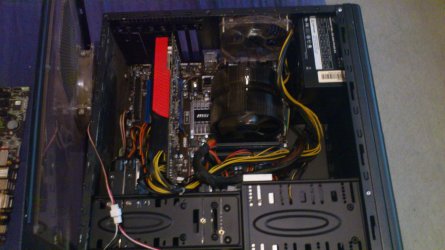
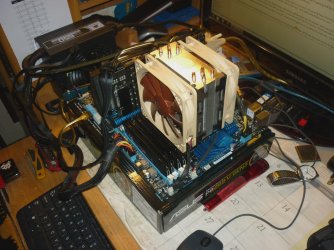
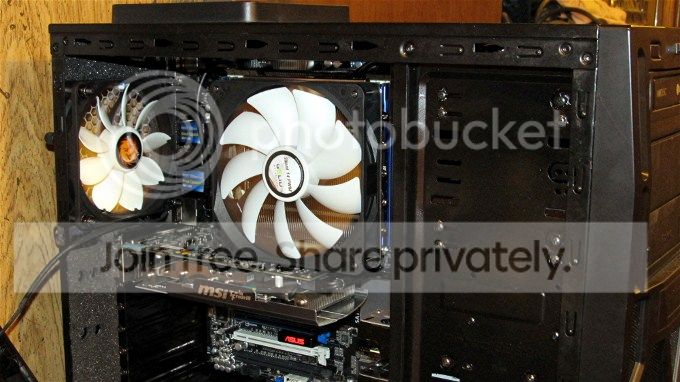
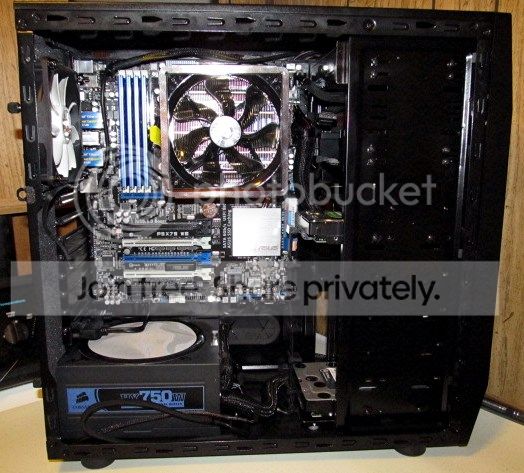
Show Us Your Rig [4]

Status
Not open for further replies.
Just added the Gigabyte Osmium to my rig.

Loving the mechanical switches. First experience with them and they do not disappoint. I would have preferred MX Blue as opposed to Red, but whose to say I won't pick up an additional keyboard soon? ;)
What is it?
 

My Computer My Computer

Computer type
PC/Desktop
Computer Manufacturer/Model Number
Home Built Desktop By DataTech
OS
Windows 7 Ultimate X64 SP1
CPU
Intel i5-2550K, Differing ~4.4-4.8GHz No built in GPU
Motherboard
ASUS P8Z68-V PRO/GEN3
Memory
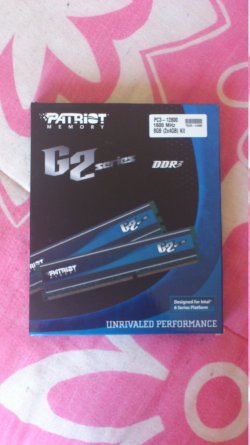
16GB G.Skill Sniper 1866MHz @ 2133MHz 2x8GB
Graphics Card(s)
ASUS GTX650TIB-DC2OC-2GD5, (650TI Boost)
Sound Card
Onboard Realtek 5-1
Monitor(s) Displays
Samsung P2570HD
Screen Resolution
1920x1080
Hard Drives
Samsung 840 Pro 256GB SSD for OS, 500GB Seagate Constellation (Enterprise drive) for Data
PSU
Corsair HX650W
Case
Inwin Dragon Rider
Cooling
Hyper 212 EVO w/two Noctua fans, push-pull, @1300 RPM
Keyboard
E-Z Eyes, bright yellow keys with large characters
Mouse
steelseries SENSEI Laser Pro Gaming
Internet Speed
48-51Mbs Mbs down, 11 Mbs up Xfinity Cable
Antivirus
Norton Internet Security 2013
Browser
IE 10, Opera, Pale Moon if needed
Other Info
4 case fans, LG BluRay-RE, ASUS DVD-RW, Mr. Fusion power supply, 1.21 gigawatts.
Yay! Got my upgrade... What a nightmare getting it to work though. Lol. The smallest and simplest of things can be a real pain in an inappropriate place..

Anyway, as promised.. Pictures attached below.
picture.php


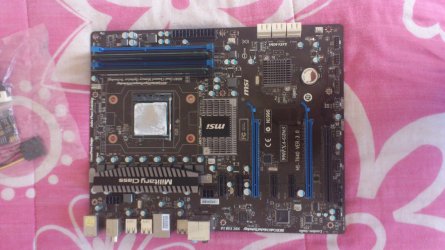
I'm thoroughly impressed with my 'new' (to me anyway) motherboard, a sexy MSI 990FXA-GD65 v3.0. Pretty sweet stats on this board too. Like 8x USB2, 2x USB3, 6x SATA3 (with no SATA2), dual PCI-e 16x (that don't drop to 8x with SLI or CrossFire), and I think it also supports all the x4 and x6 AMD chips too....
picture.php


The board didn't have the CPU heatsink mounting bracket attached when it arrived and I couldn't find any screws that would fit it, so I ended up steal the mounting bracket backplate and screws from my old XFX 750a board. Then when I finally got everything connected, I installed it in my case.

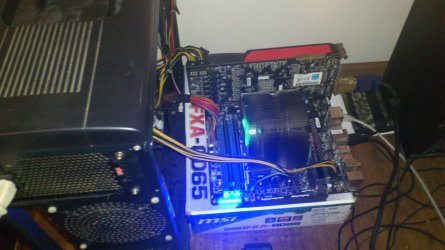
Well, let's just say I could've saved myself a lot of sore fingertips and foul language by testing it open on my desk first.... It simply wouldn't boot. Motherboard lights came on and the heatsink fan started spinning, but no POST, no BIOS, no beeps, no video output, just nothing. After removing it all from my case again, and setting up a makeshift testbed, I resorted to swapping out the CPU for my older x3 710.

Now here's the funny part... When I picked up my Zalman heatsink, the x4 975BE came out with it.
picture.php
It looked like it was in properly and it didn't fall out while I was fighting with the heatsink backplate (which went on for about 4 hours), so it was the last thing I thought of checking!

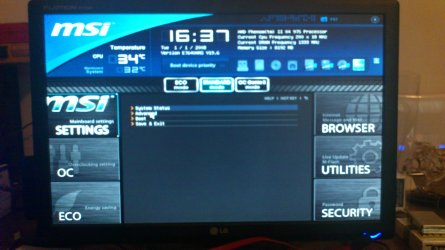
Anyway, I sat pulling wire for about 2 hours to get all the cables where they were happy without being in the way of anything else... And now I have a new PC. I must say though, I love the sideways facing SATA connectors, all my drive cables are hidden nicely with a small loop to the right of my drive bay, completely out of sight... I'll post benchmarks and stuff when I get back into Windows, I'm still in Linux downloading drivers at the moment.

 

Attachments

  • 2013-03-15 17.19.33.jpg
    2013-03-15 17.19.33.jpg
    496.5 KB · Views: 15
  • 2013-03-15 17.20.15.jpg
    2013-03-15 17.20.15.jpg
    329.1 KB · Views: 8
  • 2013-03-16 16.37.13.jpg
    2013-03-16 16.37.13.jpg
    583.4 KB · Views: 13
  • 2013-03-16 16.37.35.jpg
    2013-03-16 16.37.35.jpg
    497 KB · Views: 15
  • 2013-03-16 17.13.28.jpg
    2013-03-16 17.13.28.jpg
    512.5 KB · Views: 16

My Computer My Computer

Computer type
PC/Desktop
OS
Win 10 x64 Pro x64 / Ubuntu 15.10 x64
CPU
Intel i7-4960X
Motherboard
Asus Rampage IV Black Edition
Memory
4x8GB Corsair Dominator Platinum @2400MHz 10-12-12-31
Graphics Card(s)
2x MSI GTX780Ti 3GB (SLI)
Sound Card
Onboard SupremeFX (Cirrus Logic CS4398)
Monitor(s) Displays
3x LG Cinema 27" IPS LED (27MP65)
Screen Resolution
[1920x1080]x3
Hard Drives
Crucial M500 120GB, Crucial M500 480GB, Toshiba DT01ACA200 2TB
PSU
CoolerMaster V1000
Case
Corsair Obsidian 750D
Cooling
ThermalTake Water 3.0 Extreme, 4xSP120, 3xAF120
Keyboard
Moshi Luna
Mouse
Logitech G700s / Roccat Tyon
Internet Speed
4Mb uncapped ADSL (Afrihost)
Antivirus
MS Security Essentials
Browser
Chrome... Duh. (:
It looks real good, ZaLiTH. I know you'll be pleased with it. These things can make you pull your hair out and kick things across the room can't they? They can also make you say some words you don't normally say. But, that's the fun of it, right?
 

My Computers My Computers

System One System Two

  • Computer type
    PC/Desktop
    Computer Manufacturer/Model Number
    ALWAYS UNDER CONSTRUCTION
    OS
    Windows 11 Pro
    CPU
    Ryzen 9 5900X
    Motherboard
    Asus X570 Crosshair Viii Hero
    Memory
    32GB G Skill DDR4-3600
    Graphics Card(s)
    EVGA RTX 3080 FTW 3 Ultra
    Sound Card
    On Board/Sennheiser PC37X Headset
    Monitor(s) Displays
    3 X Asus 27"
    Screen Resolution
    2560x1440
    Hard Drives
    2 X 1 TB NVME drives
    PSU
    EVGA 850
    Case
    Phanteks Eclipse P400A
    Cooling
    EVGA 280 AIO
    Keyboard
    Logitech G510s/ Logitech G13
    Mouse
    Logitech G502
    Internet Speed
    24/1
    Antivirus
    ESET/MBAM Pro/SAS Pro
    Browser
    Chrome/ Firefox/ Edge
  • Computer type
    Laptop
    System Manufacturer/Model Number
    Dell 16 Plus
    OS
    Windows 11 Pro
    CPU
    Intel Ultra 9 288V
    Memory
    32 GB LPDDR5X 8533
    Monitor(s) Displays
    16" Mini-LED HDR600 Touch 90 Hz
    Screen Resolution
    2560X1600
    Hard Drives
    1 TB NVME
It looks real good, ZaLiTH. I know you'll be pleased with it. These things can make you pull your hair out and kick things across the room can't they? They can also make you say some words you don't normally say. But, that's the fun of it, right?

Ah yes, most definitely.. Followed by the thrill of booting up a new PC and running every benchmark app one can find in their installs folder.
picture.php
 

My Computer My Computer

Computer type
PC/Desktop
OS
Win 10 x64 Pro x64 / Ubuntu 15.10 x64
CPU
Intel i7-4960X
Motherboard
Asus Rampage IV Black Edition
Memory
4x8GB Corsair Dominator Platinum @2400MHz 10-12-12-31
Graphics Card(s)
2x MSI GTX780Ti 3GB (SLI)
Sound Card
Onboard SupremeFX (Cirrus Logic CS4398)
Monitor(s) Displays
3x LG Cinema 27" IPS LED (27MP65)
Screen Resolution
[1920x1080]x3
Hard Drives
Crucial M500 120GB, Crucial M500 480GB, Toshiba DT01ACA200 2TB
PSU
CoolerMaster V1000
Case
Corsair Obsidian 750D
Cooling
ThermalTake Water 3.0 Extreme, 4xSP120, 3xAF120
Keyboard
Moshi Luna
Mouse
Logitech G700s / Roccat Tyon
Internet Speed
4Mb uncapped ADSL (Afrihost)
Antivirus
MS Security Essentials
Browser
Chrome... Duh. (:
Just added the Gigabyte Osmium to my rig.

Loving the mechanical switches. First experience with them and they do not disappoint. I would have preferred MX Blue as opposed to Red, but whose to say I won't pick up an additional keyboard soon? ;)
What is it?

It's a mechanical keyboard. Most who have used them will never go back to a regular membrane keyboard. Mechanical keyboards are sold based mainly on what type of "switches" the keys have under the keycaps. The switches are what actuates the keystroke. The most common are Cherry MX Blue, Black, Red, and Brown.

I personally went with a keyboard with Cherry MX Brown switches, and I liked it immediately. It was pretty spendy, but for how well they work, the features and how long they last, it was worth it!.
 

My Computer My Computer

Computer type
PC/Desktop
Computer Manufacturer/Model Number
Custom Built
OS
Windows 7 Professional 64bit SP1
CPU
Intel Core i5-3570K @ 4.5GHz
Motherboard
Asus Sabertooth Z77
Memory
Corsair Vengeance 16GB (4x4) @1866MHz CL 9-9-9-24 1T
Graphics Card(s)
EVGA GTX 750 Ti FTW
Sound Card
Onboard Audio
Monitor(s) Displays
Dell S2309W
Screen Resolution
1920x1080
Hard Drives
Samsung 830 128GB SSD - OS
(4) Seagate 5TB HDD
(1) Seagate 2TB HDD
PSU
Seasonic X750 80+ Gold Full Modular
Case
Antec Eleven Hundred Super Mid Tower
Cooling
Intel Liquid Cooler
Keyboard
Max Nighthawk X8 Mechanical keyboard
Mouse
Mionix Naos 7000
Internet Speed
50 Mbps Down / 10 Mbps Up
Antivirus
Microsoft Security Essentials/Malwarebytes Anti-Malware
Browser
Chrome/Firefox
Other Info
Klipsch ProMedia 2.1's
Asus RT-N66R Wireless Router
...@ Lady Fitzgerald, I really dread turning my pc on after iv'e been adding hardware as i'm always convinced something will go wrong lol. Touch wood though nothing ever has yet. As others say though it gets easier the more you do :)

Well, my fears just intensified. I got my LSI 9211-8i yesterday, read the directions on how to install the driver and knew even less than I knew before I got the thing. From what I'm reading, I have to install the driver as part of the Windows 7 installation process. :what: I do NOT want to have to do that again (especially dealing with the M$ updates again) so I fired off an email to LSI asking if that was necessary and, if not, how to install the stupid driver. Until I hear back (they said it takes up to 48 hours for a response and I don't know if that means 48 any day hours or 48 business day hours), I'm dead in the water since I don't want to load and configure any more programs (I have only security related programs installed right now) if I'm going to have to do it all over again.

I am going to change out the fan on the CPU cooler today. Changing out the fan can be easily done without removing the cooler (thank God!; the only way to remove the cooler is to remove the MOBO and that would take a few hours to R&R since so much stuff is in the way and would have to come out first). However, the graphics card has to come out (again!) for me to be able to get to (or even see) the CPU fan header so I'm going to have to lug the boat...er...ship anchor back to the washing machine so I can see what I'm doing without killing my back (if I don't kill it lugging the ship...er...battleship anchor around).
 

My Computer My Computer

Computer type
PC/Desktop
Computer Manufacturer/Model Number
Custom Build
OS
Win 7 Ultimate 64 bit
CPU
Intel i7-3930K
Motherboard
ASUS P9X79 WS
Memory
Kingston HyperX Genesis 32GB Kit (8x4GB Modules) 1600MHz DDR
Graphics Card(s)
MSI R7850 Twin Frozr 2GD5/OC Radeon HD 7850 2GB 256-bit GDDR
Sound Card
Asus Xonar Essence STX
Monitor(s) Displays
3x Asus VG248QE 24", Vizio 32" TV
Screen Resolution
1920 x 1080, ?
Hard Drives
Samsung 128GB 840 Pro SSD (1),
Samsung 4TB 850 EVO SSDs (4)
Samsung 4TB 850 EVO SSDs (16) external backup drives used in 2.5" hot swap bays in the computer.
PSU
Corsair HX750w
Case
Antec Two Hundred v2 (modified)
Cooling
Cooler Master GeminII S524 120mm (fan replaced with a 140mm)
Keyboard
Logitech G510s
Mouse
Logitech M525 (two in use)
Internet Speed
=< 32Mbps down, 8Mbps up
Antivirus
AVAST!, MBAM, SAS, Spybot S&D (all but MBAM free) Glary Util
Browser
IE11
Other Info
LSI 9211-8i HBA card (8 SATA III ports), 2.5" & 3.5" Hot Swap Bays, HooToo HT-CR001 PCI-E to USB 3.0 Internal Hub + 6 Slot Card Reader, and LG Model CH12LS28 BD-ROM Optical Drive. Also, ScanSnap S1500 ADF duplexing scanner, Canon 9000F flat bed scanner, Corsair SP2500 2.1 speakers, Samsung CLP 415nw laser color printer, Cyberpower PP2200SW UPS
Thanks for the info Kelly, Osmium sounded like a medication of some sort. :p

Andre your system looks good. Steve and I have learned the hard way to always set up a new system and test it before putting the board in the case, it's easier to slap on a lot of cables too.


23 testing.jpg
 

My Computer My Computer

Computer type
PC/Desktop
Computer Manufacturer/Model Number
Home Built Desktop By DataTech
OS
Windows 7 Ultimate X64 SP1
CPU
Intel i5-2550K, Differing ~4.4-4.8GHz No built in GPU
Motherboard
ASUS P8Z68-V PRO/GEN3
Memory
16GB G.Skill Sniper 1866MHz @ 2133MHz 2x8GB
Graphics Card(s)
ASUS GTX650TIB-DC2OC-2GD5, (650TI Boost)
Sound Card
Onboard Realtek 5-1
Monitor(s) Displays
Samsung P2570HD
Screen Resolution
1920x1080
Hard Drives
Samsung 840 Pro 256GB SSD for OS, 500GB Seagate Constellation (Enterprise drive) for Data
PSU
Corsair HX650W
Case
Inwin Dragon Rider
Cooling
Hyper 212 EVO w/two Noctua fans, push-pull, @1300 RPM
Keyboard
E-Z Eyes, bright yellow keys with large characters
Mouse
steelseries SENSEI Laser Pro Gaming
Internet Speed
48-51Mbs Mbs down, 11 Mbs up Xfinity Cable
Antivirus
Norton Internet Security 2013
Browser
IE 10, Opera, Pale Moon if needed
Other Info
4 case fans, LG BluRay-RE, ASUS DVD-RW, Mr. Fusion power supply, 1.21 gigawatts.
Changing out the fan can be easily done without removing the cooler (thank God!; the only way to remove the cooler is to remove the MOBO and that would take a few hours to R&R since so much stuff is in the way and would have to come out first).
And of course all the cable management getting every back in where it belongs afterwards. Lol. I've spent a good few hours on that today...

...so I'm going to have to lug the boat...er...ship anchor back to the washing machine so I can see what I'm doing without killing my back (if I don't kill it lugging the ship...er...battleship anchor around).
It's amazing how much weight all the little extras add hey..? Between GPUs, nice big CPU coolers and HDDs, suddenly a PC case becomes a hefty box to move around.
 

My Computer My Computer

Computer type
PC/Desktop
OS
Win 10 x64 Pro x64 / Ubuntu 15.10 x64
CPU
Intel i7-4960X
Motherboard
Asus Rampage IV Black Edition
Memory
4x8GB Corsair Dominator Platinum @2400MHz 10-12-12-31
Graphics Card(s)
2x MSI GTX780Ti 3GB (SLI)
Sound Card
Onboard SupremeFX (Cirrus Logic CS4398)
Monitor(s) Displays
3x LG Cinema 27" IPS LED (27MP65)
Screen Resolution
[1920x1080]x3
Hard Drives
Crucial M500 120GB, Crucial M500 480GB, Toshiba DT01ACA200 2TB
PSU
CoolerMaster V1000
Case
Corsair Obsidian 750D
Cooling
ThermalTake Water 3.0 Extreme, 4xSP120, 3xAF120
Keyboard
Moshi Luna
Mouse
Logitech G700s / Roccat Tyon
Internet Speed
4Mb uncapped ADSL (Afrihost)
Antivirus
MS Security Essentials
Browser
Chrome... Duh. (:
Andre your system looks good. Steve and I have learned the hard way to always set up a new system and test it before putting the board in the case, it's easier to slap on a lot of cables too.

Too true, think I've learned my lesson now though.. I didn't have nearly as much stuff in my case when I originally got my XFX board, so I haven't actually worked on building or rebuilding any PC in ages. I'm somewhat out of practice. Looks like you've got a nice little test bed layout there, my desk hardly ever has enough space to do things like that properly (and I was too lazy to remove my PSU, so I just plonked it next to my board today when I did that).

I'll be redoing all this again pretty soon, I made a plan for a Corsair Graphite 600T the other day, which I'll be getting at month end. At least I'll have a ton more space in the case to play with though.
picture.php
 

My Computer My Computer

Computer type
PC/Desktop
OS
Win 10 x64 Pro x64 / Ubuntu 15.10 x64
CPU
Intel i7-4960X
Motherboard
Asus Rampage IV Black Edition
Memory
4x8GB Corsair Dominator Platinum @2400MHz 10-12-12-31
Graphics Card(s)
2x MSI GTX780Ti 3GB (SLI)
Sound Card
Onboard SupremeFX (Cirrus Logic CS4398)
Monitor(s) Displays
3x LG Cinema 27" IPS LED (27MP65)
Screen Resolution
[1920x1080]x3
Hard Drives
Crucial M500 120GB, Crucial M500 480GB, Toshiba DT01ACA200 2TB
PSU
CoolerMaster V1000
Case
Corsair Obsidian 750D
Cooling
ThermalTake Water 3.0 Extreme, 4xSP120, 3xAF120
Keyboard
Moshi Luna
Mouse
Logitech G700s / Roccat Tyon
Internet Speed
4Mb uncapped ADSL (Afrihost)
Antivirus
MS Security Essentials
Browser
Chrome... Duh. (:

My Computer My Computer

Computer type
PC/Desktop
Computer Manufacturer/Model Number
Custom
OS
Windows 10 Technical Preview - x64
CPU
Core i5-3570K - 4.5GHz
Motherboard
ASUS Sabertooth Z77 [B. 2003]
Memory
G.Skill Sniper 12GB DDR3-1600
Graphics Card(s)
ASUS GeForce GTX 970 STRIX
Monitor(s) Displays
Acer K272HUL
Screen Resolution
2560x1440
Hard Drives
Samsung 840 Evo 250GB (OS), Samsung Spinpoint F3 HD103SJ 1TB (Games), Seagate Expansion 1TB (Additional storage, Backup)
PSU
Cooler Master Real Power Pro 750W, Corsair HX1000W
Case
HAF-X
Cooling
XSPC Rasa RS360
Keyboard
Gigabyte Osmium, Noppoo Choc Mid 87, Corsair K70 RGB
Mouse
Roccat Kova
Internet Speed
50 Mbps up, 50 Mbps down
Antivirus
BitDefender TS 2013, Malwarebytes AM, SUPERAntiSpyware
Browser
Google Chrome
Other Info
Razer Vespula Gaming Pad, Razer eXactMat, Blackmagic Intensity Pro, Corsair Vengeance 1500 USB Headset, Google/ASUS Nexus 7
Gratz Zalith, looks awesome
 

My Computer My Computer

Computer type
PC/Desktop
Computer Manufacturer/Model Number
Custom built
OS
64bit Windows 10
CPU
Intel i9
Motherboard
MSI X299 Carbon pro
Memory
64g-8x8gig DDR4 3600
Graphics Card(s)
Asus ROg Strix 1080ti
Monitor(s) Displays
Samsung 49" Odyssey g9
Screen Resolution
5210x1440
Hard Drives
1 x 512GB m.2 OS Drive
2 x 512gb ssd
1 x 2tb

4x 1TB's
PSU
Corsair AX1200w
Case
Silverstone TJ11 B-W
Cooling
AIC
Keyboard
Asus Rog Claymore 2
Mouse
Asus Rog Apatha
Internet Speed
1gb Fibre
Andre,
Great job on the new mobo. The rig looks wicked !
 

My Computer My Computer

Computer type
PC/Desktop
Computer Manufacturer/Model Number
A blend of brains, brawn and dumb luck.
OS
Windows 7 Ultimate 64
CPU
i7 3770k OC'd 4.6 @ 1.17v, also FX 8120 & i5 miniITX
Motherboard
MSI P67A-GD80 b3
Memory
32 gb G.Skill Sniper DDR3 10-12-12-31 @ 2133
Graphics Card(s)
XFX Radeon 7870 2GB DDR5
Sound Card
Sound Blaster Z Series Card
Monitor(s) Displays
(2) LG LED 23" 1920 x 1080 2ms Monitors via mini d-port
Screen Resolution
1680 X 1050 p
Hard Drives
Samsung 256 gb 830 SSD sata III
(1) 1 tb WD Black
(2) 1 tb Hitachi deskmates/sata II
(2) 1 tb WD green/sata II
(2) 3 tb Seagate Barracuda
(1) 120 gb OCZ Vertex SS
(1) Drobo 5N w/5 Seagate 3tb
PSU
EVGA modular 1000G2 80% gold rating & APC 1200 RS
Case
CoolerMaster Storm Styker
Cooling
7 case fans 140mm & 120mm, NZXT Kraken X60
Keyboard
(2) Logitech Illuminated Keyboards (1) usb (1) wireless
Mouse
Logitech G700 & T-BC21 - nano nx for the laptop
Internet Speed
Basic 120mbps down
Antivirus
Trend Micro Titanium Max Security & Malwarebytes Premium
Browser
Chrome and IE 10
Other Info
5 Noctua case fans + 3 Noctua in p/p on NZXT cooler
Integrated hot swap drive bays for 2.5" Drives
(2) Lite-on dvd/cd/Blu Ray optical 22X
Integrated fan controller and led on/off
HP Officejet Pro 8630 all-n-one
Hot-swappable 3.5" hard drive bay
Netgear Nighthawk router
Asus USB 3 & sata 6 PCIe card
Vantec IDE to sata adptr./Ultra sata adptr
Lenovo L420 i5 lappy with m sata
Drobo 5N advanced NAS
Lady Fitzgerald,
How's the raid card driver issue going. I'm wondering are you using this for the additional sata ports like I do or are you setting up a raid array?
It makes sense that the driver needs to be installed first to set the raid before the OS install but if you're just using it for the ports maybe you can load it after and be fine?
 

My Computer My Computer

Computer type
PC/Desktop
Computer Manufacturer/Model Number
A blend of brains, brawn and dumb luck.
OS
Windows 7 Ultimate 64
CPU
i7 3770k OC'd 4.6 @ 1.17v, also FX 8120 & i5 miniITX
Motherboard
MSI P67A-GD80 b3
Memory
32 gb G.Skill Sniper DDR3 10-12-12-31 @ 2133
Graphics Card(s)
XFX Radeon 7870 2GB DDR5
Sound Card
Sound Blaster Z Series Card
Monitor(s) Displays
(2) LG LED 23" 1920 x 1080 2ms Monitors via mini d-port
Screen Resolution
1680 X 1050 p
Hard Drives
Samsung 256 gb 830 SSD sata III
(1) 1 tb WD Black
(2) 1 tb Hitachi deskmates/sata II
(2) 1 tb WD green/sata II
(2) 3 tb Seagate Barracuda
(1) 120 gb OCZ Vertex SS
(1) Drobo 5N w/5 Seagate 3tb
PSU
EVGA modular 1000G2 80% gold rating & APC 1200 RS
Case
CoolerMaster Storm Styker
Cooling
7 case fans 140mm & 120mm, NZXT Kraken X60
Keyboard
(2) Logitech Illuminated Keyboards (1) usb (1) wireless
Mouse
Logitech G700 & T-BC21 - nano nx for the laptop
Internet Speed
Basic 120mbps down
Antivirus
Trend Micro Titanium Max Security & Malwarebytes Premium
Browser
Chrome and IE 10
Other Info
5 Noctua case fans + 3 Noctua in p/p on NZXT cooler
Integrated hot swap drive bays for 2.5" Drives
(2) Lite-on dvd/cd/Blu Ray optical 22X
Integrated fan controller and led on/off
HP Officejet Pro 8630 all-n-one
Hot-swappable 3.5" hard drive bay
Netgear Nighthawk router
Asus USB 3 & sata 6 PCIe card
Vantec IDE to sata adptr./Ultra sata adptr
Lenovo L420 i5 lappy with m sata
Drobo 5N advanced NAS
Thanks you guys, it's running beautifully at the moment hey.. Been testing out a few of my favourite games this evening and they're pretty much all running that little bit smoother now. :D
 

My Computer My Computer

Computer type
PC/Desktop
OS
Win 10 x64 Pro x64 / Ubuntu 15.10 x64
CPU
Intel i7-4960X
Motherboard
Asus Rampage IV Black Edition
Memory
4x8GB Corsair Dominator Platinum @2400MHz 10-12-12-31
Graphics Card(s)
2x MSI GTX780Ti 3GB (SLI)
Sound Card
Onboard SupremeFX (Cirrus Logic CS4398)
Monitor(s) Displays
3x LG Cinema 27" IPS LED (27MP65)
Screen Resolution
[1920x1080]x3
Hard Drives
Crucial M500 120GB, Crucial M500 480GB, Toshiba DT01ACA200 2TB
PSU
CoolerMaster V1000
Case
Corsair Obsidian 750D
Cooling
ThermalTake Water 3.0 Extreme, 4xSP120, 3xAF120
Keyboard
Moshi Luna
Mouse
Logitech G700s / Roccat Tyon
Internet Speed
4Mb uncapped ADSL (Afrihost)
Antivirus
MS Security Essentials
Browser
Chrome... Duh. (:
Changing out the fan can be easily done without removing the cooler (thank God!; the only way to remove the cooler is to remove the MOBO and that would take a few hours to R&R since so much stuff is in the way and would have to come out first).
And of course all the cable management getting every back in where it belongs afterwards. Lol. I've spent a good few hours on that today...

...so I'm going to have to lug the boat...er...ship anchor back to the washing machine so I can see what I'm doing without killing my back (if I don't kill it lugging the ship...er...battleship anchor around).
It's amazing how much weight all the little extras add hey..? Between GPUs, nice big CPU coolers and HDDs, suddenly a PC case becomes a hefty box to move around.

Well I've got that ugly 120mm CPU fan swapped out with this 140mm fan:

fn-px14-12_01.gif


This is how it looks installed (btw, if you look closely, you can see the fans are actually running):

IMG_0100_zps015349d5.jpg


That is one heck of an aesthetic improvement over what was in there:

IMG_0007-2_zpsc7ee854c.jpg


The old fan's frame and impeller were made with cheap looking plastic and the impeller color didn't match my case fans (there I go being anal again). That nickel plated steel surrounding the fan just flat looked tacky and out of place (the fifties called and wanted their chrome back?).

Except for the CPU fan itself, cable management wasn't an issue. The only other cable involved was the PCIe cable going to the GPU card. I've had that card in and out of the case so many times, I can almost snap my fingers and it will jump in and out by itself.

The fan cable was a bit of a pain, though. It was insanely long (16"-18" or so; I didn't bother to measure it since I was too busy being mad at it). I had to fold it back on itself a couple of times, check to see how it fit in the case, then try again several times until I finally got it right, then use twist ties to secure it in the folded shape. Cutting the cable and crimping on new pins (I think I still have some knocking about) would have been easier but the fan has a five year warranty and, being the cheap, old bi...broad I am, I didn't want to blow it. The bundle hides under the CPU cooler and above the GPU card and can't be seen.

I did this swap purely for asethetic purposes but it turns out the new fan is no louder than the old one even though it running around 20-25 rpm faster (the old fan liked to hover at 666 rpm; mayhap that was the cause of some of my problems?). It also is cooling the CPU better by about 2-4°C. With an ambient of 27°C, it's been idling at 35-37°C for the past two hours. Keep in mind I'm still running the rig without the case sides installed since I don't have the fan power hub buttoned down because I still need to install the LSI card. I would have been happy for the same amount of cooling and would have accepted a bit more fan noise so I'm ecstatic! Doing happy dance. :dinesh:
 
Last edited:

My Computer My Computer

Computer type
PC/Desktop
Computer Manufacturer/Model Number
Custom Build
OS
Win 7 Ultimate 64 bit
CPU
Intel i7-3930K
Motherboard
ASUS P9X79 WS
Memory
Kingston HyperX Genesis 32GB Kit (8x4GB Modules) 1600MHz DDR
Graphics Card(s)
MSI R7850 Twin Frozr 2GD5/OC Radeon HD 7850 2GB 256-bit GDDR
Sound Card
Asus Xonar Essence STX
Monitor(s) Displays
3x Asus VG248QE 24", Vizio 32" TV
Screen Resolution
1920 x 1080, ?
Hard Drives
Samsung 128GB 840 Pro SSD (1),
Samsung 4TB 850 EVO SSDs (4)
Samsung 4TB 850 EVO SSDs (16) external backup drives used in 2.5" hot swap bays in the computer.
PSU
Corsair HX750w
Case
Antec Two Hundred v2 (modified)
Cooling
Cooler Master GeminII S524 120mm (fan replaced with a 140mm)
Keyboard
Logitech G510s
Mouse
Logitech M525 (two in use)
Internet Speed
=< 32Mbps down, 8Mbps up
Antivirus
AVAST!, MBAM, SAS, Spybot S&D (all but MBAM free) Glary Util
Browser
IE11
Other Info
LSI 9211-8i HBA card (8 SATA III ports), 2.5" & 3.5" Hot Swap Bays, HooToo HT-CR001 PCI-E to USB 3.0 Internal Hub + 6 Slot Card Reader, and LG Model CH12LS28 BD-ROM Optical Drive. Also, ScanSnap S1500 ADF duplexing scanner, Canon 9000F flat bed scanner, Corsair SP2500 2.1 speakers, Samsung CLP 415nw laser color printer, Cyberpower PP2200SW UPS
Lady Fitzgerald,
How's the raid card driver issue going. I'm wondering are you using this for the additional sata ports like I do or are you setting up a raid array?
It makes sense that the driver needs to be installed first to set the raid before the OS install but if you're just using it for the ports maybe you can load it after and be fine?

I still haven't heard back from LSI yet and probably won't for a day or two. I'm debating on whether to start moving (and reorganizing) data to the data drives or not since if I have to do an OS reinstall, I might not be able to relink the document folders on the DATA DISK 1 drive (my name for it) to the user folder on the boot drive and would have to move the data again (although it would be simpler and faster since since it would already be reorganized, consolidated, etc.; I could just set it to copy from folder to folder, then walk away from it for a while). I'm definitely holding off on installing and configuring any more programs (I've got a bunch of them) until the LSI issue is resolved. In the meantime, hurry up and wait?

I'm just going to to use it (I hope) for additional SATA ports and no RAID on the card itself. Besides needing five ports for HDDS, I need a couple for e-SATA ports and two more for the two hotswap bays. I'm praying the card is hot swappable; otherwise, I'll be making some changes in layout (and eliminate one e-SATA port and, possibly, two USB ports). If I ever run anything in RAID, it would two SSDs in RAID 0 off the Intel ports on the MOBO; the existing SSD would then be used to cache DATA DISK 1, using the two Marvell ports on the MOBO.
 

My Computer My Computer

Computer type
PC/Desktop
Computer Manufacturer/Model Number
Custom Build
OS
Win 7 Ultimate 64 bit
CPU
Intel i7-3930K
Motherboard
ASUS P9X79 WS
Memory
Kingston HyperX Genesis 32GB Kit (8x4GB Modules) 1600MHz DDR
Graphics Card(s)
MSI R7850 Twin Frozr 2GD5/OC Radeon HD 7850 2GB 256-bit GDDR
Sound Card
Asus Xonar Essence STX
Monitor(s) Displays
3x Asus VG248QE 24", Vizio 32" TV
Screen Resolution
1920 x 1080, ?
Hard Drives
Samsung 128GB 840 Pro SSD (1),
Samsung 4TB 850 EVO SSDs (4)
Samsung 4TB 850 EVO SSDs (16) external backup drives used in 2.5" hot swap bays in the computer.
PSU
Corsair HX750w
Case
Antec Two Hundred v2 (modified)
Cooling
Cooler Master GeminII S524 120mm (fan replaced with a 140mm)
Keyboard
Logitech G510s
Mouse
Logitech M525 (two in use)
Internet Speed
=< 32Mbps down, 8Mbps up
Antivirus
AVAST!, MBAM, SAS, Spybot S&D (all but MBAM free) Glary Util
Browser
IE11
Other Info
LSI 9211-8i HBA card (8 SATA III ports), 2.5" & 3.5" Hot Swap Bays, HooToo HT-CR001 PCI-E to USB 3.0 Internal Hub + 6 Slot Card Reader, and LG Model CH12LS28 BD-ROM Optical Drive. Also, ScanSnap S1500 ADF duplexing scanner, Canon 9000F flat bed scanner, Corsair SP2500 2.1 speakers, Samsung CLP 415nw laser color printer, Cyberpower PP2200SW UPS
Congrats Dre :thumbsup:

Looks good Lady F :thumbsup:

A Guy
 

My Computer My Computer

Computer type
PC/Desktop
OS
Windows 10 Home x64
CPU
INTEL Core i5-750 Quad-Core 3.37GHz
Motherboard
ASUS P7P55D
Memory
HyperX Fury Black Series 8GB (2 x 4GB) 1866Mhz
Graphics Card(s)
EVGA GeForce GTX 750 Superclocked 1GB 128-Bit GDDR5
Monitor(s) Displays
LG 32MA68HY 32" IPS
Screen Resolution
1920 x 1080
Hard Drives
Samsung 840 Evo 120GB, SEAGATE 500GB Barracuda® 7200.12, SATA 3 Gb/s, 7200 RPM, 16MB cache
PSU
ANTEC TruePower New TP-550, 80 PLUS, 550W
Case
ANTEC Three Hundred Illusion
Cooling
COOLER MASTER Hyper 212 Plus, 4 x 120mm 1 x 140mm Noctua's
Internet Speed
85 + Mbps
Antivirus
Avast
Browser
Vivaldi
Thanks, Guy!
 

My Computer My Computer

Computer type
PC/Desktop
Computer Manufacturer/Model Number
Custom Build
OS
Win 7 Ultimate 64 bit
CPU
Intel i7-3930K
Motherboard
ASUS P9X79 WS
Memory
Kingston HyperX Genesis 32GB Kit (8x4GB Modules) 1600MHz DDR
Graphics Card(s)
MSI R7850 Twin Frozr 2GD5/OC Radeon HD 7850 2GB 256-bit GDDR
Sound Card
Asus Xonar Essence STX
Monitor(s) Displays
3x Asus VG248QE 24", Vizio 32" TV
Screen Resolution
1920 x 1080, ?
Hard Drives
Samsung 128GB 840 Pro SSD (1),
Samsung 4TB 850 EVO SSDs (4)
Samsung 4TB 850 EVO SSDs (16) external backup drives used in 2.5" hot swap bays in the computer.
PSU
Corsair HX750w
Case
Antec Two Hundred v2 (modified)
Cooling
Cooler Master GeminII S524 120mm (fan replaced with a 140mm)
Keyboard
Logitech G510s
Mouse
Logitech M525 (two in use)
Internet Speed
=< 32Mbps down, 8Mbps up
Antivirus
AVAST!, MBAM, SAS, Spybot S&D (all but MBAM free) Glary Util
Browser
IE11
Other Info
LSI 9211-8i HBA card (8 SATA III ports), 2.5" & 3.5" Hot Swap Bays, HooToo HT-CR001 PCI-E to USB 3.0 Internal Hub + 6 Slot Card Reader, and LG Model CH12LS28 BD-ROM Optical Drive. Also, ScanSnap S1500 ADF duplexing scanner, Canon 9000F flat bed scanner, Corsair SP2500 2.1 speakers, Samsung CLP 415nw laser color printer, Cyberpower PP2200SW UPS
Yay! Got my upgrade... What a nightmare getting it to work though. Lol. The smallest and simplest of things can be a real pain in an inappropriate place..

Anyway, as promised.. Pictures attached below.
picture.php


I'm thoroughly impressed with my 'new' (to me anyway) motherboard, a sexy MSI 990FXA-GD65 v3.0. Pretty sweet stats on this board too. Like 8x USB2, 2x USB3, 6x SATA3 (with no SATA2), dual PCI-e 16x (that don't drop to 8x with SLI or CrossFire), and I think it also supports all the x4 and x6 AMD chips too....
picture.php


The board didn't have the CPU heatsink mounting bracket attached when it arrived and I couldn't find any screws that would fit it, so I ended up steal the mounting bracket backplate and screws from my old XFX 750a board. Then when I finally got everything connected, I installed it in my case.

Well, let's just say I could've saved myself a lot of sore fingertips and foul language by testing it open on my desk first.... It simply wouldn't boot. Motherboard lights came on and the heatsink fan started spinning, but no POST, no BIOS, no beeps, no video output, just nothing. After removing it all from my case again, and setting up a makeshift testbed, I resorted to swapping out the CPU for my older x3 710.

Now here's the funny part... When I picked up my Zalman heatsink, the x4 975BE came out with it.
picture.php
It looked like it was in properly and it didn't fall out while I was fighting with the heatsink backplate (which went on for about 4 hours), so it was the last thing I thought of checking!

Anyway, I sat pulling wire for about 2 hours to get all the cables where they were happy without being in the way of anything else... And now I have a new PC. I must say though, I love the sideways facing SATA connectors, all my drive cables are hidden nicely with a small loop to the right of my drive bay, completely out of sight... I'll post benchmarks and stuff when I get back into Windows, I'm still in Linux downloading drivers at the moment.

Looking good. I like the looks of Zalman coolers but I couldn't find one that would work with my CPU and fit in my case. Sigh! At least the cooler I did get sends some air into the semi-dead zone of the 5.25" bays.

Good move benching it. It's so much simpler for first testing it. Beats working in the case, especially if the parts have to be pulled out because something didn't work.
 

My Computer My Computer

Computer type
PC/Desktop
Computer Manufacturer/Model Number
Custom Build
OS
Win 7 Ultimate 64 bit
CPU
Intel i7-3930K
Motherboard
ASUS P9X79 WS
Memory
Kingston HyperX Genesis 32GB Kit (8x4GB Modules) 1600MHz DDR
Graphics Card(s)
MSI R7850 Twin Frozr 2GD5/OC Radeon HD 7850 2GB 256-bit GDDR
Sound Card
Asus Xonar Essence STX
Monitor(s) Displays
3x Asus VG248QE 24", Vizio 32" TV
Screen Resolution
1920 x 1080, ?
Hard Drives
Samsung 128GB 840 Pro SSD (1),
Samsung 4TB 850 EVO SSDs (4)
Samsung 4TB 850 EVO SSDs (16) external backup drives used in 2.5" hot swap bays in the computer.
PSU
Corsair HX750w
Case
Antec Two Hundred v2 (modified)
Cooling
Cooler Master GeminII S524 120mm (fan replaced with a 140mm)
Keyboard
Logitech G510s
Mouse
Logitech M525 (two in use)
Internet Speed
=< 32Mbps down, 8Mbps up
Antivirus
AVAST!, MBAM, SAS, Spybot S&D (all but MBAM free) Glary Util
Browser
IE11
Other Info
LSI 9211-8i HBA card (8 SATA III ports), 2.5" & 3.5" Hot Swap Bays, HooToo HT-CR001 PCI-E to USB 3.0 Internal Hub + 6 Slot Card Reader, and LG Model CH12LS28 BD-ROM Optical Drive. Also, ScanSnap S1500 ADF duplexing scanner, Canon 9000F flat bed scanner, Corsair SP2500 2.1 speakers, Samsung CLP 415nw laser color printer, Cyberpower PP2200SW UPS
Just added the Gigabyte Osmium to my rig.

Loving the mechanical switches. First experience with them and they do not disappoint. I would have preferred MX Blue as opposed to Red, but whose to say I won't pick up an additional keyboard soon? ;)

Very nice addition! :cool:
Every gaming rigs deserves mek keys.
Enjoy!
Cheers,

J
 

My Computer My Computer

Computer type
PC/Desktop
Computer Manufacturer/Model Number
Custom built
OS
Windows 7 Ultimate x64 SP1
CPU
AMD FX 8320 4.8GHz, 1.475V
Motherboard
ASUS Crosshair V Formula-Z
Memory
4 x GSkill Ripjaws Z 4GB 1600 CL8
Graphics Card(s)
2 x ASUS HD7870 2GB DirectCu II
Sound Card
M-Audio Firewire 410
Monitor(s) Displays
2 x Samsung Syncmaster SA300
Screen Resolution
1600x900
Hard Drives
1 x Seagate Barracuda 2TB, 7200 rpm, 64 mb cache - Kingston HyperX 3K 120GB (OS) - Corsair FORCE Series 180GB (Games & Apps)
PSU
Corsair TX850M
Case
NZXT Switch 810
Cooling
Custom Water. XSPC Raystorm, Laing DDC 3.2T PWM, 360+120 rad
Keyboard
Corsair Vengeance 650
Mouse
Elephant Leviathan 3200 DPI
Internet Speed
Too slow
Status
Not open for further replies.
Back
Top