Acronis True Image 10. How does it Work?

1) Delete ALL partitions on the problem HDD...
Not an acceptable solution.
I know many who operate as I do with a separate Data partition.
They will be furious if they move to W7 and have this problem.

The only question right now ..
Is this only in my HP computer .. Will Acronis fix it ..
and what has Microsoft done to us now ??
 

My Computer My Computer

Computer Manufacturer/Model Number
HP d4996t (upgraded)
OS
XP MCE .... XP Pro 64 .... W7 U x64
CPU
E6750, 2.67GHz C2D
Memory
4GB, PC2 6400
Graphics Card(s)
GeForce 9400GT
Monitor(s) Displays
Twin Samsung 2443BWT
Screen Resolution
1920x1200
Hard Drives
Many .. 3 Installed
PSU
460W
Internet Speed
Cable
Not an acceptable solution.
I know many who operate as I do with a separate Data partition.
They will be furious if they move to W7 and have this problem.

The only question right now ..
Is this only in my HP computer .. Will Acronis fix it ..
and what has Microsoft done to us now ??

Well back to my original post to your problem.

1) Yes it seems peculiar to your HP computer.

2) No Acronis will not fix it because it is not an Acronis problem.

3) MS has provided us with one of the best desktop OSes ever made available.

You speak as if it were something that will have to be done every time you boot. This is a one time fix to a problem that seems unique to your installation.

In the amount of time you have been posting the issue you could have already fixed it six times over.
 

My Computer My Computer

OS
XP Pro & Vista Home Premium (x86); Windows Ultimate 7600 x64 Retail
1. If the Win 7 installer doesn't see any Active partitions already on the HD - it will split the partition you are installing w7 onto - creating the 100mb "System" partition.

To avoid that , partition the HD before installing w7 and mark the partition you are going to install w7 onto as Active.


2. If you already have a 100mb system partition and want to get rid of it :

In Disk Management, give it a drive letter.

In Folder options make sure Hidden files and protected o/s files are showing.

Copy and paste bootmgr and the pale yellow boot folder from 100mb partition onto the 7 partition. ( Skip copying bcd when it tells you it is in use - copy the rest).

Open an elevated cmd prompt and type ( assuming7 drive letter is C)

bcdedit /export C:\Boot\bcd

then press enter.

Mark 7 partition Active and reboot.

7 partition is now the system partition. Do what you like with the 100mb partition. I suggest merging it with a partition manager ( may take a while). You then have one slightly larger 7 partition.

Of course, the start sector is now different - so the bcd entry will not be right (unless your partition manager updates bcd for you). Run startup repair to correct the bcd entry.

Future imaging/restoring of the 7 partition should be fine.
 

My Computers My Computers

System One System Two

  • Computer type
    PC/Desktop
    OS
    7 X64
    CPU
    i5 8400
    Motherboard
    gigabyte b365m ds3h
    Memory
    2x8gb 3200mhz
    Hard Drives
    various
    PSU
    pure power 11 400w cm
    Case
    Coolermaster
    Cooling
    cryorig m9i
  • Computer type
    PC/Desktop
    OS
    7x64
    CPU
    g5400
    Motherboard
    ga b365m ds3h
    Memory
    8gb ddr4 2400
    PSU
    xfx pro 450w
Great info, thanks.
+ rep! :)
 

My Computer My Computer

Computer Manufacturer/Model Number
MasterB/Custom
OS
Windows 7 Professional x64
CPU
QuadCore AMD Phenom II X4 Black Edition 955 3.2 GHz
Motherboard
Asus M4A785TD-V Evo
Memory
8 GB Crucial DDR3
Graphics Card(s)
SAPPHIRE Radeon HD 4890 1GB HDMI New Edition
Sound Card
VIA VT1708S HD Audio 7.1 onboard/ ATI HDMI video card
Monitor(s) Displays
Acer H233H 23'' LCD HDMI
Screen Resolution
1920x1080
Hard Drives
1x 500GB and 1x 1TB 7200RPM 32MB Cache WD Caviar Black
PSU
CORSAIR CMPSU-620HX 620W
Case
COOLER MASTER Storm Scout SGC-2000
Cooling
2x 140mm and 1x 120mm case fans, Stock CPU fan
Keyboard
Logitech MX 3200
Mouse
Logitech MX 3200
Internet Speed
15 Mbps
Other Info
My first build!
I just added the bit about merging partitions to my previous post - so you may want to look at that. You don't have to do that - but it saves having a 100mb partition hanging around uselessly.
 

My Computers My Computers

System One System Two

  • Computer type
    PC/Desktop
    OS
    7 X64
    CPU
    i5 8400
    Motherboard
    gigabyte b365m ds3h
    Memory
    2x8gb 3200mhz
    Hard Drives
    various
    PSU
    pure power 11 400w cm
    Case
    Coolermaster
    Cooling
    cryorig m9i
  • Computer type
    PC/Desktop
    OS
    7x64
    CPU
    g5400
    Motherboard
    ga b365m ds3h
    Memory
    8gb ddr4 2400
    PSU
    xfx pro 450w
Many Thanks ... I'm trying a fresh install to an Active partition now.
Will mess with the other .. later
 

My Computer My Computer

Computer Manufacturer/Model Number
HP d4996t (upgraded)
OS
XP MCE .... XP Pro 64 .... W7 U x64
CPU
E6750, 2.67GHz C2D
Memory
4GB, PC2 6400
Graphics Card(s)
GeForce 9400GT
Monitor(s) Displays
Twin Samsung 2443BWT
Screen Resolution
1920x1200
Hard Drives
Many .. 3 Installed
PSU
460W
Internet Speed
Cable
1. If the Win 7 installer doesn't see any Active partitions already on the HD - it will split the partition you are installing w7 onto - creating the 100mb "System" partition.

To avoid that , partition the HD before installing w7 and mark the partition you are going to install w7 onto as Active.

Yes indeed, great info, the conditions that create the "System Reserved" partition.
 

My Computer My Computer

OS
XP Pro & Vista Home Premium (x86); Windows Ultimate 7600 x64 Retail
To expand that :

If there is another HD with an Active partition - earlier in the BIOS HD boot order, 7 will see that first, of course.

It will install the bootfiles on the first Active partition it comes across. The rest of it will install wherever you pointed it.

If there isn't an Active before ( and including ) the one you pointed it at - then it makes the 100mb one.

It is mainly to help those using bitlocker.

It can be a nuisance though.
 

My Computers My Computers

System One System Two

  • Computer type
    PC/Desktop
    OS
    7 X64
    CPU
    i5 8400
    Motherboard
    gigabyte b365m ds3h
    Memory
    2x8gb 3200mhz
    Hard Drives
    various
    PSU
    pure power 11 400w cm
    Case
    Coolermaster
    Cooling
    cryorig m9i
  • Computer type
    PC/Desktop
    OS
    7x64
    CPU
    g5400
    Motherboard
    ga b365m ds3h
    Memory
    8gb ddr4 2400
    PSU
    xfx pro 450w
You're right. On my laptop I had XP before and I did not get 100mb partition after installing W7.
On my wife's laptop without any other OS I got 100mb partition when I installed W7.
 

My Computer My Computer

Computer Manufacturer/Model Number
MasterB/Custom
OS
Windows 7 Professional x64
CPU
QuadCore AMD Phenom II X4 Black Edition 955 3.2 GHz
Motherboard
Asus M4A785TD-V Evo
Memory
8 GB Crucial DDR3
Graphics Card(s)
SAPPHIRE Radeon HD 4890 1GB HDMI New Edition
Sound Card
VIA VT1708S HD Audio 7.1 onboard/ ATI HDMI video card
Monitor(s) Displays
Acer H233H 23'' LCD HDMI
Screen Resolution
1920x1080
Hard Drives
1x 500GB and 1x 1TB 7200RPM 32MB Cache WD Caviar Black
PSU
CORSAIR CMPSU-620HX 620W
Case
COOLER MASTER Storm Scout SGC-2000
Cooling
2x 140mm and 1x 120mm case fans, Stock CPU fan
Keyboard
Logitech MX 3200
Mouse
Logitech MX 3200
Internet Speed
15 Mbps
Other Info
My first build!
To expand that :

If there is another HD with an Active partition - earlier in the BIOS HD boot order, 7 will see that first, of course.

It will install the bootfiles on the first Active partition it comes across. The rest of it will install wherever you pointed it.

If there isn't an Active before ( and including ) the one you pointed it at - then it makes the 100mb one.

It is mainly to help those using bitlocker.

It can be a nuisance though.

In the past I have ensured that each HDD gets it own bootloader by physically unplugging all drives but the one of concern and forcing a bootloader onto that drive's active partition.

Since I just received, literally 15 minutes ago, a shiny new Caviar Black 640GB from the UPS man I will give changing the HDD boot order in BIOs a try. Seems I had trouble with that in the past but my memory has faded with age. ;)
 

My Computer My Computer

OS
XP Pro & Vista Home Premium (x86); Windows Ultimate 7600 x64 Retail
During the 7 install, if you use Drive Options (advanced) , and delete the existing partitions - you will also remove the Active flag - you then get the 100mb again.


In that situation best to just click on the partition you want to install to , without deleting it first.
 

My Computers My Computers

System One System Two

  • Computer type
    PC/Desktop
    OS
    7 X64
    CPU
    i5 8400
    Motherboard
    gigabyte b365m ds3h
    Memory
    2x8gb 3200mhz
    Hard Drives
    various
    PSU
    pure power 11 400w cm
    Case
    Coolermaster
    Cooling
    cryorig m9i
  • Computer type
    PC/Desktop
    OS
    7x64
    CPU
    g5400
    Motherboard
    ga b365m ds3h
    Memory
    8gb ddr4 2400
    PSU
    xfx pro 450w
cool :thumbsup:
 

My Computer My Computer

Computer Manufacturer/Model Number
MasterB/Custom
OS
Windows 7 Professional x64
CPU
QuadCore AMD Phenom II X4 Black Edition 955 3.2 GHz
Motherboard
Asus M4A785TD-V Evo
Memory
8 GB Crucial DDR3
Graphics Card(s)
SAPPHIRE Radeon HD 4890 1GB HDMI New Edition
Sound Card
VIA VT1708S HD Audio 7.1 onboard/ ATI HDMI video card
Monitor(s) Displays
Acer H233H 23'' LCD HDMI
Screen Resolution
1920x1080
Hard Drives
1x 500GB and 1x 1TB 7200RPM 32MB Cache WD Caviar Black
PSU
CORSAIR CMPSU-620HX 620W
Case
COOLER MASTER Storm Scout SGC-2000
Cooling
2x 140mm and 1x 120mm case fans, Stock CPU fan
Keyboard
Logitech MX 3200
Mouse
Logitech MX 3200
Internet Speed
15 Mbps
Other Info
My first build!
I, almost always, create/size the primary partitions as a separate step from the install or restore operation. I am sure that is why I never saw the "System Reserved" partition being created.
 

My Computer My Computer

OS
XP Pro & Vista Home Premium (x86); Windows Ultimate 7600 x64 Retail
That's certainly why.

It doean't create a 100mb system if you already have an Active partition - in case you have an o/s already installed.


If you install 7 on your new HD with it first in the BIOS boot order , then ( if you have marked an Active partition on it first) , you will have the 7 boot files and o/s on the same partition .
 

My Computers My Computers

System One System Two

  • Computer type
    PC/Desktop
    OS
    7 X64
    CPU
    i5 8400
    Motherboard
    gigabyte b365m ds3h
    Memory
    2x8gb 3200mhz
    Hard Drives
    various
    PSU
    pure power 11 400w cm
    Case
    Coolermaster
    Cooling
    cryorig m9i
  • Computer type
    PC/Desktop
    OS
    7x64
    CPU
    g5400
    Motherboard
    ga b365m ds3h
    Memory
    8gb ddr4 2400
    PSU
    xfx pro 450w
Many Thanks SIW2
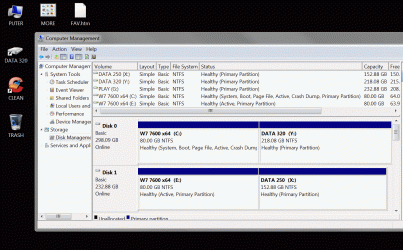
Installing W7 to an active partition did not install the reserved partition.
I’m now able to recover a HDD using an Acronis Recovery Image …
And specify the system partition size during the Recovery … Then add a Data Partition.
I’m also able to replace a system C partition without having to mess with the Data partition.
 

Attachments

  • Clip.gif
    Clip.gif
    119 KB · Views: 58

My Computer My Computer

Computer Manufacturer/Model Number
HP d4996t (upgraded)
OS
XP MCE .... XP Pro 64 .... W7 U x64
CPU
E6750, 2.67GHz C2D
Memory
4GB, PC2 6400
Graphics Card(s)
GeForce 9400GT
Monitor(s) Displays
Twin Samsung 2443BWT
Screen Resolution
1920x1200
Hard Drives
Many .. 3 Installed
PSU
460W
Internet Speed
Cable
You're welcome noyb - glad you got it working:D
 

My Computers My Computers

System One System Two

  • Computer type
    PC/Desktop
    OS
    7 X64
    CPU
    i5 8400
    Motherboard
    gigabyte b365m ds3h
    Memory
    2x8gb 3200mhz
    Hard Drives
    various
    PSU
    pure power 11 400w cm
    Case
    Coolermaster
    Cooling
    cryorig m9i
  • Computer type
    PC/Desktop
    OS
    7x64
    CPU
    g5400
    Motherboard
    ga b365m ds3h
    Memory
    8gb ddr4 2400
    PSU
    xfx pro 450w
Did any of those using Acronis find that Acronis saw the System Information Folder as the 'C' Drive and then re-lettered all other drives, and if so did this cause problems when restoring the image?
 

My Computer My Computer

OS
windows 7 64 bit
I, almost always, create/size the primary partitions as a separate step from the install or restore operation. I am sure that is why I never saw the "System Reserved" partition being created.

I do the same thing. Is it advisable or necessary to format (NTFS) before the install or restore?

That's certainly why.

It doean't create a 100mb system if you already have an Active partition - in case you have an o/s already installed.


If you install 7 on your new HD with it first in the BIOS boot order , then ( if you have marked an Active partition on it first) , you will have the 7 boot files and o/s on the same partition .

Thanks for explaining this, I've read where people had this problem and didn't know why as it's never happened to me. Now I know.

Lots of good information on this thread.

Thanks for the information,
Dave
 

My Computer My Computer

Computer type
PC/Desktop
Computer Manufacturer/Model Number
76~2.0
OS
Windows 7 Ult x64 - SP1/ Windows 8 Pro x64
CPU
Intel Core i5-3570K 4.6GHz
Motherboard
Gigabyte GA-Z77X UD3H, f18
Memory
8GB (2X4GB) DDR3 1600 Corsair Vengeance CL8 1.5v
Graphics Card(s)
Sapphire HD 7770 Vapor-X OC 1GB DDR5
Sound Card
Onboard VIA VT2021
Monitor(s) Displays
22" LCD Dell
Screen Resolution
1680x1050
Hard Drives
Samsung 840Pro 128GB SSD,
Seagate Barracuda 500GB SATA2 7200rpm 32MB cache, Seagate Barracuda 1TB SATA2 7200rpm 32MB cache,
PSU
Corsair HX650W
Case
Cooler Master Storm Scout
Cooling
Corsair H80 2x12cm Noctua NF P12 , 2x14cm case fans
Keyboard
Logitech Wave
Mouse
CM Sentinel
Internet Speed
Dismal
Antivirus
Avast
Browser
Opera Next
Other Info
Haswell laptop: HP Envy 17t-j, i7-4700MQ, GeForce 740M 2GB DDR3, 17.3" Full HD 1920x1080, 16GB RAM, Samsung 840 Pro 128GB, 1TB Hitachi 7200 HDD,
Desktop: eSATA ports,
External eSATA Seagate 500GB SATA2 7200rpm,
External WD USB 500GB
I do the same thing. Is it advisable or necessary to format (NTFS) before the install or restore?

It is not necessary but, IMO, advisable. Unless one is cloning a drive and the proportional re-sizing of the partitions is acceptable, performing partition creation/sizing as a separate operation provides more control and isolates any partitioning problems/issues from the actual restore/install.
 

My Computer My Computer

OS
XP Pro & Vista Home Premium (x86); Windows Ultimate 7600 x64 Retail
Did any of those using Acronis find that Acronis saw the System Information Folder as the 'C' Drive and then re-lettered all other drives, and if so did this cause problems when restoring the image?

"System Information" partition? Do you mean the "System Reserved" partition?
 

My Computer My Computer

OS
XP Pro & Vista Home Premium (x86); Windows Ultimate 7600 x64 Retail
Back
Top