very annoying problem: admin changes itself to standard

149047

New member
Member
Local time
3:55 AM
Messages
57
hi everyone!
i am experiencing a very weird problem: i have 2 accounts - the first originally set to admin. then i created a second one and set that one to admin. now both accounts are "labeled" admin, but whenever i try to change the account setting they are set to "standard". trying to set either one to admin gives me no ok/proceed option. i seem to have no admin at the moment ?
very weird ......
markus
 

My Computer My Computer

OS
xp, w7
CPU
q6600
Motherboard
gigabyte p35 dq6
Memory
2x 4gb kingston 1066, hyperx cl5
Graphics Card(s)
x1950pro
wow that is wierd. Do you still have all your admin permissions other then creating/changing accounts?
 

My Computer My Computer

Computer Manufacturer/Model Number
Seanix Desktop PC
OS
Windows 7 Ultimate 32 bit
CPU
Intel Core 2 Duo CPU E4500 2.20 GHz
Memory
1.99 GB
Graphics Card(s)
Intel G33/G31 Express Chipset Family (256 MB)
Sound Card
Realtek ALC888/1200
Monitor(s) Displays
DELL
Screen Resolution
1280 X 1024
Hard Drives
320GB Internal
200GB External
Case
Seanix
Keyboard
Seanix USB Keyboard
Mouse
Seanix USB Keyboard
Internet Speed
Broadband
Other Info
Getting close to 3 years old.
hi everyone!
i am experiencing a very weird problem: i have 2 accounts - the first originally set to admin. then i created a second one and set that one to admin. now both accounts are "labeled" admin, but whenever i try to change the account setting they are set to "standard". trying to set either one to admin gives me no ok/proceed option. i seem to have no admin at the moment ?
very weird ......
markus
Markus

Hi and welcome to seven forums

Are both accounts labeled "admin" or are they admin? You can label (name) a regular account admin but it will still have no admin rights

Ken
 

My Computer My Computer

Computer Manufacturer/Model Number
HP Pavillion dv-7 1005 Tx
OS
Win 8 Release candidate 8400
CPU
[email protected]
Memory
4 gigs
Graphics Card(s)
Nvidia 9600M
Sound Card
HD built-in
Monitor(s) Displays
17" Wxga
Screen Resolution
1440x900
Cooling
none
Internet Speed
45Mb down 5Mb up
ok - i do not understand all this any more. i can really need some help :)
inititally i had only one account (not only labeled admin, but being admin) - then i ran into security problems when w7 suddenly told me that i do not own the rights to open certain folders. so i executed the ownership registry hack and nothing happened.
i created a second account (admin) and suddenly the hack worked as it should.
now, again, i find folders unaccessible. so i create a third admin account - and all works fine ...
unfortunately only in the accounts the changes have been made. going back to my account where everything is set up, amounts to ... folder restrictions.

am i doing something really wrong here?
markus
 

My Computer My Computer

OS
xp, w7
CPU
q6600
Motherboard
gigabyte p35 dq6
Memory
2x 4gb kingston 1066, hyperx cl5
Graphics Card(s)
x1950pro
Markus

Hi and welcome to seven forums

Are both accounts labeled "admin" or are they admin? You can label (name) a regular account admin but it will still have no admin rights

Ken

Notice his specs. not exactly 100% complete. but

OS xp, w7
CPU q6600
Motherboard gigabyte p35 dq6
Memory 2x 4gb kingston 1066, hyperx cl5
Graphics Card x1950pro


so many Questions to ask ,
1. are youbooting back to XP?
2. Ken ask, Are you really Admin or just named Admin?
3. which OS are you using when you do this WEIRD thing?
4. some snip shots would grossy help! ?Win7 or XP
4a. name or file and or folders?
4b. which OS are they relating too?
5. Which Version is Win7? Home, Pro, Ultimate or ?
6. Which Product # -7000, 7100, 7600, or?
7. Which variable x86 or x64?
8. 9. 10. same question only for XP.
 
thank you for trying to help !!!!!![


quote=Snuffy;233116]Notice his specs. not exactly 100% complete. but


so many Questions to ask ,
1. are you booting back to XP?
[/quote]
yes, sometimes to collect files and settings i want to transfer to windows 7

2. Ken ask, Are you really Admin or just named Admin?
well, both accounts i have were originally set to admin. going into the settings now and trying to change the privileges would let me only change to standard. ie: i guess that both accounts are still admin.

3. which OS are you using when you do this WEIRD thing?
windows 7 7100 64bit. however the problems occurr on xp and win7 32bit as well.

4. some snip shots would grossy help! ?Win7 or XP
will post later today ...

4a. name or file and or folders?
i do not really understand ...


4b. which OS are they relating too?
how can i find out?

5. Which Version is Win7? Home, Pro, Ultimate or ?
windows 7 ultimate 64bit

6. Which Product # -7000, 7100, 7600, or?
7100

7. Which variable x86 or x64?
x64

8. 9. 10. same question only for XP.
xp 32bit sp3

---------
let me just jot down some notes on the problem history:
until last week i worked on xp & win7 32bit. the i decided to add more ram to my system and so i fiddled around with the partitions so as to gain space for a win7 64bit partition. i think here something must have gone wrong. because from then on i could not get access to an entire drive even under xp anymore. same problem in win7. after a couple of day i managed to gain ownership in win7 7100 (both32 & 64bit) over certain lost folders. they were suddenly marked with a keylock - however they seemed to be back and working. however yesterday i found that there was another partition i could not access. so i tried to gain ownership with and earlier posted registry hack - unfortunately to no avail. only by creating a new account with admin priviliges i could successfully access the partition. (that makes no sense however, because from my main user account its still locked)

thanks for helping,
markus
 

My Computer My Computer

OS
xp, w7
CPU
q6600
Motherboard
gigabyte p35 dq6
Memory
2x 4gb kingston 1066, hyperx cl5
Graphics Card(s)
x1950pro
ok i found something: when i want to get access to a file i hit (sorry i can only try to translate the steps, because i have a german version) so it goes something like: options->security>users>add users>advanced>search now> then i would add all results (in my case 38 possible names etc) and then add all of them. this would give me access to the file. ok, now i will only have to find out which one among the 38 is repsonsible for it ... any ideas?
 

My Computer My Computer

OS
xp, w7
CPU
q6600
Motherboard
gigabyte p35 dq6
Memory
2x 4gb kingston 1066, hyperx cl5
Graphics Card(s)
x1950pro
then i would add all results (in my case 38 possible names etc) and then add all of them.
WOW, how many ppl have access to your computer. (Sounds like you have been HACKED-> (also possible that) you added a HDD usually, that was not NEW but well USED. and some info on it, from old users, wants permission to control your system.
Recommend that you go back to XP, Im sure it is CLEAN.
Format the HDD with Win 7, fix the partitions as you want.... scrub the HDD, reformat again. and when it is CLEAN...
Then your option is reinstall Win 7 - either single boot or dual boot.
 
hi everyone!
i am experiencing a very weird problem: i have 2 accounts - the first originally set to admin. then i created a second one and set that one to admin. now both accounts are "labeled" admin, but whenever i try to change the account setting they are set to "standard". trying to set either one to admin gives me no ok/proceed option. i seem to have no admin at the moment ?
very weird ......
markus
Hello, Markus.

Are you sure you have a problem? Let me explain what I mean:

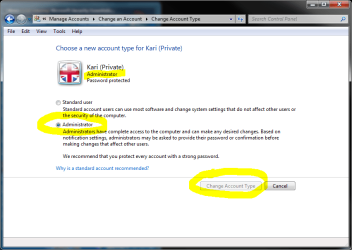
If the account type already is Administrator and you click Change the Account Type, it opens this window:

change1.PNG

Notice that because there are only two account types, and because the account already is an Administrator account, Windows thinks you want to change it to Standard. That's why this window offers you Standard User pre-selected, and the Change Account Type button is lit and operational.

If you now choose Administrator, the Change Account Type button is not lit and operational because this account already is an Administrator account and there is no change to be made:

change2.PNG

Kari
 

My Computer My Computer

Computer type
Laptop
Computer Manufacturer/Model Number
HP ENVY 17-1150eg
OS
Windows 10 Pro x64 EN-GB
CPU
1.6 GHz Intel Core i7-720QM Processor
Memory
6 GB
Graphics Card(s)
ATI Mobility Radeon HD 5850 Graphics
Sound Card
Beats sound system with integrated subwoofer
Monitor(s) Displays
17" laptop display, 22" LED and 32" Full HD TV through HDMI
Screen Resolution
1600*900 (1), 1920*1080 (2&3)
Hard Drives
Internal: 2 x 500 GB SATA Hard Disk Drive 7200 rpm
External: 2TB for backups, 3TB USB3 network drive for media
Cooling
As Envy runs a bit warm, I have it on a Cooler Master pad
Keyboard
Logitech diNovo Media Desktop Laser (bluetooth)
Mouse
Logitech Performance Mouse MX
Internet Speed
50/10 Mbps VDSL
Antivirus
Windows Defender 4.3.9431.0
Browser
Maxthon 3.5.2., IE11
WOW, how many ppl have access to your computer. (Sounds like you have been HACKED-> (also possible that) you added a HDD usually, that was not NEW but well USED. and some info on it, from old users, wants permission to control your system.
Recommend that you go back to XP, Im sure it is CLEAN.
Format the HDD with Win 7, fix the partitions as you want.... scrub the HDD, reformat again. and when it is CLEAN...
Then your option is reinstall Win 7 - either single boot or dual boot.

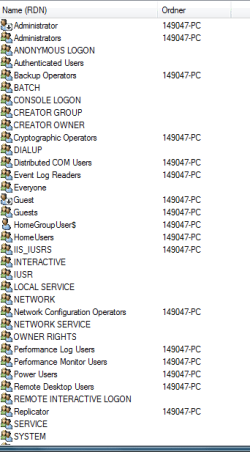
well, take a look at the snippet - i could assume everyone has stuff like that on its machine ... what do you think?
markus
 

Attachments

  • Aufzeichnen.PNG
    Aufzeichnen.PNG
    10.1 KB · Views: 50

My Computer My Computer

OS
xp, w7
CPU
q6600
Motherboard
gigabyte p35 dq6
Memory
2x 4gb kingston 1066, hyperx cl5
Graphics Card(s)
x1950pro
solved!

problem solved: ok guys - i cannot say i am not happy at the moment. here's how i got rid of the ownership troubles: as nothing would help - not even the take ownership hack i simply cleaned all the user priviliges on all drives (the ones in the security settings) and added the ones i have on my c drive (incl inheriting them downwards). that cleared the mess and let me have the files back.

thanks everyone for helping :)
markus
 

My Computer My Computer

OS
xp, w7
CPU
q6600
Motherboard
gigabyte p35 dq6
Memory
2x 4gb kingston 1066, hyperx cl5
Graphics Card(s)
x1950pro
account changing from admin to standard

Does anyone having this problem have a Toshiba PC?

This problem has occued ever since I bought a Toshiba Satellite laptop. Laptop had Vista pre installed and Toshiba sent a Win 7 system as soon as it was released. Toshiba has made extensive changes to both Vista and Win 7..After a long unsuccessful session with Toshiba support I was told to reinstall the Win7 from scratch and not do an update (witch took 3 and a half to four hours) with no assurance that it would fix the problem. This is unacceptable..
Another long session with Microsoft failed to find a fix. Both Microsoft and myself feel this is Toshiba's problem. Microsoft even waived the $59.00 fee.!!!
 

My Computer My Computer

Computer Manufacturer/Model Number
toshiba satellite
OS
Windows 7
Back
Top