Many major issues with my Win7 computer after starting up

Josiah200

New member
Local time
5:26 AM
Messages
6
Upon starting up my Windows 7 Home Premium 64bit gaming computer today, major issues have arisen. I have fund that most things are disabled in services. some things i was able to get back up and running by setting to manual/auto and starting them, but many core things give me "Windows could not start [Service name] service on local computer. Error 1068: the depenndency service or group failed to start".
What i cannot do includes but is not limited to:
  • Connect to the internet
  • Change color scheme from classic
  • uninstall a program

I have tried to reinstall windows (and go back to factory settings, but that gives me "windows cannot copy files required for installation. the file may be corrupt or missing. make sure all files required for installation ar availble and restart the installation.. Error code 0x80070241.

Looking at this ive come to the conclusion that "Virus = Very yes" and while i understand i'm pretty screwed here, ive dealt with quite a few viruses, but this one has me stumped. And honestly i literally hadnt downloaded anything the last time it was running, so all should be fine, but its clearly not. Help would be greatly appreciated!
 

My Computer My Computer

At a glance

Windows 7 Home Premium 64 bit
Computer type
PC/Desktop
OS
Windows 7 Home Premium 64 bit
If you reinstall windows from dvd ... a virus is not active!! Did restore to factory settings actually did something? Same question for reinstall win7.

What service can't be started. Give me some examples. Check the properties of those services and go to dependency tab. Start those services listed there (the ones it depends on) first.
 

My Computer My Computer

At a glance

Microsoft Windows 7 Home Premium 64-bits 7601...Intel(R) Core(TM) i3 CPU M 370 @ 2.40GHz4,00 GBATI Mobility Radeon HD 5400 Series
Computer type
Laptop
Computer Manufacturer/Model Number
ACER ASPIRE 5742G
OS
Microsoft Windows 7 Home Premium 64-bits 7601 Multiprocessor Free Service Pack 1
CPU
Intel(R) Core(TM) i3 CPU M 370 @ 2.40GHz
Motherboard
Acer Aspire 5742G
Memory
4,00 GB
Graphics Card(s)
ATI Mobility Radeon HD 5400 Series
Sound Card
(1) AMD High Definition Audio Device (2) Realtek High Defi
Screen Resolution
1366 x 768 x 32 bits (4294967296 colors) @ 60 Hz
Hard Drives
WDC WD5000BEVT-22ZAT0
That error can be multiple things. Is the installtion disk a .iso download? If so the files are more than likely corrupt.

Did you install any software before this problem. Or any hardware changes?
 

My Computer My Computer

At a glance

Windows 7 Ultimate 64-bitIntel Core 2 Duo E6550 @2.33GHz4GB DDR"NVIDIA GeForce 8600 GS
Computer type
PC/Desktop
Computer Manufacturer/Model Number
Dell / Lenovo g550
OS
Windows 7 Ultimate 64-bit
CPU
Intel Core 2 Duo E6550 @2.33GHz
Motherboard
foxconn g33m02
Memory
4GB DDR"
Graphics Card(s)
NVIDIA GeForce 8600 GS
Hard Drives
HDD 1 = 150GB
HDD 2 = 1.5TB
PSU
450W
Cooling
Stock fan
Internet Speed
12Mb
Antivirus
AVG Internet Security
Can the following services be started manually?

Network Store Interface Service
DNS Client
DHCP Client
 

My Computer My Computer

At a glance

Microsoft Windows 7 Home Premium 64-bits 7601...Intel(R) Core(TM) i3 CPU M 370 @ 2.40GHz4,00 GBATI Mobility Radeon HD 5400 Series
Computer type
Laptop
Computer Manufacturer/Model Number
ACER ASPIRE 5742G
OS
Microsoft Windows 7 Home Premium 64-bits 7601 Multiprocessor Free Service Pack 1
CPU
Intel(R) Core(TM) i3 CPU M 370 @ 2.40GHz
Motherboard
Acer Aspire 5742G
Memory
4,00 GB
Graphics Card(s)
ATI Mobility Radeon HD 5400 Series
Sound Card
(1) AMD High Definition Audio Device (2) Realtek High Defi
Screen Resolution
1366 x 768 x 32 bits (4294967296 colors) @ 60 Hz
Hard Drives
WDC WD5000BEVT-22ZAT0
@Kaktussoft's first reply

No, i was trying to restore from a dvd, but it gave me the 0x80070241 error. It did nothing.

One of the services that cant be started, as an example, is "Network Connections". I assume this is what i keeping me from connecing to the internet. When i go to the dependencie tab, it gives me "Win32: The service cannt be tarte, either because it i disabled or because it has no devices associated with it" The service doesnt have anything listed in what it relies on, nor what relies on it.

This seems to be the same for other services that arent working, such as 'Windows audio'.

I was able to enable 'windows themes' though. Now i don't have to deal with classic at least.

Edit: @benjy206, No its a disc, and no i havent downloaded anything.

Edit 2: @kak's second post
Network Store Interface Service - Yes, i enabled it
DNS Client - Yes. Enabled
DHCP Client - Yes. Enabled.

Thank you, sir. You just fixed the internet issue.

Edit 3: Remainng issues
  • Audio
  • Can't uninstall programs
  • Other things i'm certian i'm not aware of
  • Cannot see network and connection
 

My Computer My Computer

At a glance

Windows 7 Home Premium 64 bit
Computer type
PC/Desktop
OS
Windows 7 Home Premium 64 bit

My Computer My Computer

At a glance

Microsoft Windows 7 Home Premium 64-bits 7601...Intel(R) Core(TM) i3 CPU M 370 @ 2.40GHz4,00 GBATI Mobility Radeon HD 5400 Series
Computer type
Laptop
Computer Manufacturer/Model Number
ACER ASPIRE 5742G
OS
Microsoft Windows 7 Home Premium 64-bits 7601 Multiprocessor Free Service Pack 1
CPU
Intel(R) Core(TM) i3 CPU M 370 @ 2.40GHz
Motherboard
Acer Aspire 5742G
Memory
4,00 GB
Graphics Card(s)
ATI Mobility Radeon HD 5400 Series
Sound Card
(1) AMD High Definition Audio Device (2) Realtek High Defi
Screen Resolution
1366 x 768 x 32 bits (4294967296 colors) @ 60 Hz
Hard Drives
WDC WD5000BEVT-22ZAT0
For the uninstall of programs is the option there when you try?
 

My Computer My Computer

At a glance

Windows 7 Ultimate 64-bitIntel Core 2 Duo E6550 @2.33GHz4GB DDR"NVIDIA GeForce 8600 GS
Computer type
PC/Desktop
Computer Manufacturer/Model Number
Dell / Lenovo g550
OS
Windows 7 Ultimate 64-bit
CPU
Intel Core 2 Duo E6550 @2.33GHz
Motherboard
foxconn g33m02
Memory
4GB DDR"
Graphics Card(s)
NVIDIA GeForce 8600 GS
Hard Drives
HDD 1 = 150GB
HDD 2 = 1.5TB
PSU
450W
Cooling
Stock fan
Internet Speed
12Mb
Antivirus
AVG Internet Security
@Kakussoft: No, I'm (Unfortunatly) A fool who has not set backup points. (But i plan to once i'm done with all this!)

@benjy206: Yes, but it gives me "the Windows installer service could not be accessed. This can occur if the windows installer is not correctly installed" using that information, i just turned it on in the services. Its working now.

Updated issues list:
  • Audio
  • Cannot see network and connection
  • Things i'm not aware of.
 

My Computer My Computer

At a glance

Windows 7 Home Premium 64 bit
Computer type
PC/Desktop
OS
Windows 7 Home Premium 64 bit
@Kaktussoft's first reply

No, i was trying to restore from a dvd, but it gave me the 0x80070241 error. It did nothing.

One of the services that cant be started, as an example, is "Network Connections". I assume this is what i keeping me from connecing to the internet. When i go to the dependencie tab, it gives me "Win32: The service cannt be tarte, either because it i disabled or because it has no devices associated with it" The service doesnt have anything listed in what it relies on, nor what relies on it.

This seems to be the same for other services that arent working, such as 'Windows audio'.

I was able to enable 'windows themes' though. Now i don't have to deal with classic at least.

Edit: @benjy206, No its a disc, and no i havent downloaded anything.

Edit 2: @kak's second post
Network Store Interface Service - Yes, i enabled it
DNS Client - Yes. Enabled
DHCP Client - Yes. Enabled.

Thank you, sir. You just fixed the internet issue.


Edit 3: Remainng issues
  • Audio
  • Can't uninstall programs
  • Other things i'm certian i'm not aware of
  • Cannot see network and connection
Multimedia Class Scheduler has been started?
Windows Audio Endpoint Builder has been started?

If these services are not started try to start them manually. These services startup type should be automatic
 

My Computer My Computer

At a glance

Microsoft Windows 7 Home Premium 64-bits 7601...Intel(R) Core(TM) i3 CPU M 370 @ 2.40GHz4,00 GBATI Mobility Radeon HD 5400 Series
Computer type
Laptop
Computer Manufacturer/Model Number
ACER ASPIRE 5742G
OS
Microsoft Windows 7 Home Premium 64-bits 7601 Multiprocessor Free Service Pack 1
CPU
Intel(R) Core(TM) i3 CPU M 370 @ 2.40GHz
Motherboard
Acer Aspire 5742G
Memory
4,00 GB
Graphics Card(s)
ATI Mobility Radeon HD 5400 Series
Sound Card
(1) AMD High Definition Audio Device (2) Realtek High Defi
Screen Resolution
1366 x 768 x 32 bits (4294967296 colors) @ 60 Hz
Hard Drives
WDC WD5000BEVT-22ZAT0
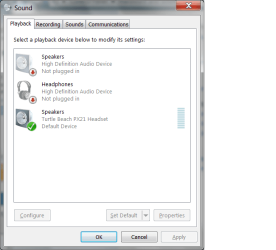
Ok for your sound is your speakers set as default as shown below. I have a headset as default as you can see with the green tick
 

Attachments

  • sound.png
    sound.png
    21.6 KB · Views: 1

My Computer My Computer

At a glance

Windows 7 Ultimate 64-bitIntel Core 2 Duo E6550 @2.33GHz4GB DDR"NVIDIA GeForce 8600 GS
Computer type
PC/Desktop
Computer Manufacturer/Model Number
Dell / Lenovo g550
OS
Windows 7 Ultimate 64-bit
CPU
Intel Core 2 Duo E6550 @2.33GHz
Motherboard
foxconn g33m02
Memory
4GB DDR"
Graphics Card(s)
NVIDIA GeForce 8600 GS
Hard Drives
HDD 1 = 150GB
HDD 2 = 1.5TB
PSU
450W
Cooling
Stock fan
Internet Speed
12Mb
Antivirus
AVG Internet Security
@kaktussoft:
I enabled Multimedia Class Scheduler, but when i try to enable the Windows Audio Endpoint Builder, it gives me "Error1722: The RPC server is unavailable

@benjy206 it gives me "No playback devices are installed (Which is clearly false)
 

My Computer My Computer

At a glance

Windows 7 Home Premium 64 bit
Computer type
PC/Desktop
OS
Windows 7 Home Premium 64 bit
@Kakussoft: No, I'm (Unfortunatly) A fool who has not set backup points. (But i plan to once i'm done with all this!)

@benjy206: Yes, but it gives me "the Windows installer service could not be accessed. This can occur if the windows installer is not correctly installed" using that information, i just turned it on in the services. Its working now.


Updated issues list:
  • Audio
  • Cannot see network and connection
  • Things i'm not aware of.
Windows installer service startup type is manually. It's started when needed. If you can start it...another process can start it as well.

Try to start all services (which are not started yet) yourself. Give the list of services that have problems. And give what problem
 

My Computer My Computer

At a glance

Microsoft Windows 7 Home Premium 64-bits 7601...Intel(R) Core(TM) i3 CPU M 370 @ 2.40GHz4,00 GBATI Mobility Radeon HD 5400 Series
Computer type
Laptop
Computer Manufacturer/Model Number
ACER ASPIRE 5742G
OS
Microsoft Windows 7 Home Premium 64-bits 7601 Multiprocessor Free Service Pack 1
CPU
Intel(R) Core(TM) i3 CPU M 370 @ 2.40GHz
Motherboard
Acer Aspire 5742G
Memory
4,00 GB
Graphics Card(s)
ATI Mobility Radeon HD 5400 Series
Sound Card
(1) AMD High Definition Audio Device (2) Realtek High Defi
Screen Resolution
1366 x 768 x 32 bits (4294967296 colors) @ 60 Hz
Hard Drives
WDC WD5000BEVT-22ZAT0
I am guessing the problem with the Windows Audio Endpoint Builder is that you have disabled the Windows power management on Windows 7. For some reason, the audio services cannot start if power management is disabled.
 

My Computer My Computer

At a glance

Windows 7 Ultimate 64-bitIntel Core 2 Duo E6550 @2.33GHz4GB DDR"NVIDIA GeForce 8600 GS
Computer type
PC/Desktop
Computer Manufacturer/Model Number
Dell / Lenovo g550
OS
Windows 7 Ultimate 64-bit
CPU
Intel Core 2 Duo E6550 @2.33GHz
Motherboard
foxconn g33m02
Memory
4GB DDR"
Graphics Card(s)
NVIDIA GeForce 8600 GS
Hard Drives
HDD 1 = 150GB
HDD 2 = 1.5TB
PSU
450W
Cooling
Stock fan
Internet Speed
12Mb
Antivirus
AVG Internet Security
@kaktussoft, is there any way to turn them on en masse? Theres like... 30-40 disabled. Its going to be extremely time consuming to have to set them to manual/auto and then press start that many times. :shock:
 

My Computer My Computer

At a glance

Windows 7 Home Premium 64 bit
Computer type
PC/Desktop
OS
Windows 7 Home Premium 64 bit
@kaktussoft, is there any way to turn them on en masse? Theres like... 30-40 disabled. Its going to be extremely time consuming to have to set them to manual/auto and then press start that many times. :shock:

In elevated command prompt:

Code:
sc  query  state= inactive | find  /i  "SERVICE_NAME:"  >t.txt
there is a space after state=
Post file t.txt. you may delete t.txt afterwards
 

My Computer My Computer

At a glance

Microsoft Windows 7 Home Premium 64-bits 7601...Intel(R) Core(TM) i3 CPU M 370 @ 2.40GHz4,00 GBATI Mobility Radeon HD 5400 Series
Computer type
Laptop
Computer Manufacturer/Model Number
ACER ASPIRE 5742G
OS
Microsoft Windows 7 Home Premium 64-bits 7601 Multiprocessor Free Service Pack 1
CPU
Intel(R) Core(TM) i3 CPU M 370 @ 2.40GHz
Motherboard
Acer Aspire 5742G
Memory
4,00 GB
Graphics Card(s)
ATI Mobility Radeon HD 5400 Series
Sound Card
(1) AMD High Definition Audio Device (2) Realtek High Defi
Screen Resolution
1366 x 768 x 32 bits (4294967296 colors) @ 60 Hz
Hard Drives
WDC WD5000BEVT-22ZAT0
So i thought to myself "Wouldnt it be great if i could find a .bat file that sets this all to default?" and a quick google search turned this up: Enable all default Microsoft Services
it says

Click Start, choose Run and execute: msconfig.
Under the General tab put a dot in normal
Click ok and then Restart.

It worked perfectly. Everything is running normally. Thanks everyone! you've been a great help!
 

My Computer My Computer

At a glance

Windows 7 Home Premium 64 bit
Computer type
PC/Desktop
OS
Windows 7 Home Premium 64 bit
Glad your problem is fixed
 

My Computer My Computer

At a glance

Windows 7 Ultimate 64-bitIntel Core 2 Duo E6550 @2.33GHz4GB DDR"NVIDIA GeForce 8600 GS
Computer type
PC/Desktop
Computer Manufacturer/Model Number
Dell / Lenovo g550
OS
Windows 7 Ultimate 64-bit
CPU
Intel Core 2 Duo E6550 @2.33GHz
Motherboard
foxconn g33m02
Memory
4GB DDR"
Graphics Card(s)
NVIDIA GeForce 8600 GS
Hard Drives
HDD 1 = 150GB
HDD 2 = 1.5TB
PSU
450W
Cooling
Stock fan
Internet Speed
12Mb
Antivirus
AVG Internet Security
So i thought to myself "Wouldnt it be great if i could find a .bat file that sets this all to default?" and a quick google search turned this up: Enable all default Microsoft Services
it says

Click Start, choose Run and execute: msconfig.
Under the General tab put a dot in normal
Click ok and then Restart.

It worked perfectly. Everything is running normally. Thanks everyone! you've been a great help!
Why did you disable things that way before? Normal boot is default! Disabling services/startup items this way is only for debugging/troubleshooting.
 

My Computer My Computer

At a glance

Microsoft Windows 7 Home Premium 64-bits 7601...Intel(R) Core(TM) i3 CPU M 370 @ 2.40GHz4,00 GBATI Mobility Radeon HD 5400 Series
Computer type
Laptop
Computer Manufacturer/Model Number
ACER ASPIRE 5742G
OS
Microsoft Windows 7 Home Premium 64-bits 7601 Multiprocessor Free Service Pack 1
CPU
Intel(R) Core(TM) i3 CPU M 370 @ 2.40GHz
Motherboard
Acer Aspire 5742G
Memory
4,00 GB
Graphics Card(s)
ATI Mobility Radeon HD 5400 Series
Sound Card
(1) AMD High Definition Audio Device (2) Realtek High Defi
Screen Resolution
1366 x 768 x 32 bits (4294967296 colors) @ 60 Hz
Hard Drives
WDC WD5000BEVT-22ZAT0
Back
Top