USB Bluetooth Dongle Not Able to Add (See) BT Device

mavigozler

New member
Local time
2:52 AM
Messages
22
Just received this USB Bluetooth dongle from ebay purchase.

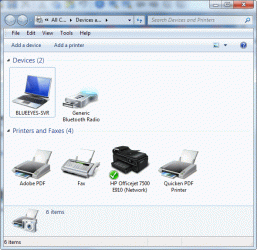
The standard Windows 7 driver appears to have installed, according Devices and Printers view (see image).

From the Bluetooth system tray icon to Show Bluetooth Devices window, when I try to add a device with my Jabra BT8010 headset in pairing mode, the device cannot be found.

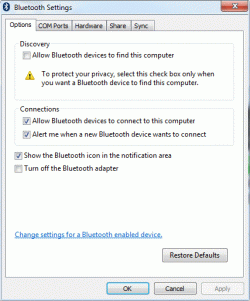
The Options tab in my Bluetooth Settings dialog is shown in an image below.

PROBLEM / QUESTION

How do I get my bluetooth device detected with my (working?) new USB dongle in Windows 7?

POSSIBILITIES

  1. Most likely possibility: getting Bluetooth to work in Windows is a huge time-consuming effort. Bluetooth services may not be started. There is no installed software or obvious Control Panel module that points to Bluetooth. In Vista, one has to find "Bluetooth Places" by typing in the Start->Run box to find it. ASUS does not even install bluetooth (a sign of where technology is going?) There is probably something similar in getting BT to work with Win 7.
  2. The dongle does not work with a standard Windows driver and requires a special driver. However it is clear that the seller did not offer any special driver software, and anyway, the Devices and Printers view clearly shows a device with a working driver
  3. Somewhat related to item #2: the dongle may still not work even though it can install the driver? For example the radio transmitter might not work? What is likelihood of that?

OTHER INFORMATION

1. The functioning (ability to pair) of the Jabra headset was re-tested in my old PC (HP dv9500t running 32-bit Vista with built-in bluetooth) and found to work. I was going to try to look for another bluetooth device to test, but when this occurred, it should not have been necessary

2. The PC is a ASUS G74Sx which was purchased with 802 wireless capability but not with bluetooth, hence the purchase of the dongle.
 

Attachments
  • Devices-and-Printers-View.gif
    Devices-and-Printers-View.gif
    62.1 KB · Views: 2
  • Bluetooth Settings Options Tab.gif
    Bluetooth Settings Options Tab.gif
    26.3 KB · Views: 2

My Computer My Computer

At a glance

Windows 7 Home Premium 64-bitIntel Core i7 2670QM @ 2.2 GHz8 GBnVIDIA GTX560M
Computer Manufacturer/Model Number
ASUS G74SX-BBK11
OS
Windows 7 Home Premium 64-bit
CPU
Intel Core i7 2670QM @ 2.2 GHz
Motherboard
ASUS
Memory
8 GB
Graphics Card(s)
nVIDIA GTX560M
Sound Card
nVIDIA HDA, Realtek HDA
Screen Resolution
1650 x 1080
Hard Drives
Seagate 1 TB @ 5400 rpm (ST1000LM024)
PSU
notebook
Case
notebook
Cooling
Internal + Thermaltake platform
Keyboard
notebook
Mouse
Synaptics PS/2 Port Touchpad
Internet Speed
4 Mbps down, 800 Kbps up
Other Info
Perfect description of rig: http://basic-electronics.blogspot.com/2012/03/asus-g74sx-bbk11-173-inch-core-i7.html
Go to the manufacturer's website and get an updated driver for your device from there.

Check 'Allow bluetooth devices to find this computer' in BT settings.
 
Go to the manufacturer's website and get an updated driver for your device from there.

I am in the process of contacting the eBay seller and asking him if there is a special driver, although

  1. he has clearly sold countless numbers of these dongles to thoroughly satisfied customers
  2. he has not indicated that there is a special driver to be used/downloaded with the device in the sales advertisements
  3. a standard Windows 7 driver installs and appears to make the device work ("Generic Bluetooth Radio" appears in Devices and Printers without any exclamation point yellow triangles).


Check 'Allow bluetooth devices to find this computer' in BT settings.
Yes, I tried that already, to no avail.

Working with Bluetooth devices has always been a problem with Windows it seems, in my own experiences with Vista. I had people tell me to buy BlueSoleil since it basically overcame all the problems with setting up BT in Windows (I tried it, it does). However, Bluetooth devices even work with Windows 6 (Vista) standard drivers, so there must be something I am missing in Windows 7: for example, I can't find "Bluetooth Places"...where is it?...is it Bluetooth Suite now?
 

My Computer My Computer

At a glance

Windows 7 Home Premium 64-bitIntel Core i7 2670QM @ 2.2 GHz8 GBnVIDIA GTX560M
Computer Manufacturer/Model Number
ASUS G74SX-BBK11
OS
Windows 7 Home Premium 64-bit
CPU
Intel Core i7 2670QM @ 2.2 GHz
Motherboard
ASUS
Memory
8 GB
Graphics Card(s)
nVIDIA GTX560M
Sound Card
nVIDIA HDA, Realtek HDA
Screen Resolution
1650 x 1080
Hard Drives
Seagate 1 TB @ 5400 rpm (ST1000LM024)
PSU
notebook
Case
notebook
Cooling
Internal + Thermaltake platform
Keyboard
notebook
Mouse
Synaptics PS/2 Port Touchpad
Internet Speed
4 Mbps down, 800 Kbps up
Other Info
Perfect description of rig: http://basic-electronics.blogspot.com/2012/03/asus-g74sx-bbk11-173-inch-core-i7.html
In personal experience, I have seen issues like this. I have had some devices that simply do not ever see each other. I guess sometimes they are simply not compatible.
 

My Computer My Computer

At a glance

Windows 7 Ultimate x64, Windows 7 Pro x64, Wi...Intel i7-4790K , Intel i7-3770K, Intel i7-451...12GB Corsair VengeanceEVGA GeForce GTX 660 2GB, 2X GIGABYTE 6890, N...
Computer type
PC/Desktop
Computer Manufacturer/Model Number
Custom (desktop), Custom (desktop), Lenovo U530 Touch
OS
Windows 7 Ultimate x64, Windows 7 Pro x64, Windows 10 Home x64
CPU
Intel i7-4790K , Intel i7-3770K, Intel i7-4510ULT
Motherboard
Asus Z87-PRO (main), Asus P8P67 Rev 3.1(secondary)
Memory
12GB Corsair Vengeance
Graphics Card(s)
EVGA GeForce GTX 660 2GB, 2X GIGABYTE 6890, Nvidia GT730M
Sound Card
Realtek Integrated, IDT (both laptops)
Monitor(s) Displays
Samsung S22C300H 21.5"
Screen Resolution
1920x1080 (Both machines)
Hard Drives
Main:
Muskin SSD 240GB
Seagate 320GB
Western Digital 1TB
Seagate 2TB

Seconday:
Toshiba 1TB
WD 1TB

Lenovo Laptop:
SAMSUNG SM843 SSD 480GB
PSU
Corsair GS700, COOLMAX CUL-850B (secondary)
Case
Thermaltake Chaser
Cooling
Corsair H60 Dual Fans, Stock Cooler
Keyboard
Logitech K360
Mouse
Logitech M310
Internet Speed
16Mbps
Antivirus
Comodo Internet Security Premium, MWB
Browser
Chrome, Firefox
Other Info
I have three systems listed in the specs area. My main desktop and my secondary desktop that was my previous build. The last one (in all the sections) is my Lenovo laptop.

Thanks for your interest in my machines! :)
In personal experience, I have seen issues like this. I have had some devices that simply do not ever see each other. I guess sometimes they are simply not compatible.

At this point, I just want to make sure that the device talks with any BT-capable device (I am waiting to check with a friend's mobile telephone). Thus I can at least tell the seller that my "quality control" system verifies it is not a dud device.

Seller sent me a pre-activated version of BlueSoleil (v.6.x) as the "driver." Did not install in Win 7 (64-bit), but did install in WinXP SP3 in my VMWare virtual host. After configuring to share a bluetooth device, BlueSoleil still could not detect the headset, so I am still unable to verify it is a working piece of hardware.

ASUS does not ship this model with working Bluetooth, and perhaps it is clear why: no proper standards it seems by which to make Bluetooth work.
 

My Computer My Computer

At a glance

Windows 7 Home Premium 64-bitIntel Core i7 2670QM @ 2.2 GHz8 GBnVIDIA GTX560M
Computer Manufacturer/Model Number
ASUS G74SX-BBK11
OS
Windows 7 Home Premium 64-bit
CPU
Intel Core i7 2670QM @ 2.2 GHz
Motherboard
ASUS
Memory
8 GB
Graphics Card(s)
nVIDIA GTX560M
Sound Card
nVIDIA HDA, Realtek HDA
Screen Resolution
1650 x 1080
Hard Drives
Seagate 1 TB @ 5400 rpm (ST1000LM024)
PSU
notebook
Case
notebook
Cooling
Internal + Thermaltake platform
Keyboard
notebook
Mouse
Synaptics PS/2 Port Touchpad
Internet Speed
4 Mbps down, 800 Kbps up
Other Info
Perfect description of rig: http://basic-electronics.blogspot.com/2012/03/asus-g74sx-bbk11-173-inch-core-i7.html
Back
Top