I'm unable to format my D drive

meerazhar86

New member
Local time
5:20 PM
Messages
5
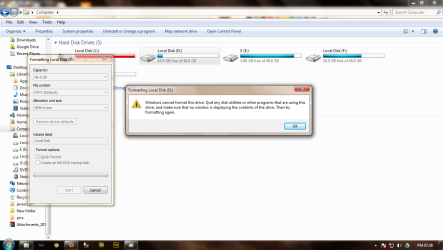
Hello I'm unable to format my D drive.

I've my windows in drive C and its full. Is this the reason I'm unable to format?

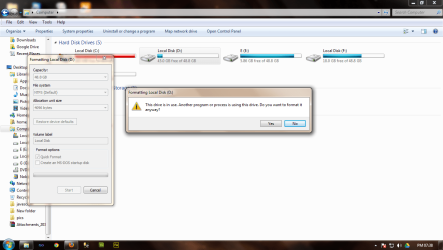
The errors are shown in the images..please help.. I want to extend memory of C: after formatting the D drive.

There were software's and games stored in this D drive, which I've moved them to F drive.
 

Attachments
  • 1.png
    1.png
    73.3 KB · Views: 19
  • 2.png
    2.png
    74.2 KB · Views: 56
  • 3.png
    3.png
    33.9 KB · Views: 20

My Computer My Computer

Computer type
PC/Desktop
OS
32bits

My Computer My Computer

OS
ME/XP/Vista/Win7
okay.

now I have 2 questions.

#1: how to get rid of the errors am receiving while "Quick formatting" the drive --as shown in the image that-- "windows cannot format the disk as it is being used by another program...."

#2. As my C: drive completely full, how can I extend it so that the memory is increased in it. If I cant be able to extend, what are the other ways to free the memory.

please understand, I cant uninstall the programs in Drive C because, all these are very important as they are very very use full for my project.

My PC has large volumes of useful information related to my projects.

Please provide me help in such a way that all these data is safe and my drive D is formatted along with freeing up the memory in Drive C:

Thanxx a lot for your help.
 

My Computer My Computer

Computer type
PC/Desktop
OS
32bits
Last edited by a moderator:

My Computer My Computer

Computer type
PC/Desktop
OS
32bits
I'm assuming that C and D both exist on the same physical hard disk. In which case just go and get Easus Parition Master, delete the D partition, which will turn it into unallocated space, then extend the size of the C drive to take up all of the space of both C and D.

It's usually wise to make a backup to another drive before messing with partititions.
 

My Computer My Computer

OS
Windows 7
CPU
Intel Core I7
Motherboard
Gigabyte EX58-UD3R
Memory
OCZ3P1333LV6GK
Graphics Card(s)
Gigabyte - GV-N220OC-1GI
Case
Antec Sonata III
You might want to move your page file to C: or another drive other than D:.

I don't think Disk Management will play nice as long as the OS is using D:

As activoice suggested, best to backup before modifying partitions.
 

My Computer My Computer

Computer Manufacturer/Model Number
HP p6370t
OS
Windows 7 Home Premium 64bit
CPU
i3-530
Motherboard
MSI - IONA
Memory
8 Gb
Graphics Card(s)
onboard
Sound Card
onboard
Monitor(s) Displays
Dell ST2400
Screen Resolution
1920x1080
Hard Drives
Intell 520 SSD 120Gb, WD6400AAKS, 640Gb & WD USB MyBook 1Tb
Internet Speed
1.5 Mmbps, Hughes Satellite
Last edited:
I think using a Partition Wizard boot disk is safer when modifying partitions since the OS is not involved in the operations. And there are more options in the newest version, but I always keep the old 4.2 handy.
 

My Computer My Computer

Computer Manufacturer/Model Number
HP p6370t
OS
Windows 7 Home Premium 64bit
CPU
i3-530
Motherboard
MSI - IONA
Memory
8 Gb
Graphics Card(s)
onboard
Sound Card
onboard
Monitor(s) Displays
Dell ST2400
Screen Resolution
1920x1080
Hard Drives
Intell 520 SSD 120Gb, WD6400AAKS, 640Gb & WD USB MyBook 1Tb
Internet Speed
1.5 Mmbps, Hughes Satellite
I agree.
 

My Computer My Computer

Computer type
PC/Desktop
Computer Manufacturer/Model Number
Skylake Special #666
OS
Windows 10 Pro x64
CPU
Intel Core i7 6700K
Motherboard
Asus Sabertooth Z170 Mark 1
Memory
GSkill TridentZ RGB 16GB 3600 16-16-16-36
Graphics Card(s)
EVGA GTX 980 Ti SC x2
Sound Card
Realtek High Definition
Monitor(s) Displays
AOC G2460PG
Screen Resolution
1920 x 1080 144Hz
Hard Drives
Samsung 860 Pro 256GB, Seagate Barracuda 4TB x2
PSU
EVGA 1000 P2, EVGA White Custom Braided Cables
Case
Corsair Vengeance C70 Gunmetal Black
Cooling
Corsair H100i v2, Corsair ML120 x2, Thermal Grizzly Kryonaut
Keyboard
Logitech G910 Orion Spectrum
Mouse
Logitech G700s
Internet Speed
Verizon Fios Quantum Gateway 75/75
Antivirus
Windows Defender, Malwarebytes Free 3.8.3
Browser
Chrome
Other Info
Corsair SP120 x4, LG Blu-ray Drive, Durabrand HT-395 100 Watt Dolby Digital Amp, Corsair H2100 Wireless 7.1 Headset
Hello team,

thanks a lot for your immense help. According to your suggestions, I've successfully extended the Memory on my C: drive.

Its good to see that there's no red color indication my C: drive any more...

Well done guys!! and more over, I've also set the drive D: for the virtual memory...thnxx a lot.

here's the preview of my drive C: and D: after resizing.


One more questions to you guyss...

#1. As you can see in the image, at the right corner, there's a memory block of 10 MB, that was unallocated at the time wen I bought my PC.

How do I make use of that memory(10 mb) even. Its been unallocated since last one year..please advice:):):)
 

My Computer My Computer

Computer type
PC/Desktop
OS
32bits
roger dat gregrpcker! done! thnxx:cool:
 

My Computer My Computer

Computer type
PC/Desktop
OS
32bits
Back
Top