Solved Desktop Problem

Status
Not open for further replies.
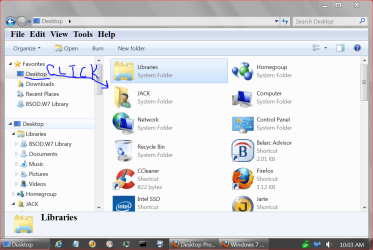
Desktop under your User name is a System file which should not be deleted. It contains all the files, shortcuts and other icons that appear on your desktop.

The only way Test would show up in your User Name's Desktop folder and not be on your desktop somewhere is because as suggested it is pushed off into an area you can't see if there are that many icons, depending upon your screen resolution, or it's in another User's Desktop folder which you can check under Users to see if there's another another Dick besides you, or you are signed in to another named Account or the Administrator account.

I'm the only user. This is a home computer. There is still plenty of space on the desktop so I doubt they were "pushed off".

Why are all the files, etc. that appear on my desktop in that folder? Not only is it redundant, but it's awkward and confusing.
 
Last edited:

My Computer My Computer

OS
Windows 7 Home Premium
Desktop under your User name is a System file which should not be deleted. It contains all the files, shortcuts and other icons that appear on your desktop.

The only way Test would show up in your User Name's Desktop folder and not be on your desktop somewhere is because as suggested it is pushed off into an area you can't see if there are that many icons, depending upon your screen resolution, or it's in another User's Desktop folder which you can check under Users to see if there's another another Dick besides you, or you are signed in to another named Account or the Administrator account.

I'm the only user. This is a home computer. There is still plenty of space on the desktop so I doubt they were "pushed off".

Why are all the files, etc. that appear on my desktop in that folder? Not only is it redundant, but it's awkward and confusing.

They could still be "pushed off"

desktop folder is not redundant, it's the desktop folder and just as real as your "real" desktop. If I'm not mistaken, the "desktop" you stare at on your screen is really just one big GUI for access to your desktop folder which leads me to believe if you can see "test folder" in desktop folder, then the icon has possibly been pushed off the screen :-) Not trying to be sarcastic, but you have probably spent as much time in this thread as you would have just rearranging your icons after trying an auto arrange just in the off chance that might be the remedy.
 

My Computer My Computer

Computer type
PC/Desktop
OS
Windows 7 Home Premium 64bit
Test is not a System folder or any other folder that I know about, except that one would make to test if a folder is showing up - which is what I though you had done.

So if you're asking how Test folder got there, we cannot say.

Can you post back the contents of the folder as we may pick up on what it is from.

It's a folder I named TEST because it has some test photos in it.
The question is how does a folder - ANY folder - get into that folder named desktop and it is not on the real desktop? Is it just another example of this Windows 7 putting things where it decides they should go instead of letting me put them where I want them?

QUESTION: If I delete that folder named desktop will it cause problems???

Did you even try my suggestion? I'm not guaranteeing you that this will solve your problem, but this solution is one of the possibilities. You might never get your problem solved if you just don't try the suggestions given by people. We are trying to be cool with you and solve your problem. And I don't think you have a 42" display with 1000 icons on desktop that will take 24 hours for you to re-arrange them accordingly.


Right click on your desktop > Click "View" > Now click "Auto arrange icons"

Now do those folders appear on your desktop?

My just done experiment:
I just filled my desktop with lots of icons. Some of them went out of screen. I deleted the icons visible on screen. Those icons which were not in view didn't show up on desktop at all. I could only access them via File Explorer. I "Auto arranged" the icons and all those icons out view appeared on the desktop. Then I unchecked back "auto arrange". Problem solved.
 
Last edited:
Many PC's have several users. Where are they going to store their desktop when someone else is signed in, Dick?
 
I just curious Dick. Did you ever do post #2 & 4.
If you did what was your outcome.
 

My Computer My Computer

Computer type
PC/Desktop
Computer Manufacturer/Model Number
Home made Desktop
OS
Windows 10 Pro. 64/ version 1709 Windows 7 Pro/64
CPU
Intel i7-6800K @ 4.3
Motherboard
ASUS X-99 Deluxe II
Memory
Corsair Platinum 16 gig @2400
Graphics Card(s)
EVGA GTX 1070 OC
Monitor(s) Displays
Asus 27" LED LCD/VE278Q
Screen Resolution
1920-1080 or 1280-720 HDMI
Hard Drives
INTEL SSD 730-240 Gb Sata 3.0/
PSU
EVGA Platium 1200W
Case
Phanteks Luxe Tempered Glass 8 fans/ one radiator
Cooling
XSPC/ Water Cooled CPU
Keyboard
Das 4 Professional
Mouse
Logitech M705/MX Anywhere 2-S
Internet Speed
100 mbits
Antivirus
Microsoft Security Essentials/ Malwarebytes Premium 3.0/ SAS
Browser
I.E. 11 default/Firefox/ ISP Time Warner Cable/Spectrum
Other Info
LG BluRay Burner/
Sound system-KLipsch-THX/
Icy Dock ssd Hot Swap bays.
Why are all the files, etc. that appear on my desktop in that folder? Not only is it redundant, but it's awkward and confusing.

That folder is your desktop its not duplicate in any way desktop is just different way to display desktop folder. data you dump on your desktop has to be saved somewhere..

IMHO dumping everything on desktop is bad habit. I have seen lots of not very computer literate people do this and it can become mess.
use libraries and/or folder structure to organize your data.

To help you with problem:
everything that is in your user desktop folder is technically on your desktop but desktop space is limited and there is no scrolling like in file explorer.. and if you dump large amount of files on desktop they may push icons of other files/folders out of screen and even when you delete some files or move them to folders to save space on desktop.. in most cases pushed out files/folders will not return to visible desktop space if you do not auto arrange.

this reminds me of
http://www.youtube.com/watch?v=eEdiC-W4L7c
 

My Computer My Computer

Computer type
PC/Desktop
Computer Manufacturer/Model Number
Self Built PC
OS
Windows 7 pro 64bit. (SP1)
CPU
Intel core I5 2400
Motherboard
Gigabyte H61
Memory
8GB DDR3 Kingston
Graphics Card(s)
Gigabyte GF GTX650OC
Sound Card
Realtek HD audio
Monitor(s) Displays
LCD 20"
Screen Resolution
1600x900
Hard Drives
INTEL SSD 320 80GB +Seagate 7200.12 1TBx3
PSU
Coolermaster RX450W
Case
Coolermaster atx case
Cooling
stock cooler
Keyboard
logitech
Mouse
logitech
Internet Speed
FTTD 100mbps
Easy:
2x click on one folder icon on your desktop.
when window opens, make level up movement.
now you have opened Window with desktop location.

This window you can list as details.

drag and drop your TEST folder somwhere special location on your desktop.

Close detailed window representation of your desktop.

Best Regards...
 

My Computer My Computer

Computer type
Laptop
Computer Manufacturer/Model Number
Dell
OS
Windows 7 Ultimate x64
CPU
i7 Q720
I just curious Dick. Did you ever do post #2 & 4.
If you did what was your outcome.


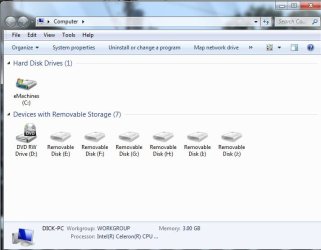
I can't find anything about Windows Explorer. Do you mean the COMPUTER icon? If so, I don't have a column on the left side as seen in BRITTON 30's attachment in Post #14.

I just tried twice to upload a .jpg screen shot of the computer screen using the paper clip and all I get is
COMPUTER.jpg
The file is named COMPUTER, not 262313.

This whole thing has gotten completely out of hand. In other forums I can use the "Insert Image" function very easily. Here, it doesn't work. I'm just going to forget the whole thing and do my own "work around".

Thanks for your help.
 
Last edited:

My Computer My Computer

OS
Windows 7 Home Premium
All I wanted to know is this. (picture) Is your missing Icons there? My thoughts were if they are not there the folder is full.
Another option would be to create a New Folder on your Desktop and put the Icon's you don't use often in there.
I have a folder on my desktop with Icons to programs I use for over clocking. Another folder with Icons for programs I use for scanning for infections ect.

desktop 2.PNG
 

My Computer My Computer

Computer type
PC/Desktop
Computer Manufacturer/Model Number
Home made Desktop
OS
Windows 10 Pro. 64/ version 1709 Windows 7 Pro/64
CPU
Intel i7-6800K @ 4.3
Motherboard
ASUS X-99 Deluxe II
Memory
Corsair Platinum 16 gig @2400
Graphics Card(s)
EVGA GTX 1070 OC
Monitor(s) Displays
Asus 27" LED LCD/VE278Q
Screen Resolution
1920-1080 or 1280-720 HDMI
Hard Drives
INTEL SSD 730-240 Gb Sata 3.0/
PSU
EVGA Platium 1200W
Case
Phanteks Luxe Tempered Glass 8 fans/ one radiator
Cooling
XSPC/ Water Cooled CPU
Keyboard
Das 4 Professional
Mouse
Logitech M705/MX Anywhere 2-S
Internet Speed
100 mbits
Antivirus
Microsoft Security Essentials/ Malwarebytes Premium 3.0/ SAS
Browser
I.E. 11 default/Firefox/ ISP Time Warner Cable/Spectrum
Other Info
LG BluRay Burner/
Sound system-KLipsch-THX/
Icy Dock ssd Hot Swap bays.
I just curious Dick. Did you ever do post #2 & 4.
If you did what was your outcome.


I can't find anything about Windows Explorer. Do you mean the COMPUTER icon? If so, I don't have a column on the left side as seen in BRITTON 30's attachment in Post #14.

I just tried twice to upload a .jpg screen shot of the computer screen using the paper clip and all I get is
View attachment 262313
The file is named COMPUTER, not 262313.

This whole thing has gotten completely out of hand. In other forums I can use the "Insert Image" function very easily. Here, it doesn't work. I'm just going to forget the whole thing and do my own "work around".

Thanks for your help.

It is quite easy to upload an image here. Why you need 100 Icons is a mystery to me. I have 3. Maybe you should try this software. It works great. Look at the attached image

7stacks | Alastria Software
 

Attachments

  • dt1.png
    dt1.png
    106.5 KB · Views: 7

My Computer My Computer

Computer type
PC/Desktop
Computer Manufacturer/Model Number
Custom Build
OS
Win 10 Pro 64
CPU
Intel Core i7 960 @3.20 GHz
Motherboard
MSI MS7522
Memory
24.0 GB DDR3
Graphics Card(s)
EVGA GTX 750Ti
Monitor(s) Displays
LG E2341 23 Inch
Screen Resolution
1920x1080
Hard Drives
1TB Western Dgital 1002FAEX-00Y9A0
1TB Hitachi HDS721010CLA322
PSU
700 Watt
Case
Haf 912
Cooling
Fans
Keyboard
Logitech MK710
Mouse
Logitech M705
Internet Speed
Cable
Antivirus
AIS 2015 .10.0.2225
Browser
Firefox 49
Other Info
MalwareBytes Anti-Rootkit utility
I will give it a try. Thanks.
 
Last edited by a moderator:

My Computer My Computer

OS
Windows 7 Home Premium
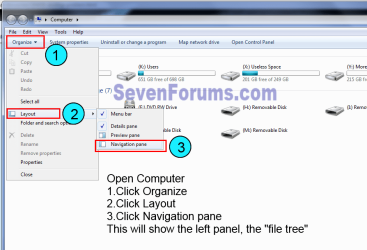
Dick, here's how to show the left pane I mentioned.
explorer.png

As an experiment try moving, say, 10 of your icons to a new folder and reboot to see if the TEST folder appears. I don't really understand why files get in there unless it's where your downloads go.
 

My Computer My Computer

Computer type
PC/Desktop
Computer Manufacturer/Model Number
Home Built Desktop By DataTech
OS
Windows 7 Ultimate X64 SP1
CPU
Intel i5-2550K, Differing ~4.4-4.8GHz No built in GPU
Motherboard
ASUS P8Z68-V PRO/GEN3
Memory
16GB G.Skill Sniper 1866MHz @ 2133MHz 2x8GB
Graphics Card(s)
ASUS GTX650TIB-DC2OC-2GD5, (650TI Boost)
Sound Card
Onboard Realtek 5-1
Monitor(s) Displays
Samsung P2570HD
Screen Resolution
1920x1080
Hard Drives
Samsung 840 Pro 256GB SSD for OS, 500GB Seagate Constellation (Enterprise drive) for Data
PSU
Corsair HX650W
Case
Inwin Dragon Rider
Cooling
Hyper 212 EVO w/two Noctua fans, push-pull, @1300 RPM
Keyboard
E-Z Eyes, bright yellow keys with large characters
Mouse
steelseries SENSEI Laser Pro Gaming
Internet Speed
48-51Mbs Mbs down, 11 Mbs up Xfinity Cable
Antivirus
Norton Internet Security 2013
Browser
IE 10, Opera, Pale Moon if needed
Other Info
4 case fans, LG BluRay-RE, ASUS DVD-RW, Mr. Fusion power supply, 1.21 gigawatts.
Dick, here's how to show the left pane I mentioned.
View attachment 262336

As an experiment try moving, say, 10 of your icons to a new folder and reboot to see if the TEST folder appears. I don't really understand why files get in there unless it's where your downloads go.

Hooray! Now I know how to see that left pane. B U T, how would anyone know unless someone like you tells them?
Now can you reveal another mystery - What, where, is WINDOWS EXPLORER???
If I can understand these things I can figure out the TEST folder problem.
 

My Computer My Computer

OS
Windows 7 Home Premium
Please post back a screenshot of the TEST folder contents so we can see what's in it and whether it is OK to delete it. Screenshots and Files - Upload and Post in Seven Forums - Windows 7 Forums

Explorer is where your files live. You can browse on the Explorer bar to any other folder or file while in Explorer, even drag a file/foder or group to a destination you wish it to be copied or moved there on the Explorer bar.
 
Last edited:
Cool! The window in my snip is windows Explorer. You can use it to navigate anywhere within Windows and it's files system, for the most part. Many files are hidden or have no access as they are system files, eg. PageFile.
 

My Computer My Computer

Computer type
PC/Desktop
Computer Manufacturer/Model Number
Home Built Desktop By DataTech
OS
Windows 7 Ultimate X64 SP1
CPU
Intel i5-2550K, Differing ~4.4-4.8GHz No built in GPU
Motherboard
ASUS P8Z68-V PRO/GEN3
Memory
16GB G.Skill Sniper 1866MHz @ 2133MHz 2x8GB
Graphics Card(s)
ASUS GTX650TIB-DC2OC-2GD5, (650TI Boost)
Sound Card
Onboard Realtek 5-1
Monitor(s) Displays
Samsung P2570HD
Screen Resolution
1920x1080
Hard Drives
Samsung 840 Pro 256GB SSD for OS, 500GB Seagate Constellation (Enterprise drive) for Data
PSU
Corsair HX650W
Case
Inwin Dragon Rider
Cooling
Hyper 212 EVO w/two Noctua fans, push-pull, @1300 RPM
Keyboard
E-Z Eyes, bright yellow keys with large characters
Mouse
steelseries SENSEI Laser Pro Gaming
Internet Speed
48-51Mbs Mbs down, 11 Mbs up Xfinity Cable
Antivirus
Norton Internet Security 2013
Browser
IE 10, Opera, Pale Moon if needed
Other Info
4 case fans, LG BluRay-RE, ASUS DVD-RW, Mr. Fusion power supply, 1.21 gigawatts.
Windows Explorer is the graphical user interface that you see while you are browsing through your files. Shortcut to launch Windows Explorer is Win+E.
 
Cool! The window in my snip is windows Explorer. You can use it to navigate anywhere within Windows and it's files system, for the most part. Many files are hidden or have no access as they are system files, eg. PageFile.

So there is no physical Windows Explorer? It is the result of clicking the COMPUTER icon?
 

My Computer My Computer

OS
Windows 7 Home Premium
Cool! The window in my snip is windows Explorer. You can use it to navigate anywhere within Windows and it's files system, for the most part. Many files are hidden or have no access as they are system files, eg. PageFile.

So there is no physical Windows Explorer? It is the result of clicking the COMPUTER icon?
Yes, or Start and your Username at the top on the right side of the start menu.
 

My Computer My Computer

Computer type
PC/Desktop
Computer Manufacturer/Model Number
Home Built Desktop By DataTech
OS
Windows 7 Ultimate X64 SP1
CPU
Intel i5-2550K, Differing ~4.4-4.8GHz No built in GPU
Motherboard
ASUS P8Z68-V PRO/GEN3
Memory
16GB G.Skill Sniper 1866MHz @ 2133MHz 2x8GB
Graphics Card(s)
ASUS GTX650TIB-DC2OC-2GD5, (650TI Boost)
Sound Card
Onboard Realtek 5-1
Monitor(s) Displays
Samsung P2570HD
Screen Resolution
1920x1080
Hard Drives
Samsung 840 Pro 256GB SSD for OS, 500GB Seagate Constellation (Enterprise drive) for Data
PSU
Corsair HX650W
Case
Inwin Dragon Rider
Cooling
Hyper 212 EVO w/two Noctua fans, push-pull, @1300 RPM
Keyboard
E-Z Eyes, bright yellow keys with large characters
Mouse
steelseries SENSEI Laser Pro Gaming
Internet Speed
48-51Mbs Mbs down, 11 Mbs up Xfinity Cable
Antivirus
Norton Internet Security 2013
Browser
IE 10, Opera, Pale Moon if needed
Other Info
4 case fans, LG BluRay-RE, ASUS DVD-RW, Mr. Fusion power supply, 1.21 gigawatts.
If you Right Click on the Start orb a pop up will display and there should be windows explorer in that popup. It will say Open Windows Explorer.
 

My Computer My Computer

Computer type
PC/Desktop
Computer Manufacturer/Model Number
Custom Build
OS
Win 10 Pro 64
CPU
Intel Core i7 960 @3.20 GHz
Motherboard
MSI MS7522
Memory
24.0 GB DDR3
Graphics Card(s)
EVGA GTX 750Ti
Monitor(s) Displays
LG E2341 23 Inch
Screen Resolution
1920x1080
Hard Drives
1TB Western Dgital 1002FAEX-00Y9A0
1TB Hitachi HDS721010CLA322
PSU
700 Watt
Case
Haf 912
Cooling
Fans
Keyboard
Logitech MK710
Mouse
Logitech M705
Internet Speed
Cable
Antivirus
AIS 2015 .10.0.2225
Browser
Firefox 49
Other Info
MalwareBytes Anti-Rootkit utility
"Check under C:Users to see if there's another another Dick besides you, or you are signed in to another named Account or the Administrator account."

Was this ever completely resolved?
 

My Computer My Computer

Computer type
PC/Desktop
OS
Windows 7 Home Premium 64bit
Status
Not open for further replies.
Back
Top