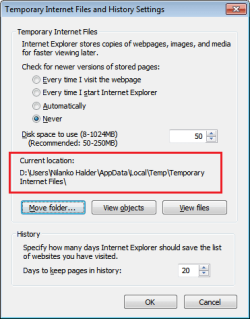
I get that part Nilank but I am still having a problem sorting out everything that is in the Windows 7 temporary internet files and where it is "all" stored. If I navigate to
C:\Users\mainuser\AppData\Local\Microsoft\Windows\Temporary Internet Files and check the properties, it shows that I have 469mb in there. Then when I navigate to: C:\Users\mainuser\AppData\Local\Microsoft\Windows\Temporary Internet Files\Low\Content.IE5 it displays the 32 folders that are listed under Low\Content.IE5, the properties of those folders only total 102mb. So this leads me to believe that 367mb are hidden somewhere else and I would like to find them.
Also I would like to know the purpose of setting a recommended limit of 250mb for the temporary internet files as nothing seems to happen if you exceed that limit.
You got it a bit wrong. It effectively have 2 "temporary internet files" for the IE cache. The one on AppData\Local is the one for "normal" browsing and another in AppData\Low used when using the so-called "protected mode IE" which runs at low integrity, which cannot be shared for security reasons.
They are 2 completely different folders which adds to the storage used by IE, generated by the fact that IE can run in both low and medium integrity levels. They aren't a "copy" of any sort of each other, so you must account them separately. In total in you case, you have 571MB in use for that.
The 250MB limit is just a value for limiting the new content there, rather arbitrarily. The browser will store contents viewed up to that limit, and from that onwards it just deletes the oldest to keep inside the limit, so it doesn't grows indefinitely. No idea how does that behaves if files are already there exceeding that limit.