Hidden Files and Folders

TinCanKenny

New member
Local time
12:28 AM
Messages
8
Why are the temporary internet files and folders hidden in Windows 7 Pro?
 

My Computer My Computer

At a glance

Windows 7 Professional 64 bit3.00 gigahertz Intel Core i5-23208gb
Computer type
PC/Desktop
Computer Manufacturer/Model Number
SYX
OS
Windows 7 Professional 64 bit
CPU
3.00 gigahertz Intel Core i5-2320
Motherboard
ASUSTeK Computer INC. P8H61-M LX2 Rev X.0x
Memory
8gb
Cause they are?
 

My Computer My Computer

At a glance

Windows 10 Pro (x64)Intel Core i7-3930K (3.2GHz - 4.5GHz)4x Samsung 4GB PC3-12800 DDR3 (16GB 1600MHz)Nvidia Geforce GTX 690
Computer type
PC/Desktop
Computer Manufacturer/Model Number
Alienware Aurora ALX R4
OS
Windows 10 Pro (x64)
CPU
Intel Core i7-3930K (3.2GHz - 4.5GHz)
Motherboard
Alienware Aurora-R4 x79
Memory
4x Samsung 4GB PC3-12800 DDR3 (16GB 1600MHz)
Graphics Card(s)
Nvidia Geforce GTX 690
Sound Card
SteelSeries Siberia Elite
Monitor(s) Displays
Dell UltraSharp U3011
Screen Resolution
2560x1600
Hard Drives
Samsung 850 Pro 256 GB, Seagate 1TB Desktop Hybrid HDD, 2x Western Digital 4TB Green HDD
PSU
875W Some Dell PSU <.<
Case
Alienware Aurora ALX
Cooling
Custom Liquid Cooling (EK CPU & GPU blocks) dual EK 480RAD
Keyboard
Logitech G710+ Mechanical
Mouse
Logitech G700s
Internet Speed
Verizon Fios (50 mbps average)
Other Info
Server: Intel NUC D54250WYK: i5-4250U, 16GB, 256 GB mSATA, Windows Server 2012 R2
No idea why really, it has been designed that way by IE developers and maintained over many versions now. It doesn't make much sense to me, since the browser's cache isn't anything "dangerous", but it's easier to make explorer show the files anyway.
 

My Computer My Computer

At a glance

Windows 7 Ultimate x64Intel Core i7-740QM8 GB DDR3NVIDIA GeForce 330GT
Computer type
Laptop
Computer Manufacturer/Model Number
Toshiba Sattelite A665-S6092
OS
Windows 7 Ultimate x64
CPU
Intel Core i7-740QM
Memory
8 GB DDR3
Graphics Card(s)
NVIDIA GeForce 330GT
Screen Resolution
1366x768
Hard Drives
Samsung 840 SSD 500GB
1TB USB3 external HD
Cooling
Coolermaster Notepal U3 notebook cooling pad
Internet Speed
3mbps ASDL
Antivirus
ClamWin 0.98.7
Browser
Opera 12.17 x86 (main), Firefox 38 (sec), IE11 (last resort)
Hello Kenny, and welcome to Seven Forums.

That folder is hidden because it's a protected operating system file, and so you will not see it since you should not mess with them. :)
 

My Computer My Computer

At a glance

64-bit Windows 11 Pro for WorkstationsIntel i7-8700K OC'd to 5 GHz64 GB (4x16GB) G.SKILL TridentZ RGB DDR4 3600...ASUS ROG-STRIX-GTX1080TI-O11G-GAMING
Computer type
PC/Desktop
Computer Manufacturer/Model Number
Self built custom
OS
64-bit Windows 11 Pro for Workstations
CPU
Intel i7-8700K OC'd to 5 GHz
Motherboard
ASUS ROG Maximus XI Formula Z390
Memory
64 GB (4x16GB) G.SKILL TridentZ RGB DDR4 3600 MHz
Graphics Card(s)
ASUS ROG-STRIX-GTX1080TI-O11G-GAMING
Sound Card
Integrated
Monitor(s) Displays
2 x Samsung Odyssey G7 27"
Screen Resolution
2560x1440
Hard Drives
1TB Samsung 990 PRO M.2,
4TB Samsung 990 PRO PRO M.2,
TerraMaster F8 SSD Plus NAS
PSU
Seasonic Prime Titanium 850W
Case
Thermaltake Core P3
Cooling
Corsair Hydro H115i
Keyboard
Logitech wireless K800
Mouse
Logitech MX Master 4
Internet Speed
2 Gb/s Download and 100 Mb/s Upload
Antivirus
Malwarebyte Anti-Malware Premium
Browser
Google Chrome
Other Info
Logitech Z625 speaker system,
Logitech BRIO 4K Pro webcam,
HP Color LaserJet Pro MFP M477fdn,
APC SMART-UPS RT 1000 XL - SURT1000XLI,
Galaxy S23 Plus phone
No idea why really, it has been designed that way by IE developers and maintained over many versions now. It doesn't make much sense to me, since the browser's cache isn't anything "dangerous", but it's easier to make explorer show the files anyway.

Thanks for the reply Alejandro.......I have been a long time XP Pro guy and it used to be quite simple to go here: C:\Documents and Settings\main user\Local Settings\Temporary Internet Files and you would be able to see all the temporary internet files in one place.

With Windows 7 Pro, I go here:
C:\Users\main user\AppData\Local\Microsoft\Windows\Temporary Internet Files\Low\Content.IE5\A0UKRFK1..............and there are 32 folders with 8 numbers/letters like A0UKRFK1 listed under Content.IE5 which makes it really hard to find anything as you have to open each Folder until you find what you are looking for.
 

My Computer My Computer

At a glance

Windows 7 Professional 64 bit3.00 gigahertz Intel Core i5-23208gb
Computer type
PC/Desktop
Computer Manufacturer/Model Number
SYX
OS
Windows 7 Professional 64 bit
CPU
3.00 gigahertz Intel Core i5-2320
Motherboard
ASUSTeK Computer INC. P8H61-M LX2 Rev X.0x
Memory
8gb
In fact, the true structure of temporary internet files is what your Win7 shows, with all those rare names and files scattered everywhere. In XP, Windows Explorer "lies" to you by showing all files together (this is controlled by the file desktop.ini there, just delete using DOS and you'll get the same). What I don't understand is why it isn't working on Win7 in the same way as it did in XP.

Anyway, I think there is an easier way. If all you want is to look at the cache's content and copy files out of there, this little program may help: Play offline/Save .flv video files from Web browser cache
(while it says "video", it really can show all files there).
 

My Computer My Computer

At a glance

Windows 7 Ultimate x64Intel Core i7-740QM8 GB DDR3NVIDIA GeForce 330GT
Computer type
Laptop
Computer Manufacturer/Model Number
Toshiba Sattelite A665-S6092
OS
Windows 7 Ultimate x64
CPU
Intel Core i7-740QM
Memory
8 GB DDR3
Graphics Card(s)
NVIDIA GeForce 330GT
Screen Resolution
1366x768
Hard Drives
Samsung 840 SSD 500GB
1TB USB3 external HD
Cooling
Coolermaster Notepal U3 notebook cooling pad
Internet Speed
3mbps ASDL
Antivirus
ClamWin 0.98.7
Browser
Opera 12.17 x86 (main), Firefox 38 (sec), IE11 (last resort)
Hello Kenny, and welcome to Seven Forums.

That folder is hidden because it's a protected operating system file, and so you will not see it since you should not mess with them. :)

Hi Brink..........I'm not making any changes or messing around in there. I usually dump the temporary internet files weekly but always like to go in and have a look before I send it off to cyberspace.

TinCanKenny
 

My Computer My Computer

At a glance

Windows 7 Professional 64 bit3.00 gigahertz Intel Core i5-23208gb
Computer type
PC/Desktop
Computer Manufacturer/Model Number
SYX
OS
Windows 7 Professional 64 bit
CPU
3.00 gigahertz Intel Core i5-2320
Motherboard
ASUSTeK Computer INC. P8H61-M LX2 Rev X.0x
Memory
8gb
In fact, the true structure of temporary internet files is what your Win7 shows, with all those rare names and files scattered everywhere. In XP, Windows Explorer "lies" to you by showing all files together (this is controlled by the file desktop.ini there, just delete using DOS and you'll get the same). What I don't understand is why it isn't working on Win7 in the same way as it did in XP.

Anyway, I think there is an easier way. If all you want is to look at the cache's content and copy files out of there, this little program may help: Play offline/Save .flv video files from Web browser cache
(while it says "video", it really can show all files there).

Thanks Alejandro....
 

My Computer My Computer

At a glance

Windows 7 Professional 64 bit3.00 gigahertz Intel Core i5-23208gb
Computer type
PC/Desktop
Computer Manufacturer/Model Number
SYX
OS
Windows 7 Professional 64 bit
CPU
3.00 gigahertz Intel Core i5-2320
Motherboard
ASUSTeK Computer INC. P8H61-M LX2 Rev X.0x
Memory
8gb
Why are the temporary internet files and folders hidden in Windows 7 Pro?

Simple and straightforward answer is that Microsoft does want inexperienced users to mess with the temp files which might result in the browser being not able to launch or display webpages properly due to messed up files.
 
Why are the temporary internet files and folders hidden in Windows 7 Pro?

Simple and straightforward answer is that Microsoft does want inexperienced users to mess with the temp files which might result in the browser being not able to launch or display webpages properly due to messed up files.

I get that part Nilank but I am still having a problem sorting out everything that is in the Windows 7 temporary internet files and where it is "all" stored. If I navigate to
C:\Users\mainuser\AppData\Local\Microsoft\Windows\Temporary Internet Files and check the properties, it shows that I have 469mb in there. Then when I navigate to: C:\Users\mainuser\AppData\Local\Microsoft\Windows\Temporary Internet Files\Low\Content.IE5 it displays the 32 folders that are listed under Low\Content.IE5, the properties of those folders only total 102mb. So this leads me to believe that 367mb are hidden somewhere else and I would like to find them.
Also I would like to know the purpose of setting a recommended limit of 250mb for the temporary internet files as nothing seems to happen if you exceed that limit.
 

My Computer My Computer

At a glance

Windows 7 Professional 64 bit3.00 gigahertz Intel Core i5-23208gb
Computer type
PC/Desktop
Computer Manufacturer/Model Number
SYX
OS
Windows 7 Professional 64 bit
CPU
3.00 gigahertz Intel Core i5-2320
Motherboard
ASUSTeK Computer INC. P8H61-M LX2 Rev X.0x
Memory
8gb
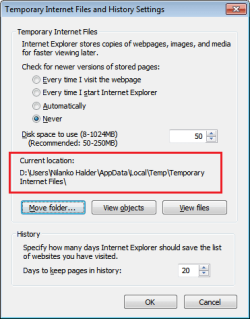
Since I don't use IE, I don't have much idea of where and how IE stores/manages temp files but I got this:

Untitled.png

That's the temp folder. That's all I know.
 
You could try unhide ... to see what and where they're hidden

Unhide.exe (http://download.bleepingcomputer.com/grinler/unhide.exe) (by Grinler)
Once the program has been downloaded, double-click on the Unhide.exe icon on your desktop and allow the program to run. This program will remove the +H, or hidden, attribute from all the files on your hard drives. If there are any files that were purposely hidden by you, you will need to hide them again after this tool is run."
 

My Computer My Computer

At a glance

Windows 7 Ultimate 32bit SP1Intel(R) Core(TM)2 Quad CPU @ 2.40GHz, 2400 MHz4 GBATI Radeon HD 2600 Pro
Computer type
PC/Desktop
Computer Manufacturer/Model Number
Bruce ... somewhere in his 40's
OS
Windows 7 Ultimate 32bit SP1
CPU
Intel(R) Core(TM)2 Quad CPU @ 2.40GHz, 2400 MHz
Motherboard
INTEL/D975XBX2
Memory
4 GB
Graphics Card(s)
ATI Radeon HD 2600 Pro
Monitor(s) Displays
Samsung SyncMaster 914v
Screen Resolution
1280 x 1024
Hard Drives
2/500GB each ... ST3500630AS ATA Device.
One is not connected
PSU
Rocketfish 700 W
Case
G.Skill Gigabyte Chassis
Keyboard
Standard PS/2 Keyboard
Mouse
Microsoft PS/2 Mouse
Internet Speed
DSL
Antivirus
Avira Internet Security
Browser
IE 11
Other Info
ATI HDMI Audio
You could try unhide ... to see what and where they're hidden

Unhide.exe (http://download.bleepingcomputer.com/grinler/unhide.exe) (by Grinler)
Once the program has been downloaded, double-click on the Unhide.exe icon on your desktop and allow the program to run. This program will remove the +H, or hidden, attribute from all the files on your hard drives. If there are any files that were purposely hidden by you, you will need to hide them again after this tool is run."

Hi Jacee........it's way past my bedtime so will have a look at this tomorrow. Thanks for sending it my way.
 

My Computer My Computer

At a glance

Windows 7 Professional 64 bit3.00 gigahertz Intel Core i5-23208gb
Computer type
PC/Desktop
Computer Manufacturer/Model Number
SYX
OS
Windows 7 Professional 64 bit
CPU
3.00 gigahertz Intel Core i5-2320
Motherboard
ASUSTeK Computer INC. P8H61-M LX2 Rev X.0x
Memory
8gb
I understand what you meant.

Here is my rant:
Since Windows Vista, all internet webpages or files viewed by the user(s) is (are) viewed as dangerous. MS downgraded these files as security threats. So, these internet webpages are hidden or jumbled up in different TIFs subfolders.
 

My Computer My Computer

At a glance

Windows 7 Home Premium 64bitIntel Core 2 Duo T6600 2.2 GHz 800MHz4GBNvidia Geforce G105M
Computer type
Laptop
Computer Manufacturer/Model Number
Acer Aspire 4736G
OS
Windows 7 Home Premium 64bit
CPU
Intel Core 2 Duo T6600 2.2 GHz 800MHz
Motherboard
Intel PM65
Memory
4GB
Graphics Card(s)
Nvidia Geforce G105M
Hard Drives
Toshiba MK5055GSX 99FKS993S LBAS 976773167
Antivirus
AVG Free AV 2015
Browser
IE & Chrome
You could try unhide ... to see what and where they're hidden

Unhide.exe (http://download.bleepingcomputer.com/grinler/unhide.exe) (by Grinler)
Once the program has been downloaded, double-click on the Unhide.exe icon on your desktop and allow the program to run. This program will remove the +H, or hidden, attribute from all the files on your hard drives. If there are any files that were purposely hidden by you, you will need to hide them again after this tool is run."

Back to it this morning........this looks like some third party program to open all the hidden files on my computer because of some "infection" and I don't think I want to go there. I'm a bit surprised that your link is the actual "executable" as someone could accidentally install this program if they did not know what they were doing.
 

My Computer My Computer

At a glance

Windows 7 Professional 64 bit3.00 gigahertz Intel Core i5-23208gb
Computer type
PC/Desktop
Computer Manufacturer/Model Number
SYX
OS
Windows 7 Professional 64 bit
CPU
3.00 gigahertz Intel Core i5-2320
Motherboard
ASUSTeK Computer INC. P8H61-M LX2 Rev X.0x
Memory
8gb
I get that part Nilank but I am still having a problem sorting out everything that is in the Windows 7 temporary internet files and where it is "all" stored. If I navigate to
C:\Users\mainuser\AppData\Local\Microsoft\Windows\Temporary Internet Files and check the properties, it shows that I have 469mb in there. Then when I navigate to: C:\Users\mainuser\AppData\Local\Microsoft\Windows\Temporary Internet Files\Low\Content.IE5 it displays the 32 folders that are listed under Low\Content.IE5, the properties of those folders only total 102mb. So this leads me to believe that 367mb are hidden somewhere else and I would like to find them.
Also I would like to know the purpose of setting a recommended limit of 250mb for the temporary internet files as nothing seems to happen if you exceed that limit.

You got it a bit wrong. It effectively have 2 "temporary internet files" for the IE cache. The one on AppData\Local is the one for "normal" browsing and another in AppData\Low used when using the so-called "protected mode IE" which runs at low integrity, which cannot be shared for security reasons.
They are 2 completely different folders which adds to the storage used by IE, generated by the fact that IE can run in both low and medium integrity levels. They aren't a "copy" of any sort of each other, so you must account them separately. In total in you case, you have 571MB in use for that.

The 250MB limit is just a value for limiting the new content there, rather arbitrarily. The browser will store contents viewed up to that limit, and from that onwards it just deletes the oldest to keep inside the limit, so it doesn't grows indefinitely. No idea how does that behaves if files are already there exceeding that limit.

 

My Computer My Computer

At a glance

Windows 7 Ultimate x64Intel Core i7-740QM8 GB DDR3NVIDIA GeForce 330GT
Computer type
Laptop
Computer Manufacturer/Model Number
Toshiba Sattelite A665-S6092
OS
Windows 7 Ultimate x64
CPU
Intel Core i7-740QM
Memory
8 GB DDR3
Graphics Card(s)
NVIDIA GeForce 330GT
Screen Resolution
1366x768
Hard Drives
Samsung 840 SSD 500GB
1TB USB3 external HD
Cooling
Coolermaster Notepal U3 notebook cooling pad
Internet Speed
3mbps ASDL
Antivirus
ClamWin 0.98.7
Browser
Opera 12.17 x86 (main), Firefox 38 (sec), IE11 (last resort)
I get that part Nilank but I am still having a problem sorting out everything that is in the Windows 7 temporary internet files and where it is "all" stored. If I navigate to
C:\Users\mainuser\AppData\Local\Microsoft\Windows\Temporary Internet Files and check the properties, it shows that I have 469mb in there. Then when I navigate to: C:\Users\mainuser\AppData\Local\Microsoft\Windows\Temporary Internet Files\Low\Content.IE5 it displays the 32 folders that are listed under Low\Content.IE5, the properties of those folders only total 102mb. So this leads me to believe that 367mb are hidden somewhere else and I would like to find them.
Also I would like to know the purpose of setting a recommended limit of 250mb for the temporary internet files as nothing seems to happen if you exceed that limit.

You got it a bit wrong. It effectively have 2 "temporary internet files" for the IE cache. The one on AppData\Local is the one for "normal" browsing and another in AppData\Low used when using the so-called "protected mode IE" which runs at low integrity, which cannot be shared for security reasons.
They are 2 completely different folders which adds to the storage used by IE, generated by the fact that IE can run in both low and medium integrity levels. They aren't a "copy" of any sort of each other, so you must account them separately. In total in you case, you have 571MB in use for that.

The 250MB limit is just a value for limiting the new content there, rather arbitrarily. The browser will store contents viewed up to that limit, and from that onwards it just deletes the oldest to keep inside the limit, so it doesn't grows indefinitely. No idea how does that behaves if files are already there exceeding that limit.

I am still a bit confused on this issue. You say there are two temporary internet files for the IE cache but when I go to the control panel>internet options>delete history, and delete temporary internet files, cookies, history, download history, form data, passwords, and active x filtering leaving only the "Preserve Favorites website data" unchecked, it does not delete everything in the temporary internet files, it leaves 364mb of data still in there. This is very confusing to me in that they only recommend that you allow 250mb for the temporary internet files and there is more than that in there before you start browsing????
 

My Computer My Computer

At a glance

Windows 7 Professional 64 bit3.00 gigahertz Intel Core i5-23208gb
Computer type
PC/Desktop
Computer Manufacturer/Model Number
SYX
OS
Windows 7 Professional 64 bit
CPU
3.00 gigahertz Intel Core i5-2320
Motherboard
ASUSTeK Computer INC. P8H61-M LX2 Rev X.0x
Memory
8gb
Well, that is true. When I deleted my cache, I was shocked to see nothing was deleted. Actually, only the non-hidden IE TIFs were deleted and the rest hidden files were intact.

So, it's time wasting session again, if you have the time.

I 1st learn the hard way. DO NOT follow this advice!

---> I downloaded nirsoft's video cache view (this pc of good stuff now contained some tracking malware if you downloaded and run it)

Search for any video you might have watched. It will show the contents location.
Saved the location ie C:\Users\xxx\ in notepad for future use.
Go to the index directory you will see the rest of the hidden folders or use wildcards *.* in the search box to find what ever you want or delete the selected file types.

That's what I did to find the hidden TIF locations 3 yrs ago. Now, nirsoft's video cache view is mined with tracking malware, I do not advise you to use it.

If you open a webpage from TIF it's just a page with words without the rests.
What you viewed in IE and want it in completeness (whole webpages with pics) you must saved immediately while ONLINE.
Unlike in Win98 to XP, IE has been programmed to jumbled up the hidden files and does not allow the webpages with contents to remain in 1 complete entity in the TIF.
 
Last edited:

My Computer My Computer

At a glance

Windows 7 Home Premium 64bitIntel Core 2 Duo T6600 2.2 GHz 800MHz4GBNvidia Geforce G105M
Computer type
Laptop
Computer Manufacturer/Model Number
Acer Aspire 4736G
OS
Windows 7 Home Premium 64bit
CPU
Intel Core 2 Duo T6600 2.2 GHz 800MHz
Motherboard
Intel PM65
Memory
4GB
Graphics Card(s)
Nvidia Geforce G105M
Hard Drives
Toshiba MK5055GSX 99FKS993S LBAS 976773167
Antivirus
AVG Free AV 2015
Browser
IE & Chrome
Here is my opinion on the temporary internet files. Remember it's only an opinion and there are members here who know a lot more about this stuff than I do, so I would like to hear how some of the others feel about it. Are any of you old enough to remember the cars of years ago?
The cars had a hand crank so that in case the car wouldn't start, you could crank it manually to get it started. The crank in those day was a good and necessary thing to have. Of course the cars of today do not need cranks so the manufacture does not put one on. Here's how I feel about it. When Microsoft puts in the temporary internet files, it's like putting a crank on a new car. Years ago internet connections were very, very slow. With the temporary internet files, if you went back to a site that you were previously on, it didn't take long to load because of the information from the site was already on your computer. Since connections now are do much faster, they are not only un-necessary , but if you have too many on they could slow down your computer. I think I am correct in what I said (or at least partially correct). If not, my feelings will not be hurt if you tell me that I have it all wrong. I feel the same way about the page file which was originally called the swap file. When I got my first computer RAM was $50.00 a meg (not a gig but a meg). Consequently we didn't have nearly as much RAM on our system in those days. So MS came up with the swap file. With our RAM now in hundreds of meg which is measured now in GB, I don't see why MS can't do away with the RAM. So I think that temporary internet files and page file are like putting a crank on a new car. Again, I've been known to be wrong so, I would like someone else's opinion.
 

My Computer My Computer

At a glance

Desk Top with Win 7 Home Premium 64 bit and L...8Gig
Computer type
Laptop
Computer Manufacturer/Model Number
HP Pavilion g7-1260us Notebook
OS
Desk Top with Win 7 Home Premium 64 bit and Lap Top with Windows 8.1 Pro 64 bit
Memory
8Gig
Screen Resolution
1600x900
Hi Frank,
I agree with you. MS thinks everyone is rich and works with all the OEM to push for upgrades all the time. I like the old stuff like Win 98 to XP where TIF is not hidden and everything is arranged according to your likings.
 

My Computer My Computer

At a glance

Windows 7 Home Premium 64bitIntel Core 2 Duo T6600 2.2 GHz 800MHz4GBNvidia Geforce G105M
Computer type
Laptop
Computer Manufacturer/Model Number
Acer Aspire 4736G
OS
Windows 7 Home Premium 64bit
CPU
Intel Core 2 Duo T6600 2.2 GHz 800MHz
Motherboard
Intel PM65
Memory
4GB
Graphics Card(s)
Nvidia Geforce G105M
Hard Drives
Toshiba MK5055GSX 99FKS993S LBAS 976773167
Antivirus
AVG Free AV 2015
Browser
IE & Chrome
Back
Top